Documentation has been updated: see help center and changelog in one place.

AI 概览

了解如何使用 Web Scraper API 提取 AI 概览。查找代码示例和支持的参数。

google_searchgoogle_ads 来源可以在所有支持的全球地区从 Google 搜索结果返回 Google AI 概述。 ai_overviews 结果数组在单个响应中支持多个 AI 块,包括“大家也在问”和“需要了解的事项”等部分。

为最大化收到完全呈现的 AI 概述内容的机会,您必须包含以下参数:

参数

source

google_searchgoogle_ads

render

html

user_agent_type

desktopmobile

使用这些参数还可以使您通过单个请求同时接收通用响应和 AI 概述内容。

AI 概述地区可用性

Google AI 概述在大多数国家可用,但有一些例外。目前最大的排除国家包括:

  • 法国

  • 中国

  • 伊朗

  • 朝鲜

请求示例

curl 'https://realtime.oxylabs.io/v1/queries' \
--user 'USERNAME:PASSWORD' \
-H 'Content-Type: application/json' \
-d '{
        "source": "google_search",
        "query": "how to sell on amazon",
        "render": "html",
        "user_agent_type": "desktop",
        "parse": true
        
    }'

我们在示例中使用同步的 Realtime 集成方法。如果您想使用 Proxy Endpoint 或异步的 Push-Pull 集成,请参考 集成方法 部分。

请求参数值

通用

用于使用 AI 概述抓取 Google 网络搜索结果的基本设置和自定义选项。

参数
描述
默认值

source

设置抓取器。使用 google_searchgoogle_ads.

google_search

query

要搜索的关键字或短语。

-

render

当设置为时启用 JavaScript 渲染 html. 更多信息.

-

parse

当设置为时返回解析后的数据 true.

false

callback_url

您回调端点的 URL。 更多信息.

-

user_agent_type

设备类型和浏览器。使用 desktopmobile.

desktop

- 必填参数

Google 高级搜索操作符

在抓取时,您可能会发现将 Google 高级搜索操作符与查询结合使用很有用。它使您能够定制搜索范围,确保结果更相关、更集中。在此处探索这些特殊命令 此处此处。看下面的示例查询。

{
    "source": "google_search",
    "query": "iphone 15 launch inurl:apple", 
    "render": "html",
    "user_agent_type": "desktop"
}

本地化

将搜索结果适配到特定的地理位置、域和语言。

参数
描述
默认值

geo_location

结果应适配的地理位置。正确使用此参数对获取正确数据非常重要。有关更多信息,请阅读我们建议的 geo_location 参数结构 此处。

-

domain

Google 的域本地化。可用域的完整列表可在 此处.

com

locale

Accept-Language 头部值,用于更改您的 Google 搜索页面 Web 界面语言。 更多信息.

-

context: results_language

结果语言。支持的 Google 语言列表可在 此处。 了解如何使用上下文参数 此处.

-

分页

用于管理分页和检索搜索结果的控件。

参数
描述
默认值

start_page

起始页码。

1

pages

要检索的页数。

1

limit

每页要检索的结果数。

10

context:limit_per_page

使用相同 IP 地址和会话(cookie 集)抓取多页。通过在带有 page 键的 JSON 数组中指定页码并使用 limit 键指明每页的自然结果数量,您可以最大限度地减少跨页出现重复自然结果的几率(例如,第一页的最后一个自然结果与第二页的第一个自然结果相同)。 参见示例.

-

支持连续滚动

Web 爬虫 API 完全支持 Google 搜索的连续滚动。它会自动检测连续滚动布局,高效加载请求的自然结果,无需任何额外参数。

每页限制

要使用此功能,请包含一个 JSON 数组,该数组包含具有以下数据的 JSON 对象:

参数
描述
示例

page

您想抓取的页面编号。任何大于 0 的整数值均可用

1

limit

该页上的结果数。任何在 1100 (含)之间的整数值均可用。

90

请求示例

{
    "source": "google_search",
    "query": "how to sell on amazon",
    "render": "html",
    "user_agent_type": "dekstop",
    "parse": true,
    "context": [
        {
            "key": "limit_per_page",
            "value": [
                {"page": 1, "limit": 10},
                {"page": 2, "limit": 90}
                    ]
        }]
}

过滤

用于根据各种条件过滤和精炼搜索结果的选项。了解如何使用上下文参数 此处.

参数
描述
默认值

context: filter

将此参数的值设置为 0 可让您查看因与其他结果相似而被排除的结果。

1

context: safe_search

安全搜索。设置为 true 以启用它。

false

context: udm

udm 参数允许在不同的搜索标签之间切换,例如图片、地点或视频,以自定义显示的结果类型。可在此处找到接受的值 此处.

-

context: tbm

待匹配或 tbm 参数。接受的值包括: app, blg, bks, dsc, isch, nws, pts, plcs, rcp, lcl

-

context: tbs

此参数类似于用于更晦涩的 Google 参数的容器,例如按日期限制/排序结果以及其他某些依赖于 tbm 参数的过滤器(例如 tbs=app_os:1 仅在与 tbm value app一起使用时可用)。更多信息 此处.

-

其他

用于特殊需求的额外高级设置和控件。

参数
描述
默认值

context: fpstate

fpstate 值设置为 aig 将使 Google 加载更多应用。该参数仅在与 render 参数一起使用时有用。

-

context: nfpr

true 将关闭拼写自动更正

false

上下文参数

所有上下文参数应作为对象添加到 context 数组中,形式为带有 value 对,例如:

...
"context": [
    {
        "key": "filter",
        "value": "0"
    }
]
...

数据结构和处理

数据字典

AI 概述 SERP 功能中所有可用键在下表中定义:

键 (results.ai_overview)
描述
类型

answer_text

关于 Google 搜索查询词的一般信息。

array

bullet_list

表示在 AI 概述 SERP 功能中以项目符号列表呈现的项目的信息。

array

products

包含各自详细信息的产品列表。

object

source_panel

用于生成 Google SERP 中 AI 概述结果的来源列表。

object

additional_questions

包含各自详细信息的补充问题列表。

object

recipes

包含各自详细信息的食谱列表。

object

info_list

用于表示与搜索查询相关的过程步骤的最常用信息列表。

array

pos_overall

表示 AI 概述 SERP 功能结果在所有 Google SERP 可用结果中的位置。

integer

处理多个 AI 概述

由于 AI 概述现在作为数组返回,您必须遍历它们:

// 处理响应中的所有 AI 概述
response.results.ai_overviews.forEach((aiOverview, index) => {
  console.log(`Processing AI Overview #${index + 1}`);
  // 处理各个组件
  if (aiOverview.answer_text) {
    // 处理答案文本
  }
  if (aiOverview.bullet_list) {
    // 处理项目符号列表
  }
  // 等等...
});

在大多数情况下,通常只有一个 AI 概述,但您的代码应准备处理多个条目。

在下面按不同搜索查询分类,探索 AI 概述结果示例: 项目, 食谱, 说明.

项目

在以下示例中,使用了查询 “Emporio Armani EA3192”。

...
  "ai_overviews": [
    {
      "answer_text": [
        {
          "text": [
            "Emporio Armani 是一个以其永恒设计和对意大利工艺承诺而闻名的奢侈品牌。",
            "Emporio Armani EA3192 是一款为男士设计的验光眼镜。",
            "它们有一个矩形镜框,由低过敏性、轻质塑料制成。",
            "镜片具有防紫外线和防反光功能。",
            "以下是来自评论的一些见解:"
          ],
          "pos": 1
        }
      ],
      "bullet_list": [
        {
          "list_title": "优点",
          "points": [
            "舒适",
            "品牌标识简约"
          ],
          "pos": 1
        }
      ],
      "products": {
        "items": [
          {
            "product_name": "Emporio Armani Men Eyeglasses Shiny Black Size: 53",
            "price": "$163.00",
            "previous_price": null,
            "seller": "Lenscrafters",
            "shipping": "免运费",
            "url": "https://www.lenscrafters.com/lc-us/emporio-armani/8056597975810?srsltid=AfmBOoqWO55KIJevhQp_c5OAp0JOM_8Uza3_gCvn9S4x4Vz342AUSQewzJI",
            "pos": 1
          }
        ]
      },
      "source_panel": {
        "items": [
          {
            "url": "https://www.italist.com/magazine/what-is-emporio-armani/#:~:text=Emporio%20Armani%20is%20a%20luxury,reinforce%20the%20perception%20of%20luxury.",
            "source": "italist.com",
            "date": "2023 年 5 月 5 日",
            "title": "什么是 Emporio Armani,Emporio Armani 是奢侈品牌吗?",
            "pos": 1
          },
        ...
        ]
      },
      "additional_questions": {
        "items": [
          {
           "question": "Emporio Armani 与 Giorgio Armani 是同一个品牌吗?",
           "pos": 1
          }
        ]
      },
      "pos_overall": 1
    }
  ],
...

答案文本

键 (results.ai_overviews.answer_text)
描述
类型

text

对 Google 搜索查询的简短回答。

array

pos

表示给定项目在所有 AI 概述答案结果中的位置。

integer

项目符号列表

键 (results.ai_overviews.bullet_list)
描述
类型

list_title

项目符号列表的标题。

string

points

在项目符号列表中呈现的项目。所有项目以逗号分隔。

array

pos

表示给定项目在所有 AI 概述项目符号列表结果中的位置。

integer

产品

键 (results.ai_overviews.products)
描述
类型

items

包含各自详细信息的产品列表。

array

items.product_name

产品名称。

string

items.price

产品的当前价格。

string

items.previous_price

产品的初始价格(如适用)。

string

items.seller

产品的卖家。

string

items.shipping

产品可用的运输类型。

string

items.url

产品的 URL。

string

items.pos

表示给定项目在所有 AI 概述产品结果中的位置。

integer

来源面板

键 (results.ai_overviews.source_panel)
描述
类型

items

用于生成 Google SERP 中 AI 概述结果的来源列表。

object

items.url

网站的 URL。

string

items.source

网站的名称。

string

items.date

文章的发布日期。

string

items.title

文章的标题。

string

items.pos

表示给定项目在所有 AI 概述来源面板结果中的位置。

integer

补充问题

键 (results.ai_overviews.additional_questions)
描述
类型

items.question

与原始搜索查询相关的逗号分隔补充问题列表。

array

items.pos

表示给定项目在所有 AI 概述补充问题结果中的位置。

integer

食谱

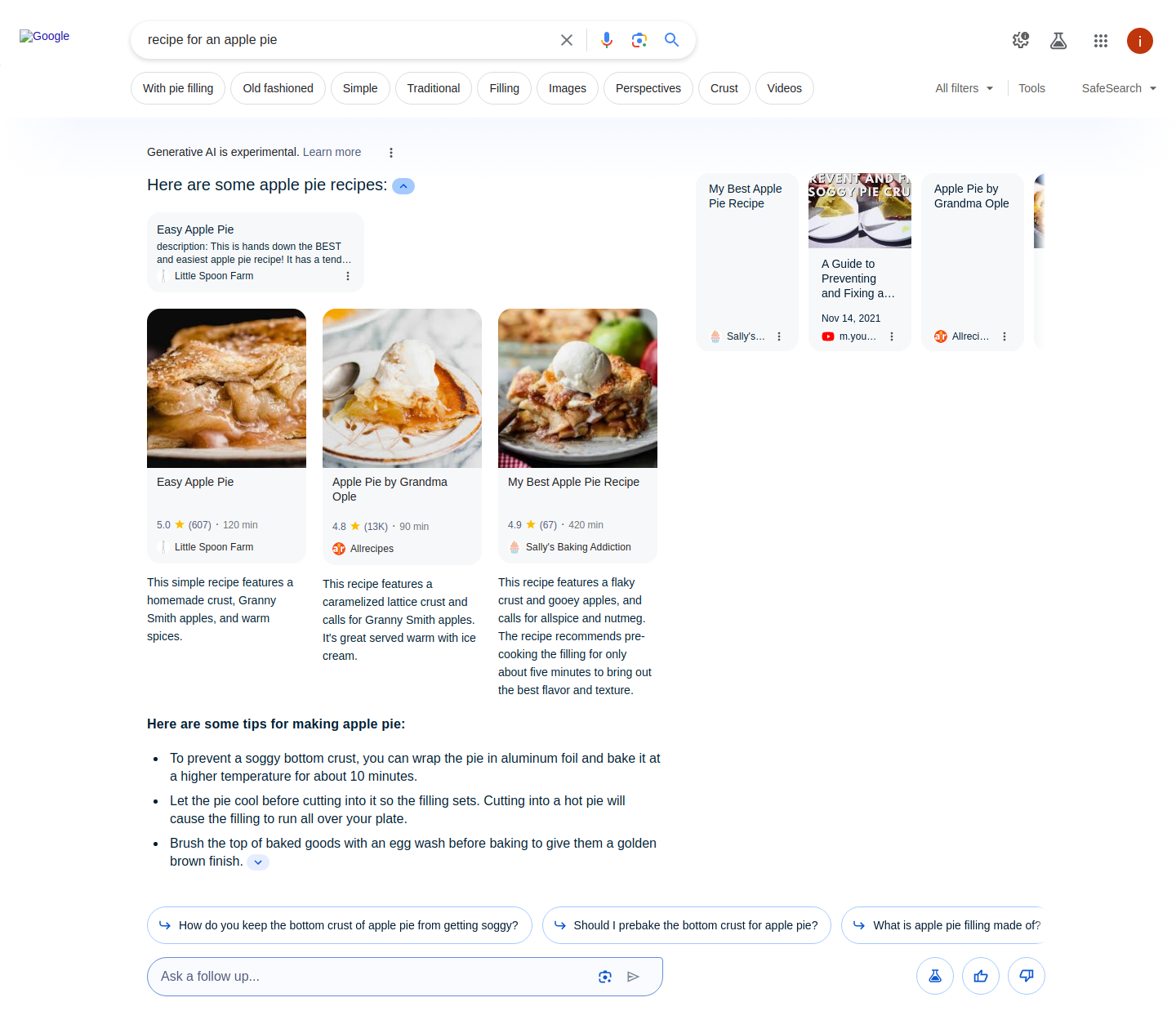
在以下示例中,使用了查询 “recipe for an apple pie”。

...  
 "ai_overviews": [
   {
      "recipes": {
        "items": [
          {
            "description": "这个简单的食谱以自制馅饼皮、格兰尼史密斯苹果和温暖香料为特色。",
            "image": "data:image/jpeg;base64,/9j/4AAQSkZJRgABAQAAAQABAAD/...",
            "source": "Allrecipes",
            "rating": "4.8",
            "rating_count": "13K",
            "duration": "90 min",
            "url": "https://www.allrecipes.com/recipe/12682/apple-pie-by-grandma-ople/",
            "title": "Grandma Ople 的苹果馅饼"
          },
...
        ]
      }
    }
  ],
...

食谱

键 (results.ai_overviews.recipes)
描述
类型

items

包含各自详细信息的食谱列表。

array

items.description

食谱的简短描述。

string

items.image

食谱的 base64 编码缩略图。

string

items.source

发表该食谱的网站名称。

string

items.rating

食谱的评分。

string

items.rating_count

评分数量。

string

items.duration

准备该菜所需的时间。

string

items.url

完整食谱的 URL。

string

items.title

食谱的标题。

string

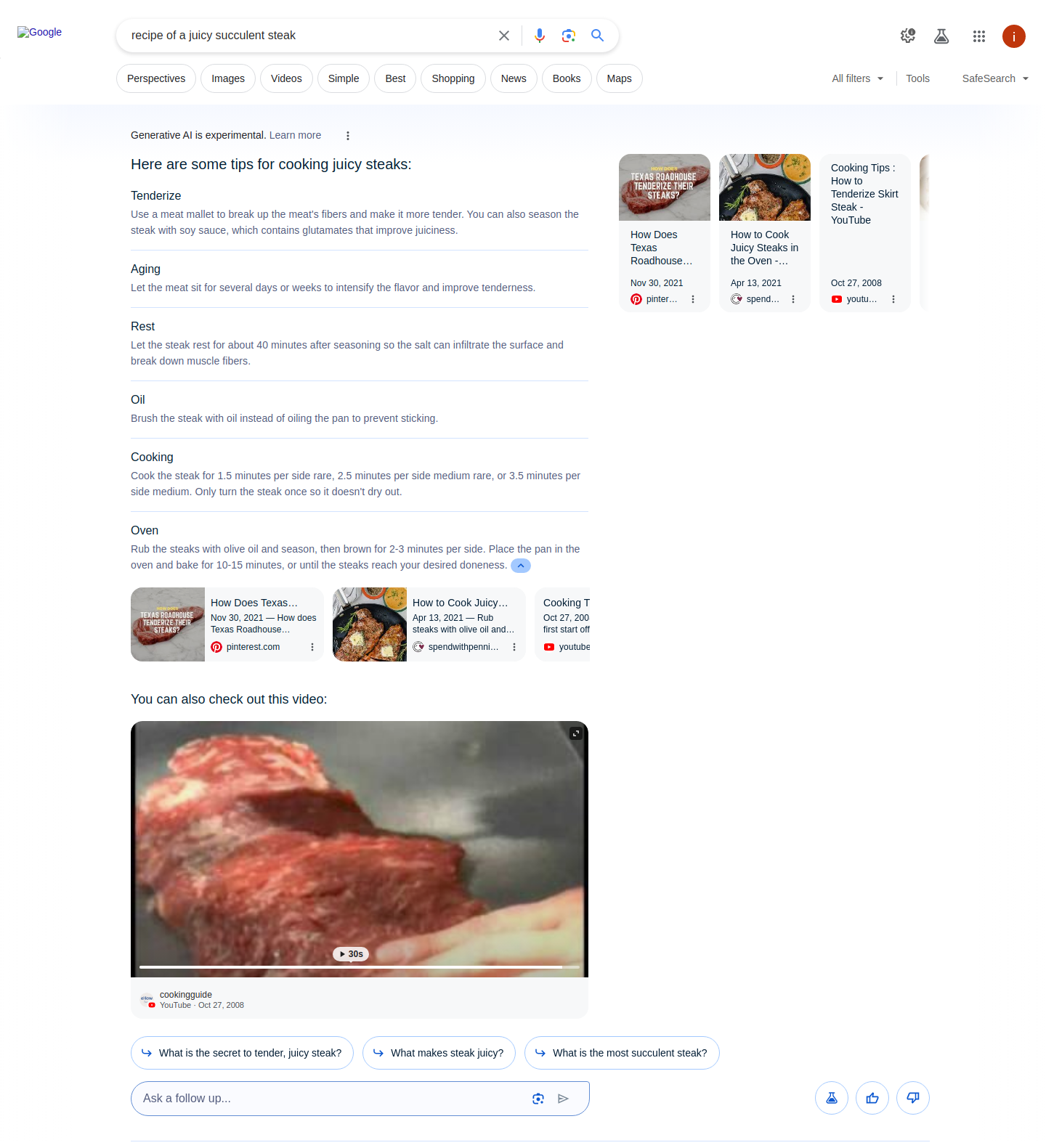
在以下示例中,使用了查询 “recipe of a juicy succulent steak”。

信息列表

键 (results.ai_overviews.info_list)
描述
类型

list_title

列表的标题。

string

list_items

包含具有各自详细信息的项目列表。

array

list_items.title

列表中该部分的标题。

string

list_items.content

该部分的简短描述。

array

list_item.pos

表示某个项目在所有 AI Overviews Info 列表结果中的位置的指标。

integer

说明

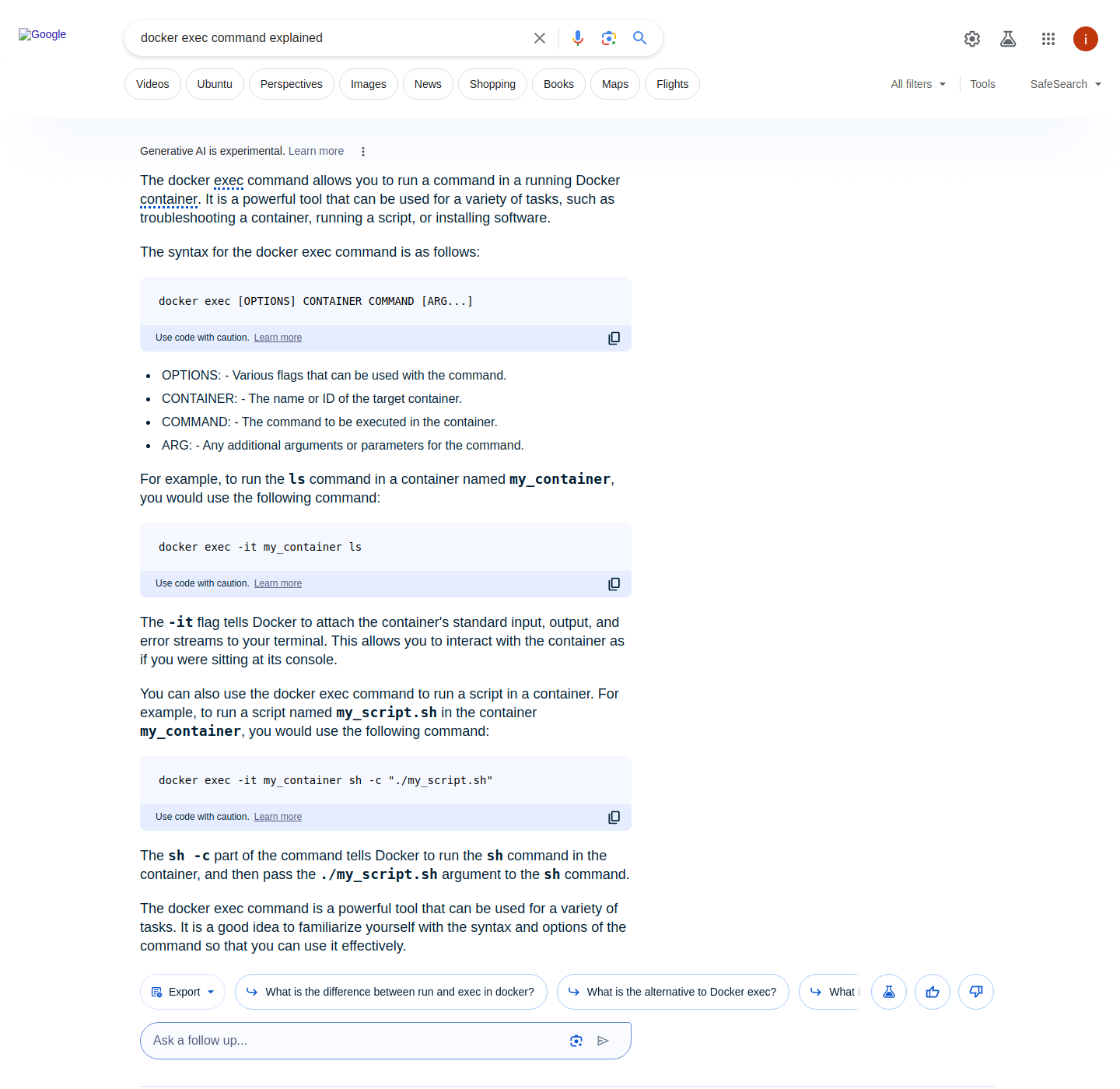
在以下示例中,使用了查询 “docker exec commands explained”。

...
  "ai_overviews": [
    {
      "answer_text": [
        {
          "text": [
            “The docker execExecIn computing, exec is a functionality of an operating system that runs an executable file in the context of an already existing process, replacing the previous executable...”,
            “It is a powerful tool that can be used for a variety of tasks, such as troubleshooting a container, running a script, or installing software.”
          ],
          "pos": 1
        },
        {
          "text": [
            “The syntax for the docker exec command is as follows:”
          ],
          “command": [
            “docker exec [OPTIONS] CONTAINER COMMAND [ARG...]”
          ],
          “pos": 2
        },
        ...
        }
      ]
    }
  ],
...

回答文本命令

注意:详细信息与 以下 相同数组中呈现 与项目相关的搜索查询,但是,对于与指令相关的查询类型,会出现一种新键(command)

键 (results.ai_overviews.answer_text)
描述
类型

command

给计算机或软件下达以执行特定任务的指令。

string

最后更新于

这有帮助吗?