AI 模式
了解如何使用 Web Scraper API 提取 AI 模式数据。
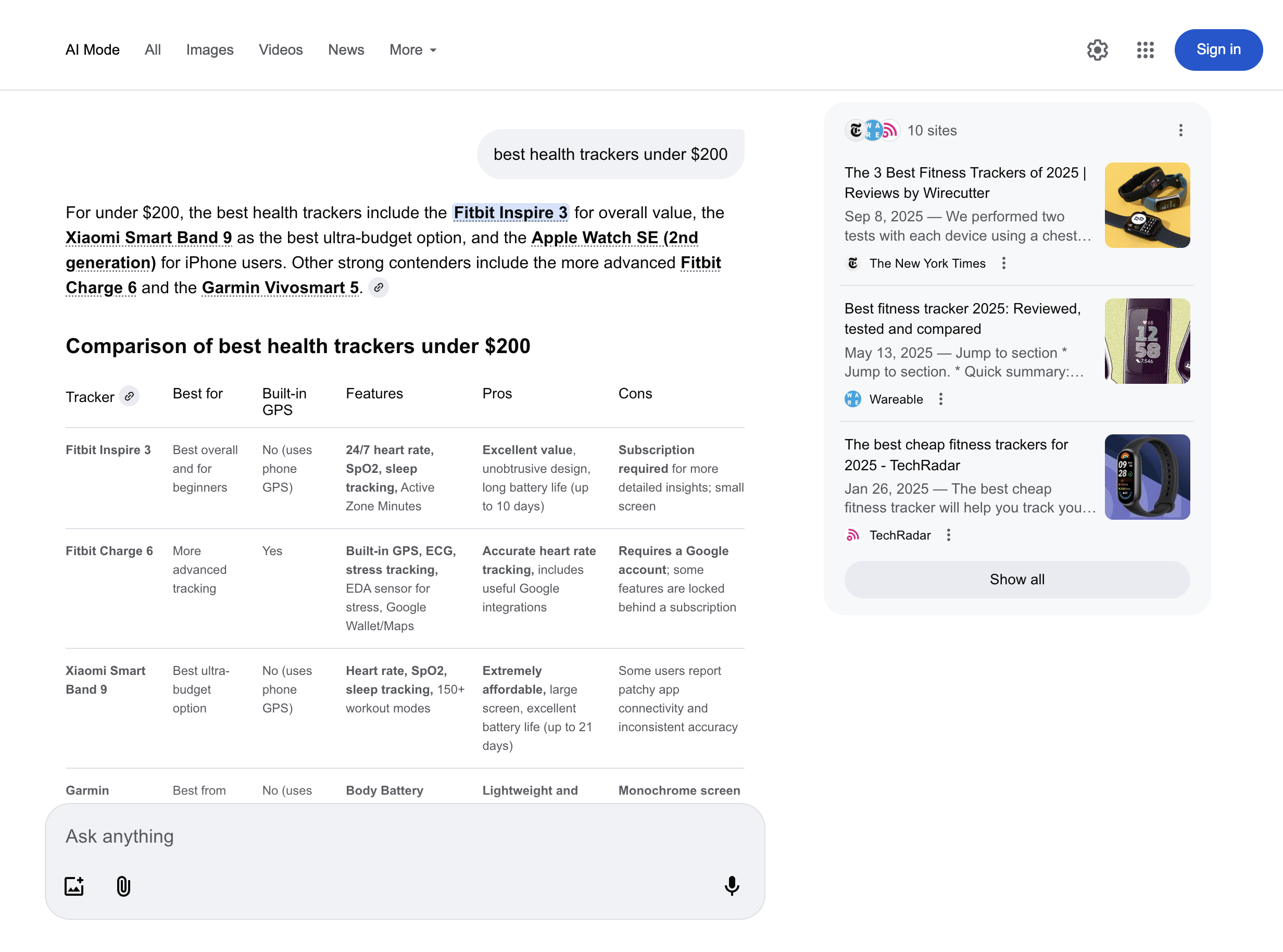
该 google_ai_mode source 被设计用于提交提示并检索 Google AI Mode 的对话式响应。它返回完整的 Google AI Mode 响应文本以及其结构化元数据。
AI Mode 区域可用性
Google AI Mode 在全球大多数国家可用 除了以下例外:
欧洲
法国、土耳其
亚洲
中国、伊朗、朝鲜、叙利亚
美洲
古巴
Google AI Mode 功能正在持续上线,随着时间推移会涵盖更多国家/地区。
请求示例
下面的代码示例演示如何检索带有解析结果的 Google AI Mode 响应。
curl 'https://realtime.oxylabs.io/v1/queries' \
--user 'USERNAME:PASSWORD' \
-H 'Content-Type: application/json' \
-d '{
"source": "google_ai_mode",
"query": "best health trackers under $200",
"render": "html",
"parse": true
}'import requests
from pprint import pprint
# 构建负载(payload)。
payload = {
'source': 'google_ai_mode',
'query': 'best health trackers under $200',
'render': 'html',
'parse': True
}
# 获取响应。
response = requests.request(
'POST',
'https://realtime.oxylabs.io/v1/queries',
auth=('USERNAME', 'PASSWORD'),
json=payload,
)
# 将美化后的响应打印到标准输出。
pprint(response.json())const https = require("https");
const username = "USERNAME";
const password = "PASSWORD";
const body = {
source: "google_ai_mode",
query: "best health trackers under $200",
render: "html",
parse: true
};
const options = {
hostname: "realtime.oxylabs.io",
path: "/v1/queries",
method: "POST",
headers: {
"Content-Type": "application/json",
Authorization:
"Basic " + Buffer.from(`${username}:${password}`).toString("base64"),
},
};
const request = https.request(options, (response) => {
let data = "";
response.on("data", (chunk) => {
data += chunk;
});
response.on("end", () => {
const responseData = JSON.parse(data);
console.log(JSON.stringify(responseData, null, 2));
});
});
request.on("error", (error) => {
console.error("Error:", error);
});
request.write(JSON.stringify(body));
request.end();https://realtime.oxylabs.io/v1/queries?source=google_ai_mode&query=best%20health%20trackers%20under%20$200&render=html&parse=true&access_token=12345abcde<?php
$params = array(
'source' => 'google_ai_mode',
'query' => 'best health trackers under $200',
'render' => 'html',
'parse' => true
);
$ch = curl_init();
curl_setopt($ch, CURLOPT_URL, "https://realtime.oxylabs.io/v1/queries");
curl_setopt($ch, CURLOPT_RETURNTRANSFER, 1);
curl_setopt($ch, CURLOPT_POSTFIELDS, json_encode($params));
curl_setopt($ch, CURLOPT_POST, 1);
curl_setopt($ch, CURLOPT_USERPWD, "USERNAME" . ":" . "PASSWORD");
$headers = array();
$headers[] = "Content-Type: application/json";
curl_setopt($ch, CURLOPT_HTTPHEADER, $headers);
$result = curl_exec($ch);
echo $result;
if (curl_errno($ch)) {
echo 'Error:' . curl_error($ch);
}
curl_close($ch);package main
import (
"bytes"
"encoding/json"
"fmt"
"io/ioutil"
"net/http"
)
func main() {
const Username = "USERNAME"
const Password = "PASSWORD"
payload := map[string]interface{}{
"source": "google_ai_mode",
"query": "best health trackers under $200",
"render": "html",
"parse": true,
}
jsonValue, _ := json.Marshal(payload)
client := &http.Client{}
request, _ := http.NewRequest("POST",
"https://realtime.oxylabs.io/v1/queries",
bytes.NewBuffer(jsonValue),
)
request.SetBasicAuth(Username, Password)
response, _ := client.Do(request)
responseText, _ := ioutil.ReadAll(response.Body)
fmt.Println(string(responseText))
}using System;
using System.Collections.Generic;
using System.Net.Http;
using System.Net.Http.Json;
using System.Threading.Tasks;
namespace OxyApi
{
class Program
{
static async Task Main()
{
const string Username = "USERNAME";
const string Password = "PASSWORD";
var parameters = new
{
source = "google_ai_mode",
query = "best health trackers under $200",
render = "html",
parse = true
};
var client = new HttpClient();
Uri baseUri = new Uri("https://realtime.oxylabs.io");
client.BaseAddress = baseUri;
var requestMessage = new HttpRequestMessage(HttpMethod.Post, "/v1/queries");
requestMessage.Content = JsonContent.Create(parameters);
var authenticationString = $"{Username}:{Password}";
var base64EncodedAuthenticationString = Convert.ToBase64String(System.Text.ASCIIEncoding.UTF8.GetBytes(authenticationString));
requestMessage.Headers.Add("Authorization", "Basic " + base64EncodedAuthenticationString);
var response = await client.SendAsync(requestMessage);
var contents = await response.Content.ReadAsStringAsync();
Console.WriteLine(contents);
}
}
}package org.example;
import okhttp3.*;
import org.json.JSONArray;
import org.json.JSONObject;
import java.util.concurrent.TimeUnit;
public class Main implements Runnable {
private static final String AUTHORIZATION_HEADER = "Authorization";
public static final String USERNAME = "USERNAME";
public static final String PASSWORD = "PASSWORD";
public void run() {
JSONObject jsonObject = new JSONObject();
jsonObject.put("source", "google_ai_mode");
jsonObject.put("query", "best health trackers under $200");
jsonObject.put("render", "html");
jsonObject.put("parse", true);
Authenticator authenticator = (route, response) -> {
String credential = Credentials.basic(USERNAME, PASSWORD);
return response
.request()
.newBuilder()
.header(AUTHORIZATION_HEADER, credential)
.build();
};
var client = new OkHttpClient.Builder()
.authenticator(authenticator)
.readTimeout(180, TimeUnit.SECONDS)
.build();
var mediaType = MediaType.parse("application/json; charset=utf-8");
var body = RequestBody.create(jsonObject.toString(), mediaType);
var request = new Request.Builder()
.url("https://realtime.oxylabs.io/v1/queries")
.post(body)
.build();
try (var response = client.newCall(request).execute()) {
if (response.body() != null) {
try (var responseBody = response.body()) {
System.out.println(responseBody.string());
}
}
} catch (Exception exception) {
System.out.println("Error: " + exception.getMessage());
}
System.exit(0);
}
public static void main(String[] args) {
new Thread(new Main()).start();
}
}{
"source": "google_ai_mode",
"query": "best health trackers under $200",
"render": "html",
"parse": true
}我们的示例使用同步 Realtime 集成方法。 如果您想使用 Proxy Endpoint 或异步的 Push-Pull 集成,请参阅 集成方法 部分。
请求参数值
检索 Google AI Mode 响应的基本设置和自定义选项。
- 必填参数
结构化数据
Web Scraper API 返回 Google AI Mode 输出的 HTML 或 JSON 对象,包含结果页面的结构化数据。
元素的组成可能会根据查询是否来自 desktop 或 移动 设备而有所不同。
输出数据字典
HTML 示例

JSON 结构
结构化 google_ai_mode 输出包括诸如 URL, page, results,以及更多。下表列出我们解析的每个 Google AI Mode 元素的详细清单,包括描述、数据类型和相关元数据。
url
Google AI Mode 的 URL。
字符串
page
页码。
整数
内容
包含解析后 Google AI Mode 响应数据的对象。
对象
content.links
响应中引用的外部链接列表。显示在页面右侧的框中。
数组
content.prompt
提交给 Google AI Mode 的原始提示。
字符串
content.citations
包含 URL 和关联文本的引用列表,如 Google AI Mode 响应主体中所示。引用相同文本的多个 URL 会被分组为列表。
数组
content.response_text
来自 Google AI Mode 的完整响应文本。
字符串
content.parse_status_code
解析操作的状态码。
整数
created_at
抓取任务创建的时间戳。
时间戳
updated_at
抓取任务完成的时间戳。
时间戳
job_id
与抓取任务关联的作业 ID。
字符串
最后更新于
这有帮助吗?

