# URL

该 `google` source 旨在从各种 Google URL 检索内容。这意味着您可以直接提供所需 Google 页面的网址，而不是发送多个参数。我们不会删除任何参数或以其他方式更改您的 URL。

## 请求示例

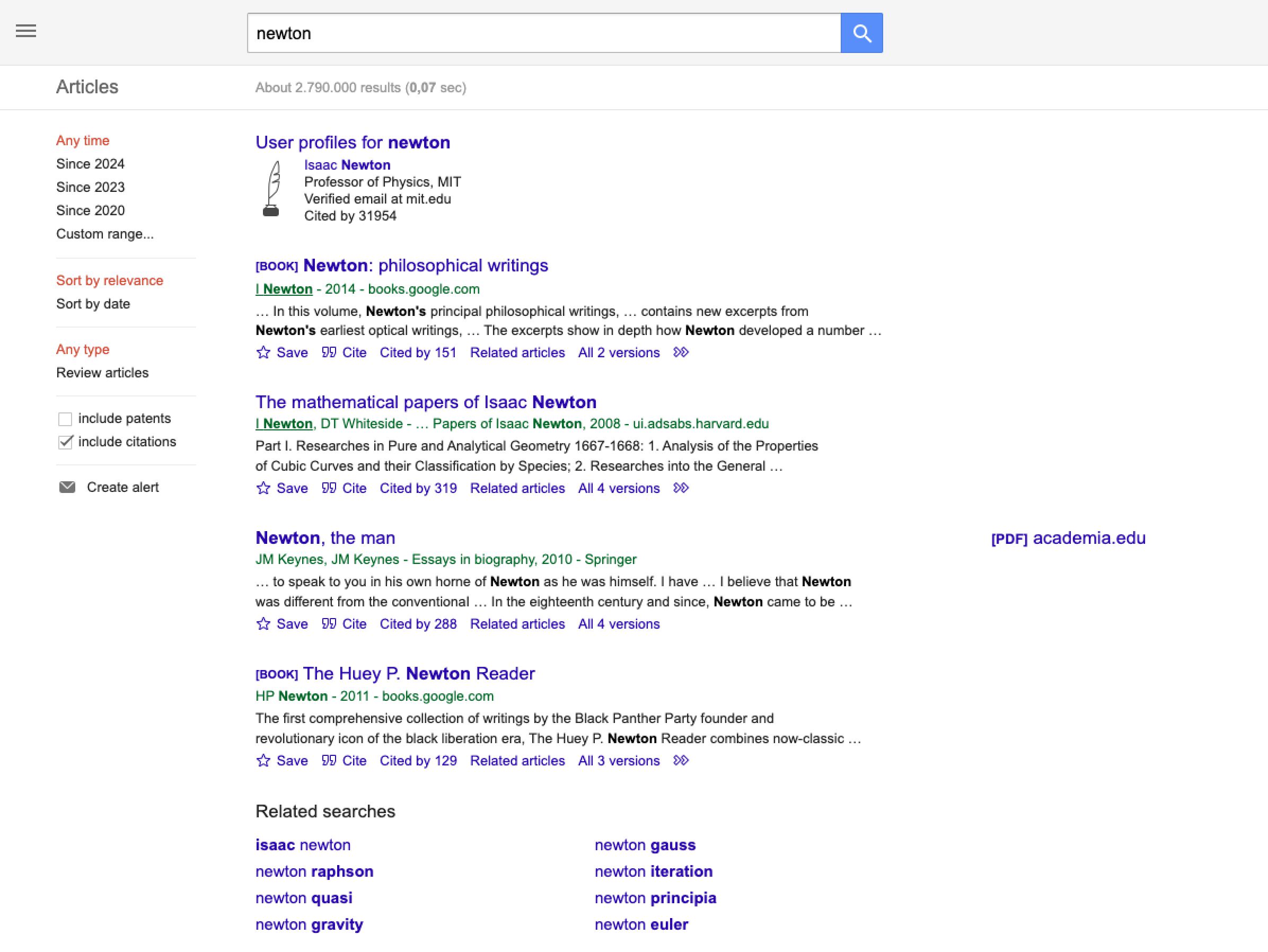
在下面的示例中，API 将检索 Google 学术的搜索页面。

{% tabs %}
{% tab title="cURL" %}

```shell
curl 'https://realtime.oxylabs.io/v1/queries' \
--user 'USERNAME:PASSWORD' \
-H 'Content-Type: application/json' \
-d '{
        "source": "google",
        "url": "https://scholar.google.com/scholar?hl=en&q=newton&btnG=&as_sdt=1%2C5&as_sdtp="
    }'
```

{% endtab %}

{% tab title="Python" %}

```python
import requests
from pprint import pprint

# 构建负载。
payload = {
    'source': 'google',
    'url': 'https://scholar.google.com/scholar?hl=en&q=newton&btnG=&as_sdt=1%2C5&as_sdtp='
}

# 获取响应。
response = requests.request(
    'POST',
    'https://realtime.oxylabs.io/v1/queries',
    auth=('USERNAME', 'PASSWORD'),
    json=payload,
)

# 这将返回带有结果的 JSON 响应，而不是包含作业状态和结果 URL 的响应。
# JSON 响应包含结果。
pprint(response.json())
```

{% endtab %}

{% tab title="Node.js" %}

```javascript
const https = require("https");

const username = "USERNAME";
const password = "PASSWORD";
const body = {
    source: "google",
    query: "https://scholar.google.com/scholar?hl=en&q=newton&btnG=&as_sdt=1%2C5&as_sdtp=",
};

const options = {
    hostname: "realtime.oxylabs.io",
    path: "/v1/queries",
    method: "POST",
    headers: {
        "Content-Type": "application/json",
        Authorization:
            "Basic " + Buffer.from(`${username}:${password}`).toString("base64"),
    },
};

const request = https.request(options, (response) => {
    let data = "";

    response.on("data", (chunk) => {
        data += chunk;
    });

    response.on("end", () => {
        const responseData = JSON.parse(data);
        console.log(JSON.stringify(responseData, null, 2));
    });
});

request.on("error", (error) => {
    console.error("Error:", error);
});

request.write(JSON.stringify(body));
request.end();
```

{% endtab %}

{% tab title="HTTP" %}

```http
# 必须对 URL 进行编码以转义 `&` 和 `=` 字符：
# URL: https://scholar.google.com/scholar?hl=en&q=newton&btnG=&as_sdt=1%2C5&as_sdtp=
# 编码后的 URL: https%3A%2F%2Fscholar.google.com%2Fscholar%3Fhl%3Den%26q%3Dnewton%26btnG%3D%26as_sdt%3D1%252C5%26as_sdtp%3D

https://realtime.oxylabs.io/v1/queries?source=google&url=https%3A%2F%2Fscholar.google.com%2Fscholar%3Fhl%3Den%26q%3Dnewton%26btnG%3D%26as_sdt%3D1%252C5%26as_sdtp%3D&access_token=12345abcde
```

{% endtab %}

{% tab title="PHP" %}

```php
<?php

$params = array(
    'source' => 'google',
    'url' => 'https://scholar.google.com/scholar?hl=en&q=newton&btnG=&as_sdt=1%2C5&as_sdtp='
);

$ch = curl_init();

curl_setopt($ch, CURLOPT_URL, "https://realtime.oxylabs.io/v1/queries");
curl_setopt($ch, CURLOPT_RETURNTRANSFER, 1);
curl_setopt($ch, CURLOPT_POSTFIELDS, json_encode($params));
curl_setopt($ch, CURLOPT_POST, 1);
curl_setopt($ch, CURLOPT_USERPWD, "USERNAME" . ":" . "PASSWORD");


$headers = array();
$headers[] = "Content-Type: application/json";
curl_setopt($ch, CURLOPT_HTTPHEADER, $headers);

$result = curl_exec($ch);
echo $result;

if (curl_errno($ch)) {
    echo 'Error:' . curl_error($ch);
}
curl_close($ch);
```

{% endtab %}

{% tab title="Golang" %}

```go
package main

import (
	"bytes"
	"encoding/json"
	"fmt"
	"io/ioutil"
	"net/http"
)

func main() {
	const Username = "USERNAME"
	const Password = "PASSWORD"

	payload := map[string]interface{}{
		"source": "google",
		"url":    "https://scholar.google.com/scholar?hl=en&q=newton&btnG=&as_sdt=1%2C5&as_sdtp=",
	}

	jsonValue, _ := json.Marshal(payload)

	client := &http.Client{}
	request, _ := http.NewRequest("POST",
		"https://realtime.oxylabs.io/v1/queries",
		bytes.NewBuffer(jsonValue),
	)

	request.SetBasicAuth(Username, Password)
	response, _ := client.Do(request)

	responseText, _ := ioutil.ReadAll(response.Body)
	fmt.Println(string(responseText))
}
```

{% endtab %}

{% tab title="C#" %}

```csharp
using System;
using System.Collections.Generic;
using System.Net.Http;
using System.Net.Http.Json;
using System.Threading.Tasks;

namespace OxyApi
{
    class Program
    {
        static async Task Main()
        {
            const string Username = "USERNAME";
            const string Password = "PASSWORD";

            var parameters = new {
                source = "google",
                query = "https://scholar.google.com/scholar?hl=en&q=newton&btnG=&as_sdt=1%2C5&as_sdtp="
            };

            var client = new HttpClient();

            Uri baseUri = new Uri("https://realtime.oxylabs.io");
            client.BaseAddress = baseUri;

            var requestMessage = new HttpRequestMessage(HttpMethod.Post, "/v1/queries");
            requestMessage.Content = JsonContent.Create(parameters);

            var authenticationString = $"{Username}:{Password}";
            var base64EncodedAuthenticationString = Convert.ToBase64String(System.Text.ASCIIEncoding.UTF8.GetBytes(authenticationString));
            requestMessage.Headers.Add("Authorization", "Basic " + base64EncodedAuthenticationString);

            var response = await client.SendAsync(requestMessage);
            var contents = await response.Content.ReadAsStringAsync();

            Console.WriteLine(contents);
        }
    }
}
```

{% endtab %}

{% tab title="Java" %}

```java
package org.example;

import okhttp3.*;
import org.json.JSONObject;
import java.util.concurrent.TimeUnit;

public class Main implements Runnable {
    private static final String AUTHORIZATION_HEADER = "Authorization";
    public static final String USERNAME = "USERNAME";
    public static final String PASSWORD = "PASSWORD";

    public void run() {
        JSONObject jsonObject = new JSONObject();
        jsonObject.put("source", "google");
        jsonObject.put("url", "https://scholar.google.com/scholar?hl=en&q=newton&btnG=&as_sdt=1%2C5&as_sdtp=");

        Authenticator authenticator = (route, response) -> {
            String credential = Credentials.basic(USERNAME, PASSWORD);
            return response
                    .request()
                    .newBuilder()
                    .header(AUTHORIZATION_HEADER, credential)
                    .build();
        };

        var client = new OkHttpClient.Builder()
                .authenticator(authenticator)
                .readTimeout(180, TimeUnit.SECONDS)
                .build();

        var mediaType = MediaType.parse("application/json; charset=utf-8");
        var body = RequestBody.create(jsonObject.toString(), mediaType);
        var request = new Request.Builder()
                .url("https://realtime.oxylabs.io/v1/queries")
                .post(body)
                .build();

        try (var response = client.newCall(request).execute()) {
            if (response.body() != null) {
                try (var responseBody = response.body()) {
                    System.out.println(responseBody.string());
                }
            }
        } catch (Exception exception) {
            System.out.println("Error: " + exception.getMessage());
        }

        System.exit(0);
    }

    public static void main(String[] args) {
        new Thread(new Main()).start();
    }
}
```

{% endtab %}

{% tab title="JSON" %}

```json
{
    "source": "google", 
    "url": "https://scholar.google.com/scholar?hl=en&q=newton&btnG=&as_sdt=1%2C5&as_sdtp="
}
```

{% endtab %}
{% endtabs %}

我们在示例中使用同步 [**Realtime**](https://developers.oxylabs.io/documentation/cn/zhua-qu-jie-jue-fang-an/web-scraper-api/integration-methods/realtime) 集成方法。如果您想使用 [**Proxy Endpoint**](https://developers.oxylabs.io/documentation/cn/zhua-qu-jie-jue-fang-an/web-scraper-api/integration-methods/proxy-endpoint) 或异步 [**Push-Pull**](https://developers.oxylabs.io/documentation/cn/zhua-qu-jie-jue-fang-an/web-scraper-api/integration-methods/push-pull) 集成，请参阅 [**集成方法**](https://developers.oxylabs.io/documentation/cn/zhua-qu-jie-jue-fang-an/web-scraper-api/integration-methods) 部分。

## 请求参数值

### 通用

用于抓取 Google URL 的基本设置和自定义选项。

<table><thead><tr><th width="222">参数</th><th width="350.3333333333333">描述</th><th>默认值</th></tr></thead><tbody><tr><td><mark style="background-color:green;"><strong>source</strong></mark></td><td>设置爬虫。</td><td><code>google</code></td></tr><tr><td><mark style="background-color:green;"><strong>url</strong></mark></td><td>指向 Google 页面 的直接 URL（链接）。</td><td>-</td></tr><tr><td><code>render</code></td><td>当设置为时启用 JavaScript 渲染 <code>html</code>. <a href="../../features/js-rendering-and-browser-control/javascript-rendering"><strong>更多信息</strong></a><strong>.</strong></td><td>-</td></tr><tr><td><code>parse</code></td><td>当设置为时返回解析后的数据 <code>true</code><strong>.</strong> 仅限特定类型的 URL <a href=""><strong>Google 页面类型</strong></a>.</td><td>-</td></tr><tr><td><code>callback_url</code></td><td>回调端点的 URL。 <a href="../../../integration-methods/push-pull#callback"><strong>更多信息</strong></a>.</td><td>-</td></tr><tr><td><code>user_agent_type</code></td><td>设备类型和浏览器。完整列表可在 <a href="../../features/http-context-and-job-management/user-agent-type"><strong>here</strong></a>.</td><td><code>desktop</code></td></tr><tr><td><code>geo_location</code></td><td>应适配结果的地理位置。正确使用此参数对于获取正确数据非常重要。有关更多信息，请阅读我们建议的 <code>geo_location</code> 参数结构 <a href="../../../features/localization/serp-localization#google"><strong>here</strong></a><strong>.</strong></td><td>-</td></tr></tbody></table>

&#x20;   \- 必填参数

## **输出示例**

```json
{
    "results": [
        {
            "content":"<!doctype html>\n<html lang=\"en\">\n<head>
            ...
            </script></body>\n</html>\n",            
            "created_at": "2024-05-27 12:28:27",
            "updated_at": "2024-05-27 12:28:30",
            "page": 1,
            "url": "https://scholar.google.com/scholar?hl=en&q=newton&btnG=&as_sdt=1%2C5&as_sdtp=",
            "job_id": "7200835246005180417",
            "status_code": 200
        }
    ]
}
```

<figure><img src="https://2655358775-files.gitbook.io/~/files/v0/b/gitbook-x-prod.appspot.com/o/spaces%2FzrXw45naRpCZ0Ku9AjY1%2Fuploads%2F3jVh359tUBw1MJ0fMZKj%2Fgoogle_url.png?alt=media&#x26;token=575c5d0e-9341-4aea-8910-b926e63c9c03" alt=""><figcaption></figcaption></figure>


---

# Agent Instructions: Querying This Documentation

If you need additional information that is not directly available in this page, you can query the documentation dynamically by asking a question.

Perform an HTTP GET request on the current page URL with the `ask` query parameter:

```
GET https://developers.oxylabs.io/documentation/cn/zhua-qu-jie-jue-fang-an/web-scraper-api/targets/google/url.md?ask=<question>
```

The question should be specific, self-contained, and written in natural language.
The response will contain a direct answer to the question and relevant excerpts and sources from the documentation.

Use this mechanism when the answer is not explicitly present in the current page, you need clarification or additional context, or you want to retrieve related documentation sections.
