Perplexity
了解如何抓取 Perplexity 的响应并使用网页爬虫 API 获取结构化数据。查找全面的代码示例和输出样本。
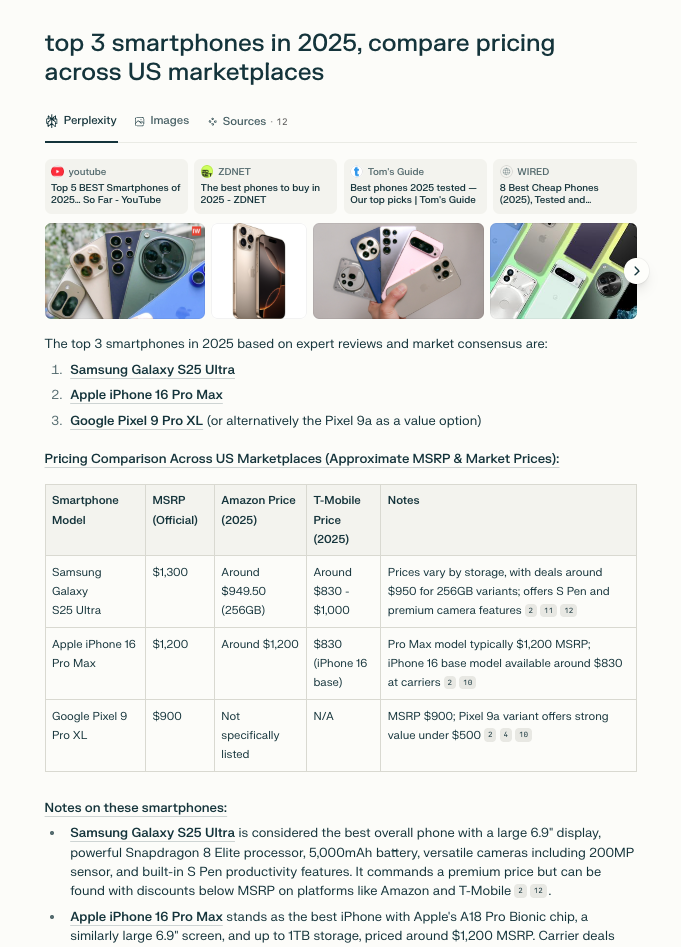
该 perplexity 来源允许你直接向 Perplexity 发送提示并捕获完整响应。它以结构化格式返回生成的文本和相关元数据,并附带结果的 Markdown 版本。
请求示例
以下代码示例展示了如何向 Perplexity 发送提示并获取解析后的响应。
curl 'https://realtime.oxylabs.io/v1/queries' \
--user 'USERNAME:PASSWORD' \
-H 'Content-Type: application/json' \
-d '{
"source": "perplexity",
"prompt": "top 3 smartphones in 2025, compare pricing across US marketplaces",
"geo_location": "United States",
"parse": true
}'import requests
from pprint import pprint
# 构造请求载荷。
payload = {
'source': 'perplexity',
'prompt': 'top 3 smartphones in 2025, compare pricing across US marketplaces',
'geo_location': 'United States',
'parse': True
}
# 获取响应。
response = requests.post(
'https://realtime.oxylabs.io/v1/queries',
auth=('USERNAME', 'PASSWORD'),
json=payload
)
# 将美化后的响应打印到标准输出。
pprint(response.json())const https = require("https");
const username = "USERNAME";
const password = "PASSWORD";
const body = {
source: "perplexity",
prompt: "top 3 smartphones in 2025, compare pricing across US marketplaces",
geo_location: "United States",
parse: true
};
const options = {
hostname: "realtime.oxylabs.io",
path: "/v1/queries",
method: "POST",
headers: {
"Content-Type": "application/json",
Authorization:
"Basic " + Buffer.from(`${username}:${password}`).toString("base64"),
},
};
const request = https.request(options, (response) => {
let data = "";
response.on("data", (chunk) => {
data += chunk;
});
response.on("end", () => {
const responseData = JSON.parse(data);
console.log(JSON.stringify(responseData, null, 2));
});
});
request.on("error", (error) => {
console.error("Error:", error);
});
request.write(JSON.stringify(body));
request.end();https://realtime.oxylabs.io/v1/queries?source=perplexity&prompt=top%203%20smartphones%20in%202025%2C%20compare%20pricing%20across%20US%20marketplaces&geo_location=United%20States&parse=true&access_token=12345abcde<?php
$params = array(
'source' => 'perplexity',
'prompt' => 'top 3 smartphones in 2025, compare pricing across US marketplaces',
'geo_location' => 'United States',
'parse' => true
);
$ch = curl_init();
curl_setopt($ch, CURLOPT_URL, "https://realtime.oxylabs.io/v1/queries");
curl_setopt($ch, CURLOPT_RETURNTRANSFER, 1);
curl_setopt($ch, CURLOPT_POSTFIELDS, json_encode($params));
curl_setopt($ch, CURLOPT_POST, 1);
curl_setopt($ch, CURLOPT_USERPWD, "USERNAME" . ":" . "PASSWORD");
$headers = array();
$headers[] = "Content-Type: application/json";
curl_setopt($ch, CURLOPT_HTTPHEADER, $headers);
$result = curl_exec($ch);
echo $result;
if (curl_errno($ch)) {
echo 'Error:' . curl_error($ch);
}
curl_close($ch);package main
import (
"bytes"
"encoding/json"
"fmt"
"io"
"net/http"
)
func main() {
const Username = "USERNAME"
const Password = "PASSWORD"
payload := map[string]interface{}{
"source": "perplexity",
"prompt": "top 3 smartphones in 2025, compare pricing across US marketplaces",
"geo_location": "United States",
"parse": true,
}
jsonValue, _ := json.Marshal(payload)
client := &http.Client{}
request, _ := http.NewRequest("POST",
"https://realtime.oxylabs.io/v1/queries",
bytes.NewBuffer(jsonValue),
)
request.SetBasicAuth(Username, Password)
response, _ := client.Do(request)
responseText, _ := io.ReadAll(response.Body)
fmt.Println(string(responseText))
}
using System;
using System.Collections.Generic;
using System.Net.Http;
using System.Net.Http.Json;
using System.Threading.Tasks;
namespace OxyApi
{
class Program
{
static async Task Main()
{
const string Username = "USERNAME";
const string Password = "PASSWORD";
var parameters = new
{
source = "perplexity",
prompt = "top 3 smartphones in 2025, compare pricing across US marketplaces",
geo_location = "United States",
parse = true
};
var client = new HttpClient();
Uri baseUri = new Uri("https://realtime.oxylabs.io");
client.BaseAddress = baseUri;
var requestMessage = new HttpRequestMessage(HttpMethod.Post, "/v1/queries");
requestMessage.Content = JsonContent.Create(parameters);
var authenticationString = $"{Username}:{Password}";
var base64EncodedAuthenticationString = Convert.ToBase64String(System.Text.ASCIIEncoding.UTF8.GetBytes(authenticationString));
requestMessage.Headers.Add("Authorization", "Basic " + base64EncodedAuthenticationString);
var response = await client.SendAsync(requestMessage);
var contents = await response.Content.ReadAsStringAsync();
Console.WriteLine(contents);
}
}
}package org.example;
import okhttp3.*;
import org.json.JSONArray;
import org.json.JSONObject;
import java.util.concurrent.TimeUnit;
public class Main implements Runnable {
private static final String AUTHORIZATION_HEADER = "Authorization";
public static final String USERNAME = "USERNAME";
public static final String PASSWORD = "PASSWORD";
public void run() {
JSONObject jsonObject = new JSONObject();
jsonObject.put("source", "perplexity");
jsonObject.put("prompt", "top 3 smartphones in 2025, compare pricing across US marketplaces");
jsonObject.put("geo_location", "United States");
jsonObject.put("parse", true);
Authenticator authenticator = (route, response) -> {
String credential = Credentials.basic(USERNAME, PASSWORD);
return response
.request()
.newBuilder()
.header(AUTHORIZATION_HEADER, credential)
.build();
};
var client = new OkHttpClient.Builder()
.authenticator(authenticator)
.readTimeout(180, TimeUnit.SECONDS)
.build();
var mediaType = MediaType.parse("application/json; charset=utf-8");
var body = RequestBody.create(jsonObject.toString(), mediaType);
var request = new Request.Builder()
.url("https://realtime.oxylabs.io/v1/queries")
.post(body)
.build();
try (var response = client.newCall(request).execute()) {
if (response.body() != null) {
try (var responseBody = response.body()) {
System.out.println(responseBody.string());
}
}
} catch (Exception exception) {
System.out.println("Error: " + exception.getMessage());
}
System.exit(0);
}
public static void main(String[] args) {
new Thread(new Main()).start();
}
}{
"source": "perplexity",
"prompt": "top 3 smartphones in 2025, compare pricing across US marketplaces",
"geo_location": "United States",
"parse": true
}我们的示例使用 Realtime (同步)集成方式。要使用 Proxy Endpoint 或 Push-Pull (异步),请参阅 集成方法 页面。
Batch 请求 当前 不支持 用于该 perplexity 来源。
请求参数取值
通用
用于抓取 Perplexity 响应的基础设置与配置参数。
- 必填参数
结构化数据
网页爬虫API 会返回一个 HTML 文档或一个包含 Perplexity 输出的 JSON 对象,其中包含来自结果页的结构化数据。
输出数据字典
HTML 示例

JSON 结构
该结构化 perplexity 输出包含以下字段,例如 url, model, answer_results,以及更多。下表拆解我们解析的页面元素,并附说明、数据类型和相关元数据。
url
Perplexity 会话的 URL。
string
page
页码。
integer
content
包含已解析 Perplexity 页面数据的对象。
object
model
用于生成答案的 Perplexity 模型。
string
prompt_query
提交给 Perplexity 的原始提示。
string
displayed_tabs
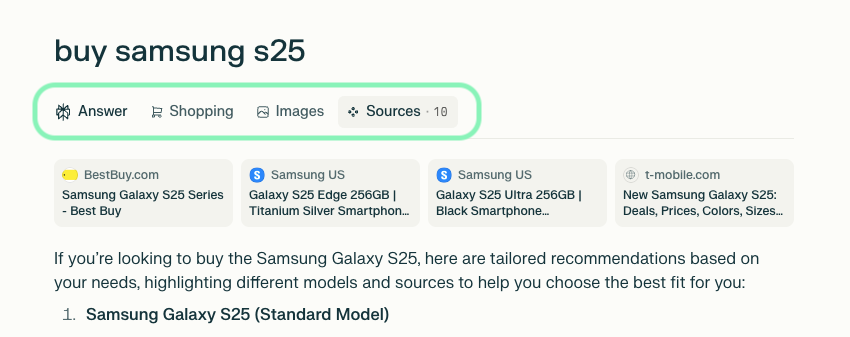
Perplexity 界面中显示的选项卡(例如购物、图片)。
list
answer_results
包含文本或嵌套内容的完整 Perplexity 响应。
list 或 string
answer_results_md
以 Markdown 格式呈现的完整答案。
string
related_queries
与主提示相关的查询列表。
list
top_images
包含标题和 URL 的热门图片列表。
array
top_sources
包含标题、来源和 URL 的主要引用来源列表。
array
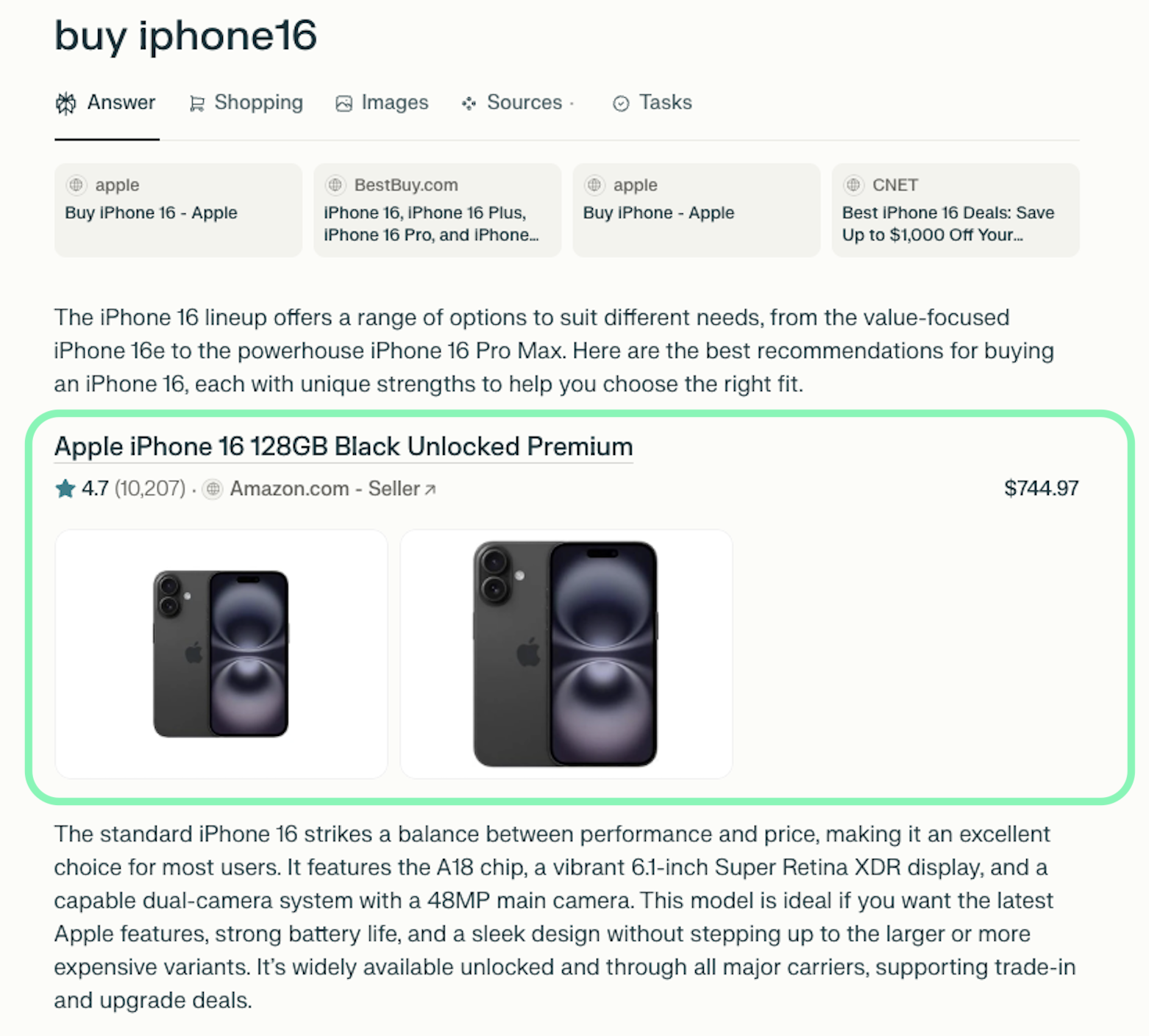
inline_products
包含标题、价格、链接和其他元数据的内联产品列表。
array
additional_results.hotels_results
包含标题、URL、地址及其他酒店详情的酒店列表。
array
additional_results.places_results
包含标题、URL、坐标及其他元数据的地点列表。
array
additional_results.videos_results
包含缩略图、标题、URL 和来源的视频列表。
array
additional_results.shopping_results
包含标题、价格、URL 和其他产品元数据的购物商品列表。
array
additional_results.sources_results
包含标题和 URL 的引用来源列表。
array
additional_results.images_results
包含标题、图片 URL 和来源页面 URL 的相关图片列表。
array
parse_status_code
解析操作的状态码。
integer
created_at
抓取任务创建的时间戳。
timestamp
updated_at
抓取任务完成的时间戳。
timestamp
job_id
与抓取任务关联的作业 ID。
string
geo_location
提交提示时所使用的代理位置。
string
parser_type
用于解析 HTML 内容的解析器类型。
string
附加结果和内联产品
除了主要的 AI 响应外,我们还在 additional_results下返回额外的数据,例如
images_resultssources_resultsshopping_resultsvideos_resultsplaces_resultshotels_results
这些数组从原始结果页面的选项卡中提取,仅在存在相关内容时包含:

此外, inline_products array 包含直接嵌入在响应中的产品:

最后更新于
这有帮助吗?