# 浏览器指令
您可以定义自己的浏览器指令,这些指令会在渲染 JavaScript 时执行。
{% hint style="success" %}
设置浏览器指令的最简单方式,是使用由 AI 驱动的可视化浏览器指令构建器,位于 [Web Scraper API Playground](https://dashboard.oxylabs.io/?route=/api-playground)。阅读相关内容 [这里](https://developers.oxylabs.io/documentation/cn/zhua-qu-jie-jue-fang-an/web-scraper-api-playground/oxycopilot#browser-instruction-builder).
{% endhint %}
### 用法
要使用浏览器指令,请提供一组 `browser_instructions` 在创建任务时。
假设您想要搜索术语 `pizza boxes` 在某个网站中。
 任务参数示例如下所示:
```json
{
"source": "universal",
"url": "https://www.ebay.com/",
"render": "html",
"browser_instructions": [
{
"type": "input",
"value": "pizza boxes",
"selector": {
"type": "xpath",
"value": "//input[@class='gh-tb ui-autocomplete-input']"
}
},
{
"type": "click",
"selector": {
"type": "xpath",
"value": "//input[@type='submit']"
}
},
{
"type": "wait",
"wait_time_s": 5
}
]
}
```
**步骤 1。** 您必须提供 `"render": "html"` 参数。
**步骤 2。** 浏览器指令应在 `"browser_instructions"` 字段中描述。
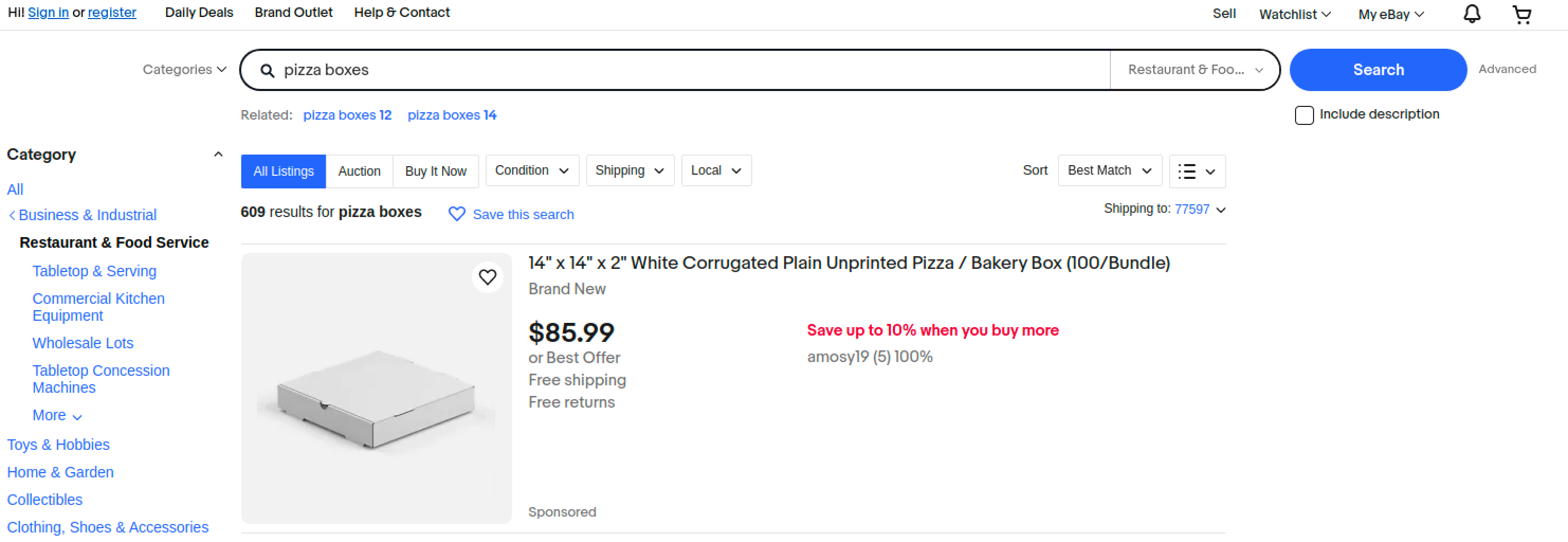
上面的浏览器指令示例指定了目标是输入一个搜索词 `pizza boxes` 到搜索字段中,点击 `搜索` 按钮,并等待 5 秒以加载内容。
抓取结果应如下所示:
```json
{
"results": [
{
"content": "
执行这些指令后的内容
",
"created_at": "2023-10-11 11:35:23",
"updated_at": "2023-10-11 11:36:08",
"page": 1,
"url": "https://www.ebay.com/",
"job_id": "7117835067442906113",
"status_code": 200
}
]
}
```
抓取到的 HTML 应如下所示:
任务参数示例如下所示:
```json
{
"source": "universal",
"url": "https://www.ebay.com/",
"render": "html",
"browser_instructions": [
{
"type": "input",
"value": "pizza boxes",
"selector": {
"type": "xpath",
"value": "//input[@class='gh-tb ui-autocomplete-input']"
}
},
{
"type": "click",
"selector": {
"type": "xpath",
"value": "//input[@type='submit']"
}
},
{
"type": "wait",
"wait_time_s": 5
}
]
}
```
**步骤 1。** 您必须提供 `"render": "html"` 参数。
**步骤 2。** 浏览器指令应在 `"browser_instructions"` 字段中描述。
上面的浏览器指令示例指定了目标是输入一个搜索词 `pizza boxes` 到搜索字段中,点击 `搜索` 按钮,并等待 5 秒以加载内容。
抓取结果应如下所示:
```json
{
"results": [
{
"content": "
执行这些指令后的内容
",
"created_at": "2023-10-11 11:35:23",
"updated_at": "2023-10-11 11:36:08",
"page": 1,
"url": "https://www.ebay.com/",
"job_id": "7117835067442906113",
"status_code": 200
}
]
}
```
抓取到的 HTML 应如下所示:
 #### 获取浏览器资源
我们提供了一个独立的浏览器指令,用于获取浏览器资源。
该功能定义如下:
使用 `fetch_resource` 将导致任务返回第一个与所提供格式匹配的 Fetch/XHR 资源,而不是目标 HTML。
假设我们想要定位一个 GraphQL 资源,该资源是在浏览器中自然访问产品页面时获取的。我们将提供如下任务信息:
```json
{
"source": "universal",
"url": "https://www.example.com/product-page/123",
"render": "html",
"browser_instructions": [
{
"type": "fetch_resource",
"filter": "/graphql/product-info/123"
}
]
}
```
这些指令将产生如下结果:
```json
{
"results": [
{
"content": "{'product_id': 123, 'description': '', 'price': 123}",
"created_at": "2023-10-11 11:35:23",
"updated_at": "2023-10-11 11:36:08",
"page": 1,
"url": "https://example.com/v1/graphql/product-info/123/",
"job_id": "7117835067442906114",
"status_code": 200
}
]
}
```
### 支持的浏览器指令列表
{% content-ref url="browser-instructions/list-of-instructions" %}
[list-of-instructions](https://developers.oxylabs.io/documentation/cn/zhua-qu-jie-jue-fang-an/web-scraper-api/features/js-rendering-and-browser-control/browser-instructions/list-of-instructions)
{% endcontent-ref %}
### 状态码
请查看我们概述的响应代码 [**这里**](https://developers.oxylabs.io/documentation/cn/zhua-qu-jie-jue-fang-an/web-scraper-api/response-codes).
与指令验证相关的状态码记录在 [**这里**](https://developers.oxylabs.io/documentation/cn/zhua-qu-jie-jue-fang-an/web-scraper-api/features/js-rendering-and-browser-control/list-of-instructions#instructions-validation).
### 错误和警告
如果您的浏览操作产生错误或警告,您可以在结果中的以下键下找到它: `browser_instructions_error` 或 `browser_instructions_warnings`。例如,如果您发送了以下浏览器指令,而预期的 xpath 在页面上未找到,结果将包含一条警告。
`browser_instructions`:
```json
[
{
"type": "input",
"selector": {
"type": "xpath",
"value": "//input[@type='search']"
},
"value": "oxylabs"
}
]
```
结果:
```json
{
"results": [
{
"content": "
执行这些指令后的内容
",
"created_at": "2023-10-11 11:35:23",
"updated_at": "2023-10-11 11:36:08",
"browser_instructions_warnings": [
{
"action_type": "click",
"msg": "无法在页面上找到值为 `//input[@type=search]` 的选择器类型 `xpath`。"
},
],
"page": 1,
"url": "https://example.com",
"job_id": "7117835067442906113",
"status_code": 200
}
]
}
```
| 可能的错误和警告 |
| -------------------------------------------------------- |
| 将浏览器指令转换为操作时发生了意外错误。 |
| 执行 `{action.type}` 浏览器指令时发生了意外错误。 |
| 操作 `{action.type}` 超时。 |
| 无法找到选择器类型 `{selector.type}` 其值为 `{selector.value}` 在页面上。 |
---
# Agent Instructions: Querying This Documentation
If you need additional information that is not directly available in this page, you can query the documentation dynamically by asking a question.
Perform an HTTP GET request on the current page URL with the `ask` query parameter:
```
GET https://developers.oxylabs.io/documentation/cn/zhua-qu-jie-jue-fang-an/web-scraper-api/features/js-rendering-and-browser-control/browser-instructions.md?ask=
```
The question should be specific, self-contained, and written in natural language.
The response will contain a direct answer to the question and relevant excerpts and sources from the documentation.
Use this mechanism when the answer is not explicitly present in the current page, you need clarification or additional context, or you want to retrieve related documentation sections.
#### 获取浏览器资源
我们提供了一个独立的浏览器指令,用于获取浏览器资源。
该功能定义如下:
使用 `fetch_resource` 将导致任务返回第一个与所提供格式匹配的 Fetch/XHR 资源,而不是目标 HTML。
假设我们想要定位一个 GraphQL 资源,该资源是在浏览器中自然访问产品页面时获取的。我们将提供如下任务信息:
```json
{
"source": "universal",
"url": "https://www.example.com/product-page/123",
"render": "html",
"browser_instructions": [
{
"type": "fetch_resource",
"filter": "/graphql/product-info/123"
}
]
}
```
这些指令将产生如下结果:
```json
{
"results": [
{
"content": "{'product_id': 123, 'description': '', 'price': 123}",
"created_at": "2023-10-11 11:35:23",
"updated_at": "2023-10-11 11:36:08",
"page": 1,
"url": "https://example.com/v1/graphql/product-info/123/",
"job_id": "7117835067442906114",
"status_code": 200
}
]
}
```
### 支持的浏览器指令列表
{% content-ref url="browser-instructions/list-of-instructions" %}
[list-of-instructions](https://developers.oxylabs.io/documentation/cn/zhua-qu-jie-jue-fang-an/web-scraper-api/features/js-rendering-and-browser-control/browser-instructions/list-of-instructions)
{% endcontent-ref %}
### 状态码
请查看我们概述的响应代码 [**这里**](https://developers.oxylabs.io/documentation/cn/zhua-qu-jie-jue-fang-an/web-scraper-api/response-codes).
与指令验证相关的状态码记录在 [**这里**](https://developers.oxylabs.io/documentation/cn/zhua-qu-jie-jue-fang-an/web-scraper-api/features/js-rendering-and-browser-control/list-of-instructions#instructions-validation).
### 错误和警告
如果您的浏览操作产生错误或警告,您可以在结果中的以下键下找到它: `browser_instructions_error` 或 `browser_instructions_warnings`。例如,如果您发送了以下浏览器指令,而预期的 xpath 在页面上未找到,结果将包含一条警告。
`browser_instructions`:
```json
[
{
"type": "input",
"selector": {
"type": "xpath",
"value": "//input[@type='search']"
},
"value": "oxylabs"
}
]
```
结果:
```json
{
"results": [
{
"content": "
执行这些指令后的内容
",
"created_at": "2023-10-11 11:35:23",
"updated_at": "2023-10-11 11:36:08",
"browser_instructions_warnings": [
{
"action_type": "click",
"msg": "无法在页面上找到值为 `//input[@type=search]` 的选择器类型 `xpath`。"
},
],
"page": 1,
"url": "https://example.com",
"job_id": "7117835067442906113",
"status_code": 200
}
]
}
```
| 可能的错误和警告 |
| -------------------------------------------------------- |
| 将浏览器指令转换为操作时发生了意外错误。 |
| 执行 `{action.type}` 浏览器指令时发生了意外错误。 |
| 操作 `{action.type}` 超时。 |
| 无法找到选择器类型 `{selector.type}` 其值为 `{selector.value}` 在页面上。 |
---
# Agent Instructions: Querying This Documentation
If you need additional information that is not directly available in this page, you can query the documentation dynamically by asking a question.
Perform an HTTP GET request on the current page URL with the `ask` query parameter:
```
GET https://developers.oxylabs.io/documentation/cn/zhua-qu-jie-jue-fang-an/web-scraper-api/features/js-rendering-and-browser-control/browser-instructions.md?ask=
```
The question should be specific, self-contained, and written in natural language.
The response will contain a direct answer to the question and relevant excerpts and sources from the documentation.
Use this mechanism when the answer is not explicitly present in the current page, you need clarification or additional context, or you want to retrieve related documentation sections.