| Parameter | Description | Default Value |
|---|---|---|
| source | Sets the scraper. | google_search |
| query | The keyword or phrase to search for. | - |
render | Enables JavaScript rendering when set to html. More info. | - |
parse | Returns parsed data when set to true. Explore output data dictionary. | false |
callback_url | URL to your callback endpoint. More info | - |
user_agent_type | Device type and browser. The full list can be found here. | desktop |
| Parameter | Description | Default Value |
|---|---|---|
geo_location | The geographical location that the result should be adapted for. Using this parameter correctly is extremely important to get the right data. For more information, read about our suggested geo_location parameter structures here. | - |
locale | Accept-Language header value which changes your Google search page web interface language. More info. | - |
| Parameter | Description | Default Value |
|---|---|---|
start_page | Starting page number. | 1 |
pages | Number of pages to retrieve. | 1 |
limit | Number of results to retrieve in each page. | 10 |
context:limit_per_page | Scrape multiple pages using the same IP address and session (cookie set). By specifying the page numbers in a JSON array with the page key and indicating the number of organic results per page using the limit key, you can minimize the chance of seeing overlapping organic results across pages (e.g., the last organic result on the first page being the same as the first organic result on the second page). See example. | - |
| Parameter | Description | Example |
|---|---|---|
page | The number of the page you would like to scrape. Any integer value greater than 0 will work | 1 |
limit | The number of results on the page in question. Any integer value between 1 and 100 (inclusive) will work. | 90 |
| Parameter | Description | Default Value |
|---|---|---|
context:filter | Setting the value of this parameter to 0 lets you see results that would otherwise be excluded due to similarity to other results. | 1 |
context:safe_search | Safe search. Set to true to enable it. | false |
context:udm | udm parameter allows switching between different search tabs, such as images, places, or videos, to customize the type of results displayed. Find the accepted values here. | - |
context:tbm | To-be-matched or tbm parameter. Accepted values are: app, blg, bks, dsc, isch, nws, pts, plcs, rcp, lcl | - |
context:tbs | This parameter is like a container for more obscure google parameters, like limiting/sorting results by date as well as other filters some of which depend on the tbm parameter (e.g. tbs=app_os:1 is only available with tbm value app). More info here. | - |
| Parameter | Description | Default Value |
|---|---|---|
context:fpstate | Setting the fpstate value to aig will make Google load more apps. This parameter is only useful if used together with the render parameter. | - |
context:nfpr | true will turn off spelling auto-correction | false |
google_search structured output| Key Name | Description | Type |
|---|---|---|
url | The URL of the Google search page. | string |
page | Page number relative to the Google SERP pagination. | integer |
results | A dictionary containing the results of the search. | object |
results.pla | A list of product listing ads with their respective details. | object |
results.paid | A list of sponsored results with their respective details. | array |
results.images | A list of image results with their respective details. | object |
results.flights | A list of flights with their respective details. | object |
results.organic | A list of unpaid listings with their respective details. | array |
results.organic_videos | A list of organic videos with their respective details. | array |
results.top_sights | A list of notable landmarks or attractions with their respective details. | array |
results.jobs | A list of jobs listings with their respective details. | object |
results.local_service_ads | A list of sponsored local service providers. | object |
results.video_boxes | Video boxes in the SERP with their respective details. | array |
results.recipes | A list of recipes with their respective details. | object |
results.twitter | A list of Twitter (X) results with their respective details. | array |
results.knowledge | A list of relevant information retrieved from the knowledge panel. | object |
results.local_pack | A list containing local business listings relevant to the search. | object |
results.item_carousel | A list of illustrative items for informational queries with their respective details. | object |
results.videos | A list of videos with their respective details. | object |
results.hotels | A list of hotels relevant to the location used in the search query. | object |
results.apps | A list of applications with their respective details. | array |
results.finance | A summary of financial data for companies, including stock prices, market cap, and other key metrics. | object |
results.sports_games | Information on recent sports games, detailing scores, teams, game types, and highlights. | object |
results.discussions_and_forums | A list of discussion threads and forum posts with URLs, titles, sources, and comment counts. | object |
results.featured_snippet | A list of specific results retrieved from the organic part of SERPs. | array |
results.top_stories | A list of articles with their respective details when a search query is identified as news-oriented. | object |
results.popular_products | A list of unpaid and organic displays of Google Shopping product listings with their respective details. | object |
results.related_searches | A list of one or more related searches blocks presented at different positions on the search page. | array |
results.related_questions | A list of related interrogative search queries with their respective details. | object |
results.what_people_are_saying | A list of discussion threads and forum posts with URLs, titles, sources, top comments, engagement level and timeframes. | array |
results.search_information | A list of details for the submitted search query. | object |
total_results_count | The total number of results found for the search query. | string |
last_visible_page | Value identifying the maximum page number visible in the search query results page. (-1 when loading of more results is initiated by scrolling). | integer |
parse_status_code | The status code of the parsing job. You can see the parser status codes described here. | integer |
created_at | The timestamp when the scraping job was created. | timestamp |
updated_at | The timestamp when the scraping job was finished. | timestamp |
job_id | The ID of the job associated with the scraping job. | string |
status_code | The status code of the scraping job. You can see the scraper status codes described here. | integer |
parser_type | The type of the parser used for breaking down the HTML content. | string |
| Key (results.pla) | Description | Type | Layout |
|---|---|---|---|
items | All PLAs available within the page. | array | Desktop and Mobile |
items.pos | An indicator denoting the position of a given item among PLA results. | integer | Desktop and Mobile |
items.title | The title of the product in the listing ad. | string | Desktop and Mobile |
items.url | The URL of the product | string | Desktop and Mobile |
items.price | The price of the product in the listing ad. | string | Desktop and Mobile |
items.seller | The seller of the product in the listing ad. | string | Desktop and Mobile |
items.url_image | The URL of the product image. | string | Desktop |
items.image_data | The base64-encoded thumbnail image of the product. | string | Desktop and Mobile |
pos_overall | An indication of the position of the PLA SERP feature within the SERP. | integer | Desktop and Mobile |
| Key (results.paid) | Description | Type | Layout |
|---|---|---|---|
pos | An indicator denoting the position of a given item among paid results. | integer | Desktop and Mobile |
url | The URL of the paid result. | string | Desktop and Mobile |
desc | A short description of the paid result. | string | Desktop and Mobile |
title | The title of the paid result. | string | Desktop and Mobile |
data_rw | Redirect URL of the paid result. | string | Desktop and Mobile |
sitelinks | An object containing information about internal links to a website that appears under the first search result on Google. | object | Desktop and Mobile |
sitelinks.inline/expanded | A list of URLs with their respective details. The name of the key (`inline`/`expanded`) specifies the type of the sitelinks element. | array | Desktop and Mobile |
sitelinks.inline.url | The URL of the linked site. | string | Desktop and Mobile |
sitelinks.inline.title | The title of the linked site. | string | Desktop and Mobile |
sitelinks.inline.description | A short description of the linked site. | string | Desktop |
url_shown | The short-hand URL visible just below the description. | string | Desktop and Mobile |
pos_overall | An indication of the position of the paid result within the SERP. | integer | Desktop and Mobile |

| Key (results.images) | Description | Type | Layout |
|---|---|---|---|
items | A list of images with their respective details. | array | Desktop and Mobile |
items.alt | The alt text of the image. | string | Desktop and Mobile |
items.pos | A unique indicator denoting the image position in the list. | integer | Desktop and Mobile |
items.url | The URL of the web page containing the image. | string | Desktop and Mobile |
pos_overall | An indication of the position of the Images SERP feature within the SERP. | integer | Desktop and Mobile |
| Key (results.organic) | Description | Type | Layout |
|---|---|---|---|
pos | An indicator denoting the position of a given item among organic results. | integer | Desktop and Mobile |
url | The URL of the organic result. | string | Desktop and Mobile |
desc | A short description of the organic result. | string | Desktop and Mobile |
title | The title of the organic result. | string | Desktop and Mobile |
images | The base64-encoded thumbnail images of the organic result. | string | Desktop and Mobile |
sitelinks | Object contains `expanded` or `inline` element with more details on the sitelinks. | object | Desktop and Mobile |
sitelinks.expanded/inline | A list of sitelinks of the organic result. The name of the key (inline/expanded) specifies the type of the sitelinks element. | array | Desktop and Mobile |
sitelinks.expanded.url | The URL of the linked site. | string | Desktop and Mobile |
sitelinks.expanded.title | The title of the linked site. | string | Desktop and Mobile |
url_shown | The short-hand URL visible just below the description. | string | Desktop and Mobile |
pos_overall | An indication of the position of the Organic result within the SERP. | integer | Desktop and Mobile |
favicon_text | The text or name associated with the favicon (website icon). | string | Desktop |
rating | The average rating of the product or content. | float | Desktop |
review_count | The number of reviews associated with the product or content. | integer | Desktop |
additional_info | Contains details about pricing, availability, product ratings, delivery options, return policies. | list of strings | Desktop |
| Key (results.organic_videos) | Description | Type | Layout |
|---|---|---|---|
pos | An indicator denoting the position of a given item among Organic Videos results. | integer | Desktop |
url | The URL of the video. | string | Desktop |
desc | Short description of the video. | string | Desktop |
title | The title of the video. | string | Desktop |
pos_overall | An indication of the position of the Organic Video result within the SERP. | integer | Desktop |

| Key (results.top_sights) | Description | Type | Layout |
|---|---|---|---|
items | A list of top attractions with their respective details. | array | Desktop |
items.pos | The position of the Top Sights result within the Top Sights SERP feature. | integer | Desktop |
items.title | The title of the tourist attraction site. | string | Desktop |
pos_overall | An indication of the position of the Top Sights result within the SERP. | integer | Desktop |
| Key (results.jobs) | Description | Type | Layout |
|---|---|---|---|
listings | An array of all jobs listings available within the page. | array | Desktop |
listings.url | The URL to the full job listing. | string | Desktop |
listings.title | The title of the job position. | string | Desktop |
listings.source | The source which contains the original job posting. | string | Desktop |
listings.employer | The organization hiring for the identified position. | string | Desktop |
listings.location | The location for the position. | string | Desktop |
pos_overall | An indication of the position of the Jobs SERP feature within the SERP. | integer | Desktop |
| Key (results.twitter) | Description | Type | Layout |
|---|---|---|---|
pos | An indicator denoting the position of a given item among organic results. | integer | Desktop |
url | The URL of the profile containing the Twitter (X) posts. | string | Desktop |
items | A list of Twitter (X) posts with their respective details. | array | Desktop |
items.pos | An indicator denoting the position of a given tweet within the Twitter (X) SERP feature. | string | Desktop |
items.url | The URL of the Twitter (X) post. | string | Desktop |
items.content | A short description denoting all of the text from the relevant Twitter (X) post. | string | Desktop |
items.timeframe | Describes how long ago the tweet was created. | string | Desktop |
title | The title of the Twitter (X) profile. | string | Desktop |
pos_overall | An indication of the position of the Twitter result within the SERP. | integer | Desktop |
| Key (results.knowledge) | Description | Type | Layout |
|---|---|---|---|
title | The title of the knowledge panel. | string | Desktop and Mobile |
images | A list of images used right next to the title. | array | Desktop |
factoids | A list of all the facts used in the knowledge panel. | array | Desktop and Mobile |
factoids.links | A list of all the links related to a given factoid item. | array | Desktop and Mobile |
factoids.links.href | A hyperlink to the Google Search results page for the given factoid. | string | Desktop and Mobile |
factoids.links.title | The description of any linked pages related to the factoid. | string | Desktop and Mobile |
factoids.title | The name of the factoid section. | string | Desktop and Mobile |
factoids.content | The description of the factoid. | string | Desktop and Mobile |
profiles | A list of social media profiles listed in the knowledge panel. | string | Desktop |
profiles.url | A link to the social media profile. | string | Desktop |
profiles.title | The title of the social media profile. | string | Desktop |
subtitle | A short explanation about the entity described in the title. | string | Desktop and Mobile |
description | A description denoting main information about the entity in the knowledge panel. | string | Desktop and Mobile |
related_searches | A list of related searches with their respective details. | array | Desktop |
related_searches.url | The URL of the related search page. | string | Desktop |
related_searches.title | The title of the related search page. | string | Desktop |
related_searches.section_title | The name of the related search section. | string | Desktop |

| Key (results.local_pack) | Description | Type | Layout |
|---|---|---|---|
items | A list of locations with their respective details. | array | Desktop and Mobile |
items.cid | A unique identification number assigned to a specific business listing. | string | Desktop and Mobile |
items.pos | The position of the local result within the local pack. | integer | Desktop and Mobile |
items.title | The title of the local entity. | string | Desktop and Mobile |
items.rating | The rating of the local entity. | integer | Desktop and Mobile |
items.address | The address of the local entity. | string | Desktop and Mobile |
items.rating_count | The number of ratings for the local entity. | integer | Desktop and Mobile |
pos_overall | An indication of the position of the Local Pack result within the SERP. | integer | Desktop and Mobile |
| Key (results.top_stories) | Description | Type | Layout |
|---|---|---|---|
items | A list of selected news articles with their respective details. | array | Desktop and Mobile |
items.pos | The position of the article within the Top Stories SERP feature. | integer | Desktop and Mobile |
items.url | The URL to the full article. | string | Desktop and Mobile |
items.title | The title of the article. | string | Desktop and Mobile |
items.section | The name of the Top Stories section. | string | Mobile |
items.source | The name of the site where the article is published. | string | Desktop and Mobile |
items.timeframe | Describes how long ago the article was published. | string | Desktop |
pos_overall | Indicates the overall position of the Top Stories SERP feature within the SERP. | integer | Desktop and Mobile |

| Key (results.popular_products) | Description | Type | Layout |
|---|---|---|---|
items | A list of popular products with their respective details. | array | Desktop and Mobile |
items.pos | A unique indicator for the position of a given popular product within the Popular Products SERP feature. | integer | Desktop and Mobile |
items.url | The URL of the product's Google Shopping page. | string | Desktop and Mobile |
items.title | The product title. | string | Desktop and Mobile |
items.token | Product token (used with google_shopping_product source for seller, pricing, product details). | string | Desktop and Mobile |
items.rating | The rating of a given popular product. | string | Desktop and Mobile |
items.sellers | A list of sellers offering the product, with their respective details. | array | Desktop and Mobile |
items.sellers.pos | The position of the seller within the sellers list. | integer | Desktop and Mobile |
items.sellers.price_str | The price of the product by the seller. | string | Desktop and Mobile |
items.sellers.seller_name | The name of the product seller. | string | Desktop and Mobile |
items.currency | The currency code of listed price. | string | Desktop and Mobile |
items.image_data | The base64-encoded thumbnail image of the product. | string | Desktop and Mobile |
items.description | Short description of the product seller. | string | Desktop and Mobile |
items.rating_count | The number of ratings for the product. | integer | Desktop and Mobile |
pos_overall | Indicates the overall position of the Popular Products SERP feature within the SERP. | integer | Desktop and Mobile |

| Key (results.related_searches) | Description | Type | Layout |
|---|---|---|---|
pos_overall | Indicates the overall position of this related searches block within the search page. | integer | Desktop and Mobile |
related_searches | A list of related search strings within this block. | array | Desktop and Mobile |
| Key (results.related_questions) | Description | Type | Layout |
|---|---|---|---|
items | A list containing all of the related questions. | array | Desktop and Mobile |
items.pos | A unique indicator denoting the position of any given related question within the Related Questions SERP feature. | integer | Desktop and Mobile |
items.answer | The answer to the related question. | string | Desktop and Mobile |
items.source | Contains values describing the source of the answer to the question. | object | Desktop and Mobile |
items.source.url | The URL of the site which is used to obtain the answer. | string | Desktop |
items.source.title | The title of the site which contains the answer. | string | Desktop |
items.source.url_shown | The short-hand URL visible just below the answer. | string | Desktop and Mobile |
items.question | The question from the related questions section. | string | Desktop and Mobile |
pos_overall | Indicates the overall position of the Related Questions SERP feature within the SERP. | integer | Desktop and Mobile |
| Key (results.what_people_are_saying) | Description | Type | Layout |
|---|---|---|---|
items | A list containing all discussion forum or social media content items. | array | Desktop and Mobile |
items.url | The URL of the discussion thread or social media content page. | integer | Desktop and Mobile |
items.title | The title of the discussion thread or content piece. | string | Desktop and Mobile |
items.top_comments | The top comment from the discussion thread, if displayed. | string | Desktop and Mobile |
items.source | The name of the platform or website hosting the content. | string | Desktop and Mobile |
items.engagement_timeframe | Comment count and activity timeframe (e.g., "45 comments, 2 days ago"). | string | Desktop and Mobile |
| Key (results.search_information) | Description | Type | Layout |
|---|---|---|---|
query | The original search term. | string | Desktop and Mobile |
geo_location * | Indicates the specific geographical area associated with the search. | string | Desktop |
showing_results_for | The search term the search results are shown for. `query` and `showing_results_for` may differ if Google auto-corrected the provided search term. | string | Desktop and Mobile |
total_results_count | The total number of results found for the search term. | integer | Desktop and Mobile |

| Key (results.item_carousel) | Description | Type | Layout |
|---|---|---|---|
items | A list of items placed in a carousel with their respective details. | array | Desktop |
items.pos | The position of the item within the carousel. | integer | Desktop |
items.href | A hyperlink to the Google SERP of the item in the carousel. | string | Desktop |
items.title | The name/title of the entity in the carousel. | string | Desktop |
items.subtitle | Additional details about the entity in the title. | string | Desktop |
title | The title of the carousel section. The title is related to the search query. | string | Desktop |
pos_overall | An indication of the position of the Item Carousel result within the SERP. | integer | Desktop |
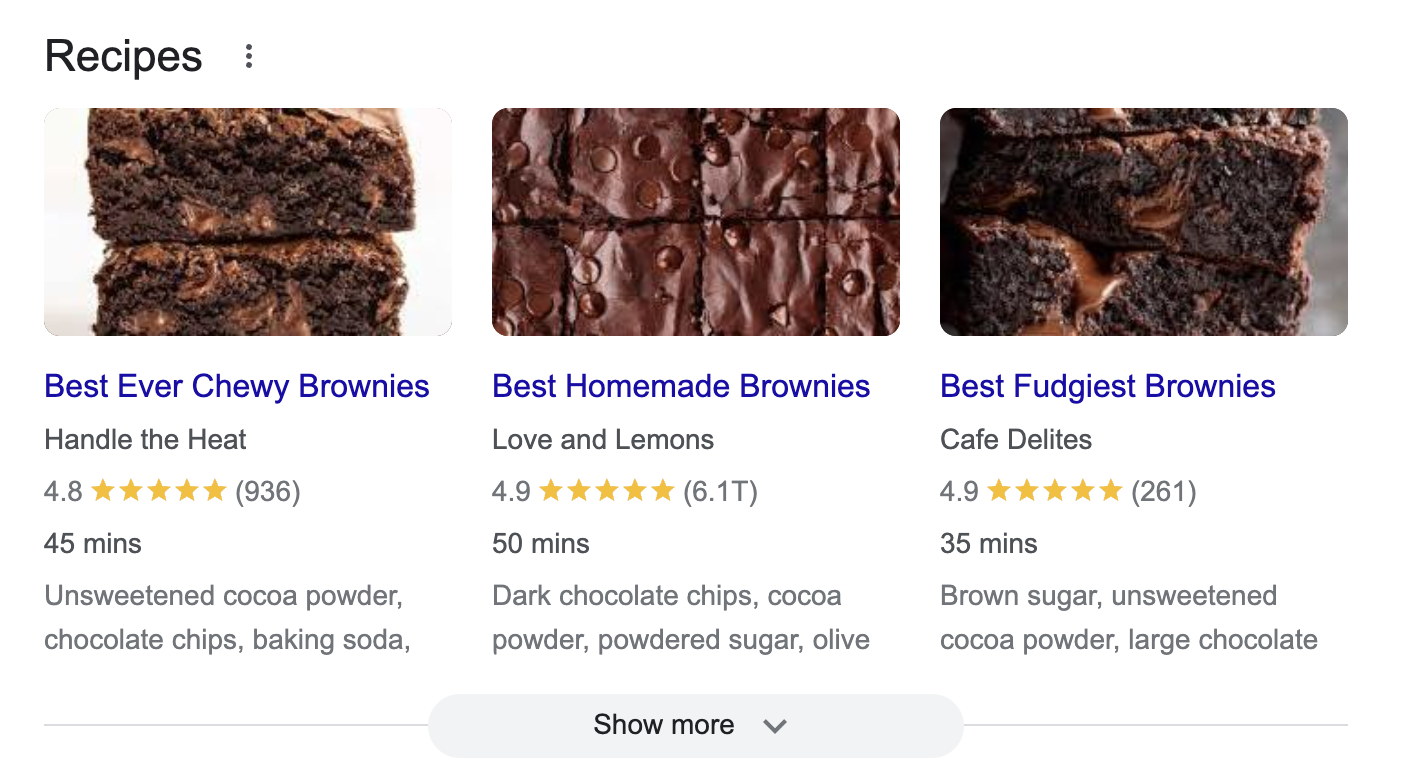
| Key (results.recipes) | Description | Type | Layout |
|---|---|---|---|
items | A list of selected recipes with their respective details. | array | Desktop and Mobile |
items.pos | The position of the recipe within the Recipes SERP feature. | integer | Desktop and Mobile |
items.url | The URL to the full recipe. | string | Desktop and Mobile |
items.desc | A short description of the recipe retrieved from the original article. | string | Desktop |
items.title | The title of the recipe. | string | Desktop and Mobile |
items.rating | The rating of the recipe. | integer | Desktop and Mobile |
items.source | The name of the website where the recipe is located. | string | Desktop and Mobile |
items.duration | The time that is needed to prepare the dish. | string | Desktop and Mobile |
pos_overall | An indication of the position of the Recipes result within the SERP. | integer | Desktop and Mobile |

| Key (results.videos) | Description | Type | Layout |
|---|---|---|---|
items | A list containing all of the video section results. | array | Desktop and Mobile |
items.pos | The position of the video inside the list. | integer | Desktop and Mobile |
items.url | A link to the video. | string | Desktop and Mobile |
items.title | The title of the video. | string | Desktop and Mobile |
items.author | The name of the profile where the video had been uploaded. | string | Desktop and Mobile |
items.source | The name of the platform hosting the video. | string | Desktop and Mobile |
pos_overall | An indication of the position of the Videos result within the SERP. | integer | Desktop and Mobile |
| Key (results.featured_snippet) | Description | Type | Layout |
|---|---|---|---|
url | The URL of the website from which the snippet describing the page is retrieved. | string | Desktop and Mobile |
desc | The snippet containing a description for a specific search result. | string | Desktop and Mobile |
title | The name of the article from which the snippet describing a page is retrieved. | string | Desktop and Mobile |
url_shown | The URL of the website containing the featured snippet that is visible in the SERP. | string | Desktop and Mobile |
pos_overall | An indication of the position of the Featured Snippet result within the SERP. | integer | Desktop and Mobile |
| Key (results.related_searches_categorized) | Description | Type | Layout |
|---|---|---|---|
items | A list containing all of the related searches items retrieved from a horizontal carousel within the SERP. | array | Desktop |
items.url | The URL of the related search page. | string | Desktop |
items.title | The name of the related search result rendered in the browser. | string | Desktop |
category | An object containing more details regarding the category of the related search results. | object | Desktop |
category.name | The name of the category. | string | Desktop |
category.type | The type of the related search section. | string | Desktop |
pos_overall | An indication of the position of the Related Searches Categorized result within the SERP. | integer | Desktop |

| Key (results.hotels) | Description | Type | Layout |
|---|---|---|---|
date_to | The date of the check-out. | string | Desktop |
results | A list with all of the hotel's details. | array | Desktop |
results.price | The price of the hotel. | string | Desktop |
results.title | The name of the hotel. | string | Desktop |
results.description | A short description of the hotel visible just below the name of the hotel. | string | Desktop |
date_from | The date of the check-in. | string | Desktop |
pos_overall | An indication of the position of the Hotels result within the SERP. | integer | Desktop |
| Key (results.flights) | Description | Type | Layout |
|---|---|---|---|
to | The airport of arrival. | string | Desktop and Mobile |
from | The airport of departure. | string | Desktop and Mobile |
date_to | The day of the arrival. | string | Desktop and Mobile |
results | A list of selected flights with their respective details. | array | Desktop and Mobile |
results.url | A link to Google Flights page listing all flights from a single airline. | string | Desktop and Mobile |
results.type | The type of the flight. | string | Desktop |
results.price | The price of the flight. | string | Desktop and Mobile |
results.airline | The name of the carrier. | string | Desktop and Mobile |
results.duration | The duration of the flight. | string | Desktop and Mobile |
date_from | The date of the departure. | string | Desktop and Mobile |
pos_overall | An indication of the position of the Flights result within the SERP. | integer | Desktop and Mobile |
| Key (results.video_boxes) | Description | Type | Layout |
|---|---|---|---|
pos_overall | The overall position of the Video Box. | integer | Desktop and Mobile |
title | The title of the video. | string | Desktop and Mobile |
url | The URL of the video. | string | Desktop and Mobile |

...
"local_service_ads": {
    "items": [
        {
            "pos": 1,
            "url": "/localservices/prolist?g2lbs=...=accident+lawyer",
            "title": "Crandall & Katt, Attorneys at Law",
            "rating": 4.4,
            "reviews_count": 254,
        },
       ...
    ],
    "pos_overall": 2
},
...
| Key (results.local_service_ads) | Description | Type | Layout |
|---|---|---|---|
items | A list of service providers with their respective details. | array | Desktop |
items.pos | The position of the service ad within the Local Services Ads SERP feature. | integer | Desktop |
items.url | A link to the service in the Local Services search page. | string | Desktop |
items.title | The title of the service provider. | string | Desktop |
items.rating | The rating of the service provider. | integer | Desktop |
items.reviews_count | The number of reviews for the service provider. | integer | Desktop |
pos_overall | An indication of the position of the Local Service Ads result within the SERP. | integer | Desktop |
| Key (results.apps) | Description | Type | Layout |
|---|---|---|---|
id | The id of the application within the available app store. | string | Mobile |
url | The URL of the application store containing full information about the application in the SERP. | string | Mobile |
title | The title of the application. | string | Mobile |
rating | The rating of the application. | integer | Mobile |
reviews_count | The total number of reviews available for the Apps SERP result in the application store. | integer | Mobile |
items.reviews_count | The number of reviews for the service provider. | string | Mobile |

| Key (results.sports_games) | Description | Type | Layout |
|---|---|---|---|
games | An array which provides information about a number of sports games | array | Desktop |
games.date | The date and time when the game is scheduled to take place or when it occurred | string | Desktop |
games.teams | The teams involved in the game | array | Desktop |
games.game_type | The type of game being played, such as a regular season match, playoff game, championship game, etc. | string | Desktop |
games.highlight | A link to notable highlights from the game, such as key plays, goals, etc. | string | Desktop |
games.teams.score | The scores or points earned by each team during the game | string | Desktop |
games.teams.winner | Specifies which team won the game | boolean | Desktop |
games.teams.team_name | Displays the names of the teams involved in the game | string | Desktop |
stage | The specific phase or stage of a sports competition or tournament. | string | Desktop |
league | Refers to the sports league or organization overseeing the competition | string | Desktop |
| Key (results.discussions_and_forums) | Description | Type | Layout |
|---|---|---|---|
items | An array of items or entries within a forum or discussion thread that Google has indexed | array | Desktop |
items.pos | An indicator denoting the position of a given item among all Discussions and Forums results. | integer | Desktop |
items.url | The URL link to the specific forum post or discussion thread | string | Desktop |
items.title | The title or headline of the forum post or discussion topic | string | Desktop |
items.source | The source which hosts the forum or discussion | string | Desktop |
items.timeframe | The timeframe or date of the forum post or discussion | string | Desktop |
items.comments_count | The number of comments or replies the forum post or discussion thread has received | string | Desktop |
pos_overall | An indication of the position of the Discussions and Forums SERP feature within the SERP. | integer | Desktop |