# AI Overviews

The `google_search` and `google_ads` sources can return AI Overviews from Google Search results in all supported global regions. `ai_overviews` result array supports multiple AI blocks in a single response, including sections like “People also ask” and “Things to know.”

To maximize the chance of receiving fully rendered AI Overviews content, you must include the following parameters:

| Parameter         | Value                           |
| ----------------- | ------------------------------- |
| `source`          | `google_search` or `google_ads` |
| `render`          | `html`                          |
| `user_agent_type` | `desktop` or `mobile`           |

Using these parameters also allows you to receive both the general response and AI Overviews content with a single request.

{% hint style="warning" %}
Google dynamically generates this content or loads a cached version, so AI-generated answers may vary over time, even with identical parameters.
{% endhint %}

{% hint style="info" %}
Explore[ **data dictionary**](#data-dictionary) for some of the AI Overviews SERP features.
{% endhint %}

## AI Overviews regional availability

Google AI Overviews are available in most countries apart from a few exceptions. Currently biggest excluded countries are:

* France
* China
* Iran
* North Korea

{% hint style="warning" %}
Google AI Overviews feature is continuously rolling out with more countries included over time.
{% endhint %}

## Request samples

{% tabs %}
{% tab title="cURL" %}

```shell
curl 'https://realtime.oxylabs.io/v1/queries' \
--user 'USERNAME:PASSWORD' \
-H 'Content-Type: application/json' \
-d '{
        "source": "google_search",
        "query": "how to sell on amazon",
        "render": "html",
        "user_agent_type": "desktop",
        "parse": true
        
    }'
```

{% endtab %}

{% tab title="Python" %}

```python
import requests
from pprint import pprint

# Updated payload.
payload = {
    'source': 'google_search',
    'query': 'how to sell on amazon',
    'render': 'html',
    'user_agent_type': 'desktop',
}

# Get response.
response = requests.request(
    'POST',
    'https://realtime.oxylabs.io/v1/queries',
    auth=('user', 'pass1'),
    json=payload,
)

# Print prettified response to stdout.
pprint(response.json())
```

{% endtab %}

{% tab title="PHP" %}

```php
<?php

$params = [
    'source' => 'google_search',
    'query' => 'how to sell on amazon',
    'render' => 'html',
    'user_agent_type' => 'desktop',
];

$ch = curl_init();

curl_setopt($ch, CURLOPT_URL, "https://realtime.oxylabs.io/v1/queries");
curl_setopt($ch, CURLOPT_RETURNTRANSFER, 1);
curl_setopt($ch, CURLOPT_POSTFIELDS, json_encode($params));
curl_setopt($ch, CURLOPT_POST, 1);
curl_setopt($ch, CURLOPT_USERPWD, "user" . ":" . "pass1");

$headers = [];
$headers[] = "Content-Type: application/json";
curl_setopt($ch, CURLOPT_HTTPHEADER, $headers);

$result = curl_exec($ch);
echo $result;

if (curl_errno($ch)) {
    echo 'Error:' . curl_error($ch);
}
curl_close($ch);
```

{% endtab %}

{% tab title="HTTP" %}

```http
https://realtime.oxylabs.io/v1/queries?source=google_search&query=Emporio%20Armani%20EA3192&render=html&user_agent_type=desktop&access_token=12345abcde
```

{% endtab %}

{% tab title="JSON" %}

```json
{
    "source": "google_search",
    "query": "how to sell on amazon",
    "render": "html",
    "user_agent_type": "desktop"
}
```

{% endtab %}
{% endtabs %}

We use synchronous [**Realtime**](https://developers.oxylabs.io/~/changes/1231/scraping-solutions/web-scraper-api/integration-methods/realtime) integration method in our examples. If you would like to use [**Proxy Endpoint**](https://developers.oxylabs.io/~/changes/1231/scraping-solutions/web-scraper-api/integration-methods/proxy-endpoint) or asynchronous [**Push-Pull**](https://developers.oxylabs.io/~/changes/1231/scraping-solutions/web-scraper-api/integration-methods/push-pull) integration, refer to the [**integration methods**](https://developers.oxylabs.io/~/changes/1231/scraping-solutions/web-scraper-api/integration-methods) section.

## Request parameter values

### Generic

Basic setup and customization options for scraping Google Web search results with AI Overviews.

<table><thead><tr><th width="222">Parameter</th><th width="350.3333333333333">Description</th><th>Default Value</th></tr></thead><tbody><tr><td><mark style="background-color:green;"><strong>source</strong></mark></td><td>Sets the scraper. Use <code>google_search</code> or <code>google_ads</code>.</td><td><code>google_search</code></td></tr><tr><td><mark style="background-color:green;"><strong>query</strong></mark></td><td>The keyword or phrase to search for.</td><td>-</td></tr><tr><td><code>render</code></td><td>Enables JavaScript rendering when set to <code>html</code>. <a href="../../features/js-rendering-and-browser-control/javascript-rendering"><strong>More info</strong></a><strong>.</strong></td><td>-</td></tr><tr><td><code>parse</code></td><td>Returns parsed data when set to <code>true</code>.</td><td><code>false</code></td></tr><tr><td><code>callback_url</code></td><td>URL to your callback endpoint. <a href="../../../integration-methods/push-pull#callback"><strong>More info</strong></a>.</td><td>-</td></tr><tr><td><code>user_agent_type</code></td><td>Device type and browser. Use <code>desktop</code> or <code>mobile</code>.</td><td><code>desktop</code></td></tr></tbody></table>

&#x20;   \- mandatory parameter

#### Google Advanced Search Operators

When scraping, you might find it useful to combine Google advanced search operators with your query. It enables you to customize the scope of the search, ensuring that the results are more relevant and focused. Explore these special commands [**here**](https://ahrefs.com/blog/google-advanced-search-operators/) and [**here**](https://www.semrush.com/kb/831-how-to-use-google-advanced-search-operators). See the example query below.

```json
{
    "source": "google_search",
    "query": "iphone 15 launch inurl:apple", 
    "render": "html",
    "user_agent_type": "desktop"
}
```

### Localization

Adapt search results to specific geographical locations, domains, and languages.

<table><thead><tr><th width="222">Parameter</th><th width="350.3333333333333">Description</th><th>Default Value</th></tr></thead><tbody><tr><td><code>geo_location</code></td><td>The geographical location that the result should be adapted for. Using this parameter correctly is extremely important to get the right data. For more information, read about our suggested <code>geo_location</code> parameter structures <a href="../../../features/localization/serp-localization#google"><strong>here.</strong></a></td><td>-</td></tr><tr><td><code>domain</code></td><td>Domain localization for Google. The full list of available domains can be found <a href="https://files.gitbook.com/v0/b/gitbook-x-prod.appspot.com/o/spaces%2FiwDdoZGfMbUe5cRL2417%2Fuploads%2FS6e9iUtXb5YkRLlfQdm6%2Flocale.json?alt=media&#x26;token=435886ac-6223-42d4-8204-1e7d53512a42"><strong>here</strong></a>.</td><td><code>com</code></td></tr><tr><td><code>locale</code></td><td><code>Accept-Language</code> header value which changes your Google search page web interface language. <a href="../../../features/localization/domain-locale-results-language#locale-1"><strong>More info</strong></a>.</td><td>-</td></tr><tr><td><code>context</code>:<br><code>results_language</code></td><td>Results language. List of supported Google languages can be found <a href="../../../features/localization/domain-locale-results-language#results-language"><strong>here</strong></a>.<br>Learn how to use context parameters <a href="#context-parameters"><strong>here</strong></a>.</td><td>-</td></tr></tbody></table>

### Pagination

Controls for managing the pagination and retrieval of search results.

<table><thead><tr><th width="222">Parameter</th><th width="350.3333333333333">Description</th><th width="167">Default Value</th></tr></thead><tbody><tr><td><code>start_page</code></td><td>Starting page number.</td><td><code>1</code></td></tr><tr><td><code>pages</code></td><td>Number of pages to retrieve.</td><td><code>1</code></td></tr><tr><td><code>limit</code></td><td>Number of results to retrieve in each page.</td><td><code>10</code></td></tr><tr><td><code>context</code>:<code>limit_per_page</code></td><td>Scrape multiple pages using the same IP address and session (cookie set). By specifying the page numbers in a JSON array with the <code>page</code> key and indicating the number of organic results per page using the <code>limit</code> key, you can minimize the chance of seeing overlapping organic results across pages (e.g., the last organic result on the first page being the same as the first organic result on the second page). <a href="#request-sample"><strong>See example</strong></a><strong>.</strong></td><td>-</td></tr></tbody></table>

#### Continuous scroll support

The Web Scraper API fully supports Google Search continuous scroll. It automatically detects continuous scrolling layouts, efficiently loading the requested organic results without any extra parameters required.

#### Limit per page

{% hint style="warning" %}
Due to recent Google limit changes, we've adjusted Web Scraper API's behavior. Maximum results per page will match Google's organic output, which is typically 10 results.
{% endhint %}

To use this feature, include a JSON array with JSON objects containing the following data:

<table><thead><tr><th width="142">Parameter</th><th width="446.3333333333333">Description</th><th>Example</th></tr></thead><tbody><tr><td><code>page</code></td><td>The number of the page you would like to scrape. Any integer value greater than <code>0</code> will work</td><td><code>1</code></td></tr><tr><td><code>limit</code></td><td>The number of results on the page in question. Any integer value between <code>1</code> and <code>100</code> (inclusive) will work.</td><td><code>90</code></td></tr></tbody></table>

#### Request sample

```json
{
    "source": "google_search",
    "query": "how to sell on amazon",
    "render": "html",
    "user_agent_type": "dekstop",
    "parse": true,
    "context": [
        {
            "key": "limit_per_page",
            "value": [
                {"page": 1, "limit": 10},
                {"page": 2, "limit": 90}
                    ]
        }]
}
```

### Filtering

Options to filter and refine search results based on various criteria. Learn how to use context parameters [**here**](#context-parameters).

<table><thead><tr><th width="245">Parameter</th><th width="350.3333333333333">Description</th><th>Default Value</th></tr></thead><tbody><tr><td><code>context</code>:<br><code>filter</code></td><td>Setting the value of this parameter to <code>0</code> lets you see results that would otherwise be excluded due to similarity to other results.</td><td><code>1</code></td></tr><tr><td><code>context</code>:<br><code>safe_search</code></td><td>Safe search. Set to <code>true</code> to enable it.</td><td><code>false</code></td></tr><tr><td><code>context</code>:<br><code>udm</code></td><td><code>udm</code> parameter allows switching between different search tabs, such as images, places, or videos, to customize the type of results displayed. Find the accepted values <a href="https://files.gitbook.com/v0/b/gitbook-x-prod.appspot.com/o/spaces%2FzrXw45naRpCZ0Ku9AjY1%2Fuploads%2FeoShpvYuZlb4hGpCIXNG%2Fudm_values%20(eu%2Bus).json?alt=media&#x26;token=a6b77fab-b170-478c-b06f-b8fbf7ab64c7"><strong>here</strong></a>.</td><td>-</td></tr><tr><td><code>context</code>:<br><code>tbm</code></td><td>To-be-matched or <code>tbm</code> parameter. Accepted values are: <code>app</code>, <code>blg</code>, <code>bks</code>, <code>dsc</code>, <code>isch</code>, <code>nws</code>, <code>pts</code>, <code>plcs</code>, <code>rcp</code>, <code>lcl</code></td><td>-</td></tr><tr><td><code>context</code>:<br><code>tbs</code></td><td>This parameter is like a container for more obscure Google parameters, like limiting/sorting results by date as well as other filters some of which depend on the <code>tbm</code> parameter (e.g. <code>tbs=app_os:1</code> is only available with <code>tbm</code> value <code>app</code>). More info <a href="https://stenevang.wordpress.com/2013/02/22/google-advanced-power-search-url-request-parameters/"><strong>here</strong></a>.</td><td>-</td></tr></tbody></table>

{% hint style="warning" %}
`udm` and `tbm` context parameters cannot be used together in a single scraping request; please select only one. Using both simultaneously may lead to conflicts or unexpected behavior.
{% endhint %}

### Other

Additional advanced settings and controls for specialized requirements.

<table><thead><tr><th width="222">Parameter</th><th width="350.3333333333333">Description</th><th>Default Value</th></tr></thead><tbody><tr><td><code>context</code>:<br><code>fpstate</code></td><td>Setting the <code>fpstate</code> value to <code>aig</code> will make Google load more apps. This parameter is only useful if used together with the <code>render</code> parameter.</td><td>-</td></tr><tr><td><code>context</code>:<br><code>nfpr</code></td><td><code>true</code> will turn off spelling auto-correction</td><td><code>false</code></td></tr></tbody></table>

### Context parameters

All context parameters should be added to the `context` array as objects with `key` and `value` pairs, e.g.:

```json
...
"context": [
    {
        "key": "filter",
        "value": "0"
    }
]
...
```

## Data structure and processing

### Data dictionary

All of the available keys within AI Overviews SERP feature are defined in the table below:

<table><thead><tr><th width="249">Key (results.ai_overview)</th><th width="383">Description</th><th>Type</th></tr></thead><tbody><tr><td><code>answer_text</code></td><td>General information about the Google Search query term.</td><td>array</td></tr><tr><td><code>bullet_list</code></td><td>Indicates information on items rendered in a bulleted list within the AI Overviews SERP feature.</td><td>array</td></tr><tr><td><code>products</code></td><td>A list of products with their respective details.</td><td>object</td></tr><tr><td><code>source_panel</code></td><td>A list of sources used to generate AI Overviews result in Google SERP feature.</td><td>object</td></tr><tr><td><code>additional_questions</code></td><td>A list of additional questions with their respective details.</td><td>object</td></tr><tr><td><code>recipes</code></td><td>A list of recipes with their respective details.</td><td>object</td></tr><tr><td><code>info_list</code></td><td>A list of information most frequently used to represent steps of a process relevant to the search query.</td><td>array</td></tr><tr><td><code>pos_overall</code></td><td>An indication of the position of the AI Overviews SERP feature result among all available Google SERP results.</td><td>integer</td></tr></tbody></table>

### Working with Multiple AI Overviews

Since AI Overviews are now returned as an array, you have to iterate through them:

{% tabs %}
{% tab title="JavaScript" %}

```javascript
// Processing all AI Overviews in a response
response.results.ai_overviews.forEach((aiOverview, index) => {
  console.log(`Processing AI Overview #${index + 1}`);
  // Process individual components
  if (aiOverview.answer_text) {
    // Handle answer text
  }
  if (aiOverview.bullet_list) {
    // Handle bullet lists
  }
  // And so on...
});
```

{% endtab %}

{% tab title="Python" %}

```python
# Processing all AI Overviews in a response
for index, ai_overview in enumerate(response['results']['ai_overviews']):
    print(f"Processing AI Overview #{index + 1}")
    # Process individual components
    if 'answer_text' in ai_overview:
        answer_texts = ai_overview['answer_text']
        for answer in answer_texts:
            # Process each answer text
            if 'text' in answer:
                for text_item in answer['text']:
                    print(f"Answer text: {text_item}")
    
    if 'bullet_list' in ai_overview:
        bullet_lists = ai_overview['bullet_list']
        for bullet_list in bullet_lists:
            if 'list_title' in bullet_list:
                print(f"List title: {bullet_list['list_title']}")
            if 'points' in bullet_list:
                for point in bullet_list['points']:
                    print(f"- {point}")
    # Continue processing other elements...
```

{% endtab %}

{% tab title="PHP" %}

```php
<?php
// Processing all AI Overviews in a response
if (isset($response['results']['ai_overviews']) && is_array($response['results']['ai_overviews'])) {
    foreach ($response['results']['ai_overviews'] as $index => $aiOverview) {
        $indexNumber = $index + 1;
        echo "Processing AI Overview #{$indexNumber}\n";
        
        // Process answer text
        if (isset($aiOverview['answer_text']) && is_array($aiOverview['answer_text'])) {
            foreach ($aiOverview['answer_text'] as $answer) {
                if (isset($answer['text']) && is_array($answer['text'])) {
                    foreach ($answer['text'] as $textItem) {
                        echo "Answer text: {$textItem}\n";
                    }
                }
            }
        }
        
        // Process bullet lists
        if (isset($aiOverview['bullet_list']) && is_array($aiOverview['bullet_list'])) {
            foreach ($aiOverview['bullet_list'] as $bulletList) {
                if (isset($bulletList['list_title'])) {
                    echo "List title: {$bulletList['list_title']}\n";
                }
                if (isset($bulletList['points']) && is_array($bulletList['points'])) {
                    foreach ($bulletList['points'] as $point) {
                        echo "- {$point}\n";
                    }
                }
            }
        }
        // Continue processing other elements...
    }
}
?>
```

{% endtab %}
{% endtabs %}

In most cases, there will be only one AI Overview, but your code should be prepared to handle multiple entries.

Explore examples of AI Overviews results below, categorized by different search queries: [**Item**](#item), [**Recipes**](#recipe), [**Instruction**](#instruction).

### Item

In the following example, "Emporio Armani EA3192" query was used.

<figure><img src="https://lh7-us.googleusercontent.com/Ecp6t0NHm0ZDg2qopAN4uLilI5onTqfLK8i_GdT_NTeEawPopV-CFGMqHwfi7mX3sTRgD7PnWGks1gsn3yu5Ekmo5tadyQQyMgGpbx0qSwhHlnWSs4RO9_Y7f-0Bww8SIaF4uD9X3z8xO4tIfd948rY" alt=""><figcaption></figcaption></figure>

```json
...
  "ai_overviews": [
    {
      "answer_text": [
        {
          "text": [
            "Emporio Armani is a luxury brand known for its timeless designs and commitment to Italian craftsmanship.",
            "The Emporio Armani EA3192 is a pair of prescription glasses that are designed for men.",
            "They have a rectangular frame that is made from hypoallergenic, lightweight plastic.",
            "The lenses are UV and anti-reflective.",
            "Here are some insights from reviews:"
          ],
          "pos": 1
        }
      ],
      "bullet_list": [
        {
          "list_title": "Pros",
          "points": [
            "Comfortable",
            "Minimal branding"
          ],
          "pos": 1
        }
      ],
      "products": {
        "items": [
          {
            "product_name": "Emporio Armani Men Eyeglasses Shiny Black Size: 53",
            "price": "$163.00",
            "previous_price": null,
            "seller": "Lenscrafters",
            "shipping": "Free delivery",
            "url": "https://www.lenscrafters.com/lc-us/emporio-armani/8056597975810?srsltid=AfmBOoqWO55KIJevhQp_c5OAp0JOM_8Uza3_gCvn9S4x4Vz342AUSQewzJI",
            "pos": 1
          }
        ]
      },
      "source_panel": {
        "items": [
          {
            "url": "https://www.italist.com/magazine/what-is-emporio-armani/#:~:text=Emporio%20Armani%20is%20a%20luxury,reinforce%20the%20perception%20of%20luxury.",
            "source": "italist.com",
            "date": "May 5, 2023",
            "title": "What is Emporio Armani and is Emporio Armani a luxury brand?",
            "pos": 1
          },
        ...
        ]
      },
      "additional_questions": {
        "items": [
          {
           "question": "Is Emporio Armani the same as Giorgio Armani?",
           "pos": 1
          }
        ]
      },
      "pos_overall": 1
    }
  ],
...
```

#### Answer text

<table><thead><tr><th width="273">Key (results.ai_overviews.answer_text)</th><th width="368">Description</th><th>Type</th></tr></thead><tbody><tr><td><code>text</code></td><td>A short answer to the Google Search query.</td><td>array</td></tr><tr><td><code>pos</code></td><td>An indicator denoting the position of a given item among all AI Overviews answer results.</td><td>integer</td></tr></tbody></table>

**Bullet list**

<table><thead><tr><th width="268">Key (results.ai_overviews.bullet_list)</th><th width="364">Description</th><th>Type</th></tr></thead><tbody><tr><td><code>list_title</code></td><td>The title of the bullet list.</td><td>string</td></tr><tr><td><code>points</code></td><td>The items rendered in the bullet list. All items are comma-separated.</td><td>array</td></tr><tr><td><code>pos</code></td><td>An indicator denoting the position of a given item among all AI Overviews bullet list results.</td><td>integer</td></tr></tbody></table>

**Products**

<table><thead><tr><th width="271">Key (results.ai_overviews.products)</th><th width="364">Description</th><th>Type</th></tr></thead><tbody><tr><td><code>items</code></td><td>A list of products with their respective details.</td><td>array</td></tr><tr><td><code>items.product_name</code></td><td>The name of the product.</td><td>string</td></tr><tr><td><code>items.price</code></td><td>The current price of the product.</td><td>string</td></tr><tr><td><code>items.previous_price</code></td><td>The initial price of the product (if applicable).</td><td>string</td></tr><tr><td><code>items.seller</code></td><td>The seller of the product.</td><td>string</td></tr><tr><td><code>items.shipping</code></td><td>The type of shipping available for the product.</td><td>string</td></tr><tr><td><code>items.url</code></td><td>The URL of the product.</td><td>string</td></tr><tr><td><code>items.pos</code></td><td>An indicator denoting the position of a given item among all AI Overviews Product results.</td><td>integer</td></tr></tbody></table>

#### Source panel

<table><thead><tr><th width="274">Key (results.ai_overviews.source_panel)</th><th width="353">Description</th><th>Type</th></tr></thead><tbody><tr><td><code>items</code></td><td>A list of sources used to generate AI Overviews result in Google SERP feature.</td><td>object</td></tr><tr><td><code>items.url</code></td><td>The URL of the website.</td><td>string</td></tr><tr><td><code>items.source</code></td><td>The name of the website.</td><td>string</td></tr><tr><td><code>items.date</code></td><td>The date when the article was published.</td><td>string</td></tr><tr><td><code>items.title</code></td><td>The title of the article.</td><td>string</td></tr><tr><td><code>items.pos</code></td><td>An indicator denoting the position of a given item among all AI Overviews source panel results.</td><td>integer</td></tr></tbody></table>

#### Additional questions

<table><thead><tr><th width="275">Key (results.ai_overviews.additional_questions)</th><th width="343">Description</th><th>Type</th></tr></thead><tbody><tr><td><code>items.question</code></td><td>A list of comma-separated Additional questions relevant to the original search query.</td><td>array</td></tr><tr><td><code>items.pos</code></td><td>An indicator denoting the position of a given item among all AI Overviews additional questions results.</td><td>integer</td></tr></tbody></table>

### Recipe

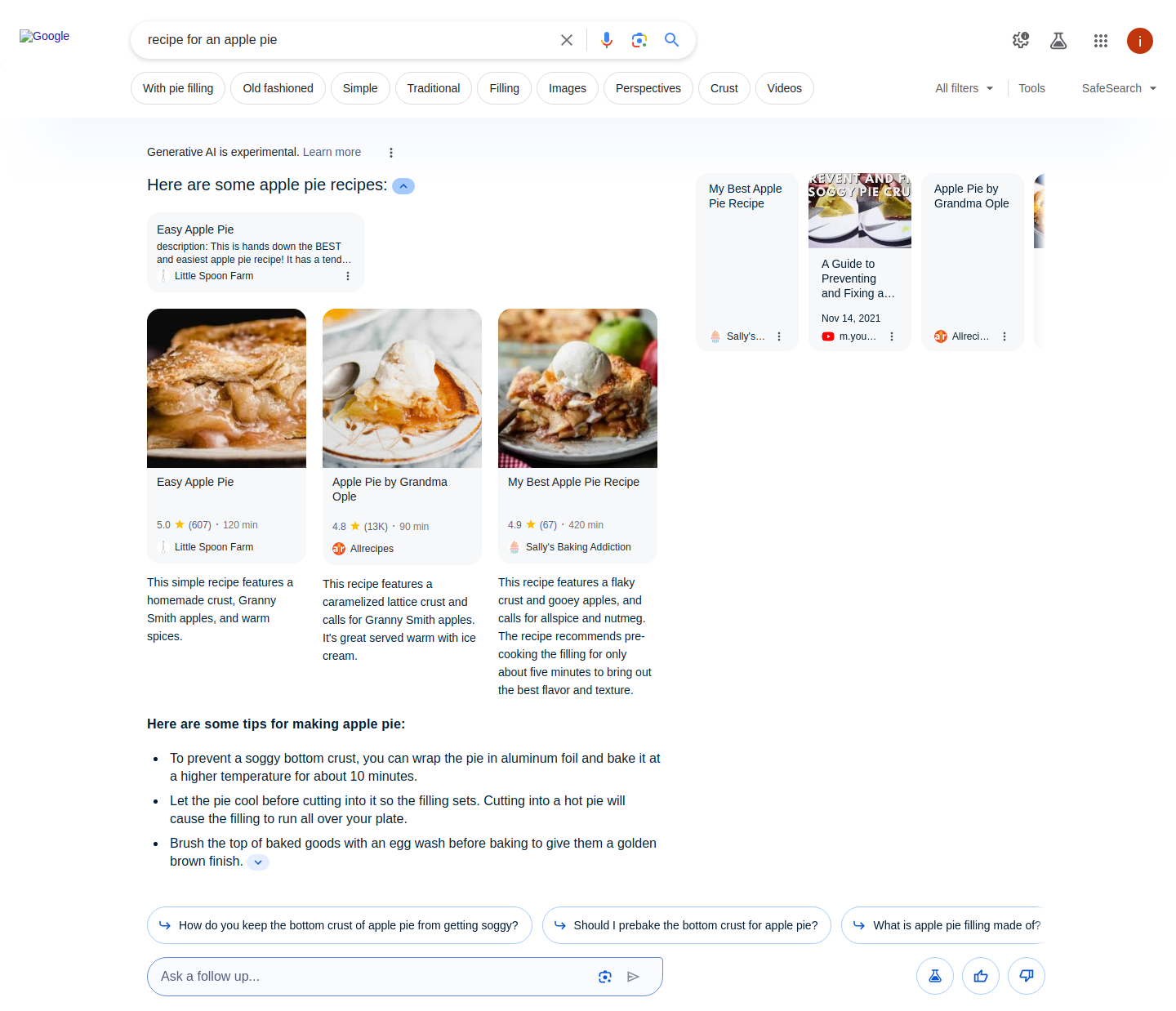
In the following example, "recipe for an apple pie" query was used.

<figure><img src="https://63892162-files.gitbook.io/~/files/v0/b/gitbook-x-prod.appspot.com/o/spaces%2FzrXw45naRpCZ0Ku9AjY1%2Fuploads%2FBqo3YSylUPTuTuoo5wPH%2Frecipe_for_an_apple_pie.png?alt=media&#x26;token=fba1b0f9-4ac8-4421-abb8-f35b03e542b1" alt=""><figcaption></figcaption></figure>

```json
...  
 "ai_overviews": [
   {
      "recipes": {
        "items": [
          {
            "description": "This simple recipe features a homemade crust, Granny Smith apples, and warm spices.",
            "image": "data:image/jpeg;base64,/9j/4AAQSkZJRgABAQAAAQABAAD/...",
            "source": "Allrecipes",
            "rating": "4.8",
            "rating_count": "13K",
            "duration": "90 min",
            "url": "https://www.allrecipes.com/recipe/12682/apple-pie-by-grandma-ople/",
            "title": "Apple Pie by Grandma Ople"
          },
...
        ]
      }
    }
  ],
...
```

**Recipes**

<table><thead><tr><th width="234">Key (results.ai_overviews.recipes)</th><th width="375">Description</th><th>Type</th></tr></thead><tbody><tr><td><code>items</code></td><td>A list of recipes with their respective details.</td><td>array</td></tr><tr><td><code>items.description</code></td><td>A short description of the recipe.</td><td>string</td></tr><tr><td><code>items.image</code></td><td>A base64-encoded thumbnail image of the recipe.</td><td>string</td></tr><tr><td><code>items.source</code></td><td>The name of the site where the recipe is published.</td><td>string</td></tr><tr><td><code>items.rating</code></td><td>The rating of the recipe.</td><td>string</td></tr><tr><td><code>items.rating_count</code></td><td>The number of ratings.</td><td>string</td></tr><tr><td><code>items.duration</code></td><td>The time that is needed to prepare the dish.</td><td>string</td></tr><tr><td><code>items.url</code></td><td>The URL to the full recipe.</td><td>string</td></tr><tr><td><code>items.title</code></td><td>The title of the recipe.</td><td>string</td></tr></tbody></table>

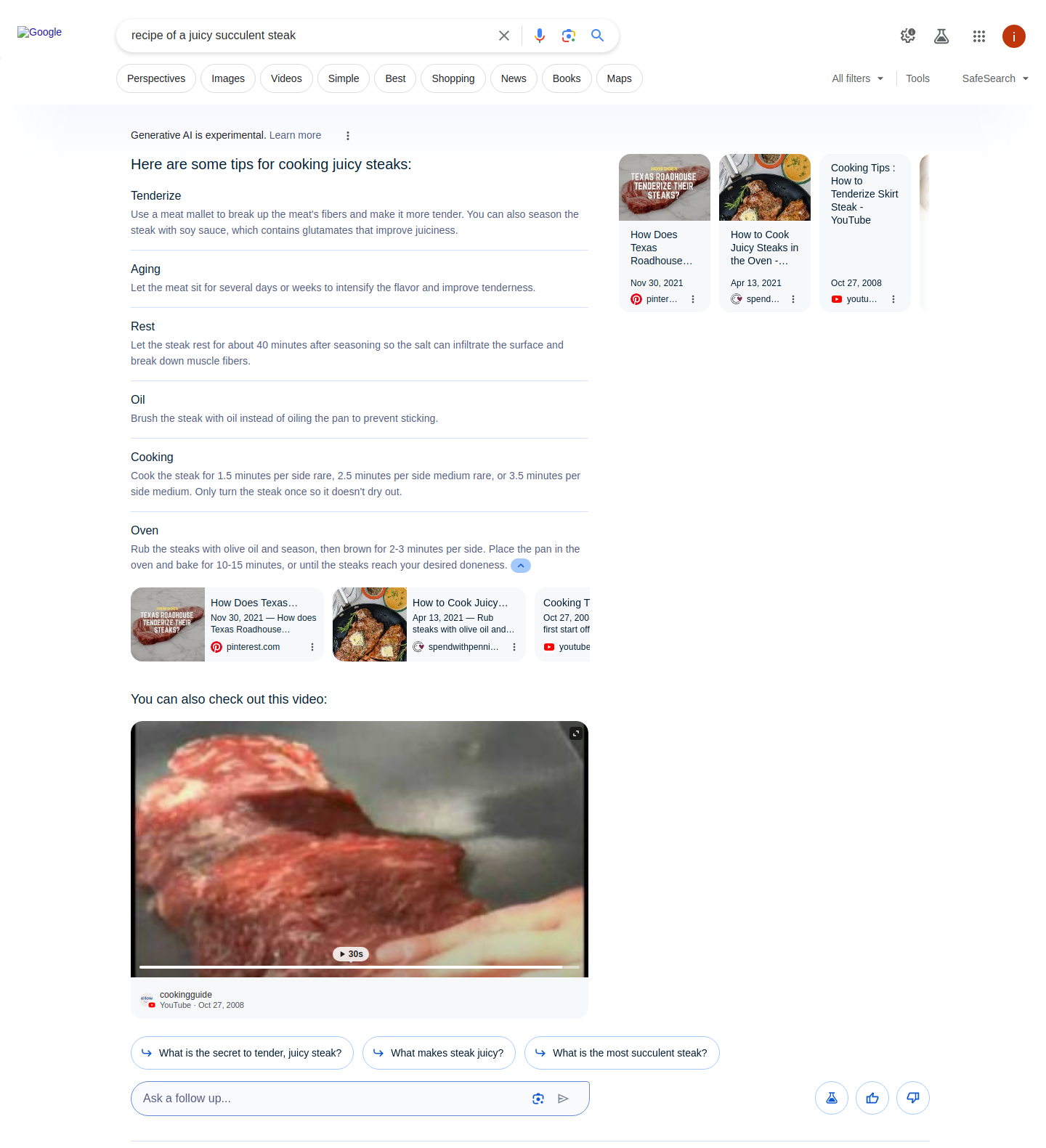
In the following example, "recipe of a juicy succulent steak" query was used.

<figure><img src="https://63892162-files.gitbook.io/~/files/v0/b/gitbook-x-prod.appspot.com/o/spaces%2FzrXw45naRpCZ0Ku9AjY1%2Fuploads%2FnSGAvuTLJoNsEKNxZaa6%2Frecipe_of_a_juicy_succulent_steak.png?alt=media&#x26;token=709025b4-80a5-4a43-8d9f-7429bc4da446" alt=""><figcaption></figcaption></figure>

#### Info list

<table><thead><tr><th width="276">Key (results.ai_overviews.info_list)</th><th width="353">Description</th><th>Type</th></tr></thead><tbody><tr><td><code>list_title</code></td><td>The title of the list.</td><td>string</td></tr><tr><td><code>list_items</code></td><td>Contains a list of items with their respective details.</td><td>array</td></tr><tr><td><code>list_items.title</code></td><td>The title of the section within the list.</td><td>string</td></tr><tr><td><code>list_items.content</code></td><td>A short description of the section.</td><td>array</td></tr><tr><td><code>list_item.pos</code></td><td>An indicator denoting the position of a given item among all AI Overviews Info list results.</td><td>integer</td></tr></tbody></table>

### Instruction

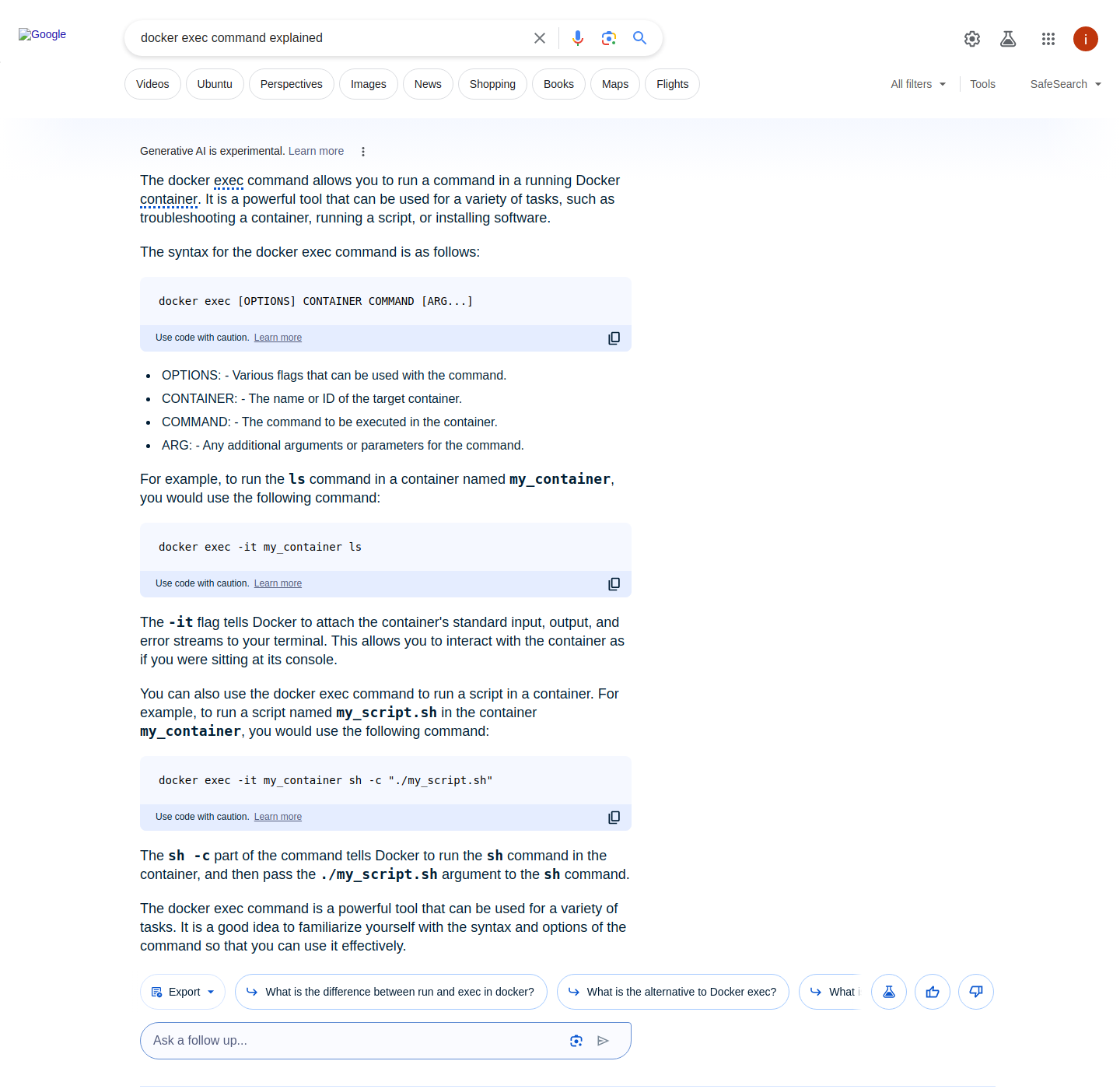
In the following example, "docker exec commands explained" query was used.

<figure><img src="https://63892162-files.gitbook.io/~/files/v0/b/gitbook-x-prod.appspot.com/o/spaces%2FzrXw45naRpCZ0Ku9AjY1%2Fuploads%2Fb3YBmQk5cYVULbAAPokZ%2Fdocker_exec_command_explained.png?alt=media&#x26;token=bf50d5e7-b4f1-48a0-ab76-80475d2323fa" alt=""><figcaption></figcaption></figure>

```json
...
  "ai_overviews": [
    {
      "answer_text": [
        {
          "text": [
            "The docker execExecIn computing, exec is a functionality of an operating system that runs an executable file in the context of an already existing process, replacing the previous executable...",
            "It is a powerful tool that can be used for a variety of tasks, such as troubleshooting a container, running a script, or installing software."
          ],
          "pos": 1
        },
        {
          "text": [
            "The syntax for the docker exec command is as follows:"
          ],
          "command": [
            "docker exec [OPTIONS] CONTAINER COMMAND [ARG...]"
          ],
          "pos": 2
        },
        ...
        }
      ]
    }
  ],
...
```

**Answer text command**

{% hint style="info" %}
Note: details are rendered in the same array as for [**item related search query**](#answer-text), however, one new type of key (command) appears for instruction related type of query
{% endhint %}

<table><thead><tr><th width="268">Key (results.ai_overviews.answer_text)</th><th width="342">Description</th><th>Type</th></tr></thead><tbody><tr><td><code>command</code></td><td>An instruction given to a computer or software to perform a specific task.</td><td>string</td></tr></tbody></table>