> For the complete documentation index, see [llms.txt](https://developers.oxylabs.io/llms.txt). Markdown versions of documentation pages are available by appending `.md` to page URLs; this page is available as [Markdown](https://developers.oxylabs.io/products/web-unblocker/custom-browser-instructions/browser-instructions-beta.md).
# Browser instructions (Beta)
With Web Unblocker, you can define browser instructions when creating a job for a smooth data collection process.
When using Custom Browser Instructions, you can define your own specific browser instructions that are executed when rendering JavaScript.
{% hint style="success" %}
Generate **Browser instructions automatically** in the [**Web Scraper API Playground**](https://dashboard.oxylabs.io/?route=/api-playground) on the Oxylabs dashboard. Set up browser actions, test them, and export the generated instructions in JSON format.
{% endhint %}
## How to use it?
To use browser instructions, provide a set of `browser_instructions` when creating a job.
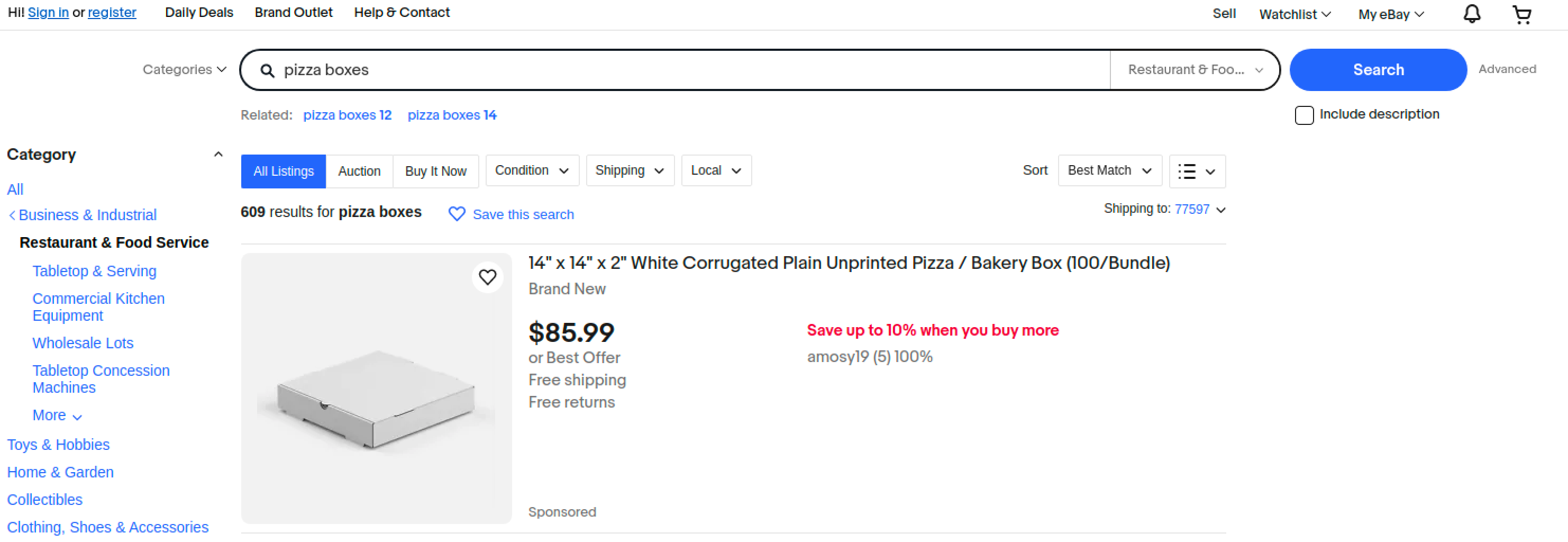
Let’s say you want to search for the term `pizza boxes` in a website.
An example job parameters would look as follows:
{% code overflow="wrap" %}
```bash
curl -k -x https://unblock.oxylabs.io:60000 \
-U 'USERNAME:PASSWORD' \
'https://www.ebay.com' \
-H 'x-oxylabs-render: html' \
-H "x-oxylabs-browser-instructions: [{\"type\":\"input\",\"value\":\"pizza boxes\",\"selector\":{\"type\":\"xpath\",\"value\":\"\/\/input[@class='gh-tb ui-autocomplete-input']\"}},{\"type\":\"click\",\"selector\":{\"type\":\"xpath\",\"value\":\"\/\/input[@type='submit']\"}},{\"type\":\"wait\",\"wait_time_s\":5}]"
```
{% endcode %}
**Step 1.** You must provide the `x-oxylabs-render: html` parameter.
**Step 2.** Browser instructions should be described in the `x-oxylabs-browser_instructions` field.
{% hint style="info" %}
The browser instructions provided as the header value must be JSON-escaped and contain no extra spaces.
{% endhint %}
The sample browser instructions above specifies that the aim is to enter a search term `pizza boxes` into a search field, click `search` button and wait for 5 seconds for content to load.
The scraped result should look as follows:
```html
Content after executing the instructions
```
Scraped HTML should look like this:
## Fetching browser resources
We provide a standalone browser instruction for fetching browser resources.
The function is defined here:
Using `fetch_resource` will result in job returning the first occurrence of a Fetch/XHR resource that matches the format provided instead of the HTML that is being targeted.
Let’s say we want to target a GraphQL resource that is fetched when visiting a product page organically in the browser. We will provide job information as such:
{% code overflow="wrap" %}
```bash
curl -k -x https://unblock.oxylabs.io:60000 \
-U 'USERNAME:PASSWORD' \
'https://www.example.com/product-page/123' \
-H 'x-oxylabs-render: html' \
-H "x-oxylabs-browser-instructions: [{\"type\": \"fetch_resource\",\"filter\": \"\/graphql\/product-info\/123\"}]"
```
{% endcode %}
These instructions will result in a result as such:
```html
{"product_id": 123, "description": "", "price": 456}
```
## List of supported browser instructions
### General arguments
All the instructions defined below have a consistent set of arguments. The arguments are as follows.
#### `type`
* **Type**: `Enum["click", "input", "scroll", "scroll_to_bottom", "wait", "wait_for_element", "fetch_resource"]`
* **Description:** Browser instruction type.
#### `timeout_s`
* **Type**: `int`
* **Description:** How long until action is skipped if not completed in time.
* **Restrictions**: 0 < `timeout_s` <= 60
* **Default value**: 5
#### `wait_time_s`
* **Type**: `int`
* **Description:** How long to wait before executing next action.
* **Restrictions**: 0 < `wait_time_s` <= 60
* **Default value**: 0
#### `on_error`
* **Type**: `Enum["error", "skip"]`
* **Description:** Indicator what to do with instructions in case this instruction fails:
* `"error"`: Stops the execution of browser instructions.
* `"skip"`: Continues with the next instruction.
* **Default value**: `"error"`
#### Example with general arguments
{% code overflow="wrap" %}
```bash
{\"type\": \"wait_for_element\", \"selector\": {\"type\": \"text\", \"value\": \"Load More Items\"},\"timeout_s\": 5, \"wait_time_s\": 2, \"on_error\": \"skip\"}
```
{% endcode %}
### Instructions
#### `click`
* **Description**: Clicks an element and wait a set count of seconds.
* **Args:**
* `type: str = "click"`
* `selector: dict`
* `type: Enum["xpath", "css", "text"]`
* `value: str`
* **Example**:
{% code overflow="wrap" %}
```bash
{\"type\": \"click\",\"selector\": {\"type\": \"xpath\",\"value\": \"\/\/button\"}}
```
{% endcode %}
#### `input`
* **Description**: Enters a text into a selected element.
* **Args:**
* `type: str = "input"`
* `selector: dict`
* `type: Enum["xpath", "css", "text"]`
* `value: str`
* `value: str`
* **Example:**
{% code overflow="wrap" %}
```bash
{\"type\": \"input\",\"selector\": {\"type\": \"xpath\",\"value\": \"\/\/input\"},\"value\": \"pizza boxes\"}
```
{% endcode %}
#### `scroll`
* **Description**: Scrolls a set count of pixels.
* **Args:**
* `type: str = "scroll"`
* `x: int`
* `y: int`
* **Example:**
```bash
{\"type\": \"scroll\",\"x\": 0,\"y\": 100}
```
#### `scroll_to_bottom`
* **Description**: Scrolls to bottom for a set count of seconds.
* **Args:**
* `type: str = "scroll_to_bottom"`
* **Example**:
```bash
{\"type\": \"scroll_to_bottom\",\"timeout_s\": 10}
```
### `wait`
* **Description**: Waits a set count of seconds.
* **Args:**
* `type: str = "wait"`
* **Example**:
```bash
{\"type\": \"wait\",\"wait_time_s\": 2}
```
#### `wait_for_element`
* **Description**: Waits for element to load for a set count of seconds.
* **Args:**
* `type: str = "wait_for_element"`
* `selector: dict`
* `type: Enum["xpath", "css", "text"]`
* `value: str`
* **Example:**
{% code overflow="wrap" %}
```bash
{\"type\": \"wait_for_element\",\"selector\": {\"type\": \"text\",\"value\": \"Load More Items\"},\"timeout_s\": 5}
```
{% endcode %}
#### `fetch_resource`
{% hint style="warning" %}
The `fetch_resource` instruction must be the final instruction in the browser instructions list; any subsequent instructions will not be executed.
{% endhint %}
* **Description**: Fetches the first occurrence of a Fetch/XHR resource matching the set pattern.
* **Args:**
* `type: str = "fetch_resource"`
* `filter: str(RegEx expression)`
* `on_error: Enum["error", "skip"]`
* **Example:**
```bash
{\"type\": \"fetch_resource\",\"filter\": \"\/graphql\/item\/\"}
```
### Instructions' validation
Any inconsistency in regards to instruction format will result in a `400` status code and a corresponding error message.
For example, payload as such:
```bash
[{\"type\": \"unsupported-wait\",\"wait_time_s\": 5}]}]
```
Will result in:
```json
{
"errors": {
"message": "Unsupported action type `unsupported-wait`, choose from 'click,fetch_resource,input,scroll,scroll_to_bottom,wait,wait_for_element'"
}
}
```
## Status codes
See our response codes outlined [**here**](/products/web-unblocker/response-codes.md).
---
# Agent Instructions
This documentation is published with GitBook. GitBook is the documentation platform designed so that both humans and AI agents can read, navigate, and reason over technical content effectively. Learn more at gitbook.com.
## Querying This Documentation
If you need additional information that is not directly available in this page, you can query the documentation by asking a question.
Perform an HTTP GET request on the following URL with the `ask` and `goal` query parameters:
```
GET https://developers.oxylabs.io/products/web-unblocker/custom-browser-instructions/browser-instructions-beta.md?ask=&goal=
```
`ask` is the immediate question: it should be specific, self-contained, and written in natural language.
`goal` is what the user is ultimately trying to achieve, the reason they need the answer. Sharing it helps GitBook give you a better, more relevant answer. A goal is most helpful when it describes the outcome the user wants rather than restating the question. For example, with `ask=how do I create an API token`, a goal like `automate deployments from our CI pipeline` lets GitBook tailor the answer to that use case.
The response will contain a direct answer to the question and relevant excerpts and sources from the documentation.
Use this mechanism when the answer is not explicitly present in the current page, you need clarification or additional context, or you want to retrieve related documentation sections.