> For the complete documentation index, see [llms.txt](https://developers.oxylabs.io/llms.txt). Markdown versions of documentation pages are available by appending `.md` to page URLs; this page is available as [Markdown](https://developers.oxylabs.io/products/web-scraper-api/targets/e-commerce/walmart/product.md).

# Product

Scrape Walmart product pages with Web Scraper API. Retrieve the title, price, rating, seller, variations, specifications and fulfillment options of a product, with store localization.

The `walmart_product` source retrieves Walmart product pages. With `"parse": true` the response is structured JSON (fields described in the data dictionary below); without it, the response contains the page HTML in `content`.

{% hint style="info" %}
Besides the parameters listed below, you can include additional parameters such as `user_agent_type`, `geo_location`, `render`, and more to customize your scraping request. Read more [here](/products/web-scraper-api/features.md).
{% endhint %}

## Request samples

{% tabs %}
{% tab title="cURL" %}

```shell
curl 'https://realtime.oxylabs.io/v1/queries' \
--user 'USERNAME:PASSWORD' \
-H 'Content-Type: application/json' \
-d '{
        "source": "walmart_product",
        "product_id": "11601059297",
        "parse": true
    }'
```

{% endtab %}

{% tab title="Python" %}

```python
import requests
from pprint import pprint

# Structure payload.
payload = {
    'source': 'walmart_product',
    'product_id': '11601059297',
    'parse': True
}

# Get response.
response = requests.request(
    'POST',
    'https://realtime.oxylabs.io/v1/queries',
    auth=('USERNAME', 'PASSWORD'),
    json=payload
)

# Instead of response with job status and results url, this will return the
# JSON response with the result.
pprint(response.json())
```

{% endtab %}

{% tab title="Node.js" %}

```javascript
const https = require("https");

const username = "USERNAME";
const password = "PASSWORD";
const body = {
    source: "walmart_product",
    product_id: "11601059297",
    parse: true
};

const options = {
    hostname: "realtime.oxylabs.io",
    path: "/v1/queries",
    method: "POST",
    headers: {
        "Content-Type": "application/json",
        Authorization:
            "Basic " + Buffer.from(`${username}:${password}`).toString("base64"),
    },
};

const request = https.request(options, (response) => {
    let data = "";

    response.on("data", (chunk) => {
        data += chunk;
    });

    response.on("end", () => {
        const responseData = JSON.parse(data);
        console.log(JSON.stringify(responseData, null, 2));
    });
});

request.on("error", (error) => {
    console.error("Error:", error);
});

request.write(JSON.stringify(body));
request.end();
```

{% endtab %}

{% tab title="HTTP" %}

```http
# The whole string you submit has to be URL-encoded.

https://realtime.oxylabs.io/v1/queries?source=walmart_product&product_id=11601059297&parse=true&access_token=12345abcde
```

{% endtab %}

{% tab title="PHP" %}

```php
<?php

$params = array(
    'source' => 'walmart_product',
    'product_id' => '11601059297',
    'parse' => true
);

$ch = curl_init();

curl_setopt($ch, CURLOPT_URL, "https://realtime.oxylabs.io/v1/queries");
curl_setopt($ch, CURLOPT_RETURNTRANSFER, 1);
curl_setopt($ch, CURLOPT_POSTFIELDS, json_encode($params));
curl_setopt($ch, CURLOPT_POST, 1);
curl_setopt($ch, CURLOPT_USERPWD, "USERNAME" . ":" . "PASSWORD");

$headers = array();
$headers[] = "Content-Type: application/json";
curl_setopt($ch, CURLOPT_HTTPHEADER, $headers);

$result = curl_exec($ch);
echo $result;

if (curl_errno($ch)) {
    echo 'Error:' . curl_error($ch);
}
curl_close($ch);
```

{% endtab %}

{% tab title="Golang" %}

```go
package main

import (
    "bytes"
    "encoding/json"
    "fmt"
    "io/ioutil"
    "net/http"
)

func main() {
    const Username = "USERNAME"
    const Password = "PASSWORD"

    payload := map[string]interface{}{
        "source": "walmart_product",
        "product_id": "11601059297",
        "parse": true,
    }

    jsonValue, _ := json.Marshal(payload)

    client := &http.Client{}
    request, _ := http.NewRequest("POST",
        "https://realtime.oxylabs.io/v1/queries",
        bytes.NewBuffer(jsonValue),
    )

    request.SetBasicAuth(Username, Password)
    response, _ := client.Do(request)

    responseText, _ := ioutil.ReadAll(response.Body)
    fmt.Println(string(responseText))
}
```

{% endtab %}

{% tab title="C#" %}

```csharp
using System;
using System.Collections.Generic;
using System.Net.Http;
using System.Net.Http.Json;
using System.Threading.Tasks;

namespace OxyApi
{
    class Program
    {
        static async Task Main()
        {
            const string Username = "USERNAME";
            const string Password = "PASSWORD";

            var parameters = new {
                source = "walmart_product",
                product_id = "11601059297",
                parse = true
            };

            var client = new HttpClient();

            Uri baseUri = new Uri("https://realtime.oxylabs.io");
            client.BaseAddress = baseUri;

            var requestMessage = new HttpRequestMessage(HttpMethod.Post, "/v1/queries");
            requestMessage.Content = JsonContent.Create(parameters);

            var authenticationString = $"{Username}:{Password}";
            var base64EncodedAuthenticationString = Convert.ToBase64String(System.Text.ASCIIEncoding.UTF8.GetBytes(authenticationString));
            requestMessage.Headers.Add("Authorization", "Basic " + base64EncodedAuthenticationString);

            var response = await client.SendAsync(requestMessage);
            var contents = await response.Content.ReadAsStringAsync();

            Console.WriteLine(contents);
        }
    }
}
```

{% endtab %}

{% tab title="Java" %}

```java
package org.example;

import okhttp3.*;
import org.json.JSONObject;
import java.util.concurrent.TimeUnit;

public class Main implements Runnable {
    private static final String AUTHORIZATION_HEADER = "Authorization";
    public static final String USERNAME = "USERNAME";
    public static final String PASSWORD = "PASSWORD";

    public void run() {
        JSONObject jsonObject = new JSONObject();
        jsonObject.put("source", "walmart_product");
        jsonObject.put("product_id", "11601059297");
        jsonObject.put("parse", true);

        Authenticator authenticator = (route, response) -> {
            String credential = Credentials.basic(USERNAME, PASSWORD);
            return response
                    .request()
                    .newBuilder()
                    .header(AUTHORIZATION_HEADER, credential)
                    .build();
        };

        var client = new OkHttpClient.Builder()
                .authenticator(authenticator)
                .readTimeout(180, TimeUnit.SECONDS)
                .build();

        var mediaType = MediaType.parse("application/json; charset=utf-8");
        var body = RequestBody.create(jsonObject.toString(), mediaType);
        var request = new Request.Builder()
                .url("https://realtime.oxylabs.io/v1/queries")
                .post(body)
                .build();

        try (var response = client.newCall(request).execute()) {
            if (response.body() != null) {
                try (var responseBody = response.body()) {
                    System.out.println(responseBody.string());
                }
            }
        } catch (Exception exception) {
            System.out.println("Error: " + exception.getMessage());
        }

        System.exit(0);
    }

    public static void main(String[] args) {
        new Thread(new Main()).start();
    }
}
```

{% endtab %}

{% tab title="JSON" %}

```json
{
    "source": "walmart_product",
    "product_id": "11601059297",
    "parse": true
}
```

{% endtab %}
{% endtabs %}

## Request parameter values

<table><thead><tr><th width="180">Parameter</th><th>Description</th><th width="160">Default Value</th></tr></thead><tbody><tr><td><mark style="background-color:green;"><strong><code>source</code></strong></mark></td><td>Sets the scraper.</td><td><code>walmart_product</code></td></tr><tr><td><mark style="background-color:green;"><strong><code>product_id</code></strong></mark></td><td>The product ID, the number after the product name in the product page URL, e.g. <code>walmart.com/ip/Straight-Talk-Apple-iPhone-16-128GB-White/</code><strong><code>11601059297</code></strong>.</td><td>-</td></tr><tr><td><code>parse</code></td><td>Returns parsed data when set to <code>true</code>. Explore the <a href="#output-data-dictionary">output data dictionary</a>.</td><td><code>false</code></td></tr><tr><td><code>domain</code>, <code>store_id</code>, <code>delivery_zip</code>, <code>fulfillment_type</code></td><td>Optional localization parameters, see <a href="#localization-and-filtering">Localization and Filtering</a>.</td><td>-</td></tr></tbody></table>

&#x20;   \- mandatory parameter

## Response example <a href="#response-example" id="response-example"></a>

A parsed product page for product ID `11601059297` (lists shortened, description cut):

```json
{
    "results": [
        {
            "content": {
                "breadcrumbs": [
                    {
                        "category_name": "Cell Phones",
                        "url": "/cp/cell-phones/1105910"
                    },
                    {
                        "category_name": "Shop Phones by Brand",
                        "url": "/cp/shop-phones-by-brand/7551331"
                    }
                ],
                "cheapest_seller_name": null,
                "fulfillment": {
                    "delivery": false,
                    "delivery_information": ", Delivery, Not available",
                    "free_shipping": false,
                    "fulfilled_by": "",
                    "out_of_stock": false,
                    "pickup": false,
                    "pickup_information": ", Pickup, Not available",
                    "shipping": true,
                    "shipping_information": ", Shipping, Arrives Oct 1, Free"
                },
                "general": {
                    "badge": [
                        "In 25+ people's carts",
                        "Best seller"
                    ],
                    "brand": "Apple",
                    "description": "<p>Superfast. Supersmart. Get the first iPhone built for Apple Intelligence<sup>1</sup> with the iPhone 16 from Straight Talk.</p> <p>With a...",
                    "images": [
                        "https://i5.walmartimages.com/seo/Straight-Talk-Apple-iPhone-16-128GB-White-Prepaid-Smartphone-Locked-to-Straight-Talk_7f52d4b1-47ea-40cc-ae62-2b5edf40f29b.8ef1f8d28ce70177fbc03331f9fa9064.jpeg?odnHeight=117&odnWidth=117&odnBg=FFFFFF"
                    ],
                    "main_image": "https://i5.walmartimages.com/seo/Straight-Talk-Apple-iPhone-16-128GB-White-Prepaid-Smartphone-Locked-to-Straight-Talk_7f52d4b1-47ea-40cc-ae62-2b5edf40f29b.8ef1f8d28ce70177fbc03331f9fa9064.jpeg?odnHeight=573&odnWidth=573&odnBg=FFFFFF",
                    "meta": {
                        "gtin": "616960552697",
                        "sku": "11632865509"
                    },
                    "title": "Straight Talk Apple iPhone 16, 128GB, White - Prepaid Smartphone [Locked to Straight Talk]",
                    "url": "https://www.walmart.com/ip/Straight-Talk-Apple-iPhone-16-128GB-White-Prepaid-Smartphone-Locked-to-Straight-Talk/11601059297"
                },
                "location": {
                    "city": "Rockville",
                    "state": "MD",
                    "store_id": "2357",
                    "zip_code": "20850"
                },
                "parse_status_code": 12000,
                "price": {
                    "currency": "USD",
                    "price": 629
                },
                "rating": {
                    "count": 768,
                    "rating": 4.4
                },
                "seller": {
                    "id": "F55CDC31AB754BB68FE0B39041159D63",
                    "name": "Walmart.com",
                    "official_name": "Walmart.com"
                },
                "sold_by_walmart_price": null,
                "specifications": [
                    {
                        "key": "Edition",
                        "value": "Apple iPhone 16"
                    },
                    {
                        "key": "HD capacity",
                        "value": "128 GB"
                    }
                ],
                "variations": [
                    {
                        "price": {
                            "currency": "USD",
                            "price": 629
                        },
                        "product_id": "3VYN46XFXQYH",
                        "selected_options": [
                            {
                                "key": "Capacity",
                                "value": "128GB"
                            },
                            {
                                "key": "Series",
                                "value": "iPhone 16"
                            },
                            {
                                "key": "Color",
                                "value": "White"
                            }
                        ],
                        "state": "IN_STOCK"
                    }
                ]
            },
            "created_at": "2026-09-26 06:26:02",
            "updated_at": "2026-09-26 06:26:04",
            "page": 1,
            "url": "https://www.walmart.com/ip/QNFsjIgTiuFvWXkl/11601059297",
            "job_id": "7509498501294774273",
            "status_code": 200,
            "is_render_forced": false,
            "parser_type": "walmart_product_new"
        }
    ]
}
```

## Localization and Filtering <a href="#localization-and-filtering" id="localization-and-filtering"></a>

Walmart tailors prices and availability to a store. The parsed `location` object shows which store the page was served for; without `store_id` or `delivery_zip` it is a random US store.

You can also find the official page of Walmart Stores [**here**](https://www.walmart.com/store-directory)**.** Store numbers for each site are in these lists (`store_id` column):

{% file src="/files/ap2MNKVGUFN3JWB0skN5" %}

{% file src="/files/wCSX58aVk5NMrIqYupUR" %}

{% file src="/files/PT9PVlmdDOZjvEdjriIx" %}

{% file src="/files/2auGBBJ1I64oQhCmfV3g" %}

<table><thead><tr><th width="162">Parameter</th><th width="510">Description</th><th width="88">Default</th></tr></thead><tbody><tr><td><code>domain</code></td><td>Walmart site to scrape. Available values: <code>com</code> (walmart.com), <code>ca</code> (walmart.ca), <code>com.mx</code> (walmart.com.mx), <code>co.cr</code> (walmart.co.cr). Use a product ID from the chosen site.</td><td><code>com</code></td></tr><tr><td><code>store_id</code></td><td>Walmart store number of the chosen site as a string, e.g. <code>"3520"</code>. Take it from the store lists above.</td><td>-</td></tr><tr><td><code>delivery_zip</code></td><td>Delivery ZIP or postal code as a string, e.g. <code>"90210"</code>. The nearest store to the code becomes the page's store.</td><td>-</td></tr><tr><td><code>fulfillment_type</code></td><td>Fulfillment method to show availability for. Available values: <code>pickup</code>, <code>delivery</code>, <code>shipping</code>. Use it together with <code>store_id</code> or <code>delivery_zip</code>.</td><td>-</td></tr></tbody></table>

```json
{
    "source": "walmart_product",
    "product_id": "174916638",
    "store_id": "3520",
    "fulfillment_type": "pickup",
    "parse": true
}
```

{% hint style="info" %}
If target store is too far away from the given postal code - we will attempt to use the postal code of the target store, otherwise the location will not be set properly. In the case we can't set the `delivery_zip` - Walmart will return their default results without store targeting.
{% endhint %}

## Output data dictionary

#### HTML example

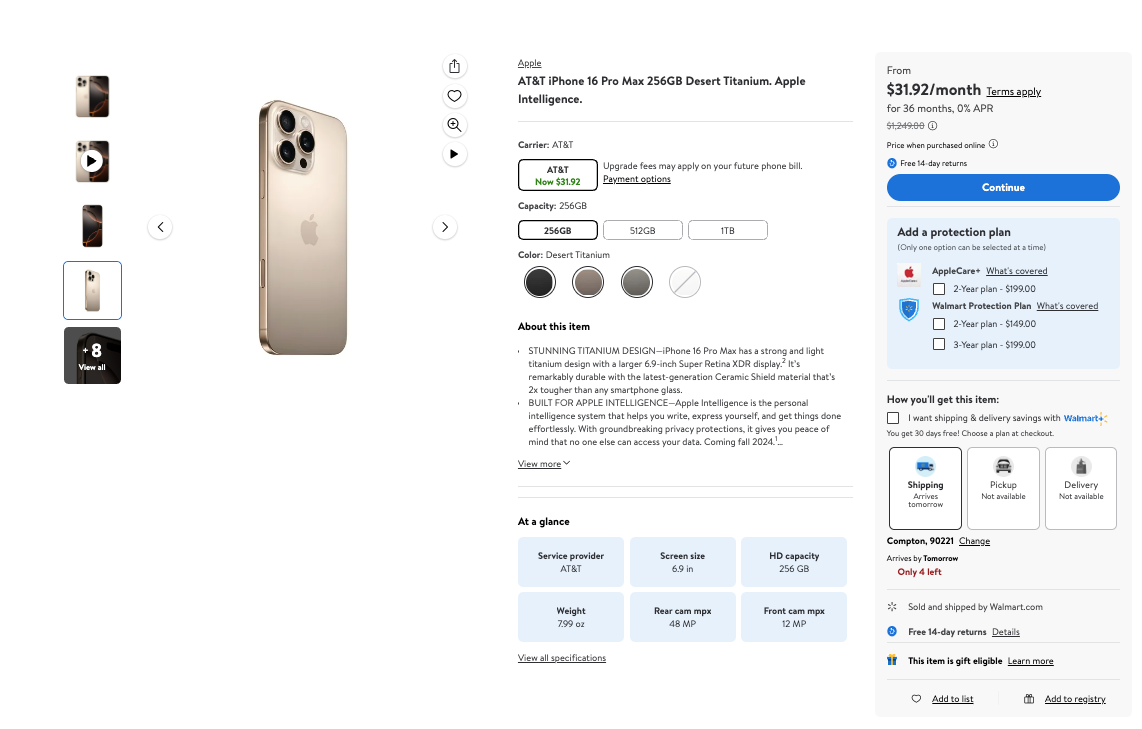
<figure><img src="https://3826932121-files.gitbook.io/~/files/v0/b/gitbook-x-prod.appspot.com/o/spaces%2FBQ7Zf9paoN3FTeGcyfY1%2Fuploads%2Fgit-blob-594d284dbfc053eaf3bc5765fdc40324ee78a1de%2Fimage.png?alt=media" alt=""><figcaption></figcaption></figure>

**JSON structure**

The table below presents a detailed list of each product page element we parse, along with its description and data type. The table also includes some metadata.

<table><thead><tr><th width="237">Key</th><th width="406">Description</th><th>Type</th></tr></thead><tbody><tr><td><code>general</code></td><td>General details of the product.</td><td>object</td></tr><tr><td><code>price</code></td><td>Pricing details of the product.</td><td>object</td></tr><tr><td><code>rating</code></td><td>Rating details of the product.</td><td>object</td></tr><tr><td><code>seller</code></td><td>Details of the seller of the buy-box offer.</td><td>object</td></tr><tr><td><code>variations</code> (optional)</td><td>List of variations of the product.</td><td>array</td></tr><tr><td><code>breadcrumbs</code></td><td>Category path leading to the product.</td><td>array</td></tr><tr><td><code>location</code></td><td>The store the page was served for.</td><td>object</td></tr><tr><td><code>fulfillment</code></td><td>Fulfillment options of the product.</td><td>object</td></tr><tr><td><code>specifications</code></td><td>List of key-value pairs with product attributes.</td><td>array</td></tr><tr><td><code>cheapest_seller_name</code> (optional)</td><td>The name of the seller featured in the "Other sellers" box, when Walmart shows it.</td><td>string</td></tr><tr><td><code>cheapest_price</code> (optional)</td><td>The price of the offer featured in the "Other sellers" box, as an object with <code>price</code> and <code>currency</code>.</td><td>object</td></tr><tr><td><code>sold_by_walmart_price</code> (optional)</td><td>Walmart's own price when the buy-box offer is from another seller, when shown.</td><td>object</td></tr><tr><td><code>parse_status_code</code></td><td>The status code of the parsing job. You can see the parser status codes described <strong>here</strong>.</td><td>integer</td></tr><tr><td><code>created_at</code></td><td>The timestamp when the scraping job was created.</td><td>timestamp</td></tr><tr><td><code>updated_at</code></td><td>The timestamp when the scraping job was finished.</td><td>timestamp</td></tr><tr><td><code>page</code></td><td>The page number in the pagination of results.</td><td>integer</td></tr><tr><td><code>url</code></td><td>The URL of the scraped page.</td><td>string</td></tr><tr><td><code>job_id</code></td><td>The ID of the job associated with the scraping job.</td><td>string</td></tr><tr><td><code>status_code</code></td><td>The HTTP status code of the scraped page.</td><td>integer</td></tr><tr><td><code>is_render_forced</code></td><td>Identifies whether rendering has been forced for this request.</td><td>boolean</td></tr><tr><td><code>parser_type</code></td><td>The type of parser used to extract the data.</td><td>string</td></tr></tbody></table>

### **General**

A snippet from [response example](#response-example):

```json
...
"general": {
                    "badge": [
                        "In 25+ people's carts",
                        "Best seller"
                    ],
                    "brand": "Apple",
                    "description": "<p>Superfast. Supersmart. Get the first iPhone built for Apple Intelligence<sup>1</sup> with the iPhone 16 from Straight Talk.</p> <p>With a...",
                    "images": [
                        "https://i5.walmartimages.com/seo/Straight-Talk-Apple-iPhone-16-128GB-White-Prepaid-Smartphone-Locked-to-Straight-Talk_7f52d4b1-47ea-40cc-ae62-2b5edf40f29b.8ef1f8d28ce70177fbc03331f9fa9064.jpeg?odnHeight=117&odnWidth=117&odnBg=FFFFFF"
                    ],
                    "main_image": "https://i5.walmartimages.com/seo/Straight-Talk-Apple-iPhone-16-128GB-White-Prepaid-Smartphone-Locked-to-Straight-Talk_7f52d4b1-47ea-40cc-ae62-2b5edf40f29b.8ef1f8d28ce70177fbc03331f9fa9064.jpeg?odnHeight=573&odnWidth=573&odnBg=FFFFFF",
                    "meta": {
                        "gtin": "616960552697",
                        "sku": "11632865509"
                    },
                    "title": "Straight Talk Apple iPhone 16, 128GB, White - Prepaid Smartphone [Locked to Straight Talk]",
                    "url": "https://www.walmart.com/ip/Straight-Talk-Apple-iPhone-16-128GB-White-Prepaid-Smartphone-Locked-to-Straight-Talk/11601059297"
                  },
 ...
```

<table><thead><tr><th width="131">Key (general)</th><th width="508">Description</th><th>Type</th></tr></thead><tbody><tr><td><code>url</code></td><td>The URL of the product page.</td><td>string</td></tr><tr><td><code>main_image</code></td><td>The URL of the main product image.</td><td>string</td></tr><tr><td><code>images</code></td><td>List of URLs of the product images.</td><td>array</td></tr><tr><td><code>title</code></td><td>The title of the product.</td><td>string</td></tr><tr><td><code>description</code></td><td>The description of the product.</td><td>string</td></tr><tr><td><code>brand</code></td><td>The brand of the product.</td><td>string</td></tr><tr><td><code>badge</code></td><td>List of badges shown for the product, e.g. <code>Best seller</code>, <code>Popular pick</code>.</td><td>array</td></tr><tr><td><code>meta</code></td><td>Identifiers of the product.</td><td>object</td></tr><tr><td><code>meta.sku</code></td><td>The SKU of the product.</td><td>string</td></tr><tr><td><code>meta.gtin</code></td><td>The GTIN of the product.</td><td>string</td></tr></tbody></table>

### Price

A snippet from [response example](#response-example):

```json
...
"price": {
"currency": "USD",
"price": 629
},
...
```

<table><thead><tr><th width="254">Key (price)</th><th width="406">Description</th><th>Type</th></tr></thead><tbody><tr><td><code>price</code></td><td>The current price of the product.</td><td>float</td></tr><tr><td><code>price_strikethrough</code> (optional)</td><td>The strikethrough price (Was, Bundle or List price).</td><td>float</td></tr><tr><td><code>currency</code></td><td>The ISO 4217 three-letter code of the currency.</td><td>string</td></tr></tbody></table>

### Rating

A snippet from [response example](#response-example):

```json
...
"rating": {
"count": 768,
"rating": 4.4
},
...
```

<table><thead><tr><th width="132">Key (rating)</th><th width="512">Description</th><th>Type</th></tr></thead><tbody><tr><td><code>rating</code></td><td>The average rating of the product.</td><td>float</td></tr><tr><td><code>count</code></td><td>The number of ratings.</td><td>integer</td></tr></tbody></table>

### Seller

A snippet from [response example](#response-example):

```javascript
...
"seller": {
"id": "F55CDC31AB754BB68FE0B39041159D63",
"name": "Walmart.com",
"official_name": "Walmart.com"
c},
...
```

<table><thead><tr><th width="182">Key (seller)</th><th width="480">Description</th><th>Type</th></tr></thead><tbody><tr><td><code>name</code></td><td>The name of the seller.</td><td>string</td></tr><tr><td><code>official_name</code></td><td>The official registered name of the seller.</td><td>string</td></tr><tr><td><code>id</code></td><td>The ID of the seller.</td><td>string</td></tr><tr><td><code>url</code> (optional)</td><td>The URL of the seller's storefront on Walmart. Present when the seller is a marketplace seller, not Walmart.com.</td><td>string</td></tr><tr><td><code>catalog_id</code> (optional)</td><td>The seller's catalog ID, the number at the end of the seller URL. Present when the seller is a marketplace seller, not Walmart.com.</td><td>string</td></tr></tbody></table>

### Specifications

A snippet from [response example](#response-example):

```javascript
...
"specifications": [
{
"key": "Edition",
"value": "Apple iPhone 16"
},
{
"key": "HD capacity",
"value": "128 GB"
}
...
```

<table><thead><tr><th width="186">Key (specifications)</th><th width="458">Description</th><th>Type</th></tr></thead><tbody><tr><td><code>key</code></td><td>Specific attribute or characteristic of the product.</td><td>string</td></tr><tr><td><code>value</code></td><td>Corresponding value or description of the attribute specified by the specifications key.</td><td>string</td></tr></tbody></table>

### Fulfillment

A snippet from [response example](#response-example):

```javascript
...
 "fulfillment": {
                    "delivery": false,
                    "delivery_information": ", Delivery, Not available",
                    "free_shipping": false,
                    "fulfilled_by": "",
                    "out_of_stock": false,
                    "pickup": false,
                    "pickup_information": ", Pickup, Not available",
                    "shipping": true,
                    "shipping_information": ", Shipping, Arrives Oct 1, Free"
                },
...
```

<table><thead><tr><th width="207">Key (fulfillment)</th><th width="423">Description</th><th>Type</th></tr></thead><tbody><tr><td><code>pickup</code></td><td>Indicates whether in-store pickup is offered.</td><td>boolean</td></tr><tr><td><code>pickup_information</code></td><td>The pickup message shown on the page.</td><td>string</td></tr><tr><td><code>delivery</code></td><td>Indicates whether delivery from a local store is offered.</td><td>boolean</td></tr><tr><td><code>delivery_information</code></td><td>The delivery message shown on the page.</td><td>string</td></tr><tr><td><code>shipping</code></td><td>Indicates whether home shipping is offered.</td><td>boolean</td></tr><tr><td><code>shipping_information</code></td><td>The shipping message shown on the page.</td><td>string</td></tr><tr><td><code>free_shipping</code></td><td>Indicates whether shipping is free.</td><td>boolean</td></tr><tr><td><code>out_of_stock</code></td><td>Indicates whether the product is out of stock.</td><td>boolean</td></tr><tr><td><code>fulfilled_by</code></td><td>Who fulfills the order, e.g. <code>Walmart</code>, when shown.</td><td>string</td></tr></tbody></table>

### Variations

A snippet from [response example](#response-example):

```javascript
...
 "variations": [
                    {
                        "price": {
                            "currency": "USD",
                            "price": 629
                        },
                        "product_id": "3VYN46XFXQYH",
                        "selected_options": [
                            {
                                "key": "Capacity",
                                "value": "128GB"
                            },
                            {
                                "key": "Series",
                                "value": "iPhone 16"
                            },
                            {
                                "key": "Color",
                                "value": "White"
                            }
                        ],
...
```

<table><thead><tr><th width="214.5546875">Key (variations)</th><th width="450.94140625">Description</th><th width="109.2109375">Type</th></tr></thead><tbody><tr><td><code>state</code></td><td>Availability state of the variation, e.g. <code>IN_STOCK</code>.</td><td>string</td></tr><tr><td><code>product_id</code></td><td>The product ID of the variation.</td><td>string</td></tr><tr><td><code>price</code></td><td>Pricing of the variation.</td><td>object</td></tr><tr><td><code>price.price</code></td><td>The price of the variation.</td><td>float</td></tr><tr><td><code>price.currency</code></td><td>The ISO 4217 three-letter code of the currency.</td><td>string</td></tr><tr><td><code>selected_options</code></td><td>List of the options that define the variation.</td><td>array</td></tr><tr><td><code>selected_options.key</code></td><td>The name of the option, e.g. <code>Color</code>.</td><td>string</td></tr><tr><td><code>selected_options.value</code></td><td>The value of the option, e.g. <code>White</code>.</td><td>string</td></tr></tbody></table>

### Breadcrumbs

A snippet from [response example](#response-example):

```javascript
... 
"breadcrumbs": [
                    {
                        "category_name": "Cell Phones",
                        "url": "/cp/cell-phones/1105910"
                    },
                    {
                        "category_name": "Shop Phones by Brand",
                        "url": "/cp/shop-phones-by-brand/7551331"
                    }
               ],
...
```

<table><thead><tr><th width="164">Key (breadcrumbs)</th><th width="466">Description</th><th>Type</th></tr></thead><tbody><tr><td><code>category_name</code></td><td>The name of the category.</td><td>string</td></tr><tr><td><code>url</code></td><td>The URL of the category</td><td>string</td></tr></tbody></table>

### Location

A snippet from [response example](#response-example):

```javascript
...
"location": {
                    "city": "Rockville",
                    "state": "MD",
                    "store_id": "2357",
                    "zip_code": "20850"
                },
...
```

<table><thead><tr><th width="153.03515625">Key (location)</th><th width="460.71875">Description</th><th>Type</th></tr></thead><tbody><tr><td><code>city</code></td><td>The city of the store the page was served for.</td><td>string</td></tr><tr><td><code>state</code></td><td>The state of the store.</td><td>string</td></tr><tr><td><code>zip_code</code></td><td>The ZIP code of the store.</td><td>string</td></tr><tr><td><code>store_id</code></td><td>The ID of the store.</td><td>string</td></tr></tbody></table>


---

# Agent Instructions
This documentation is published with GitBook. GitBook is the documentation platform designed so that both humans and AI agents can read, navigate, and reason over technical content effectively. Learn more at gitbook.com.

## Querying This Documentation
If you need additional information that is not directly available in this page, you can query the documentation by asking a question.

Perform an HTTP GET request on the following URL with the `ask` and `goal` query parameters:

```
GET https://developers.oxylabs.io/products/web-scraper-api/targets/e-commerce/walmart/product.md?ask=<question>&goal=<user_goal>
```

`ask` is the immediate question: it should be specific, self-contained, and written in natural language.
`goal` is what the user is ultimately trying to achieve, the reason they need the answer. Sharing it helps GitBook give you a better, more relevant answer. A goal is most helpful when it describes the outcome the user wants rather than restating the question. For example, with `ask=how do I create an API token`, a goal like `automate deployments from our CI pipeline` lets GitBook tailor the answer to that use case.

The response will contain a direct answer to the question and relevant excerpts and sources from the documentation.

Use this mechanism when the answer is not explicitly present in the current page, you need clarification or additional context, or you want to retrieve related documentation sections.