> For the complete documentation index, see [llms.txt](https://developers.oxylabs.io/llms.txt). Markdown versions of documentation pages are available by appending `.md` to page URLs; this page is available as [Markdown](https://developers.oxylabs.io/products/web-scraper-api/targets/e-commerce/target/search.md).

# Search

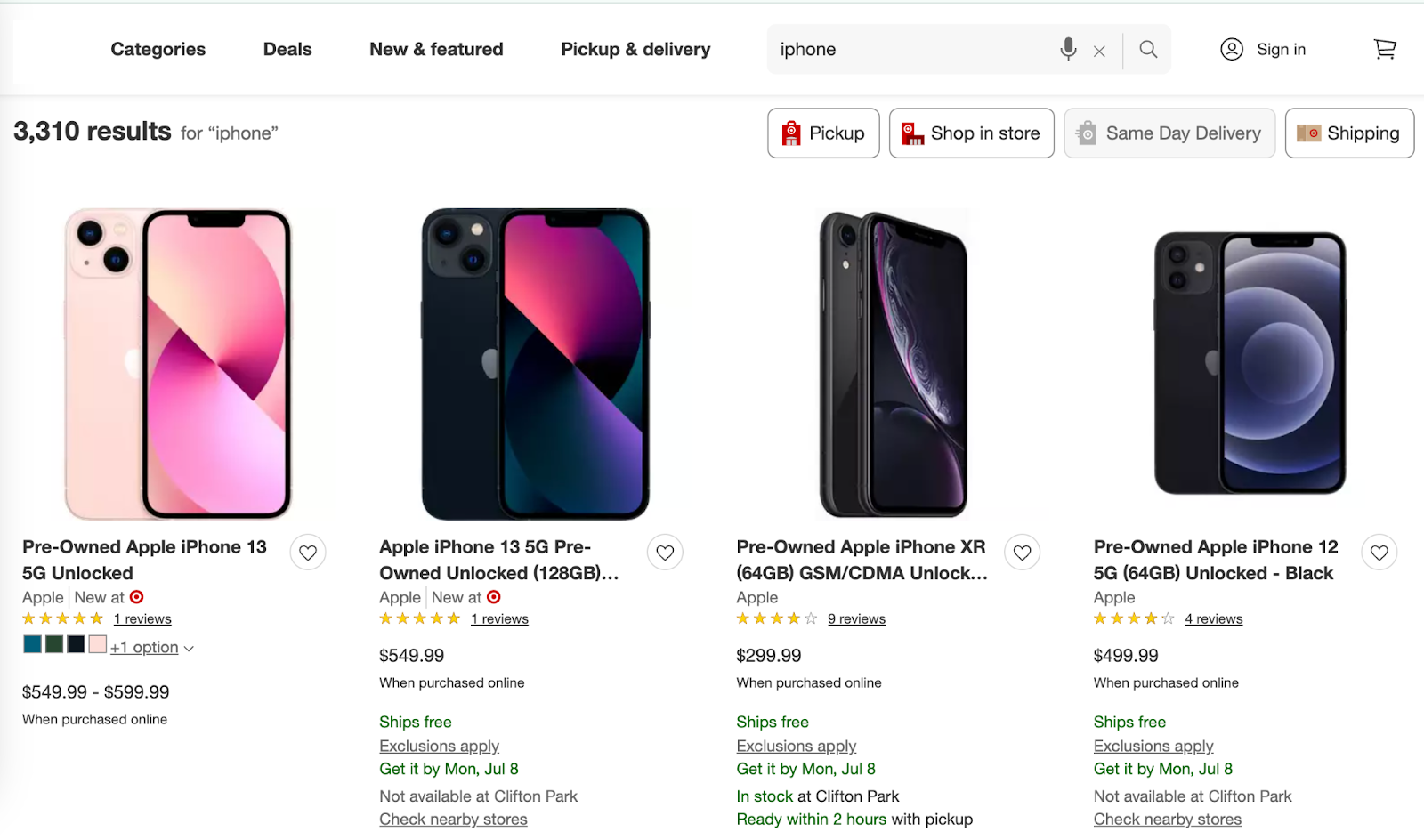
Extract Target search results with parsed data for organic listings, including pricing, ratings and brand info, with support for store, fulfillment type and delivery ZIP localization.

The `target_search` source retrieves Target search result pages. With `"parse": true` the response is structured JSON (fields described in the [data dictionary](#output-data-dictionary) below); without it, `content` holds the page HTML.

{% hint style="info" %}
Besides the parameters listed below, you can include additional parameters such as `user_agent_type`, `geo_location`, `render`, and more to customize your scraping request. Read more [here](/products/web-scraper-api/features.md).
{% endhint %}

## Request samples

{% tabs %}
{% tab title="cURL" %}

```shell
curl 'https://realtime.oxylabs.io/v1/queries' \
--user 'USERNAME:PASSWORD' \
-H 'Content-Type: application/json' \
-d '{
        "source": "target_search",
        "query": "iphone",
        "parse": true
    }'
```

{% endtab %}

{% tab title="Python" %}

```python
import requests
from pprint import pprint

# Structure payload.
payload = {
    'source': 'target_search',
    'query': 'iphone',
    'parse': True
}

# Get response.
response = requests.request(
    'POST',
    'https://realtime.oxylabs.io/v1/queries',
    auth=('USERNAME', 'PASSWORD'),
    json=payload
)

# Instead of response with job status and results url, this will return the
# JSON response with the result.
pprint(response.json())
```

{% endtab %}

{% tab title="Node.js" %}

```javascript
const https = require("https");

const username = "USERNAME";
const password = "PASSWORD";
const body = {
    source: "target_search",
    query: "iphone",
    parse: true
};

const options = {
    hostname: "realtime.oxylabs.io",
    path: "/v1/queries",
    method: "POST",
    headers: {
        "Content-Type": "application/json",
        Authorization:
            "Basic " + Buffer.from(`${username}:${password}`).toString("base64"),
    },
};

const request = https.request(options, (response) => {
    let data = "";

    response.on("data", (chunk) => {
        data += chunk;
    });

    response.on("end", () => {
        const responseData = JSON.parse(data);
        console.log(JSON.stringify(responseData, null, 2));
    });
});

request.on("error", (error) => {
    console.error("Error:", error);
});

request.write(JSON.stringify(body));
request.end();
```

{% endtab %}

{% tab title="HTTP" %}

```http
# The whole string you submit has to be URL-encoded.

https://realtime.oxylabs.io/v1/queries?source=target_search&query=iphone&parse=true&access_token=12345abcde
```

{% endtab %}

{% tab title="PHP" %}

```php
<?php

$params = array(
    'source' => 'target_search',
    'query' => 'iphone',
    'parse' => true
);

$ch = curl_init();

curl_setopt($ch, CURLOPT_URL, "https://realtime.oxylabs.io/v1/queries");
curl_setopt($ch, CURLOPT_RETURNTRANSFER, 1);
curl_setopt($ch, CURLOPT_POSTFIELDS, json_encode($params));
curl_setopt($ch, CURLOPT_POST, 1);
curl_setopt($ch, CURLOPT_USERPWD, "USERNAME" . ":" . "PASSWORD");

$headers = array();
$headers[] = "Content-Type: application/json";
curl_setopt($ch, CURLOPT_HTTPHEADER, $headers);

$result = curl_exec($ch);
echo $result;

if (curl_errno($ch)) {
    echo 'Error:' . curl_error($ch);
}
curl_close($ch);
```

{% endtab %}

{% tab title="Golang" %}

```go
package main

import (
    "bytes"
    "encoding/json"
    "fmt"
    "io/ioutil"
    "net/http"
)

func main() {
    const Username = "USERNAME"
    const Password = "PASSWORD"

    payload := map[string]interface{}{
        "source": "target_search",
        "query": "iphone",
        "parse": true,
    }

    jsonValue, _ := json.Marshal(payload)

    client := &http.Client{}
    request, _ := http.NewRequest("POST",
        "https://realtime.oxylabs.io/v1/queries",
        bytes.NewBuffer(jsonValue),
    )

    request.SetBasicAuth(Username, Password)
    response, _ := client.Do(request)

    responseText, _ := ioutil.ReadAll(response.Body)
    fmt.Println(string(responseText))
}
```

{% endtab %}

{% tab title="C#" %}

```csharp
using System;
using System.Collections.Generic;
using System.Net.Http;
using System.Net.Http.Json;
using System.Threading.Tasks;

namespace OxyApi
{
    class Program
    {
        static async Task Main()
        {
            const string Username = "USERNAME";
            const string Password = "PASSWORD";

            var parameters = new {
                source = "target_search",
                query = "iphone",
                parse = true
            };

            var client = new HttpClient();

            Uri baseUri = new Uri("https://realtime.oxylabs.io");
            client.BaseAddress = baseUri;

            var requestMessage = new HttpRequestMessage(HttpMethod.Post, "/v1/queries");
            requestMessage.Content = JsonContent.Create(parameters);

            var authenticationString = $"{Username}:{Password}";
            var base64EncodedAuthenticationString = Convert.ToBase64String(System.Text.ASCIIEncoding.UTF8.GetBytes(authenticationString));
            requestMessage.Headers.Add("Authorization", "Basic " + base64EncodedAuthenticationString);

            var response = await client.SendAsync(requestMessage);
            var contents = await response.Content.ReadAsStringAsync();

            Console.WriteLine(contents);
        }
    }
}
```

{% endtab %}

{% tab title="Java" %}

```java
package org.example;

import okhttp3.*;
import org.json.JSONObject;
import java.util.concurrent.TimeUnit;

public class Main implements Runnable {
    private static final String AUTHORIZATION_HEADER = "Authorization";
    public static final String USERNAME = "USERNAME";
    public static final String PASSWORD = "PASSWORD";

    public void run() {
        JSONObject jsonObject = new JSONObject();
        jsonObject.put("source", "target_search");
        jsonObject.put("query", "iphone");
        jsonObject.put("parse", true);

        Authenticator authenticator = (route, response) -> {
            String credential = Credentials.basic(USERNAME, PASSWORD);
            return response
                    .request()
                    .newBuilder()
                    .header(AUTHORIZATION_HEADER, credential)
                    .build();
        };

        var client = new OkHttpClient.Builder()
                .authenticator(authenticator)
                .readTimeout(180, TimeUnit.SECONDS)
                .build();

        var mediaType = MediaType.parse("application/json; charset=utf-8");
        var body = RequestBody.create(jsonObject.toString(), mediaType);
        var request = new Request.Builder()
                .url("https://realtime.oxylabs.io/v1/queries")
                .post(body)
                .build();

        try (var response = client.newCall(request).execute()) {
            if (response.body() != null) {
                try (var responseBody = response.body()) {
                    System.out.println(responseBody.string());
                }
            }
        } catch (Exception exception) {
            System.out.println("Error: " + exception.getMessage());
        }

        System.exit(0);
    }

    public static void main(String[] args) {
        new Thread(new Main()).start();
    }
}
```

{% endtab %}

{% tab title="JSON" %}

```json
{
    "source": "target_search",
    "query": "iphone",
    "parse": true
}
```

{% endtab %}
{% endtabs %}

## Request parameter values

<table><thead><tr><th width="180">Parameter</th><th>Description</th><th width="160">Default Value</th></tr></thead><tbody><tr><td><mark style="background-color:green;"><strong><code>source</code></strong></mark></td><td>Sets the scraper.</td><td><code>target_search</code></td></tr><tr><td><mark style="background-color:green;"><strong><code>query</code></strong></mark></td><td>The keyword or phrase to search for products.</td><td>-</td></tr><tr><td><code>parse</code></td><td>Returns parsed data when set to <code>true</code>. Explore the output data dictionary.</td><td><code>false</code></td></tr><tr><td><code>fulfillment_type</code>, <code>store_id</code>, <code>delivery_zip</code></td><td>Optional localization and availability filters, see Localization and Filtering.</td><td>-</td></tr></tbody></table>

&#x20;   \- mandatory parameter

## Response example <a href="#response-example" id="response-example"></a>

A parsed search page for the query `iphone` (the `organic` list is shortened to one item):

```json
{
    "results": [
        {
            "content": {
                "parse_status_code": 12000,
                "results": {
                    "organic": [
                        {
                            "brand_name": "Apple",
                            "image": "https://target.scene7.com/is/image/Target/GUEST_58d0978e-bfe1-4ad0-b2bf-e3b5f49546f9",
                            "price_data": {
                                "currency": "USD",
                                "price": 229.99,
                                "upper_price": 359.99
                            },
                            "product_id": "90127803",
                            "rating_data": {
                                "count": 13,
                                "reviews_url": "https://www.target.com/p/apple-iphone-12-pre-owned-unlocked-64gb-gsm-cdma-red/-/A-90127803?type=scroll_to_review_section",
                                "score": 3.6
                            },
                            "shipping_message": "Shipping arrives Wed, Sep 30 Shipping dates may vary",
                            "title": "Pre-Owned Apple iPhone 12 Unlocked",
                            "url": "https://www.target.com/p/apple-iphone-12-pre-owned-unlocked-64gb-gsm-cdma-red/-/A-90127803"
                        }
                    ]
                },
                "url": "https://www.target.com/s?searchTerm=iphone"
            },
            "created_at": "2026-09-25 20:46:24",
            "updated_at": "2026-09-25 20:46:25",
            "page": 1,
            "url": "https://www.target.com/s?searchTerm=iphone",
            "job_id": "7509352631114943489",
            "status_code": 200,
            "parser_type": "target_search"
        }
    ]
}
```

## Localization and Filtering <a href="#localization-and-filtering" id="localization-and-filtering"></a>

<table><thead><tr><th width="164">Parameter</th><th>Description</th><th width="120">Default</th></tr></thead><tbody><tr><td><code>fulfillment_type</code></td><td>Filters the results by how the product can be obtained. Available values: <code>pickup</code>, <code>shipping</code>, <code>shop_in_store</code>. Target applies the matching filter to the results page.</td><td>-</td></tr><tr><td><code>store_id</code></td><td>Target store number as an integer, e.g. <code>1771</code>. Only existing store numbers are accepted.</td><td>-</td></tr><tr><td><code>delivery_zip</code></td><td>Delivery ZIP code as a string, e.g. <code>"10001"</code>.</td><td>-</td></tr></tbody></table>

```json
{
    "source": "target_search",
    "query": "headphones",
    "fulfillment_type": "pickup",
    "store_id": 1771,
    "parse": true
}
```

## Output data dictionary

#### HTML example

<figure><img src="https://3826932121-files.gitbook.io/~/files/v0/b/gitbook-x-prod.appspot.com/o/spaces%2FBQ7Zf9paoN3FTeGcyfY1%2Fuploads%2Fgit-blob-5a34f667f8cbf33db13342c31eb3c986bb7fe116%2Ftarget_1.png?alt=media" alt=""><figcaption></figcaption></figure>

#### JSON structure

The table below presents a detailed list of each search results page element we parse, along with its description and data type. The table also includes some metadata.

<table><thead><tr><th width="237">Key</th><th width="372">Description</th><th>Type</th></tr></thead><tbody><tr><td><code>url</code></td><td>The URL of the search results page.</td><td>string</td></tr><tr><td><code>results</code></td><td>Container for the search results.</td><td>object</td></tr><tr><td><code>results.organic</code></td><td>List of organic (non-paid) search results.</td><td>array</td></tr><tr><td><code>organic.url</code></td><td>The URL of the product page.</td><td>string</td></tr><tr><td><code>organic.title</code></td><td>The title of the product.</td><td>string</td></tr><tr><td><code>organic.brand_name</code></td><td>The name of the brand.</td><td>string</td></tr><tr><td><code>organic.image</code></td><td>URL of the product image.</td><td>string</td></tr><tr><td><code>organic.product_id</code></td><td>The Target product ID (TCIN).</td><td>string</td></tr><tr><td><code>organic.price_data</code></td><td>Container for the product price data.</td><td>object</td></tr><tr><td><code>organic.price_data.price</code></td><td>The price of the product.</td><td>float</td></tr><tr><td><code>organic.price_data.currency</code></td><td>The currency of the price.</td><td>string</td></tr><tr><td><code>organic.price_data.comparison_price</code></td><td>The regular price the current price is compared against, if discounted.</td><td>float</td></tr><tr><td><code>organic.price_data.upper_price</code></td><td>The upper price if there is a price range.</td><td>float</td></tr><tr><td><code>organic.rating_data</code></td><td>Container for the product rating data.</td><td>object</td></tr><tr><td><code>organic.rating_data.count</code></td><td>The number of ratings.</td><td>integer</td></tr><tr><td><code>organic.rating_data.score</code></td><td>The average rating score.</td><td>float</td></tr><tr><td><code>organic.rating_data.reviews_url</code></td><td>The URL of the product's reviews section.</td><td>string</td></tr><tr><td><code>organic.shipping_message</code></td><td>The shipping or delivery message shown for the product, if present.</td><td>string</td></tr><tr><td><code>parse_status_code</code></td><td>The status code of the parsing job. You can see the parser status codes described <a href="/products/web-scraper-api/response-codes.md"><strong>here</strong></a>.</td><td>integer</td></tr><tr><td><code>created_at</code></td><td>The timestamp when the scraping job was created.</td><td>timestamp</td></tr><tr><td><code>updated_at</code></td><td>The timestamp when the scraping job was finished.</td><td>timestamp</td></tr><tr><td><code>page</code></td><td>The page number in the pagination of results.</td><td>integer</td></tr><tr><td><code>status_code</code></td><td>The HTTP status code of the scraped page.</td><td>integer</td></tr><tr><td><code>parser_type</code></td><td>The type of parser used to extract the data.</td><td>string</td></tr><tr><td><code>job_id</code></td><td>The ID of the job associated with the scraping job.</td><td>string</td></tr></tbody></table>


---

# Agent Instructions
This documentation is published with GitBook. GitBook is the documentation platform designed so that both humans and AI agents can read, navigate, and reason over technical content effectively. Learn more at gitbook.com.

## Querying This Documentation
If you need additional information that is not directly available in this page, you can query the documentation by asking a question.

Perform an HTTP GET request on the following URL with the `ask` and `goal` query parameters:

```
GET https://developers.oxylabs.io/products/web-scraper-api/targets/e-commerce/target/search.md?ask=<question>&goal=<user_goal>
```

`ask` is the immediate question: it should be specific, self-contained, and written in natural language.
`goal` is what the user is ultimately trying to achieve, the reason they need the answer. Sharing it helps GitBook give you a better, more relevant answer. A goal is most helpful when it describes the outcome the user wants rather than restating the question. For example, with `ask=how do I create an API token`, a goal like `automate deployments from our CI pipeline` lets GitBook tailor the answer to that use case.

The response will contain a direct answer to the question and relevant excerpts and sources from the documentation.

Use this mechanism when the answer is not explicitly present in the current page, you need clarification or additional context, or you want to retrieve related documentation sections.