> For the complete documentation index, see [llms.txt](https://developers.oxylabs.io/llms.txt). Markdown versions of documentation pages are available by appending `.md` to page URLs; this page is available as [Markdown](https://developers.oxylabs.io/products/pt-br/web-scraper-api/web-scraper-api-playground.md).
# Playground da Web Scraper API
Domine o Playground da Web Scraper API para criar e testar solicitações. Prototipe scrapers, use OxyCopilot para parsing com IA e exporte trechos de código.
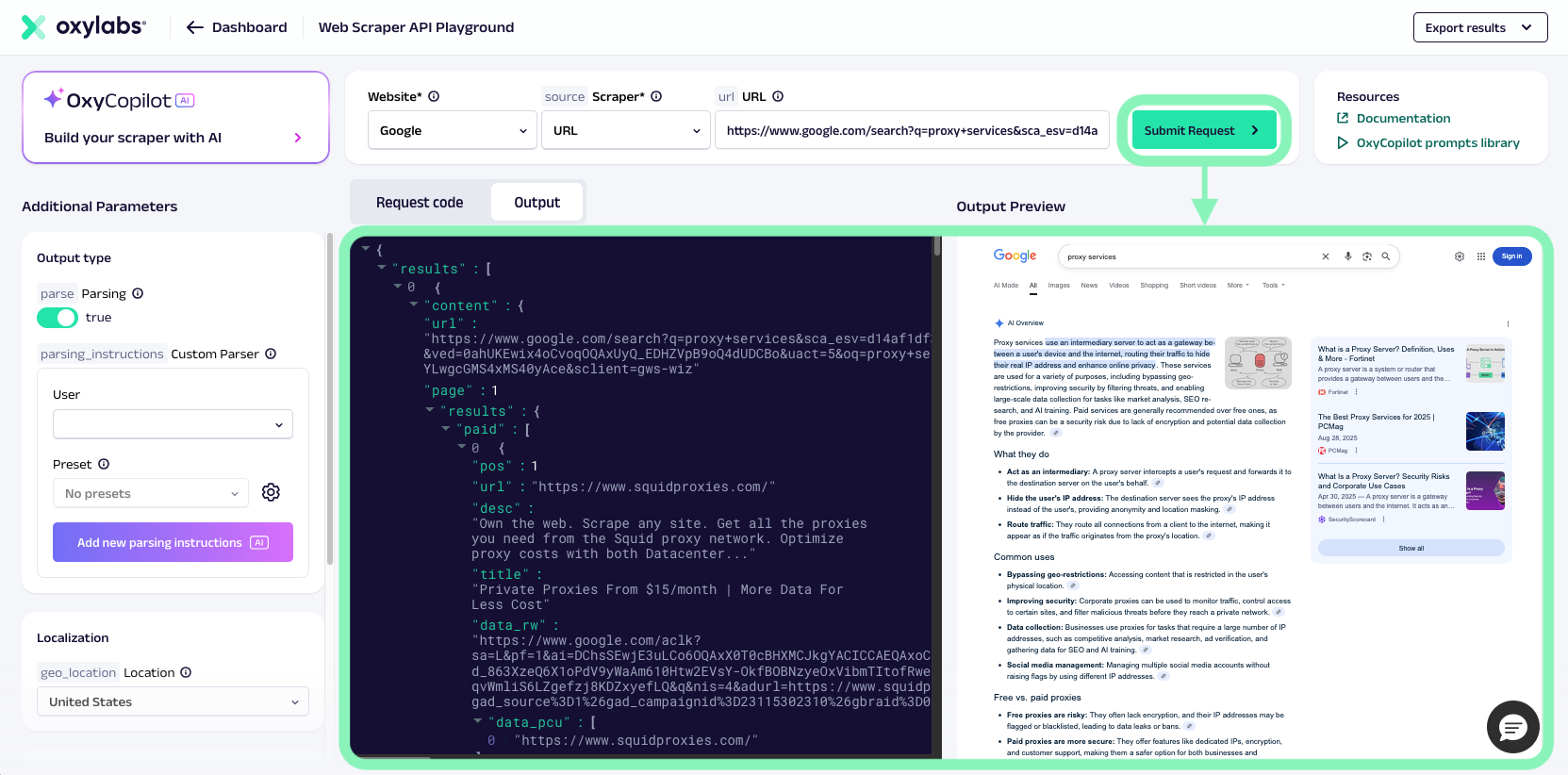
[**Playground do Web Scraper API**](https://dashboard.oxylabs.io/?route=/api-playground) é uma ferramenta interativa disponível no painel da Oxylabs. Ela permite criar e testar solicitações do Web Scraper API em um ambiente simplificado.
Com o Web Scraper API Playground, você pode experimentar diferentes alvos, ajustar parâmetros da solicitação, pré-visualizar resultados e exportar trechos de código prontos para uso. Ele foi projetado para usuários iniciantes e avançados, prototipagem rápida e verificação de configurações de solicitação.
Ele também integra [**OxyCopilot**](/products/pt-br/web-scraper-api/web-scraper-api-playground/oxycopilot.md), um assistente com IA que ajuda a gerar regras de parsing, criar presets de parser, construir scrapers e gerar instruções de navegador a partir de prompts em linguagem natural.
## Principais recursos
O Web Scraper API Playground é o principal ambiente para experimentar solicitações do Web Scraper API. Suas principais funções incluem:
* **Construtor interativo de solicitações** – escolha uma fonte (Universal, Amazon, Google, YouTube etc.), insira uma URL ou consulta e execute uma solicitação diretamente pelo painel.
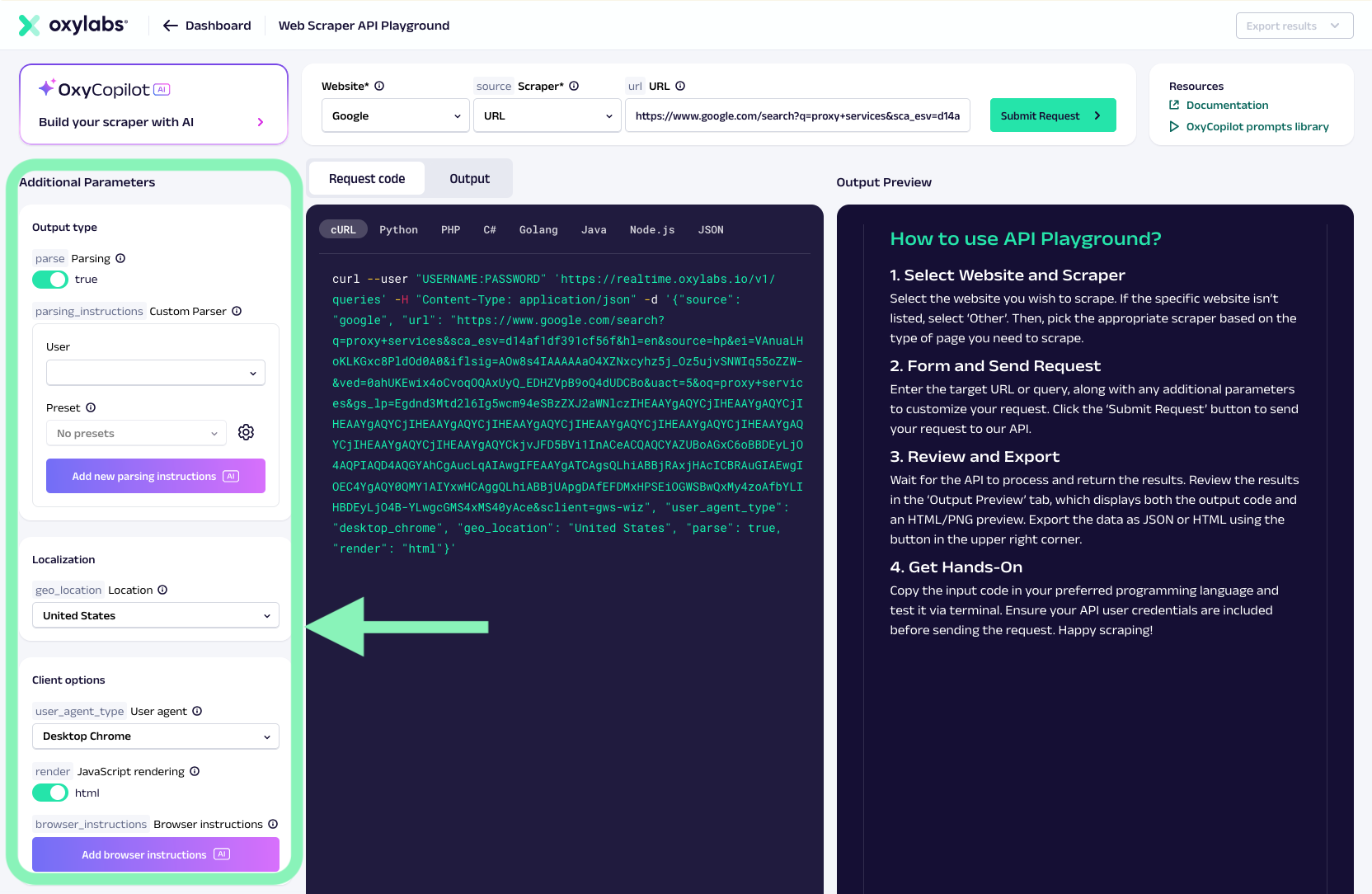
* **Personalização de parâmetros** – ajuste opções como renderização de JavaScript, geolocalização, localidade, parsing, tipo de user agent e mais.
* **Pré-visualização de resultados** – veja a resposta em HTML bruto ou JSON analisado para confirmar a saída da sua solicitação.
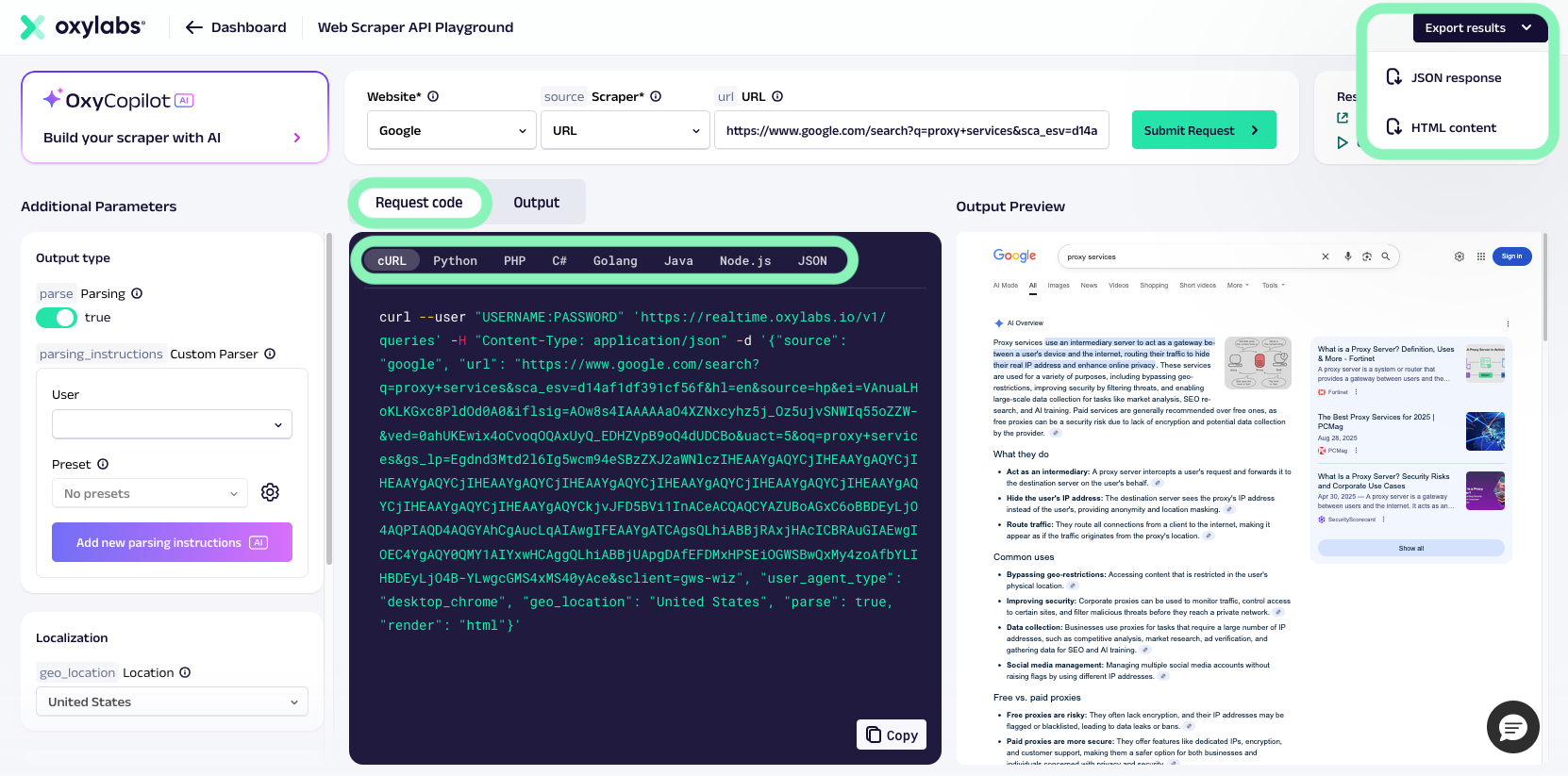
* **Opções de exportação** – copie trechos de código gerados (cURL, Python etc.) ou payloads de solicitação para uso posterior.
* [**OxyCopilot**](/products/pt-br/web-scraper-api/web-scraper-api-playground/oxycopilot.md) **integração** – use o assistente integrado para criar automaticamente payloads de solicitação do scraper, lógica de parsing, presets reutilizáveis de parser ou instruções de navegador usando linguagem natural.
{% hint style="info" %}
Ao fazer scraping, o Web Scraper API Playground é destinado a **testes e exploração**. Para fluxos de trabalho automatizados ou de alto volume, use os métodos padrão de integração do Web Scraper API ([Realtime](/products/pt-br/web-scraper-api/integration-methods/realtime.md), [Push-Pull](/products/pt-br/web-scraper-api/integration-methods/push-pull.md), ou [Proxy Endpoint](/products/pt-br/web-scraper-api/integration-methods/proxy-endpoint.md)).
{% endhint %}
## Como usá-lo
Usar o Web Scraper API Playground é muito fácil. Siga estes passos:
{% stepper %}
{% step %}
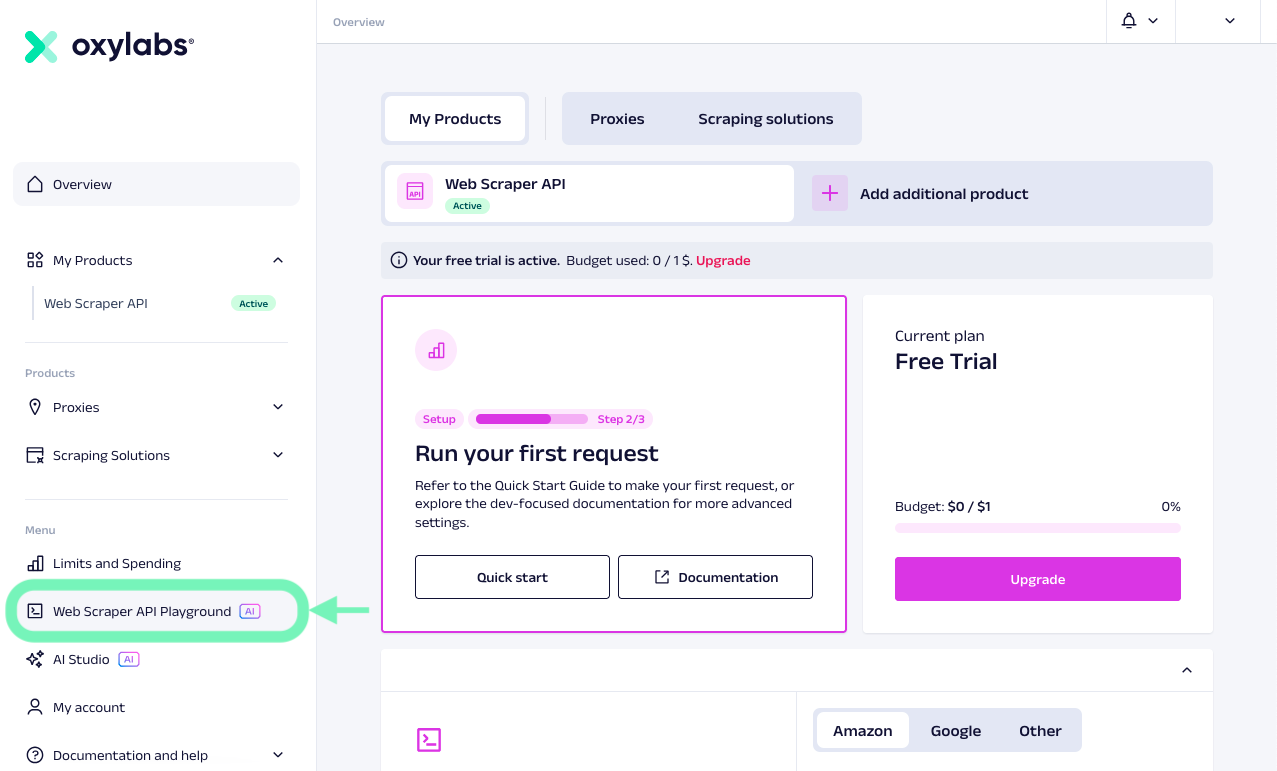
### Acesse o Web Scraper API Playground
Faça login no [painel da Oxylabs](https://dashboard.oxylabs.io/) e abra o Web Scraper API Playground.
{% endstep %}
{% step %}
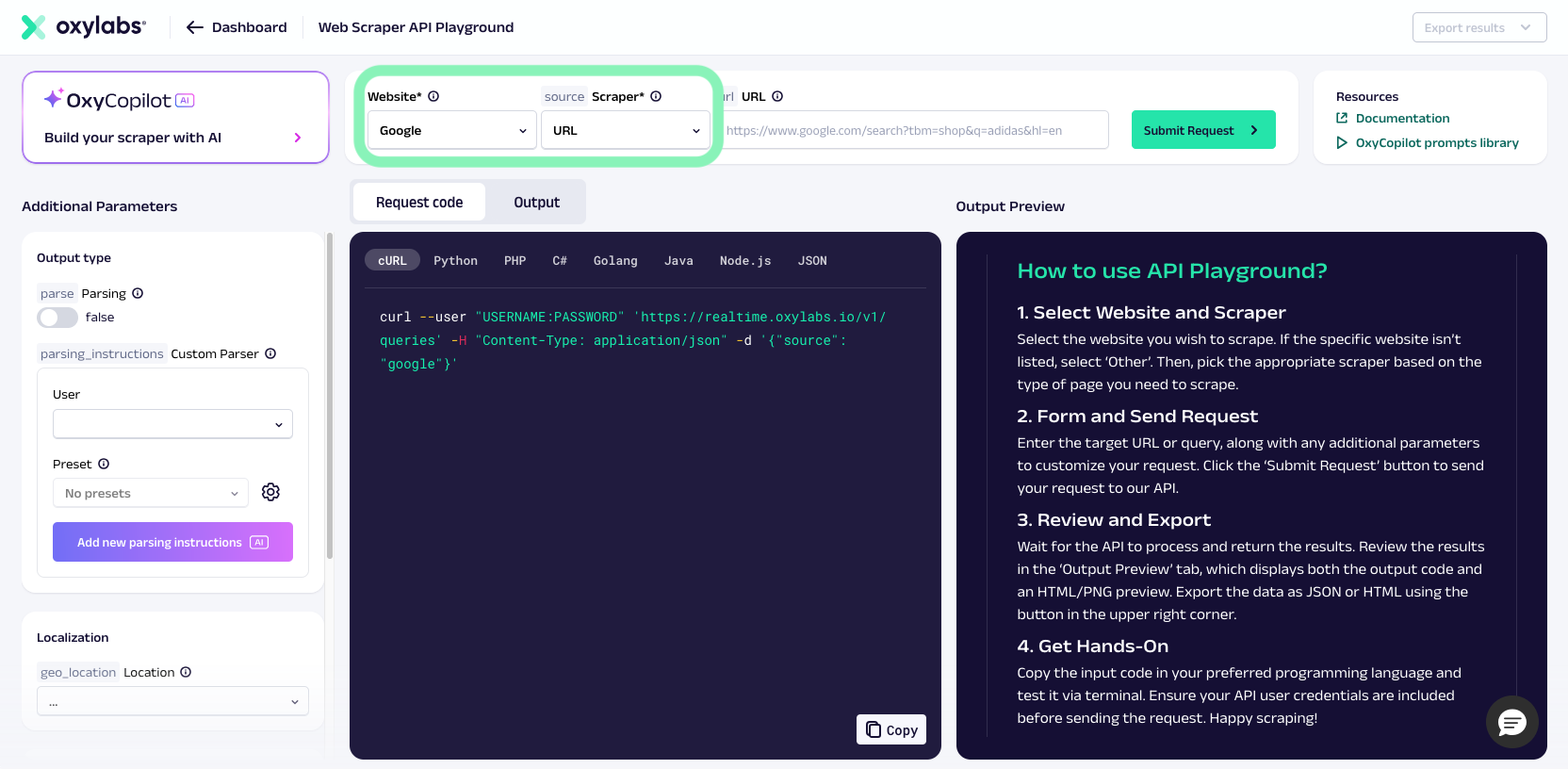
### Selecione uma fonte
Escolha uma fonte dedicada – website específico (por exemplo, Google, Amazon, YouTube e muitos outros) e fonte de scraper (por exemplo, URL, `amazon_product`, `google_search`) ou "--Any other website--" para sites não mencionados no menu suspenso.
{% endstep %}
{% step %}
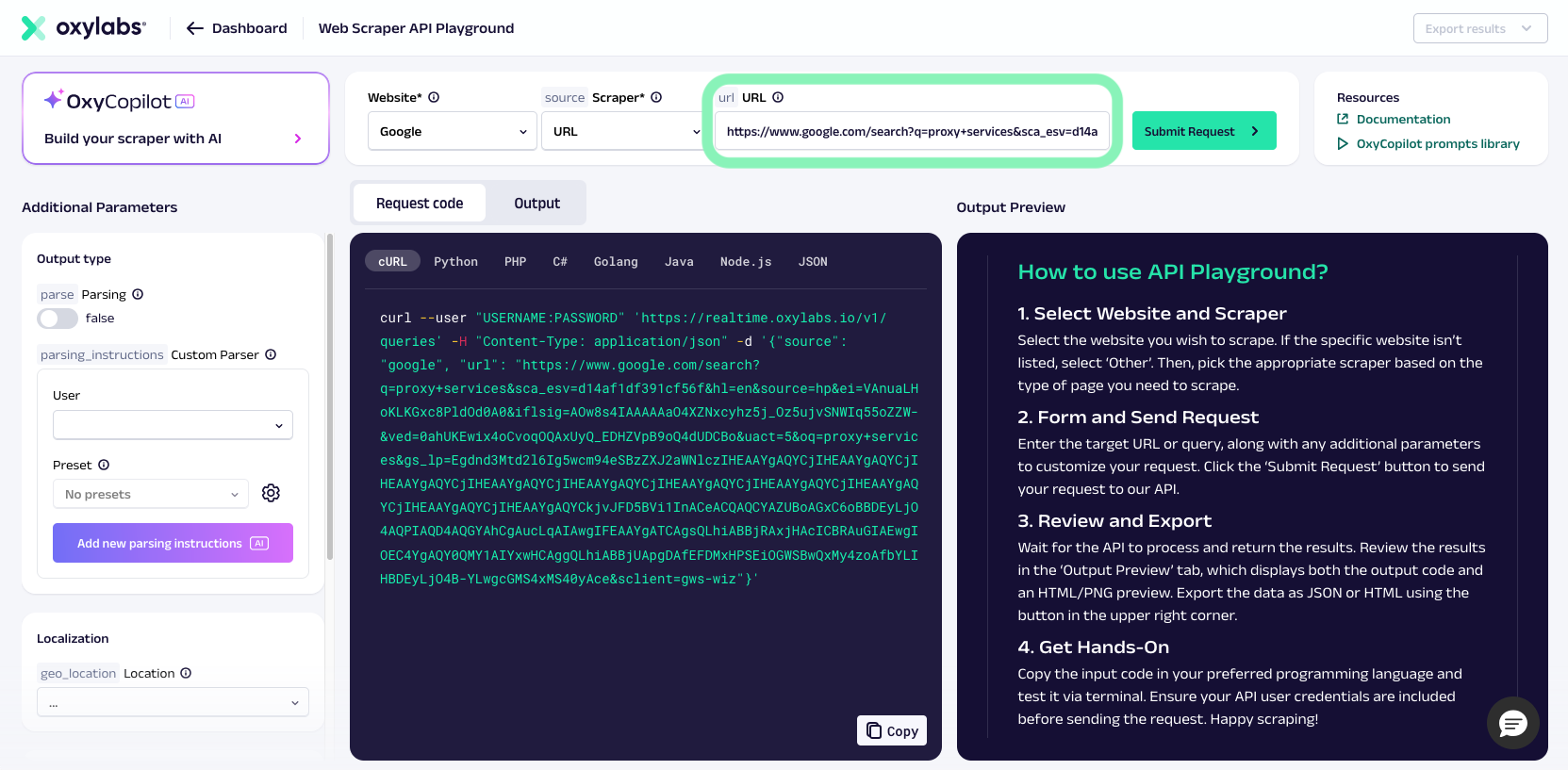
### Insira uma consulta ou URL
Informe a consulta de busca ou URL da página que você quer raspar.
{% endstep %}
{% step %}
### Adicione parâmetros adicionais (opcional)
Ajuste renderização, parsing, localização ou outras opções para seu caso de uso.
{% endstep %}
{% step %}
### Execute a solicitação
Envie sua solicitação e visualize instantaneamente os dados retornados.
{% endstep %}
{% step %}
### Exportar
Se você estiver satisfeito com os resultados, copie o trecho de código gerado ou o payload da solicitação na linguagem de programação de sua preferência e use-o em seus scripts ou aplicativos. Você também pode exportar resultados em JSON ou HTML usando o menu suspenso no canto superior direito.
{% endstep %}
{% endstepper %}
## Acesso e teste
O Web Scraper API Playground está disponível para todos os usuários do painel da Oxylabs para testar os recursos do Web Scraper API.
---
# Agent Instructions
This documentation is published with GitBook. GitBook is the documentation platform designed so that both humans and AI agents can read, navigate, and reason over technical content effectively. Learn more at gitbook.com.
## Querying This Documentation
If you need additional information that is not directly available in this page, you can query the documentation by asking a question.
Perform an HTTP GET request on the following URL with the `ask` and `goal` query parameters:
```
GET https://developers.oxylabs.io/products/pt-br/web-scraper-api/web-scraper-api-playground.md?ask=&goal=
```
`ask` is the immediate question: it should be specific, self-contained, and written in natural language.
`goal` is what the user is ultimately trying to achieve, the reason they need the answer. Sharing it helps GitBook give you a better, more relevant answer. A goal is most helpful when it describes the outcome the user wants rather than restating the question. For example, with `ask=how do I create an API token`, a goal like `automate deployments from our CI pipeline` lets GitBook tailor the answer to that use case.
The response will contain a direct answer to the question and relevant excerpts and sources from the documentation.
Use this mechanism when the answer is not explicitly present in the current page, you need clarification or additional context, or you want to retrieve related documentation sections.