> For the complete documentation index, see [llms.txt](https://developers.oxylabs.io/llms.txt). Markdown versions of documentation pages are available by appending `.md` to page URLs; this page is available as [Markdown](https://developers.oxylabs.io/products/pt-br/proxies/datacenter-proxies.md).
# Datacenter Proxies
Veja como usar Datacenter Proxies. Encontre exemplos de código, informações de controle de IP, configurações de localização e outros detalhes.
Para começar a usar os Oxylabs Datacenter Proxies, você deve primeiro acessar [**painel Oxylabs**](https://dashboard.oxylabs.io/en/) e criar uma instância do produto Datacenter Proxies:
{% stepper %}
{% step %}
### **Adicionar uma instância de produto**
Clique **+ Adicionar instância de produto** e selecione Datacenter Proxies.
 {% endstep %}
{% step %}
### **Configure seus Proxies**
Escolha **Pague por IP** ou **Pague por GB**, e defina o nome da instância.
{% endstep %}
{% step %}
### **Configure seus Proxies**
Escolha **Pague por IP** ou **Pague por GB**, e defina o nome da instância.
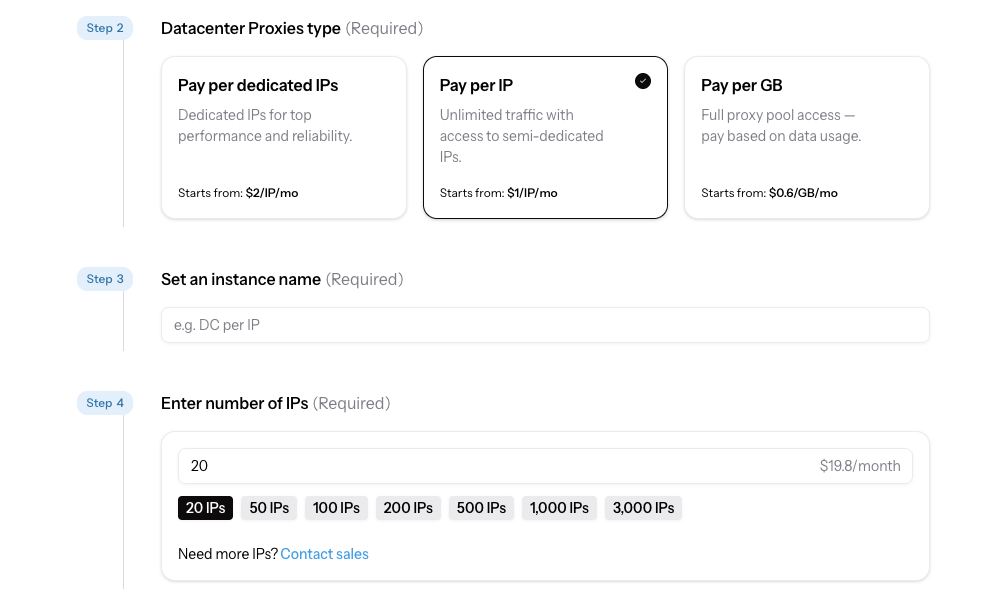 **Se você escolheu Pague por IP:** Configure as localizações dos IPs e escolha o número de IPs para cada localidade.
{% hint style="success" %}
Continuar sem localizações escolhidas atribuirá IPs aleatoriamente.
{% endhint %}
**Se você escolheu Pague por IP:** Configure as localizações dos IPs e escolha o número de IPs para cada localidade.
{% hint style="success" %}
Continuar sem localizações escolhidas atribuirá IPs aleatoriamente.
{% endhint %}
 Por fim, configure suas definições de autenticação e clique em **Criar instância**.
{% endstep %}
{% step %}
### **Obter credenciais**
Clique na sua instância de Datacenter Proxies na tabela de instâncias da página inicial do painel e confirme as credenciais de usuário do seu proxy.
{% endstep %}
{% endstepper %}
## Fazendo requisições
Copie o código abaixo na linguagem de sua preferência e altere os `USERNAME` e `PASSWORD` parâmetros para as credenciais do seu proxy:
{% tabs %}
{% tab title="cURL" %}
```sh
curl -x dc.oxylabs.io:8000 -U "user-USERNAME:PASSWORD" https://ip.oxylabs.io/location
```
{% endtab %}
{% tab title="Python" %}
```python
#pip install requests
import requests
username = 'USERNAME'
password = 'PASSWORD'
proxy = 'dc.oxylabs.io:8000'
proxies = {
"https": ('https://user-%s:%s@%s' % (username, password, proxy))
}
response=requests.get("https://ip.oxylabs.io/location", proxies=proxies)
print(response.content)
```
{% endtab %}
{% tab title="Node.js" %}
Por fim, configure suas definições de autenticação e clique em **Criar instância**.
{% endstep %}
{% step %}
### **Obter credenciais**
Clique na sua instância de Datacenter Proxies na tabela de instâncias da página inicial do painel e confirme as credenciais de usuário do seu proxy.
{% endstep %}
{% endstepper %}
## Fazendo requisições
Copie o código abaixo na linguagem de sua preferência e altere os `USERNAME` e `PASSWORD` parâmetros para as credenciais do seu proxy:
{% tabs %}
{% tab title="cURL" %}
```sh
curl -x dc.oxylabs.io:8000 -U "user-USERNAME:PASSWORD" https://ip.oxylabs.io/location
```
{% endtab %}
{% tab title="Python" %}
```python
#pip install requests
import requests
username = 'USERNAME'
password = 'PASSWORD'
proxy = 'dc.oxylabs.io:8000'
proxies = {
"https": ('https://user-%s:%s@%s' % (username, password, proxy))
}
response=requests.get("https://ip.oxylabs.io/location", proxies=proxies)
print(response.content)
```
{% endtab %}
{% tab title="Node.js" %}
//npm install axios
const axios = require("axios");
const https = require("https");

const client = axios.create({
    httpsAgent: new https.Agent({
        rejectUnauthorized: false,
    }),
});
const username = 'USERNAME';
const password = 'PASSWORD'

client
    .get("https://ip.oxylabs.io/location", {
        proxy: {
            protocol: "https",
            host: "dc.oxylabs.io",
            port: 8000,
            auth: {
                username: `user-${username}`,
                password: password,
            },
        },
    })
    .then((res) => {
        console.log(res.data);
    })
    .catch((err) => console.error(err));
{% endtab %}
{% tab title="PHP" %}
```php
&goal=
```
`ask` is the immediate question: it should be specific, self-contained, and written in natural language.
`goal` is what the user is ultimately trying to achieve, the reason they need the answer. Sharing it helps GitBook give you a better, more relevant answer. A goal is most helpful when it describes the outcome the user wants rather than restating the question. For example, with `ask=how do I create an API token`, a goal like `automate deployments from our CI pipeline` lets GitBook tailor the answer to that use case.
The response will contain a direct answer to the question and relevant excerpts and sources from the documentation.
Use this mechanism when the answer is not explicitly present in the current page, you need clarification or additional context, or you want to retrieve related documentation sections.