> For the complete documentation index, see [llms.txt](https://developers.oxylabs.io/llms.txt). Markdown versions of documentation pages are available by appending `.md` to page URLs; this page is available as [Markdown](https://developers.oxylabs.io/products/es/web-unblocker/custom-browser-instructions/javascript-rendering.md).
# Renderizado de JavaScript
Aprende sobre el encabezado que puedes incluir en tus solicitudes para obtener datos totalmente renderizados, que puedes guardar en un archivo HTML o como una captura PNG.
Si la página que desea extraer requiere cargar JavaScript para cargar dinámicamente todos los datos necesarios en el DOM, en lugar de configurar y usar un Headless Browser por su cuenta, puede incluir el `"X-Oxylabs-Render: html"` encabezado con sus solicitudes. Todas las solicitudes con este encabezado incluido se renderizarán por completo y todos los datos se almacenarán en un archivo HTML o una captura de pantalla PNG (según el parámetro pasado).
{% hint style="info" %}
El renderizado de JavaScript tarda más en extraer la página. Al usar el renderizado de JavaScript, establezca el valor de tiempo de espera del lado del cliente en 180 segundos.
{% endhint %}
{% hint style="warning" %}
Para garantizar el menor consumo de tráfico, nuestro sistema no carga activos innecesarios durante el renderizado de la página.
{% endhint %}
Este parámetro tiene dos valores disponibles:
* `html` (HTML de una página renderizada)
* `png` (bytes sin procesar que se pueden guardar como PNG)
#### Ejemplos de código
{% tabs %}
{% tab title="cURL" %}
```shell
curl -k -v -x https://unblock.oxylabs.io:60000 \
-U 'USERNAME:PASSWORD' \
'https://ip.oxylabs.io/location' \
-H 'X-Oxylabs-Render: html'
```
{% endtab %}
{% tab title="Python" %}
```python
import requests
# Use your Web Unblocker credentials here.
USERNAME, PASSWORD = 'YOUR_USERNAME', 'YOUR_PASSWORD'
# Define proxy dict.
proxies = {
'http': f'http://{USERNAME}:{PASSWORD}@unblock.oxylabs.io:60000',
'https': f'https://{USERNAME}:{PASSWORD}@unblock.oxylabs.io:60000',
}
headers = {
'X-Oxylabs-Render': 'html'
}
response = requests.get(
'https://ip.oxylabs.io/location',
verify=False, # It is required to ignore certificate
proxies=proxies,
headers=headers,
)
# Print result page to stdout
print(response.text)
# Save returned HTML to result.html file
with open('result.html', 'w') as f:
f.write(response.text)
```
{% endtab %}
{% tab title="Node.js" %}
```javascript
import fetch from 'node-fetch';
import { HttpsProxyAgent } from 'https-proxy-agent';
const username = 'YOUR_USERNAME';
const password = 'YOUR_PASSWORD';
const agent = new HttpsProxyAgent(
`https://${username}:${password}@unblock.oxylabs.io:60000`
);
// We recommend accepting our certificate instead of allowing insecure (http) traffic
process.env['NODE_TLS_REJECT_UNAUTHORIZED'] = 0;
const headers = {
'X-Oxylabs-Render': 'html',
}
const response = await fetch('https://ip.oxylabs.io/location', {
method: 'get',
headers: headers,
agent: agent,
});
console.log(await response.text());
```
{% endtab %}
{% tab title="PHP" %}
```php
array(
'X-Oxylabs-Render: html'
)
));
$result = curl_exec($ch);
echo $result;
if (curl_errno($ch)) {
echo 'Error:' . curl_error($ch);
}
curl_close($ch);
```
{% endtab %}
{% tab title="Golang" %}
```go
package main
import (
"crypto/tls"
"fmt"
"io/ioutil"
"net/http"
"net/url"
)
func main() {
const Username = "YOUR_USERNAME"
const Password = "YOUR_PASSWORD"
proxyUrl, _ := url.Parse(
fmt.Sprintf(
"https://%s:%s@unblock.oxylabs.io:60000",
Username,
Password,
),
)
customTransport := &http.Transport{Proxy: http.ProxyURL(proxyUrl)}
// We recommend accepting our certificate instead of allowing insecure (http) traffic
customTransport.TLSClientConfig = &tls.Config{InsecureSkipVerify: true}
client := &http.Client{Transport: customTransport}
request, _ := http.NewRequest("GET",
"https://ip.oxylabs.io/location",
nil,
)
// Add custom cookies
request.Header.Add("X-Oxylabs-Render", "html")
request.SetBasicAuth(Username, Password)
response, _ := client.Do(request)
responseText, _ := ioutil.ReadAll(response.Body)
fmt.Println(string(responseText))
}
```
{% endtab %}
{% tab title="C#" %}
```csharp
using System;
using System.Net;
using System.Net.Http;
using System.Threading.Tasks;
namespace OxyApi
{
class Program
{
static async Task Main(string[] args)
{
var webProxy = new WebProxy
{
Address = new Uri("https://unblock.oxylabs.io:60000"),
BypassProxyOnLocal = false,
UseDefaultCredentials = false,
Credentials = new NetworkCredential(
userName: "YOUR_USERNAME",
password: "YOUR_PASSWORD"
)
};
var httpClientHandler = new HttpClientHandler
{
Proxy = webProxy,
};
// We recommend accepting our certificate instead of allowing insecure (http) traffic
httpClientHandler.ClientCertificateOptions = ClientCertificateOption.Manual;
httpClientHandler.ServerCertificateCustomValidationCallback =
(httpRequestMessage, cert, cetChain, policyErrors) =>
{
return true;
};
var client = new HttpClient(handler: httpClientHandler, disposeHandler: true);
// Add custom cookies
client.DefaultRequestHeaders.Add("X-Oxylabs-Render", "html");
Uri baseUri = new Uri("https://ip.oxylabs.io/location");
client.BaseAddress = baseUri;
var requestMessage = new HttpRequestMessage(HttpMethod.Get, "");
var response = await client.SendAsync(requestMessage);
var contents = await response.Content.ReadAsStringAsync();
Console.WriteLine(contents);
}
}
}
```
{% endtab %}
{% tab title="Java" %}
```java
package org.example;
import org.apache.hc.client5.http.auth.AuthScope;
import org.apache.hc.client5.http.auth.CredentialsProvider;
import org.apache.hc.client5.http.classic.methods.HttpGet;
import org.apache.hc.client5.http.config.RequestConfig;
import org.apache.hc.client5.http.impl.auth.CredentialsProviderBuilder;
import org.apache.hc.client5.http.impl.classic.CloseableHttpClient;
import org.apache.hc.client5.http.impl.classic.HttpClients;
import org.apache.hc.client5.http.impl.io.PoolingHttpClientConnectionManagerBuilder;
import org.apache.hc.client5.http.ssl.NoopHostnameVerifier;
import org.apache.hc.client5.http.ssl.SSLConnectionSocketFactoryBuilder;
import org.apache.hc.client5.http.ssl.TrustAllStrategy;
import org.apache.hc.core5.http.HttpHost;
import org.apache.hc.core5.http.io.entity.EntityUtils;
import org.apache.hc.core5.http.message.StatusLine;
import org.apache.hc.core5.ssl.SSLContextBuilder;
import java.util.Arrays;
import java.util.Properties;
public class Main {
public static void main(final String[] args)throws Exception {
final CredentialsProvider credsProvider = CredentialsProviderBuilder.create()
.add(new AuthScope("unblock.oxylabs.io", 60000), "USERNAME", "PASSWORD".toCharArray())
.build();
final HttpHost target = new HttpHost("https", "ip.oxylabs.io", 443);
final HttpHost proxy = new HttpHost("https", "unblock.oxylabs.io", 60000);
try (final CloseableHttpClient httpclient = HttpClients.custom()
.setDefaultCredentialsProvider(credsProvider)
.setProxy(proxy)
// We recommend accepting our certificate instead of allowing insecure (http) traffic
.setConnectionManager(PoolingHttpClientConnectionManagerBuilder.create()
.setSSLSocketFactory(SSLConnectionSocketFactoryBuilder.create()
.setSslContext(SSLContextBuilder.create()
.loadTrustMaterial(TrustAllStrategy.INSTANCE)
.build())
.setHostnameVerifier(NoopHostnameVerifier.INSTANCE)
.build())
.build())
.build()) {
final RequestConfig config = RequestConfig.custom()
.build();
final HttpGet request = new HttpGet("/location");
request.addHeader("X-Oxylabs-Render","html");
request.setConfig(config);
System.out.println("Executing request " + request.getMethod() + " " + request.getUri() +
" via " + proxy + " headers: " + Arrays.toString(request.getHeaders()));
httpclient.execute(target, request, response -> {
System.out.println("----------------------------------------");
System.out.println(request + "->" + new StatusLine(response));
EntityUtils.consume(response.getEntity());
return null;
});
}
}
}
```
{% endtab %}
{% endtabs %}
**Extracción del HTML de un sitio web**
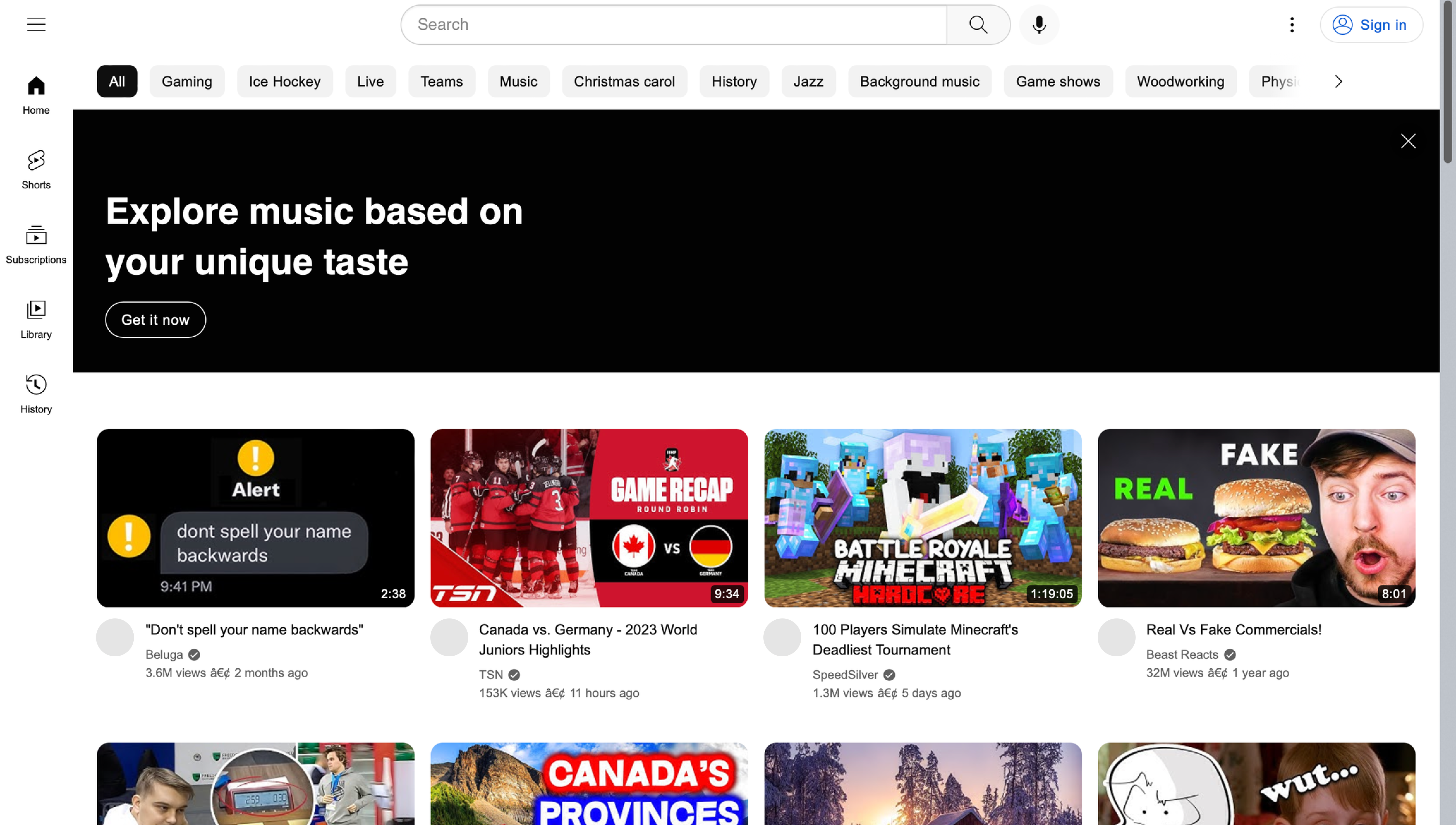
En este ejemplo, renderizaremos la página de inicio de YouTube y extraeremos el contenido de la página. Normalmente, la página de inicio de YouTube se vería así si se usa Web Unblocker sin renderizado de JavaScript:
Ejemplo de página de YouTube sin renderizado de JavaScript
Agregando el `"X-Oxylabs-Render: html"` encabezado, como se muestra en los ejemplos a continuación, habilitará el renderizado de JavaScript y devolverá el HTML de una página renderizada:
{% tabs %}
{% tab title="cURL" %}
```shell
curl -k -v -x https://unblock.oxylabs.io:60000 \
-U 'USERNAME:PASSWORD' \
'https://youtube.com' \
-H 'X-Oxylabs-Render: html'
```
{% endtab %}
{% tab title="Python" %}
```python
import requests
# Use your Web Unblocker credentials here.
USERNAME, PASSWORD = 'YOUR_USERNAME', 'YOUR_PASSWORD'
# Define proxy dict.
proxies = {
'http': f'http://{USERNAME}:{PASSWORD}@unblock.oxylabs.io:60000',
'https': f'https://{USERNAME}:{PASSWORD}@unblock.oxylabs.io:60000',
}
headers = {
'X-Oxylabs-Render': 'html'
}
response = requests.get(
'https://youtube.com',
verify=False, # It is required to ignore certificate
proxies=proxies,
headers=headers,
)
# Print result page to stdout
print(response.text)
# Save returned HTML to result.html file
with open('result.html', 'w') as f:
f.write(response.text)
```
{% endtab %}
{% tab title="Node.js" %}
```javascript
import fetch from 'node-fetch';
import { HttpsProxyAgent } from 'https-proxy-agent';
const username = 'YOUR_USERNAME';
const password = 'YOUR_PASSWORD';
const agent = new HttpsProxyAgent(
`https://${username}:${password}@unblock.oxylabs.io:60000`
);
// We recommend accepting our certificate instead of allowing insecure (http) traffic
process.env['NODE_TLS_REJECT_UNAUTHORIZED'] = 0;
const headers = {
'X-Oxylabs-Render': 'html',
}
const response = await fetch('https://youtube.com', {
method: 'get',
headers: headers,
agent: agent,
});
console.log(await response.text());
```
{% endtab %}
{% tab title="PHP" %}
```php
[
'X-Oxylabs-Render: html'
]
]);
$result = curl_exec($ch);
echo $result;
if (curl_errno($ch)) {
echo 'Error:' . curl_error($ch);
}
curl_close($ch);
```
{% endtab %}
{% tab title="Golang" %}
```go
package main
import (
"crypto/tls"
"fmt"
"io/ioutil"
"net/http"
"net/url"
)
func main() {
const Username = "YOUR_USERNAME"
const Password = "YOUR_PASSWORD"
proxyUrl, _ := url.Parse(
fmt.Sprintf(
"https://%s:%s@unblock.oxylabs.io:60000",
Username,
Password,
),
)
customTransport := &http.Transport{Proxy: http.ProxyURL(proxyUrl)}
// We recommend accepting our certificate instead of allowing insecure (http) traffic
customTransport.TLSClientConfig = &tls.Config{InsecureSkipVerify: true}
client := &http.Client{Transport: customTransport}
request, _ := http.NewRequest("GET",
"https://youtube.com",
nil,
)
// Add custom cookies
request.Header.Add("X-Oxylabs-Render", "html")
request.SetBasicAuth(Username, Password)
response, _ := client.Do(request)
responseText, _ := ioutil.ReadAll(response.Body)
fmt.Println(string(responseText))
}
```
{% endtab %}
{% tab title="C#" %}
```csharp
using System;
using System.Net;
using System.Net.Http;
using System.Threading.Tasks;
namespace OxyApi
{
class Program
{
static async Task Main(string[] args)
{
var webProxy = new WebProxy
{
Address = new Uri("https://unblock.oxylabs.io:60000"),
BypassProxyOnLocal = false,
UseDefaultCredentials = false,
Credentials = new NetworkCredential(
userName: "YOUR_USERNAME",
password: "YOUR_PASSWORD"
)
};
var httpClientHandler = new HttpClientHandler
{
Proxy = webProxy,
};
// We recommend accepting our certificate instead of allowing insecure (http) traffic
httpClientHandler.ClientCertificateOptions = ClientCertificateOption.Manual;
httpClientHandler.ServerCertificateCustomValidationCallback =
(httpRequestMessage, cert, cetChain, policyErrors) =>
{
return true;
};
var client = new HttpClient(handler: httpClientHandler, disposeHandler: true);
// Add custom header
client.DefaultRequestHeaders.Add("X-Oxylabs-Render", "html");
Uri baseUri = new Uri("https://youtube.com");
client.BaseAddress = baseUri;
var requestMessage = new HttpRequestMessage(HttpMethod.Get, "");
var response = await client.SendAsync(requestMessage);
var contents = await response.Content.ReadAsStringAsync();
Console.WriteLine(contents);
}
}
}
```
{% endtab %}
{% tab title="Java" %}
```java
package org.example;
import org.apache.hc.client5.http.auth.AuthScope;
import org.apache.hc.client5.http.auth.CredentialsProvider;
import org.apache.hc.client5.http.classic.methods.HttpGet;
import org.apache.hc.client5.http.config.RequestConfig;
import org.apache.hc.client5.http.impl.auth.CredentialsProviderBuilder;
import org.apache.hc.client5.http.impl.classic.CloseableHttpClient;
import org.apache.hc.client5.http.impl.classic.HttpClients;
import org.apache.hc.client5.http.impl.io.PoolingHttpClientConnectionManagerBuilder;
import org.apache.hc.client5.http.ssl.NoopHostnameVerifier;
import org.apache.hc.client5.http.ssl.SSLConnectionSocketFactoryBuilder;
import org.apache.hc.client5.http.ssl.TrustAllStrategy;
import org.apache.hc.core5.http.HttpHost;
import org.apache.hc.core5.http.io.entity.EntityUtils;
import org.apache.hc.core5.http.message.StatusLine;
import org.apache.hc.core5.ssl.SSLContextBuilder;
import java.util.Arrays;
import java.util.Properties;
public class Main {
public static void main(final String[] args)throws Exception {
final CredentialsProvider credsProvider = CredentialsProviderBuilder.create()
.add(new AuthScope("unblock.oxylabs.io", 60000), "USERNAME", "PASSWORD".toCharArray())
.build();
final HttpHost target = new HttpHost("https", "youtube.com", 443);
final HttpHost proxy = new HttpHost("https", "unblock.oxylabs.io", 60000);
try (final CloseableHttpClient httpclient = HttpClients.custom()
.setDefaultCredentialsProvider(credsProvider)
.setProxy(proxy)
// We recommend accepting our certificate instead of allowing insecure (http) traffic
.setConnectionManager(PoolingHttpClientConnectionManagerBuilder.create()
.setSSLSocketFactory(SSLConnectionSocketFactoryBuilder.create()
.setSslContext(SSLContextBuilder.create()
.loadTrustMaterial(TrustAllStrategy.INSTANCE)
.build())
.setHostnameVerifier(NoopHostnameVerifier.INSTANCE)
.build())
.build())
.build()) {
final RequestConfig config = RequestConfig.custom()
.build();
final HttpGet request = new HttpGet("/");
request.addHeader("X-Oxylabs-Render","html");
request.setConfig(config);
System.out.println("Executing request " + request.getMethod() + " " + request.getUri() +
" via " + proxy + " headers: " + Arrays.toString(request.getHeaders()));
httpclient.execute(target, request, response -> {
System.out.println("----------------------------------------");
System.out.println(request + "->" + new StatusLine(response));
EntityUtils.consume(response.getEntity());
return null;
});
}
}
}
```
{% endtab %}
{% endtabs %}
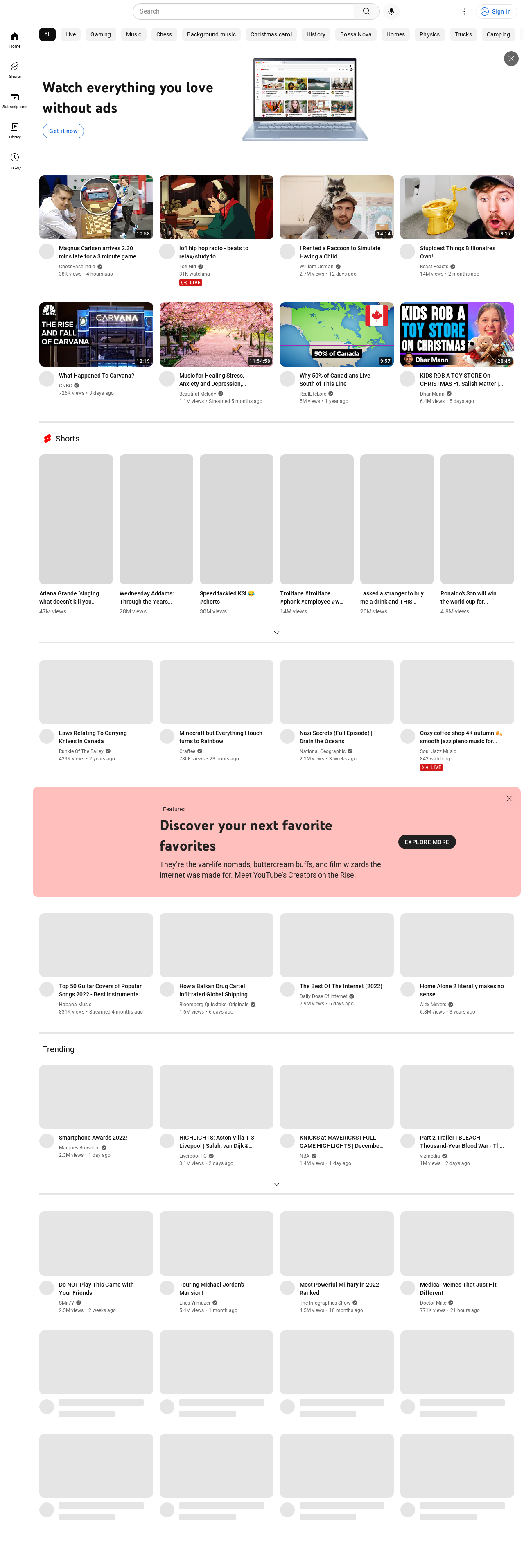
El archivo HTML abierto en un navegador debería verse así:
**Obtener una captura de pantalla de una página totalmente renderizada**
Para obtener una captura de pantalla en formato PNG en lugar del HTML de la página, es necesario proporcionar el `"X-Oxylabs-Render: png"` encabezado.
{% tabs %}
{% tab title="cURL" %}
```shell
curl -k -v -x https://unblock.oxylabs.io:60000 \
-U 'USERNAME:PASSWORD' \
'https://youtube.com' \
-H 'X-Oxylabs-Render: png' > rendered_page.png
```
{% endtab %}
{% tab title="Python" %}
```python
import requests
# Use your Web Unblocker credentials here.
USERNAME, PASSWORD = 'YOUR_USERNAME', 'YOUR_PASSWORD'
# Define proxy dict.
proxies = {
'http': f'http://{USERNAME}:{PASSWORD}@unblock.oxylabs.io:60000',
'https': f'https://{USERNAME}:{PASSWORD}@unblock.oxylabs.io:60000',
}
headers = {
'X-Oxylabs-Render': 'png'
}
response = requests.get(
'https://youtube.com',
verify=False, # It is required to ignore certificate
proxies=proxies,
headers=headers,
)
# Save screeenshot as PNG file
with open('rendered_page.png', 'wb') as f:
f.write(response.content)
```
{% endtab %}
{% tab title="Node.js" %}
```javascript
import fs from 'fs';
import fetch from 'node-fetch';
import { HttpsProxyAgent } from 'https-proxy-agent';
const username = 'YOUR_USERNAME';
const password = 'YOUR_PASSWORD';
const agent = new HttpsProxyAgent(
`https://${username}:${password}@unblock.oxylabs.io:60000`
);
// We recommend accepting our certificate instead of allowing insecure (http) traffic
process.env['NODE_TLS_REJECT_UNAUTHORIZED'] = 0;
const headers = {
'X-Oxylabs-Render': 'png',
}
await fetch('https://youtube.com', {
method: 'get',
headers: headers,
agent: agent,
}).then(res =>
res.body.pipe(fs.createWriteStream('./rendered_page.png'))
);
console.log('Image was saved');
```
{% endtab %}
{% tab title="PHP" %}
```php
[
'X-Oxylabs-Render: png'
]
]);
$result = curl_exec($ch);
if (curl_errno($ch)) {
echo 'Error:' . curl_error($ch);
}
curl_close ($ch);
if(file_exists('rendered_page.png')){
unlink('rendered_page.png');
}
$fp = fopen('rendered_page.png','wb');
fwrite($fp, $result);
fclose($fp);
```
{% endtab %}
{% tab title="Golang" %}
```go
package main
import (
"crypto/tls"
"fmt"
"io/ioutil"
"net/http"
"net/url"
)
func main() {
const Username = "YOUR_USERNAME"
const Password = "YOUR_PASSWORD"
proxyUrl, _ := url.Parse(
fmt.Sprintf(
"https://%s:%s@unblock.oxylabs.io:60000",
Username,
Password,
),
)
customTransport := &http.Transport{Proxy: http.ProxyURL(proxyUrl)}
// We recommend accepting our certificate instead of allowing insecure (http) traffic
customTransport.TLSClientConfig = &tls.Config{InsecureSkipVerify: true}
client := &http.Client{Transport: customTransport}
request, _ := http.NewRequest("GET",
"https://youtube.com",
nil,
)
// Add custom cookies
request.Header.Add("X-Oxylabs-Render", "png")
request.SetBasicAuth(Username, Password)
response, _ := client.Do(request)
responseData, _ := ioutil.ReadAll(response.Body)
response.Body.Close()
ioutil.WriteFile("rendered_page.png", responseData, 0666)
log.Println("Image was saved")
}
```
{% endtab %}
{% tab title="C#" %}
using System;
using System.Net;
using System.Net.Http;
using System.Drawing;
using System.IO;
using System.Threading.Tasks;

namespace OxyApi
{
    class Program
    {
        static async Task Main(string[] args)
        {
            var webProxy = new WebProxy
            {
                Address = new Uri("https://unblock.oxylabs.io:60000"),
                BypassProxyOnLocal = false,
                UseDefaultCredentials = false,

                Credentials = new NetworkCredential(
                userName: "YOUR_USERNAME",
                password: "YOUR_PASSWORD"
                )
            };

            var httpClientHandler = new HttpClientHandler
            {
                Proxy = webProxy,
            };

            // We recommend accepting our certificate instead of allowing insecure (http) traffic
            httpClientHandler.ClientCertificateOptions = ClientCertificateOption.Manual;
            httpClientHandler.ServerCertificateCustomValidationCallback =
                (httpRequestMessage, cert, cetChain, policyErrors) =>
                {
                    return true;
                };


            var client = new HttpClient(handler: httpClientHandler, disposeHandler: true);

            // Add custom header
            client.DefaultRequestHeaders.Add("X-Oxylabs-Render", "png");

            Uri baseUri = new Uri("https://youtube.com");
            client.BaseAddress = baseUri;

            var requestMessage = new HttpRequestMessage(HttpMethod.Get, "");

            var response = await client.SendAsync(requestMessage);
            byte[] bytes = await response.Content.ReadAsByteArrayAsync();

            using (Image image = Image.FromStream(new MemoryStream(bytes)))
            {
                image.Save("rendered_page.png");
            }
        }
    }
}
{% endtab %}
{% tab title="Java" %}
```java
package org.example;
import okhttp3.Authenticator;
import okhttp3.Credentials;
import okhttp3.OkHttpClient;
import okhttp3.Request;
import javax.net.ssl.*;
import java.net.InetSocketAddress;
import java.net.Proxy;
import java.util.concurrent.TimeUnit;
import java.io.File;
import org.apache.commons.io.FileUtils;
public class App implements Runnable
{
private static final String AUTHORIZATION_HEADER = "Proxy-Authorization";
public static final String USERNAME = "YOUR_USERNAME";
public static final String PASSWORD = "YOUR_PASSWORD";
public void run() {
Authenticator authenticator = (route, response) -> {
String credential = Credentials.basic(USERNAME, PASSWORD);
return response
.request()
.newBuilder()
.header(AUTHORIZATION_HEADER, credential)
.build();
};
OkHttpClient.Builder builder = new OkHttpClient.Builder()
.readTimeout(180, TimeUnit.SECONDS)
.writeTimeout(180, TimeUnit.SECONDS);
// We recommend accepting our certificate instead of allowing insecure (http) traffic
this.disableSSLCertificateChecking(builder);
Proxy proxy = new Proxy(Proxy.Type.HTTP, new InetSocketAddress("unblock.oxylabs.io", 60000));
OkHttpClient client = builder
.proxy(proxy)
.proxyAuthenticator(authenticator)
.build();
var request = new Request.Builder()
.url("https://youtube.com")
.addHeader("X-Oxylabs-Render", "png")
.get()
.build();
try (var response = client.newCall(request).execute()) {
assert response.body() != null;
okhttp3.ResponseBody body = response.body();
if (body != null) {
byte[] bytes = body.bytes();
FileUtils.writeByteArrayToFile(new File("rendered_page.png"), bytes);
}
} catch (Exception exception) {
exception.printStackTrace();
System.exit(1);
}
System.exit(0);
}
private void disableSSLCertificateChecking(OkHttpClient.Builder builder) {
TrustManager[] trustManagers = new TrustManager[]{
new X509TrustManager() {
@Override
public java.security.cert.X509Certificate[] getAcceptedIssuers() {
return new java.security.cert.X509Certificate[]{};
}
@Override
public void checkServerTrusted(java.security.cert.X509Certificate[] x509Certificates, String authType) {
}
@Override
public void checkClientTrusted(java.security.cert.X509Certificate[] x509Certificates, String authType) {
}
}
};
try {
HttpsURLConnection.setDefaultHostnameVerifier((s, sslSession) -> true);
SSLContext sslContext = SSLContext.getInstance("TLS");
sslContext.init(null, trustManagers, new java.security.SecureRandom());
HttpsURLConnection.setDefaultSSLSocketFactory(sslContext.getSocketFactory());
builder.sslSocketFactory(sslContext.getSocketFactory(), (X509TrustManager) trustManagers[0]);
} catch (Exception exception) {
exception.printStackTrace();
System.exit(1);
}
builder.hostnameVerifier((hostname, session) -> true);
}
public static void main(String[] args) {
new Thread(new App()).start();
}
}
```
{% endtab %}
{% endtabs %}
La respuesta contendrá bytes sin procesar de una imagen que se pueden guardar en formato PNG y abrir como en el ejemplo a continuación:
Ejemplo de página de YouTube como captura de pantalla en formato PNG
## Forzar el renderizado en páginas específicas
Para una extracción exitosa, algunos tipos de página de dominios específicos requieren renderizado debido a su contenido dinámico. Nuestro sistema aplica automáticamente el renderizado para estas páginas, incluso si el usuario no lo establece explícitamente.
{% hint style="warning" %}
Ten en cuenta que los trabajos renderizados consumen más tráfico que los no renderizados.
{% endhint %}
Queremos que nuestros usuarios sean plenamente conscientes de esto al extraer las siguientes páginas:
{% file src="/files/67dc18516d8938fed07497f121abb8d53cb4d8bf" %}
Este enfoque proporciona la mejor experiencia de extracción posible, garantizando la precisión y confiabilidad de los datos de estas páginas difíciles.
Si desea deshabilitar el renderizado, envíe el encabezado de renderizado sin un valor
```
X-oxylabs-render:
```
---
# Agent Instructions
This documentation is published with GitBook. GitBook is the documentation platform designed so that both humans and AI agents can read, navigate, and reason over technical content effectively. Learn more at gitbook.com.
## Querying This Documentation
If you need additional information that is not directly available in this page, you can query the documentation by asking a question.
Perform an HTTP GET request on the following URL with the `ask` and `goal` query parameters:
```
GET https://developers.oxylabs.io/products/es/web-unblocker/custom-browser-instructions/javascript-rendering.md?ask=&goal=
```
`ask` is the immediate question: it should be specific, self-contained, and written in natural language.
`goal` is what the user is ultimately trying to achieve, the reason they need the answer. Sharing it helps GitBook give you a better, more relevant answer. A goal is most helpful when it describes the outcome the user wants rather than restating the question. For example, with `ask=how do I create an API token`, a goal like `automate deployments from our CI pipeline` lets GitBook tailor the answer to that use case.
The response will contain a direct answer to the question and relevant excerpts and sources from the documentation.
Use this mechanism when the answer is not explicitly present in the current page, you need clarification or additional context, or you want to retrieve related documentation sections.