> For the complete documentation index, see [llms.txt](https://developers.oxylabs.io/llms.txt). Markdown versions of documentation pages are available by appending `.md` to page URLs; this page is available as [Markdown](https://developers.oxylabs.io/products/cn/web-unblocker/custom-browser-instructions/javascript-rendering.md).

# JavaScript 渲染

如果您想抓取的页面需要加载 JavaScript，才能将所有必需数据动态加载到 DOM 中，那么您无需自行设置和使用无头浏览器，只需在请求中包含 `"X-Oxylabs-Render: html"` 标头即可。所有包含此标头的请求都会被完整渲染，所有数据都会存储在 HTML 文件或 PNG 截图中（取决于传入的参数）。

{% hint style="info" %}
JavaScript 渲染会使页面抓取耗时更长。使用 JavaScript 渲染时，请将客户端超时值设置为 180 秒。
{% endhint %}

{% hint style="warning" %}
为了确保最低流量消耗，我们的系统在页面渲染期间不会加载不必要的资源。
{% endhint %}

此参数有两个可用值：&#x20;

* `html` （已渲染页面的 HTML）
* `png` （可保存为 PNG 的原始字节）

#### 代码示例

{% tabs %}
{% tab title="cURL" %}

```shell
curl -k -v -x https://unblock.oxylabs.io:60000 \
-U 'USERNAME:PASSWORD' \
'https://ip.oxylabs.io/location' \
-H 'X-Oxylabs-Render: html'
```

{% endtab %}

{% tab title="Python" %}

```python
import requests

# 在此处使用您的网页解锁器凭据。
USERNAME, PASSWORD = 'YOUR_USERNAME', 'YOUR_PASSWORD'

# 定义代理字典。
代理 = {
  'http': f'http://{USERNAME}:{PASSWORD}@unblock.oxylabs.io:60000',
  'https': f'https://{USERNAME}:{PASSWORD}@unblock.oxylabs.io:60000',
}

headers = {
    'X-Oxylabs-Render': 'html'
}

response = requests.get(
    'https://ip.oxylabs.io/location',
    verify=False,  # 需要忽略证书
    代理=代理,
    headers=headers,
)

# Print result page to stdout
print(response.text)

# Save returned HTML to result.html file
with open('result.html', 'w') as f:
    f.write(response.text)
```

{% endtab %}

{% tab title="Node.js" %}

```javascript
import fetch from 'node-fetch';
import { HttpsProxyAgent } from 'https-proxy-agent';

const username = 'YOUR_USERNAME';
const password = 'YOUR_PASSWORD';

const agent = new HttpsProxyAgent(
  `https://${username}:${password}@unblock.oxylabs.io:60000`
);

// We recommend accepting our certificate instead of allowing insecure (http) traffic
process.env['NODE_TLS_REJECT_UNAUTHORIZED'] = 0;

const headers = {
   'X-Oxylabs-Render': 'html',
}

const response = await fetch('https://ip.oxylabs.io/location', {
  method: 'get',
  headers: headers,
  agent: agent,
});

console.log(await response.text());
```

{% endtab %}

{% tab title="PHP" %}

```php
<?php
$ch = curl_init();

curl_setopt($ch, CURLOPT_URL, 'https://ip.oxylabs.io/location');
curl_setopt($ch, CURLOPT_RETURNTRANSFER, 1);
curl_setopt($ch, CURLOPT_PROXY, 'https://unblock.oxylabs.io:60000');
curl_setopt($ch, CURLOPT_PROXYUSERPWD, 'YOUR_USERNAME' . ':' . 'YOUR_PASSWORD');
curl_setopt($ch, CURLOPT_SSL_VERIFYPEER, false);
curl_setopt($ch, CURLOPT_SSL_VERIFYHOST, false);

curl_setopt_array($ch, array(
    CURLOPT_HTTPHEADER  => array(
        'X-Oxylabs-Render: html'
    )
));

$result = curl_exec($ch);
echo $result;

if (curl_errno($ch)) {
    echo 'Error:' . curl_error($ch);
}
curl_close($ch);
```

{% endtab %}

{% tab title="Golang" %}

```go
package main

import (
	"crypto/tls"
	"fmt"
	"io/ioutil"
	"net/http"
	"net/url"
)

func main() {
	const Username = "YOUR_USERNAME"
	const Password = "YOUR_PASSWORD"

	proxyUrl, _ := url.Parse(
		fmt.Sprintf(
			"https://%s:%s@unblock.oxylabs.io:60000",
			Username,
			Password,
		),
	)
	customTransport := &http.Transport{Proxy: http.ProxyURL(proxyUrl)}

	// We recommend accepting our certificate instead of allowing insecure (http) traffic
	customTransport.TLSClientConfig = &tls.Config{InsecureSkipVerify: true}

	client := &http.Client{Transport: customTransport}
	request, _ := http.NewRequest("GET",
		"https://ip.oxylabs.io/location",
		nil,
	)
	
	// 添加自定义 Cookie
        request.Header.Add("X-Oxylabs-Render", "html")
        
	request.SetBasicAuth(Username, Password)
	response, _ := client.Do(request)

	responseText, _ := ioutil.ReadAll(response.Body)
	fmt.Println(string(responseText))
}

```

{% endtab %}

{% tab title="C#" %}

```csharp
using System;
using System.Net;
using System.Net.Http;
using System.Threading.Tasks;

namespace OxyApi
{
    class Program
    {
        static async Task Main(string[] args)
        {
            var webProxy = new WebProxy
            {
                Address = new Uri("https://unblock.oxylabs.io:60000"),
                BypassProxyOnLocal = false,
                UseDefaultCredentials = false,

                Credentials = new NetworkCredential(
                userName: "YOUR_USERNAME",
                password: "YOUR_PASSWORD"
                )
            };

            var httpClientHandler = new HttpClientHandler
            {
                Proxy = webProxy,
            };

            // We recommend accepting our certificate instead of allowing insecure (http) traffic
            httpClientHandler.ClientCertificateOptions = ClientCertificateOption.Manual;
            httpClientHandler.ServerCertificateCustomValidationCallback =
                (httpRequestMessage, cert, cetChain, policyErrors) =>
                {
                    return true;
                };


            var client = new HttpClient(handler: httpClientHandler, disposeHandler: true);
            
            // 添加自定义 Cookie
            client.DefaultRequestHeaders.Add("X-Oxylabs-Render", "html");
            
            Uri baseUri = new Uri("https://ip.oxylabs.io/location");
            client.BaseAddress = baseUri;

            var requestMessage = new HttpRequestMessage(HttpMethod.Get, "");

            var response = await client.SendAsync(requestMessage);
            var contents = await response.Content.ReadAsStringAsync();

            Console.WriteLine(contents);
        }
    }
}
```

{% endtab %}

{% tab title="Java" %}

```java
package org.example;

import org.apache.hc.client5.http.auth.AuthScope;
import org.apache.hc.client5.http.auth.CredentialsProvider;
import org.apache.hc.client5.http.classic.methods.HttpGet;
import org.apache.hc.client5.http.config.RequestConfig;
import org.apache.hc.client5.http.impl.auth.CredentialsProviderBuilder;
import org.apache.hc.client5.http.impl.classic.CloseableHttpClient;
import org.apache.hc.client5.http.impl.classic.HttpClients;
import org.apache.hc.client5.http.impl.io.PoolingHttpClientConnectionManagerBuilder;
import org.apache.hc.client5.http.ssl.NoopHostnameVerifier;
import org.apache.hc.client5.http.ssl.SSLConnectionSocketFactoryBuilder;
import org.apache.hc.client5.http.ssl.TrustAllStrategy;
import org.apache.hc.core5.http.HttpHost;
import org.apache.hc.core5.http.io.entity.EntityUtils;
import org.apache.hc.core5.http.message.StatusLine;
import org.apache.hc.core5.ssl.SSLContextBuilder;

import java.util.Arrays;
import java.util.Properties;


public class Main {

    public static void main(final String[] args)throws Exception {
        final CredentialsProvider credsProvider = CredentialsProviderBuilder.create()
                .add(new AuthScope("unblock.oxylabs.io", 60000), "USERNAME", "PASSWORD".toCharArray())
                .build();
        final HttpHost target = new HttpHost("https", "ip.oxylabs.io", 443);
        final HttpHost proxy = new HttpHost("https", "unblock.oxylabs.io", 60000);
        try (final CloseableHttpClient httpclient = HttpClients.custom()
                .setDefaultCredentialsProvider(credsProvider)
                .setProxy(proxy)
                // We recommend accepting our certificate instead of allowing insecure (http) traffic
                .setConnectionManager(PoolingHttpClientConnectionManagerBuilder.create()
                        .setSSLSocketFactory(SSLConnectionSocketFactoryBuilder.create()
                                .setSslContext(SSLContextBuilder.create()
                                        .loadTrustMaterial(TrustAllStrategy.INSTANCE)
                                        .build())
                                .setHostnameVerifier(NoopHostnameVerifier.INSTANCE)
                                .build())
                        .build())
                .build()) {

            final RequestConfig config = RequestConfig.custom()
                    .build();
            final HttpGet request = new HttpGet("/location");
            request.addHeader("X-Oxylabs-Render","html");
            request.setConfig(config);

            System.out.println("Executing request " + request.getMethod() + " " + request.getUri() +
                    " via " + proxy + " headers: " + Arrays.toString(request.getHeaders()));

            httpclient.execute(target, request, response -> {
                System.out.println("----------------------------------------");
                System.out.println(request + "->" + new StatusLine(response));
                EntityUtils.consume(response.getEntity());
                return null;
            });
        }
    }
}
```

{% endtab %}
{% endtabs %}

**抓取网站 HTML**

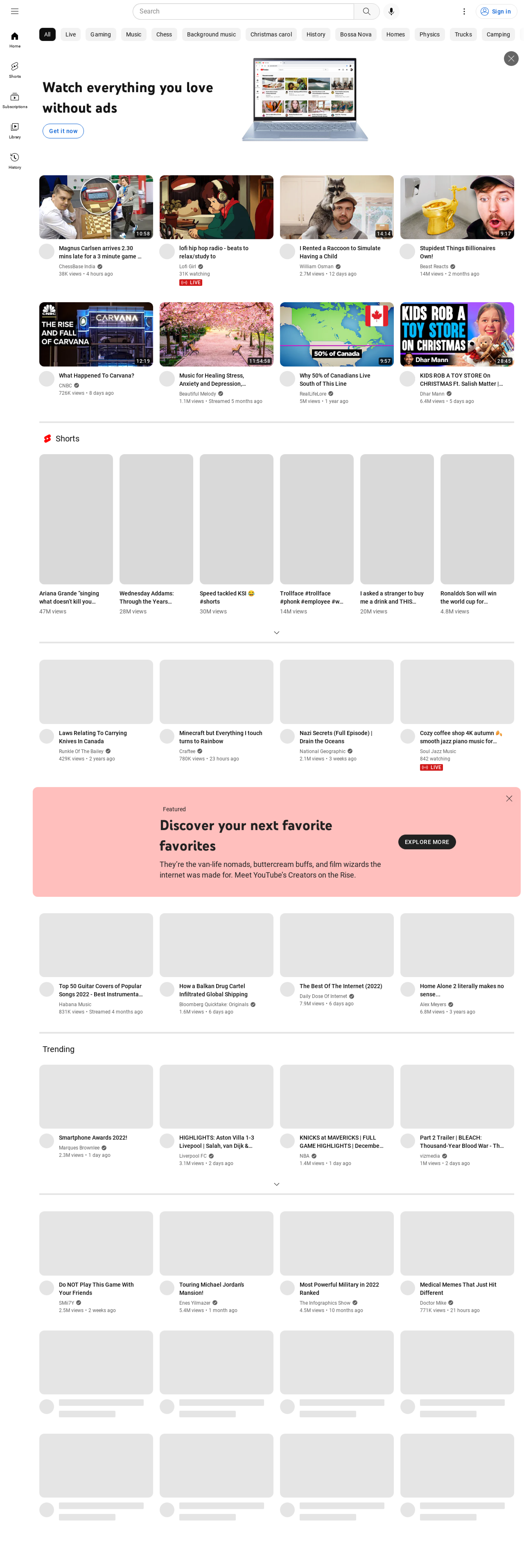
在此示例中，我们将渲染 YouTube 首页并抓取页面内容。通常，如果使用网页解锁器但不启用 Javascript 渲染，Youtube 首页会如下所示：

<div align="left"><figure><img src="/files/39bb459e70642974d5dfc7375a8ec33a360a5e14" alt=""><figcaption><p>未启用 JavaScript 渲染的 Youtube 页面示例</p></figcaption></figure></div>

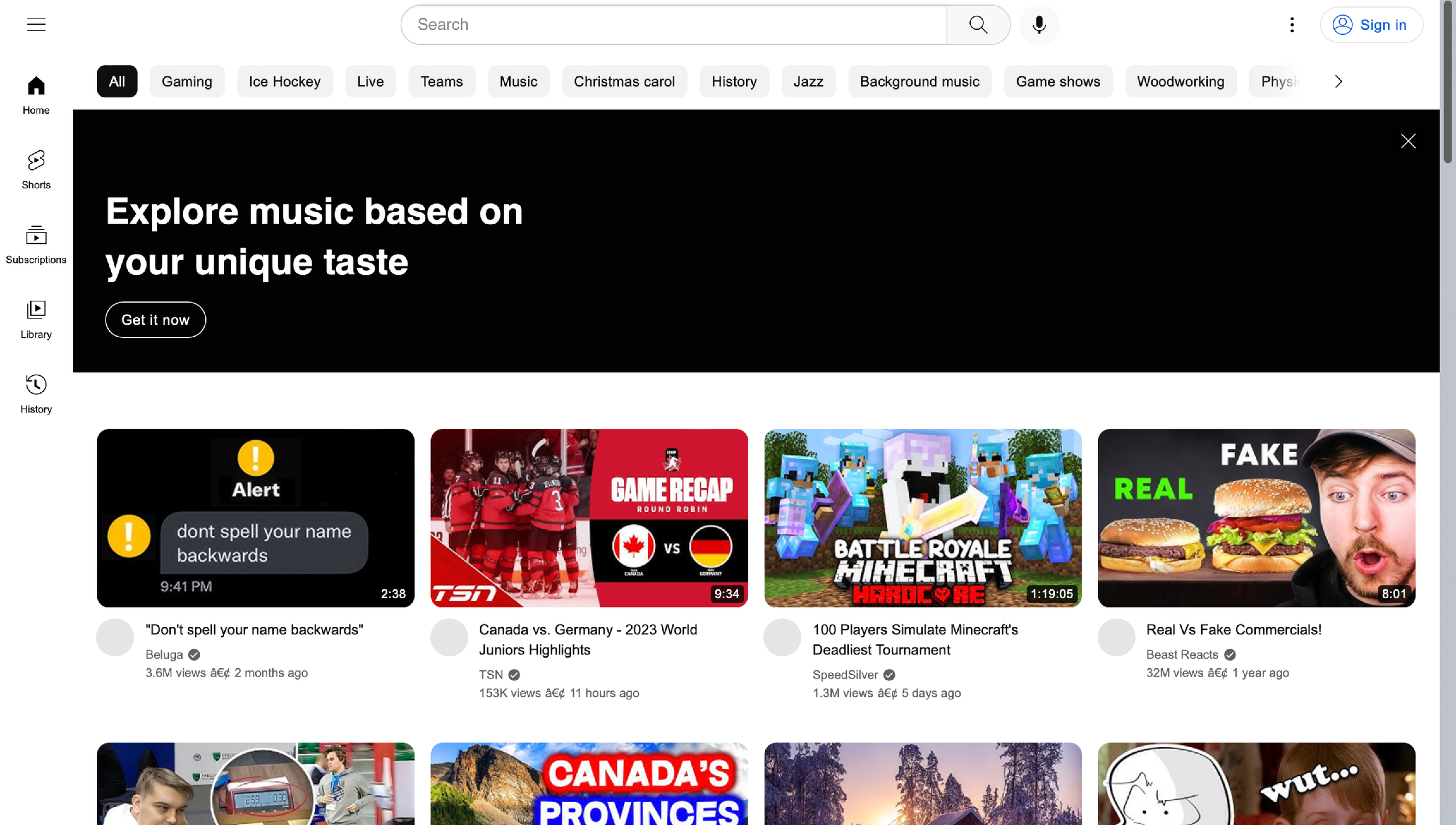
添加 `"X-Oxylabs-Render: html"` 标头（如下方示例所示）将启用 Javascript 渲染，并返回已渲染页面的 HTML：

{% tabs %}
{% tab title="cURL" %}

```shell
curl -k -v -x https://unblock.oxylabs.io:60000 \
-U 'USERNAME:PASSWORD' \
'https://youtube.com' \
-H 'X-Oxylabs-Render: html'
```

{% endtab %}

{% tab title="Python" %}

```python
import requests

# 在此处使用您的网页解锁器凭据。
USERNAME, PASSWORD = 'YOUR_USERNAME', 'YOUR_PASSWORD'

# 定义代理字典。
代理 = {
  'http': f'http://{USERNAME}:{PASSWORD}@unblock.oxylabs.io:60000',
  'https': f'https://{USERNAME}:{PASSWORD}@unblock.oxylabs.io:60000',
}

headers = {
    'X-Oxylabs-Render': 'html'
}

response = requests.get(
    'https://youtube.com',
    verify=False,  # 需要忽略证书
    代理=代理,
    headers=headers,
)

# Print result page to stdout
print(response.text)

# Save returned HTML to result.html file
with open('result.html', 'w') as f:
    f.write(response.text)
```

{% endtab %}

{% tab title="Node.js" %}

```javascript
import fetch from 'node-fetch';
import { HttpsProxyAgent } from 'https-proxy-agent';

const username = 'YOUR_USERNAME';
const password = 'YOUR_PASSWORD';

const agent = new HttpsProxyAgent(
  `https://${username}:${password}@unblock.oxylabs.io:60000`
);

// We recommend accepting our certificate instead of allowing insecure (http) traffic
process.env['NODE_TLS_REJECT_UNAUTHORIZED'] = 0;

const headers = {
   'X-Oxylabs-Render': 'html',
}

const response = await fetch('https://youtube.com', {
  method: 'get',
  headers: headers,
  agent: agent,
});

console.log(await response.text());
```

{% endtab %}

{% tab title="PHP" %}

```php
<?php
$ch = curl_init();

curl_setopt($ch, CURLOPT_URL, 'https://youtube.com');
curl_setopt($ch, CURLOPT_RETURNTRANSFER, 1);
curl_setopt($ch, CURLOPT_PROXY, 'https://unblock.oxylabs.io:60000');
curl_setopt($ch, CURLOPT_PROXYUSERPWD, 'YOUR_USERNAME' . ':' . 'YOUR_PASSWORD');
curl_setopt($ch, CURLOPT_SSL_VERIFYPEER, false);
curl_setopt($ch, CURLOPT_SSL_VERIFYHOST, false);

curl_setopt_array($ch, [
    CURLOPT_HTTPHEADER  => [
        'X-Oxylabs-Render: html'
    ]
]);

$result = curl_exec($ch);
echo $result;

if (curl_errno($ch)) {
    echo 'Error:' . curl_error($ch);
}
curl_close($ch);
```

{% endtab %}

{% tab title="Golang" %}

```go
package main

import (
	"crypto/tls"
	"fmt"
	"io/ioutil"
	"net/http"
	"net/url"
)

func main() {
	const Username = "YOUR_USERNAME"
	const Password = "YOUR_PASSWORD"

	proxyUrl, _ := url.Parse(
		fmt.Sprintf(
			"https://%s:%s@unblock.oxylabs.io:60000",
			Username,
			Password,
		),
	)
	customTransport := &http.Transport{Proxy: http.ProxyURL(proxyUrl)}

	// We recommend accepting our certificate instead of allowing insecure (http) traffic
	customTransport.TLSClientConfig = &tls.Config{InsecureSkipVerify: true}

	client := &http.Client{Transport: customTransport}
	request, _ := http.NewRequest("GET",
		"https://youtube.com",
		nil,
	)
	
	// 添加自定义 Cookie
        request.Header.Add("X-Oxylabs-Render", "html")
        
	request.SetBasicAuth(Username, Password)
	response, _ := client.Do(request)

	responseText, _ := ioutil.ReadAll(response.Body)
	fmt.Println(string(responseText))
}

```

{% endtab %}

{% tab title="C#" %}

```csharp
using System;
using System.Net;
using System.Net.Http;
using System.Threading.Tasks;

namespace OxyApi
{
    class Program
    {
        static async Task Main(string[] args)
        {
            var webProxy = new WebProxy
            {
                Address = new Uri("https://unblock.oxylabs.io:60000"),
                BypassProxyOnLocal = false,
                UseDefaultCredentials = false,

                Credentials = new NetworkCredential(
                userName: "YOUR_USERNAME",
                password: "YOUR_PASSWORD"
                )
            };

            var httpClientHandler = new HttpClientHandler
            {
                Proxy = webProxy,
            };

            // We recommend accepting our certificate instead of allowing insecure (http) traffic
            httpClientHandler.ClientCertificateOptions = ClientCertificateOption.Manual;
            httpClientHandler.ServerCertificateCustomValidationCallback =
                (httpRequestMessage, cert, cetChain, policyErrors) =>
                {
                    return true;
                };


            var client = new HttpClient(handler: httpClientHandler, disposeHandler: true);
            
            // 添加自定义标头
            client.DefaultRequestHeaders.Add("X-Oxylabs-Render", "html");
            
            Uri baseUri = new Uri("https://youtube.com");
            client.BaseAddress = baseUri;

            var requestMessage = new HttpRequestMessage(HttpMethod.Get, "");

            var response = await client.SendAsync(requestMessage);
            var contents = await response.Content.ReadAsStringAsync();

            Console.WriteLine(contents);
        }
    }
}
```

{% endtab %}

{% tab title="Java" %}

```java
package org.example;

import org.apache.hc.client5.http.auth.AuthScope;
import org.apache.hc.client5.http.auth.CredentialsProvider;
import org.apache.hc.client5.http.classic.methods.HttpGet;
import org.apache.hc.client5.http.config.RequestConfig;
import org.apache.hc.client5.http.impl.auth.CredentialsProviderBuilder;
import org.apache.hc.client5.http.impl.classic.CloseableHttpClient;
import org.apache.hc.client5.http.impl.classic.HttpClients;
import org.apache.hc.client5.http.impl.io.PoolingHttpClientConnectionManagerBuilder;
import org.apache.hc.client5.http.ssl.NoopHostnameVerifier;
import org.apache.hc.client5.http.ssl.SSLConnectionSocketFactoryBuilder;
import org.apache.hc.client5.http.ssl.TrustAllStrategy;
import org.apache.hc.core5.http.HttpHost;
import org.apache.hc.core5.http.io.entity.EntityUtils;
import org.apache.hc.core5.http.message.StatusLine;
import org.apache.hc.core5.ssl.SSLContextBuilder;

import java.util.Arrays;
import java.util.Properties;


public class Main {

    public static void main(final String[] args)throws Exception {
        final CredentialsProvider credsProvider = CredentialsProviderBuilder.create()
                .add(new AuthScope("unblock.oxylabs.io", 60000), "USERNAME", "PASSWORD".toCharArray())
                .build();
        final HttpHost target = new HttpHost("https", "youtube.com", 443);
        final HttpHost proxy = new HttpHost("https", "unblock.oxylabs.io", 60000);
        try (final CloseableHttpClient httpclient = HttpClients.custom()
                .setDefaultCredentialsProvider(credsProvider)
                .setProxy(proxy)
                // We recommend accepting our certificate instead of allowing insecure (http) traffic
                .setConnectionManager(PoolingHttpClientConnectionManagerBuilder.create()
                        .setSSLSocketFactory(SSLConnectionSocketFactoryBuilder.create()
                                .setSslContext(SSLContextBuilder.create()
                                        .loadTrustMaterial(TrustAllStrategy.INSTANCE)
                                        .build())
                                .setHostnameVerifier(NoopHostnameVerifier.INSTANCE)
                                .build())
                        .build())
                .build()) {

            final RequestConfig config = RequestConfig.custom()
                    .build();
            final HttpGet request = new HttpGet("/");
            request.addHeader("X-Oxylabs-Render","html");
            request.setConfig(config);

            System.out.println("Executing request " + request.getMethod() + " " + request.getUri() +
                    " via " + proxy + " headers: " + Arrays.toString(request.getHeaders()));

            httpclient.execute(target, request, response -> {
                System.out.println("----------------------------------------");
                System.out.println(request + "->" + new StatusLine(response));
                EntityUtils.consume(response.getEntity());
                return null;
            });
        }
    }
}
```

{% endtab %}
{% endtabs %}

在浏览器中打开的 HTML 文件应如下所示：

<figure><img src="/files/c53f46270fbfe3442e342d958c92a487c38351ed" alt=""><figcaption></figcaption></figure>

**获取完整渲染页面的截图**

若要获取 PNG 格式的截图而不是页面 HTML，则必须提供 `"X-Oxylabs-Render: png"` 标头。&#x20;

{% tabs %}
{% tab title="cURL" %}

```shell
curl -k -v -x https://unblock.oxylabs.io:60000 \
-U 'USERNAME:PASSWORD' \
'https://youtube.com' \
-H 'X-Oxylabs-Render: png' > rendered_page.png
```

{% endtab %}

{% tab title="Python" %}

```python
import requests

# 在此处使用您的网页解锁器凭据。
USERNAME, PASSWORD = 'YOUR_USERNAME', 'YOUR_PASSWORD'

# 定义代理字典。
代理 = {
  'http': f'http://{USERNAME}:{PASSWORD}@unblock.oxylabs.io:60000',
  'https': f'https://{USERNAME}:{PASSWORD}@unblock.oxylabs.io:60000',
}

headers = {
    'X-Oxylabs-Render': 'png'
}

response = requests.get(
    'https://youtube.com',
    verify=False,  # 需要忽略证书
    代理=代理,
    headers=headers,
)

# 将截图保存为 PNG 文件
with open('rendered_page.png', 'wb') as f:
  f.write(response.content)
```

{% endtab %}

{% tab title="Node.js" %}

```javascript
import fs from 'fs';
import fetch from 'node-fetch';
import { HttpsProxyAgent } from 'https-proxy-agent';

const username = 'YOUR_USERNAME';
const password = 'YOUR_PASSWORD';

const agent = new HttpsProxyAgent(
  `https://${username}:${password}@unblock.oxylabs.io:60000`
);

// We recommend accepting our certificate instead of allowing insecure (http) traffic
process.env['NODE_TLS_REJECT_UNAUTHORIZED'] = 0;

const headers = {
   'X-Oxylabs-Render': 'png',
}

await fetch('https://youtube.com', {
  method: 'get',
  headers: headers,
  agent: agent,
}).then(res => 
  res.body.pipe(fs.createWriteStream('./rendered_page.png'))
  );

console.log('Image was saved');
```

{% endtab %}

{% tab title="PHP" %}

```php
<?php
$ch = curl_init();

curl_setopt($ch, CURLOPT_URL, 'https://youtube.com');
curl_setopt($ch, CURLOPT_RETURNTRANSFER, 1);
curl_setopt($ch, CURLOPT_PROXY, 'https://unblock.oxylabs.io:60000');
curl_setopt($ch, CURLOPT_PROXYUSERPWD, 'YOUR_USERNAME' . ':' . 'YOUR_PASSWORD');
curl_setopt($ch, CURLOPT_SSL_VERIFYPEER, false);
curl_setopt($ch, CURLOPT_SSL_VERIFYHOST, false);

curl_setopt_array($ch, [
    CURLOPT_HTTPHEADER  => [
        'X-Oxylabs-Render: png'
    ]
]);

$result = curl_exec($ch);

if (curl_errno($ch)) {
    echo 'Error:' . curl_error($ch);
}
curl_close ($ch);

if(file_exists('rendered_page.png')){
    unlink('rendered_page.png');
}
$fp = fopen('rendered_page.png','wb');
fwrite($fp, $result);
fclose($fp);

```

{% endtab %}

{% tab title="Golang" %}

```go
package main

import (
	"crypto/tls"
	"fmt"
	"io/ioutil"
	"net/http"
	"net/url"
)

func main() {
	const Username = "YOUR_USERNAME"
	const Password = "YOUR_PASSWORD"

	proxyUrl, _ := url.Parse(
		fmt.Sprintf(
			"https://%s:%s@unblock.oxylabs.io:60000",
			Username,
			Password,
		),
	)
	customTransport := &http.Transport{Proxy: http.ProxyURL(proxyUrl)}

	// We recommend accepting our certificate instead of allowing insecure (http) traffic
	customTransport.TLSClientConfig = &tls.Config{InsecureSkipVerify: true}

	client := &http.Client{Transport: customTransport}
	request, _ := http.NewRequest("GET",
		"https://youtube.com",
		nil,
	)
	
	// 添加自定义 Cookie
        request.Header.Add("X-Oxylabs-Render", "png")
        
	request.SetBasicAuth(Username, Password)
	response, _ := client.Do(request)
	
	responseData, _ := ioutil.ReadAll(response.Body)
	response.Body.Close()
	ioutil.WriteFile("rendered_page.png", responseData, 0666)

	log.Println("Image was saved")
}

```

{% endtab %}

{% tab title="C#" %}

<pre class="language-csharp"><code class="lang-csharp">using System;
using System.Net;
using System.Net.Http;
using System.Drawing;
using System.IO;
using System.Threading.Tasks;

namespace OxyApi
{
    class Program
    {
        static async Task Main(string[] args)
        {
            var webProxy = new WebProxy
            {
                Address = new Uri("https://unblock.oxylabs.io:60000"),
                BypassProxyOnLocal = false,
                UseDefaultCredentials = false,

                Credentials = new NetworkCredential(
                userName: "YOUR_USERNAME",
                password: "YOUR_PASSWORD"
                )
            };

            var httpClientHandler = new HttpClientHandler
            {
                Proxy = webProxy,
            };

            // We recommend accepting our certificate instead of allowing insecure (http) traffic
            httpClientHandler.ClientCertificateOptions = ClientCertificateOption.Manual;
            httpClientHandler.ServerCertificateCustomValidationCallback =
                (httpRequestMessage, cert, cetChain, policyErrors) =>
                {
                    return true;
                };


            var client = new HttpClient(handler: httpClientHandler, disposeHandler: true);
            
            // 添加自定义标头
            client.DefaultRequestHeaders.Add("X-Oxylabs-Render", "png");
            
            Uri baseUri = new Uri("https://youtube.com");
            client.BaseAddress = baseUri;

            var requestMessage = new HttpRequestMessage(HttpMethod.Get, "");

            var response = await client.SendAsync(requestMessage);
<strong>            byte[] bytes = await response.Content.ReadAsByteArrayAsync();
</strong>
            using (Image image = Image.FromStream(new MemoryStream(bytes)))
            {
                image.Save("rendered_page.png");
            }
        }
    }
}
</code></pre>

{% endtab %}

{% tab title="Java" %}

```java
package org.example;

import okhttp3.Authenticator;
import okhttp3.Credentials;
import okhttp3.OkHttpClient;
import okhttp3.Request;
import javax.net.ssl.*;
import java.net.InetSocketAddress;
import java.net.Proxy;
import java.util.concurrent.TimeUnit;
import java.io.File;
import org.apache.commons.io.FileUtils;

public class App implements Runnable
{
    private static final String AUTHORIZATION_HEADER = "Proxy-Authorization";
    public static final String USERNAME = "YOUR_USERNAME";
    public static final String PASSWORD = "YOUR_PASSWORD";

    public void run() {
        Authenticator authenticator = (route, response) -> {
            String credential = Credentials.basic(USERNAME, PASSWORD);

            return response
                    .request()
                    .newBuilder()
                    .header(AUTHORIZATION_HEADER, credential)
                    .build();
        };

        OkHttpClient.Builder builder = new OkHttpClient.Builder()
                .readTimeout(180, TimeUnit.SECONDS)
                .writeTimeout(180, TimeUnit.SECONDS);

        // We recommend accepting our certificate instead of allowing insecure (http) traffic
        this.disableSSLCertificateChecking(builder);

        Proxy proxy = new Proxy(Proxy.Type.HTTP, new InetSocketAddress("unblock.oxylabs.io", 60000));
        OkHttpClient client = builder
                .proxy(proxy)
                .proxyAuthenticator(authenticator)
                .build();

        var request = new Request.Builder()
                .url("https://youtube.com")
                .addHeader("X-Oxylabs-Render", "png")
                .get()
                .build();

        try (var response = client.newCall(request).execute()) {
            assert response.body() != null;
            okhttp3.ResponseBody body = response.body();
            if (body != null) {
                byte[] bytes = body.bytes();
                FileUtils.writeByteArrayToFile(new File("rendered_page.png"), bytes);
            }
        } catch (Exception exception) {
            exception.printStackTrace();
            System.exit(1);
        }

        System.exit(0);
    }

    private void disableSSLCertificateChecking(OkHttpClient.Builder builder) {
        TrustManager[] trustManagers = new TrustManager[]{
                new X509TrustManager() {
                    @Override
                    public java.security.cert.X509Certificate[] getAcceptedIssuers() {
                        return new java.security.cert.X509Certificate[]{};
                    }

                    @Override
                    public void checkServerTrusted(java.security.cert.X509Certificate[] x509Certificates, String authType) {
                    }

                    @Override
                    public void checkClientTrusted(java.security.cert.X509Certificate[] x509Certificates, String authType) {
                    }
                }
        };

        try {
            HttpsURLConnection.setDefaultHostnameVerifier((s, sslSession) -> true);
            SSLContext sslContext = SSLContext.getInstance("TLS");
            sslContext.init(null, trustManagers, new java.security.SecureRandom());
            HttpsURLConnection.setDefaultSSLSocketFactory(sslContext.getSocketFactory());

            builder.sslSocketFactory(sslContext.getSocketFactory(), (X509TrustManager) trustManagers[0]);
        } catch (Exception exception) {
            exception.printStackTrace();
            System.exit(1);
        }

        builder.hostnameVerifier((hostname, session) -> true);
    }

    public static void main(String[] args) {
        new Thread(new App()).start();
    }
}

```

{% endtab %}
{% endtabs %}

响应将包含图像的原始字节，可保存为 PNG 格式，并像下面的示例一样打开：

<figure><img src="/files/567f46d27be136a3ebde7904e7d40b4594101c6a" alt=""><figcaption><p>作为 PNG 格式截图的 Youtube 页面示例</p></figcaption></figure>

## 强制渲染特定页面

为了成功抓取，某些特定域名的页面类型由于其动态内容需要渲染。即使用户未明确设置，我们的系统也会自动对这些页面强制启用渲染。

{% hint style="warning" %}
请注意，渲染任务相比非渲染任务会消耗更多流量。
{% endhint %}

我们希望用户在抓取以下页面时充分了解这一点：

{% file src="/files/8f476b13b3dc64fd9f5984624acdc541e11ee2ce" %}

这种方式提供尽可能好的抓取体验，确保这些高难度页面的数据准确性和可靠性。&#x20;

如果您想禁用渲染，请发送不带值的 render 标头

```
X-oxylabs-render: 
```


---

# Agent Instructions
This documentation is published with GitBook. GitBook is the documentation platform designed so that both humans and AI agents can read, navigate, and reason over technical content effectively. Learn more at gitbook.com.

## Querying This Documentation
If you need additional information that is not directly available in this page, you can query the documentation dynamically by asking a question.

Perform an HTTP GET request on the current page URL with the `ask` query parameter:

```
GET https://developers.oxylabs.io/products/cn/web-unblocker/custom-browser-instructions/javascript-rendering.md?ask=<question>
```

The question should be specific, self-contained, and written in natural language.
The response will contain a direct answer to the question and relevant excerpts and sources from the documentation.

Use this mechanism when the answer is not explicitly present in the current page, you need clarification or additional context, or you want to retrieve related documentation sections.