> For the complete documentation index, see [llms.txt](https://developers.oxylabs.io/llms.txt). Markdown versions of documentation pages are available by appending `.md` to page URLs; this page is available as [Markdown](https://developers.oxylabs.io/products/cn/web-unblocker/custom-browser-instructions/browser-instructions-beta.md).
# 浏览器指令(Beta)
使用网页解锁器时,您可以在创建任务时定义浏览器指令,以实现顺畅的数据采集流程。
使用自定义浏览器指令时,您可以定义自己的特定浏览器指令,这些指令会在渲染 JavaScript 时执行。
{% hint style="success" %}
生成 **自动生成浏览器指令** 在 [**网页爬虫API Playground**](https://dashboard.oxylabs.io/?route=/api-playground) 在 Oxylabs 控制面板中。设置浏览器操作、测试它们,并以 JSON 格式导出生成的指令。
{% endhint %}
## 如何使用?
要使用浏览器指令,请提供一组 `browser_instructions` 在创建任务时。
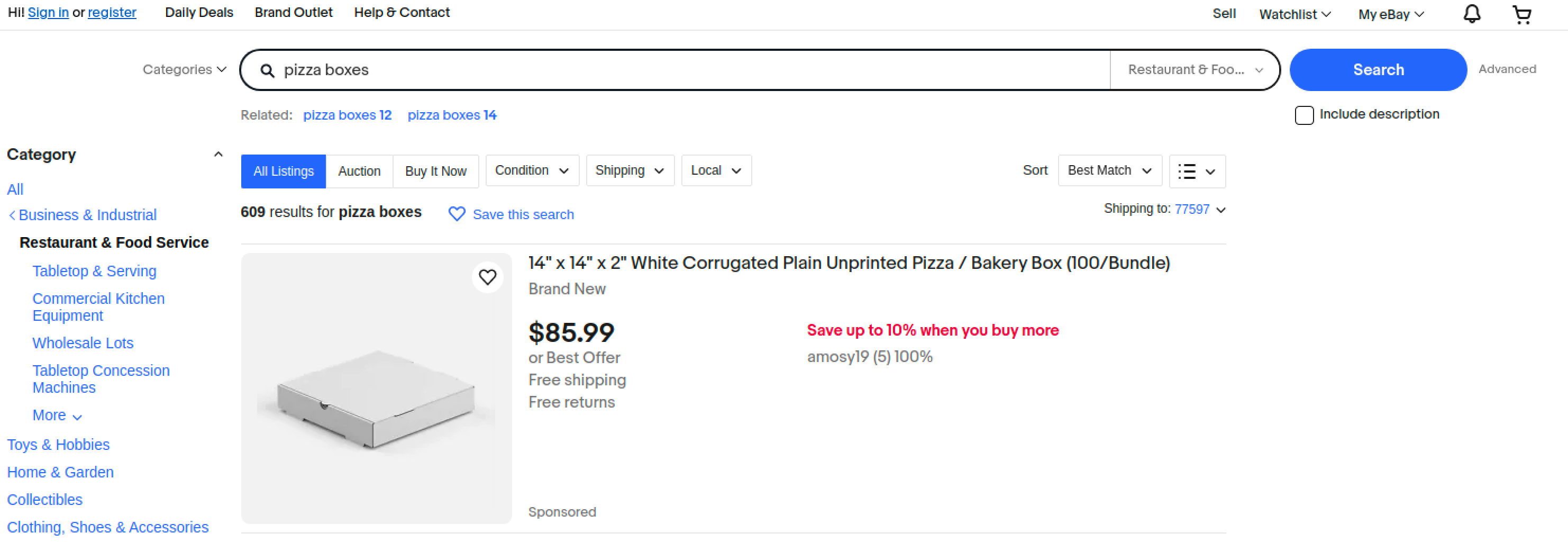
假设您想搜索术语 `披萨盒` 在网站中。
 示例任务参数如下:
{% code overflow="wrap" %}
```bash
curl -k -x https://unblock.oxylabs.io:60000 \
-U 'USERNAME:PASSWORD' \
'https://www.ebay.com' \
-H 'x-oxylabs-render: html' \
-H "x-oxylabs-browser-instructions: [{\"type\":\"input\",\"value\":\"pizza boxes\",\"selector\":{\"type\":\"xpath\",\"value\":\"\/\/input[@class='gh-tb ui-autocomplete-input']\"}},{\"type\":\"click\",\"selector\":{\"type\":\"xpath\",\"value\":\"\/\/input[@type='submit']\"}},{\"type\":\"wait\",\"wait_time_s\":5}]"
```
{% endcode %}
**步骤 1。** 您必须提供 `x-oxylabs-render: html` 参数。
**步骤 2。** 浏览器指令应在 `x-oxylabs-browser_instructions` 字段中描述。
{% hint style="info" %}
作为请求头值提供的浏览器指令必须经过 JSON 转义,并且不能包含多余空格。
{% endhint %}
上面的示例浏览器指令说明,其目标是输入搜索词 `披萨盒` 到搜索字段中,点击 `搜索` 按钮并等待 5 秒以加载内容。
抓取结果应如下所示:
```html
执行指令后的内容
```
抓取到的 HTML 应如下所示:
示例任务参数如下:
{% code overflow="wrap" %}
```bash
curl -k -x https://unblock.oxylabs.io:60000 \
-U 'USERNAME:PASSWORD' \
'https://www.ebay.com' \
-H 'x-oxylabs-render: html' \
-H "x-oxylabs-browser-instructions: [{\"type\":\"input\",\"value\":\"pizza boxes\",\"selector\":{\"type\":\"xpath\",\"value\":\"\/\/input[@class='gh-tb ui-autocomplete-input']\"}},{\"type\":\"click\",\"selector\":{\"type\":\"xpath\",\"value\":\"\/\/input[@type='submit']\"}},{\"type\":\"wait\",\"wait_time_s\":5}]"
```
{% endcode %}
**步骤 1。** 您必须提供 `x-oxylabs-render: html` 参数。
**步骤 2。** 浏览器指令应在 `x-oxylabs-browser_instructions` 字段中描述。
{% hint style="info" %}
作为请求头值提供的浏览器指令必须经过 JSON 转义,并且不能包含多余空格。
{% endhint %}
上面的示例浏览器指令说明,其目标是输入搜索词 `披萨盒` 到搜索字段中,点击 `搜索` 按钮并等待 5 秒以加载内容。
抓取结果应如下所示:
```html
执行指令后的内容
```
抓取到的 HTML 应如下所示:
 ## 获取浏览器资源
我们提供了一个用于获取浏览器资源的独立浏览器指令。
函数定义如下:
使用 `fetch_resource` 将使任务返回与所提供格式匹配的第一个 Fetch/XHR 资源,而不是目标 HTML。
假设我们想定位一个 GraphQL 资源,该资源会在浏览器中自然访问商品页面时被获取。我们将这样提供任务信息:
{% code overflow="wrap" %}
```bash
curl -k -x https://unblock.oxylabs.io:60000 \
-U 'USERNAME:PASSWORD' \
'https://www.example.com/product-page/123' \
-H 'x-oxylabs-render: html' \
-H "x-oxylabs-browser-instructions: [{\"type\": \"fetch_resource\",\"filter\": \"\/graphql\/product-info\/123\"}]"
```
{% endcode %}
这些指令将得到如下结果:
```html
{"product_id": 123, "description": "", "price": 456}
```
## 支持的浏览器指令列表
### 通用参数
下面定义的所有指令都使用一致的一组参数。参数如下。
#### `type`
* **类型**: `Enum["click", "input", "scroll", "scroll_to_bottom", "wait", "wait_for_element", "fetch_resource"]`
* **说明:** 浏览器指令类型。
#### `timeout_s`
* **类型**: `整数`
* **说明:** 如果未能在规定时间内完成,多久后跳过该操作。
* **限制**: 0 < `timeout_s` <= 60
* **默认值**: 5
#### `wait_time_s`
* **类型**: `整数`
* **说明:** 在执行下一步操作前等待多长时间。
* **限制**: 0 < `wait_time_s` <= 60
* **默认值**: 0
#### `on_error`
* **类型**: `Enum["error", "skip"]`
* **说明:** 用于指示当此指令失败时如何处理后续指令:
* `"error"`:停止浏览器指令的执行。
* `"skip"`:继续执行下一条指令。
* **默认值**: `"error"`
#### 通用参数示例
{% code overflow="wrap" %}
```bash
{\"type\": \"wait_for_element\", \"selector\": {\"type\": \"text\", \"value\": \"Load More Items\"},\"timeout_s\": 5, \"wait_time_s\": 2, \"on_error\": \"skip\"}
```
{% endcode %}
### 指令
#### `click`
* **描述**:点击某个元素并等待指定秒数。
* **参数:**
* `type: str = "click"`
* `selector: dict`
* `type: Enum["xpath", "css", "text"]`
* `value: str`
* **示例**:
{% code overflow="wrap" %}
```bash
{\"type\": \"click\",\"selector\": {\"type\": \"xpath\",\"value\": \"\/\/button\"}}
```
{% endcode %}
#### `input`
* **描述**:向选定元素输入文本。
* **参数:**
* `type: str = "input"`
* `selector: dict`
* `type: Enum["xpath", "css", "text"]`
* `value: str`
* `value: str`
* **示例:**
{% code overflow="wrap" %}
```bash
{\"type\": \"input\",\"selector\": {\"type\": \"xpath\",\"value\": \"\/\/input\"},\"value\": \"pizza boxes\"}
```
{% endcode %}
#### `scroll`
* **描述**:滚动指定像素数。
* **参数:**
* `type: str = "scroll"`
* `x: int`
* `y: int`
* **示例:**
```bash
{\"type\": \"scroll\",\"x\": 0,\"y\": 100}
```
#### `scroll_to_bottom`
* **描述**:向下滚动到底部,持续指定秒数。
* **参数:**
* `type: str = "scroll_to_bottom"`
* **示例**:
```bash
{\"type\": \"scroll_to_bottom\",\"timeout_s\": 10}
```
### `wait`
* **描述**:等待指定秒数。
* **参数:**
* `type: str = "wait"`
* **示例**:
```bash
{\"type\": \"wait\",\"wait_time_s\": 2}
```
#### `wait_for_element`
* **描述**:等待元素加载,持续指定秒数。
* **参数:**
* `type: str = "wait_for_element"`
* `selector: dict`
* `type: Enum["xpath", "css", "text"]`
* `value: str`
* **示例:**
{% code overflow="wrap" %}
```bash
{\"type\": \"wait_for_element\",\"selector\": {\"type\": \"text\",\"value\": \"Load More Items\"},\"timeout_s\": 5}
```
{% endcode %}
#### `fetch_resource`
{% hint style="warning" %}
该 `fetch_resource` 该指令必须是浏览器指令列表中的最后一条;后续任何指令都不会执行。
{% endhint %}
* **描述**:获取与所设模式匹配的第一个 Fetch/XHR 资源。
* **参数:**
* `type: str = "fetch_resource"`
* `filter: str(RegEx expression)`
* `on_error: Enum["error", "skip"]`
* **示例:**
```bash
{\"type\": \"fetch_resource\",\"filter\": \"\/graphql\/item\/\"}
```
### 指令验证
任何关于指令格式的不一致都会导致一个 `400` 状态码和相应的错误消息。
例如,载荷如下:
```bash
[{\"type\": \"unsupported-wait\",\"wait_time_s\": 5}]}]
```
将导致:
```json
{
"errors": {
"message": "不支持的操作类型 `unsupported-wait`,可从 'click,fetch_resource,input,scroll,scroll_to_bottom,wait,wait_for_element' 中选择"
}
}
```
## 状态码
请参见我们列出的响应代码 [**这里**](/products/cn/web-unblocker/response-codes.md).
---
# Agent Instructions
This documentation is published with GitBook. GitBook is the documentation platform designed so that both humans and AI agents can read, navigate, and reason over technical content effectively. Learn more at gitbook.com.
## Querying This Documentation
If you need additional information that is not directly available in this page, you can query the documentation by asking a question.
Perform an HTTP GET request on the following URL with the `ask` and `goal` query parameters:
```
GET https://developers.oxylabs.io/products/cn/web-unblocker/custom-browser-instructions/browser-instructions-beta.md?ask=&goal=
```
`ask` is the immediate question: it should be specific, self-contained, and written in natural language.
`goal` is what the user is ultimately trying to achieve, the reason they need the answer. Sharing it helps GitBook give you a better, more relevant answer. A goal is most helpful when it describes the outcome the user wants rather than restating the question. For example, with `ask=how do I create an API token`, a goal like `automate deployments from our CI pipeline` lets GitBook tailor the answer to that use case.
The response will contain a direct answer to the question and relevant excerpts and sources from the documentation.
Use this mechanism when the answer is not explicitly present in the current page, you need clarification or additional context, or you want to retrieve related documentation sections.
## 获取浏览器资源
我们提供了一个用于获取浏览器资源的独立浏览器指令。
函数定义如下:
使用 `fetch_resource` 将使任务返回与所提供格式匹配的第一个 Fetch/XHR 资源,而不是目标 HTML。
假设我们想定位一个 GraphQL 资源,该资源会在浏览器中自然访问商品页面时被获取。我们将这样提供任务信息:
{% code overflow="wrap" %}
```bash
curl -k -x https://unblock.oxylabs.io:60000 \
-U 'USERNAME:PASSWORD' \
'https://www.example.com/product-page/123' \
-H 'x-oxylabs-render: html' \
-H "x-oxylabs-browser-instructions: [{\"type\": \"fetch_resource\",\"filter\": \"\/graphql\/product-info\/123\"}]"
```
{% endcode %}
这些指令将得到如下结果:
```html
{"product_id": 123, "description": "", "price": 456}
```
## 支持的浏览器指令列表
### 通用参数
下面定义的所有指令都使用一致的一组参数。参数如下。
#### `type`
* **类型**: `Enum["click", "input", "scroll", "scroll_to_bottom", "wait", "wait_for_element", "fetch_resource"]`
* **说明:** 浏览器指令类型。
#### `timeout_s`
* **类型**: `整数`
* **说明:** 如果未能在规定时间内完成,多久后跳过该操作。
* **限制**: 0 < `timeout_s` <= 60
* **默认值**: 5
#### `wait_time_s`
* **类型**: `整数`
* **说明:** 在执行下一步操作前等待多长时间。
* **限制**: 0 < `wait_time_s` <= 60
* **默认值**: 0
#### `on_error`
* **类型**: `Enum["error", "skip"]`
* **说明:** 用于指示当此指令失败时如何处理后续指令:
* `"error"`:停止浏览器指令的执行。
* `"skip"`:继续执行下一条指令。
* **默认值**: `"error"`
#### 通用参数示例
{% code overflow="wrap" %}
```bash
{\"type\": \"wait_for_element\", \"selector\": {\"type\": \"text\", \"value\": \"Load More Items\"},\"timeout_s\": 5, \"wait_time_s\": 2, \"on_error\": \"skip\"}
```
{% endcode %}
### 指令
#### `click`
* **描述**:点击某个元素并等待指定秒数。
* **参数:**
* `type: str = "click"`
* `selector: dict`
* `type: Enum["xpath", "css", "text"]`
* `value: str`
* **示例**:
{% code overflow="wrap" %}
```bash
{\"type\": \"click\",\"selector\": {\"type\": \"xpath\",\"value\": \"\/\/button\"}}
```
{% endcode %}
#### `input`
* **描述**:向选定元素输入文本。
* **参数:**
* `type: str = "input"`
* `selector: dict`
* `type: Enum["xpath", "css", "text"]`
* `value: str`
* `value: str`
* **示例:**
{% code overflow="wrap" %}
```bash
{\"type\": \"input\",\"selector\": {\"type\": \"xpath\",\"value\": \"\/\/input\"},\"value\": \"pizza boxes\"}
```
{% endcode %}
#### `scroll`
* **描述**:滚动指定像素数。
* **参数:**
* `type: str = "scroll"`
* `x: int`
* `y: int`
* **示例:**
```bash
{\"type\": \"scroll\",\"x\": 0,\"y\": 100}
```
#### `scroll_to_bottom`
* **描述**:向下滚动到底部,持续指定秒数。
* **参数:**
* `type: str = "scroll_to_bottom"`
* **示例**:
```bash
{\"type\": \"scroll_to_bottom\",\"timeout_s\": 10}
```
### `wait`
* **描述**:等待指定秒数。
* **参数:**
* `type: str = "wait"`
* **示例**:
```bash
{\"type\": \"wait\",\"wait_time_s\": 2}
```
#### `wait_for_element`
* **描述**:等待元素加载,持续指定秒数。
* **参数:**
* `type: str = "wait_for_element"`
* `selector: dict`
* `type: Enum["xpath", "css", "text"]`
* `value: str`
* **示例:**
{% code overflow="wrap" %}
```bash
{\"type\": \"wait_for_element\",\"selector\": {\"type\": \"text\",\"value\": \"Load More Items\"},\"timeout_s\": 5}
```
{% endcode %}
#### `fetch_resource`
{% hint style="warning" %}
该 `fetch_resource` 该指令必须是浏览器指令列表中的最后一条;后续任何指令都不会执行。
{% endhint %}
* **描述**:获取与所设模式匹配的第一个 Fetch/XHR 资源。
* **参数:**
* `type: str = "fetch_resource"`
* `filter: str(RegEx expression)`
* `on_error: Enum["error", "skip"]`
* **示例:**
```bash
{\"type\": \"fetch_resource\",\"filter\": \"\/graphql\/item\/\"}
```
### 指令验证
任何关于指令格式的不一致都会导致一个 `400` 状态码和相应的错误消息。
例如,载荷如下:
```bash
[{\"type\": \"unsupported-wait\",\"wait_time_s\": 5}]}]
```
将导致:
```json
{
"errors": {
"message": "不支持的操作类型 `unsupported-wait`,可从 'click,fetch_resource,input,scroll,scroll_to_bottom,wait,wait_for_element' 中选择"
}
}
```
## 状态码
请参见我们列出的响应代码 [**这里**](/products/cn/web-unblocker/response-codes.md).
---
# Agent Instructions
This documentation is published with GitBook. GitBook is the documentation platform designed so that both humans and AI agents can read, navigate, and reason over technical content effectively. Learn more at gitbook.com.
## Querying This Documentation
If you need additional information that is not directly available in this page, you can query the documentation by asking a question.
Perform an HTTP GET request on the following URL with the `ask` and `goal` query parameters:
```
GET https://developers.oxylabs.io/products/cn/web-unblocker/custom-browser-instructions/browser-instructions-beta.md?ask=&goal=
```
`ask` is the immediate question: it should be specific, self-contained, and written in natural language.
`goal` is what the user is ultimately trying to achieve, the reason they need the answer. Sharing it helps GitBook give you a better, more relevant answer. A goal is most helpful when it describes the outcome the user wants rather than restating the question. For example, with `ask=how do I create an API token`, a goal like `automate deployments from our CI pipeline` lets GitBook tailor the answer to that use case.
The response will contain a direct answer to the question and relevant excerpts and sources from the documentation.
Use this mechanism when the answer is not explicitly present in the current page, you need clarification or additional context, or you want to retrieve related documentation sections.