# 云存储

网页爬虫API 任务结果存储在我们的存储中。您可以通过 `GET`获取 `/results` 端点来从我们的存储中获取您的结果。

作为一种替代方案，我们可以将结果上传到您的云存储。这样一来，您无需发起额外请求来获取结果——所有内容都会直接进入您的存储桶。

{% hint style="info" %}
云存储集成仅适用于 [**Push-Pull**](/products/cn/web-scraper-api/integration-methods/push-pull.md) 集成方式。
{% endhint %}

目前，我们支持以下云存储服务：

* [**Google Cloud Storage**](#google-cloud-storage)
* [**Amazon S3**](#amazon-s3)
* [**Alibaba Cloud Object Storage Service (OSS)**](#alibaba-cloud-object-storage-service-oss)
* [**BytePlus Torch Object Storage (TOS)**](#byteplus-tos)
* [**其他兼容 S3 的存储**](#other-s3-compatible-storage)

如果您想使用其他类型的存储，请联系您的客户经理以讨论该功能的交付时间表。

上传路径如下所示： `YOUR_BUCKET_NAME/job_ID.json`。您可以在提交任务后从我们收到的响应中找到任务 ID。

#### 输入

<table><thead><tr><th>参数</th><th width="187.33333333333331">描述</th><th>有效值</th></tr></thead><tbody><tr><td><code>storage_type</code></td><td>您的云存储类型。</td><td><p><code>gcs</code> （Google Cloud Storage）；</p><p><code>s3</code> （AWS S3）； <code>tos</code> （BytePlus TOS）； </p><p><code>s3_compatible</code> （任何兼容 S3 的存储）。</p></td></tr><tr><td><code>storage_url</code></td><td>您的云存储 bucket 名称 / URL。</td><td><ul><li>任意 <code>s3</code> , <code>gcs</code> ，或 <code>tos</code> bucket 名称；</li><li>任意 <code>兼容 S3 的</code> 存储 URL。</li></ul></td></tr></tbody></table>

## **Google Cloud Storage**

下面的负载会让 网页爬虫API 抓取 `https://example.com` 并将结果放入 Google Cloud Storage bucket 中。

```json
{
    "source": "universal",
    "query": "https://example.com",
    "storage_type": "gcs",
    "storage_url": "bucket_name/path"
}
```

要将您的任务结果上传到您的 Google Cloud Storage bucket，请按如下所示为我们的服务设置特殊权限：

{% stepper %}
{% step %}
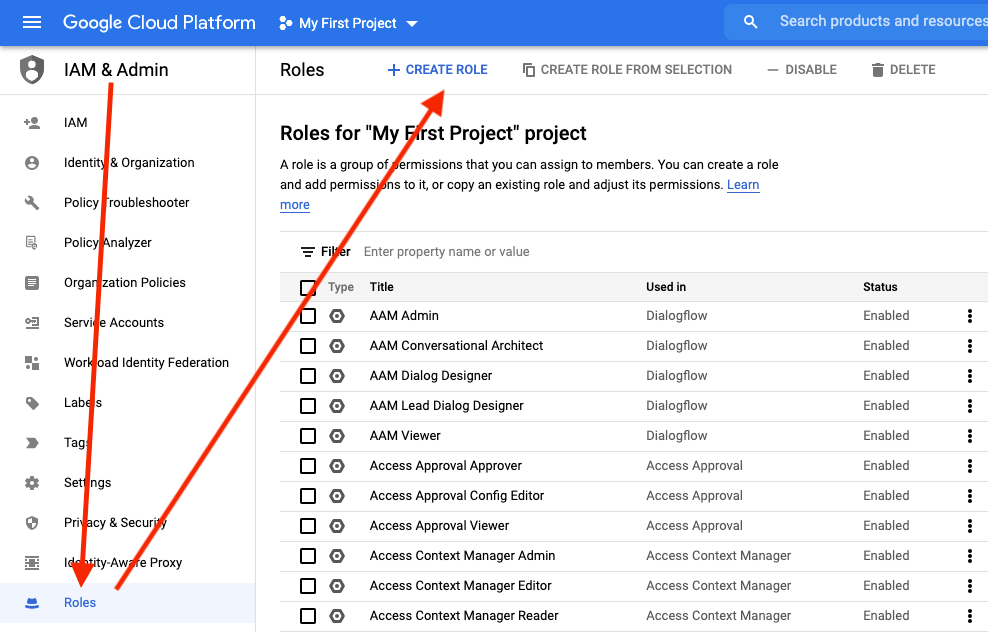
**创建一个自定义角色**

<div align="left"><img src="/files/0a169ed64253c085374ee4ffbe7e9971c8c7bc6c" alt=""></div>
{% endstep %}

{% step %}
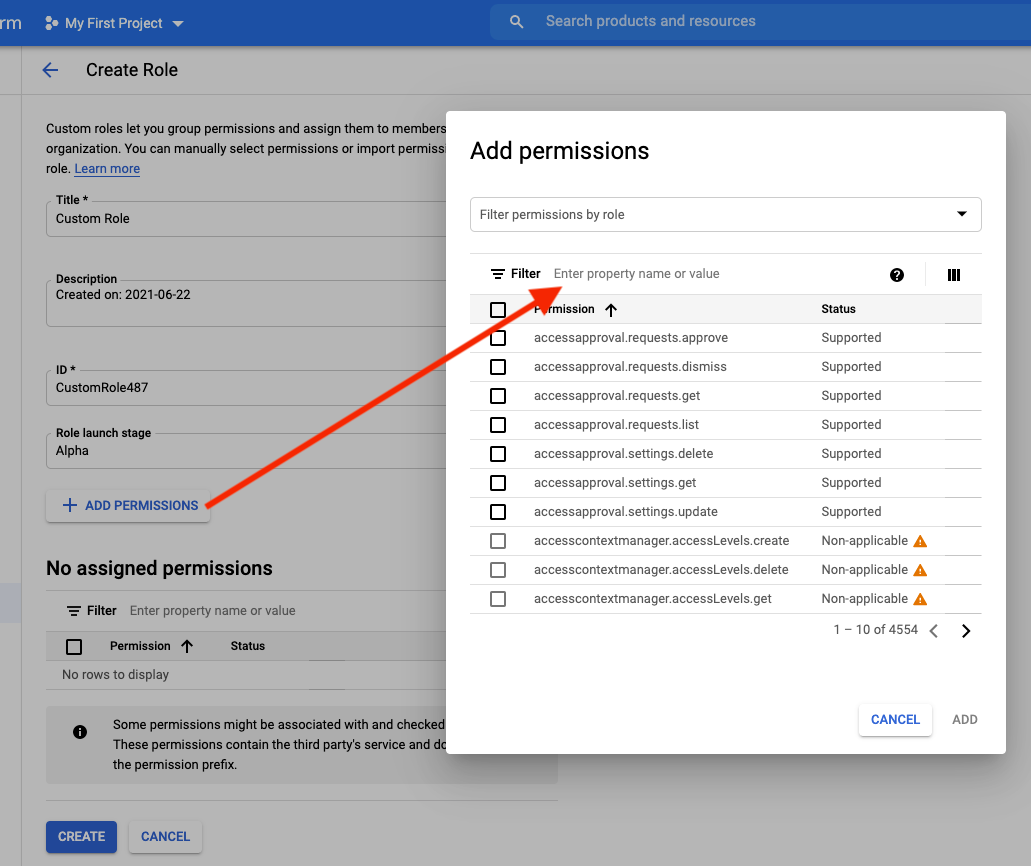
**添加 `storage.objects.create` 权限**

<div align="left"><img src="/files/1a516f86ce7f76c30681823f2b0147aaad70c99b" alt=""></div>
{% endstep %}

{% step %}
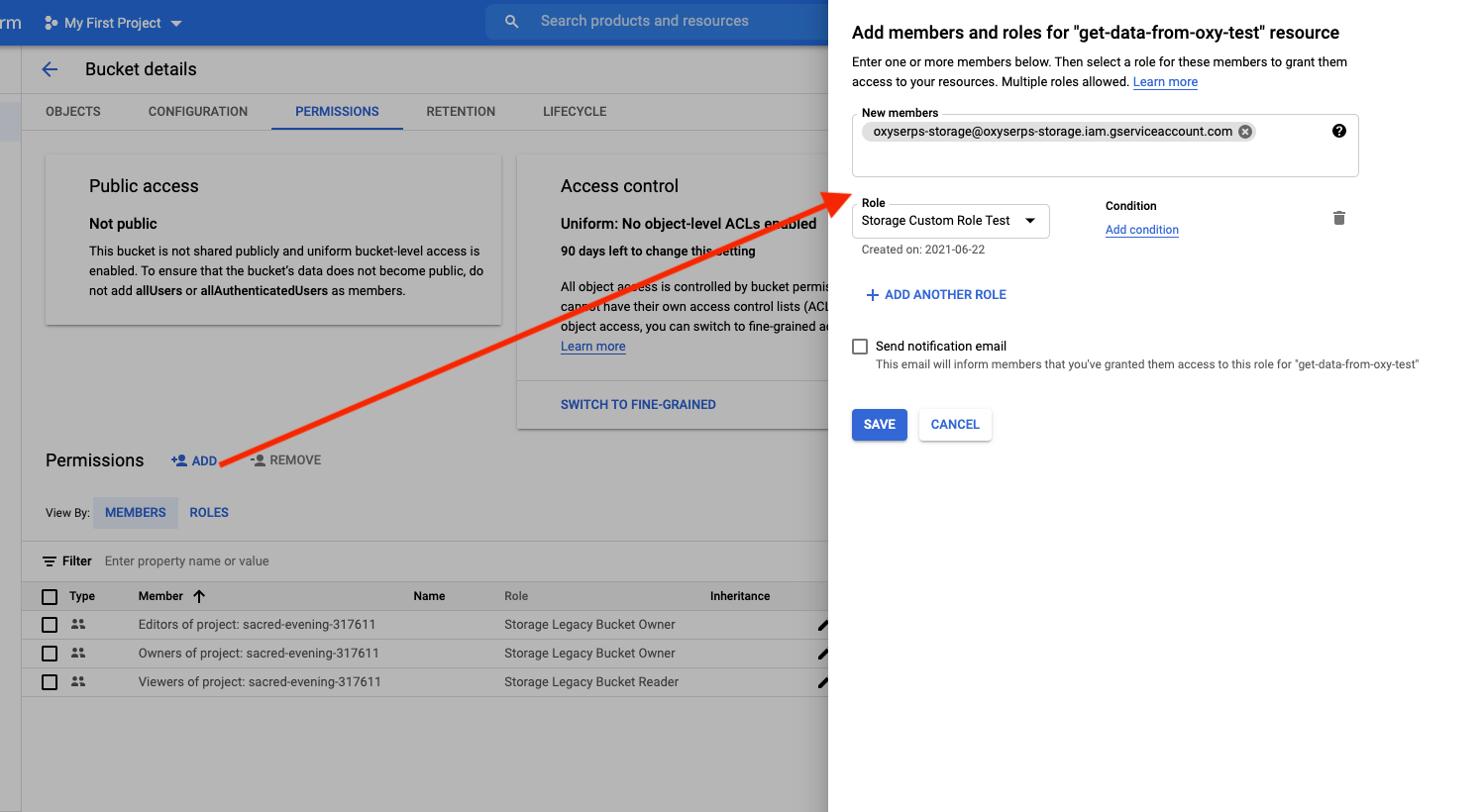
**将其分配给 Oxylabs**

在 **新成员** 字段中，输入以下 **Oxylabs 服务账号电子邮件**:

```
oxyserps-storage@oxyserps-storage.iam.gserviceaccount.com
```

<div align="left"><img src="/files/05f825aed9dc2a698562ade46da9835022cad400" alt=""></div>
{% endstep %}
{% endstepper %}

## **Amazon S3**

下面的负载会让 网页爬虫API 抓取 `https://example.com` 并将结果放入 Amazon S3 bucket 中。

```json
{
    "source": "universal",
    "query": "https://example.com",
    "storage_type": "s3",
    "storage_url": "bucket_name/path"
}
```

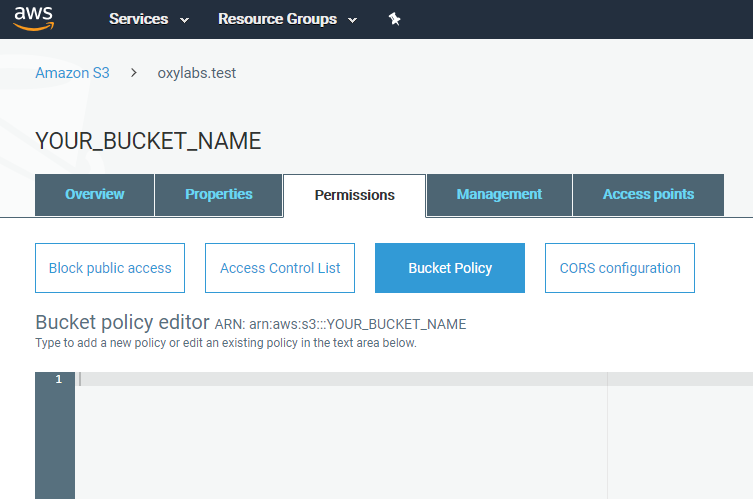
要将您的任务结果上传到您的 Amazon S3 bucket，请为我们的服务设置访问权限。为此，请前往 [**https://s3.console.aws.amazon.com/**](https://s3.console.aws.amazon.com/) → **`S3`** → **`存储`** → **`Bucket 名称`**` ``（如果您还没有，请新建一个）` → **`权限`** → **`Bucket 策略`**.

<div align="left"><img src="/files/a85daea10b5984fdcdc7d8a2b1e524dbe1af5859" alt=""></div>

您可以在下方或代码示例区域中找到附带的 bucket 策略。

{% file src="/files/613dde66c560f9f6d82fc2197d93ed7699fd0ddf" %}
s3 bucket 策略
{% endfile %}

不要忘记更改 `YOUR_BUCKET_NAME`下的 bucket 名称。此策略允许我们向您的 bucket 写入、为您提供对已上传文件的访问权限，并获知 bucket 的位置。

```json
{
    "Version": "2012-10-17",
    "Id": "Policy1577442634787",
    "Statement": [
        {
            "Sid": "Stmt1577442633719",
            "Effect": "Allow",
            "Principal": {
                "AWS": "arn:aws:iam::324311890426:user/oxylabs.s3.uploader"
            },
            "Action": "s3:GetBucketLocation",
            "Resource": "arn:aws:s3:::YOUR_BUCKET_NAME"
        },
        {
            "Sid": "Stmt1577442633719",
            "Effect": "Allow",
            "Principal": {
                "AWS": "arn:aws:iam::324311890426:user/oxylabs.s3.uploader"
            },
            "Action": [
                "s3:PutObject",
                "s3:PutObjectAcl"
            ],
            "Resource": "arn:aws:s3:::YOUR_BUCKET_NAME/*"
        }
    ]
}
```

## Alibaba Cloud Object Storage Service (OSS)

下面的负载会让 网页爬虫API 抓取 `https://example.com` 并将结果放入 Alibaba Cloud OSS bucket 中。&#x20;

```json
{
    "source": "universal",
    "query": "https://example.com",
    "storage_type": "s3_compatible",
    "storage_url": "https://ACCESS_KEY_ID:ACCESS_KEY_SECRET@BUCKET_NAME.oss-REGION.aliyuncs.com/FOLDER_NAME"
}
```

### 构建存储 URL <a href="#forming-the-storage-url" id="forming-the-storage-url"></a>

存储 URL 格式：

```http
https://ACCESS_KEY_ID:ACCESS_KEY_SECRET@BUCKET_NAME.oss-REGION.aliyuncs.com/FOLDER_NAME
```

{% hint style="warning" %}
目前， **我们无法上传到根 bucket**。请为您的上传提供一个具体的文件夹名称。
{% endhint %}

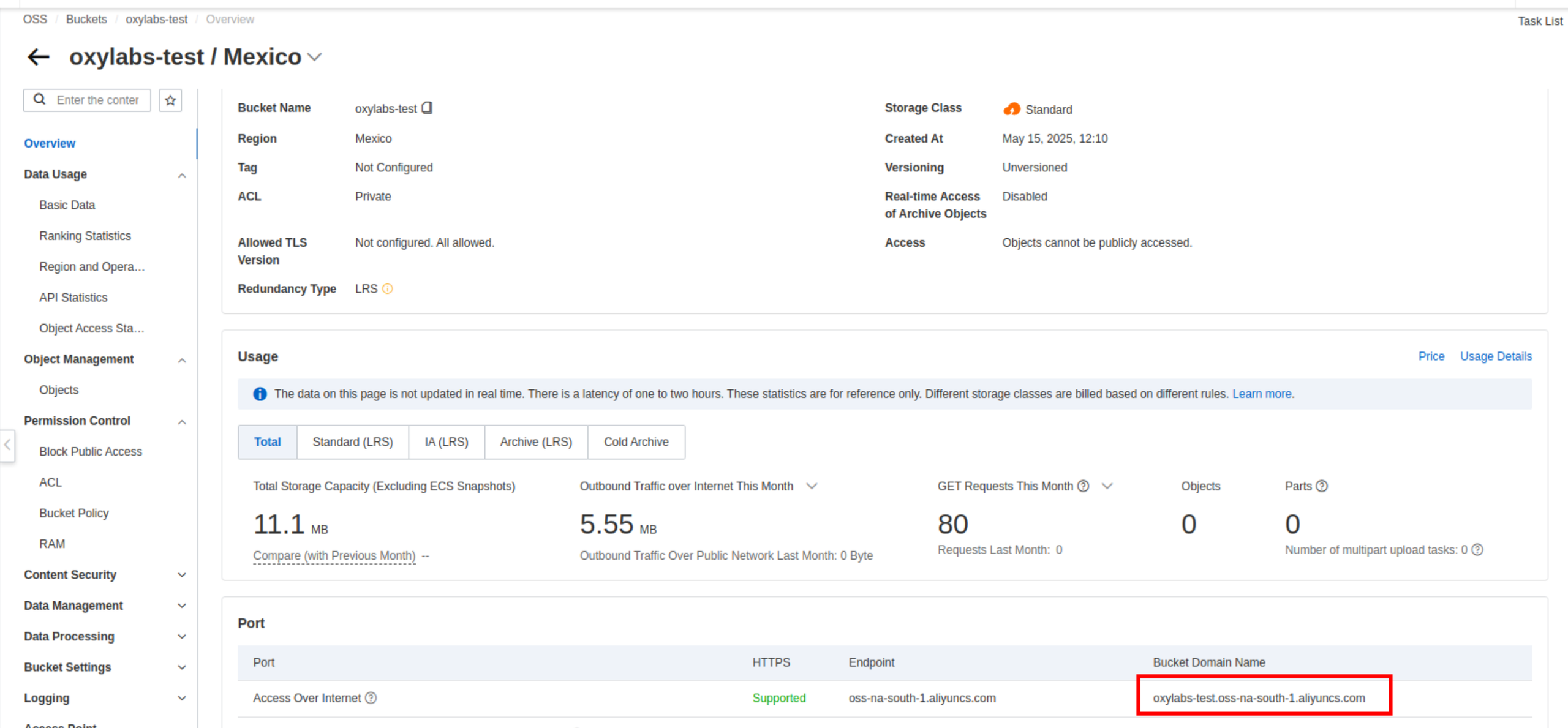
您可以在这里找到您的 bucket 的 `BUCKET_NAME` 和 `oss-REGION` ：

<figure><img src="/files/e8433d5b4e58afb43f17d9d60aa26fa61fc19cb4" alt=""><figcaption></figcaption></figure>

### 创建 Access Key 和 Secret <a href="#creating-the-access-key-and-secret" id="creating-the-access-key-and-secret"></a>

为了通过 Alibaba OSS 使用兼容 S3 的接口，您必须创建 `ACCESS_KEY_ID` 和 `ACCESS_KEY_SECRET` ，如下所示。更多信息，请参见 [![](https://img.alicdn.com/tfs/TB1ugg7M9zqK1RjSZPxXXc4tVXa-32-32.png)如何使用 Amazon S3 SDK 访问 OSS](https://www.alibabacloud.com/help/en/oss/developer-reference/use-amazon-s3-sdks-to-access-oss?spm=a2c63.p38356.0.i1).

{% stepper %}
{% step %}
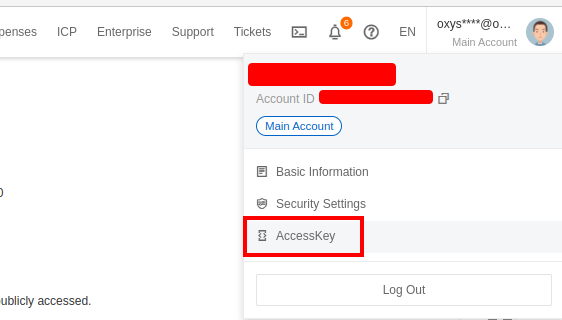
前往 **AccessKey 账户菜单**

<div align="left"><figure><img src="/files/81a4913122ae796ddde8107c9cbcec294bd736cc" alt="" width="422"><figcaption></figcaption></figure></div>
{% endstep %}

{% step %}
登录 **RAM console**

通过 [RAM console](https://ram.console.aliyun.com/) 使用 **Alibaba Cloud 账户** 或 **RAM User** （具有管理权限）进行访问。
{% endstep %}

{% step %}
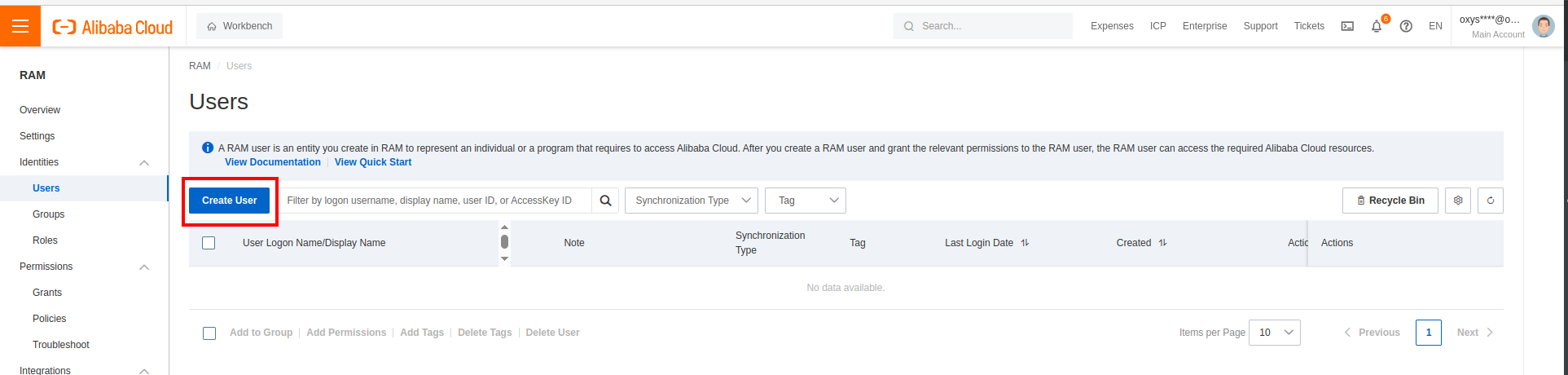
前往 **身份** → **用户** 在左侧导航窗格中
{% endstep %}

{% step %}
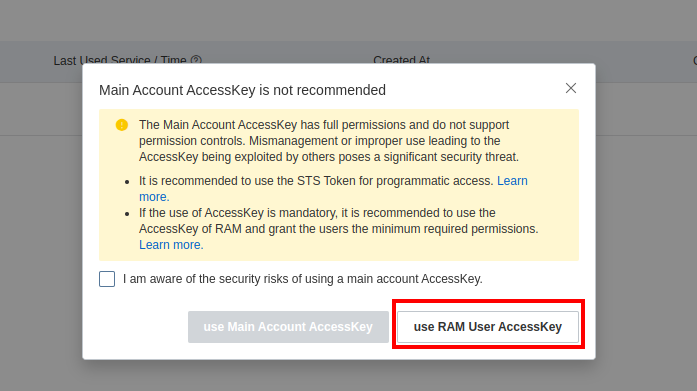
选择 **创建用户** 并使用 **RAM User AccessKey：**

<div align="left"><figure><img src="/files/5d223d61dbb44b9bab154282ebc86e23dbb215fd" alt=""><figcaption></figcaption></figure></div>

<div align="left"><figure><img src="/files/8e7c5b0c96a83d57d7610404e6abacb3021e2725" alt=""><figcaption></figcaption></figure></div>
{% endstep %}

{% step %}
**向 RAM User 授予权限**

新创建的 RAM User 没有任何权限。您必须向 RAM User 授予 **AliyunOSSFullAccess** 权限。然后，RAM User 就可以访问所需的 Alibaba Cloud 资源。更多信息，请参见 [向 RAM User 授予权限](https://www.alibabacloud.com/help/en/ram/user-guide/grant-permissions-to-the-ram-user#task-187800).

<div align="left"><figure><img src="/files/c11541442ed1a4ce4bc012b9b86147e2d72bfa75" alt=""><figcaption></figcaption></figure></div>
{% endstep %}

{% step %}
获取您的 **AccessKey ID** 和 **AccessKey Secret**

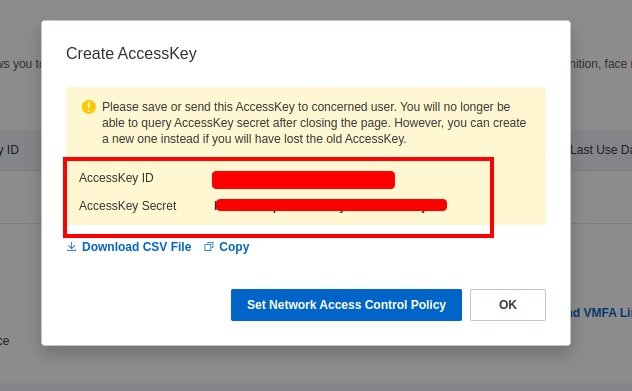
授予权限后，返回到 **身份验证** 部分，并在 **Access Key** 部分中，选择 **创建 AccessKey**。选择为 **第三方服务**创建一个 Access Key `ACCESS_KEY_ID` 和 `ACCESS_KEY_SECRET`，然后您将看到一个，之后可在请求中使用它。
{% endstep %}
{% endstepper %}

### Alibaba OSS 速率限制 <a href="#alibaba-oss-ratelimits" id="alibaba-oss-ratelimits"></a>

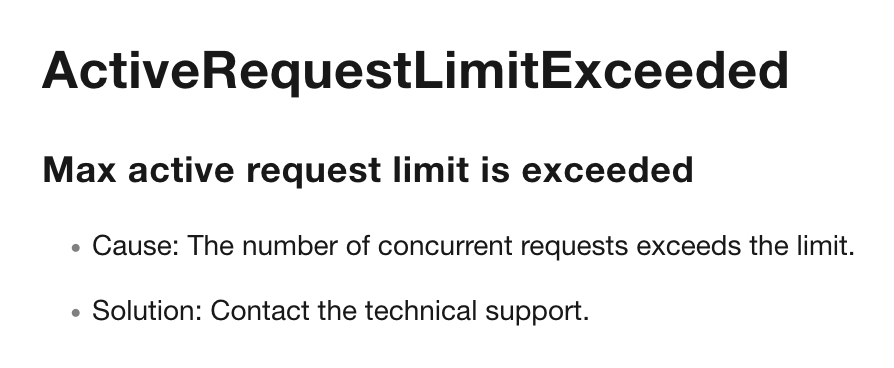
在并发上传到 Alibaba OSS 时，可能会触及其账户/bucket 速率限制，上传将开始因以下错误而超时：

<div align="left"><figure><img src="/files/cfb3ab1998872f8887ada7e1d303e7c186445d3f" alt="" width="563"><figcaption></figcaption></figure></div>

在这种情况下，请联系 Alibaba OSS 支持以提高您的 OSS 速率限制。

## BytePlus TOS

您可以将抓取结果直接上传到 BytePlus Torch Object Storage (TOS) bucket。

要成功连接，您将需要：

* 一个正确配置的 TOS bucket。
* 您的 access key 和 secret key。
* 一个兼容 S3 的端点。

您可以在 BytePlus 官方 [文档](https://docs.byteplus.com/en/docs/tos/docs-region-and-endpoint).

### 示例

以下负载将抓取 `https://example.com` 并将结果上传到您的 TOS bucket。

```json
{
    "source": "universal",
    "query": "https://example.com",
    "storage_type": "tos",
    "storage_url": "https://access_key:secret_key@endpoint/bucket_name/path"
}
```

### 参数 <a href="#docs-internal-guid-dbfc45c7-7fff-9754-b71a-bacb24e2ac54" id="docs-internal-guid-dbfc45c7-7fff-9754-b71a-bacb24e2ac54"></a>

<table><thead><tr><th width="166">参数</th><th width="165">可用值</th><th>描述</th></tr></thead><tbody><tr><td><code>storage_type</code></td><td><code>tos</code></td><td>指定 BytePlus TOS 作为存储提供商。</td></tr><tr><td><code>storage_url</code></td><td>URL 字符串</td><td>指向您的 TOS bucket 的已认证 URL（见下方格式）。</td></tr></tbody></table>

### 存储 URL 格式

该 `storage_url` 必须使用您的 TOS 凭证和 bucket 详细信息构建。

```bash
https://access_key:secret_key@endpoint/bucket_name/path
```

| 组成部分          | 描述                                             |
| ------------- | ---------------------------------------------- |
| `access_key`  | 您的 BytePlus access key ID。                     |
| `secret_key`  | 您的 BytePlus secret access key。                 |
| `endpoint`    | 区域特定的端点（例如， `tos-cn-hongkong.bytepluses.com`). |
| `bucket_name` | 目标 bucket 名称。                                  |
| `path`        | *（可选）* bucket 的特定文件夹路径。                        |

{% hint style="warning" %}
如果您的 Access Key 或 Secret Key 包含特殊字符（例如 `/`, `+`，或 `=`），它们 **必须进行 URL 编码** 然后再构建该字符串。
{% endhint %}

### 输出文件命名

Oxylabs 会根据任务详情为上传的对象自动生成文件名：

* **HTML/内容：** `{query_id}_{timestamp}.html`
* **解析后的数据：** `{query_id}_results.json`

文件将在您的 bucket 中以下位置可访问： `tos://{bucket_name}/{path}/{filename}`

## 其他兼容 S3 的存储

如果您希望将结果传送到兼容 S3 的存储位置，您必须在负载中的 `ACCESS_KEY:SECRET` 认证字符串包含在 `storage_url` 值中：

```json
{
    "source": "universal",
    "url": "https://example.com",
    "storage_type": "s3_compatible",
    "storage_url": "https://ACCESS_KEY:SECRET@s3.oxylabs.io/my-videos"
}
```


---

# Agent Instructions: Querying This Documentation

If you need additional information that is not directly available in this page, you can query the documentation dynamically by asking a question.

Perform an HTTP GET request on the current page URL with the `ask` query parameter:

```
GET https://developers.oxylabs.io/products/cn/web-scraper-api/features/result-processing-and-storage/cloud-storage.md?ask=<question>
```

The question should be specific, self-contained, and written in natural language.
The response will contain a direct answer to the question and relevant excerpts and sources from the documentation.

Use this mechanism when the answer is not explicitly present in the current page, you need clarification or additional context, or you want to retrieve related documentation sections.