# 电商本地化

我们的 网页爬虫API 提供本地化选项，可检索针对特定配送和门店位置定制的电商数据。本页说明如何使用 `geo_location` 和 `store_id` 以及其他参数，使结果与本地可用性和偏好保持一致。

#### 网站特定本地化支持

<table data-full-width="false"><thead><tr><th width="160">域</th><th width="187">地理位置 / 配送 </th><th>门店 ID</th><th>履约类型</th></tr></thead><tbody><tr><td><a href="#allegro"><strong>Allegro</strong></a></td><td>-</td><td>支持</td><td>-</td></tr><tr><td><a href="#amazon"><strong>Amazon</strong></a></td><td>邮政编码或 <a href="https://en.wikipedia.org/wiki/ISO_3166-1_alpha-2"><strong>2 位国家代码</strong></a></td><td>-</td><td>-</td></tr><tr><td><a href="#bestbuy"><strong>Bestbuy</strong></a></td><td>邮政编码</td><td>支持</td><td>支持</td></tr><tr><td><a href="#bodega-aurrera"><strong>Bodega Aurrerá</strong></a></td><td>邮政编码</td><td>支持</td><td>支持</td></tr><tr><td><a href="#etsy"><strong>Etsy</strong></a></td><td>邮政编码或 <a href="https://en.wikipedia.org/wiki/ISO_3166-1_alpha-2"><strong>2 位国家代码</strong></a></td><td>支持</td><td>-</td></tr><tr><td><a href="#kroger"><strong>Kroger</strong></a></td><td>邮政编码</td><td>支持</td><td>支持</td></tr><tr><td><a href="#lowes"><strong>Lowes</strong></a></td><td>邮政编码</td><td>支持</td><td>-</td></tr><tr><td><a href="#menards"><strong>Menards</strong></a></td><td>-</td><td>支持</td><td>-</td></tr><tr><td><a href="#publix"><strong>Publix</strong></a></td><td>-</td><td>支持</td><td>-</td></tr><tr><td><a href="#sams-club"><strong>Sam's Club</strong></a></td><td>邮政编码</td><td>支持</td><td>支持</td></tr><tr><td><a href="#target"><strong>Target</strong></a></td><td>邮政编码</td><td>支持</td><td>支持</td></tr><tr><td><a href="#the-home-depot"><strong>The Home Depot</strong></a></td><td>邮政编码或国家</td><td>支持</td><td>-</td></tr><tr><td><a href="#walmart"><strong>Walmart</strong></a></td><td>邮政编码或国家</td><td>支持</td><td>支持</td></tr></tbody></table>

## Allegro

将结果适配到特定门店、配送地点等。

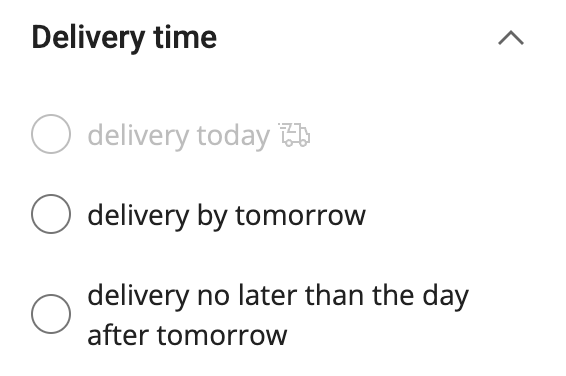
<figure><img src="/files/d4d5aad03bf6d2077076a265847524c3ddb7b0be" alt="" width="283"><figcaption><p>设置 delivery_type</p></figcaption></figure>

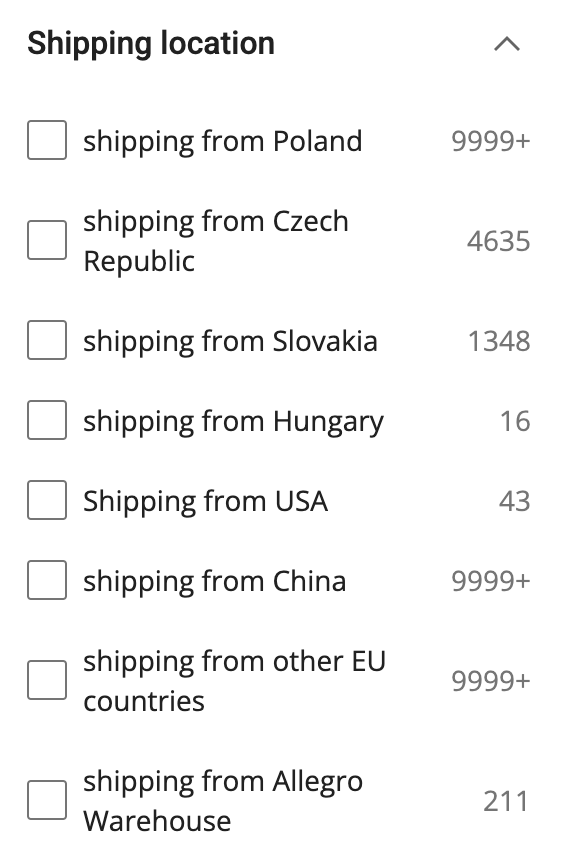
<figure><img src="/files/652471765ac1b57fd1d2bd15ac9fff6fdf9e15c3" alt="" width="283"><figcaption><p>设置 shipping_from 位置</p></figcaption></figure>

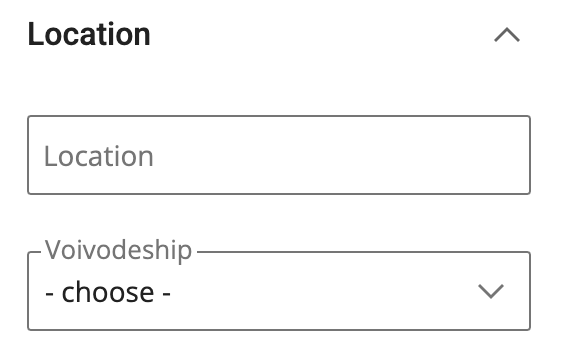
<figure><img src="/files/05c2b668883a13692d48ee359632f700f51a44ae" alt="" width="284"><figcaption><p>设置 store_city 和 store_region</p></figcaption></figure>

<table><thead><tr><th width="212">参数</th><th width="235">描述</th><th>类型</th></tr></thead><tbody><tr><td><code>delivery_time</code></td><td>设置配送日期。可用值为： <code>one_day</code>, <code>two_days</code>.</td><td>字符串</td></tr><tr><td><code>shipping_from</code></td><td>设置发货来源位置。可用值为： <code>china</code>, <code>czech</code>, <code>poland</code>, <code>hungary,</code> <code>slovakia</code>, <code>eu_countries</code>, <code>allegro_warehouse</code>.</td><td>字符串</td></tr><tr><td><code>store_city</code></td><td>设置购物门店所在城市。</td><td>字符串</td></tr><tr><td><code>store_region</code></td><td><p>设置发货门店所在地区。可用值为： </p><pre class="language-json"><code class="lang-json"><strong>"lodz",
</strong>"opole",
"lublin",
"mazovia",
"silesia",
"lubuskie",
"podlaskie",
"pomerania",
"subcarpathia",
"lesser_poland",
"lower_silesia",
"greater_poland",
"warmia-masuria",
"west_pomerania",
"Świętokrzyskie",
"kuyavian-pomeranian"
</code></pre></td><td>字符串</td></tr></tbody></table>

## Amazon

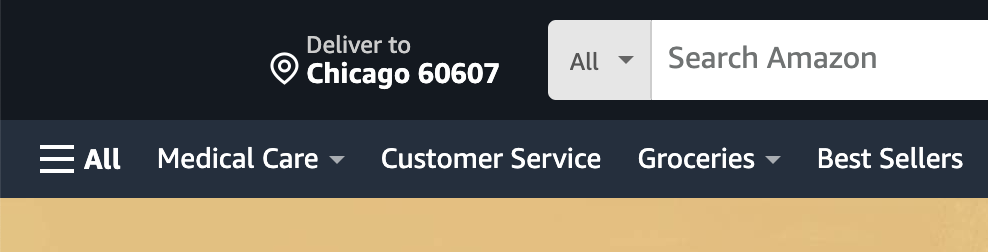
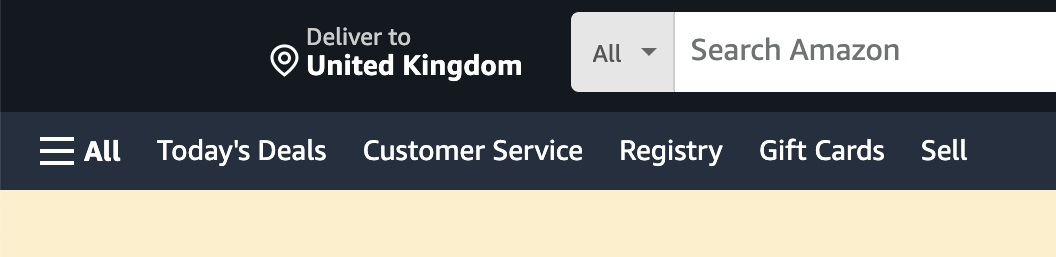
使用 `geo_location` 该参数会根据配送偏好自定义 Amazon 结果，如下方截图所示：

<div><figure><img src="/files/577a8ace6ebddbefba17a1f7648c867c67dd9195" alt=""><figcaption></figcaption></figure> <figure><img src="/files/5500e25644bb610a185ecb31962b84b467edd39a" alt=""><figcaption></figcaption></figure></div>

对于大多数 Amazon 域名，你可以设置 `geo_location` 为邮政编码或 [**2 位国家代码**](https://en.wikipedia.org/wiki/ISO_3166-1_alpha-2)。除了少数情况外，这种方法涵盖两种主要本地化场景：

* 使用 **邮政编码** 用于位置 **在** 所在市场的国家。示例配对：
  * `{ "domain": "com", "geo_location": "90210" }`
  * `{ "domain": "co.uk", "geo_location": "W105LT" }`
* 使用 **2 位国家代码** 用于位置 **目标市场** 所在市场的国家。示例配对：
  * `{ "domain": "com", "geo_location": "LT" }`
  * `{ "domain": "de", "geo_location": "US" }`

#### 例外情况

* **不支持的域名**: `cn`, `com.tr`, `com.be`，以及 `nl` 不支持自定义配送地点。
* **特殊情况**:
  * **澳大利亚（`com.au`)**：仅接受澳大利亚邮编。
  * **阿联酋（`.ae`)**：接受阿联酋城市名称作为 `geo_location`，例如 `"geo_location": "Abu Dhabi"`，或 2 位国家代码。

{% hint style="info" %}
您还可以在抓取 Google 时使用 `domain` 和 `locale` 在抓取 Amazon 时使用的参数。了解更多 [**这里**](/products/cn/web-scraper-api/features/localization/domain-locale.md).
{% endhint %}

## Bestbuy

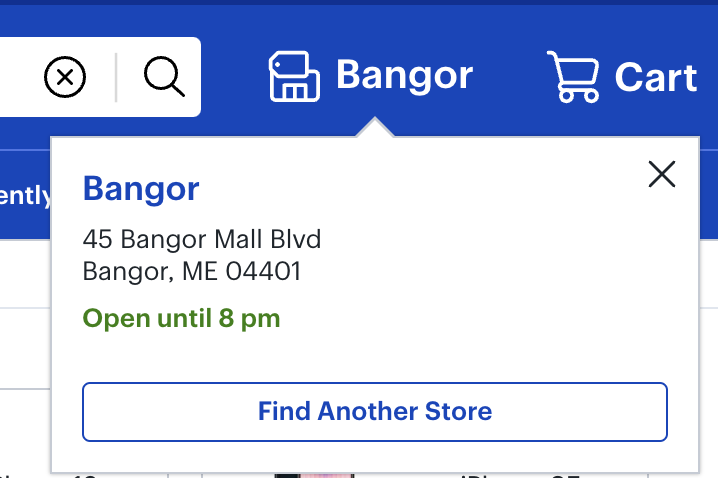
将结果适配到特定域名、门店、配送地点。

<figure><img src="/files/07b18412b7bdb3373c48d3ca485f056206506fa5" alt="" width="359"><figcaption></figcaption></figure>

<table><thead><tr><th width="212">参数</th><th width="180">描述</th><th width="135">默认值</th><th>类型</th></tr></thead><tbody><tr><td><code>domain</code></td><td>Bestbuy 的域名本地化。可用值： <code>com</code>, <code>ca</code>.</td><td><code>com</code></td><td>字符串</td></tr><tr><td><code>store_id</code></td><td>指定一个门店。 </td><td>-</td><td>整数</td></tr><tr><td><code>delivery_zip</code></td><td>设置配送邮编位置。</td><td>-</td><td>字符串</td></tr><tr><td><code>fulfillment_type</code></td><td>指定订单履约方式。可用值： <code>pickup</code>, <code>shipping</code></td><td>-</td><td>字符串</td></tr></tbody></table>

## Etsy

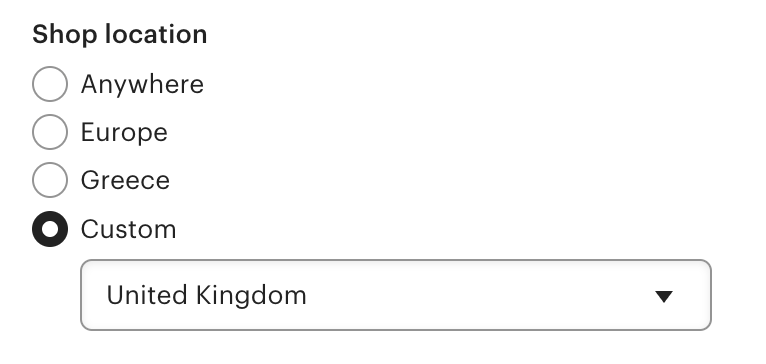
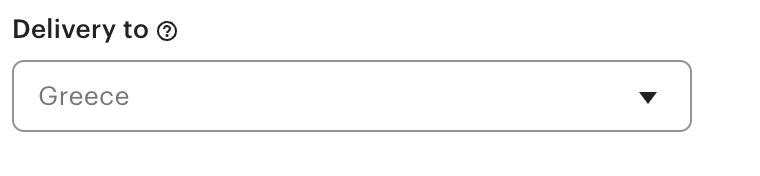
将结果适配到特定门店、配送地点。

<figure><img src="/files/10d7138f6d5fae9c737de2f1b678b88f6bb7e9f7" alt="" width="375"><figcaption><p>选择 store_id</p></figcaption></figure>

<figure><img src="/files/ad2d1f247ebf8b4b8239575eb337341a74706579" alt="" width="375"><figcaption><p>选择配送地点</p></figcaption></figure>

<table><thead><tr><th width="212">参数</th><th width="235">描述</th><th>类型</th></tr></thead><tbody><tr><td><code>store_id</code></td><td>指定一个门店。 </td><td>整数</td></tr><tr><td><code>geo_location</code></td><td>设置配送至位置。</td><td>字符串</td></tr></tbody></table>

## Kroger

<figure><img src="https://lh7-qw.googleusercontent.com/docsz/AD_4nXfi8IRb24cfhIXTYy2QciLGDjD2S3EOlCGo_W8ipSDjNXBJI8N1cN1a03TB-5sQTGzMwk5RZkrxoPkXWBGP0GhZo12T10V8jA38BpsKP4f7hPKUD_DQtwaNSmPAT-XkzdR4kAJbWHqVHKDmTytH5DBFXbGm?key=O8OPhOCjl3FoIrVoMiPnpgh4" alt="" width="375"><figcaption></figcaption></figure>

<table><thead><tr><th width="210">参数</th><th width="172.33333333333331">描述</th><th width="153">默认值</th><th>依赖项</th></tr></thead><tbody><tr><td><code>store_id</code></td><td>指定一个门店。请查看可用值 <a href="https://files.gitbook.com/v0/b/gitbook-x-prod.appspot.com/o/spaces%2FzrXw45naRpCZ0Ku9AjY1%2Fuploads%2FAsihGe7hi5yfauUl2JIQ%2Fkroger_stores.csv?alt=media&#x26;token=40fcd869-1845-47c5-bf76-96e74cabf685"><strong>这里</strong></a>。ID 必须以 '0' 开头。</td><td>-</td><td>当  <code>fulfillment_type</code> 设置为 <code>pickup</code> 或 <code>in_store</code>.</td></tr><tr><td><code>delivery_zip</code></td><td>指定配送地点邮政编码。</td><td>-</td><td>当  <code>fulfillment_type</code> 设置为 <code>delivery</code>.</td></tr><tr><td><code>fulfillment_type</code></td><td>指定订单履约方式。可用值： <code>pickup</code>, <code>delivery</code>, <code>in_store</code>.</td><td><code>pickup</code> （如果只提供 <code>store_id</code> ）</td><td>时需要 <code>store_id</code> 用于 <code>pickup</code> 和 <code>in_store</code>，或 <code>delivery_zip</code> 用于 <code>delivery</code>.</td></tr></tbody></table>

**依赖关系说明：**

* `pickup` 和 `in_store` 值使用 `store_id` 参数来确定正确的门店。
* `delivery` 使用 `delivery_zip` 参数来指定配送地点。
* 如果只提供 `store_id` ，并且未指定 `fulfillment_type` ，默认类型为 `pickup`.

{% hint style="warning" %}
如果 `fulfillment_type` 和 `store_id`/`delivery_zip` 组合无效（Kroger 不支持），抓取页面将返回 404 状态。
{% endhint %}

{% hint style="warning" %}
请注意，与其他来源不同，Kroger 源不需要上下文参数来设置门店 ID。
{% endhint %}

## Lowe's

<figure><img src="/files/d760d19ceef4d741a6e9d67a51b3e19373c582e0" alt=""><figcaption><p>选择 store_id</p></figcaption></figure>

<table><thead><tr><th width="210">参数</th><th width="342.8841145833333">描述</th><th>类型</th></tr></thead><tbody><tr><td><code>store_id</code></td><td>指定一个门店。</td><td>整数</td></tr><tr><td><code>delivery_zip</code></td><td>指定配送地点邮政编码。</td><td>字符串</td></tr></tbody></table>

## Menards

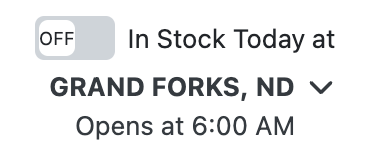
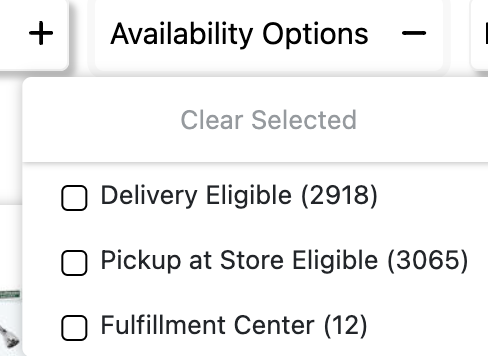
将结果适配到特定门店、可用性选项。

<figure><img src="/files/3c90681745955a68469cbd3e2536aea55a68c4f7" alt="" width="195"><figcaption><p>选择 store_id</p></figcaption></figure>

<figure><img src="/files/a0346d812b3f1dfbb04fb2ad97dce3b7d52cacb9" alt="" width="244"><figcaption><p>选择可用性选项</p></figcaption></figure>

<table><thead><tr><th width="230">参数</th><th width="247.328125">描述</th><th>类型</th></tr></thead><tbody><tr><td><code>store_id</code></td><td>指定一个门店。 </td><td>字符串</td></tr><tr><td><code>pickup_at_store_eligible</code></td><td>门店可自提。</td><td>布尔值</td></tr><tr><td><code>in_stock_today</code></td><td>商品今天有库存。</td><td>布尔值</td></tr><tr><td><code>fulfillment_center</code></td><td>订单可由集中式 Menards 仓库发货。</td><td>布尔值</td></tr><tr><td><code>delivery_eligible</code></td><td>商品符合送货上门服务条件。</td><td>布尔值</td></tr></tbody></table>

## Publix

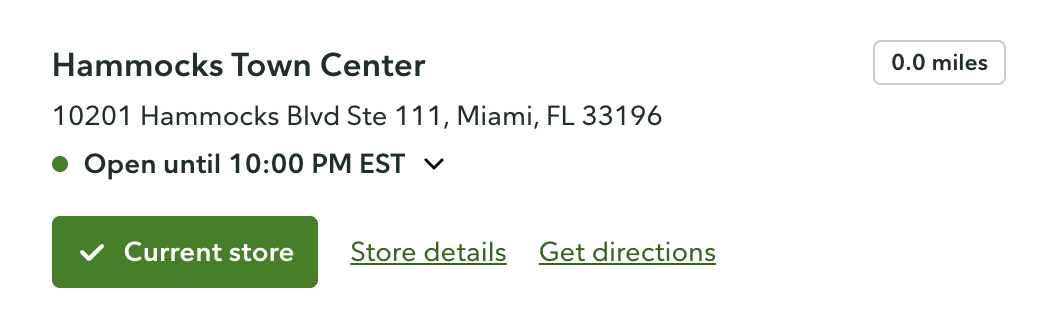
调整 [Publix](/api-targets/cn/dian-zi-shang-wu/publix.md) 基于门店位置的结果。

<figure><img src="/files/46606187c15f8edf73ecd690f16920797f6975f4" alt="" width="563"><figcaption></figcaption></figure>

<table><thead><tr><th width="157.34375">参数</th><th width="383.1223958333333">描述</th><th>类型</th></tr></thead><tbody><tr><td><code>store_id</code></td><td>指定一个门店。请查看 <a href="https://files.gitbook.com/v0/b/gitbook-x-prod.appspot.com/o/spaces%2FzrXw45naRpCZ0Ku9AjY1%2Fuploads%2FBnY1mBp2TzLykr7HkhkR%2Fpublix_store_data.json?alt=media&#x26;token=6b66ce31-745b-4558-8b26-6d74c561ded2"><strong>此处可用值</strong></a>.</td><td>整数</td></tr></tbody></table>

## Target

<figure><img src="/files/d389c0c723f61662e3ef88bc645359a83a04c299" alt="" width="313"><figcaption><p>选择 geo_location 和 store_id</p></figcaption></figure>

<figure><img src="/files/9db101957fa5d318f7e15893476ceb82997bc689" alt="" width="375"><figcaption><p>选择 fulfillment_type</p></figcaption></figure>

<table><thead><tr><th width="230">参数</th><th width="298.41796875">描述</th><th>类型</th></tr></thead><tbody><tr><td><code>store_id</code></td><td>指定一个门店。 </td><td>字符串</td></tr><tr><td><code>fulfillment_type</code></td><td>指定订单履约方式。可用值为： <code>pickup</code>, <code>shop_in_store</code>, <code>same_day_delivery</code>, <code>shipping</code>.</td><td>布尔值</td></tr></tbody></table>

## The Home Depot

使用 `geo_location` 参数，通过 **邮政编码** 或 **country**.&#x20;

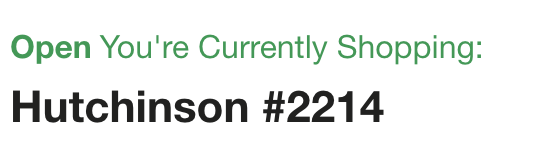
您还可以在 `store_id` 在 `上下文` 用于门店特定数据的参数。Store ID 必须是 4 位数字。例如，如果 Store ID 是 3 位数字，请在前面补一个 0（例如，618 -> `0618`）。请查找 Home Depot Store ID 列表 [**这里**](https://www.homedepot.com/l/storeDirectory).

<div><figure><img src="/files/f99b86070616375dca453a45b337f9656693ab39" alt=""><figcaption></figcaption></figure> <figure><img src="/files/3f0694ed3b04833ffe13b846e2423d4679936303" alt=""><figcaption></figcaption></figure></div>

```json
...
"geo_location": "29576",
"context": [
    {
        "key": "store_id",
        "value": "2214"
    }
]
...  
```

## Walmart

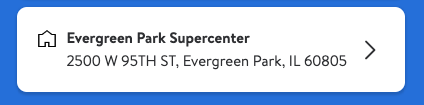
使用 `delivery_zip` 参数，用于根据 **邮政编码**.&#x20;

您还可以在 `store_id` 参数用于门店特定数据。Walmart Store ID 列表请见：&#x20;

{% file src="/files/a1fd89df42ba65b5b82eb8830835de0afcfd38c7" %}

Walmart 门店的官方页面是 [**这里**](https://www.walmart.com/store-directory)**.**

<div align="center"><figure><img src="/files/38c6e79f857d397a81b958b3ad6cd877895cdb6b" alt=""><figcaption></figcaption></figure></div>

```json
...
"delivery_zip": "60805",
"store_id": "2070"
...  
```

### 国际 Walmart 域名

以下 Walmart 域名也支持本地化。使用 `delivery_zip` 和 `store_id` 作为上下文参数来设置配送或自提地点，并定位到特定门店。

对于 `walmart.com`, `walmart.com.mx`，以及 `walmart.ca`，你也可以传入 `fulfillment_type` 作为上下文参数来设置履约方式。

<table><thead><tr><th width="341">域</th><th>支持的履约类型</th></tr></thead><tbody><tr><td><code>walmart.com</code></td><td><code>pickup</code>, <code>delivery</code>, <code>shipping</code></td></tr><tr><td><code>walmart.com.mx</code></td><td><code>pickup</code>, <code>delivery</code></td></tr><tr><td><code>walmart.ca</code></td><td><code>pickup</code>, <code>delivery</code></td></tr><tr><td><code>walmart.co.cr</code></td><td><code>pickup</code></td></tr></tbody></table>

```json
"context": [
    { "key": "delivery_zip", "value": "06600" },
    { "key": "store_id", "value": "1015" },
    { "key": "fulfillment_type", "value": "delivery" }
]
```

查找下方每个域名可用的 `store_id` 值：

{% file src="/files/46899e4a5618d3d01f87817cfa6346a07e18bac6" %}

{% file src="/files/627397ac4f11a69d93c2ff8ed9a5679e04b086ad" %}

对于 `walmart.co.cr`，履约类型始终为 `pickup`。使用 `delivery_zip` 和 `store_id` 来定位到特定地点。

```json
"context": [
    { "key": "delivery_zip", "value": "10101" },
    { "key": "store_id", "value": "4413" }
]
```

查找下方每个域名可用的 `store_id` 值如下，适用于哥斯达黎加地区：

{% file src="/files/6820d3e7b452344fc889cc51360075ef50fdb882" %}

### Bodega Aurrerá

使用 `delivery_zip` 参数，用于通过邮政编码设置配送或自提地点，适用于 `despensa.bodegaaurrera.com.mx` 仅限该域名。你也可以使用 `store_id` 指定门店，并使用 `fulfillment_type`.

| 参数                 | 描述                                | 类型  |
| ------------------ | --------------------------------- | --- |
| `delivery_zip`     | 设置配送或自提地点。接受墨西哥邮政编码。              | 字符串 |
| `store_id`         | 指定一个门店。                           | 字符串 |
| `fulfillment_type` | 设置履约方式。可用值： `pickup`, `delivery`. | 字符串 |

```json
"delivery_zip": "06600",
"context": [
    { "key": "store_id", "value": "383" },
    { "key": "fulfillment_type", "value": "delivery" }
]
```

请在下方查找可用的 Bodega Aurrerá 门店 ID：

{% file src="/files/9720fb92f9b2c2d36508848c463c435570bc6b18" %}

### Sam's Club

以下两者均支持本地化： `samsclub.com` （美国）和 `sams.com.mx` （墨西哥）。使用 `delivery_zip` 和 `store_id` 上下文参数设置配送或自提地点，并定位到特定门店。使用 `fulfillment_type` 选择履约方式。

| 参数                 | 描述                                                                                                                     | 类型  |
| ------------------ | ---------------------------------------------------------------------------------------------------------------------- | --- |
| `delivery_zip`     | 设置配送或自提地点。                                                                                                             | 字符串 |
| `store_id`         | 指定一个门店。                                                                                                                | 字符串 |
| `fulfillment_type` | <p>设置履约方式。可用值： <code>delivery</code>, <code>pickup</code>, <code>shipping</code>. </p><p>默认值： <code>pickup</code>.</p> | 字符串 |

```json
"context": [
    { "key": "delivery_zip", "value": "60601" },
    { "key": "store_id", "value": "4702" },
    { "key": "fulfillment_type", "value": "pickup" }
]
```

查找下方每个域名可用的 `store_id` 值：

{% file src="/files/fa0b0fd292c7c5639a4fec0bfb071f7d345a1354" %}

{% file src="/files/774bc8206a77c7bc050ec12400132f9a71f44699" %}


---

# Agent Instructions: Querying This Documentation

If you need additional information that is not directly available in this page, you can query the documentation dynamically by asking a question.

Perform an HTTP GET request on the current page URL with the `ask` query parameter:

```
GET https://developers.oxylabs.io/products/cn/web-scraper-api/features/localization/e-commerce-localization.md?ask=<question>
```

The question should be specific, self-contained, and written in natural language.
The response will contain a direct answer to the question and relevant excerpts and sources from the documentation.

Use this mechanism when the answer is not explicitly present in the current page, you need clarification or additional context, or you want to retrieve related documentation sections.