> For the complete documentation index, see [llms.txt](https://developers.oxylabs.io/llms.txt). Markdown versions of documentation pages are available by appending `.md` to page URLs; this page is available as [Markdown](https://developers.oxylabs.io/products/cn/proxies/residential-proxies/endpoint-generator.md).
# 端点生成器
使用端点生成器简化集成。配置住宅代理的位置、会话和认证以导出列表。
Endpoint Generator 的设计旨在帮助你轻松集成住宅代理。选择位置和会话类型参数,并将端点列表导出为 CSV、JSON 或 TXT 格式。如果你已经购买了住宅代理,登录到 [**控制面板**](https://dashboard.oxylabs.io/?route=/overview/RP/endpoint-generator).
按照以下步骤获取住宅代理端点列表:
{% stepper %}
{% step %}
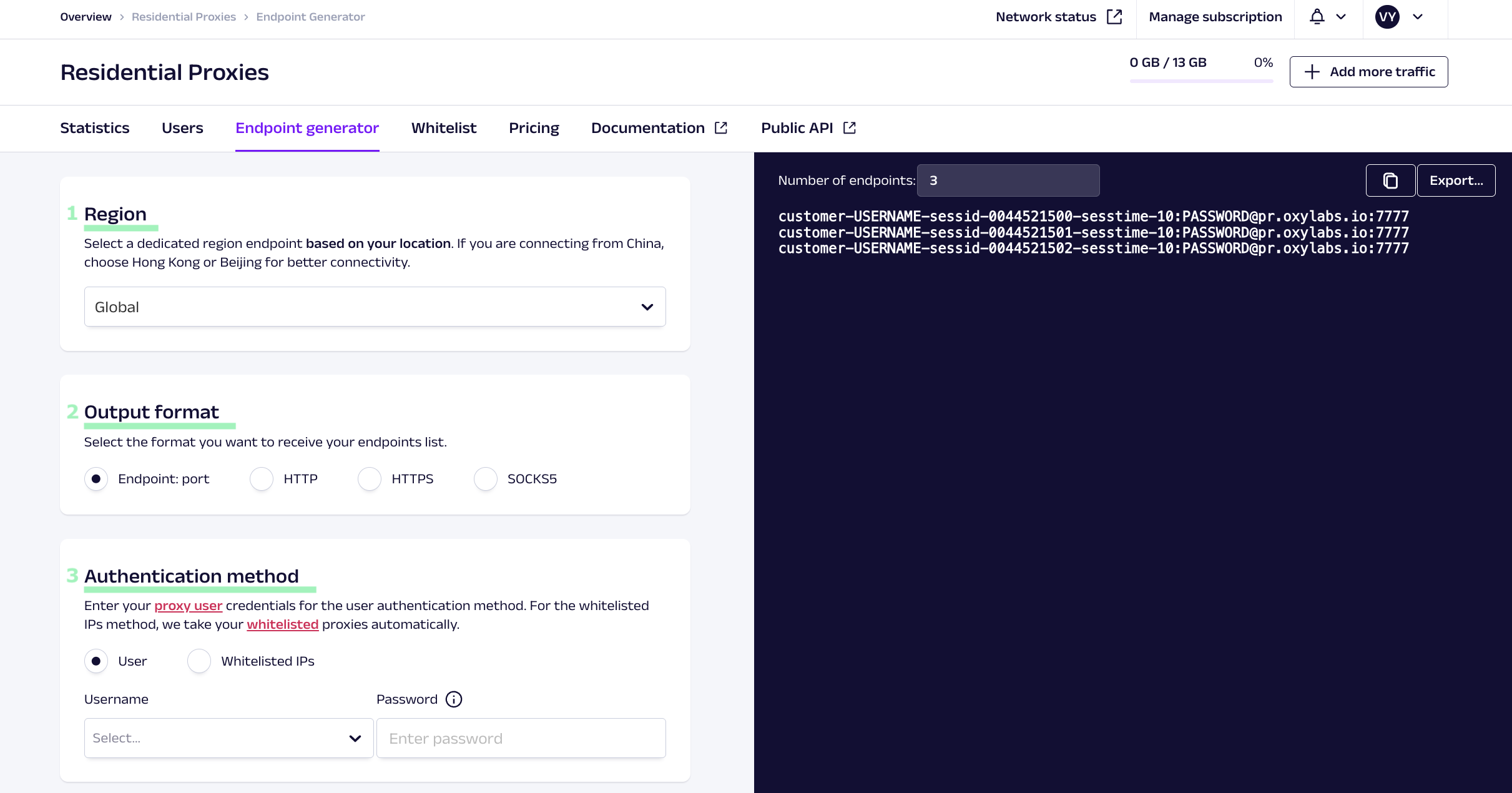
### 选择一个地区
* 选择 **香港** 还是 **北京** 如果你正在从 [**中国**](broken://pages/63d09c6ba0780ff5b5d73d778044d16e26aa0ae3)
* **全球** 适用于世界其他地区
{% endstep %}
{% step %}
### 设置输出格式
选择你希望接收端点的格式。可用格式包括纯 **endpoint:port** 或带有 **HTTP**, **HTTPS**,或 **SOCKS5** 协议前缀。
{% endstep %}
{% step %}
### 选择 **认证方式**
* **用户认证** – 使用此方法时,你需要创建一个代理用户。创建后,选择你的代理用户名并输入密码。
* [**白名单 IP**](/products/cn/proxies/residential-proxies/whitelisting-ips.md) **–** 此方法不需要用户名和密码。我们会自动获取你的白名单 IP 列表。
{% endstep %}
{% step %}
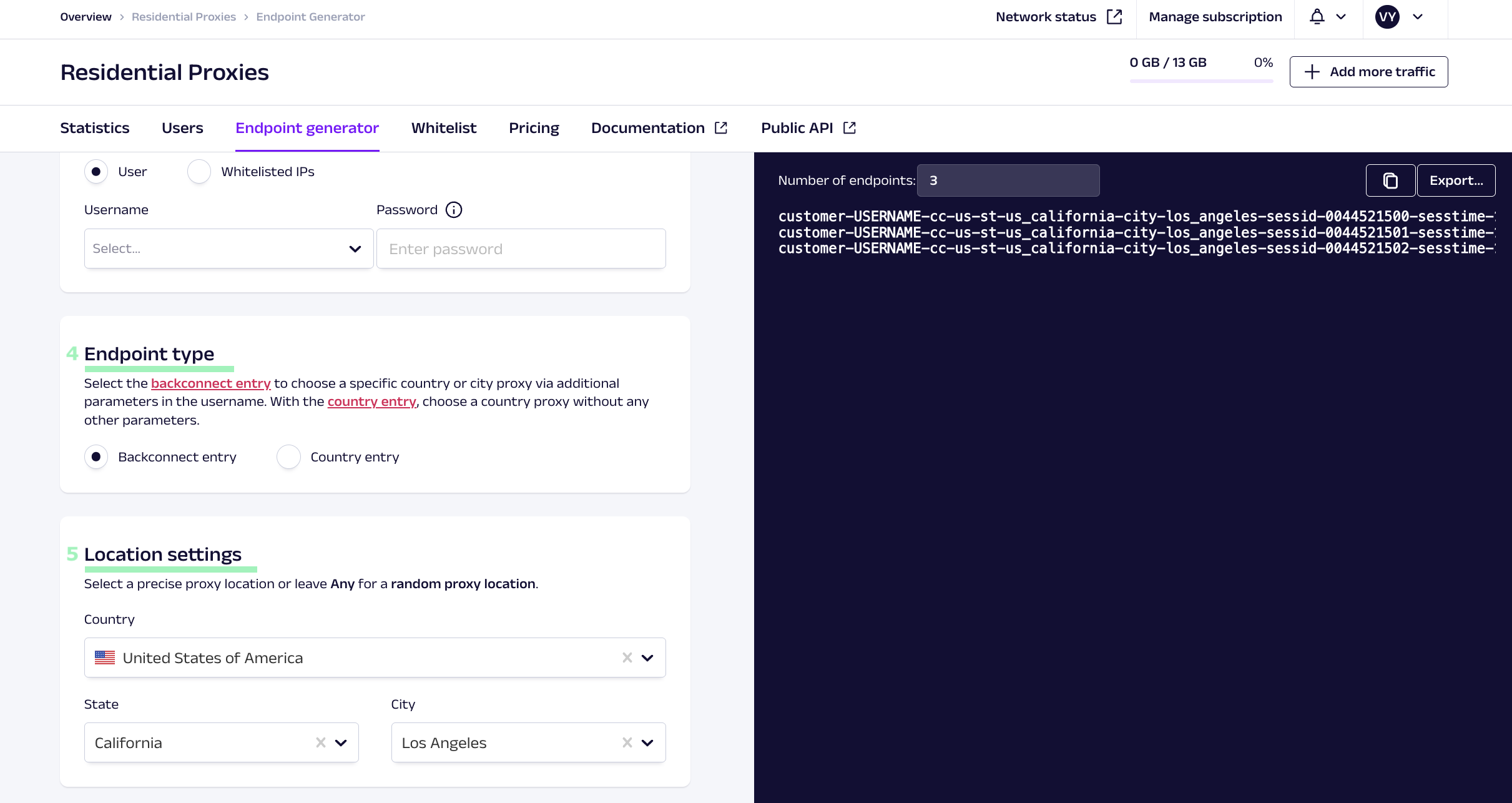
### 选择端点类型
* [**回连入口**](/products/cn/proxies/residential-proxies/making-requests.md) – 会为你的用户名添加额外参数。它支持国家、省/州和城市级定向。
* [**国家入口**](/products/cn/proxies/residential-proxies/location-settings/select-country.md#country-specific-entry-nodes) – 用户名中无需额外参数。它使用特定国家的入口节点,并支持国家级定向。
{% endstep %}
{% step %}
### 设置位置参数
* 如果你选择了 **backconnect 入口** 类型,请选择 **国家**, **州**、以及 **城市**,或将具体值设置为 **任何** ,以获取随机位置。
* 如果你选择了 **国家入口** 类型,请选择 **国家** 或将其设置为 **任何** ,以获取随机位置。
请参阅 [位置设置](/products/cn/proxies/residential-proxies/location-settings.md) 页面了解更多。
{% endstep %}
{% step %}
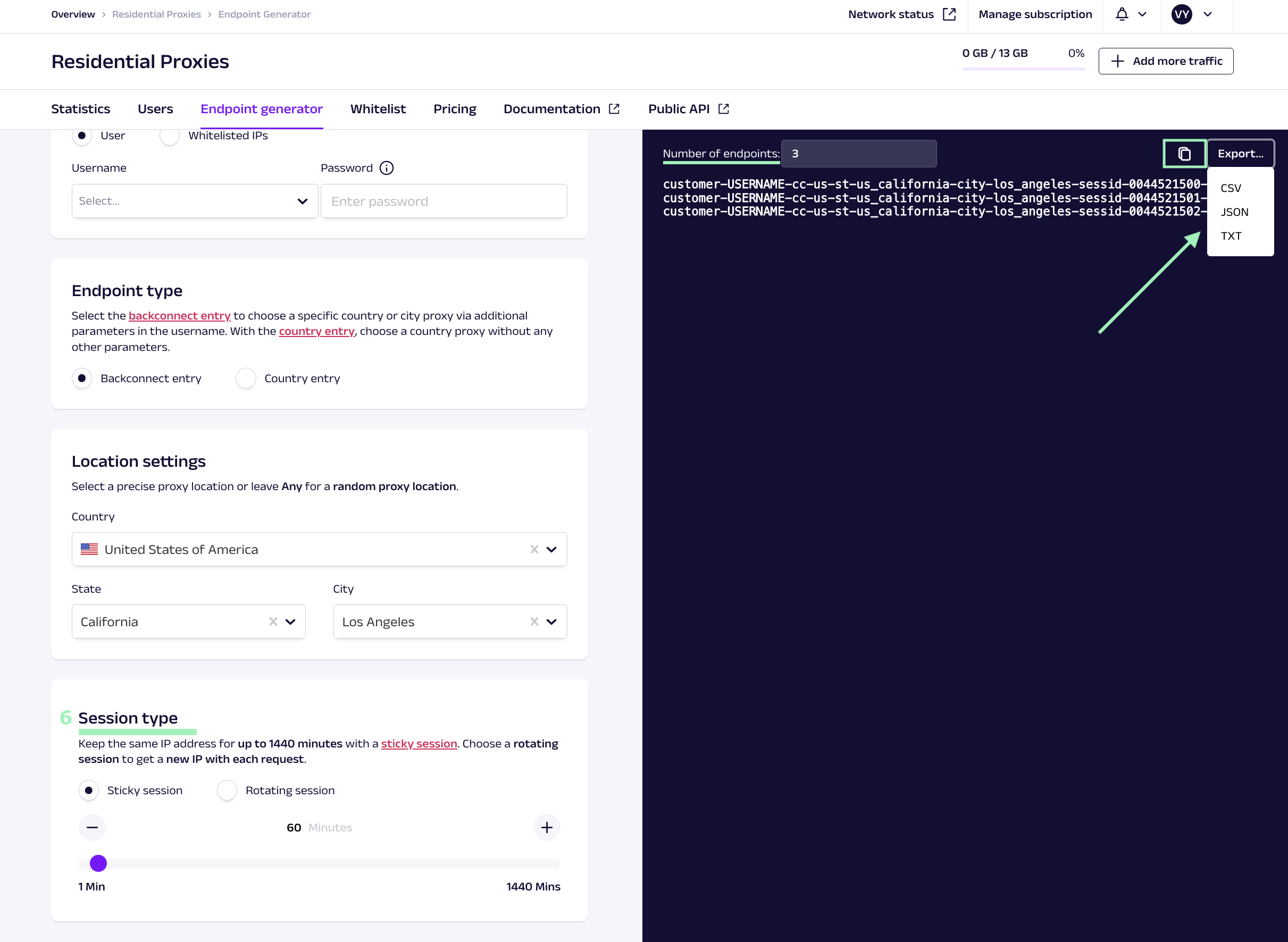
### 选择 **会话类型**
* [**粘性会话**](/products/cn/proxies/residential-proxies/session-control.md) – 允许你在指定时长内保持相同的 IP 地址。
* 如果你选择了 **回连入口,** 你可以指定 [**会话持续时间**](/products/cn/proxies/residential-proxies/session-control.md#session-time) ,最长可持续 *1440* 分钟。
* 如果你选择了 **国家入口**,你的 [**会话国家节点**](broken://pages/a7b2e5c423ead1821bf87e8d883aceae933c6fae) 将最长持续 *10* 分钟。
* **轮换会话** – 每次请求都会返回一个新的 IP 地址。
{% endstep %}
{% step %}
### 导出端点列表
输入你需要的端点数量,并以建议的格式之一导出列表,或者直接将其复制到剪贴板。
{% endstep %}
{% endstepper %}
就是这样!你已成功创建一份可直接使用的住宅代理端点列表!
---
# Agent Instructions
This documentation is published with GitBook. GitBook is the documentation platform designed so that both humans and AI agents can read, navigate, and reason over technical content effectively. Learn more at gitbook.com.
## Querying This Documentation
If you need additional information that is not directly available in this page, you can query the documentation dynamically by asking a question.
Perform an HTTP GET request on the current page URL with the `ask` query parameter, and the optional `goal` query parameter:
```
GET https://developers.oxylabs.io/products/cn/proxies/residential-proxies/endpoint-generator.md?ask=&goal=
```
`ask` is the immediate question: it should be specific, self-contained, and written in natural language.
`goal` is optional and describes the broader end goal you are ultimately trying to accomplish on behalf of the user. GitBook uses it to tailor the answer towards what is most useful for that goal.
The response will contain a direct answer to the question and relevant excerpts and sources from the documentation.
Use this mechanism when the answer is not explicitly present in the current page, you need clarification or additional context, or you want to retrieve related documentation sections.