> For the complete documentation index, see [llms.txt](https://developers.oxylabs.io/llms.txt). Markdown versions of documentation pages are available by appending `.md` to page URLs; this page is available as [Markdown](https://developers.oxylabs.io/integrations/proxy-integrations/duoplus.md).
# DuoPlus
Configure Oxylabs Proxies with DuoPlus cloud phone service for multi-account management – a step-by-step SOCKS5 integration guide.
[DuoPlus](https://www.duoplus.net/?r=oxylabs) is a cloud-based mobile device service designed to facilitate the management of multiple social media and e-commerce accounts, particularly for larger-scale mobile applications.
The following guide will show you how to set up DuoPlus with the following Oxylabs proxies:
* [**Residential & Mobile Proxies**](#residential-and-mobile-proxies)
* [**Datacenter Proxies**](#datacenter-proxies)
* [**Dedicated Datacenter Proxies (Enterprise)**](#dedicated-datacenter-proxies-enterprise)
* [**Dedicated Datacenter Proxies (Self-service)**](#dedicated-datacenter-proxies-self-service)
* [**ISP Proxies**](#isp-proxies)
* [**Dedicated ISP Proxies**](#dedicated-isp-proxies)
{% stepper %}
{% step %}
### Log in to DuoPlus
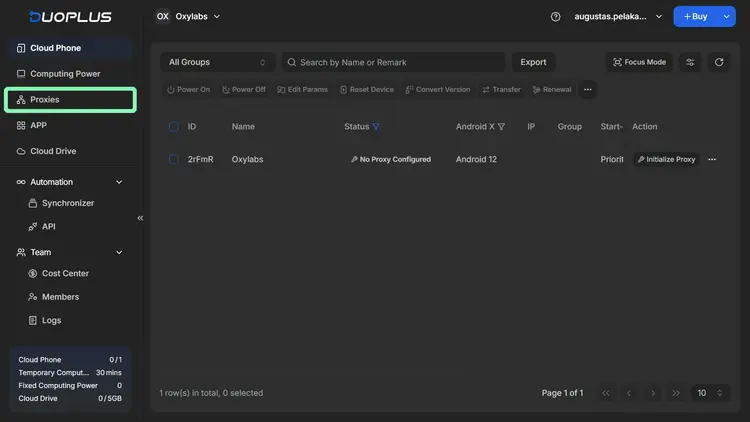
Set up a [DuoPlus account](https://my.duoplus.net/sign-in?callbackUrl=/images) and acquire cloud phone access. The app works in-browser.
{% endstep %}
{% step %}
### Add proxies to your dashboard
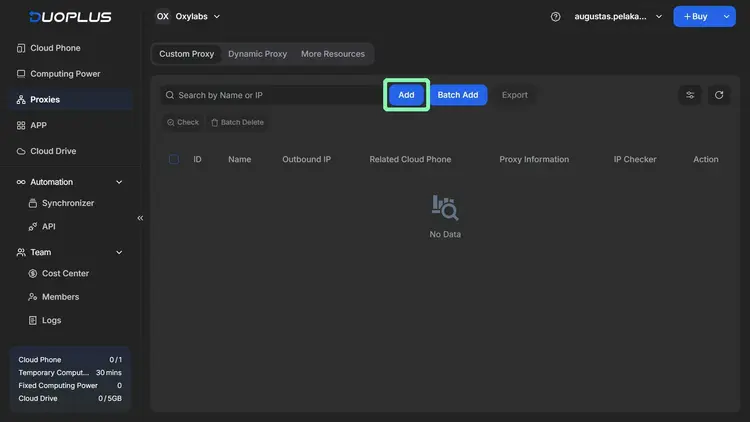
In your DuoPlus dashboard, go to **Proxies** and **Add** a new one. You can also add multiple proxies in batches.
{% endstep %}
{% step %}
### Enter proxy details
{% hint style="warning" %}
DuoPlus supports **SOCKS5** proxies only.
{% endhint %}
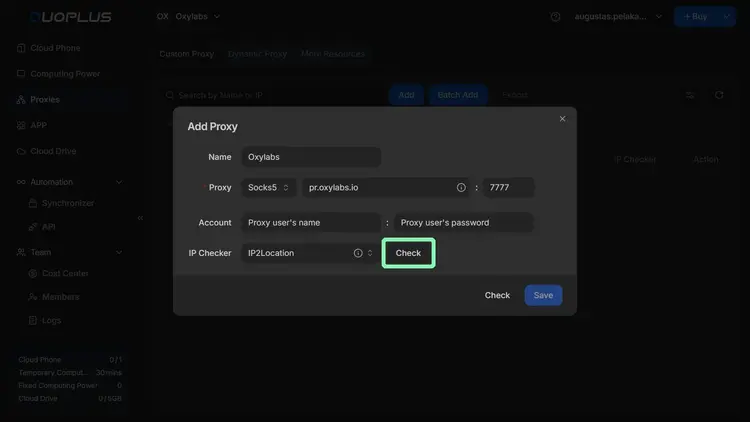
Fill in the connection details and user credentials (used in the [Oxylabs dashboard](https://dashboard.oxylabs.io/en/)) for the Oxylabs Proxies:
* [Residential & Mobile Proxies](#residential-and-mobile-proxies)
* [Datacenter Proxies](#datacenter-proxies)
* [Dedicated Datacenter Proxies (Enterprise)](#dedicated-datacenter-proxies-enterprise)
* [Dedicated Datacenter Proxies (Self-service)](#dedicated-datacenter-proxies-self-service)
* [ISP Proxies](#isp-proxies)
* [Dedicated ISP Proxies](#dedicated-isp-proxies)
#### Residential & Mobile Proxies
**Host:** `pr.oxylabs.io`
**Port:** `7777`
**Username:** `customer-USERNAME`
**Password:** `PASSWORD`
{% hint style="warning" %}
**Note:** Don't forget to add `customer-` prefix to your username.
{% endhint %}
{% hint style="success" %}
You can also use [country-specific entry points](broken://spaces/BQ7Zf9paoN3FTeGcyfY1/pages/UPg2AOzHh8eTwZf0ZfxE#country-specific-entry-nodes). For example, entering `us-pr.oxylabs.io` under **Host** and `10000` under **Port** will acquire a US exit node.
{% endhint %}
#### Datacenter Proxies
**Host:** `dc.oxylabs.io`
**Port:** `8001`
**Username:** `user-USERNAME`
**Password:** `PASSWORD`
{% hint style="warning" %}
**Note:** Don't forget to add `user-` prefix to your username.
{% endhint %}
**For the Pay-per-IP subscription:** the port corresponds to the sequential number assigned to an IP address from the provided list. Hence, port `8001` uses the first IP address on [your list](/products/proxies/datacenter-proxies/proxy-list.md).
**For the Pay-per-traffic subscription:** port `8001` randomly selects an IP address but remains consistent throughout a session. You can also specify geo-location, such as the US, in the user authentication string: `user-USERNAME-country-US:PASSWORD`. For more details, read [IP Control documentation](/products/proxies/datacenter-proxies/ip-control.md).
#### Dedicated Datacenter Proxies (Enterprise)
**Host:** `1.2.3.4` (a specific IP address)
**Port:** `60000`
**Username:** `USERNAME`
**Password:** `PASSWORD`
For Enterprise Dedicated Datacenter Proxies, choose an IP address from the [acquired list](/products/proxies/dedicated-datacenter-proxies/enterprise/proxy-lists.md).
#### Dedicated Datacenter Proxies (Self-service)
**Host:** `ddc.oxylabs.io`
**Port:** `8001`
**Username:** `user-USERNAME`
**Password:** `PASSWORD`
{% hint style="warning" %}
**Note:** Don't forget to add `user-` prefix to your username.
{% endhint %}
For Self-Service Dedicated Datacenter Proxies, the port indicates the sequential number of an IP address from the [acquired list](/products/proxies/dedicated-datacenter-proxies/self-service/proxy-list.md).
#### ISP Proxies
**Host:** `isp.oxylabs.io`
**Port:** `8001`
**Username:** `user-USERNAME`
**Password:** `PASSWORD`
{% hint style="warning" %}
**Note:** Don't forget to add `user-` prefix to your username.
{% endhint %}
You can check out our [ISP Proxies documentation](/products/proxies/isp-proxies.md) for more control options.
#### Dedicated ISP Proxies
**Host:** `disp.oxylabs.io`
**Port:** `8001`
**Proxy username:** `user-USERNAME`
**Proxy password:** `PASSWORD`
{% hint style="warning" %}
Make sure to add the `user-` part to your username.
{% endhint %}
The port number indicates which IP address from your [proxy list](/products/proxies/dedicated-isp-proxies/self-service/proxy-list.md) will be used. Use port `8000` for automatic proxy [IP rotation](/products/proxies/dedicated-isp-proxies/self-service/proxy-rotation.md).
{% endstep %}
{% step %}
### Test your connection
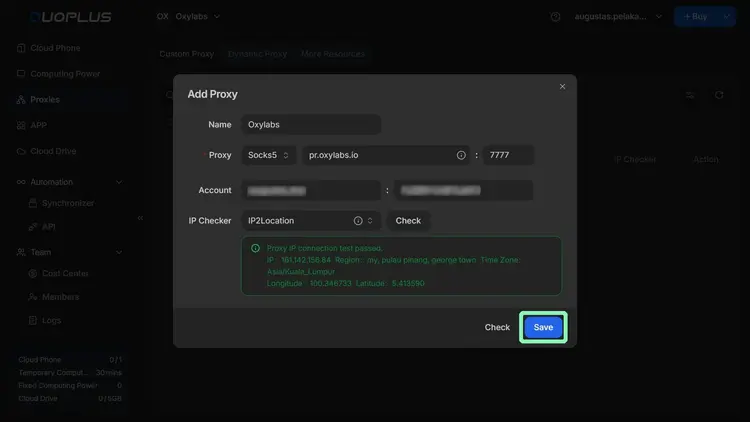
**Check** proxy connection with a quick test:
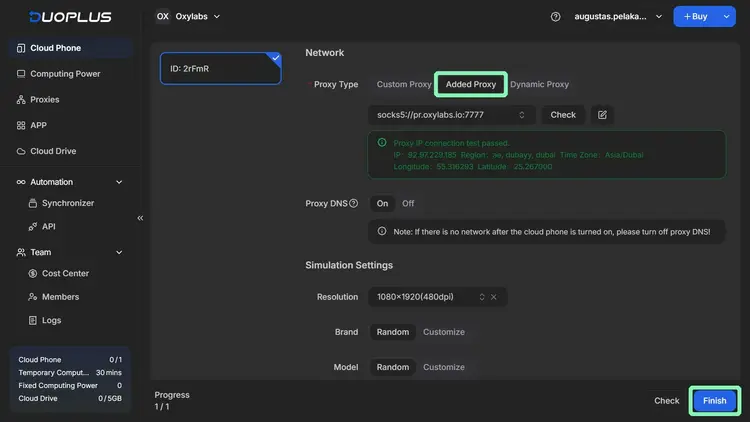
If you see the message "Proxy IP connection test passed" under the proxy credentials, you can **Save** the proxy setup.
{% endstep %}
{% step %}
### Activate the proxy
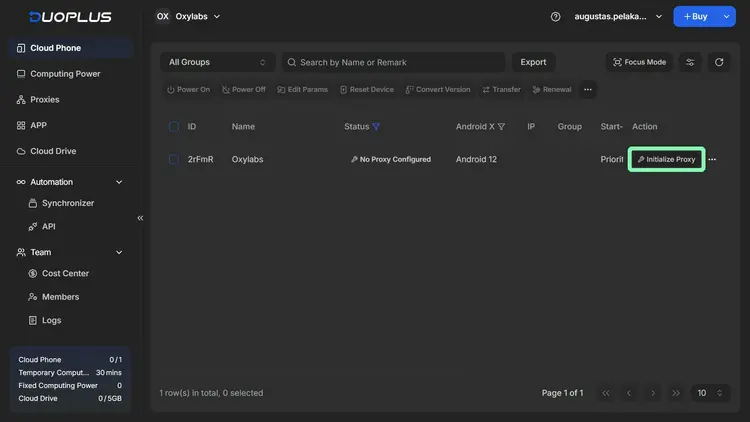
**Initialize Proxy** for a cloud phone instance.
Choose the proxy you just added, set desirable cloud phone settings, and **Finish** the setup.
{% endstep %}
{% step %}
### Launch the cloud phone with proxy
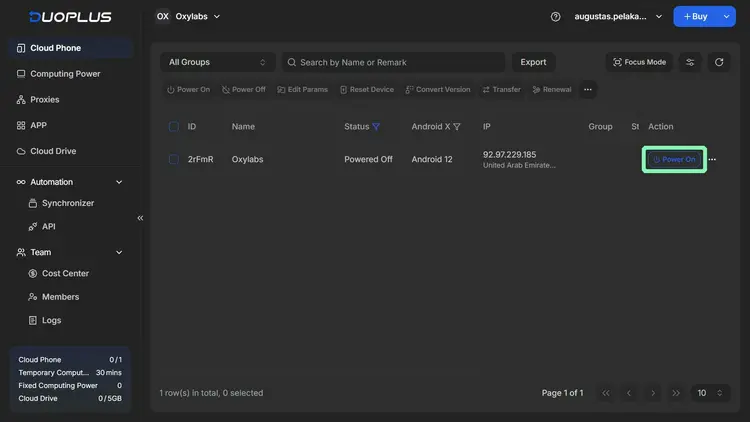
**Power On** a cloud phone to launch a virtual environment.
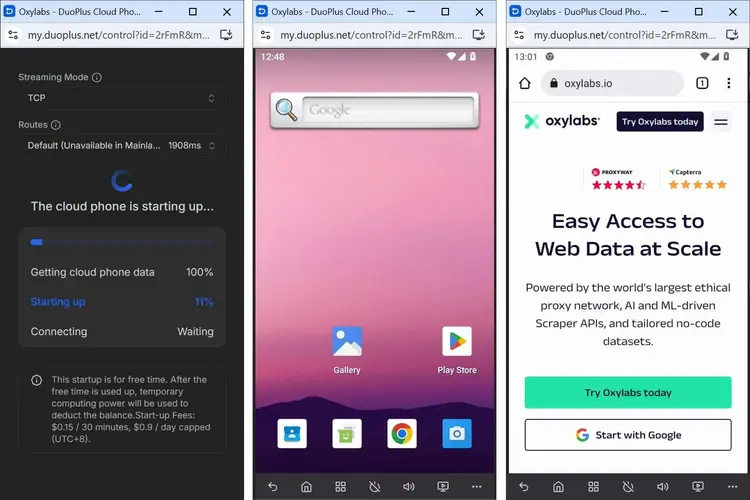
Finally, just wait for the virtual environment to load.
{% endstep %}
{% endstepper %}
That's it! DuoPlus will now use your Oxylabs Proxies.
---
# Agent Instructions
This documentation is published with GitBook. GitBook is the documentation platform designed so that both humans and AI agents can read, navigate, and reason over technical content effectively. Learn more at gitbook.com.
## Querying This Documentation
If you need additional information that is not directly available in this page, you can query the documentation by asking a question.
Perform an HTTP GET request on the following URL with the `ask` and `goal` query parameters:
```
GET https://developers.oxylabs.io/integrations/proxy-integrations/duoplus.md?ask=&goal=
```
`ask` is the immediate question: it should be specific, self-contained, and written in natural language.
`goal` is what the user is ultimately trying to achieve, the reason they need the answer. Sharing it helps GitBook give you a better, more relevant answer. A goal is most helpful when it describes the outcome the user wants rather than restating the question. For example, with `ask=how do I create an API token`, a goal like `automate deployments from our CI pipeline` lets GitBook tailor the answer to that use case.
The response will contain a direct answer to the question and relevant excerpts and sources from the documentation.
Use this mechanism when the answer is not explicitly present in the current page, you need clarification or additional context, or you want to retrieve related documentation sections.