> For the complete documentation index, see [llms.txt](https://developers.oxylabs.io/llms.txt). Markdown versions of documentation pages are available by appending `.md` to page URLs; this page is available as [Markdown](https://developers.oxylabs.io/integrations/cn/proxy-integrations/morelogin.md).
# MoreLogin
将 MoreLogin 与 Oxylabs 代理集成以进行多账号管理。使用团队权限配置反检测浏览器配置文件。
[**MoreLogin**](https://www.morelogin.com/?from=AASFM37JXppd) 是一款反检测浏览器,可让您管理多个账户,并通过权限管理在团队内分配职责。
按照以下步骤集成下面的 Oxylabs 代理:
* [**住宅代理和移动代理**](#residential-and-mobile-proxies)
* [**数据中心代理**](#datacenter-proxies)
* [**独享数据中心代理(企业版)**](#dedicated-datacenter-proxies-enterprise)
* [**独享数据中心代理(自助服务)**](#dedicated-datacenter-proxies-self-service)
* [**ISP代理**](#isp-proxies)
* [**独享ISP代理**](#dedicated-isp-proxies)
{% stepper %}
{% step %}
### 下载并安装
前往官方 [**MoreLogin**](https://www.morelogin.com/?from=AASFM37JXppd) 网站并下载适用于 Windows 或 macOS 的应用。创建账户并登录。
{% endstep %}
{% step %}
### 创建浏览器配置文件
设置完成后,创建 **一个新的浏览器配置文件**.
{% endstep %}
{% step %}
### 输入配置文件设置
填写初始配置文件设置,例如名称和浏览器指纹,然后点击 **高级创建。**
{% endstep %}
{% step %}
### 设置你的代理
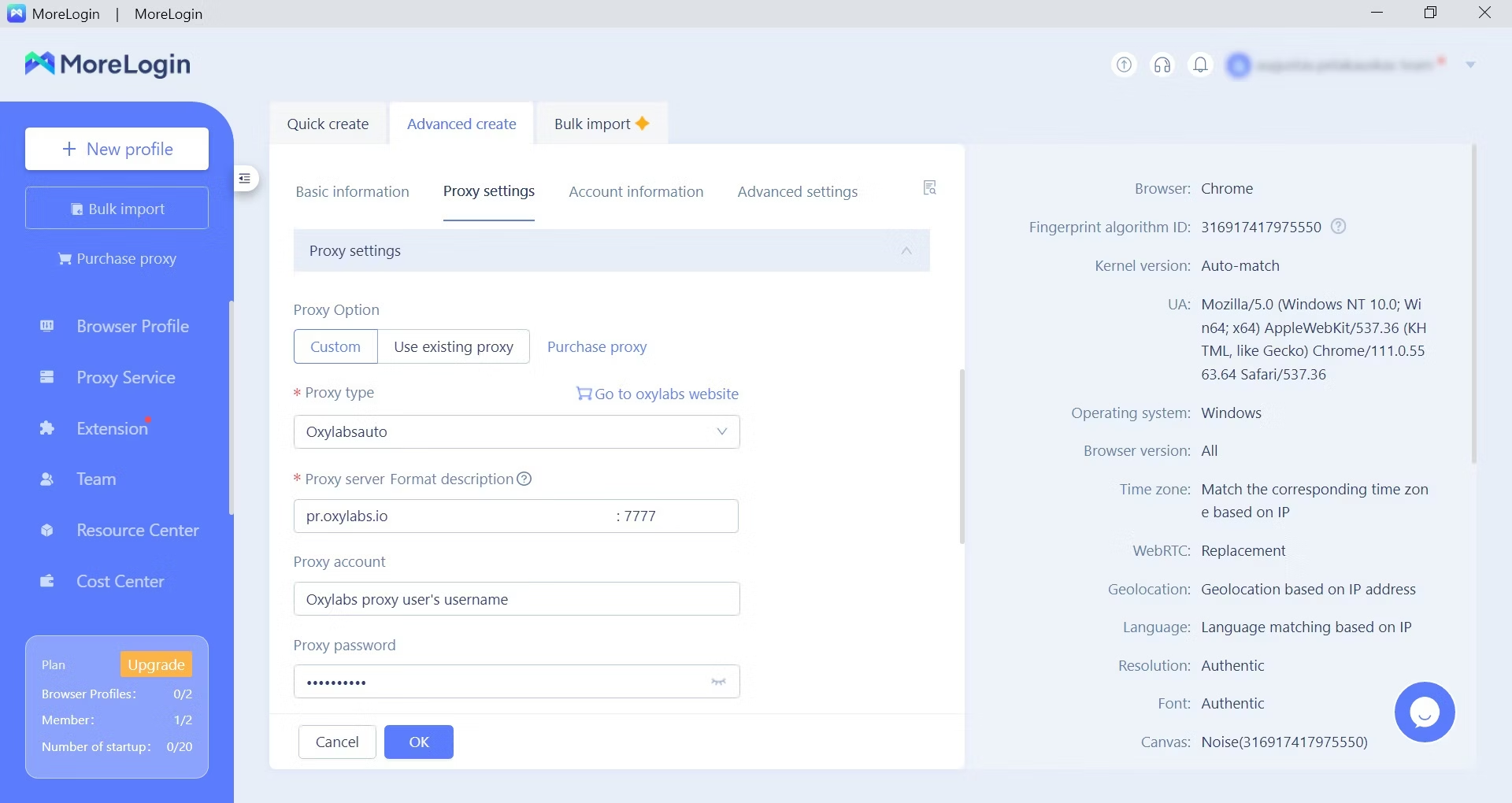
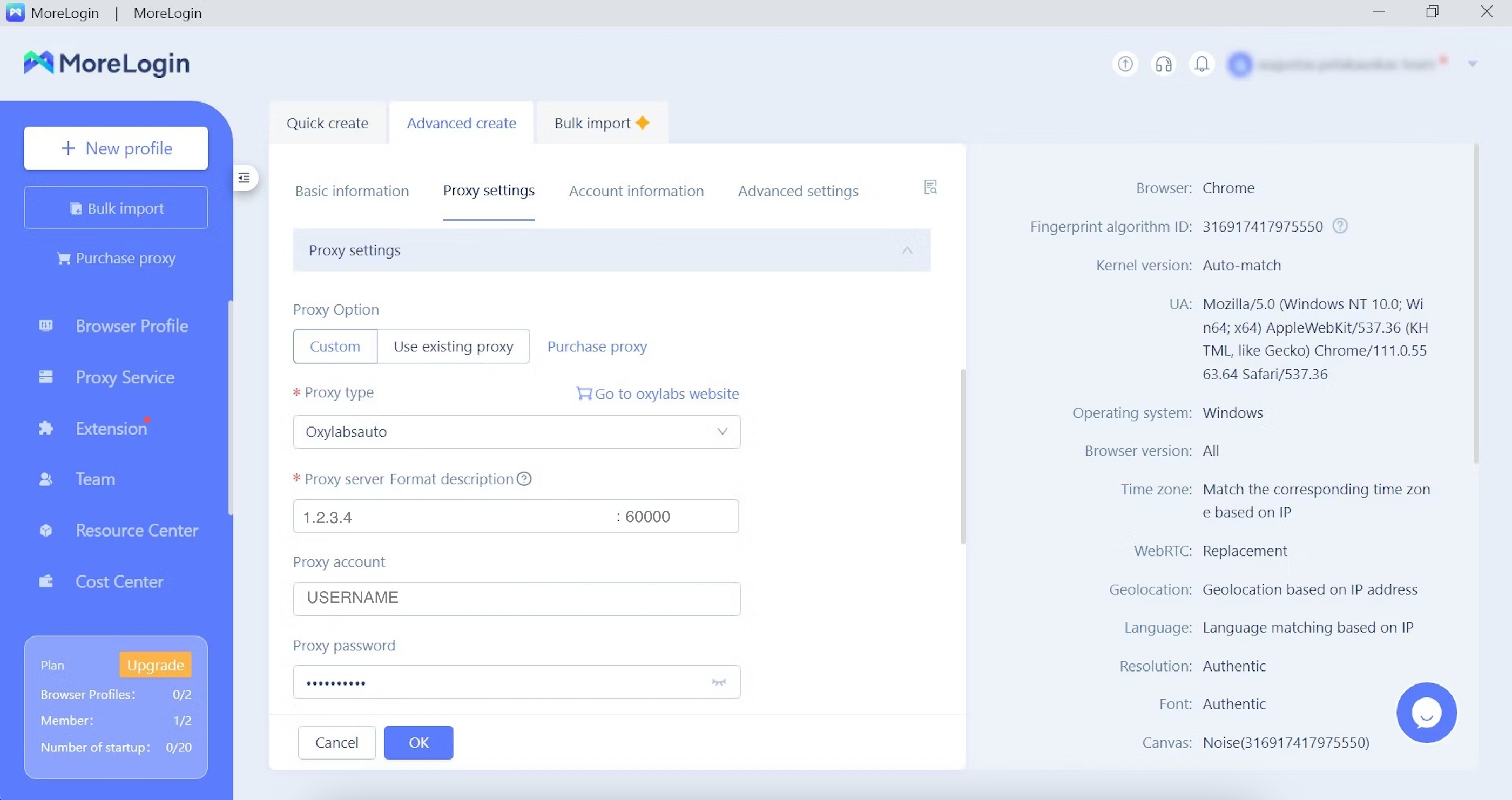
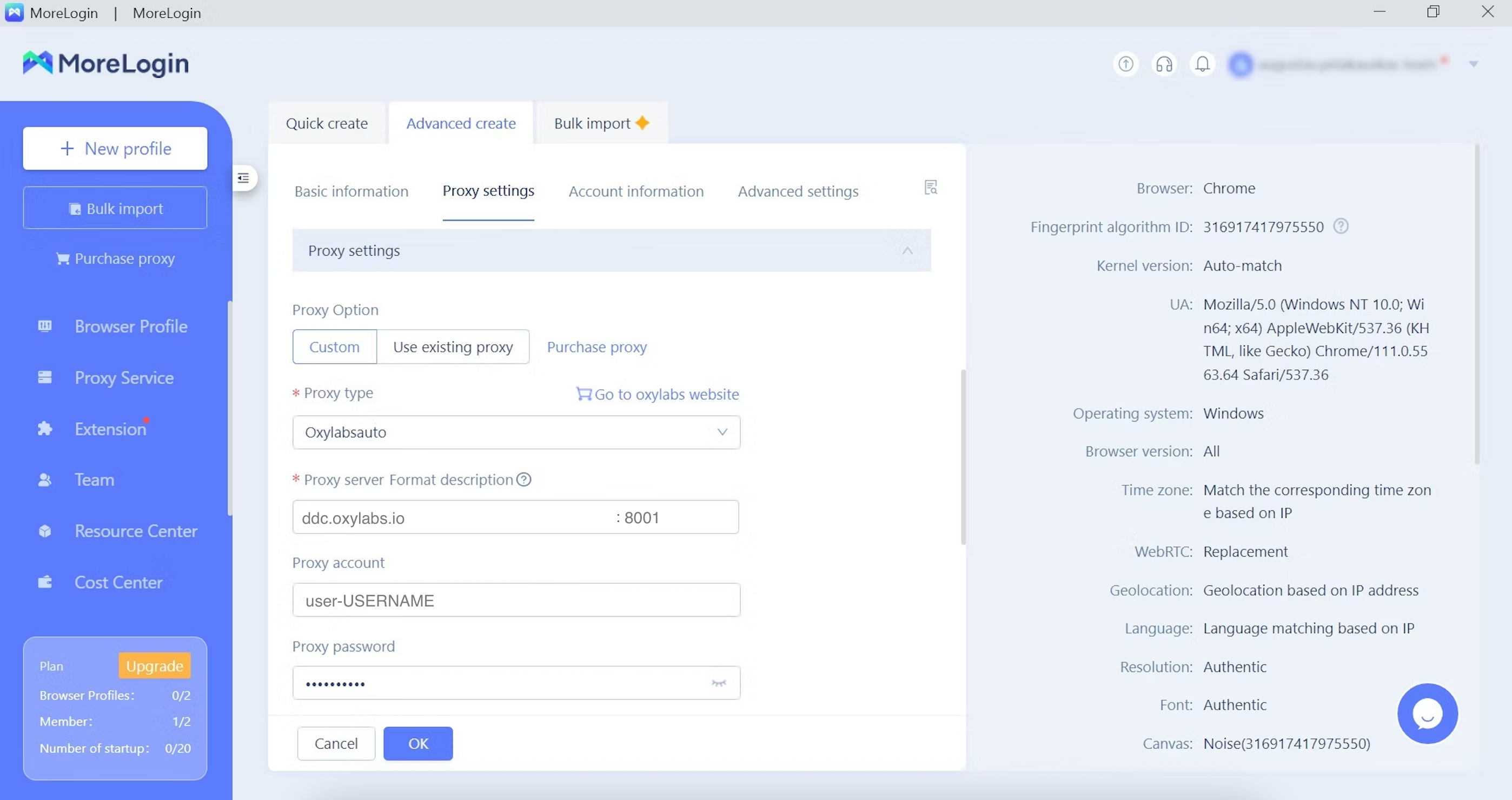
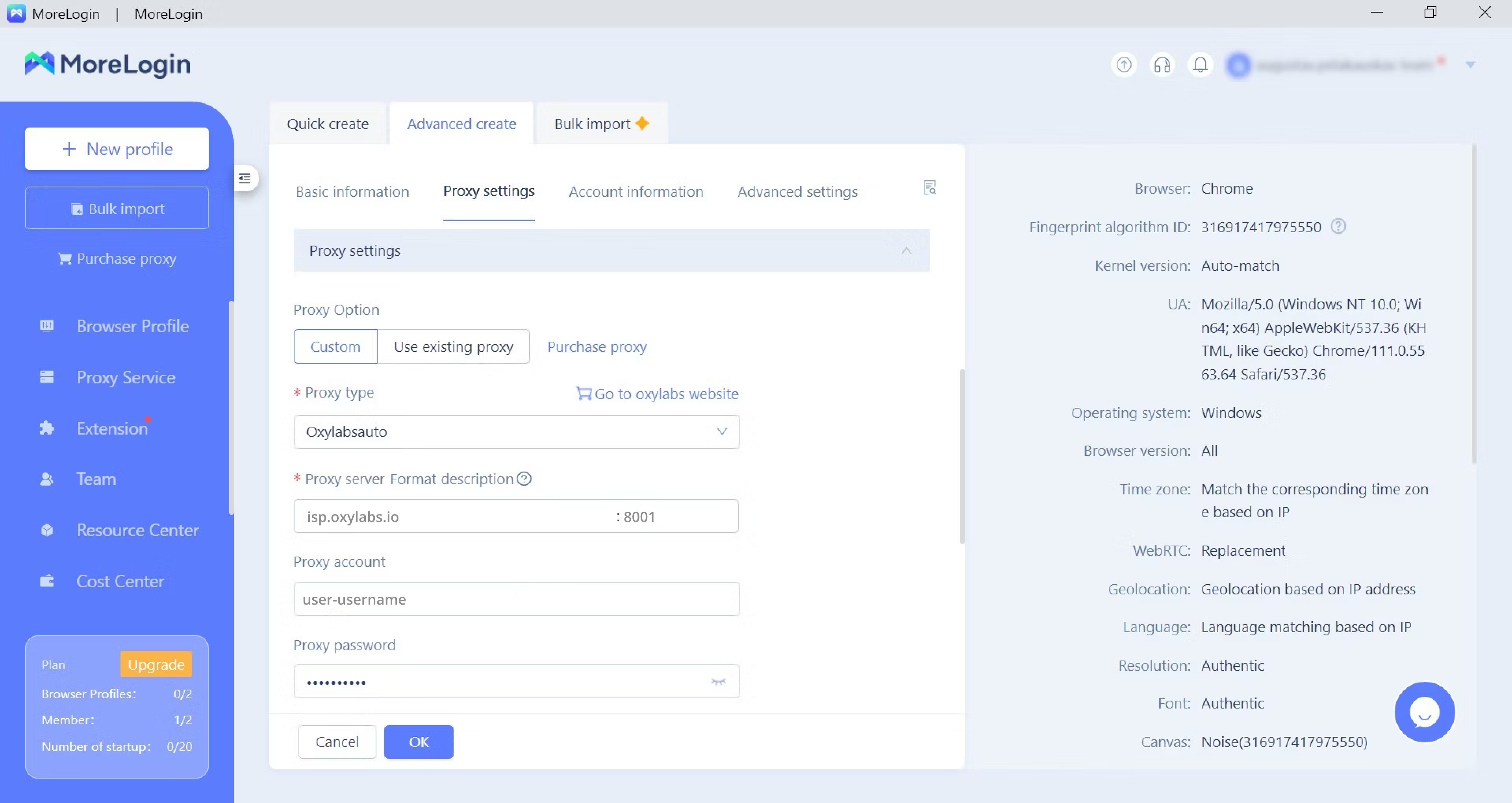
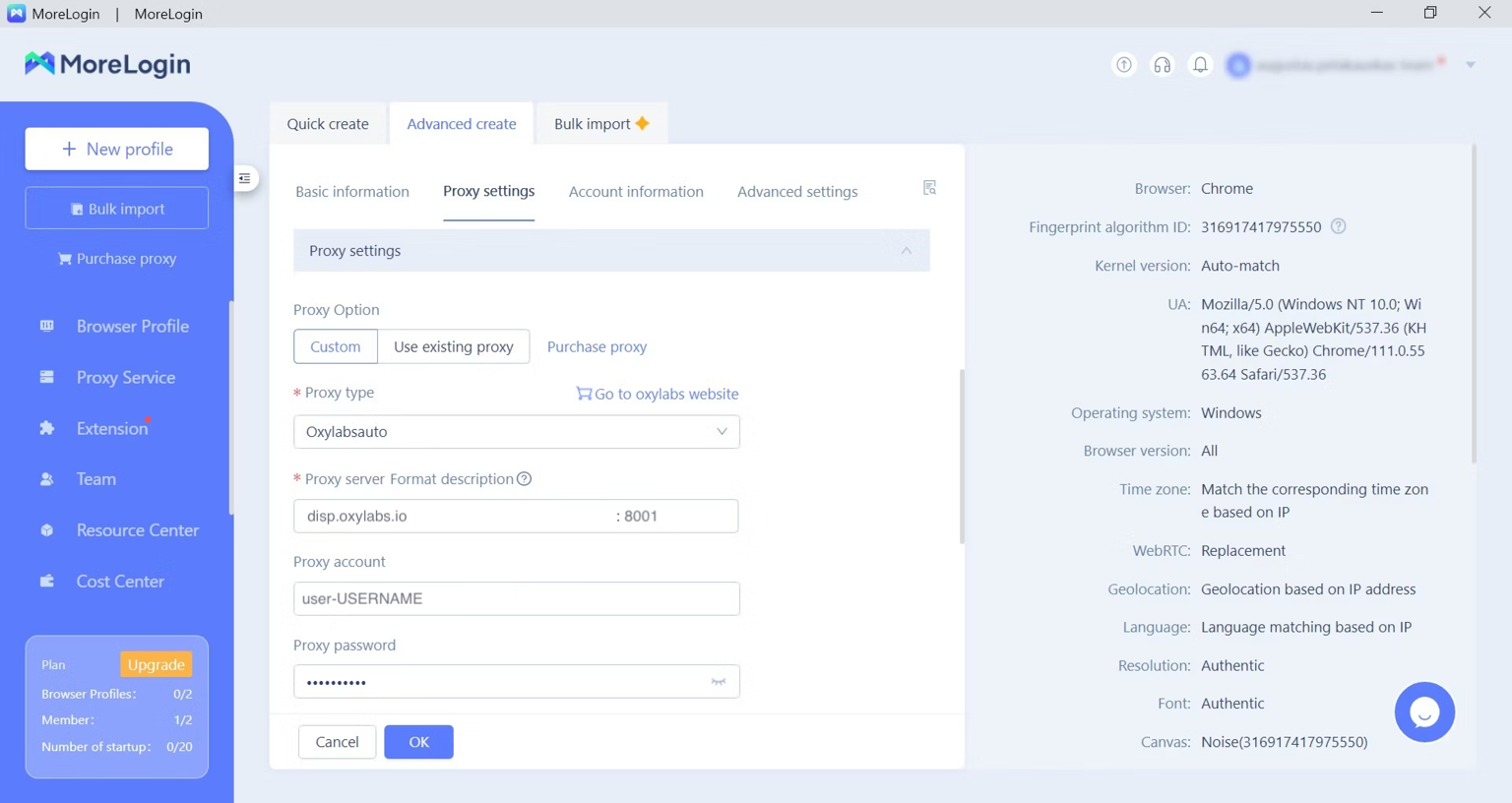
向下滚动或按 **代理设置** 来配置你的 Oxylabs 代理。作为你的 **代理选项**,选择 **自定义**.
要手动配置代理设置,请输入详细信息和凭据(在 [Oxylabs 仪表板](https://dashboard.oxylabs.io/en/)中创建),用于以下 Oxylabs 代理:
* [住宅代理和移动代理](#residential-and-mobile-proxies)
* [数据中心代理](#datacenter-proxies)
* [独享数据中心代理(企业版)](#dedicated-datacenter-proxies-enterprise)
* [独享数据中心代理(自助服务)](#dedicated-datacenter-proxies-self-service)
* [ISP代理](#isp-proxies)
* [独享ISP代理](#dedicated-isp-proxies)
#### 住宅代理和移动代理
**代理类型**: `HTTP`, `HTTPS`,或 `SOCKS5`
**IP/主机**: `pr.oxylabs.io`
**端口**: `7777`
**代理账户:** `customer-USERNAME`
**代理密码:** `PASSWORD`
{% hint style="warning" %}
请务必添加 `customer-` 部分到您的用户名中。
{% endhint %}
{% hint style="info" %}
你也可以使用特定国家的条目,以通过粘性会话获取所需国家的出口节点。例如,要使用美国出口节点,请在 `us-pr.oxylabs.io` 旁边输入 **主机或 IP 地址** 和 `10001` 旁边输入 **端口**。你可以在我们的 [文档](/products/cn/proxies/residential-proxies/location-settings.md).
{% endhint %}
#### 数据中心代理
**代理类型**: `HTTP`, `HTTPS`,或 `SOCKS5`
**IP/主机**: `dc.oxylabs.io`
**端口**: `8001`
**代理账户:** `user-USERNAME`
**代理密码:** `PASSWORD`
{% hint style="warning" %}
请务必添加 `user-` 部分到您的用户名中。
{% endhint %}
对于 **按 IP 计费** 订阅中,端口是从给定列表分配给 IP 地址的顺序编号。因此,端口 `8001` 使用列表中的第一个 IP 地址。
对于 **按流量计费** 套餐,端口 `8001` 随机选择一个 IP 地址,但在会话期间保持一致。
{% hint style="info" %}
你也可以在用户身份验证字符串中指定地理位置,例如美国: `user-USERNAME-country-US:PASSWORD`。参见我们的 [文档](/products/cn/proxies/datacenter-proxies.md) 了解更多详情。
{% endhint %}
#### 独享数据中心代理(企业版)
**代理类型**: `HTTP` 或 `SOCKS5`
**IP/主机**:一个特定的 IP 地址(例如, `1.2.3.4`)
**端口**: `60000` (HTTP), `1180` (SOCKS5)
**代理账户:** `USERNAME`
**代理密码:** `PASSWORD`
{% hint style="info" %}
对于企业版独享数据中心代理,您必须从已获取的 [**列表**](/products/cn/proxies/dedicated-datacenter-proxies/enterprise/proxy-lists.md)**.**
{% endhint %}
#### 独享数据中心代理(自助服务)
**代理类型**: `HTTP`, `HTTPS`,或 `SOCKS5`
**IP/主机**: `ddc.oxylabs.io`
**端口**: `8001`
**代理账户:** `user-USERNAME`
**代理密码:** `PASSWORD`
{% hint style="warning" %}
请务必添加 `user-` 部分到您的用户名中。
{% endhint %}
{% hint style="info" %}
你需要选择一个分配给已购买的 [**代理列表**](/products/cn/proxies/dedicated-datacenter-proxies/self-service/proxy-list.md)**,** IP 地址的端口,你可以在 Oxylabs 仪表板中找到。
{% endhint %}
#### ISP代理
**代理类型**: `HTTP`, `HTTPS`,或 `SOCKS5`
**IP/主机**: `isp.oxylabs.io`
**端口**: `8001`
**代理账户:** `user-USERNAME`
**代理密码:** `PASSWORD`
{% hint style="warning" %}
请务必添加 `user-` 部分到您的用户名中。
{% endhint %}
{% hint style="info" %}
您需要选择分配给所购买的 IP 地址的端口 [**代理列表**](/products/cn/proxies/isp-proxies/proxy-list.md)**,** ,您可以在 Oxylabs 仪表板上找到。 `8001` 该端口将为所有请求从您的列表中选择第一个 IP 地址。
{% endhint %}
#### 独享ISP代理
**代理类型**: `HTTP`, `HTTPS`,或 `SOCKS5`
**代理服务器**: `disp.oxylabs.io`
**端口**: `8001`
**代理账户:** `user-USERNAME`
**代理密码:** `PASSWORD`
{% hint style="warning" %}
请务必添加 `user-` 部分到您的用户名中。
{% endhint %}
{% hint style="info" %}
端口号指示将使用您已获取的 [代理列表](/products/cn/proxies/dedicated-isp-proxies/self-service/proxy-list.md) 中的哪个 IP 地址。使用端口 `8000` 可自动进行 [代理 IP 轮换](/products/cn/proxies/dedicated-isp-proxies/self-service/proxy-rotation.md).
{% endhint %}
{% endstep %}
{% step %}
### 测试你的连接
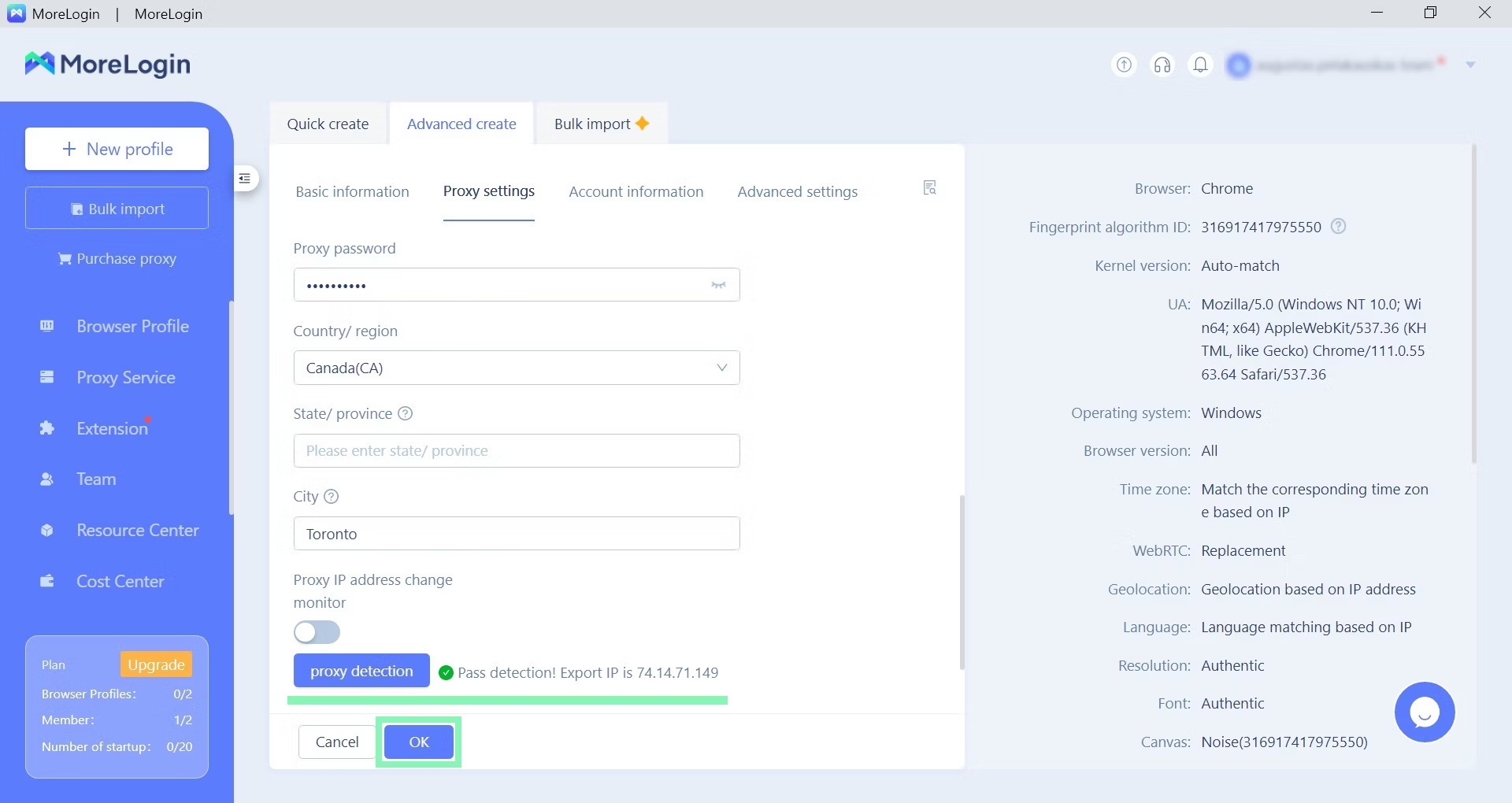
点击 **代理检测** 并测试你的代理,以确保其按预期工作。
{% endstep %}
{% step %}
### 启动你的配置文件
按 **开始** 以启动一个新的浏览器配置文件。
一个基于 Chromium 的浏览器将启动,并打开两个标签页。一个显示你的指纹详细信息,另一个显示搜索引擎主页。
{% endstep %}
{% endstepper %}
你现在已准备好继续进行多账号任务。
---
# Agent Instructions
This documentation is published with GitBook. GitBook is the documentation platform designed so that both humans and AI agents can read, navigate, and reason over technical content effectively. Learn more at gitbook.com.
## Querying This Documentation
If you need additional information that is not directly available in this page, you can query the documentation dynamically by asking a question.
Perform an HTTP GET request on the current page URL with the `ask` query parameter, and the optional `goal` query parameter:
```
GET https://developers.oxylabs.io/integrations/cn/proxy-integrations/morelogin.md?ask=&goal=
```
`ask` is the immediate question: it should be specific, self-contained, and written in natural language.
`goal` is optional and describes the broader end goal you are ultimately trying to accomplish on behalf of the user. GitBook uses it to tailor the answer towards what is most useful for that goal.
The response will contain a direct answer to the question and relevant excerpts and sources from the documentation.
Use this mechanism when the answer is not explicitly present in the current page, you need clarification or additional context, or you want to retrieve related documentation sections.