# 编写 XPath 表达式的技巧

## 抓取的文档与浏览器加载的文档之间的 HTML 结构可能不同 <a href="#html-structure-may-differ-between-scraped-and-browser-loaded-document" id="html-structure-may-differ-between-scraped-and-browser-loaded-document"></a>

在编写 HTML 元素选择函数时， **请确保使用抓取到的文档，而不是你浏览器中加载的在线网站版本**，因为文档可能不同。造成此问题的主要原因是 JavaScript 渲染。当网站被打开时，浏览器负责加载额外的文档，例如 CSS 样式表和 JavaScript 脚本，这些都可能改变初始 HTML 文档的结构。在解析抓取的 HTML 时，Custom Parser 不会像浏览器那样加载 HTML 文档（解析器会忽略 JavaScript 指令），因此解析器与浏览器渲染的 HTML 树可能不同。

例如，请查看以下 HTML 文档：

```html
<!doctype html>
<html lang="en">
<head>
    <meta charset="UTF-8">
    <title>Document</title>
</head>
<body>
    <div>
        <h3>This is a product</h3>
        <div id="price-container">
            <p>This is the price:</p>
        </div>
        <p>And here is some description</p>
    </div>
    <script>
        const priceContainer = document.querySelector("#price-container");
        const priceElement = document.createElement("p");
        priceElement.textContent = "123";
        priceElement.id = "price"
        priceContainer.insertAdjacentElement("beforeend", priceElement);
    </script>
</body>
</html>
```

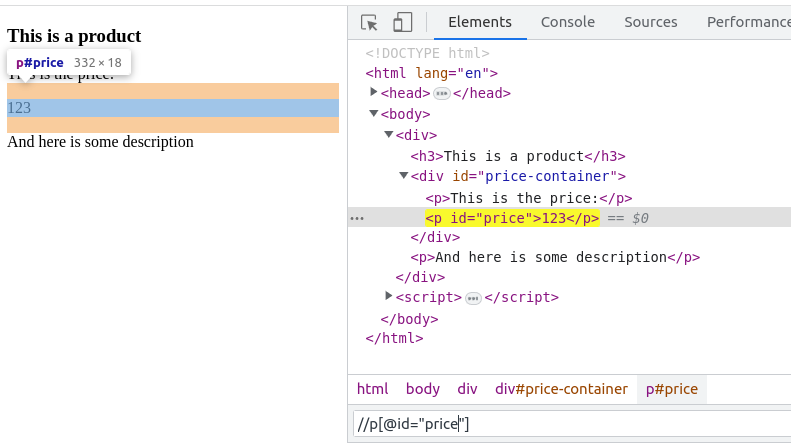
如果你通过浏览器打开该文档，它会显示价格，你可以使用以下 XPath 表达式进行选择 `//p[@id="price"]`:

<figure><img src="https://2655358775-files.gitbook.io/~/files/v0/b/gitbook-x-prod.appspot.com/o/spaces%2FzrXw45naRpCZ0Ku9AjY1%2Fuploads%2Fa1Q7Xy0RGkCtyypmJiaz%2Fimage.png?alt=media&#x26;token=b8a517cb-77a5-49c3-9611-d61923657e83" alt=""><figcaption></figcaption></figure>

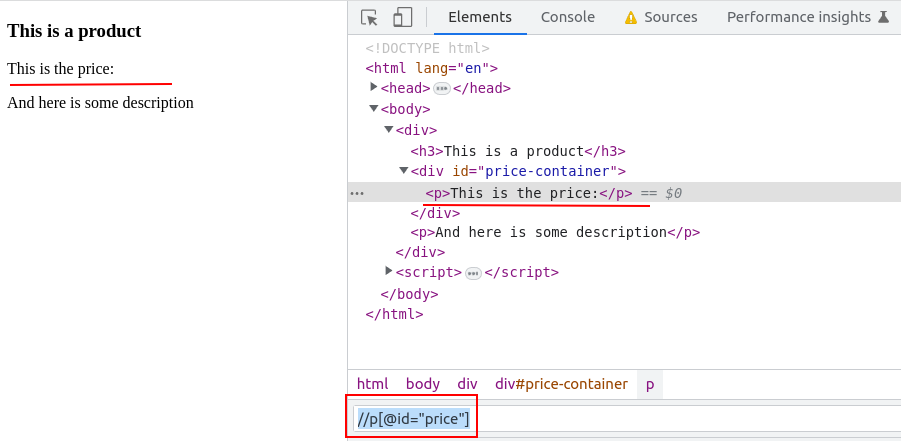
现在如果你在浏览器中禁用 JavaScript 渲染，网站将按如下方式渲染：

<figure><img src="https://2655358775-files.gitbook.io/~/files/v0/b/gitbook-x-prod.appspot.com/o/spaces%2FzrXw45naRpCZ0Ku9AjY1%2Fuploads%2FAZ0eGq3gY8dklt1AayeD%2Fimage.png?alt=media&#x26;token=0d2254da-65f9-4fde-8f0b-68ab5caddc4b" alt=""><figcaption></figcaption></figure>

同样的 `//p[@id="price"]` XPath 表达式将不再匹配价格，因为它未被渲染。

## 请确保为目标元素编写所有可能的 HTML 选择器 <a href="#make-sure-to-write-all-possible-html-selectors-for-the-target-element" id="make-sure-to-write-all-possible-html-selectors-for-the-target-element"></a>

出于多种原因，同一页面被抓取两次可能具有不同的布局（抓取时使用了不同的 User-Agent、目标网站进行 A/B 测试等）。

为解决此问题，我们建议为最初抓取的文档定义 `parsing_instructions` ，并立即使用同类型页面的多个其他抓取任务结果来测试这些指令。

HTML 选择器函数（`xpath`/`xpath_one`）支持 [**选择器回退**](https://developers.oxylabs.io/documentation/cn/zhua-qu-jie-jue-fang-an/web-scraper-api/features/custom-parser/list-of-functions/function-examples#xpath).

## 推荐的 HTML 选择器编写流程 <a href="#suggested-html-selector-writing-flow" id="suggested-html-selector-writing-flow"></a>

1. 使用 网页爬虫API 抓取目标页面的 HTML 文档。
2. 禁用 JavaScript，并在本地使用浏览器打开抓取的 HTML。如果在 **之后** 禁用 JavaScript 才打开了 HTML，请确保重新加载页面，使 HTML 在没有 JavaScript 的情况下重新加载。
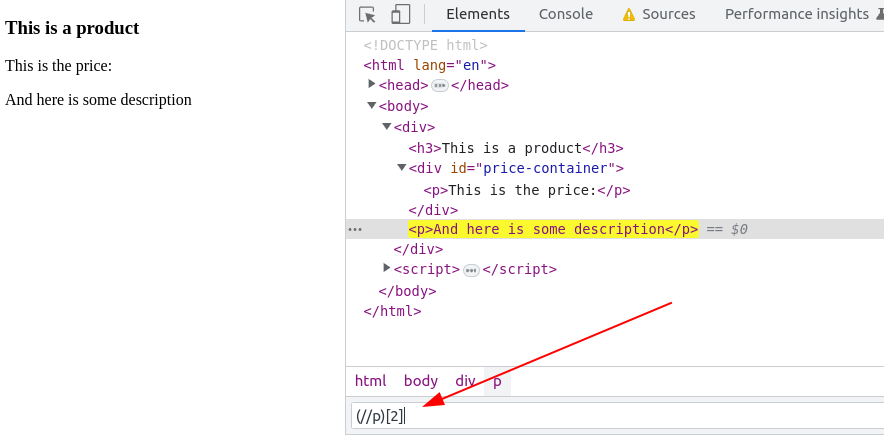
3. [**使用浏览器开发者工具**](https://www.computerhope.com/issues/ch002153.htm).

<figure><img src="https://2655358775-files.gitbook.io/~/files/v0/b/gitbook-x-prod.appspot.com/o/spaces%2FzrXw45naRpCZ0Ku9AjY1%2Fuploads%2FoG0t7V4hrgrtY5EgtqvF%2Fimage.png?alt=media&#x26;token=c53e0220-0cef-420f-974b-7123c49c1187" alt=""><figcaption></figcaption></figure>

### 如何编写解析指令  <a href="#how-to-write-parsing-instructions-inlineextension" id="how-to-write-parsing-instructions-inlineextension"></a>

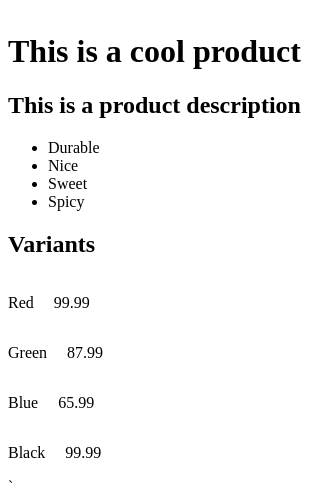
假设你有以下页面需要解析：

```html
`<!doctype html>
<html lang="en">
<head></head>
<body>
<style>
.variant {
  display: flex;
  flex-wrap: nowrap;
}
.variant p {
  white-space: nowrap;
  margin-right: 20px;
}
</style>
<div>
    <h1 id="title">This is a cool product</h1>
    <div id="description-container">
        <h2>This is a product description</h2>
        <ul>
            <li class="description-item">Durable</li>
            <li class="description-item">Nice</li>
            <li class="description-item">Sweet</li>
            <li class="description-item">Spicy</li>
        </ul>
    </div>
    <div id="price-container">
        <h2>Variants</h2>
        <div id="variants">
            <div class="variant">
                <p class="color">Red</p>
                <p class="price">99.99</p>
            </div>
            <div class="variant">
                <p class="color">Green</p>
                <p class="price">87.99</p>
            </div>
            <div class="variant">
                <p class="color">Blue</p>
                <p class="price">65.99</p>
            </div>
            <div class="variant">
                <p class="color">Black</p>
                <p class="price">99.99</p>
            </div>
        </div>
    </div>
</div>
</body>
</html>
```

<figure><img src="https://2655358775-files.gitbook.io/~/files/v0/b/gitbook-x-prod.appspot.com/o/spaces%2FzrXw45naRpCZ0Ku9AjY1%2Fuploads%2FHJ39wJ8MBPxXnS8pjXuF%2Fimage.png?alt=media&#x26;token=ac49bb0c-655e-4bc5-abb2-7b82d7b56a6a" alt=""><figcaption></figcaption></figure>

### 解析商品标题

创建一个新的 JSON 对象，并为其分配一个新字段。

你可以按喜好命名该字段，但有一些例外（用户自定义字段名不能以下划线开头 `_` ，例如： `"_title"`).&#x20;

字段名将显示在解析结果中。

新字段必须是 JSON 对象类型的值：

```json
{
    "title": {}  // 定义要解析的 title 字段
} 
```

如果你将这些指令提供给 Custom Parser，它将不会执行任何操作，或者会提示你没有提供任何指令。

要将标题实际解析到 `title` 字段中，你必须在该 `title` 对象内使用保留的 `_fns` 属性（其类型始终为 array）来定义数据处理流水线：

```json
{
    "title": {
        "_fns": []  // 为 title 字段定义数据处理流水线
    }
}
```

为了让 Custom Parser 选择标题文本，你可以使用 HTML 选择器函数 `xpath_one`。要在 HTML 文档上使用该函数，应将其添加到数据处理流水线中。该函数定义为一个包含必需 `_fn` （函数名）和必需 `_args` （函数参数）字段的 JSON 对象。查看完整的函数定义列表 [**此处**](https://developers.oxylabs.io/documentation/cn/zhua-qu-jie-jue-fang-an/web-scraper-api/features/custom-parser/writing-instructions-manually/list-of-functions).

```json
{
    "title": {
        "_fns": [
            {
                "_fn": "xpath_one",
                "_args": ["//h1/text()"]
            }
        ]
    }
}
```

上述解析指令应生成以下结果：

```json
{
    "title": "This is a cool product"
}
```

### 解析描述

类似地，在解析指令中，你可以定义另一个字段来解析商品描述容器、描述标题和条目。为了让描述的标题和条目嵌套在 `description` 对象下，指令的结构应如下所示：

```json
{
    "title": {...},
    "description": { // 描述容器
        "title": {}, // 描述标题
        "items": {} // 描述条目
    } 
}
```

给定的解析指令结构意味着 `description.title` 和 `description.items` 将基于 `description` 元素来解析。你可以为 `description` 字段定义一个流水线。在此情况下，先执行它，以简化描述标题的 XPath 表达式。

```json
{
    "title": {...},
    "description": {
        "_fns": [
            {
                "_fn": "xpath_one",
                "_args": ["//div[@id='description-container']"]
            }
        ],  // 在解析 `title` 和 `items` 时将使用流水线结果。
        "title": {},
        "items": {}
    }
}
```

在该示例中， `description._fns` 流水线将选择 `description-container` HTML 元素，它将作为解析描述标题和条目的参考点。

要解析剩余的描述字段，为字段添加两个不同的流水线 `description.items`，和 `description.title`:

```json
{
    "title": {...},
    "description": {
        "_fns": [
            {
                "_fn": "xpath_one",
                "_args": [
                    "//div[@id='description-container']"
                ]
            }
        ],
        "title": {
            "_fns": [
                {
                    "_fn": "xpath_one",
                    "_args": [
                        "//h2/text()"
                    ]
                }
            ]
        },
        "items": {
            "_fns": [
                {
                    "_fn": "xpath",
                    "_args": [
                        "//li/text()"
                    ]
                }
            ]
        }
    }
}
```

注意到 `xpath` 函数用于替代 `xpath_one` 以提取所有匹配该 XPath 表达式的条目。

解析指令将生成以下结果：

```json
{
    "title": {...},
    "description": {
        "title": "This is description about the product",
        "items": [
            "Durable",
            "Nice",
            "Sweet",
            "Spicy"
        ]
    }
}
```

### 解析商品变体

以下示例展示了如果你想将信息解析到 `product_variants` 字段（其中包含变体对象的列表）时指令的结构。在此情况下，变体对象包含 `价格` 和 `color` 字段。

```json
{
    "title": {...},
    "description": {...},
    "product_variants": [
        {
            "price": ...,
            "color": ...
        },
        {
            ...
        },
        ...
    ]
}
```

首先选择所有商品变体元素：

```json
{
    "title": {...},
    "description": {...},
    "product_variants": {
        "_fns": [
            {
                "_fn": "xpath",
                "_args": ["//div[@class='variant']"]
            }
        ]
    }
}
```

要将 `product_variants` 制作为包含 JSON 对象的列表，你需要使用 `_items` 迭代器来遍历找到的变体：

```json
{
    "title": {...},
    "description": {...},
    "product_variants": {
        "_fns": [
            {
                "_fn": "xpath",
                "_args": ["//div[@class='variant']"]
            }
        ],
        "_items": { // 通过此项，你在指示逐个处理找到的元素
            // 此处将描述字段指令
        } 
    }
}
```

最后，定义如何解析 `color` 和 `价格` 字段的指令：

```json
{
    "title": {...},
    "description": {...},
    "product_variants": {
        "_fns": [
            {
                "_fn": "xpath",
                "_args": [
                    "//div[@class='variant']"
                ]
            }
        ],
        "_items": {
            "color": {
                "_fns": [
                    {
                        "_fn": "xpath_one",
                        "_args": [
                            // 由于我们使用的是相对 XPath 表达式，
                            // 请确保 XPath 以点号 (.) 开头
                            ".//p[@class='color']/text()"
                        ]
                    }
                ]
            },
            "price": {
                "_fns": [
                    {
                        "_fn": "xpath_one",
                        "_args": [
                            ".//p[@class='price']/text()"
                        ]
                    }
                ]
            }
        }
    }
}
```

在描述了 `product_variants` 之后，最终指令如下所示：

```json
{
    "title": {
        "_fns": [
            {
                "_fn": "xpath_one",
                "_args": [
                    "//h1/text()"
                ]
            }
        ]
    },
    "description": {
        "_fns": [
            {
                "_fn": "xpath_one",
                "_args": [
                    "//div[@id='description-container']"
                ]
            }
        ],
        "title": {
            "_fns": [
                {
                    "_fn": "xpath_one",
                    "_args": [
                        "//h2/text()"
                    ]
                }
            ]
        },
        "items": {
            "_fns": [
                {
                    "_fn": "xpath",
                    "_args": [
                        "//li/text()"
                    ]
                }
            ]
        }
    },
    "product_variants": {
        "_fns": [
            {
                "_fn": "xpath",
                "_args": [
                    "//div[@class='variant']"
                ]
            }
        ],
        "_items": {
            "color": {
                "_fns": [
                    {
                        "_fn": "xpath_one",
                        "_args": [
                            ".//p[@class='color']/text()"
                        ]
                    }
                ]
            },
            "price": {
                "_fns": [
                    {
                        "_fn": "xpath_one",
                        "_args": [
                            ".//p[@class='price']/text()"
                        ]
                    }
                ]
            }
        }
    }
}
```

它将生成如下输出：

```json
{
    "title": "This is a cool product",
    "description": {
        "title": "This is a product description",
        "items": [
            "Durable",
            "Nice",
            "Sweet",
            "Spicy"
        ]
    },
    "product_variants": [
        {
            "color": "Red",
            "price": "99.99"
        },
        {
            "color": "Green",
            "price": "87.99"
        },
        {
            "color": "Blue",
            "price": "65.99"
        },
        {
            "color": "Black",
            "price": "99.99"
        }
    ]
}
```

你可以在此处找到更多解析指令示例： [**Parsing instruction examples**](https://developers.oxylabs.io/documentation/cn/zhua-qu-jie-jue-fang-an/web-scraper-api/features/custom-parser/writing-instructions-manually/parsing-instruction-examples).