# DuoPlus
[DuoPlus](https://www.duoplus.net/?r=oxylabs) 是一项基于云的移动设备服务,旨在帮助管理多个社交媒体和电商账户,尤其适用于大规模移动应用场景。
以下指南将向你展示如何在 DuoPlus 中设置 Oxylabs [数据中心代理](https://oxylabs.io/products/datacenter-proxies) 。
{% hint style="warning" %}
**注意:** 本指南中的部分截图为便于说明,展示的是使用住宅代理的设置过程;请参考正文中提供的针对数据中心代理的具体指南。
{% endhint %}
{% stepper %}
{% step %}
### 登录 DuoPlus
设置一个 [DuoPlus 账户](https://my.duoplus.net/sign-in?callbackUrl=/images) 并获取云手机访问权限。该应用可在浏览器中运行。
{% endstep %}
{% step %}
### 将代理添加到你的仪表盘
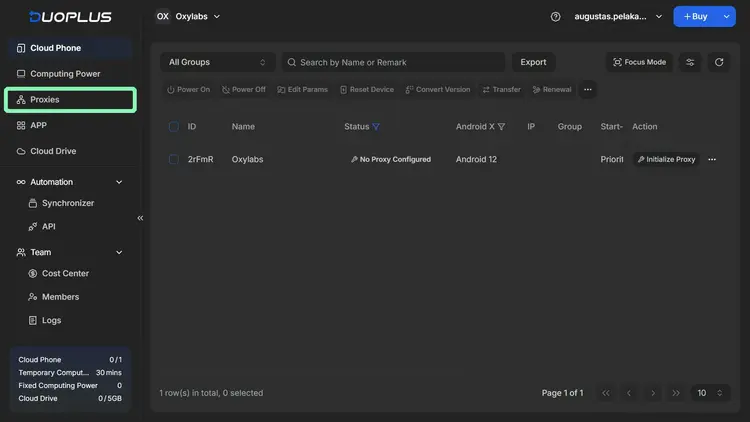
在 DuoPlus 仪表盘中,进入 **代理** 和 **添加** 一个新的代理。你也可以批量添加多个代理。
{% endstep %}
{% step %}
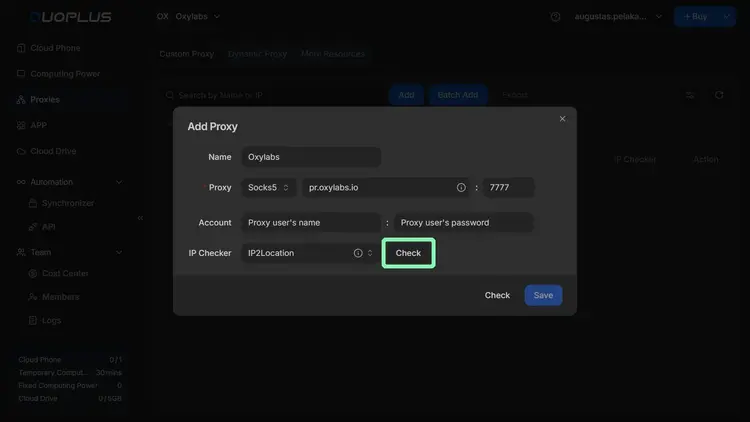
### 添加数据中心代理
{% hint style="warning" %}
DuoPlus 仅支持 **SOCKS5** 代理。
{% endhint %}
请填写 Oxylabs 数据中心代理的以下详细信息:
**主机:** `dc.oxylabs.io`
**端口:** `8001`
**对于按 IP 计费订阅:** 端口对应于从所提供列表中分配给某个 IP 地址的顺序编号。因此,端口 8001 使用列表中的第一个 IP 地址 [你的列表](https://developers.oxylabs.io/documentation/cn/dai-li/datacenter-proxies/proxy-list).
**对于按流量计费订阅:** 端口 8001 会随机选择一个 IP 地址,但在整个会话中保持一致。你还可以在用户认证字符串中指定地理位置,例如美国: `user-USERNAME-country-US:PASSWORD`。更多详情请阅读 [IP Control 文档](https://developers.oxylabs.io/documentation/cn/dai-li/datacenter-proxies/ip-control).
中选择一个 IP 地址。然后,输入你的 Oxylabs 代理用户凭据。使用你在 Oxylabs 仪表盘 [中创建新代理用户时填写的相同用户名和密码。](https://dashboard.oxylabs.io/en/).
**作为身份验证方式。** `user-USERNAME`
**用户名:** `PASSWORD`
{% hint style="warning" %}
**注意:** 别忘了在用户名中添加 `user-` 前缀。
{% endhint %}
{% endstep %}
{% step %}
### 测试你的连接
**检查** 代理连接,进行快速测试:
如果你在代理凭据下看到消息“Proxy IP connection test passed”,你就可以 **保存** 完成代理设置。
{% endstep %}
{% step %}
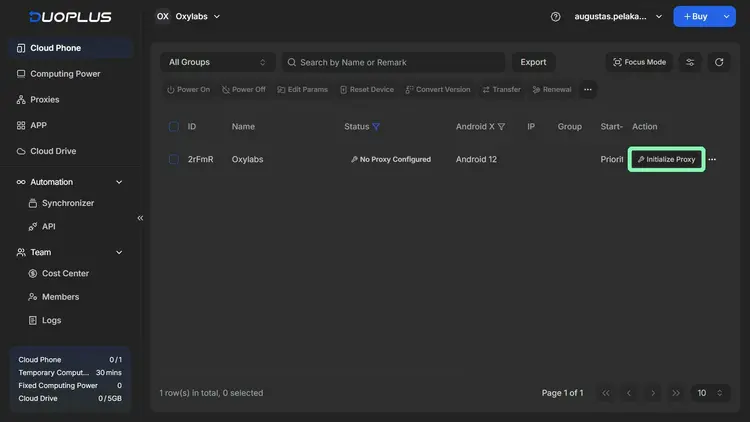
### 激活代理
**为云手机实例** 初始化一个代理。
选择你刚添加的代理,设置所需的云手机配置,然后 **完成** 设置。
{% endstep %}
{% step %}
### 使用代理启动云手机
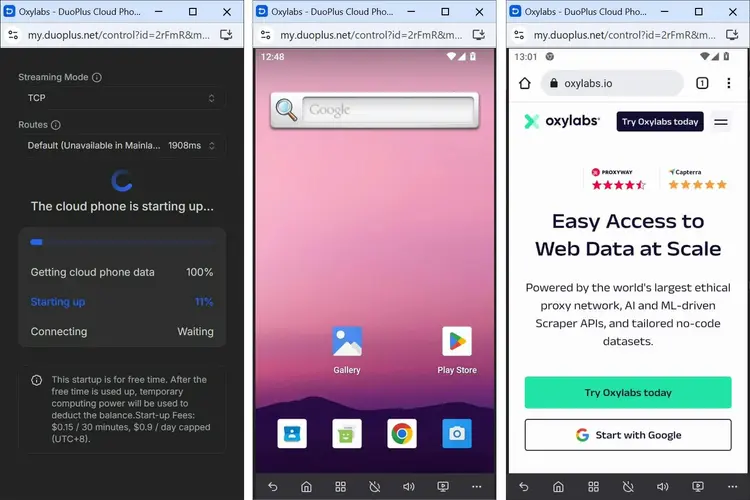
**开启** 云手机以启动虚拟环境。
最后,只需等待虚拟环境加载完成。
{% endstep %}
{% endstepper %}
你也可以在 DuoPlus 中使用其他类型的代理: [住宅代理](https://developers.oxylabs.io/documentation/cn/dai-li/integration-guides/3rd-party-integrations/duoplus), [移动代理](https://developers.oxylabs.io/documentation/cn/dai-li/integration-guides/3rd-party-integrations-1/duoplus), [ISP 代理](https://developers.oxylabs.io/documentation/cn/dai-li/integration-guides/isp-proxies-integrations/duoplus), [企业独享数据中心代理](https://developers.oxylabs.io/documentation/cn/dai-li/integration-guides/3rd-party-integrations-1-1/enterprise/duoplus),以及 [自助独享数据中心代理](https://developers.oxylabs.io/documentation/cn/dai-li/integration-guides/3rd-party-integrations-1-1/self-service/duoplus).
---
# Agent Instructions: Querying This Documentation
If you need additional information that is not directly available in this page, you can query the documentation dynamically by asking a question.
Perform an HTTP GET request on the current page URL with the `ask` query parameter:
```
GET https://developers.oxylabs.io/documentation/cn/dai-li/integration-guides/shared-datacenter-proxies-guides/duoplus.md?ask=
```
The question should be specific, self-contained, and written in natural language.
The response will contain a direct answer to the question and relevant excerpts and sources from the documentation.
Use this mechanism when the answer is not explicitly present in the current page, you need clarification or additional context, or you want to retrieve related documentation sections.