# 搜索

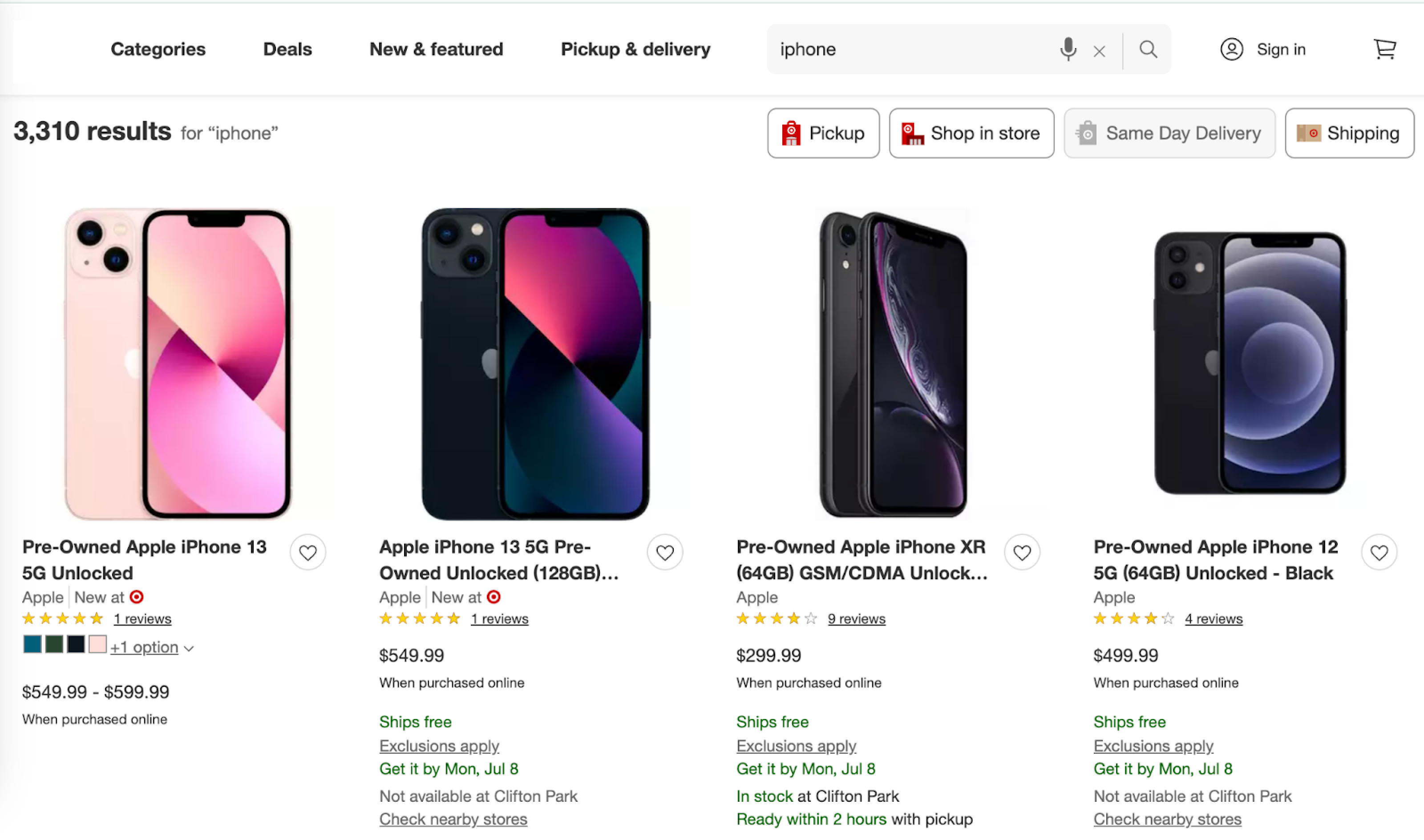
该 `target_search` 该 source 用于检索 Target 搜索结果页面。我们可以返回任意 Target 页面 的 HTML。此外，我们还可以提供 **Target 搜索页面的结构化（解析）输出**.

## 请求示例

下面的示例说明如何获取解析后的 Target 搜索页面结果。

{% tabs %}
{% tab title="cURL" %}

```shell
curl 'https://realtime.oxylabs.io/v1/queries' \
--user 'USERNAME:PASSWORD' \
-H 'Content-Type: application/json' \
-d '{
        "source": "target_search", 
        "query": "iphone",
        "render": "html",
        "parse": true
    }'
```

{% endtab %}

{% tab title="Python" %}

```python
import requests
from pprint import pprint


# 构建负载。
payload = {
    'source': 'target_search',
    'query': 'iphone',
    'render': 'html',
    'parse': True,
}

# 获取响应。
response = requests.request(
    'POST',
    'https://realtime.oxylabs.io/v1/queries',
    auth=('user', 'pass1'),
    json=payload,
)

# 此外，替代返回包含作业状态和结果 URL 的响应，这将直接返回
# 含结果的 JSON 响应。
pprint(response.json())
```

{% endtab %}

{% tab title="Node.js" %}

```javascript
const https = require("https");

const username = "USERNAME";
const password = "PASSWORD";
const body = {
    source: "target_search",
    query: "iphone",
    render: "html",
    parse: true,
};

const options = {
    hostname: "realtime.oxylabs.io",
    path: "/v1/queries",
    method: "POST",
    headers: {
        "Content-Type": "application/json",
        Authorization:
            "Basic " + Buffer.from(`${username}:${password}`).toString("base64"),
    },
};

const request = https.request(options, (response) => {
    let data = "";

    response.on("data", (chunk) => {
        data += chunk;
    });

    response.on("end", () => {
        const responseData = JSON.parse(data);
        console.log(JSON.stringify(responseData, null, 2));
    });
});

request.on("error", (error) => {
    console.error("Error:", error);
});

request.write(JSON.stringify(body));
request.end();
```

{% endtab %}

{% tab title="HTTP" %}

```http
# 你提交的整个字符串必须进行 URL 编码。

https://realtime.oxylabs.io/v1/queries?source=target_search&query=iphone&render=html&parse=true&access_token=12345abcde
```

{% endtab %}

{% tab title="PHP" %}

```php
<?php

$params = array(
    'source' => 'target_search',
    'query' => 'iphone',
    'render' => 'html',
    'parse' => true
);

$ch = curl_init();

curl_setopt($ch, CURLOPT_URL, "https://realtime.oxylabs.io/v1/queries");
curl_setopt($ch, CURLOPT_RETURNTRANSFER, 1);
curl_setopt($ch, CURLOPT_POSTFIELDS, json_encode($params));
curl_setopt($ch, CURLOPT_POST, 1);
curl_setopt($ch, CURLOPT_USERPWD, "USERNAME" . ":" . "PASSWORD");

$headers = array();
$headers[] = "Content-Type: application/json";
curl_setopt($ch, CURLOPT_HTTPHEADER, $headers);

$result = curl_exec($ch);
echo $result;

if (curl_errno($ch)) {
    echo 'Error:' . curl_error($ch);
}
curl_close($ch);
```

{% endtab %}

{% tab title="Golang" %}

```go
package main

import (
	"bytes"
	"encoding/json"
	"fmt"
	"io/ioutil"
	"net/http"
)

func main() {
	const Username = "USERNAME"
	const Password = "PASSWORD"

	payload := map[string]interface{}{
		"source":       "target_search",
		"query":        "iphone",
		"render":       "html",
		"parse":        true,
	}

	jsonValue, _ := json.Marshal(payload)

	client := &http.Client{}
	request, _ := http.NewRequest("POST",
		"https://realtime.oxylabs.io/v1/queries",
		bytes.NewBuffer(jsonValue),
	)

	request.SetBasicAuth(Username, Password)
	response, _ := client.Do(request)

	responseText, _ := ioutil.ReadAll(response.Body)
	fmt.Println(string(responseText))
}

```

{% endtab %}

{% tab title="C#" %}

```csharp
using System;
using System.Collections.Generic;
using System.Net.Http;
using System.Net.Http.Json;
using System.Threading.Tasks;

namespace OxyApi
{
    class Program
    {
        static async Task Main()
        {
            const string Username = "USERNAME";
            const string Password = "PASSWORD";

            var parameters = new {
                source = "target_search",
                url = "iphone",
                render = "html",
                parse = true
            };

            var client = new HttpClient();

            Uri baseUri = new Uri("https://realtime.oxylabs.io");
            client.BaseAddress = baseUri;

            var requestMessage = new HttpRequestMessage(HttpMethod.Post, "/v1/queries");
            requestMessage.Content = JsonContent.Create(parameters);

            var authenticationString = $"{Username}:{Password}";
            var base64EncodedAuthenticationString = Convert.ToBase64String(System.Text.ASCIIEncoding.UTF8.GetBytes(authenticationString));
            requestMessage.Headers.Add("Authorization", "Basic " + base64EncodedAuthenticationString);

            var response = await client.SendAsync(requestMessage);
            var contents = await response.Content.ReadAsStringAsync();

            Console.WriteLine(contents);
        }
    }
}
```

{% endtab %}

{% tab title="Java" %}

```java
package org.example;

import okhttp3.*;
import org.json.JSONObject;
import java.util.concurrent.TimeUnit;

public class Main implements Runnable {
    private static final String AUTHORIZATION_HEADER = "Authorization";
    public static final String USERNAME = "USERNAME";
    public static final String PASSWORD = "PASSWORD";

    public void run() {
        JSONObject jsonObject = new JSONObject();
        jsonObject.put("source", "target_search");
        jsonObject.put("query", "iphone");
        jsonObject.put("render", "html");
        jsonObject.put("parse", true);

        Authenticator authenticator = (route, response) -> {
            String credential = Credentials.basic(USERNAME, PASSWORD);
            return response
                    .request()
                    .newBuilder()
                    .header(AUTHORIZATION_HEADER, credential)
                    .build();
        };

        var client = new OkHttpClient.Builder()
                .authenticator(authenticator)
                .readTimeout(180, TimeUnit.SECONDS)
                .build();

        var mediaType = MediaType.parse("application/json; charset=utf-8");
        var body = RequestBody.create(jsonObject.toString(), mediaType);
        var request = new Request.Builder()
                .url("https://realtime.oxylabs.io/v1/queries")
                .post(body)
                .build();

        try (var response = client.newCall(request).execute()) {
            if (response.body() != null) {
                try (var responseBody = response.body()) {
                    System.out.println(responseBody.string());
                }
            }
        } catch (Exception exception) {
            System.out.println("Error: " + exception.getMessage());
        }

        System.exit(0);
    }

    public static void main(String[] args) {
        new Thread(new Main()).start();
    }
}
```

{% endtab %}

{% tab title="JSON" %}

```json
{
    "source": "target_search", 
    "query": "iphone", 
    "render": "html",
    "parse": true
}
```

{% endtab %}
{% endtabs %}

我们的示例中使用同步的 [**Realtime**](https://developers.oxylabs.io/documentation/cn/zhua-qu-jie-jue-fang-an/web-scraper-api/integration-methods/realtime) 集成方式。如果你想使用 [**Proxy Endpoint**](https://developers.oxylabs.io/documentation/cn/zhua-qu-jie-jue-fang-an/web-scraper-api/integration-methods/proxy-endpoint) 或异步的 [**Push-Pull**](https://developers.oxylabs.io/documentation/cn/zhua-qu-jie-jue-fang-an/web-scraper-api/integration-methods/push-pull) 集成，请参阅 [**集成方法**](https://developers.oxylabs.io/documentation/cn/zhua-qu-jie-jue-fang-an/web-scraper-api/integration-methods) 部分。

## 请求参数值

### 通用

<table><thead><tr><th width="205">参数</th><th width="289.3333333333333">描述</th><th>默认值</th></tr></thead><tbody><tr><td><mark style="background-color:green;"><strong>source</strong></mark></td><td>设置要使用的爬取器。</td><td><code>target_search</code></td></tr><tr><td><mark style="background-color:green;"><strong>query</strong></mark></td><td>用于搜索产品的关键字或短语。</td><td>-</td></tr><tr><td><code>render</code></td><td>当设置为启用 JavaScript 渲染 <code>html</code>. <a href="../../../features/js-rendering-and-browser-control/javascript-rendering"><strong>更多信息</strong></a><strong>.</strong></td><td>-</td></tr><tr><td><code>parse</code></td><td>设置为时返回解析后的数据 <code>true</code>.</td><td><code>false</code></td></tr><tr><td><code>callback_url</code></td><td>你的回调端点的 URL。 <a href="../../../../integration-methods/push-pull#callback"><strong>更多信息</strong></a>.</td><td>-</td></tr><tr><td><code>user_agent_type</code></td><td>设备类型和浏览器。完整列表可在此处找到 <a href="../../../features/http-context-and-job-management/user-agent-type"><strong>here</strong></a>.</td><td><code>desktop</code></td></tr></tbody></table>

&#x20;    \- 必填参数

### 本地化

根据特定商店、履约类型和配送地点调整结果。

<table><thead><tr><th width="212">参数</th><th width="218">描述</th><th>类型</th></tr></thead><tbody><tr><td><code>fulfillment_type</code></td><td>设置履行类型。可用值为： <code>pickup</code>, <code>shipping</code>, <code>shop_in_store</code>, <code>same_day_delivery</code>.</td><td>String</td></tr><tr><td><code>store_id</code></td><td>设置门店位置。</td><td>Integer</td></tr><tr><td><code>delivery_zip</code></td><td>设置送货到的邮编位置。</td><td>String</td></tr></tbody></table>

## 输出数据字典

#### HTML 示例

<figure><img src="https://2655358775-files.gitbook.io/~/files/v0/b/gitbook-x-prod.appspot.com/o/spaces%2FzrXw45naRpCZ0Ku9AjY1%2Fuploads%2FKoqmUBK4g1aAgKVHhTVP%2Ftarget_1.png?alt=media&#x26;token=8da9a6cb-40c1-4a78-9fff-8a9a4ede1441" alt=""><figcaption></figcaption></figure>

```json
"content": {
    "url": "https://www.target.com/s?searchTerm=iphone&tref=typeahead%7Cterm%7Ciphone%7C%7C%7Chistory",
    "results": {
        "organic": [
            {
                "url": "https://www.target.com/p/refurbished-at-38-t-apple-iphone-12-128gb-black-target-certified-refurbished/-/A-90500508#lnk=sametab",
                "title": "Refurbished AT&T Apple iPhone 12 (128GB) - Black - Target Certified Refurbished",
                "brand_link": "https://www.target.com/b/apple/-/N-5y3ej",
                "brand_name": "Apple",
                "price_data": {
                    "price": 380.79,
                    "currency": "USD",
                    "comparison_price": 475.99
                },
                "product_id": "90500508",
                "rating_data": {
                    "count": 0,
                    "score": 0
                },
                "shipping_message": "Ships freeExclusions applyGet it by Tue, Jul 9"
            },
                        ...
        ]
    },
    "parse_status_code": 12000
},
"created_at": "2024-07-03 10:48:01",
"updated_at": "2024-07-03 10:48:32",
"page": 1,
"url": "https://www.target.com/s?searchTerm=iphone&tref=typeahead%7Cterm%7Ciphone%7C%7C%7Chistory",
"job_id": "7214218323129556993",
"status_code": 200,
"parser_type": "target_search",
		...
}
```

#### JSON 结构

下表列出了详细的 **搜索结果页面** 元素及其说明和数据类型。表中还包括一些元数据。

<table><thead><tr><th width="235">键</th><th width="352">描述</th><th>键 类型</th></tr></thead><tbody><tr><td><code>url</code></td><td>搜索结果页面的 URL。</td><td>String</td></tr><tr><td><code>results</code></td><td>搜索结果的容器。</td><td>字典</td></tr><tr><td><code>organic</code></td><td>自然（非付费）搜索结果列表。</td><td>列表</td></tr><tr><td><code>organic.url</code></td><td>单个产品页面的 URL。</td><td>String</td></tr><tr><td><code>organic.title</code></td><td>产品标题。</td><td>String</td></tr><tr><td><code>organic.brand_link</code></td><td>品牌页面的 URL。</td><td>String</td></tr><tr><td><code>organic.brand_name</code></td><td>品牌名称。</td><td>String</td></tr><tr><td><code>organic.price_data</code></td><td>产品价格数据的容器。</td><td>字典</td></tr><tr><td><code>organic.price_data.price</code></td><td>产品的价格。</td><td>浮点数</td></tr><tr><td><code>organic.price_data.currency</code></td><td>价格的货币单位。</td><td>String</td></tr><tr><td><code>organic.price_data.upper_price</code></td><td>如果存在价格区间，则为上限价格。</td><td>浮点数</td></tr><tr><td><code>organic.product_id</code></td><td>唯一的产品 ID。</td><td>String</td></tr><tr><td><code>organic.rating_data</code></td><td>产品评分数据的容器。</td><td>字典</td></tr><tr><td><code>organic.rating_data.count</code></td><td>评分数量。</td><td>Integer</td></tr><tr><td><code>organic.rating_data.score</code></td><td>平均评分分数。</td><td>浮点数</td></tr><tr><td><code>organic.rating_data.reviews_url</code></td><td>评论页面的 URL。</td><td>String</td></tr><tr><td><code>organic.shipping_message</code></td><td>产品的配送信息。</td><td>String</td></tr><tr><td><code>created_at</code></td><td>抓取作业创建的时间戳。</td><td>String</td></tr><tr><td><code>updated_at</code></td><td>抓取作业完成的时间戳。</td><td>String</td></tr><tr><td><code>parse_status_code</code></td><td>解析作业的状态代码。您可以查看解析器状态代码的说明 <a href="https://github.com/oxylabs/gitbook-public-english/blob/master/scraping-solutions/web-scraper-api/targets/north-american-e-commerce/target/broken-reference/README.md"><strong>here</strong></a>.</td><td>Integer</td></tr><tr><td><code>page</code></td><td>搜索结果的页码</td><td>Integer</td></tr><tr><td><code>status_code</code></td><td>抓取作业的状态代码。您可以查看抓取器状态代码的说明 <a href="https://github.com/oxylabs/gitbook-public-english/blob/master/scraping-solutions/web-scraper-api/targets/north-american-e-commerce/target/broken-reference/README.md"><strong>here</strong></a>.</td><td>Integer</td></tr><tr><td><code>parser_type</code></td><td>用于提取数据的解析器类型。</td><td>String</td></tr><tr><td><code>job_id</code></td><td>与抓取作业关联的任务ID。</td><td>String</td></tr></tbody></table>