# 新闻搜索

该 `google_search` source 旨在检索 Google 搜索结果 (SERP)。此子页面专门展示与 Google 新闻搜索 相关的数据。要查看其他结果类型，请阅读： [**网页搜索**](https://github.com/oxylabs/gitbook-public-english/blob/master/scraping-solutions/web-scraper-api/targets/google/search/broken-reference/README.md), [**图片搜索**](https://github.com/oxylabs/gitbook-public-english/blob/master/scraping-solutions/web-scraper-api/targets/google/search/broken-reference/README.md).

{% hint style="warning" %}
要抓取 Google 新闻搜索，请包含 `context:udm` 参数并将值设置为 `12` 或 `context:tbm` 参数并将值设置为 `nws`.
{% endhint %}

{% hint style="info" %}
探索输出 [**数据字典**](#data-dictionary) 针对每个新闻 SERP 功能，提供简要说明、截图、解析后的 JSON 代码片段以及定义每个解析字段的表格。使用右侧导航或向下滚动页面在详细信息之间导航。
{% endhint %}

## 请求示例

在下面的示例中，我们发出请求以获取搜索词的新闻搜索结果页面 `adidas`.

### udm

{% tabs %}
{% tab title="cURL" %}

```shell
curl 'https://realtime.oxylabs.io/v1/queries' \
--user 'USERNAME:PASSWORD' \
-H 'Content-Type: application/json' \
-d '{
        "source": "google_search",
        "query": "adidas",
        "parse": true,
        "context": [
            {
                "key": "udm",
                "value": "12"
            }
        ]
    }'
```

{% endtab %}

{% tab title="Python" %}

```python
import requests
from pprint import pprint

# 构建负载。
payload = {
    'source': 'google_search',
    'query': 'adidas',
    'parse': True,
    'context': [
        {'key': 'udm', 'value': '12'},
    ],
}

# 获取响应。
response = requests.post(
    'https://realtime.oxylabs.io/v1/queries',
    auth=('USERNAME', 'PASSWORD'),
    json=payload,
)

# 将美化后的响应打印到 stdout。
pprint(response.json())
```

{% endtab %}

{% tab title="Node.js" %}

```javascript
const https = require("https");

const username = "USERNAME";
const password = "PASSWORD";
const body = {
    source: "google_search",
    query: "adidas",
    parse: true,
    context: [
        { key: "udm", value: "12" },
    ],
};

const options = {
    hostname: "realtime.oxylabs.io",
    path: "/v1/queries",
    method: "POST",
    headers: {
        "Content-Type": "application/json",
        Authorization:
            "Basic " + Buffer.from(`${username}:${password}`).toString("base64"),
    },
};

const request = https.request(options, (response) => {
    let data = "";

    response.on("data", (chunk) => {
        data += chunk;
    });

    response.on("end", () => {
        const responseData = JSON.parse(data);
        console.log(JSON.stringify(responseData, null, 2));
    });
});

request.on("error", (error) => {
    console.error("Error:", error);
});

request.write(JSON.stringify(body));
request.end();
```

{% endtab %}

{% tab title="HTTP" %}

```http
source=google_search&query=adidas&parse=true&context[0][key]=udm&context[0][value]=12&access_token=12345abcde
```

{% endtab %}

{% tab title="PHP" %}

```php
<?php

$params = array(
    'source' => 'google_search',
    'query' => 'adidas',
    'parse' => true,
    'context' => [
        [
            'key' => 'udm',
            'value' => '12',
        ]
    ]
);

$ch = curl_init();

curl_setopt($ch, CURLOPT_URL, "https://realtime.oxylabs.io/v1/queries");
curl_setopt($ch, CURLOPT_RETURNTRANSFER, 1);
curl_setopt($ch, CURLOPT_POSTFIELDS, json_encode($params));
curl_setopt($ch, CURLOPT_POST, 1);
curl_setopt($ch, CURLOPT_USERPWD, "USERNAME" . ":" . "PASSWORD");


$headers = array();
$headers[] = "Content-Type: application/json";
curl_setopt($ch, CURLOPT_HTTPHEADER, $headers);

$result = curl_exec($ch);
echo $result;

if (curl_errno($ch)) {
    echo 'Error:' . curl_error($ch);
}
curl_close($ch);
```

{% endtab %}

{% tab title="Golang" %}

```go
package main

import (
	"bytes"
	"encoding/json"
	"fmt"
	"io/ioutil"
	"net/http"
)

func main() {
	const Username = "USERNAME"
	const Password = "PASSWORD"

	payload := map[string]interface{}{
		"source": "google_search",
		"query":  "adidas",
		"parse":  true,
		"context": []map[string]interface{}{
			{"key": "udm", "value": "12"},
		},
	}

	jsonValue, _ := json.Marshal(payload)

	client := &http.Client{}
	request, _ := http.NewRequest("POST",
		"https://realtime.oxylabs.io/v1/queries",
		bytes.NewBuffer(jsonValue),
	)

	request.SetBasicAuth(Username, Password)
	response, _ := client.Do(request)

	responseText, _ := ioutil.ReadAll(response.Body)
	fmt.Println(string(responseText))
}
```

{% endtab %}

{% tab title="C#" %}

```csharp
using System;
using System.Collections.Generic;
using System.Net.Http;
using System.Net.Http.Json;
using System.Threading.Tasks;

namespace OxyApi
{
    class Program
    {
        static async Task Main()
        {
            const string Username = "USERNAME";
            const string Password = "PASSWORD";

            var parameters = new {
                source = "google_search",
                query = "adidas",
                parse = true,
                context = new dynamic [] {
                    new { key = "udm", value = "12" },
                }
            };

            var client = new HttpClient();

            Uri baseUri = new Uri("https://realtime.oxylabs.io");
            client.BaseAddress = baseUri;

            var requestMessage = new HttpRequestMessage(HttpMethod.Post, "/v1/queries");
            requestMessage.Content = JsonContent.Create(parameters);

            var authenticationString = $"{Username}:{Password}";
            var base64EncodedAuthenticationString = Convert.ToBase64String(System.Text.ASCIIEncoding.UTF8.GetBytes(authenticationString));
            requestMessage.Headers.Add("Authorization", "Basic " + base64EncodedAuthenticationString);

            var response = await client.SendAsync(requestMessage);
            var contents = await response.Content.ReadAsStringAsync();

            Console.WriteLine(contents);
        }
    }
}
```

{% endtab %}

{% tab title="Java" %}

```java
package org.example;

import okhttp3.*;
import org.json.JSONArray;
import org.json.JSONObject;
import java.util.concurrent.TimeUnit;

public class Main implements Runnable {
    private static final String AUTHORIZATION_HEADER = "Authorization";
    public static final String USERNAME = "USERNAME";
    public static final String PASSWORD = "PASSWORD";

    public void run() {
        JSONObject jsonObject = new JSONObject();
        jsonObject.put("source", "google_search");
        jsonObject.put("query", "adidas");
        jsonObject.put("parse", true);
        jsonObject.put("context", new JSONArray()
                .put(new JSONObject()
                        .put("key", "udm")
                        .put("value", "12"))
        );

        Authenticator authenticator = (route, response) -> {
            String credential = Credentials.basic(USERNAME, PASSWORD);
            return response
                    .request()
                    .newBuilder()
                    .header(AUTHORIZATION_HEADER, credential)
                    .build();
        };

        var client = new OkHttpClient.Builder()
                .authenticator(authenticator)
                .readTimeout(180, TimeUnit.SECONDS)
                .build();

        var mediaType = MediaType.parse("application/json; charset=utf-8");
        var body = RequestBody.create(jsonObject.toString(), mediaType);
        var request = new Request.Builder()
                .url("https://realtime.oxylabs.io/v1/queries")
                .post(body)
                .build();

        try (var response = client.newCall(request).execute()) {
            if (response.body() != null) {
                try (var responseBody = response.body()) {
                    System.out.println(responseBody.string());
                }
            }
        } catch (Exception exception) {
            System.out.println("Error: " + exception.getMessage());
        }

        System.exit(0);
    }

    public static void main(String[] args) {
        new Thread(new Main()).start();
    }
}
```

{% endtab %}

{% tab title="JSON" %}

```json
{
    "source": "google_search",
    "query": "adidas",
    "parse": true,
    "context": [
        {
            "key": "udm",
            "value": "12"
        }
    ]
}
```

{% endtab %}
{% endtabs %}

### tbm

{% tabs %}
{% tab title="cURL" %}

```shell
curl 'https://realtime.oxylabs.io/v1/queries' \
--user 'USERNAME:PASSWORD' \
-H 'Content-Type: application/json' \
-d '{
        "source": "google_search",
        "query": "adidas",
        "parse": true,
        "context": [
            {
                "key": "tbm",
                "value": "nws"
            }
        ]
    }'
```

{% endtab %}

{% tab title="Python" %}

```python
import requests
from pprint import pprint

# 构建负载。
payload = {
    'source': 'google_search',
    'query': 'adidas',
    'parse': True,
    'context': [
        {'key': 'tbm', 'value': 'nws'},
    ],
}

# 获取响应。
response = requests.post(
    'https://realtime.oxylabs.io/v1/queries',
    auth=('USERNAME', 'PASSWORD'),
    json=payload,
)

# 将美化后的响应打印到 stdout。
pprint(response.json())
```

{% endtab %}

{% tab title="Node.js" %}

```javascript
const https = require("https");

const username = "USERNAME";
const password = "PASSWORD";
const body = {
    source: "google_search",
    query: "adidas",
    parse: true,
    context: [
        { key: "tbm", value: "nws" },
    ],
};

const options = {
    hostname: "realtime.oxylabs.io",
    path: "/v1/queries",
    method: "POST",
    headers: {
        "Content-Type": "application/json",
        Authorization:
            "Basic " + Buffer.from(`${username}:${password}`).toString("base64"),
    },
};

const request = https.request(options, (response) => {
    let data = "";

    response.on("data", (chunk) => {
        data += chunk;
    });

    response.on("end", () => {
        const responseData = JSON.parse(data);
        console.log(JSON.stringify(responseData, null, 2));
    });
});

request.on("error", (error) => {
    console.error("Error:", error);
});

request.write(JSON.stringify(body));
request.end();
```

{% endtab %}

{% tab title="HTTP" %}

```http
source=google_search&query=adidas&parse=true&context[0][key]=tbm&context[0][value]=nws&access_token=12345abcde
```

{% endtab %}

{% tab title="PHP" %}

```php
<?php

$params = array(
    'source' => 'google_search',
    'query' => 'adidas',
    'parse' => true,
    'context' => [
        [
            'key' => 'tbm',
            'value' => 'nws',
        ]
    ]
);

$ch = curl_init();

curl_setopt($ch, CURLOPT_URL, "https://realtime.oxylabs.io/v1/queries");
curl_setopt($ch, CURLOPT_RETURNTRANSFER, 1);
curl_setopt($ch, CURLOPT_POSTFIELDS, json_encode($params));
curl_setopt($ch, CURLOPT_POST, 1);
curl_setopt($ch, CURLOPT_USERPWD, "USERNAME" . ":" . "PASSWORD");


$headers = array();
$headers[] = "Content-Type: application/json";
curl_setopt($ch, CURLOPT_HTTPHEADER, $headers);

$result = curl_exec($ch);
echo $result;

if (curl_errno($ch)) {
    echo 'Error:' . curl_error($ch);
}
curl_close($ch);
```

{% endtab %}

{% tab title="Golang" %}

```go
package main

import (
	"bytes"
	"encoding/json"
	"fmt"
	"io/ioutil"
	"net/http"
)

func main() {
	const Username = "USERNAME"
	const Password = "PASSWORD"

	payload := map[string]interface{}{
		"source": "google_search",
		"query":  "adidas",
		"parse":  true,
		"context": []map[string]interface{}{
			{"key": "tbm", "value": "nws"},
		},
	}

	jsonValue, _ := json.Marshal(payload)

	client := &http.Client{}
	request, _ := http.NewRequest("POST",
		"https://realtime.oxylabs.io/v1/queries",
		bytes.NewBuffer(jsonValue),
	)

	request.SetBasicAuth(Username, Password)
	response, _ := client.Do(request)

	responseText, _ := ioutil.ReadAll(response.Body)
	fmt.Println(string(responseText))
}
```

{% endtab %}

{% tab title="C#" %}

```csharp
using System;
using System.Collections.Generic;
using System.Net.Http;
using System.Net.Http.Json;
using System.Threading.Tasks;

namespace OxyApi
{
    class Program
    {
        static async Task Main()
        {
            const string Username = "USERNAME";
            const string Password = "PASSWORD";

            var parameters = new {
                source = "google_search",
                query = "adidas",
                parse = true,
                context = new dynamic [] {
                    new { key = "tbm", value = "nws" },
                }
            };

            var client = new HttpClient();

            Uri baseUri = new Uri("https://realtime.oxylabs.io");
            client.BaseAddress = baseUri;

            var requestMessage = new HttpRequestMessage(HttpMethod.Post, "/v1/queries");
            requestMessage.Content = JsonContent.Create(parameters);

            var authenticationString = $"{Username}:{Password}";
            var base64EncodedAuthenticationString = Convert.ToBase64String(System.Text.ASCIIEncoding.UTF8.GetBytes(authenticationString));
            requestMessage.Headers.Add("Authorization", "Basic " + base64EncodedAuthenticationString);

            var response = await client.SendAsync(requestMessage);
            var contents = await response.Content.ReadAsStringAsync();

            Console.WriteLine(contents);
        }
    }
}
```

{% endtab %}

{% tab title="Java" %}

```java
package org.example;

import okhttp3.*;
import org.json.JSONArray;
import org.json.JSONObject;
import java.util.concurrent.TimeUnit;

public class Main implements Runnable {
    private static final String AUTHORIZATION_HEADER = "Authorization";
    public static final String USERNAME = "USERNAME";
    public static final String PASSWORD = "PASSWORD";

    public void run() {
        JSONObject jsonObject = new JSONObject();
        jsonObject.put("source", "google_search");
        jsonObject.put("query", "adidas");
        jsonObject.put("parse", true);
        jsonObject.put("context", new JSONArray()
                .put(new JSONObject()
                        .put("key", "tbm")
                        .put("value", "nws"))
        );

        Authenticator authenticator = (route, response) -> {
            String credential = Credentials.basic(USERNAME, PASSWORD);
            return response
                    .request()
                    .newBuilder()
                    .header(AUTHORIZATION_HEADER, credential)
                    .build();
        };

        var client = new OkHttpClient.Builder()
                .authenticator(authenticator)
                .readTimeout(180, TimeUnit.SECONDS)
                .build();

        var mediaType = MediaType.parse("application/json; charset=utf-8");
        var body = RequestBody.create(jsonObject.toString(), mediaType);
        var request = new Request.Builder()
                .url("https://realtime.oxylabs.io/v1/queries")
                .post(body)
                .build();

        try (var response = client.newCall(request).execute()) {
            if (response.body() != null) {
                try (var responseBody = response.body()) {
                    System.out.println(responseBody.string());
                }
            }
        } catch (Exception exception) {
            System.out.println("Error: " + exception.getMessage());
        }

        System.exit(0);
    }

    public static void main(String[] args) {
        new Thread(new Main()).start();
    }
}
```

{% endtab %}

{% tab title="JSON" %}

```json
{
    "source": "google_search",
    "query": "adidas",
    "parse": true,
    "context": [
        {
            "key": "tbm",
            "value": "nws"
        }
    ]
}
```

{% endtab %}
{% endtabs %}

我们在示例中使用同步 [**Realtime**](https://developers.oxylabs.io/documentation/cn/zhua-qu-jie-jue-fang-an/web-scraper-api/integration-methods/realtime) 集成方法。如果您想使用 [**Proxy Endpoint**](https://developers.oxylabs.io/documentation/cn/zhua-qu-jie-jue-fang-an/web-scraper-api/integration-methods/proxy-endpoint) 或异步 [**Push-Pull**](https://developers.oxylabs.io/documentation/cn/zhua-qu-jie-jue-fang-an/web-scraper-api/integration-methods/push-pull) 集成，请参阅 [**集成方法**](https://developers.oxylabs.io/documentation/cn/zhua-qu-jie-jue-fang-an/web-scraper-api/integration-methods) 部分。

## 请求参数值

### 通用

抓取 Google 新闻搜索结果的基本设置和自定义选项。

<table><thead><tr><th width="222">参数</th><th width="350.3333333333333">描述</th><th>默认值</th></tr></thead><tbody><tr><td><mark style="background-color:green;"><strong>source</strong></mark></td><td>设置爬虫。</td><td><code>google_search</code></td></tr><tr><td><mark style="background-color:green;"><strong>query</strong></mark></td><td>要搜索的关键词或短语。</td><td>-</td></tr><tr><td><mark style="background-color:orange;"><strong>context：</strong></mark><br><mark style="background-color:orange;"><strong>udm</strong></mark></td><td>要获取新闻搜索结果，请将 value 设置为 <mark style="background-color:orange;"><strong>12</strong></mark>。 查找其他接受的值 <a href="https://files.gitbook.com/v0/b/gitbook-x-prod.appspot.com/o/spaces%2FzrXw45naRpCZ0Ku9AjY1%2Fuploads%2FeoShpvYuZlb4hGpCIXNG%2Fudm_values%20(eu%2Bus).json?alt=media&#x26;token=a6b77fab-b170-478c-b06f-b8fbf7ab64c7"><strong>here</strong></a>.</td><td></td></tr><tr><td><mark style="background-color:orange;"><strong>context：</strong></mark><br><mark style="background-color:orange;"><strong>tbm</strong></mark></td><td>要获取新闻搜索结果，请将 value 设置为 <mark style="background-color:orange;"><strong>nws</strong></mark>. 其他接受的值有： <code>app</code>, <code>blg</code>, <code>bks</code>, <code>dsc</code>, <code>isch</code>, <code>pts</code>, <code>plcs</code>, <code>rcp</code>, <code>lcl</code></td><td>-</td></tr><tr><td><code>render</code></td><td>当设置为时启用 JavaScript 渲染 <code>html</code>. <a href="../../../features/js-rendering-and-browser-control/javascript-rendering"><strong>更多信息</strong></a><strong>.</strong></td><td>-</td></tr><tr><td><code>parse</code></td><td>当设置为时返回解析后的数据 <code>true</code>。查看输出 <a href="#output-data-dictionary"><strong>数据字典</strong></a>.</td><td><code>false</code></td></tr><tr><td><code>callback_url</code></td><td>回调端点的 URL。 <a href="../../../../integration-methods/push-pull#callback"><strong>更多信息</strong></a>.</td><td>-</td></tr><tr><td><code>user_agent_type</code></td><td>设备类型和浏览器。完整列表可在 <a href="../../../features/http-context-and-job-management/user-agent-type"><strong>here</strong></a>.</td><td><code>desktop</code></td></tr></tbody></table>

&#x20;   \- 必填参数

\- `udm` 和 `tbm` context 参数不能在单个抓取请求中同时使用； **请从中选择一个**。 同时使用两者可能导致冲突或意外行为。

#### Google 高级搜索运算符

抓取时，将 Google 高级搜索运算符与查询结合使用可能很有用。它使您能够自定义搜索范围，从而确保结果更相关、聚焦。探索这些特殊命令 [**here**](https://ahrefs.com/blog/google-advanced-search-operators/) 和 [**here**](https://www.semrush.com/kb/831-how-to-use-google-advanced-search-operators)。见下面示例。

```json
{
    "source": "google_search",
    "query": "iphone 15 launch inurl:apple",
}
```

### 本地化

将搜索结果适配到特定地理位置和语言。

<table><thead><tr><th width="222">参数</th><th width="350.3333333333333">描述</th><th>默认值</th></tr></thead><tbody><tr><td><code>geo_location</code></td><td>应适配结果的地理位置。正确使用此参数对于获取正确数据非常重要。有关更多信息，请阅读我们建议的 <code>geo_location</code> 参数结构 <a href="../../../../features/localization/serp-localization#google"><strong>here</strong></a><strong>.</strong></td><td>-</td></tr><tr><td><code>locale</code></td><td><code>Accept-Language</code> 标头值，用于更改您 Google 搜索页面的网页界面语言。 <a href="../../../../features/localization/domain-locale-results-language#locale-1"><strong>更多信息</strong></a>.</td><td>-</td></tr></tbody></table>

### 分页

用于管理搜索结果分页和检索的控制项。

<table><thead><tr><th width="222">参数</th><th width="350.3333333333333">描述</th><th width="167">默认值</th></tr></thead><tbody><tr><td><code>start_page</code></td><td>起始页码。</td><td><code>1</code></td></tr><tr><td><code>pages</code></td><td>要检索的页数。</td><td><code>1</code></td></tr><tr><td><code>limit</code></td><td>每页要检索的结果数量。</td><td><code>10</code></td></tr><tr><td><p><code>context</code>:</p><p><code>limit_per_page</code></p></td><td>如果您想用相同 IP 抓取多个页面，请包含一个 JSON 数组并使用 <code>page</code> 键 指定页码。您还必须通过添加一个 <code>limit</code> 键 来指明每页的自然结果数量。 <a href="#limit-per-page"><strong>见示例</strong></a><strong>.</strong></td><td>-</td></tr></tbody></table>

#### 每页限制

要使用此功能，请包含一个 JSON 数组，数组内为包含以下数据的 JSON 对象：

<table><thead><tr><th width="142">参数</th><th width="446.3333333333333">描述</th><th>示例</th></tr></thead><tbody><tr><td><code>page</code></td><td>您要抓取的页码。任何大于 <code>0</code> 的整数值都可用</td><td><code>1</code></td></tr><tr><td><code>limit</code></td><td>相关页的结果数量。任何介于 <code>1</code> 和 <code>100</code> （含）之间的整数值都可用。</td><td><code>90</code></td></tr></tbody></table>

#### 请求示例

```json
{
    "source": "google_search",
    "query": "adidas",
    "parse": true,
    "context": [
        {
            "key": "limit_per_page",
            "value": [
                {"page": 1, "limit": 10},
                {"page": 2, "limit": 90}
                    ]
        }]
}
```

### 过滤

用于根据各种条件过滤和优化搜索结果的选项。

<table><thead><tr><th width="245">参数</th><th width="350.3333333333333">描述</th><th>默认值</th></tr></thead><tbody><tr><td><code>context</code>:<code>safe_search</code></td><td>安全搜索。设置为 <code>true</code> 以启用它。</td><td><code>false</code></td></tr><tr><td><code>context</code>:<br><code>tbs</code></td><td><code>tbs</code> 参数。该参数类似于一个容器，用于更晦涩的 Google 参数，例如按日期限制/排序结果，以及其他某些依赖于 <code>tbm</code> 参数（例如 <code>tbs=app_os:1</code> 仅在与 <code>tbm</code> 值 <code>app</code>一起使用时可用）。更多信息 <a href="https://stenevang.wordpress.com/2013/02/22/google-advanced-power-search-url-request-parameters/"><strong>here</strong></a>.</td><td>-</td></tr></tbody></table>

### 其他

用于特殊需求的其他高级设置和控制项。

<table><thead><tr><th width="222">参数</th><th width="350.3333333333333">描述</th><th>默认值</th></tr></thead><tbody><tr><td><code>context</code>:<br><code>nfpr</code></td><td><code>true</code> 将关闭拼写自动更正</td><td><code>false</code></td></tr></tbody></table>

### 上下文参数

所有上下文参数应作为对象添加到 `context` 数组，形式为具有 `键` 和 `值` 对，例如：

```json
...
"context": [
    {
        "key": "filter",
        "value": "0"
    }
]
...
```

## 结构化数据

SERP 爬虫 API 能够提取包含 Google 搜索结果的 HTML 或 JSON 对象，提供关于结果页面各个元素的结构化数据。

<details>

<summary><code>google_search</code> news 结构化输出</summary>

```json
{
    "results": [
        {
            "content": {
                "url": "https://www.google.com/search?q=adidas&tbm=nws&uule=w+CAIQICINdW5pdGVkIHN0YXRlcw&gl=us&hl=en",
                "page": 1,
                "results": {
                    "main": [
                        {
                            "url": "https://www.cnn.com/2022/05/06/business/under-armour-stock-adidas-nike/index.html",
                            "desc": "受阻的供应链和中国的新冠病例激增正给顶级运动品牌带来\n麻烦。",
                            "title": "华尔街对 Under Armour、Nike 和 Adidas 已经感到不满",
                            "source": "CNN",
                            "pos_overall": 1,
                            "relative_publish_date": "2 days ago"
                        },
                        ...
                        {
                            "url": "https://www.cnbc.com/2022/05/06/dsw-tests-layout-to-spotlight-brands-like-adidas-crocs-birkenstock.html",
                            "desc": "DSW 正在休斯顿一家本周末开业的门店试验新的店面外观和布局，试图将顾客的注意力集中在...",
                            "title": "DSW 正在测试一种将焦点放在 Adidas、Crocs 和 Birkenstock 等品牌的店铺布局",
                            "source": "CNBC",
                            "pos_overall": 10,
                            "relative_publish_date": "2 days ago"
                        }
                    ],
                    "total_results_count": 57300000
                },
                "parse_status_code": 12000
            },
            "created_at": "2022-05-09 07:25:03",
            "updated_at": "2022-05-09 07:25:07",
            "page": 1,
            "url": "https://www.google.com/search?q=adidas&tbm=nws&uule=w+CAIQICINdW5pdGVkIHN0YXRlcw&gl=us&hl=en",
            "job_id": "6929330379711060993",
            "status_code": 200,
            "parser_type": "v2"
        }
    ]
}
```

</details>

{% hint style="info" %}
我们仅为 抓取新闻搜索结果 进行解析 **desktop** 搜索。
{% endhint %}

## 输出数据字典

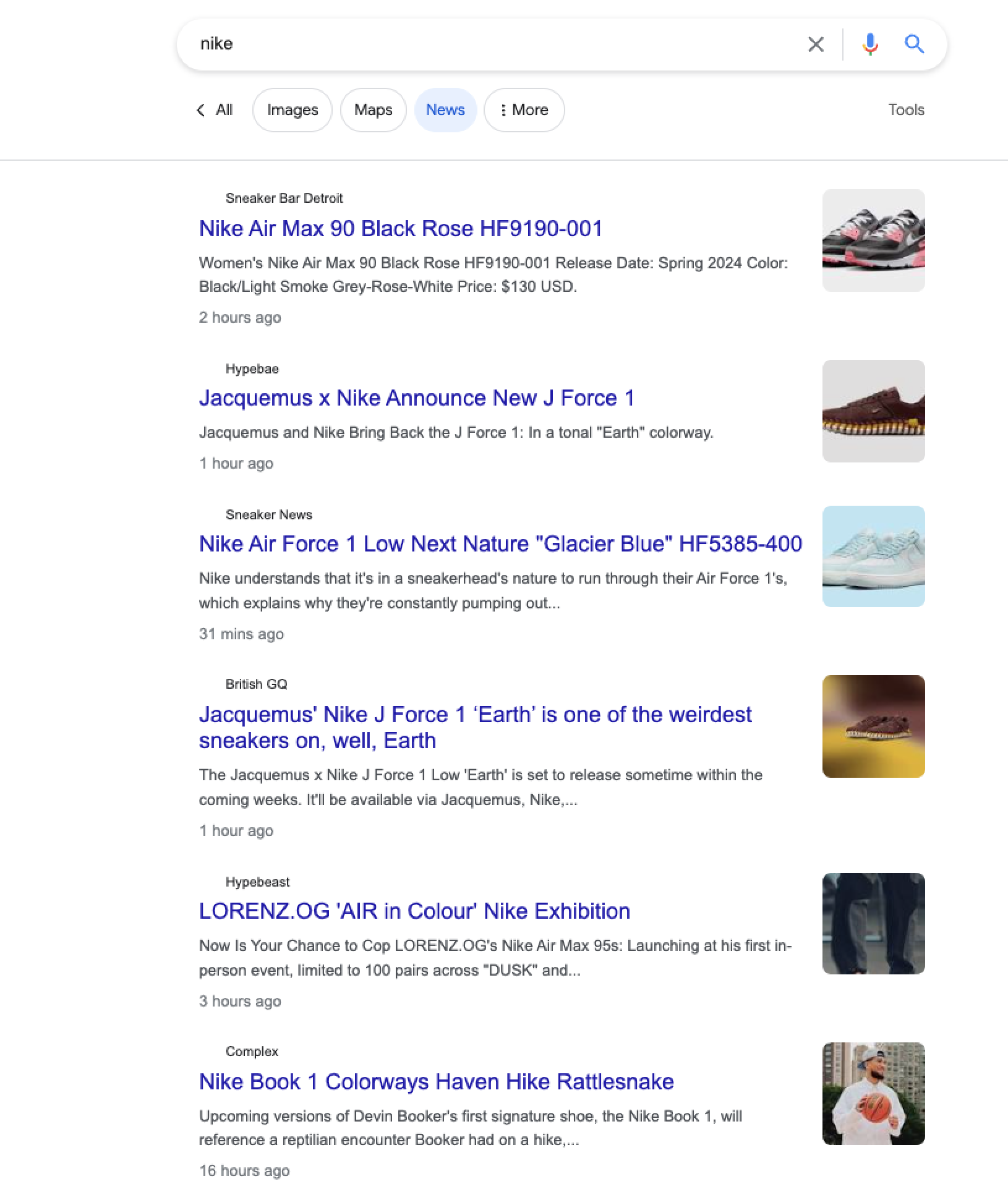
#### HTML 示例

<figure><img src="https://2655358775-files.gitbook.io/~/files/v0/b/gitbook-x-prod.appspot.com/o/spaces%2FzrXw45naRpCZ0Ku9AjY1%2Fuploads%2FSxmNbXjudpsJ4VcregnQ%2Fgoogle_news_search.png?alt=media&#x26;token=0453c806-368e-459e-ae54-78b434cbc250" alt=""><figcaption></figcaption></figure>

#### JSON 结构

Google 新闻搜索的结构化输出包含如下字段，例如 `URL`, `page`, `结果`，以及其他字段。下表列出我们解析的每个 SERP 功能的详细信息、描述和数据类型。表中还包含一些元数据。

{% hint style="info" %}
特定结果类型的项目和字段数量可能会根据搜索查询而变化。
{% endhint %}

<table><thead><tr><th width="265">键</th><th width="368.3333333333333">描述</th><th>类型</th></tr></thead><tbody><tr><td><code>url</code></td><td>Google 搜索页面的 URL。</td><td>字符串</td></tr><tr><td><code>结果</code></td><td>包含搜索结果的字典。</td><td>数组</td></tr><tr><td><code>results.main</code></td><td>一列未付费新闻结果及其各自的详细信息。</td><td>数组</td></tr><tr><td><code>results.additional</code></td><td>一列热门文章及其各自的详细信息。</td><td>对象</td></tr><tr><td><code>results.total_results_count</code></td><td>搜索查询找到的结果总数。</td><td>数组</td></tr><tr><td><code>parse_status_code</code></td><td>解析任务的状态代码。您可以在此处查看解析器状态代码的描述 <a href="https://github.com/oxylabs/gitbook-public-english/blob/master/scraping-solutions/web-scraper-api/targets/google/search/broken-reference/README.md"><strong>here</strong></a>.</td><td>整数</td></tr><tr><td><code>created_at</code></td><td>抓取任务创建的时间戳。</td><td>timestamp</td></tr><tr><td><code>updated_at</code></td><td>抓取任务完成的时间戳。</td><td>timestamp</td></tr><tr><td><code>page</code></td><td>相对于 Google SERP 分页的页面编号。</td><td>整数</td></tr><tr><td><code>job_id</code></td><td>与抓取任务关联的作业 ID。</td><td>字符串</td></tr><tr><td><code>status_code</code></td><td>抓取任务的状态代码。您可以在此处查看抓取器状态代码的描述 <a href="https://github.com/oxylabs/gitbook-public-english/blob/master/scraping-solutions/web-scraper-api/targets/google/search/broken-reference/README.md"><strong>here</strong></a>.</td><td>整数</td></tr></tbody></table>

{% hint style="info" %}
在下列部分，当某个结果类型存在多个项目时，解析后的 JSON 代码片段会被缩短。
{% endhint %}

### 主要内容

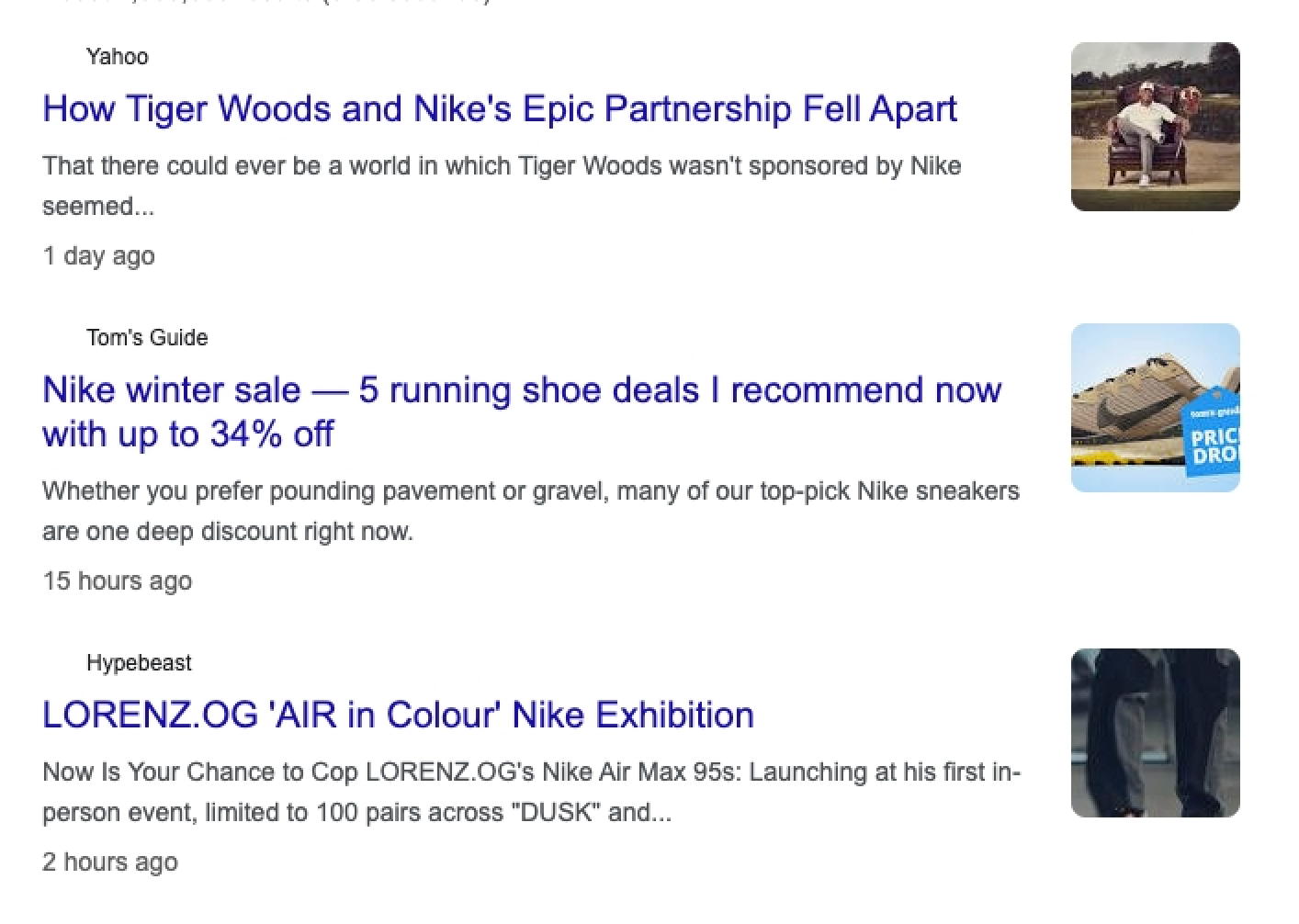
显示未付费新闻结果的列表，为每篇文章提供相关的详细信息。

<figure><img src="https://2655358775-files.gitbook.io/~/files/v0/b/gitbook-x-prod.appspot.com/o/spaces%2FzrXw45naRpCZ0Ku9AjY1%2Fuploads%2FPubsRUBP8Jq7MTMBax9g%2Fgoogle_news_search_3.png?alt=media&#x26;token=a36bcefb-fc14-4024-899d-517350b61fdf" alt=""><figcaption></figcaption></figure>

```json
...
"main": [
    {
        "url": "https://www.yahoo.com/lifestyle/tiger-woods-nikes-epic-partnership-015311819.html",
        "desc": "曾经存在一个泰格·伍兹没有得到 Nike 赞助的世界似乎...",
        "title": "泰格·伍兹与 Nike 的传奇合作如何破裂",
        "source": "Yahoo",
        "pos_overall": 1,
        "relative_publish_date": "1 day ago"
    },
                       ...
},

...
```

<table><thead><tr><th width="260.3333333333333">键 (results.main)</th><th width="317">描述</th><th>类型</th></tr></thead><tbody><tr><td><code>url</code></td><td>完整文章的 URL。</td><td>字符串</td></tr><tr><td><code>desc</code></td><td>文章正文的简短摘录。</td><td>字符串</td></tr><tr><td><code>title</code></td><td>文章的标题。</td><td>字符串</td></tr><tr><td><code>source</code></td><td>文章发布的网站名称。</td><td>字符串</td></tr><tr><td><code>pos_overall</code></td><td>表示该结果在新闻 SERP 主结果中的整体位置。</td><td>整数</td></tr><tr><td><code>relative_publish_date</code></td><td>描述文章发布的距离当前时间。</td><td>字符串</td></tr></tbody></table>

### 附加内容

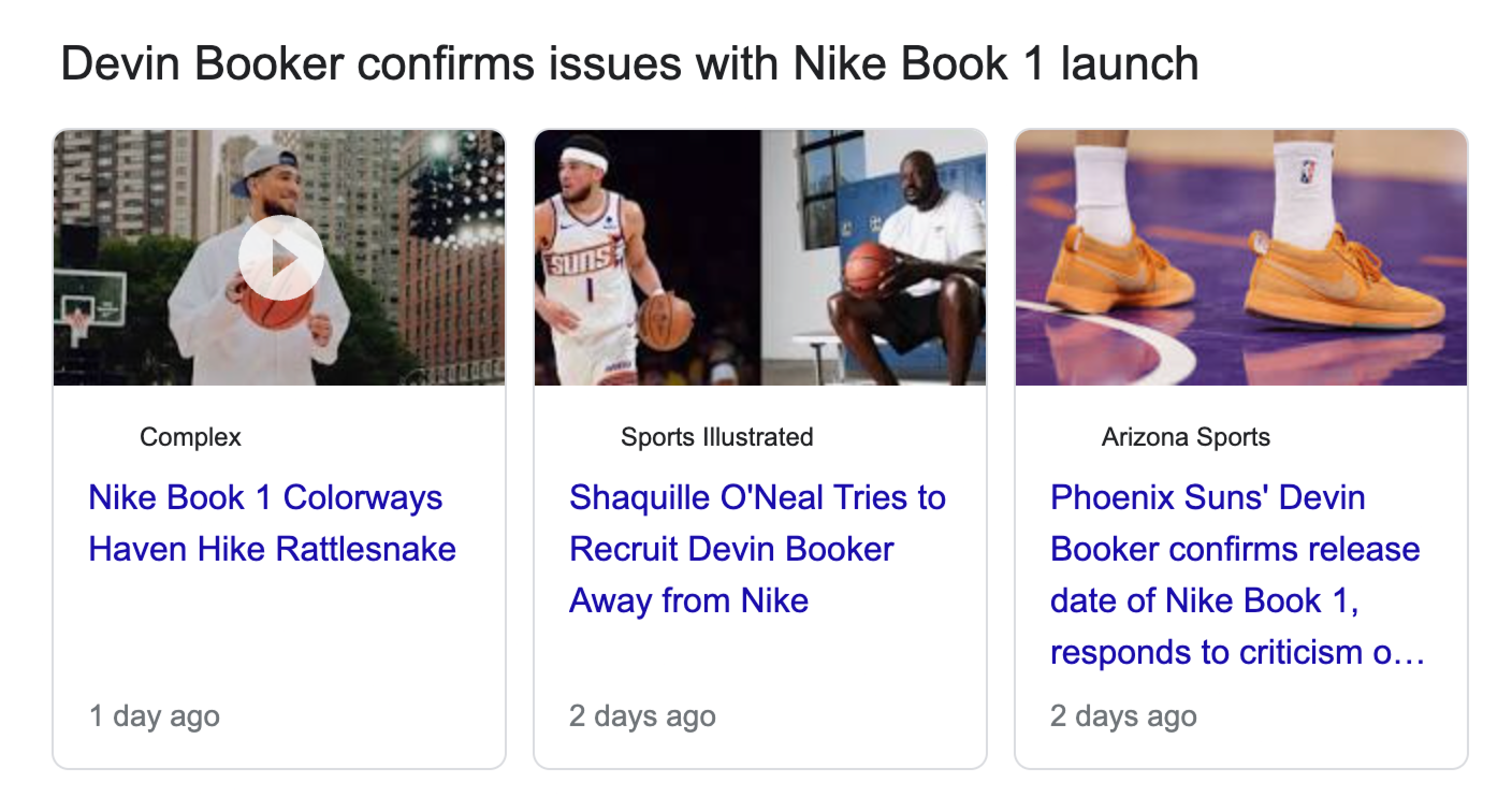
展示一列热门文章，并附上相关详细信息。

<figure><img src="https://2655358775-files.gitbook.io/~/files/v0/b/gitbook-x-prod.appspot.com/o/spaces%2FzrXw45naRpCZ0Ku9AjY1%2Fuploads%2FijqjTbDfWASz2pRsCwdr%2Fgoogle_news_search_2.png?alt=media&#x26;token=33ec1e0d-54dd-4d1d-bd08-e337fd3b2f2e" alt=""><figcaption></figcaption></figure>

```json
...
"additional": [
    {
        "items": [
            {
                "pos": 1,
                "url": "https://www.complex.com/sneakers/a/brendan-dunne/nike-book-1-colorways-haven-hike-rattlesnake",
                "title": "Nike Book 1 色系 Haven Hike Rattlesnake",
                "source": "Complex",
                "relative_publish_date": "1 day ago"
            },
         ...
        ],
        "pos_overall": 2,
        "section_title": "Devin Booker 确认 Nike Book 1 发布存在问题"
    }
...
```

<table><thead><tr><th width="265.3333333333333">键 (results.additional)</th><th width="366">描述</th><th>类型</th></tr></thead><tbody><tr><td><code>项目</code></td><td>带有各自详细信息的文章列表。</td><td>数组</td></tr><tr><td><code>items.pos</code></td><td>表示文章在列表中的唯一位置标识。</td><td>整数</td></tr><tr><td><code>items.url</code></td><td>完整文章的 URL。</td><td>字符串</td></tr><tr><td><code>items.title</code></td><td>文章的标题。</td><td>字符串</td></tr><tr><td><code>items.source</code></td><td>文章发布的网站名称。</td><td>字符串</td></tr><tr><td><code>items.relative_publish_date</code></td><td>描述文章发布的距离当前时间。</td><td>字符串</td></tr><tr><td><code>pos_overall</code></td><td>表示该结果在新闻 SERP 附加结果中的整体位置。</td><td>整数</td></tr><tr><td><code>section_title</code></td><td>附加部分的名称。</td><td>字符串</td></tr></tbody></table>