# 端点生成器
Endpoint Generator 用于帮助您轻松集成 Mobile Proxies。选择位置和会话类型参数,并以 CSV、JSON 或 TXT 格式导出端点列表。如果您已购买 Mobile Proxies,可通过登录到 [**仪表板**](https://dashboard.oxylabs.io/?route=/overview/MP/endpoint-generator).
按以下步骤获取 Mobile Proxies 端点列表:
{% stepper %}
{% step %}
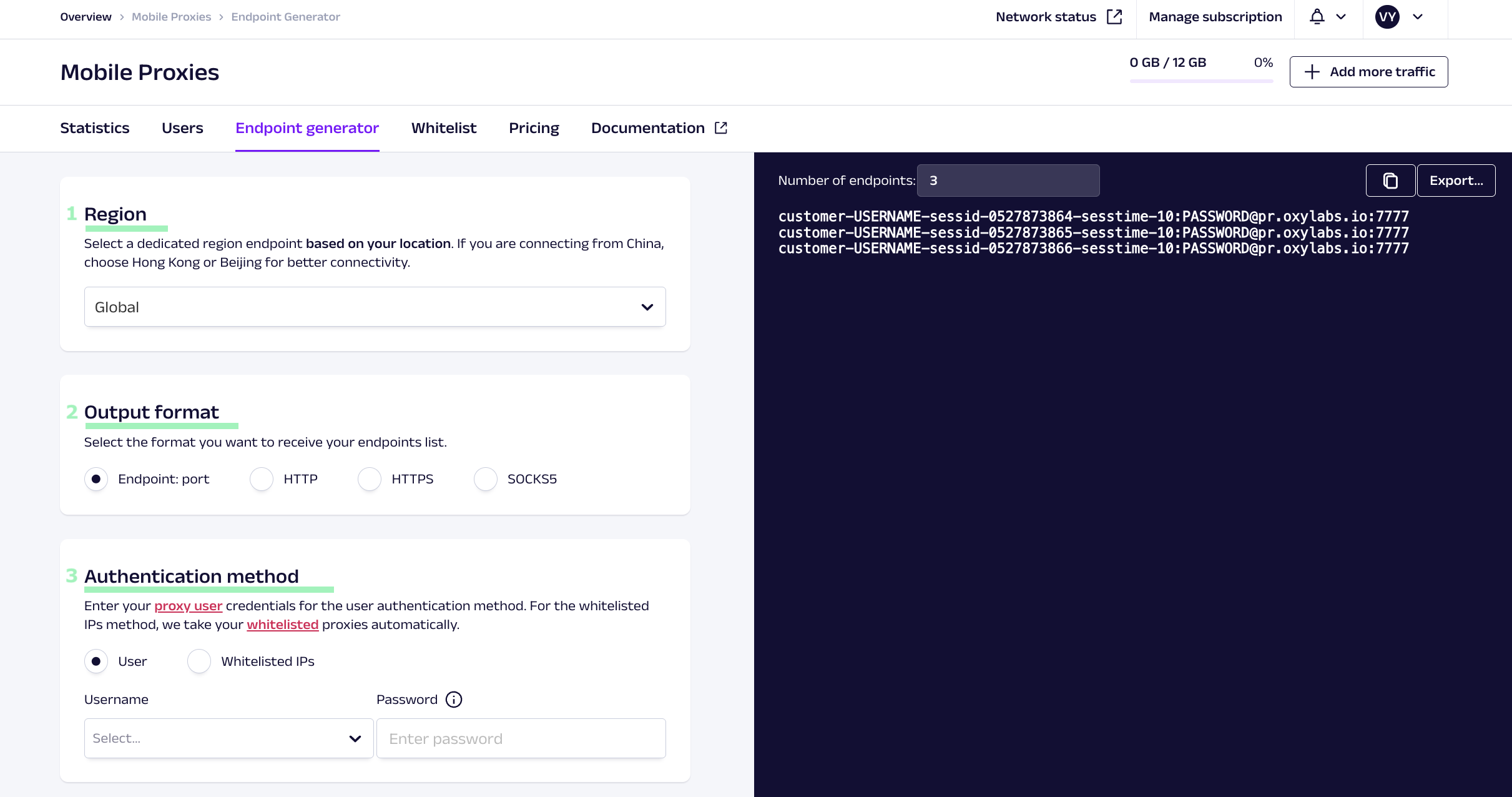
### 选择区域
* 选择 **香港** 或 **北京** 如果您从 [**中国**](https://developers.oxylabs.io/documentation/cn/dai-li/mobile-proxies/making-requests/entry-node-for-china)
* **全球** 用于世界其他地区
{% endstep %}
{% step %}
### 设置输出格式
选择您希望接收端点的格式。可用格式包括纯 **endpoint:port** 或带有 **HTTP**, **HTTPS**,或 **SOCKS5** 协议前缀。
{% endstep %}
{% step %}
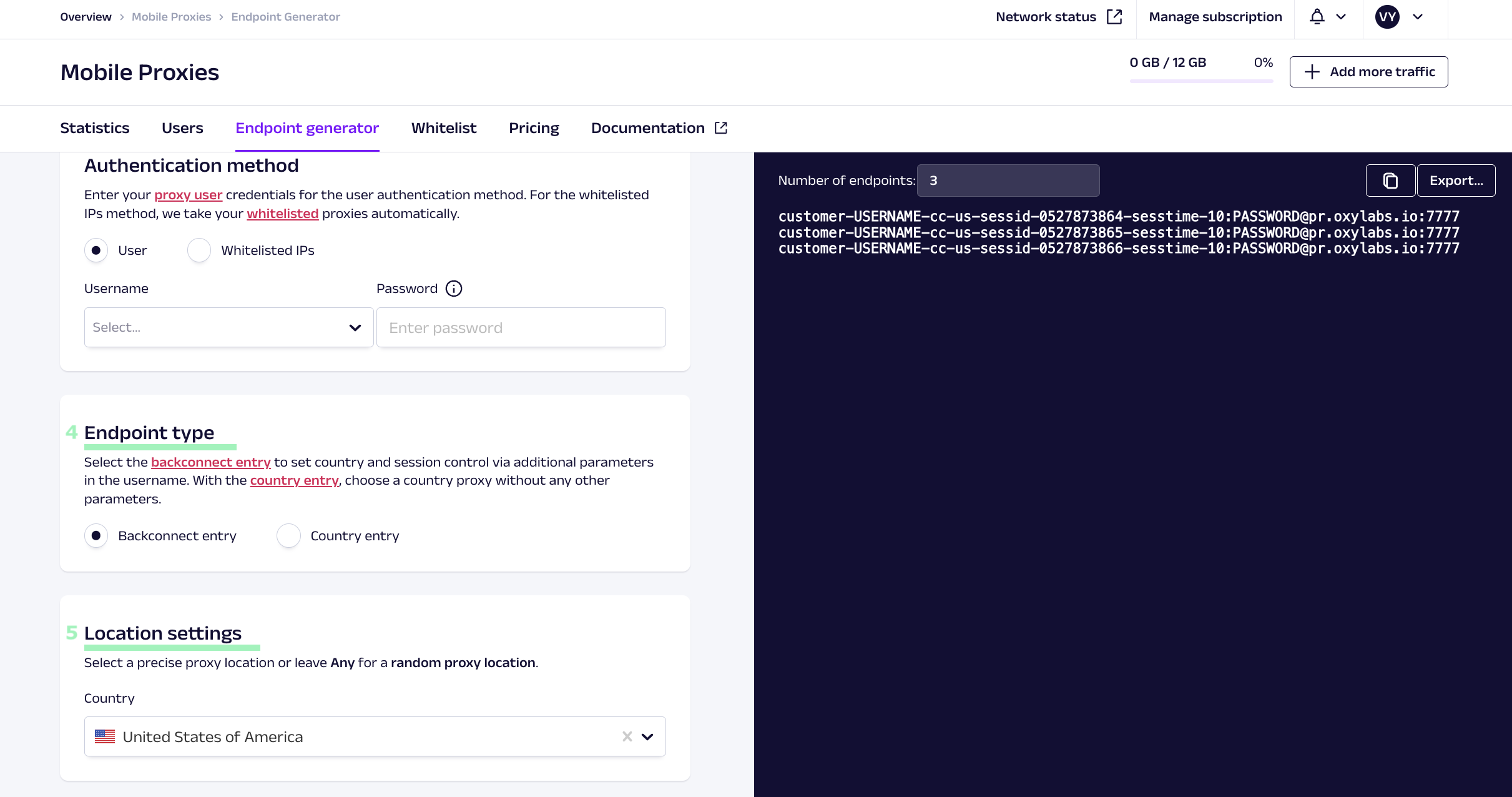
### 选择 **认证方法**
* **用户认证** – 使用此方法,您需要创建一个代理用户。创建后,选择代理用户的用户名并输入密码。
* [**白名单 IP**](https://developers.oxylabs.io/documentation/cn/dai-li/mobile-proxies/whitelisting-ips) **–** 此方法不需要用户名和密码。我们会自动获取您的白名单 IP 列表。
 {% endstep %}
{% step %}
### 选择端点类型
* [**回连入口**](https://developers.oxylabs.io/documentation/cn/dai-li/mobile-proxies/making-requests) – 在用户名中添加额外参数。支持国家、省/州和城市定向。
* [**国家入口**](https://developers.oxylabs.io/documentation/cn/dai-li/location-settings/country#country-specific-entry-nodes) – 在用户名中不需要额外参数。它使用特定国家的入口节点并支持国家级定向。
{% endstep %}
{% step %}
### 设置位置设置
选择一个特定的 **国家** 或将其设置为 **任意** 以获取随机位置。请参阅 [位置设置](https://developers.oxylabs.io/documentation/cn/dai-li/mobile-proxies/location-settings) 页面以了解更多信息。
{% endstep %}
{% step %}
### 选择端点类型
* [**回连入口**](https://developers.oxylabs.io/documentation/cn/dai-li/mobile-proxies/making-requests) – 在用户名中添加额外参数。支持国家、省/州和城市定向。
* [**国家入口**](https://developers.oxylabs.io/documentation/cn/dai-li/location-settings/country#country-specific-entry-nodes) – 在用户名中不需要额外参数。它使用特定国家的入口节点并支持国家级定向。
{% endstep %}
{% step %}
### 设置位置设置
选择一个特定的 **国家** 或将其设置为 **任意** 以获取随机位置。请参阅 [位置设置](https://developers.oxylabs.io/documentation/cn/dai-li/mobile-proxies/location-settings) 页面以了解更多信息。
 {% endstep %}
{% step %}
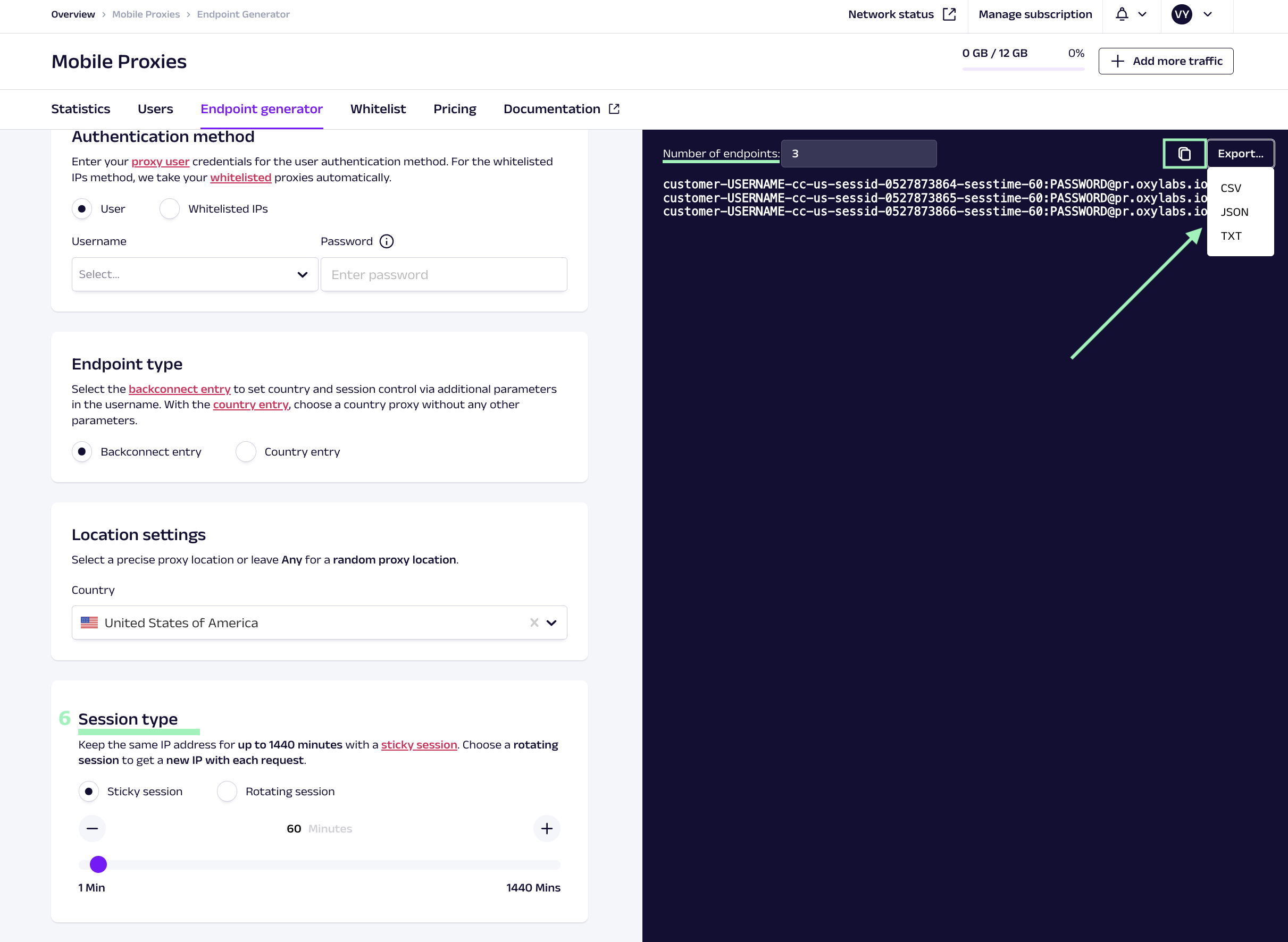
### 选择 **会话类型**
* [**粘性会话**](https://developers.oxylabs.io/documentation/cn/dai-li/mobile-proxies/session-control) – 允许您在指定时长内保持相同的 IP 地址。
* 如果您选择了 **回连入口,** 您可以指定 [**会话时长**](https://developers.oxylabs.io/documentation/cn/dai-li/session-control#session-time) 最长可达 *1440* 分钟。
* 如果您选择了 **国家入口**,您的 [**粘性会话**](https://developers.oxylabs.io/documentation/cn/dai-li/mobile-proxies/session-control/sticky-proxy-entry-nodes) 将持续最长 *10* 分钟。
* **轮换会话** – 每次请求都会返回一个新的 IP 地址。
{% endstep %}
{% step %}
### 导出端点列表
输入所需的端点数量,并以建议的任一格式导出列表,或直接复制到剪贴板。
{% endstep %}
{% step %}
### 选择 **会话类型**
* [**粘性会话**](https://developers.oxylabs.io/documentation/cn/dai-li/mobile-proxies/session-control) – 允许您在指定时长内保持相同的 IP 地址。
* 如果您选择了 **回连入口,** 您可以指定 [**会话时长**](https://developers.oxylabs.io/documentation/cn/dai-li/session-control#session-time) 最长可达 *1440* 分钟。
* 如果您选择了 **国家入口**,您的 [**粘性会话**](https://developers.oxylabs.io/documentation/cn/dai-li/mobile-proxies/session-control/sticky-proxy-entry-nodes) 将持续最长 *10* 分钟。
* **轮换会话** – 每次请求都会返回一个新的 IP 地址。
{% endstep %}
{% step %}
### 导出端点列表
输入所需的端点数量,并以建议的任一格式导出列表,或直接复制到剪贴板。
 {% endstep %}
{% endstepper %}
完成!您已成功创建一个可直接使用的 Mobile Proxies 端点列表!
{% endstep %}
{% endstepper %}
完成!您已成功创建一个可直接使用的 Mobile Proxies 端点列表!