> For the complete documentation index, see [llms.txt](https://developers.oxylabs.io/llms.txt). Markdown versions of documentation pages are available by appending `.md` to page URLs; this page is available as [Markdown](https://developers.oxylabs.io/api-targets/pt-br/search-engines/google/lens.md).

# Lens

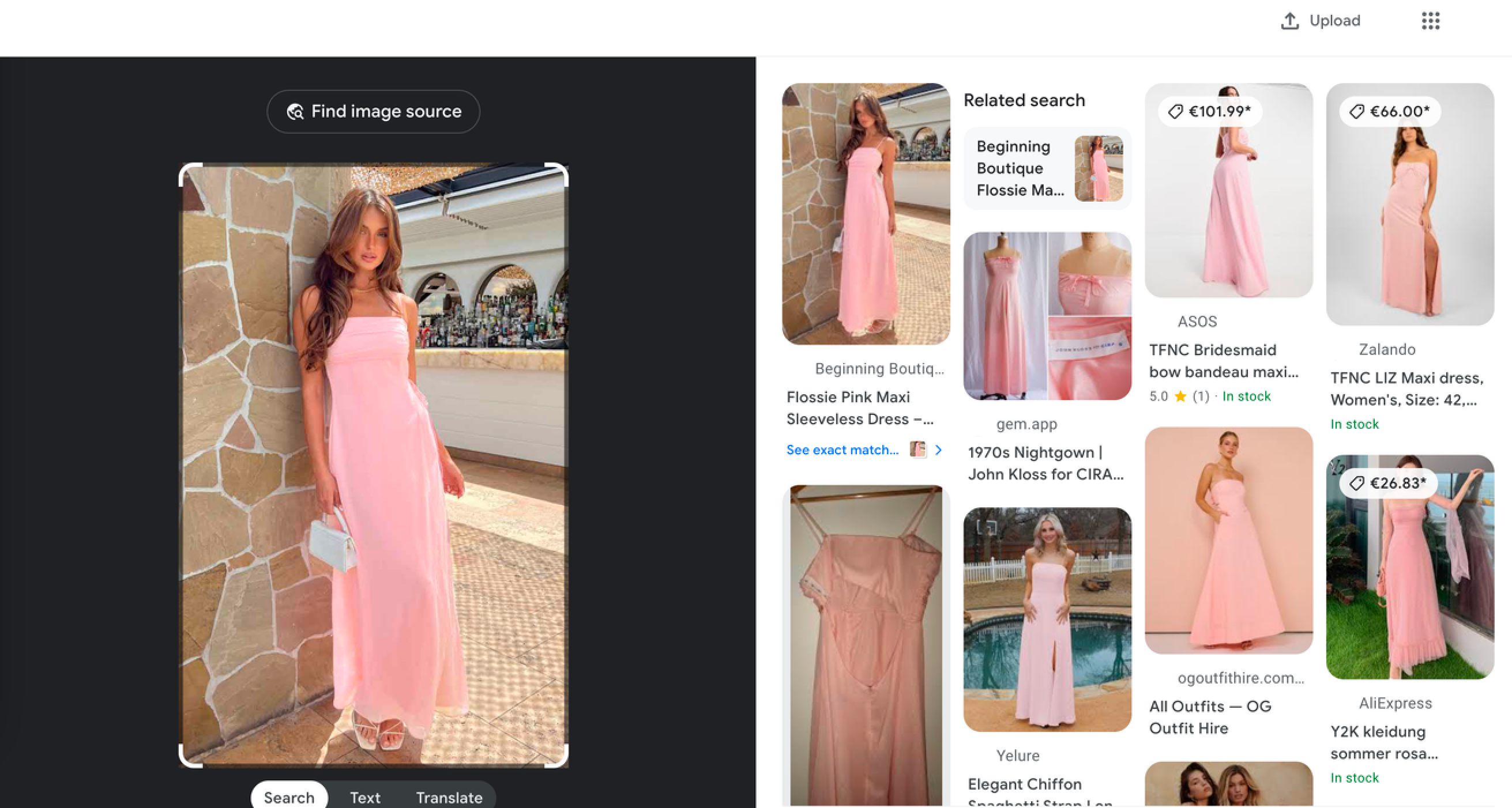
A Google Lens API extrai resultados de pesquisa visual a partir das URLs de imagem fornecidas. Retorna imagens visualmente correspondentes com títulos, URLs, domínios e muito mais.

Nossa `google_lens` fonte permite que você extraia resultados do recurso Google Lens ao realizar uma pesquisa por imagem.

{% hint style="info" %}
Explorar saída [**dicionário de dados**](#data-dictionary) para cada recurso de SERP do Lens, oferecendo uma breve descrição, captura de tela, trecho de código JSON analisado e uma tabela que define cada campo analisado. Navegue pelos detalhes usando a navegação à direita ou rolando a página para baixo.
{% endhint %}

## Exemplos de requisição

A API envia uma solicitação ao recurso Google Lens para recuperar dados estruturados relacionados ao conteúdo de uma imagem.

{% tabs %}
{% tab title="cURL" %}

```shell
curl 'https://realtime.oxylabs.io/v1/queries' \\
--user 'USERNAME:PASSWORD' \\
-H 'Content-Type: application/json' \\
-d '{
        "source": "google_lens",
        "query": "https://www.beginningboutique.com.au/cdn/shop/files/Flossie-Pink-Maxi-Sleeveless-Dress_750x.jpg",
        "parse": "true"
    }'
```

{% endtab %}

{% tab title="Python" %}

```python
import requests
from pprint import pprint

# Structure payload.
payload = {
    'source': 'google_lens',
    'query': 'https://www.beginningboutique.com.au/cdn/shop/files/Flossie-Pink-Maxi-Sleeveless-Dress_750x.jpg',
    'parse': 'true'
}

# Get response.
response = requests.request(
    'POST',
    'https://realtime.oxylabs.io/v1/queries',
    auth=('USERNAME', 'PASSWORD'),
    json=payload,
)

# Print prettified response to stdout.
pprint(response.json())

```

{% endtab %}

{% tab title="Node.js" %}

```javascript
const https = require("https");

const username = "USERNAME";
const password = "PASSWORD";
const body = {
    source: "google_lens",
    query: "https://www.beginningboutique.com.au/cdn/shop/files/Flossie-Pink-Maxi-Sleeveless-Dress_750x.jpg",
    parse: true,
};

const options = {
    hostname: "realtime.oxylabs.io",
    path: "/v1/queries",
    method: "POST",
    headers: {
        "Content-Type": "application/json",
        Authorization:
            "Basic " + Buffer.from(`${username}:${password}`).toString("base64"),
    },
};

const request = https.request(options, (response) => {
    let data = "";

    response.on("data", (chunk) => {
        data += chunk;
    });

    response.on("end", () => {
        const responseData = JSON.parse(data);
        console.log(JSON.stringify(responseData, null, 2));
    });
});

request.on("error", (error) => {
    console.error("Error:", error);
});

request.write(JSON.stringify(body));
request.end();
```

{% endtab %}

{% tab title="HTTP" %}

```http
https://realtime.oxylabs.io/v1/queries?source=google_lens&query=https%3A%2F%2Fwww.beginningboutique.com.au%2Fcdn%2Fshop%2Ffiles%2FFlossie-Pink-Maxi-Sleeveless-Dress_750x.jpg&parse=true&access_token=12345abcde
```

{% endtab %}

{% tab title="PHP" %}

```php
<?php

$params = array(
    'source' => 'google_lens',
    'query' => 'https://www.beginningboutique.com.au/cdn/shop/files/Flossie-Pink-Maxi-Sleeveless-Dress_750x.jpg',
    'parse' => true
);

$ch = curl_init();

curl_setopt($ch, CURLOPT_URL, "https://realtime.oxylabs.io/v1/queries");
curl_setopt($ch, CURLOPT_RETURNTRANSFER, 1);
curl_setopt($ch, CURLOPT_POSTFIELDS, json_encode($params));
curl_setopt($ch, CURLOPT_POST, 1);
curl_setopt($ch, CURLOPT_USERPWD, "USERNAME" . ":" . "PASSWORD");


$headers = array();
$headers[] = "Content-Type: application/json";
curl_setopt($ch, CURLOPT_HTTPHEADER, $headers);

$result = curl_exec($ch);
echo $result;

if (curl_errno($ch)) {
    echo 'Error:' . curl_error($ch);
}
curl_close($ch);
```

{% endtab %}

{% tab title="Golang" %}

```go
package main

import (
	"bytes"
	"encoding/json"
	"fmt"
	"io/ioutil"
	"net/http"
)

func main() {
	const Username = "USERNAME"
	const Password = "PASSWORD"

	payload := map[string]interface{}{
		"source": "google_lens",
		"query":  "https://www.beginningboutique.com.au/cdn/shop/files/Flossie-Pink-Maxi-Sleeveless-Dress_750x.jpg",
		"parse":  true,
	}

	jsonValue, _ := json.Marshal(payload)

	client := &http.Client{}
	request, _ := http.NewRequest("POST",
		"https://realtime.oxylabs.io/v1/queries",
		bytes.NewBuffer(jsonValue),
	)

	request.SetBasicAuth(Username, Password)
	response, _ := client.Do(request)

	responseText, _ := ioutil.ReadAll(response.Body)
	fmt.Println(string(responseText))
}
```

{% endtab %}

{% tab title="C#" %}

```csharp
using System;
using System.Collections.Generic;
using System.Net.Http;
using System.Net.Http.Json;
using System.Threading.Tasks;

namespace OxyApi
{
    class Program
    {
        static async Task Main()
        {
            const string Username = "USERNAME";
            const string Password = "PASSWORD";

            var parameters = new {
                source = "google_lens",
                query = "https://www.beginningboutique.com.au/cdn/shop/files/Flossie-Pink-Maxi-Sleeveless-Dress_750x.jpg",
                parse = true
            };

            var client = new HttpClient();

            Uri baseUri = new Uri("https://realtime.oxylabs.io");
            client.BaseAddress = baseUri;

            var requestMessage = new HttpRequestMessage(HttpMethod.Post, "/v1/queries");
            requestMessage.Content = JsonContent.Create(parameters);

            var authenticationString = $"{Username}:{Password}";
            var base64EncodedAuthenticationString = Convert.ToBase64String(System.Text.ASCIIEncoding.UTF8.GetBytes(authenticationString));
            requestMessage.Headers.Add("Authorization", "Basic " + base64EncodedAuthenticationString);

            var response = await client.SendAsync(requestMessage);
            var contents = await response.Content.ReadAsStringAsync();

            Console.WriteLine(contents);
        }
    }
}
```

{% endtab %}

{% tab title="Java" %}

```java
package org.example;

import okhttp3.*;
import org.json.JSONObject;
import java.util.concurrent.TimeUnit;

public class Main implements Runnable {
    private static final String AUTHORIZATION_HEADER = "Authorization";
    public static final String USERNAME = "USERNAME";
    public static final String PASSWORD = "PASSWORD";

    public void run() {
        JSONObject jsonObject = new JSONObject();
        jsonObject.put("source", "google_lens");
        jsonObject.put("query", "https://www.beginningboutique.com.au/cdn/shop/files/Flossie-Pink-Maxi-Sleeveless-Dress_750x.jpg");
        jsonObject.put("parse", true);

        Authenticator authenticator = (route, response) -> {
            String credential = Credentials.basic(USERNAME, PASSWORD);
            return response
                    .request()
                    .newBuilder()
                    .header(AUTHORIZATION_HEADER, credential)
                    .build();
        };

        var client = new OkHttpClient.Builder()
                .authenticator(authenticator)
                .readTimeout(180, TimeUnit.SECONDS)
                .build();

        var mediaType = MediaType.parse("application/json; charset=utf-8");
        var body = RequestBody.create(jsonObject.toString(), mediaType);
        var request = new Request.Builder()
                .url("https://realtime.oxylabs.io/v1/queries")
                .post(body)
                .build();

        try (var response = client.newCall(request).execute()) {
            if (response.body() != null) {
                try (var responseBody = response.body()) {
                    System.out.println(responseBody.string());
                }
            }
        } catch (Exception exception) {
            System.out.println("Error: " + exception.getMessage());
        }

        System.exit(0);
    }

    public static void main(String[] args) {
        new Thread(new Main()).start();
    }
}
```

{% endtab %}

{% tab title="JSON" %}

```json
{
    "source": "google_lens", 
    "query": "https://www.beginningboutique.com.au/cdn/shop/files/Flossie-Pink-Maxi-Sleeveless-Dress_750x.jpg",
    "parse": "true"
}
```

{% endtab %}
{% endtabs %}

Usamos o método de integração síncrona [**Realtime**](/products/pt-br/web-scraper-api/integration-methods/realtime.md) método de integração em nossos exemplos. Se você quiser usar [**Proxy Endpoint**](/products/pt-br/web-scraper-api/integration-methods/proxy-endpoint.md) ou assíncrono [**Push-Pull**](/products/pt-br/web-scraper-api/integration-methods/push-pull.md) de integração, consulte a [**métodos de integração**](/products/pt-br/web-scraper-api/integration-methods.md) seção.

## Valores dos parâmetros da solicitação

### Genérico

Configuração básica e opções de personalização para raspagem dos resultados do Google Lens.

<table><thead><tr><th width="222">Parâmetro</th><th width="350.3333333333333">Descrição</th><th>Valor padrão</th></tr></thead><tbody><tr><td><mark style="background-color:green;"><strong>source</strong></mark></td><td>Define o scraper.</td><td><code>google_lens</code></td></tr><tr><td><mark style="background-color:green;"><strong>query</strong></mark></td><td>A URL da imagem a ser pesquisada.</td><td>-</td></tr><tr><td><code>render</code></td><td>Ativa a renderização de JavaScript quando definido como <code>html</code>. <a href="/products/pt-br/web-scraper-api/features/js-rendering-and-browser-control.md#javascript-rendering"><strong>Mais informações</strong></a><strong>.</strong></td><td>-</td></tr><tr><td><code>parse</code></td><td>Retorna os dados analisados quando definido como <code>verdadeiro</code>. Explorar saída <a href="#output-data-dictionary"><strong>dicionário de dados</strong></a>.</td><td><code>false</code></td></tr><tr><td><code>callback_url</code></td><td>URL para seu endpoint de callback. <a href="/products/pt-br/web-scraper-api/integration-methods/push-pull.md"><strong>Mais informações</strong></a></td><td>-</td></tr><tr><td><code>user_agent_type</code></td><td>Tipo de dispositivo e navegador. A lista completa pode ser encontrada <a href="/products/pt-br/web-scraper-api/features/http-context-and-job-management/user-agent-type.md"><strong>aqui</strong></a>.</td><td><code>desktop</code></td></tr></tbody></table>

\- parâmetro obrigatório

### Localização

Adapte os resultados de pesquisa para locais geográficos e idiomas específicos.

<table><thead><tr><th width="222">Parâmetro</th><th width="350.3333333333333">Descrição</th><th>Valor padrão</th></tr></thead><tbody><tr><td><code>geo_location</code></td><td>O local geográfico para o qual o resultado deve ser adaptado. Usar este parâmetro corretamente é extremamente importante para obter os dados certos. Para mais informações, leia sobre nossas <code>geo_location</code> estruturas de parâmetros sugeridas <a href="/products/pt-br/web-scraper-api/features/localization/serp-localization.md#google"><strong>aqui</strong></a><strong>.</strong></td><td>-</td></tr><tr><td><code>locale</code></td><td><code>Accept-Language</code> valor do cabeçalho que altera o idioma da interface web da sua página de pesquisa do Google. <a href="/products/pt-br/web-scraper-api/features/localization/domain-locale.md#locale-1"><strong>Mais informações</strong></a>.</td><td>-</td></tr></tbody></table>

## Dados estruturados

```json
{
    "results": [
        {
            "content": {
                "results": {
                    "organic": [
                        {
                            "pos": 1,
                            "url": "https://www.pinterest.com/shopping/free-people-pink-maxi-dress/903333914404/",
                            "title": "Free People Pink Maxi Dress - Shop on Pinterest",
                            "domain": "Pinterest",
                            "pos_overall": 1,
                            "url_thumbnail": "https://encrypted-tbn2.gstatic.com/images?q=tbn:ANd9GcR5hGHj6ima-cDFEYeMNi-7ngOomqkHz_1Joc4_DVA5gDTprXGJ"
                        },
                        ...
                        {
                            "pos": 59,
                            "url": "https://www.jjshouse.com/Sheath-Column-One-Shoulder-Floor-Length-Chiffon-Junior-Bridesmaid-Dress-With-Ruffle-Lace-Beading-009119572-g119572",
                            "title": "Sheath/Column One-Shoulder Floor-Length Chiffon Junior Bridesmaid Dress With Ruffle Lace Beading",
                            "domain": "JJsHouse.com",
                            "pos_overall": 59,
                            "url_thumbnail": "https://encrypted-tbn2.gstatic.com/images?q=tbn:ANd9GcR8evuMBA8z7Aa8mcYh97Y2hbpB3YIEV0ZSs2gkpYIyF3pmyj_X"
                        }
                    ],
                    "total_results_count": 59
                },
                "parse_status_code": 12000
            },
            "created_at": "2024-03-13 15:07:42",
            "updated_at": "2024-03-13 15:07:45",
            "page": 1,
            "url": "https://lens.google.com/uploadbyurl?url=https://www.beginningboutique.com.au/cdn/shop/files/Flossie-Pink-Maxi-Sleeveless-Dress_750x.jpg&uule=w+CAIQICINdW5pdGVkIHN0YXRlcw&gl=us&hl=en",
            "job_id": "7173696230097183745",
            "status_code": 200,
            "parser_type": ""
        }
    ],
}
```

## Dicionário de dados de saída

#### **Estrutura JSON**

Esta tabela descreve os principais elementos de um resultado de pesquisa do Google Lens. A tabela abaixo apresenta uma lista detalhada de cada recurso de SERP que analisamos, juntamente com sua descrição e tipo de dado. A tabela também inclui alguns metadados.

<table><thead><tr><th width="264.3333333333333">Chave</th><th width="319">Descrição</th><th>Tipo</th></tr></thead><tbody><tr><td><code>resultados</code></td><td>Um dicionário contendo os resultados da busca.</td><td>array</td></tr><tr><td><code>results.organic</code></td><td>Uma lista de resultados de imagem não patrocinados com seus respectivos detalhes.</td><td>array</td></tr><tr><td><code>contagem_total_de_resultados</code></td><td>O número total de resultados encontrados para a URL da imagem.</td><td>integer</td></tr><tr><td><code>parse_status_code</code></td><td>O código de status do trabalho de parsing. Você pode ver os códigos de status do parser descritos <a href="https://github.com/oxylabs/gitbook-public-english/blob/master/scraping-solutions/web-scraper-api/targets/google/broken-reference/README.md"><strong>aqui</strong></a>.</td><td>integer</td></tr><tr><td><code>criado_em</code></td><td>O timestamp em que o trabalho de scraping foi criado.</td><td>carimbo_de_data_hora</td></tr><tr><td><code>atualizado_em</code></td><td>O timestamp em que o trabalho de scraping foi concluído.</td><td>carimbo_de_data_hora</td></tr><tr><td><code>page</code></td><td>Número da página em relação à paginação da SERP do Google.</td><td>integer</td></tr><tr><td><code>id_do_trabalho</code></td><td>O ID do trabalho associado ao trabalho de scraping.</td><td>string</td></tr><tr><td><code>código_de_status</code></td><td>O código de status do trabalho de scraping. Você pode ver os códigos de status do scraper descritos <a href="https://github.com/oxylabs/gitbook-public-english/blob/master/scraping-solutions/web-scraper-api/targets/google/broken-reference/README.md"><strong>aqui</strong></a>.</td><td>integer</td></tr></tbody></table>

### Orgânico

O Google Lens considera vários fatores para entregar as informações mais relevantes e úteis aos usuários com base no conteúdo da imagem enviada pelo usuário.

<figure><img src="https://3537372600-files.gitbook.io/~/files/v0/b/gitbook-x-prod.appspot.com/o/spaces%2FBaJCXoqO1zdFnaMnCKrg%2Fuploads%2Fgit-blob-8e10fb01b15cd7ea14440367eb6761fc85e13e15%2Fgoogle_lens.png?alt=media" alt=""><figcaption></figcaption></figure>

```json
...
{
    "pos": 1,
    "url": "https://www.pinterest.com/shopping/free-people-pink-maxi-dress/903333914404/",
    "title": "Free People Pink Maxi Dress - Shop on Pinterest",
    "domain": "Pinterest",
    "pos_overall": 1,
    "url_thumbnail": "https://encrypted-tbn2.gstatic.com/images?q=tbn:ANd9GcR5hGHj6ima-cDFEYeMNi-7ngOomqkHz_1Joc4_DVA5gDTprXGJ"
},
...
```

<table><thead><tr><th width="241">Chave (results.organic)</th><th width="363">Descrição</th><th>Tipo</th></tr></thead><tbody><tr><td><code>pos</code></td><td>Um indicador que denota a posição de um item entre todos os resultados do Google Lens.</td><td>integer</td></tr><tr><td><code>url</code></td><td>A URL do resultado do Google Lens.</td><td>string</td></tr><tr><td><code>title</code></td><td>O título do resultado.</td><td>string</td></tr><tr><td><code>domain</code></td><td>A fonte do resultado do Google Lens.</td><td>string</td></tr><tr><td><code>pos_overall</code></td><td>O índice de posição do resultado do Google Lens dentro da SERP.</td><td>integer</td></tr><tr><td><code>url_thumbnail</code></td><td>As imagens em miniatura codificadas em base64 do resultado do Google Lens.</td><td>string</td></tr></tbody></table>


---

# Agent Instructions
This documentation is published with GitBook. GitBook is the documentation platform designed so that both humans and AI agents can read, navigate, and reason over technical content effectively. Learn more at gitbook.com.

## Querying This Documentation
If you need additional information that is not directly available in this page, you can query the documentation dynamically by asking a question.

Perform an HTTP GET request on the current page URL with the `ask` query parameter, and the optional `goal` query parameter:

```
GET https://developers.oxylabs.io/api-targets/pt-br/search-engines/google/lens.md?ask=<question>&goal=<endgoal>
```

`ask` is the immediate question: it should be specific, self-contained, and written in natural language.
`goal` is optional and describes the broader end goal you are ultimately trying to accomplish on behalf of the user. GitBook uses it to tailor the answer towards what is most useful for that goal.

The response will contain a direct answer to the question and relevant excerpts and sources from the documentation.

Use this mechanism when the answer is not explicitly present in the current page, you need clarification or additional context, or you want to retrieve related documentation sections.
