> For the complete documentation index, see [llms.txt](https://developers.oxylabs.io/llms.txt). Markdown versions of documentation pages are available by appending `.md` to page URLs; this page is available as [Markdown](https://developers.oxylabs.io/api-targets/pt-br/search-engines/google/ai-mode.md).

# Modo de IA

Extraia respostas do Google AI Mode enviando prompts, incluindo o texto completo da resposta, links referenciados e citações com URLs de origem.

O `google_ai_mode` A fonte foi projetada para enviar prompts e recuperar respostas conversacionais do Google AI Mode. Ela retorna tanto o texto completo da resposta do Google AI Mode quanto seus metadados estruturados.

## Disponibilidade regional do AI Mode

Google AI Mode está disponível na maioria dos países do mundo **exceto por estas exceções**:

<table><thead><tr><th width="96">Região</th><th>Países</th></tr></thead><tbody><tr><td>Europa</td><td>França, Turquia</td></tr><tr><td>Ásia</td><td>China, Irã, Coreia do Norte, Síria</td></tr><tr><td>Américas</td><td>Cuba</td></tr></tbody></table>

{% hint style="warning" %}
O recurso Google AI Mode está sendo lançado continuamente, com mais países incluídos ao longo do tempo.
{% endhint %}

## Exemplos de requisição

Os exemplos de código a seguir demonstram como recuperar uma resposta do Google AI Mode com resultados analisados.

{% tabs %}
{% tab title="cURL" %}

```bash
curl 'https://realtime.oxylabs.io/v1/queries' \\
--user 'USERNAME:PASSWORD' \\
-H 'Content-Type: application/json' \\
-d '{
        "source": "google_ai_mode",
        "query": "best health trackers under $200",
        "render": "html",
        "parse": true
    }'
```

{% endtab %}

{% tab title="Python" %}

```python
import requests
from pprint import pprint


# Structure payload.
payload = {
    'source': 'google_ai_mode',
    'query': 'best health trackers under $200',
    'render': 'html',
    'parse': True
}


# Get response.
response = requests.request(
    'POST',
    'https://realtime.oxylabs.io/v1/queries',
    auth=('USERNAME', 'PASSWORD'),
    json=payload,
)

# Print prettified response to stdout.
pprint(response.json())
```

{% endtab %}

{% tab title="Node.js" %}

```javascript
const https = require("https");

const username = "USERNAME";
const password = "PASSWORD";
const body = {
    source: "google_ai_mode",
    query: "best health trackers under $200",
    render: "html",
    parse: true
};

const options = {
    hostname: "realtime.oxylabs.io",
    path: "/v1/queries",
    method: "POST",
    headers: {
        "Content-Type": "application/json",
        Authorization:
            "Basic " + Buffer.from(`${username}:${password}`).toString("base64"),
    },
};

const request = https.request(options, (response) => {
    let data = "";

    response.on("data", (chunk) => {
        data += chunk;
    });

    response.on("end", () => {
        const responseData = JSON.parse(data);
        console.log(JSON.stringify(responseData, null, 2));
    });
});

request.on("error", (error) => {
    console.error("Error:", error);
});

request.write(JSON.stringify(body));
request.end();
```

{% endtab %}

{% tab title="HTTP" %}

```http
https://realtime.oxylabs.io/v1/queries?source=google_ai_mode&query=best%20health%20trackers%20under%20$200&render=html&parse=true&access_token=12345abcde
```

{% endtab %}

{% tab title="PHP" %}

```php
<?php

$params = array(
    'source' => 'google_ai_mode',
    'query' => 'best health trackers under $200',
    'render' => 'html',
    'parse' => true
);

$ch = curl_init();

curl_setopt($ch, CURLOPT_URL, "https://realtime.oxylabs.io/v1/queries");
curl_setopt($ch, CURLOPT_RETURNTRANSFER, 1);
curl_setopt($ch, CURLOPT_POSTFIELDS, json_encode($params));
curl_setopt($ch, CURLOPT_POST, 1);
curl_setopt($ch, CURLOPT_USERPWD, "USERNAME" . ":" . "PASSWORD");


$headers = array();
$headers[] = "Content-Type: application/json";
curl_setopt($ch, CURLOPT_HTTPHEADER, $headers);

$result = curl_exec($ch);
echo $result;

if (curl_errno($ch)) {
    echo 'Error:' . curl_error($ch);
}
curl_close($ch);
```

{% endtab %}

{% tab title="Golang" %}

```go
package main

import (
	"bytes"
	"encoding/json"
	"fmt"
	"io/ioutil"
	"net/http"
)

func main() {
	const Username = "USERNAME"
	const Password = "PASSWORD"

  	payload := map[string]interface{}{
        	"source": "google_ai_mode",
        	"query": "best health trackers under $200",
        	"render": "html",
        	"parse":  true,
    	}

	jsonValue, _ := json.Marshal(payload)

	client := &http.Client{}
	request, _ := http.NewRequest("POST",
		"https://realtime.oxylabs.io/v1/queries",
		bytes.NewBuffer(jsonValue),
	)

	request.SetBasicAuth(Username, Password)
	response, _ := client.Do(request)

	responseText, _ := ioutil.ReadAll(response.Body)
	fmt.Println(string(responseText))
}
```

{% endtab %}

{% tab title="C#" %}

```csharp
using System;
using System.Collections.Generic;
using System.Net.Http;
using System.Net.Http.Json;
using System.Threading.Tasks;

namespace OxyApi
{
    class Program
    {
        static async Task Main()
        {
            const string Username = "USERNAME";
            const string Password = "PASSWORD";

            var parameters = new
            {
                source = "google_ai_mode",
                query = "best health trackers under $200",
                render = "html",
                parse = true
            };

            var client = new HttpClient();

            Uri baseUri = new Uri("https://realtime.oxylabs.io");
            client.BaseAddress = baseUri;

            var requestMessage = new HttpRequestMessage(HttpMethod.Post, "/v1/queries");
            requestMessage.Content = JsonContent.Create(parameters);

            var authenticationString = $"{Username}:{Password}";
            var base64EncodedAuthenticationString = Convert.ToBase64String(System.Text.ASCIIEncoding.UTF8.GetBytes(authenticationString));
            requestMessage.Headers.Add("Authorization", "Basic " + base64EncodedAuthenticationString);

            var response = await client.SendAsync(requestMessage);
            var contents = await response.Content.ReadAsStringAsync();

            Console.WriteLine(contents);
        }
    }
}
```

{% endtab %}

{% tab title="Java" %}

```java
package org.example;

import okhttp3.*;
import org.json.JSONArray;
import org.json.JSONObject;
import java.util.concurrent.TimeUnit;

public class Main implements Runnable {
    private static final String AUTHORIZATION_HEADER = "Authorization";
    public static final String USERNAME = "USERNAME";
    public static final String PASSWORD = "PASSWORD";

    public void run() {
        JSONObject jsonObject = new JSONObject();
        jsonObject.put("source", "google_ai_mode");
        jsonObject.put("query", "best health trackers under $200");
        jsonObject.put("render", "html");
        jsonObject.put("parse", true);

        Authenticator authenticator = (route, response) -> {
            String credential = Credentials.basic(USERNAME, PASSWORD);
            return response
                    .request()
                    .newBuilder()
                    .header(AUTHORIZATION_HEADER, credential)
                    .build();
        };

        var client = new OkHttpClient.Builder()
                .authenticator(authenticator)
                .readTimeout(180, TimeUnit.SECONDS)
                .build();

        var mediaType = MediaType.parse("application/json; charset=utf-8");
        var body = RequestBody.create(jsonObject.toString(), mediaType);
        var request = new Request.Builder()
                .url("https://realtime.oxylabs.io/v1/queries")
                .post(body)
                .build();

        try (var response = client.newCall(request).execute()) {
            if (response.body() != null) {
                try (var responseBody = response.body()) {
                    System.out.println(responseBody.string());
                }
            }
        } catch (Exception exception) {
            System.out.println("Error: " + exception.getMessage());
        }

        System.exit(0);
    }

    public static void main(String[] args) {
        new Thread(new Main()).start();
    }
}
```

{% endtab %}

{% tab title="JSON" %}

```json
{
        "source": "google_ai_mode",
        "query": "best health trackers under $200",
        "render": "html",
        "parse": true
}
```

{% endtab %}
{% endtabs %}

Usamos o método de integração síncrona [**Realtime**](/products/pt-br/web-scraper-api/integration-methods/realtime.md) método de integração em nossos exemplos. Se você quiser usar [**Proxy Endpoint**](/products/pt-br/web-scraper-api/integration-methods/proxy-endpoint.md) ou assíncrono [**Push-Pull**](/products/pt-br/web-scraper-api/integration-methods/push-pull.md) de integração, consulte a [**métodos de integração**](/products/pt-br/web-scraper-api/integration-methods.md) seção.

## Valores dos parâmetros da solicitação

Configuração básica e opções de personalização para recuperar respostas do Google AI Mode.

<table><thead><tr><th width="222">Parâmetro</th><th width="350.3333333333333">Descrição</th><th>Valor padrão</th></tr></thead><tbody><tr><td><mark style="background-color:green;"><strong>source</strong></mark></td><td>Define o scraper. Use <code>google_ai_mode</code>.</td><td>–</td></tr><tr><td><mark style="background-color:green;"><strong>query</strong></mark></td><td>O prompt ou pergunta a ser enviado ao Google AI Mode. Deve ter menos de 400 símbolos.</td><td>–</td></tr><tr><td><mark style="background-color:green;"><strong>render</strong></mark></td><td>Definir para <code>html</code> é obrigatório para esta fonte. <a href="/products/pt-br/web-scraper-api/features/js-rendering-and-browser-control.md#javascript-rendering"><strong>Mais informações</strong></a><strong>.</strong></td><td>–</td></tr><tr><td><code>parse</code></td><td>Retorna os dados analisados quando definido como <code>verdadeiro</code>.</td><td><code>false</code></td></tr><tr><td><code>geo_location</code></td><td>A localização geográfica para a qual o resultado deve ser adaptado. Para mais informações, leia sobre nossa configuração sugerida <code>geo_location</code> estruturas de parâmetros sugeridas <a href="/products/pt-br/web-scraper-api/features/localization/serp-localization.md#google"><strong>aqui</strong></a><strong>.</strong></td><td>–</td></tr><tr><td><code>callback_url</code></td><td>URL para seu endpoint de callback. <a href="/products/pt-br/web-scraper-api/integration-methods/push-pull.md"><strong>Mais informações</strong></a></td><td>–</td></tr></tbody></table>

\- parâmetro obrigatório

## Dados estruturados

Web Scraper API retorna um objeto HTML ou JSON da saída do Google AI Mode, contendo dados estruturados da página de resultados.

{% hint style="warning" %}
A composição dos elementos pode variar dependendo se a consulta foi feita a partir de um **desktop** ou **mobile** dispositivo.
{% endhint %}

<details>

<summary><code>google_ai_mode</code> saída estruturada</summary>

```json
{
    "results": [
        {
            "content": {
                "links": [
                    {
                        "url": "https://www.nytimes.com/wirecutter/reviews/the-best-fitness-trackers/#:~:text=%7C,Apple%20users:%20Apple%20Watch%20SE",
                        "text": "The 3 Best Fitness Trackers of 2025 | Reviews by Wirecutter"
                    },
                    {
                        "url": "https://www.wareable.com/fitness-trackers/the-best-fitness-tracker#:~:text=Fitbit%20Charge%206%20%E2%80%93%20the%20best,10%20%E2%80%93%20Best%20fitness%2Dtracking%20smartwatch",
                        "text": "Best fitness tracker 2025: Reviewed, tested and compared"
                    },
                    {
                        "url": "https://www.techradar.com/best/best-cheap-fitness-trackers",
                        "text": "The best cheap fitness trackers for 2025 - TechRadar"
                    },
                    {
                        "url": "https://www.livescience.com/best-budget-fitness-tracker",
                        "text": "Best budget fitness trackers 2025: Hand-picked by our expert reviewers"
                    },
                    {
                        "url": "https://www.garagegymreviews.com/best-budget-fitness-tracker",
                        "text": "Expert-Tested: Best Budget Fitness Tracker (2025)"
                    },
                    {
                        "url": "https://www.businessinsider.com/guides/tech/best-fitbit#:~:text=Our%20top%20recommendation%20is%20the,fitness%20tools%20for%20under%20%24100.",
                        "text": "The Best Fitbit in 2025 - Business Insider"
                    },
                    {
                        "url": "https://medium.com/@kellyshephard/best-smartwatches-under-200-5961cbc1a6f8#:~:text=The%20Apple%20Watch%20SE%20(2022)%20is%20the,it%20still%20performs%20well%20throughout%20the%20day.",
                        "text": "Best Smartwatches Under $200 in 2025: Tested and Approved"
                    },
                    {
                        "url": "https://www.gminsights.com/industry-analysis/smartwatch-market#:~:text=More%20advanced%20functions%20such%20as%20ECG%20monitoring%2C,Galaxy%20Watch%205%2C%20and%20Fitbit%20Sense%202.",
                        "text": "Smartwatch Market Share, Growth Analysis Report 2025-2034"
                    },
                    {
                        "url": "https://www.linkedin.com/pulse/best-smartwatches-law-enforcement-rugged-reliable-ready-samar-abbas-n1bif#:~:text=Q6:%20What's%20the%20best%20smartwatch%20for%20health,especially%20for%20VO2%20Max%20and%20stress%20levels.",
                        "text": "Best Smartwatches for Law Enforcement: Rugged, Reliable, and Ready for Duty"
                    },
                    {
                        "url": "https://gearjunkie.com/health-fitness/best-fitness-watch#:~:text=Technology%20for%20health%20tracking%20has%20advanced%20a,and%20infrared%20light)%20and%20Heart%20Rate%20Variability.",
                        "text": "The Best Fitness Watches of 2025"
                    }
                ],
                "prompt": "best health trackers under $200",
                "citations": [
                    {
                        "text": "Tracker",
                        "urls": [
                            "https://www.nytimes.com/wirecutter/reviews/the-best-fitness-trackers/#:~:text=%7C,Apple%20users:%20Apple%20Watch%20SE",
                            "https://www.livescience.com/best-budget-fitness-tracker",
                            "https://www.techradar.com/best/best-cheap-fitness-trackers"
                        ]
                    },
                    {
                        "text": "Tracking accuracy: Reputable brands like Fitbit and Garmin offer reliable accuracy for tracking heart rate, steps, and sleep. More advanced metrics like blood oxygen (SpO2) and stress are also available on many models. GPS: For runners and cyclists, having built-in GPS is crucial for mapping routes and tracking distance without carrying a phone. If you don't need this, or are comfortable relying on your phone's GPS, you can save money with a tracker that lacks this feature. Subscription services: Brands like Fitbit offer a premium membership to unlock more detailed insights and guided programs. However, all trackers on this list provide basic tracking for free. Battery life: Simpler trackers typically last a week or more on a single charge, while more complex smartwatches like the Apple Watch SE need daily charging . Design and comfort: Consider the size and style of the tracker. Some prefer the compact, lightweight design of a basic band, while others like the larger, more interactive display of a smartwatch.",
                        "urls": [
                            "https://www.nytimes.com/wirecutter/reviews/the-best-fitness-trackers/#:~:text=%7C,Apple%20users:%20Apple%20Watch%20SE",
                            "https://www.wareable.com/fitness-trackers/the-best-fitness-tracker#:~:text=Fitbit%20Charge%206%20%E2%80%93%20the%20best,10%20%E2%80%93%20Best%20fitness%2Dtracking%20smartwatch"
                        ]
                    }
                ],
                Para menos de US$ 200, os melhores rastreadores de saúde incluem o Fitbit Inspire 3 pelo melhor custo-benefício geral, o Xiaomi Smart Band 9 como a melhor opção ultraeconômica e o Apple Watch SE (2ª geração) para usuários de iPhone. Outros fortes concorrentes incluem o mais avançado Fitbit Charge 6 e o Garmin Vivosmart 5. Comparação dos melhores rastreadores de saúde abaixo de US$ 200 Rastreador Melhor para GPS integrado Recursos Prós Contras Fitbit Inspire 3 Melhor no geral e para iniciantes Não (usa o GPS do telefone) Frequência cardíaca 24/7, SpO2, monitoramento do sono, Active Zone Minutes Ótimo custo-benefício, design discreto, longa duração da bateria (até 10 dias) Assinatura necessária para insights mais detalhados; tela pequena Fitbit Charge 6 Rastreamento mais avançado Sim GPS integrado, ECG, monitoramento de estresse, sensor EDA para estresse, Google Wallet/Maps Monitoramento preciso da frequência cardíaca, inclui integrações úteis do Google Requer uma conta do Google; alguns recursos ficam bloqueados por assinatura Xiaomi Smart Band 9 Melhor opção ultraeconômica Não (usa o GPS do telefone) Frequência cardíaca, SpO2, monitoramento do sono, mais de 150 modos de treino Extremamente acessível, tela grande, excelente duração da bateria (até 21 dias) Alguns usuários relatam conectividade irregular do app e precisão inconsistente Garmin Vivosmart 5 Melhor da Garmin Não (usa o GPS do telefone) Monitor de energia Body Battery, monitoramento do sono, SpO2, rastreamento automático de atividades Leve e confortável, especialmente bom para monitoramento do sono Tela monocromática e sem GPS integrado Apple Watch SE (2ª geração) Melhor para usuários de iPhone Sim Frequência cardíaca, Anéis de Atividade, detecção de quedas, ecossistema de apps Integração perfeita com iPhone; tela vibrante A duração da bateria é curta (até 18 horas); mais caro Fitbit Inspire 3 Rastreador de atividades de saúde e fitness preto com intensidade de treino R$646.00 4.4 (5K+) XIAOMI SMART BAND 9 - Preto Meia-noite R$237.07 (Rs�a012,499.00) 4.8 (7K+) Apple Watch SE GPS + Cellular 40mm Caixa de alumínio Meia-noite com pulseira esportiva Meia-noite - M/L R$184.11/mo x 18 4.6 (9K+) Fitbit Charge 6 Rastreador de atividades e fitness com apps do Google R$832.34 ($156.00) 4.2 (5K+) Garmin Vivosmart 5, Preto S/m (010-02645-00) R$800.27 ($149.99) 4.2 (2K+) Ver mais Principais recursos a considerar Precisão do rastreamento: marcas respeitáveis como Fitbit e Garmin oferecem precisão confiável para monitorar frequência cardíaca, passos e sono. Métricas mais avançadas como oxigênio no sangue (SpO2) e estresse também estão disponíveis em muitos modelos. GPS: para corredores e ciclistas, ter GPS integrado é crucial para mapear rotas e acompanhar a distância sem carregar um telefone. Se você não precisa disso, ou se sente confortável em depender do GPS do seu telefone, pode economizar com um rastreador que não tenha esse recurso. Serviços de assinatura: marcas como Fitbit oferecem uma assinatura premium para desbloquear insights mais detalhados e programas guiados. No entanto, todos os rastreadores desta lista oferecem rastreamento básico gratuitamente. Duração da bateria: rastreadores mais simples normalmente duram uma semana ou mais com uma única carga, enquanto smartwatches mais complexos como o Apple Watch SE precisam de carregamento diário. Design e conforto: considere o tamanho e o estilo do rastreador. Alguns preferem o design compacto e leve de uma pulseira básica, enquanto outros gostam da tela maior e mais interativa de um smartwatch. Obrigado. Seu feedback ajuda o Google a melhorar. Veja nossa Política de Privacidade. Compartilhar mais feedback Relatar um problema Fechar
                "parse_status_code": 12000
            },
            "created_at": "2025-10-28 14:41:42",
            "updated_at": "2025-10-28 14:41:59",
            "page": 1,
            "url": "https://www.google.com/search?udm=50&q=best+health+trackers+under+$200&hl=en&sei=KtYAaaHbBZ_m1sQP0IOaqQg&mstk=AUtExfAUpaUCxnFayf6G4-kNkwNbm0bQCoQ9U98qUnjI2A0E7T5DCKi2lmolJe5o9X9h3tJVH-Cx91tGJrhIiDPrrcvO4kX8vex4rnW_IUsQA-b6EGmpCtqj2ocY-FWO95EcMcaYeOvsQhtFqGdYF4CChex2n6h4PeopuL0&csuir=1",
            "job_id": "7388948081053534209",
            "is_render_forced": false,
            "status_code": 200,
            "type": "parsed",
            "parser_type": "",
            "parser_preset": null
        }
    ],
    "job": {
        "callback_url": null,
        "client_id": 12345,
        "context": [
            {
                "key": "force_headers",
                "value": false
            },
            {
                "key": "force_cookies",
                "value": false
            },
            {
                "key": "hc_policy",
                "value": true
            },
            {
                "key": "successful_parse_status_codes",
                "value": []
            }
        ],
        "created_at": "2025-10-28 14:41:42",
        "geo_location": null,
        "id": "7388948081053534209",
        "limit": 10,
        "locale": null,
        "pages": 1,
        "parse": true,
        "parser_type": null,
        "parser_preset": null,
        "parsing_instructions": null,
        "browser_instructions": null,
        "render": "html",
        "xhr": false,
        "markdown": false,
        "url": null,
        "query": "best health trackers under $200",
        "source": "google_ai_mode",
        "start_page": 1,
        "status": "done",
        "storage_type": null,
        "storage_url": null,
        "subdomain": "www",
        "content_encoding": "utf-8",
        "updated_at": "2025-10-28 14:41:59",
        "user_agent_type": "desktop",
        "session_info": null,
        "statuses": [],
        "client_notes": null,
        "_links": [
            {
                "rel": "self",
                "href": "http://data.oxylabs.io/v1/queries/7388948081053534209",
                "method": "GET"
            },
            {
                "rel": "results",
                "href": "http://data.oxylabs.io/v1/queries/7388948081053534209/results",
                "method": "GET"
            },
            {
                "rel": "results-content",
                "href_list": [
                    "http://data.oxylabs.io/v1/queries/7388948081053534209/results/1/content"
                ],
                "method": "GET"
            },
            {
                "rel": "results-html",
                "href": "http://data.oxylabs.io/v1/queries/7388948081053534209/results?type=raw",
                "method": "GET"
            },
            {
                "rel": "results-content-html",
                "href_list": [
                    "http://data.oxylabs.io/v1/queries/7388948081053534209/results/1/content?type=raw"
                ],
                "method": "GET"
            },
            {
                "rel": "results-parsed",
                "href": "http://data.oxylabs.io/v1/queries/7388948081053534209/results?type=parsed",
                "method": "GET"
            },
            {
                "rel": "results-content-parsed",
                "href_list": [
                    "http://data.oxylabs.io/v1/queries/7388948081053534209/results/1/content?type=parsed"
                ],
                "method": "GET"
            }
        ]
    }
}
```

</details>

## Dicionário de dados de saída

### Exemplo em HTML

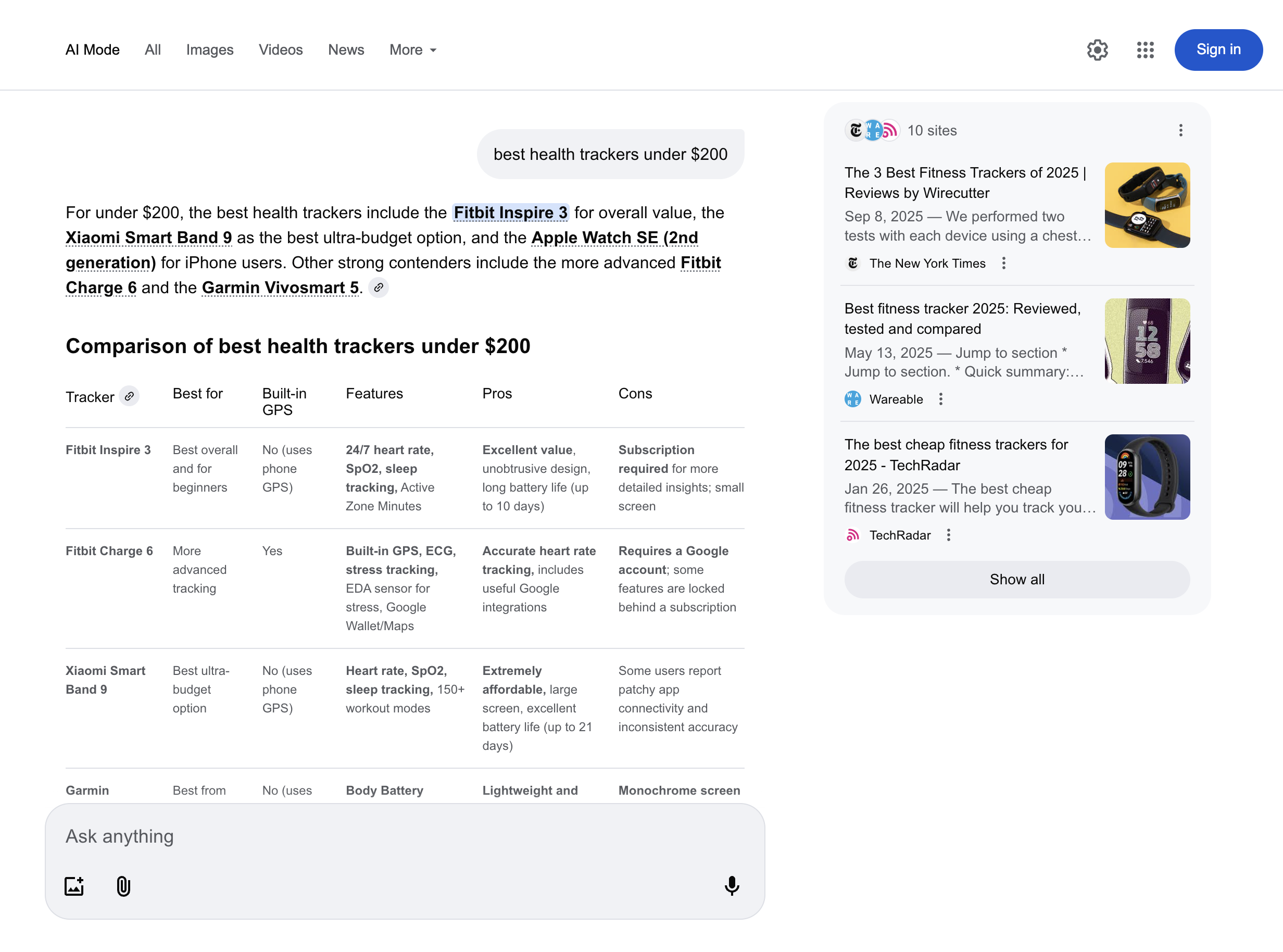
<figure><img src="https://3537372600-files.gitbook.io/~/files/v0/b/gitbook-x-prod.appspot.com/o/spaces%2FBaJCXoqO1zdFnaMnCKrg%2Fuploads%2Fgit-blob-3291699f43277a356d2a4b8887bae5856280fa45%2Fgoogle_ai_mode_html.png?alt=media" alt=""><figcaption></figcaption></figure>

### Estrutura JSON

A saída estruturada `google_ai_mode` a saída inclui campos como `URL`, `page`, `resultados`, e mais. A tabela abaixo apresenta uma lista detalhada de cada elemento do Google AI Mode que analisamos, incluindo descrição, tipo de dado e metadados relevantes.

{% hint style="info" %}
O número de itens e campos para um tipo de resultado específico pode variar dependendo da consulta de pesquisa.
{% endhint %}

<table data-full-width="false"><thead><tr><th width="289">Nome da chave</th><th width="337.3333333333333">Descrição</th><th>Tipo</th></tr></thead><tbody><tr><td><code>url</code></td><td>A URL do Google AI Mode.</td><td>string</td></tr><tr><td><code>page</code></td><td>Número da página.</td><td>integer</td></tr><tr><td><code>content</code></td><td>Um objeto contendo os dados analisados da resposta do Google AI Mode.</td><td>objeto</td></tr><tr><td><code>content.links</code></td><td>Lista de links externos referenciados na resposta. Exibida na caixa à direita da página.</td><td>array</td></tr><tr><td><code>content.prompt</code></td><td>Prompt original enviado ao Google AI Mode.</td><td>string</td></tr><tr><td><code>content.citations</code></td><td>Lista de citações com URLs e textos associados, conforme mostrado no bloco principal da resposta do Google AI Mode. Várias URLs que fazem referência ao mesmo texto são agrupadas em uma lista.</td><td>array</td></tr><tr><td><code>content.response_text</code></td><td>Texto completo da resposta do Google AI Mode.</td><td>string</td></tr><tr><td><code>content.parse_status_code</code></td><td>Código de status da operação de parsing.</td><td>integer</td></tr><tr><td><code>criado_em</code></td><td>Carimbo de data/hora em que o trabalho de scraping foi criado.</td><td>carimbo_de_data_hora</td></tr><tr><td><code>atualizado_em</code></td><td>Carimbo de data/hora em que o trabalho de scraping foi concluído.</td><td>carimbo_de_data_hora</td></tr><tr><td><code>id_do_trabalho</code></td><td>ID do trabalho associado ao trabalho de scraping.</td><td>string</td></tr><tr><td><code>código_de_status</code></td><td>Código de status do job de scraping. Você pode ver os códigos de status do scraper descritos <a href="/products/pt-br/web-scraper-api/response-codes.md"><strong>aqui</strong></a>.</td><td>integer</td></tr></tbody></table>


---

# Agent Instructions
This documentation is published with GitBook. GitBook is the documentation platform designed so that both humans and AI agents can read, navigate, and reason over technical content effectively. Learn more at gitbook.com.

## Querying This Documentation
If you need additional information that is not directly available in this page, you can query the documentation dynamically by asking a question.

Perform an HTTP GET request on the current page URL with the `ask` query parameter, and the optional `goal` query parameter:

```
GET https://developers.oxylabs.io/api-targets/pt-br/search-engines/google/ai-mode.md?ask=<question>&goal=<endgoal>
```

`ask` is the immediate question: it should be specific, self-contained, and written in natural language.
`goal` is optional and describes the broader end goal you are ultimately trying to accomplish on behalf of the user. GitBook uses it to tailor the answer towards what is most useful for that goal.

The response will contain a direct answer to the question and relevant excerpts and sources from the documentation.

Use this mechanism when the answer is not explicitly present in the current page, you need clarification or additional context, or you want to retrieve related documentation sections.