> For the complete documentation index, see [llms.txt](https://developers.oxylabs.io/llms.txt). Markdown versions of documentation pages are available by appending `.md` to page URLs; this page is available as [Markdown](https://developers.oxylabs.io/api-targets/pt-br/e-commerce/target/category.md).
# Categoria
Faça scraping das páginas de categoria do Target pelo ID do nó de taxonomia, com suporte para loja, tipo de fulfillment e localização por CEP de entrega.
O `target_category` A fonte foi projetada para recuperar páginas de categoria do Target com base no ID do nó de taxonomia do Target. A fonte oferece suporte a recursos de localização e permite navegar pelas categorias de produtos do Target.
## Exemplos de solicitação
{% tabs %}
{% tab title="cURL" %}
```bash
curl 'https://realtime.oxylabs.io/v1/queries' \
--user 'USERNAME:PASSWORD' \
-H 'Content-Type: application/json' \
-d '{
"source": "target_category",
"category_id": "owq2q",
"render": "html"
}'
```
{% endtab %}
{% tab title="Python" %}
```python
import requests
from pprint import pprint
# Estruture o payload
payload = {
'source': 'target_category',
'category_id': 'owq2q',
'render': 'html',
}
# Obtenha a resposta
response = requests.request(
'POST',
'https://realtime.oxylabs.io/v1/queries',
auth=('USERNAME', 'PASSWORD'),
json=payload,
)
# Imprima a resposta
pprint(response.json())
```
{% endtab %}
{% tab title="Node.js" %}
```javascript
const https = require("https");
const username = "USERNAME";
const password = "PASSWORD";
const body = {
source: "target_category",
category_id: "owq2q",
render: "html",
};
const options = {
hostname: "realtime.oxylabs.io",
path: "/v1/queries",
method: "POST",
headers: {
"Content-Type": "application/json",
Authorization:
"Basic " + Buffer.from(`${username}:${password}`).toString("base64"),
},
};
const request = https.request(options, (response) => {
let data = "";
response.on("data", (chunk) => {
data += chunk;
});
response.on("end", () => {
const responseData = JSON.parse(data);
console.log(JSON.stringify(responseData, null, 2));
});
});
request.on("error", (error) => {
console.error("Error:", error);
});
request.write(JSON.stringify(body));
request.end();
```
{% endtab %}
{% tab title="HTTP" %}
```http
# Toda a string que você enviar precisa estar codificada em URL.
https://realtime.oxylabs.io/v1/queries?source=target_category&category_id=owq2q&render=html&access_token=12345abcde
```
{% endtab %}
{% tab title="PHP" %}
```php
'target_category',
'category_id' => 'owq2q',
'render' => 'html'
);
$ch = curl_init();
curl_setopt($ch, CURLOPT_URL, "https://realtime.oxylabs.io/v1/queries");
curl_setopt($ch, CURLOPT_RETURNTRANSFER, 1);
curl_setopt($ch, CURLOPT_POSTFIELDS, json_encode($params));
curl_setopt($ch, CURLOPT_POST, 1);
curl_setopt($ch, CURLOPT_USERPWD, "USERNAME" . ":" . "PASSWORD");
$headers = array();
$headers[] = "Content-Type: application/json";
curl_setopt($ch, CURLOPT_HTTPHEADER, $headers);
$result = curl_exec($ch);
echo $result;
if (curl_errno($ch)) {
echo 'Error:' . curl_error($ch);
}
curl_close($ch);
```
{% endtab %}
{% tab title="Golang" %}
```go
package main
import (
"bytes"
"encoding/json"
"fmt"
"io/ioutil"
"net/http"
)
func main() {
const Username = "USERNAME"
const Password = "PASSWORD"
payload := map[string]interface{}{
"source": "target_category",
"category_id": "owq2q",
"render": "html",
}
jsonValue, _ := json.Marshal(payload)
client := &http.Client{}
request, _ := http.NewRequest("POST",
"https://realtime.oxylabs.io/v1/queries",
bytes.NewBuffer(jsonValue),
)
request.SetBasicAuth(Username, Password)
response, _ := client.Do(request)
responseText, _ := ioutil.ReadAll(response.Body)
fmt.Println(string(responseText))
}
```
{% endtab %}
{% tab title="Java" %}
```java
package org.example;
import okhttp3.*;
import org.json.JSONObject;
import java.util.concurrent.TimeUnit;
public class Main implements Runnable {
private static final String AUTHORIZATION_HEADER = "Authorization";
public static final String USERNAME = "USERNAME";
public static final String PASSWORD = "PASSWORD";
public void run() {
JSONObject jsonObject = new JSONObject();
jsonObject.put("source", "target_category");
jsonObject.put("category_id", "owq2q");
jsonObject.put("render", "html");
Authenticator authenticator = (route, response) -> {
String credential = Credentials.basic(USERNAME, PASSWORD);
return response
.request()
.newBuilder()
.header(AUTHORIZATION_HEADER, credential)
.build();
};
var client = new OkHttpClient.Builder()
.authenticator(authenticator)
.readTimeout(180, TimeUnit.SECONDS)
.build();
var mediaType = MediaType.parse("application/json; charset=utf-8");
var body = RequestBody.create(jsonObject.toString(), mediaType);
var request = new Request.Builder()
.url("https://realtime.oxylabs.io/v1/queries")
.post(body)
.build();
try (var response = client.newCall(request).execute()) {
if (response.body() != null) {
try (var responseBody = response.body()) {
System.out.println(responseBody.string());
}
}
} catch (Exception exception) {
System.out.println("Error: " + exception.getMessage());
}
System.exit(0);
}
public static void main(String[] args) {
new Thread(new Main()).start();
}
}
```
{% endtab %}
{% tab title="JSON" %}
```json
{
"source": "target_category",
"category_id": "owq2q",
"render": "html"
}
```
{% endtab %}
{% endtabs %}
Usamos integração síncrona [**Realtime**](/products/pt-br/web-scraper-api/integration-methods/realtime.md) método de integração em nossos exemplos. Se você quiser usar [**Proxy Endpoint**](/products/pt-br/web-scraper-api/integration-methods/proxy-endpoint.md) ou assíncrona [**Push-Pull**](/products/pt-br/web-scraper-api/integration-methods/push-pull.md) integração, consulte a [**métodos de integração**](/products/pt-br/web-scraper-api/integration-methods.md) seção.
## Valores dos parâmetros da solicitação
### Genérico
| Parâmetro | Descrição | Valor padrão |
| ------------------------------------------------------------- | ---------------------------------------------------------------------------------------------------------------------------------------------------------------------------------------------- | ---------------- |
| `source` | Define o scraper. | target\_category |
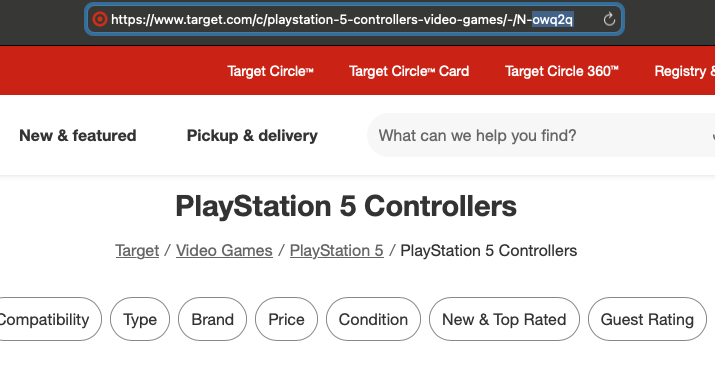
| **category\_id** | ID do nó de taxonomia do Target para a categoria (ex.: "owq2q" para controles de PlayStation 5). | - |
| `render` | Ativa a renderização de JavaScript quando definido como `html`. [**Mais informações**](/products/pt-br/web-scraper-api/features/js-rendering-and-browser-control.md#javascript-rendering)**.** | - |
| `callback_url` | URL para o seu endpoint de callback. [**Mais informações**](/products/pt-br/web-scraper-api/integration-methods/push-pull.md) | - |
| `user_agent_type` | Tipo de dispositivo e navegador. A lista completa pode ser encontrada [**aqui**](/products/pt-br/web-scraper-api/features/http-context-and-job-management/user-agent-type.md). | desktop |
\- parâmetro obrigatório
### Localização
Adapte os resultados a lojas, tipos de fulfillment e locais de entrega específicos.
| Parâmetro | Descrição | Tipo |
| ------------------ | ----------------------------------------------------------------------------------------------------------------- | -------------------- |
| `fulfillment_type` | Defina o tipo de fulfillment. Os valores disponíveis são: pickup, shipping, shop\_in\_store, same\_day\_delivery. | Cadeia de caracteres |
| `store_id` | Defina a localização da loja. | Inteiro |
| `delivery_zip` | Defina o local de envio. | Cadeia de caracteres |
## Entendendo os IDs de nó do Target
O sistema de categorias do Target usa IDs de nó para identificar categorias específicas. Esses IDs de nó são identificadores exclusivos no sistema de taxonomia do Target.
### Exemplos de IDs de nó
Os IDs de nó podem ser encontrados na URL da página da categoria. É a parte da URL que tem o formato `N-<5 symbols>` . Aqui estão algumas URLs de categoria de exemplo e seus respectivos IDs de nó:
1. Controles de PlayStation 5: `owq2q`
* URL completa:
2. Acessórios de PlayStation 5: `lbxgt`
* URL completa:
3. PlayStation 5: `hj96d`
* URL completa:
### Formato do ID de nó
Ao usar o `target_category` source, você só precisa fornecer o ID de nó sem o `N-` prefixo. A API formatará a URL corretamente automaticamente.
---
# Agent Instructions
This documentation is published with GitBook. GitBook is the documentation platform designed so that both humans and AI agents can read, navigate, and reason over technical content effectively. Learn more at gitbook.com.
## Querying This Documentation
If you need additional information that is not directly available in this page, you can query the documentation dynamically by asking a question.
Perform an HTTP GET request on the current page URL with the `ask` query parameter, and the optional `goal` query parameter:
```
GET https://developers.oxylabs.io/api-targets/pt-br/e-commerce/target/category.md?ask=&goal=
```
`ask` is the immediate question: it should be specific, self-contained, and written in natural language.
`goal` is optional and describes the broader end goal you are ultimately trying to accomplish on behalf of the user. GitBook uses it to tailor the answer towards what is most useful for that goal.
The response will contain a direct answer to the question and relevant excerpts and sources from the documentation.
Use this mechanism when the answer is not explicitly present in the current page, you need clarification or additional context, or you want to retrieve related documentation sections.