> For the complete documentation index, see [llms.txt](https://developers.oxylabs.io/llms.txt). Markdown versions of documentation pages are available by appending `.md` to page URLs; this page is available as [Markdown](https://developers.oxylabs.io/api-targets/llms-and-ai/chatgpt.md).

# ChatGPT

The `chatgpt` source lets you submit a prompt to ChatGPT and receive a fully parsed, structured response, including the plain-text and Markdown answer, source citations, search queries the model used, and shopping products and ads.

## Request samples

The following code examples demonstrate how to submit a prompt and retrieve a ChatGPT response with parsed results.

{% tabs %}
{% tab title="cURL" %}

```bash
curl 'https://realtime.oxylabs.io/v1/queries' \
--user 'USERNAME:PASSWORD' \
-H 'Content-Type: application/json' \
-d '{
        "source": "chatgpt",
        "prompt": "best supplements for better sleep",
        "parse": true,
        "geo_location": "United States"
    }'
```

{% endtab %}

{% tab title="Python" %}

```python
import requests
from pprint import pprint

# Structure payload.
payload = {
    'source': 'chatgpt',
    'prompt': 'best supplements for better sleep',
    'parse': True,
    'geo_location': "United States"
}

# Get response.
response = requests.request(
    'POST',
    'https://realtime.oxylabs.io/v1/queries',
    auth=('USERNAME', 'PASSWORD'),
    json=payload,
)

# Print prettified response to stdout.
pprint(response.json())
```

{% endtab %}

{% tab title="Node.js" %}

```javascript
const https = require("https");

const username = "USERNAME";
const password = "PASSWORD";
const body = {
    source: "chatgpt",
    prompt: "best supplements for better sleep",
    parse: true,
    geo_location: "United States"
};

const options = {
    hostname: "realtime.oxylabs.io",
    path: "/v1/queries",
    method: "POST",
    headers: {
        "Content-Type": "application/json",
        Authorization:
            "Basic " + Buffer.from(`${username}:${password}`).toString("base64"),
    },
};

const request = https.request(options, (response) => {
    let data = "";

    response.on("data", (chunk) => {
        data += chunk;
    });

    response.on("end", () => {
        const responseData = JSON.parse(data);
        console.log(JSON.stringify(responseData, null, 2));
    });
});

request.on("error", (error) => {
    console.error("Error:", error);
});

request.write(JSON.stringify(body));
request.end();
```

{% endtab %}

{% tab title="HTTP" %}

```http
https://realtime.oxylabs.io/v1/queries?source=chatgpt&prompt=best%20supplements%20for%20better%20sleep&parse=true&geo_location=United%20States&access_token=12345abcde
```

{% endtab %}

{% tab title="PHP" %}

```php
<?php

$params = array(
    'source' => 'chatgpt',
    'prompt' => 'best supplements for better sleep',
    'parse' => true,
    'geo_location' => "United States"
);

$ch = curl_init();

curl_setopt($ch, CURLOPT_URL, "https://realtime.oxylabs.io/v1/queries");
curl_setopt($ch, CURLOPT_RETURNTRANSFER, 1);
curl_setopt($ch, CURLOPT_POSTFIELDS, json_encode($params));
curl_setopt($ch, CURLOPT_POST, 1);
curl_setopt($ch, CURLOPT_USERPWD, "USERNAME" . ":" . "PASSWORD");


$headers = array();
$headers[] = "Content-Type: application/json";
curl_setopt($ch, CURLOPT_HTTPHEADER, $headers);

$result = curl_exec($ch);
echo $result;

if (curl_errno($ch)) {
    echo 'Error:' . curl_error($ch);
}
curl_close($ch);
```

{% endtab %}

{% tab title="Golang" %}

```go
package main

import (
	"bytes"
	"encoding/json"
	"fmt"
	"io/ioutil"
	"net/http"
)

func main() {
	const Username = "USERNAME"
	const Password = "PASSWORD"

  	payload := map[string]interface{}{
        	"source": "chatgpt",
        	"prompt": "best supplements for better sleep",
        	"parse":  true,
        	"geo_location": "United States"
    	}

	jsonValue, _ := json.Marshal(payload)

	client := &http.Client{}
	request, _ := http.NewRequest("POST",
		"https://realtime.oxylabs.io/v1/queries",
		bytes.NewBuffer(jsonValue),
	)

	request.SetBasicAuth(Username, Password)
	response, _ := client.Do(request)

	responseText, _ := ioutil.ReadAll(response.Body)
	fmt.Println(string(responseText))
}
```

{% endtab %}

{% tab title="C#" %}

```csharp
using System;
using System.Collections.Generic;
using System.Net.Http;
using System.Net.Http.Json;
using System.Threading.Tasks;

namespace OxyApi
{
    class Program
    {
        static async Task Main()
        {
            const string Username = "USERNAME";
            const string Password = "PASSWORD";

            var parameters = new
            {
                source = "chatgpt",
                prompt = "best supplements for better sleep",
                parse = true,
                geo_location = "United States"
            };

            var client = new HttpClient();

            Uri baseUri = new Uri("https://realtime.oxylabs.io");
            client.BaseAddress = baseUri;

            var requestMessage = new HttpRequestMessage(HttpMethod.Post, "/v1/queries");
            requestMessage.Content = JsonContent.Create(parameters);

            var authenticationString = $"{Username}:{Password}";
            var base64EncodedAuthenticationString = Convert.ToBase64String(System.Text.ASCIIEncoding.UTF8.GetBytes(authenticationString));
            requestMessage.Headers.Add("Authorization", "Basic " + base64EncodedAuthenticationString);

            var response = await client.SendAsync(requestMessage);
            var contents = await response.Content.ReadAsStringAsync();

            Console.WriteLine(contents);
        }
    }
}
```

{% endtab %}

{% tab title="Java" %}

```java
package org.example;

import okhttp3.*;
import org.json.JSONArray;
import org.json.JSONObject;
import java.util.concurrent.TimeUnit;

public class Main implements Runnable {
    private static final String AUTHORIZATION_HEADER = "Authorization";
    public static final String USERNAME = "USERNAME";
    public static final String PASSWORD = "PASSWORD";

    public void run() {
        JSONObject jsonObject = new JSONObject();
        jsonObject.put("source", "chatgpt");
        jsonObject.put("prompt", "best supplements for better sleep");
        jsonObject.put("parse", true);
        jsonObject.put("geo_location", "United States");

        Authenticator authenticator = (route, response) -> {
            String credential = Credentials.basic(USERNAME, PASSWORD);
            return response
                    .request()
                    .newBuilder()
                    .header(AUTHORIZATION_HEADER, credential)
                    .build();
        };

        var client = new OkHttpClient.Builder()
                .authenticator(authenticator)
                .readTimeout(180, TimeUnit.SECONDS)
                .build();

        var mediaType = MediaType.parse("application/json; charset=utf-8");
        var body = RequestBody.create(jsonObject.toString(), mediaType);
        var request = new Request.Builder()
                .url("https://realtime.oxylabs.io/v1/queries")
                .post(body)
                .build();

        try (var response = client.newCall(request).execute()) {
            if (response.body() != null) {
                try (var responseBody = response.body()) {
                    System.out.println(responseBody.string());
                }
            }
        } catch (Exception exception) {
            System.out.println("Error: " + exception.getMessage());
        }

        System.exit(0);
    }

    public static void main(String[] args) {
        new Thread(new Main()).start();
    }
}
```

{% endtab %}

{% tab title="JSON" %}

```json
{
        "source": "chatgpt",
        "prompt": "best supplements for better sleep",
        "parse": true,
        "geo_location": "United States"
}
```

{% endtab %}
{% endtabs %}

{% hint style="info" %}
**Note:** JavaScript rendering is enabled by default for all LLM sources. You do not need to include rendering parameters in your request payload.
{% endhint %}

We use synchronous [**Realtime**](/products/web-scraper-api/integration-methods/realtime.md) integration method in our examples. If you would like to use [**Proxy Endpoint**](/products/web-scraper-api/integration-methods/proxy-endpoint.md) or asynchronous [**Push-Pull**](/products/web-scraper-api/integration-methods/push-pull.md) integration, refer to the [**integration methods**](/products/web-scraper-api/integration-methods.md) section.

{% hint style="warning" %}
B**atch requests** are currently **not supported** for the `chatgpt` source.&#x20;
{% endhint %}

### Request parameters

Basic setup and customization options for scraping ChatGPT.

<table><thead><tr><th width="222">Parameter</th><th width="350.3333333333333">Description</th><th>Default Value</th></tr></thead><tbody><tr><td><mark style="background-color:green;"><strong><code>source</code></strong></mark></td><td>Sets the scraper target. Use <code>chatgpt</code>.</td><td>–</td></tr><tr><td><mark style="background-color:green;"><strong><code>prompt</code></strong></mark></td><td>The prompt or question to submit to ChatGPT. Must be under 4000 characters.</td><td>–</td></tr><tr><td><code>search</code></td><td>Set to <code>true</code> for web search.</td><td><code>false</code></td></tr><tr><td><code>parse</code></td><td>Set to <code>true</code> for structured JSON results.</td><td><code>false</code></td></tr><tr><td><code>geo_location</code></td><td>Specify a country to route the request from. <a href="/spaces/BQ7Zf9paoN3FTeGcyfY1/pages/0I4VTnd54ZqcMpbB6L0s"><strong>More info</strong></a>.</td><td>–</td></tr><tr><td><code>callback_url</code></td><td>URL to your callback endpoint. <a href="https://developers.oxylabs.io/products/web-scraper-api/integration-methods/push-pull"><strong>More info</strong></a></td><td>–</td></tr></tbody></table>

&#x20;    \- mandatory parameter

## Structured data

Web Scraper API can either an HTML or JSON object that contains ChatGPT output, with structured data on various elements of the results page.

<details>

<summary><code>chatgpt</code> structured output</summary>

```json
{
  "results": [
    {
      "job_id": "7470033199733683201",
      "status_code": 200,
      "url": "https://chatgpt.com/?model=auto",
      "content": {
        "prompt": "best supplements for better sleep",
        "llm_model": "gpt-5-5",
        "response_text": "If you're looking for supplements with the best evidence for improving sleep, I'd rank them roughly like this: 1. Magnesium glycinate Best all-around starting point for many people ...",
        "markdown_text": "If you're looking for supplements with the best evidence for improving sleep, I'd rank them roughly like this:\n\n### 1. Magnesium glycinate\n\n**Best all-around starting point for many people**\n\n* ...",
        "markdown_json": [
          {
            "type": "paragraph",
            "children": [
              {
                "type": "text",
                "raw": "If you're looking for supplements with the best evidence for improving sleep, I'd rank them roughly like this:"
              }
            ]
          },
          {
            "type": "blank_line"
          },
          ...
        ],
        "citations": [
          {
            "title": "Best Sleep Supplements: Evidence-Based Gui | Holistic Health",
            "url": "https://holistic.health/journal/best-sleep-supplements-beyond-melatonin?utm_source=chatgpt.com",
            "text": "Holistic Health",
            "description": "May 26, 2026"
          },
          {
            "title": "Natural Sleep Aids: Which Are the Most Effective?",
            "url": "https://www.sleepfoundation.org/sleep-aids/natural-sleep-aids?utm_source=chatgpt.com",
            "text": "sleepfoundation.org",
            "description": "July 14, 2025 — NATURAL SLEEP AIDS: WHICH ARE THE MOST EFFECTIVE?  Updated July 15, 2025  Written by Lucy Bryan ...",
            "section": "more"
          },
          {
            "title": "Do Magnesium Sleep Drinks Really Work? What the Science Says",
            "url": "https://www.health.com/magnesium-drink-before-bed-11920427?utm_source=chatgpt.com",
            "text": "Health",
            "description": "Magnesium sleep drinks are beverages containing powdered magnesium and often calming ingredients like herbs or amino acids..."
          },
          ...
        ],
        "search_queries": [
          "best supplements for sleep evidence melatonin magnesium valerian 2025"
        ],
        "parse_status_code": 12000
      }
    }
  ]
}
```

</details>

{% hint style="warning" %}
The composition of response may vary depending on whether the query was made from a **desktop** or **mobile** device.
{% endhint %}

### Output data dictionary

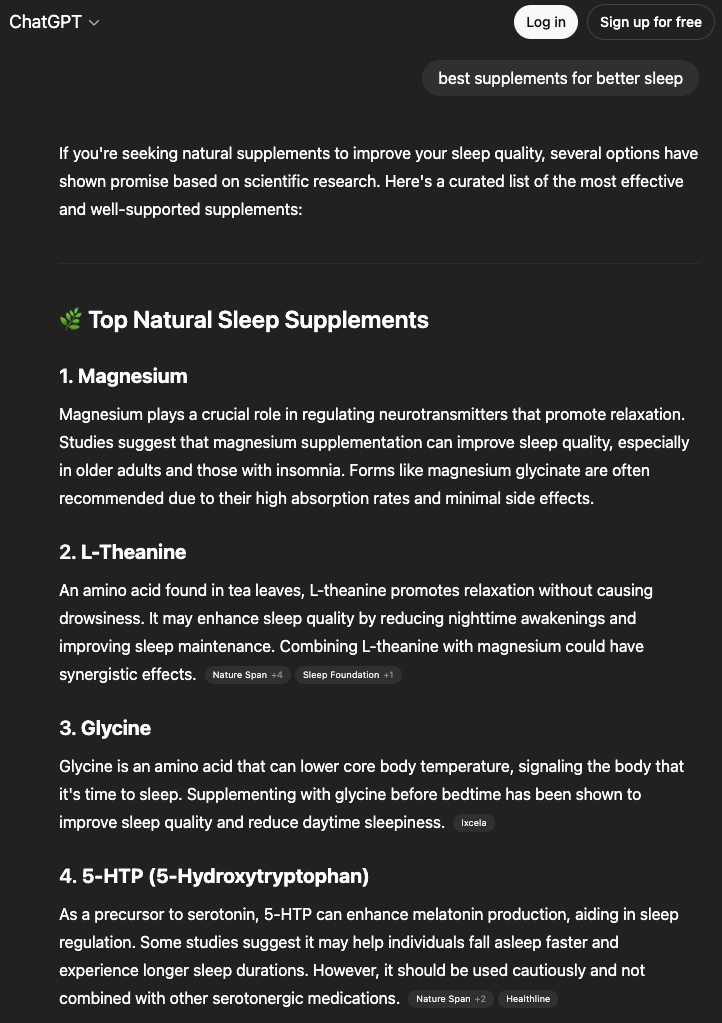
#### HTML example

<figure><img src="/files/ApjAmaODSxK30VG3UDfP" alt=""><figcaption></figcaption></figure>

#### JSON structure

All LLM targets return the same top-level `job` and `results[]` envelope. See [LLMs and AI](/api-targets/llms-and-ai.md) for the full metadata reference.

The following table show ChatGPT-specific `results[].content` fields:

{% hint style="info" %}
The number of items and fields for a specific result type may vary depending on the submitted prompt.
{% endhint %}

<table><thead><tr><th width="173">Field</th><th width="476">Description</th><th width="90">Type</th></tr></thead><tbody><tr><td><code>prompt</code></td><td>Submitted prompt to generate result.</td><td>string</td></tr><tr><td><code>llm_model</code></td><td>Specific ChatGPT model used for the response (e.g., <code>gpt-4o</code>).</td><td>string</td></tr><tr><td><code>response_text</code></td><td>Plain-text response from ChatGPT.</td><td>string</td></tr><tr><td><code>markdown_text</code></td><td>ChatGPT response as Markdown.</td><td>string</td></tr><tr><td><code>markdown_json</code></td><td>Structured JSON representation of the Markdown response. Each item contains <code>type</code> and <code>children</code>.</td><td>array</td></tr><tr><td><mark style="background-color:yellow;"><code>citations</code></mark></td><td>List of response source citations. Objects contain <code>title</code>, <code>url</code>, <code>text</code>, <code>description</code>, and <code>section</code>.</td><td>array</td></tr><tr><td><mark style="background-color:yellow;"><code>search_queries</code></mark></td><td>Search queries used by the model to gather information.</td><td>array of strings</td></tr><tr><td><mark style="background-color:yellow;"><code>links</code></mark></td><td>List of objects for inline source link details: <code>url</code> and <code>text</code>.</td><td>array</td></tr><tr><td><mark style="background-color:yellow;"><code>shopping_products</code></mark></td><td>List of objects containing product details: <code>price</code>, <code>title</code>, <code>rating</code>, <code>currency</code>, <code>price_str</code>, and <code>thumbnail</code>.</td><td>array</td></tr><tr><td><mark style="background-color:yellow;"><code>ads</code></mark></td><td>Ad details containing <code>url</code>, <code>title</code>, <code>image_url</code>, <code>description</code>, and an <code>advertiser_info</code> object.</td><td>array</td></tr><tr><td><mark style="background-color:yellow;"><code>ads.advertiser_info</code></mark></td><td>Object with advertiser <code>url</code>, <code>name</code>, and <code>image_url</code></td><td>object</td></tr><tr><td><code>parse_status_code</code></td><td><code>12000</code> – successful. Otherwise, parser failed to extract some or all structured fields.</td><td>integer</td></tr></tbody></table>

&#x20;    – conditional, returned only when content is in the LLM's response.


---

# Agent Instructions
This documentation is published with GitBook. GitBook is the documentation platform designed so that both humans and AI agents can read, navigate, and reason over technical content effectively. Learn more at gitbook.com.

## Querying This Documentation
If you need additional information that is not directly available in this page, you can query the documentation dynamically by asking a question.

Perform an HTTP GET request on the current page URL with the `ask` query parameter, and the optional `goal` query parameter:

```
GET https://developers.oxylabs.io/api-targets/llms-and-ai/chatgpt.md?ask=<question>&goal=<endgoal>
```

`ask` is the immediate question: it should be specific, self-contained, and written in natural language.
`goal` is optional and describes the broader end goal you are ultimately trying to accomplish on behalf of the user. GitBook uses it to tailor the answer towards what is most useful for that goal.

The response will contain a direct answer to the question and relevant excerpts and sources from the documentation.

Use this mechanism when the answer is not explicitly present in the current page, you need clarification or additional context, or you want to retrieve related documentation sections.