> For the complete documentation index, see [llms.txt](https://developers.oxylabs.io/llms.txt). Markdown versions of documentation pages are available by appending `.md` to page URLs; this page is available as [Markdown](https://developers.oxylabs.io/api-targets/es/search-engines/google/search/local-search.md).

# Búsqueda local

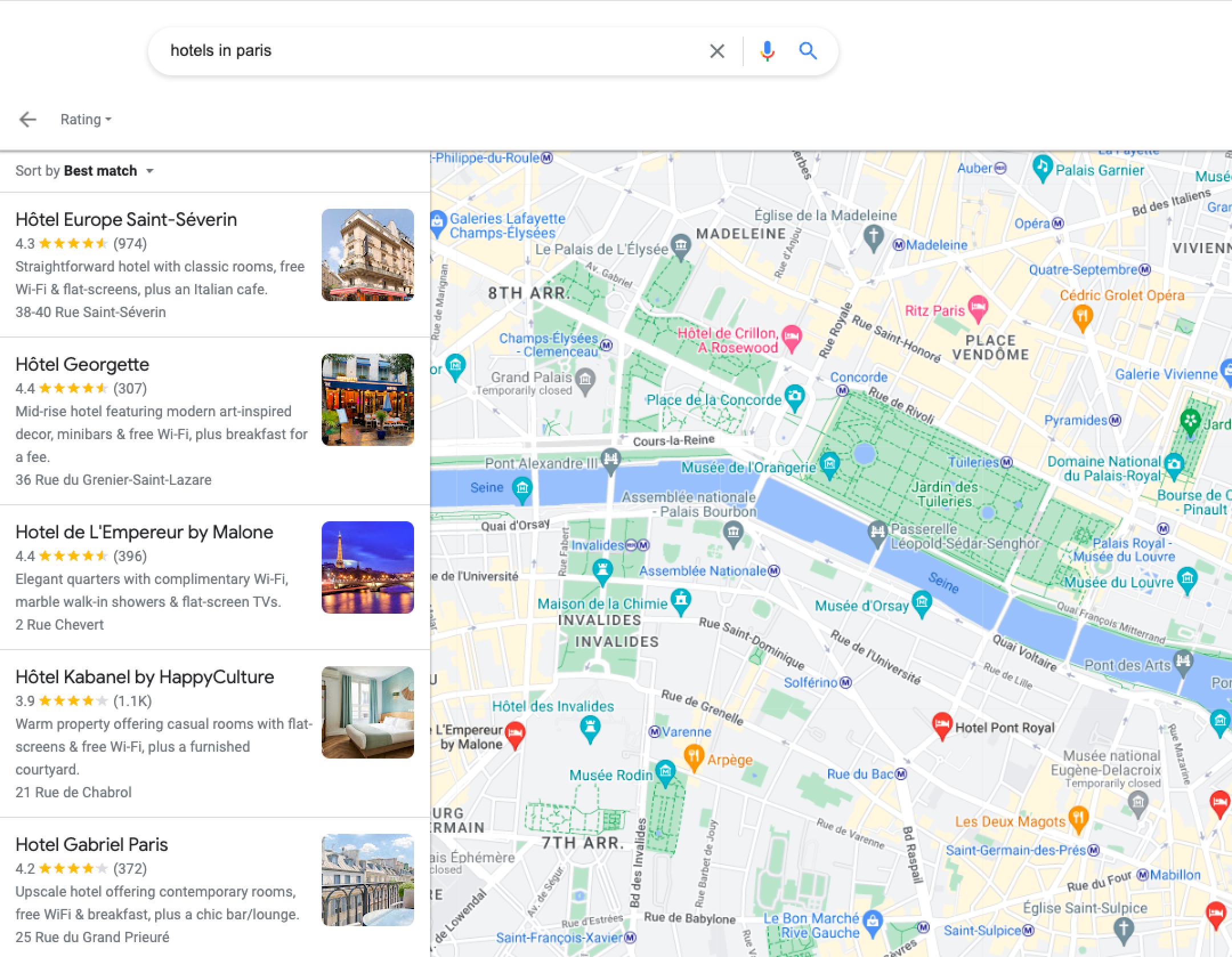
Google Local Search API recupera resultados basados en ubicación para restaurantes, hoteles y servicios con opciones de filtrado.

La `google_maps` La fuente está diseñada para recuperar resultados de búsqueda de Google Local. Extrae varios datos basados en la ubicación, como restaurantes, hoteles, cafeterías, gasolineras, supermercados y más.

## Ejemplos de solicitud

En este ejemplo, hacemos una solicitud para recuperar las primeras `3` páginas de disponibilidad de hotel para `1` huésped entre `2023-10-01` y `2023-10-10` para `hoteles en París`.

{% tabs %}
{% tab title="cURL" %}

```shell
curl 'https://realtime.oxylabs.io/v1/queries' \\
--user 'USERNAME:PASSWORD' \\
-H 'Content-Type: application/json' \\
-d '{
        "source": "google_maps", 
        "pages": 3, 
        "query": "hoteles en París", 
        "context": [
            {
                "key": "hotel_occupancy", 
                "value": 1
            }, 
            {
                "key": "hotel_dates", 
                "value": "2023-10-01,2023-10-10"
            }
        ]
    }'
```

{% endtab %}

{% tab title="Python" %}

```python
import requests
from pprint import pprint


# Estructura del payload.
payload = {
    'source': 'google_maps',
    'query': 'hotels in Paris',
    'pages': 3,
    'context': [
        {'key': 'hotel_occupancy', 'value': 1},
        {'key': 'hotel_dates', 'value': '2023-10-01,2023-10-10'},
    ],
}

# Obtener respuesta.
response = requests.request(
    'POST',
    'https://realtime.oxylabs.io/v1/queries',
    auth=('USERNAME', 'PASSWORD'),
    json=payload,
)

# Print prettified response to stdout.
pprint(response.json())
```

{% endtab %}

{% tab title="Node.js" %}

```javascript
const https = require("https");

const username = "USERNAME";
const password = "PASSWORD";
const body = {
    source: "google_maps",
    pages: 3,
    query: "hoteles en París",
    context: [
        { key: "hotel_occupancy", value: 1 },
        { key: "hotel_dates", value: "2023-10-01,2023-10-10" },
    ],
};

const options = {
    hostname: "realtime.oxylabs.io",
    path: "/v1/queries",
    method: "POST",
    headers: {
        "Content-Type": "application/json",
        Authorization:
            "Basic " + Buffer.from(`${username}:${password}`).toString("base64"),
    },
};

const request = https.request(options, (response) => {
    let data = "";

    response.on("data", (chunk) => {
        data += chunk;
    });

    response.on("end", () => {
        const responseData = JSON.parse(data);
        console.log(JSON.stringify(responseData, null, 2));
    });
});

request.on("error", (error) => {
    console.error("Error:", error);
});

request.write(JSON.stringify(body));
request.end();
```

{% endtab %}

{% tab title="HTTP" %}

```http
https://realtime.oxylabs.io/v1/queries?source=google_maps&query=hotels+in+Paris&pages=3&context[0][key]=hotel_occupancy&context[0][value]=1&context[1][key]=hotel_dates&context[1][value]=2023-10-01,2023-10-10&access_token=12345abcde
```

{% endtab %}

{% tab title="PHP" %}

```php
<?php

$params = array(
    'source' => 'google_maps',
    'query' => 'hoteles en París',
    'pages' => 3,
    'context' => [
        ['key' => 'hotel_occupancy',  'value' => 1],
        ['key' => 'hotel_dates', 'value' => '2023-10-01,2023-10-10']
    ]
);

$ch = curl_init();

curl_setopt($ch, CURLOPT_URL, "https://realtime.oxylabs.io/v1/queries");
curl_setopt($ch, CURLOPT_RETURNTRANSFER, 1);
curl_setopt($ch, CURLOPT_POSTFIELDS, json_encode($params));
curl_setopt($ch, CURLOPT_POST, 1);
curl_setopt($ch, CURLOPT_USERPWD, "USERNAME" . ":" . "PASSWORD");


$headers = array();
$headers[] = "Content-Type: application/json";
curl_setopt($ch, CURLOPT_HTTPHEADER, $headers);

$result = curl_exec($ch);
echo $result;

if (curl_errno($ch)) {
    echo 'Error:' . curl_error($ch);
}
curl_close($ch);
```

{% endtab %}

{% tab title="Golang" %}

```go
package main

import (
	"bytes"
	"encoding/json"
	"fmt"
	"io/ioutil"
	"net/http"
)

func main() {
	const Username = "USERNAME"
	const Password = "PASSWORD"

	payload := map[string]interface{}{
		"source": "google_maps",
		"pages":  3,
		"query":  "hotels in Paris",
		"context": []map[string]interface{}{
			{"key": "hotel_occupancy", "value": 1},
			{"key": "hotel_dates", "value": "2023-10-01,2023-10-10"},
		},
	}

	jsonValue, _ := json.Marshal(payload)

	client := &http.Client{}
	request, _ := http.NewRequest("POST",
		"https://realtime.oxylabs.io/v1/queries",
		bytes.NewBuffer(jsonValue),
	)

	request.SetBasicAuth(Username, Password)
	response, _ := client.Do(request)

	responseText, _ := ioutil.ReadAll(response.Body)
	fmt.Println(string(responseText))
}
```

{% endtab %}

{% tab title="C#" %}

```csharp
using System;
using System.Collections.Generic;
using System.Net.Http;
using System.Net.Http.Json;
using System.Threading.Tasks;

namespace OxyApi
{
    class Program
    {
        static async Task Main()
        {
            const string Username = "USERNAME";
            const string Password = "PASSWORD";

            var parameters = new {
                source = "google_maps",
                pages = 3,
                query = "hoteles en París",
                context = new dynamic [] {
                    new { key = "hotel_occupancy", value = 1 },
                    new { key = "hotel_dates", value = "2023-10-01,2023-10-10" }
                }
            };

            var client = new HttpClient();

            Uri baseUri = new Uri("https://realtime.oxylabs.io");
            client.BaseAddress = baseUri;

            var requestMessage = new HttpRequestMessage(HttpMethod.Post, "/v1/queries");
            requestMessage.Content = JsonContent.Create(parameters);

            var authenticationString = $"{Username}:{Password}";
            var base64EncodedAuthenticationString = Convert.ToBase64String(System.Text.ASCIIEncoding.UTF8.GetBytes(authenticationString));
            requestMessage.Headers.Add("Authorization", "Basic " + base64EncodedAuthenticationString);

            var response = await client.SendAsync(requestMessage);
            var contents = await response.Content.ReadAsStringAsync();

            Console.WriteLine(contents);
        }
    }
}
```

{% endtab %}

{% tab title="Java" %}

```java
package org.example;

import okhttp3.*;
import org.json.JSONArray;
import org.json.JSONObject;
import java.util.concurrent.TimeUnit;

public class Main implements Runnable {
    private static final String AUTHORIZATION_HEADER = "Authorization";
    public static final String USERNAME = "USERNAME";
    public static final String PASSWORD = "PASSWORD";

    public void run() {
        JSONObject jsonObject = new JSONObject();
        jsonObject.put("source", "google_maps");
        jsonObject.put("pages", 3);
        jsonObject.put("query", "hoteles en París");
        jsonObject.put("context", new JSONArray()
                .put(new JSONObject()
                        .put("key", "hotel_occupancy")
                        .put("value", 1))
                .put(new JSONObject()
                        .put("key", "hotel_dates")
                        .put("value", "2023-10-01,2023-10-10"))
        );

        Authenticator authenticator = (route, response) -> {
            String credential = Credentials.basic(USERNAME, PASSWORD);
            return response
                    .request()
                    .newBuilder()
                    .header(AUTHORIZATION_HEADER, credential)
                    .build();
        };

        var client = new OkHttpClient.Builder()
                .authenticator(authenticator)
                .readTimeout(180, TimeUnit.SECONDS)
                .build();

        var mediaType = MediaType.parse("application/json; charset=utf-8");
        var body = RequestBody.create(jsonObject.toString(), mediaType);
        var request = new Request.Builder()
                .url("https://realtime.oxylabs.io/v1/queries")
                .post(body)
                .build();

        try (var response = client.newCall(request).execute()) {
            if (response.body() != null) {
                try (var responseBody = response.body()) {
                    System.out.println(responseBody.string());
                }
            }
        } catch (Exception exception) {
            System.out.println("Error: " + exception.getMessage());
        }

        System.exit(0);
    }

    public static void main(String[] args) {
        new Thread(new Main()).start();
    }
}
```

{% endtab %}

{% tab title="JSON" %}

```json
{
    "source": "google_maps", 
    "pages": 3, 
    "query": "hoteles en París", 
    "context": [
        {
            "key": "hotel_occupancy", 
            "value": 1
        }, 
        {
            "key": "hotel_dates", 
            "value": "2023-10-01,2023-10-10"
        }
    ]
}
```

{% endtab %}
{% endtabs %}

Usamos integración síncrona [**Realtime**](/products/es/web-scraper-api/integration-methods/realtime.md) método de integración en nuestros ejemplos. Si deseas usar [**Proxy Endpoint**](/products/es/web-scraper-api/integration-methods/proxy-endpoint.md) o una integración asíncrona [**Push-Pull**](/products/es/web-scraper-api/integration-methods/push-pull.md) integración, consulta la [**métodos de integración**](/products/es/web-scraper-api/integration-methods.md) sección.

## Valores de los parámetros de solicitud

### Genérico

Configuración básica y opciones de personalización para raspar resultados de búsqueda local de Google.

<table><thead><tr><th width="222">Parámetro</th><th width="350.3333333333333">Descripción</th><th>Valor predeterminado</th></tr></thead><tbody><tr><td><mark style="background-color:green;"><strong><code>source</code></strong></mark></td><td>Establece el scraper. Usa <code>google_maps</code>.</td><td>–</td></tr><tr><td><mark style="background-color:green;"><strong><code>consulta</code></strong></mark></td><td>La palabra clave o frase que se buscará.</td><td>–</td></tr><tr><td><code>render</code></td><td>Habilita el renderizado de JavaScript cuando se establece en <code>html</code>. <a href="/products/es/web-scraper-api/features/js-rendering-and-browser-control.md#javascript-rendering"><strong>Más información</strong></a><strong>.</strong></td><td><code>html</code></td></tr><tr><td><code>callback_url</code></td><td>URL para tu endpoint de callback. <a href="/products/es/web-scraper-api/integration-methods/push-pull.md"><strong>Más información</strong></a></td><td>–</td></tr><tr><td><code>user_agent_type</code></td><td>Tipo de dispositivo y navegador. La lista completa se puede encontrar <a href="/products/es/web-scraper-api/features/http-context-and-job-management/user-agent-type.md"><strong>aquí</strong></a>.</td><td><code>desktop</code></td></tr></tbody></table>

\- parámetro obligatorio

### Localización

Adapta los resultados de búsqueda a ubicaciones geográficas y lenguajes específicos.

<table><thead><tr><th width="222">Parámetro</th><th width="350.3333333333333">Descripción</th><th>Valor predeterminado</th></tr></thead><tbody><tr><td><code>geo_location</code></td><td>La ubicación geográfica a la que debe adaptarse el resultado. Usar correctamente este parámetro es extremadamente importante para obtener los datos correctos. Para más información, lee sobre nuestras <code>geo_location</code> estructuras de parámetros <a href="/products/es/web-scraper-api/features/localization/serp-localization.md#google"><strong>aquí</strong></a><strong>.</strong></td><td>–</td></tr><tr><td><code>locale</code></td><td><code>Accept-Language</code> valor del encabezado que cambia el idioma de la interfaz web de tu página de búsqueda de Google. <a href="/products/es/web-scraper-api/features/localization/domain-locale.md#google"><strong>Más información</strong></a>.</td><td>–</td></tr></tbody></table>

### Paginación

Controles para gestionar la paginación y la recuperación de resultados de búsqueda.

<table><thead><tr><th width="222">Parámetro</th><th width="350.3333333333333">Descripción</th><th width="167">Valor predeterminado</th></tr></thead><tbody><tr><td><code>start_page</code></td><td>Número de página inicial.</td><td><code>1</code></td></tr><tr><td><code>pages</code></td><td>Número de páginas a recuperar.</td><td><code>1</code></td></tr><tr><td><code>limit</code></td><td>Número de resultados a recuperar en cada página.</td><td><code>10</code></td></tr></tbody></table>

### Otros

Configuraciones y controles avanzados adicionales para requisitos especializados.

<table><thead><tr><th width="222">Parámetro</th><th width="350.3333333333333">Descripción</th><th>Valor predeterminado</th></tr></thead><tbody><tr><td><code>contexto</code>:<br><code>nfpr</code></td><td><code>true</code> desactivará la autocorrección ortográfica</td><td><code>false</code></td></tr><tr><td><code>contexto</code>:<br><code>hotel_occupancy</code></td><td>Número de huéspedes.<br><strong>NOTA:</strong> este parámetro solo se aplica si buscas un término de búsqueda relacionado con hoteles.</td><td>–</td></tr><tr><td><code>contexto</code>:<br><code>hotel_dates</code></td><td>Duración de la estancia en el hotel, de - a. Ejemplo: <code>2023-07-12,2023-07-13</code><br><strong>NOTA:</strong> este parámetro solo se aplica si buscas un término de búsqueda relacionado con hoteles.</td><td>–</td></tr></tbody></table>

### Parámetros de contexto

Todos los parámetros de contexto deben añadirse al `contexto` array como objetos con `key` y `valor` pares, por ejemplo:

```json
...
"context": [
    {
        "key": "filter",
        "value": "0"
    }
]
...
```

## Ejemplo de salida

```json
{
    "results": [
        {
            "content":"<!doctype html>\n<html lang=\"en\">\n<head>
            ...
            </script></body>\n</html>\n",  
            "created_at": "2024-02-13 11:44:28",
            "updated_at": "2024-02-13 11:45:06",
            "page": 3,
            "url": "https://www.google.com/search?tbm=lcl&q=hotels+in+Paris&hotel_occupancy=1&hotel_dates=2023-10-01,2023-10-10&start=40&uule=w+CAIQICINdW5pdGVkIHN0YXRlcw&gl=us&hl=en",
            "job_id": "7163135836748268545",
            "status_code": 200
        }
    ]
}
```

<figure><img src="https://197269033-files.gitbook.io/~/files/v0/b/gitbook-x-prod.appspot.com/o/spaces%2FBaJCXoqO1zdFnaMnCKrg%2Fuploads%2Fgit-blob-6a7126959745bf690b97dd6248f64a4922809fd5%2Fgoogle_local_search.png?alt=media" alt=""><figcaption></figcaption></figure>


---

# Agent Instructions
This documentation is published with GitBook. GitBook is the documentation platform designed so that both humans and AI agents can read, navigate, and reason over technical content effectively. Learn more at gitbook.com.

## Querying This Documentation
If you need additional information that is not directly available in this page, you can query the documentation dynamically by asking a question.

Perform an HTTP GET request on the current page URL with the `ask` query parameter, and the optional `goal` query parameter:

```
GET https://developers.oxylabs.io/api-targets/es/search-engines/google/search/local-search.md?ask=<question>&goal=<endgoal>
```

`ask` is the immediate question: it should be specific, self-contained, and written in natural language.
`goal` is optional and describes the broader end goal you are ultimately trying to accomplish on behalf of the user. GitBook uses it to tailor the answer towards what is most useful for that goal.

The response will contain a direct answer to the question and relevant excerpts and sources from the documentation.

Use this mechanism when the answer is not explicitly present in the current page, you need clarification or additional context, or you want to retrieve related documentation sections.
