> For the complete documentation index, see [llms.txt](https://developers.oxylabs.io/llms.txt). Markdown versions of documentation pages are available by appending `.md` to page URLs; this page is available as [Markdown](https://developers.oxylabs.io/api-targets/es/search-engines/google/ai-mode.md).

# Modo de IA

Extrae respuestas de Google AI Mode enviando prompts, incluido el texto completo de la respuesta, enlaces referenciados y citas con URLs de origen.

La `google_ai_mode` la fuente está diseñada para enviar prompts y recuperar respuestas conversacionales de Google AI Mode. Devuelve tanto el texto completo de la respuesta de Google AI Mode como sus metadatos estructurados.

## Disponibilidad regional de AI Mode

Google AI Mode está disponible en la mayoría de los países del mundo **salvo estas excepciones**:

<table><thead><tr><th width="96">Región</th><th>Países</th></tr></thead><tbody><tr><td>Europa</td><td>Francia, Turquía</td></tr><tr><td>Asia</td><td>China, Irán, Corea del Norte, Siria</td></tr><tr><td>Américas</td><td>Cuba</td></tr></tbody></table>

{% hint style="warning" %}
La función Google AI Mode se está implementando de forma continua, con más países incluidos con el tiempo.
{% endhint %}

## Ejemplos de solicitud

Los siguientes ejemplos de código muestran cómo recuperar una respuesta de Google AI Mode con resultados analizados.

{% tabs %}
{% tab title="cURL" %}

```bash
curl 'https://realtime.oxylabs.io/v1/queries' \\
--user 'USERNAME:PASSWORD' \\
-H 'Content-Type: application/json' \\
-d '{
        "source": "google_ai_mode",
        "query": "best health trackers under $200",
        "render": "html",
        "parse": true
    }'
```

{% endtab %}

{% tab title="Python" %}

```python
import requests
from pprint import pprint


# Estructura del payload.
payload = {
    'source': 'google_ai_mode',
    'query': 'best health trackers under $200',
    'render': 'html',
    'parse': True
}


# Obtener respuesta.
response = requests.request(
    'POST',
    'https://realtime.oxylabs.io/v1/queries',
    auth=('USERNAME', 'PASSWORD'),
    json=payload,
)

# Print prettified response to stdout.
pprint(response.json())
```

{% endtab %}

{% tab title="Node.js" %}

```javascript
const https = require("https");

const username = "USERNAME";
const password = "PASSWORD";
const body = {
    source: "google_ai_mode",
    query: "best health trackers under $200",
    render: "html",
    parse: true
};

const options = {
    hostname: "realtime.oxylabs.io",
    path: "/v1/queries",
    method: "POST",
    headers: {
        "Content-Type": "application/json",
        Authorization:
            "Basic " + Buffer.from(`${username}:${password}`).toString("base64"),
    },
};

const request = https.request(options, (response) => {
    let data = "";

    response.on("data", (chunk) => {
        data += chunk;
    });

    response.on("end", () => {
        const responseData = JSON.parse(data);
        console.log(JSON.stringify(responseData, null, 2));
    });
});

request.on("error", (error) => {
    console.error("Error:", error);
});

request.write(JSON.stringify(body));
request.end();
```

{% endtab %}

{% tab title="HTTP" %}

```http
https://realtime.oxylabs.io/v1/queries?source=google_ai_mode&query=best%20health%20trackers%20under%20$200&render=html&parse=true&access_token=12345abcde
```

{% endtab %}

{% tab title="PHP" %}

```php
<?php

$params = array(
    'source' => 'google_ai_mode',
    'query' => 'best health trackers under $200',
    'render' => 'html',
    'parse' => true
);

$ch = curl_init();

curl_setopt($ch, CURLOPT_URL, "https://realtime.oxylabs.io/v1/queries");
curl_setopt($ch, CURLOPT_RETURNTRANSFER, 1);
curl_setopt($ch, CURLOPT_POSTFIELDS, json_encode($params));
curl_setopt($ch, CURLOPT_POST, 1);
curl_setopt($ch, CURLOPT_USERPWD, "USERNAME" . ":" . "PASSWORD");


$headers = array();
$headers[] = "Content-Type: application/json";
curl_setopt($ch, CURLOPT_HTTPHEADER, $headers);

$result = curl_exec($ch);
echo $result;

if (curl_errno($ch)) {
    echo 'Error:' . curl_error($ch);
}
curl_close($ch);
```

{% endtab %}

{% tab title="Golang" %}

```go
package main

import (
	"bytes"
	"encoding/json"
	"fmt"
	"io/ioutil"
	"net/http"
)

func main() {
	const Username = "USERNAME"
	const Password = "PASSWORD"

  	payload := map[string]interface{}{
        	"source": "google_ai_mode",
        	"query": "best health trackers under $200",
        	"render": "html",
        	"parse":  true,
    	}

	jsonValue, _ := json.Marshal(payload)

	client := &http.Client{}
	request, _ := http.NewRequest("POST",
		"https://realtime.oxylabs.io/v1/queries",
		bytes.NewBuffer(jsonValue),
	)

	request.SetBasicAuth(Username, Password)
	response, _ := client.Do(request)

	responseText, _ := ioutil.ReadAll(response.Body)
	fmt.Println(string(responseText))
}
```

{% endtab %}

{% tab title="C#" %}

```csharp
using System;
using System.Collections.Generic;
using System.Net.Http;
using System.Net.Http.Json;
using System.Threading.Tasks;

namespace OxyApi
{
    class Program
    {
        static async Task Main()
        {
            const string Username = "USERNAME";
            const string Password = "PASSWORD";

            var parameters = new
            {
                source = "google_ai_mode",
                query = "best health trackers under $200",
                render = "html",
                parse = true
            };

            var client = new HttpClient();

            Uri baseUri = new Uri("https://realtime.oxylabs.io");
            client.BaseAddress = baseUri;

            var requestMessage = new HttpRequestMessage(HttpMethod.Post, "/v1/queries");
            requestMessage.Content = JsonContent.Create(parameters);

            var authenticationString = $"{Username}:{Password}";
            var base64EncodedAuthenticationString = Convert.ToBase64String(System.Text.ASCIIEncoding.UTF8.GetBytes(authenticationString));
            requestMessage.Headers.Add("Authorization", "Basic " + base64EncodedAuthenticationString);

            var response = await client.SendAsync(requestMessage);
            var contents = await response.Content.ReadAsStringAsync();

            Console.WriteLine(contents);
        }
    }
}
```

{% endtab %}

{% tab title="Java" %}

```java
package org.example;

import okhttp3.*;
import org.json.JSONArray;
import org.json.JSONObject;
import java.util.concurrent.TimeUnit;

public class Main implements Runnable {
    private static final String AUTHORIZATION_HEADER = "Authorization";
    public static final String USERNAME = "USERNAME";
    public static final String PASSWORD = "PASSWORD";

    public void run() {
        JSONObject jsonObject = new JSONObject();
        jsonObject.put("source", "google_ai_mode");
        jsonObject.put("query", "best health trackers under $200");
        jsonObject.put("render", "html");
        jsonObject.put("parse", true);

        Authenticator authenticator = (route, response) -> {
            String credential = Credentials.basic(USERNAME, PASSWORD);
            return response
                    .request()
                    .newBuilder()
                    .header(AUTHORIZATION_HEADER, credential)
                    .build();
        };

        var client = new OkHttpClient.Builder()
                .authenticator(authenticator)
                .readTimeout(180, TimeUnit.SECONDS)
                .build();

        var mediaType = MediaType.parse("application/json; charset=utf-8");
        var body = RequestBody.create(jsonObject.toString(), mediaType);
        var request = new Request.Builder()
                .url("https://realtime.oxylabs.io/v1/queries")
                .post(body)
                .build();

        try (var response = client.newCall(request).execute()) {
            if (response.body() != null) {
                try (var responseBody = response.body()) {
                    System.out.println(responseBody.string());
                }
            }
        } catch (Exception exception) {
            System.out.println("Error: " + exception.getMessage());
        }

        System.exit(0);
    }

    public static void main(String[] args) {
        new Thread(new Main()).start();
    }
}
```

{% endtab %}

{% tab title="JSON" %}

```json
{
        "source": "google_ai_mode",
        "query": "best health trackers under $200",
        "render": "html",
        "parse": true
}
```

{% endtab %}
{% endtabs %}

Usamos integración síncrona [**Realtime**](/products/es/web-scraper-api/integration-methods/realtime.md) método de integración en nuestros ejemplos. Si deseas usar [**Proxy Endpoint**](/products/es/web-scraper-api/integration-methods/proxy-endpoint.md) o una integración asíncrona [**Push-Pull**](/products/es/web-scraper-api/integration-methods/push-pull.md) integración, consulta la [**métodos de integración**](/products/es/web-scraper-api/integration-methods.md) sección.

## Valores de los parámetros de solicitud

Opciones básicas de configuración y personalización para recuperar respuestas de Google AI Mode.

<table><thead><tr><th width="222">Parámetro</th><th width="350.3333333333333">Descripción</th><th>Valor predeterminado</th></tr></thead><tbody><tr><td><mark style="background-color:green;"><strong>source</strong></mark></td><td>Establece el scraper. Usa <code>google_ai_mode</code>.</td><td>–</td></tr><tr><td><mark style="background-color:green;"><strong>consulta</strong></mark></td><td>El prompt o la pregunta que se enviará a Google AI Mode. Debe tener menos de 400 símbolos.</td><td>–</td></tr><tr><td><mark style="background-color:green;"><strong>render</strong></mark></td><td>Establecer en <code>html</code> es obligatorio para esta fuente. <a href="/products/es/web-scraper-api/features/js-rendering-and-browser-control.md#javascript-rendering"><strong>Más información</strong></a><strong>.</strong></td><td>–</td></tr><tr><td><code>parse</code></td><td>Devuelve datos analizados cuando se establece en <code>true</code>.</td><td><code>false</code></td></tr><tr><td><code>geo_location</code></td><td>La ubicación geográfica para la que debe adaptarse el resultado. Para más información, lee sobre nuestra sugerida <code>geo_location</code> estructuras de parámetros <a href="/products/es/web-scraper-api/features/localization/serp-localization.md#google"><strong>aquí</strong></a><strong>.</strong></td><td>–</td></tr><tr><td><code>callback_url</code></td><td>URL para tu endpoint de callback. <a href="/products/es/web-scraper-api/integration-methods/push-pull.md"><strong>Más información</strong></a></td><td>–</td></tr></tbody></table>

\- parámetro obligatorio

## Datos estructurados

Web Scraper API devuelve un objeto HTML o JSON de la salida de Google AI Mode, que contiene datos estructurados de la página de resultados.

{% hint style="warning" %}
La composición de los elementos puede variar según si la consulta se realizó desde un **desktop** o **móvil** dispositivo.
{% endhint %}

<details>

<summary><code>google_ai_mode</code> salida estructurada</summary>

```json
{
    "results": [
        {
            "content": {
                "links": [
                    {
                        "url": "https://www.nytimes.com/wirecutter/reviews/the-best-fitness-trackers/#:~:text=%7C,Apple%20users:%20Apple%20Watch%20SE",
                        "text": "The 3 Best Fitness Trackers of 2025 | Reviews by Wirecutter"
                    },
                    {
                        "url": "https://www.wareable.com/fitness-trackers/the-best-fitness-tracker#:~:text=Fitbit%20Charge%206%20%E2%80%93%20the%20best,10%20%E2%80%93%20Best%20fitness%2Dtracking%20smartwatch",
                        "text": "Best fitness tracker 2025: Reviewed, tested and compared"
                    },
                    {
                        "url": "https://www.techradar.com/best/best-cheap-fitness-trackers",
                        "text": "The best cheap fitness trackers for 2025 - TechRadar"
                    },
                    {
                        "url": "https://www.livescience.com/best-budget-fitness-tracker",
                        "text": "Best budget fitness trackers 2025: Hand-picked by our expert reviewers"
                    },
                    {
                        "url": "https://www.garagegymreviews.com/best-budget-fitness-tracker",
                        "text": "Expert-Tested: Best Budget Fitness Tracker (2025)"
                    },
                    {
                        "url": "https://www.businessinsider.com/guides/tech/best-fitbit#:~:text=Our%20top%20recommendation%20is%20the,fitness%20tools%20for%20under%20%24100.",
                        "text": "The Best Fitbit in 2025 - Business Insider"
                    },
                    {
                        "url": "https://medium.com/@kellyshephard/best-smartwatches-under-200-5961cbc1a6f8#:~:text=The%20Apple%20Watch%20SE%20(2022)%20is%20the,it%20still%20performs%20well%20throughout%20the%20day.",
                        "text": "Best Smartwatches Under $200 in 2025: Tested and Approved"
                    },
                    {
                        "url": "https://www.gminsights.com/industry-analysis/smartwatch-market#:~:text=More%20advanced%20functions%20such%20as%20ECG%20monitoring%2C,Galaxy%20Watch%205%2C%20and%20Fitbit%20Sense%202.",
                        "text": "Smartwatch Market Share, Growth Analysis Report 2025-2034"
                    },
                    {
                        "url": "https://www.linkedin.com/pulse/best-smartwatches-law-enforcement-rugged-reliable-ready-samar-abbas-n1bif#:~:text=Q6:%20What's%20the%20best%20smartwatch%20for%20health,especially%20for%20VO2%20Max%20and%20stress%20levels.",
                        "text": "Best Smartwatches for Law Enforcement: Rugged, Reliable, and Ready for Duty"
                    },
                    {
                        "url": "https://gearjunkie.com/health-fitness/best-fitness-watch#:~:text=Technology%20for%20health%20tracking%20has%20advanced%20a,and%20infrared%20light)%20and%20Heart%20Rate%20Variability.",
                        "text": "The Best Fitness Watches of 2025"
                    }
                ],
                "prompt": "best health trackers under $200",
                "citations": [
                    {
                        "text": "Tracker",
                        "urls": [
                            "https://www.nytimes.com/wirecutter/reviews/the-best-fitness-trackers/#:~:text=%7C,Apple%20users:%20Apple%20Watch%20SE",
                            "https://www.livescience.com/best-budget-fitness-tracker",
                            "https://www.techradar.com/best/best-cheap-fitness-trackers"
                        ]
                    },
                    {
                        "text": "Tracking accuracy: Reputable brands like Fitbit and Garmin offer reliable accuracy for tracking heart rate, steps, and sleep. More advanced metrics like blood oxygen (SpO2) and stress are also available on many models. GPS: For runners and cyclists, having built-in GPS is crucial for mapping routes and tracking distance without carrying a phone. If you don't need this, or are comfortable relying on your phone's GPS, you can save money with a tracker that lacks this feature. Subscription services: Brands like Fitbit offer a premium membership to unlock more detailed insights and guided programs. However, all trackers on this list provide basic tracking for free. Battery life: Simpler trackers typically last a week or more on a single charge, while more complex smartwatches like the Apple Watch SE need daily charging . Design and comfort: Consider the size and style of the tracker. Some prefer the compact, lightweight design of a basic band, while others like the larger, more interactive display of a smartwatch.",
                        "urls": [
                            "https://www.nytimes.com/wirecutter/reviews/the-best-fitness-trackers/#:~:text=%7C,Apple%20users:%20Apple%20Watch%20SE",
                            "https://www.wareable.com/fitness-trackers/the-best-fitness-tracker#:~:text=Fitbit%20Charge%206%20%E2%80%93%20the%20best,10%20%E2%80%93%20Best%20fitness%2Dtracking%20smartwatch"
                        ]
                    }
                ],
                "response_text": "Por menos de $200, los mejores rastreadores de salud incluyen el Fitbit Inspire 3 por su valor general, el Xiaomi Smart Band 9 como la mejor opción ultraeconómica y el Apple Watch SE (2nd Gen) para usuarios de iPhone. Otros contendientes fuertes incluyen el más avanzado Fitbit Charge 6 y el Garmin Vivosmart 5. Comparación de los mejores rastreadores de salud por menos de $200 Rastreador Mejor para GPS incorporado Características Ventajas Desventajas Fitbit Inspire 3 Mejor en general y para principiantes No (usa GPS del teléfono) Frecuencia cardíaca 24/7, SpO2, seguimiento del sueño, Active Zone Minutes Excelente valor, diseño discreto, larga duración de la batería (hasta 10 días) Se requiere suscripción para obtener información más detallada; pantalla pequeña Fitbit Charge 6 Seguimiento más avanzado Sí GPS incorporado, ECG, seguimiento del estrés, sensor EDA para el estrés, Google Wallet/Maps Seguimiento preciso de la frecuencia cardíaca, incluye integraciones útiles de Google Requiere una cuenta de Google; algunas funciones están bloqueadas detrás de una suscripción Xiaomi Smart Band 9 Mejor opción ultraeconómica No (usa GPS del teléfono) Frecuencia cardíaca, SpO2, seguimiento del sueño, más de 150 modos de entrenamiento Extremadamente asequible, pantalla grande, excelente duración de la batería (hasta 21 días) Algunos usuarios informan de conectividad irregular de la app y precisión inconsistente Garmin Vivosmart 5 Lo mejor de Garmin No (usa GPS del teléfono) monitor de energía Body Battery, seguimiento del sueño, SpO2, seguimiento automático de la actividad Ligero y cómodo, seguimiento del sueño especialmente bueno Pantalla monocroma y sin GPS incorporado Apple Watch SE (2nd Gen) Mejor para usuarios de iPhone Sí Frecuencia cardíaca, Anillos de actividad, detección de caídas, ecosistema de apps Integración perfecta con iPhone; pantalla vibrante La duración de la batería es corta (hasta 18 horas); más caro Fitbit Inspire 3 Health & Fitness Activity Tracker Black with Workout Intensity R$646.00 4.4 (5K+) XIAOMI SMART BAND 9 - Midnight Black R$237.07 (Rs\u00a012,499.00) 4.8 (7K+) Apple Watch SE GPS + Cellular 40mm Midnight Aluminium Case with Midnight Sport Band - M/L R$184.11/mo x 18 4.6 (9K+) Fitbit Charge 6 Activity and Fitness Tracker with Google apps R$832.34 ($156.00) 4.2 (5K+) Garmin Vivosmart 5, Black S/m (010-02645-00) R$800.27 ($149.99) 4.2 (2K+) Ver más Características clave a considerar Precisión del seguimiento: marcas reputadas como Fitbit y Garmin ofrecen precisión fiable para rastrear la frecuencia cardíaca, los pasos y el sueño. Métricas más avanzadas como el oxígeno en sangre (SpO2) y el estrés también están disponibles en muchos modelos. GPS: para corredores y ciclistas, contar con GPS incorporado es crucial para trazar rutas y seguir la distancia sin llevar un teléfono. Si no necesitas esto, o te sientes cómodo confiando en el GPS de tu teléfono, puedes ahorrar dinero con un rastreador que no tenga esta función. Servicios de suscripción: marcas como Fitbit ofrecen una membresía premium para desbloquear información más detallada y programas guiados. Sin embargo, todos los rastreadores de esta lista ofrecen seguimiento básico gratis. Duración de la batería: los rastreadores más sencillos suelen durar una semana o más con una sola carga, mientras que relojes inteligentes más complejos como el Apple Watch SE necesitan carga diaria. Diseño y comodidad: considera el tamaño y el estilo del rastreador. Algunos prefieren el diseño compacto y ligero de una banda básica, mientras que otros prefieren la pantalla más grande e interactiva de un reloj inteligente. Gracias Tu opinión ayuda a Google a mejorar. Consulta nuestra Política de privacidad. Comparte más comentarios Informar de un problema Cerrar",
                "parse_status_code": 12000
            },
            "created_at": "2025-10-28 14:41:42",
            "updated_at": "2025-10-28 14:41:59",
            "page": 1,
            "url": "https://www.google.com/search?udm=50&q=best+health+trackers+under+$200&hl=en&sei=KtYAaaHbBZ_m1sQP0IOaqQg&mstk=AUtExfAUpaUCxnFayf6G4-kNkwNbm0bQCoQ9U98qUnjI2A0E7T5DCKi2lmolJe5o9X9h3tJVH-Cx91tGJrhIiDPrrcvO4kX8vex4rnW_IUsQA-b6EGmpCtqj2ocY-FWO95EcMcaYeOvsQhtFqGdYF4CChex2n6h4PeopuL0&csuir=1",
            "job_id": "7388948081053534209",
            "is_render_forced": false,
            "status_code": 200,
            "type": "parsed",
            "parser_type": "",
            "parser_preset": null
        }
    ],
    "job": {
        "callback_url": null,
        "client_id": 12345,
        "context": [
            {
                "key": "force_headers",
                "value": false
            },
            {
                "key": "force_cookies",
                "value": false
            },
            {
                "key": "hc_policy",
                "value": true
            },
            {
                "key": "successful_parse_status_codes",
                "value": []
            }
        ],
        "created_at": "2025-10-28 14:41:42",
        "geo_location": null,
        "id": "7388948081053534209",
        "limit": 10,
        "locale": null,
        "pages": 1,
        "parse": true,
        "parser_type": null,
        "parser_preset": null,
        "parsing_instructions": null,
        "browser_instructions": null,
        "render": "html",
        "xhr": false,
        "markdown": false,
        "url": null,
        "query": "best health trackers under $200",
        "source": "google_ai_mode",
        "start_page": 1,
        "status": "done",
        "storage_type": null,
        "storage_url": null,
        "subdomain": "www",
        "content_encoding": "utf-8",
        "updated_at": "2025-10-28 14:41:59",
        "user_agent_type": "desktop",
        "session_info": null,
        "statuses": [],
        "client_notes": null,
        "_links": [
            {
                "rel": "self",
                "href": "http://data.oxylabs.io/v1/queries/7388948081053534209",
                "method": "GET"
            },
            {
                "rel": "results",
                "href": "http://data.oxylabs.io/v1/queries/7388948081053534209/results",
                "method": "GET"
            },
            {
                "rel": "results-content",
                "href_list": [
                    "http://data.oxylabs.io/v1/queries/7388948081053534209/results/1/content"
                ],
                "method": "GET"
            },
            {
                "rel": "results-html",
                "href": "http://data.oxylabs.io/v1/queries/7388948081053534209/results?type=raw",
                "method": "GET"
            },
            {
                "rel": "results-content-html",
                "href_list": [
                    "http://data.oxylabs.io/v1/queries/7388948081053534209/results/1/content?type=raw"
                ],
                "method": "GET"
            },
            {
                "rel": "results-parsed",
                "href": "http://data.oxylabs.io/v1/queries/7388948081053534209/results?type=parsed",
                "method": "GET"
            },
            {
                "rel": "results-content-parsed",
                "href_list": [
                    "http://data.oxylabs.io/v1/queries/7388948081053534209/results/1/content?type=parsed"
                ],
                "method": "GET"
            }
        ]
    }
}
```

</details>

## Diccionario de datos de salida

### Ejemplo en HTML

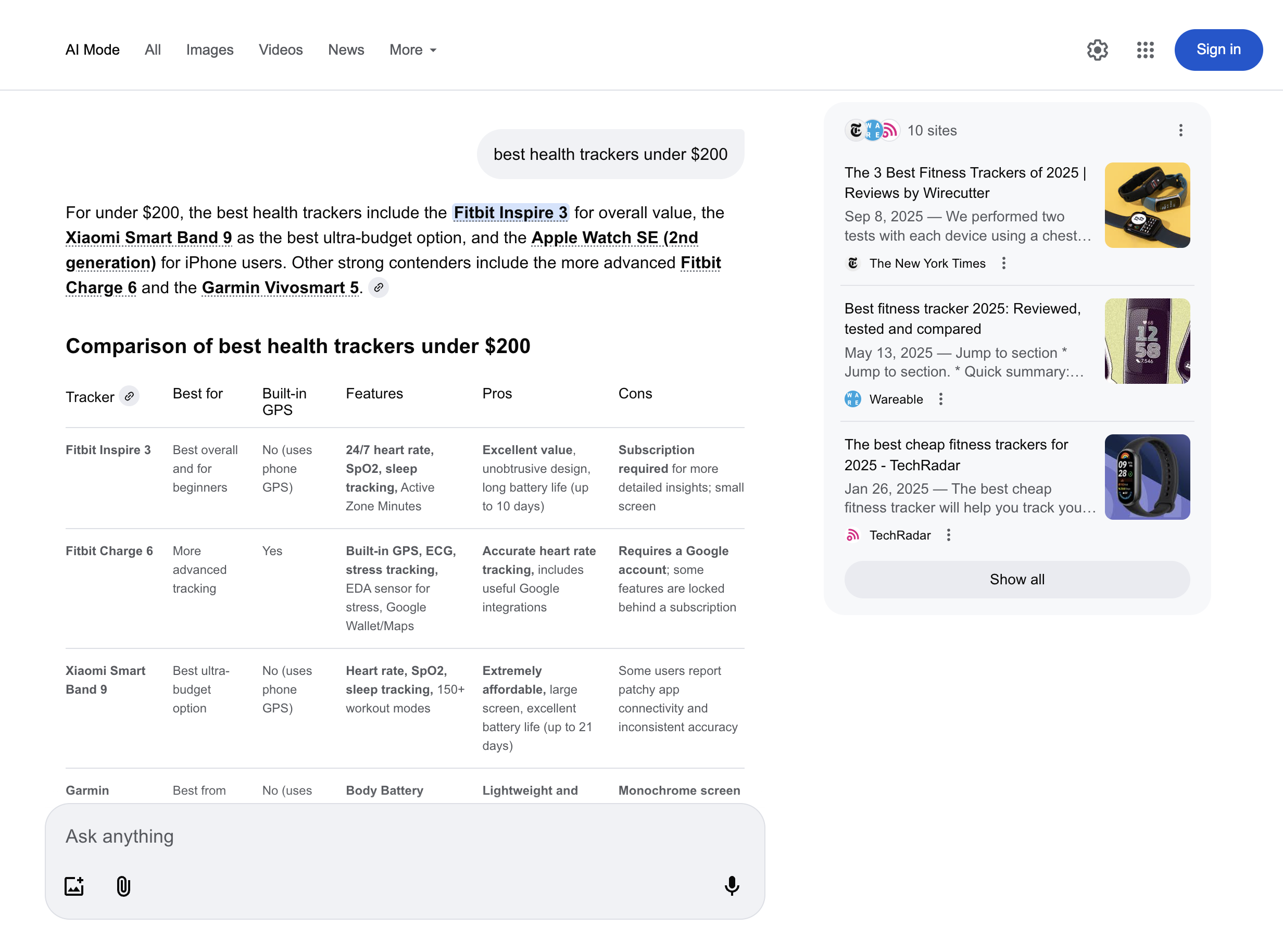
<figure><img src="https://197269033-files.gitbook.io/~/files/v0/b/gitbook-x-prod.appspot.com/o/spaces%2FBaJCXoqO1zdFnaMnCKrg%2Fuploads%2Fgit-blob-3291699f43277a356d2a4b8887bae5856280fa45%2Fgoogle_ai_mode_html.png?alt=media" alt=""><figcaption></figcaption></figure>

### Estructura JSON

La salida estructurada `google_ai_mode` incluye campos como `URL`, `page`, `results`, y más. La siguiente tabla presenta una lista detallada de cada elemento de Google AI Mode que analizamos, incluida la descripción, el tipo de dato y los metadatos relevantes.

{% hint style="info" %}
El número de elementos y campos de un tipo de resultado específico puede variar según la consulta de búsqueda.
{% endhint %}

<table data-full-width="false"><thead><tr><th width="289">Nombre de la clave</th><th width="337.3333333333333">Descripción</th><th>Tipo</th></tr></thead><tbody><tr><td><code>url</code></td><td>La URL de Google AI Mode.</td><td>cadena</td></tr><tr><td><code>page</code></td><td>Número de página.</td><td>entero</td></tr><tr><td><code>content</code></td><td>Un objeto que contiene los datos de respuesta analizados de Google AI Mode.</td><td>objeto</td></tr><tr><td><code>content.links</code></td><td>Lista de enlaces externos referenciados en la respuesta. Se muestra en el recuadro del lado derecho de la página.</td><td>arreglo</td></tr><tr><td><code>content.prompt</code></td><td>Prompt original enviado a Google AI Mode.</td><td>cadena</td></tr><tr><td><code>content.citations</code></td><td>Lista de citas con URLs y textos asociados, como se muestra en el bloque principal de la respuesta de Google AI Mode. Varias URLs que hacen referencia al mismo texto se agrupan en una lista.</td><td>arreglo</td></tr><tr><td><code>content.response_text</code></td><td>Texto completo de la respuesta de Google AI Mode.</td><td>cadena</td></tr><tr><td><code>content.parse_status_code</code></td><td>Código de estado de la operación de análisis.</td><td>entero</td></tr><tr><td><code>creado_en</code></td><td>Marca de tiempo en que se creó el trabajo de scraping.</td><td>marca_de_tiempo</td></tr><tr><td><code>actualizado_en</code></td><td>Marca de tiempo en que se terminó el trabajo de scraping.</td><td>marca_de_tiempo</td></tr><tr><td><code>id_del_trabajo</code></td><td>ID del trabajo asociado con el trabajo de scraping.</td><td>cadena</td></tr><tr><td><code>código_de_estado</code></td><td>Código de estado del trabajo de extracción. Puede ver los códigos de estado del scraper descritos <a href="/products/es/web-scraper-api/response-codes.md"><strong>aquí</strong></a>.</td><td>entero</td></tr></tbody></table>


---

# Agent Instructions
This documentation is published with GitBook. GitBook is the documentation platform designed so that both humans and AI agents can read, navigate, and reason over technical content effectively. Learn more at gitbook.com.

## Querying This Documentation
If you need additional information that is not directly available in this page, you can query the documentation dynamically by asking a question.

Perform an HTTP GET request on the current page URL with the `ask` query parameter, and the optional `goal` query parameter:

```
GET https://developers.oxylabs.io/api-targets/es/search-engines/google/ai-mode.md?ask=<question>&goal=<endgoal>
```

`ask` is the immediate question: it should be specific, self-contained, and written in natural language.
`goal` is optional and describes the broader end goal you are ultimately trying to accomplish on behalf of the user. GitBook uses it to tailor the answer towards what is most useful for that goal.

The response will contain a direct answer to the question and relevant excerpts and sources from the documentation.

Use this mechanism when the answer is not explicitly present in the current page, you need clarification or additional context, or you want to retrieve related documentation sections.