> For the complete documentation index, see [llms.txt](https://developers.oxylabs.io/llms.txt). Markdown versions of documentation pages are available by appending `.md` to page URLs; this page is available as [Markdown](https://developers.oxylabs.io/api-targets/es/llms-and-ai/chatgpt.md).

# ChatGPT

Extrae respuestas de ChatGPT enviando prompts, con datos analizados que incluyen texto de respuesta, salida en Markdown, citas, enlaces externos e información del modelo LLM.

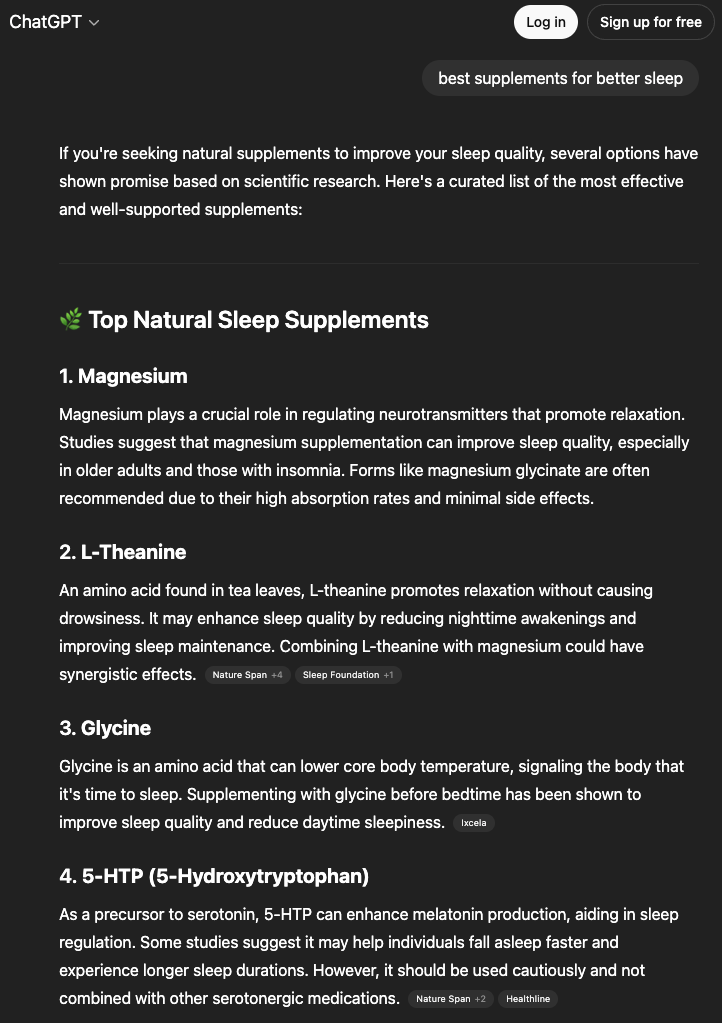
La `chatgpt` source te permite enviar un prompt a ChatGPT y recibir una respuesta totalmente analizada y estructurada, incluyendo la respuesta en texto plano y en Markdown, las citas de las fuentes, las consultas de búsqueda que usó el modelo y los productos y anuncios de compras.

## Ejemplos de solicitud

Los siguientes ejemplos de código muestran cómo enviar un prompt a ChatGPT usando [**Push-Pull**](/products/es/web-scraper-api/integration-methods/push-pull.md).

{% tabs %}
{% tab title="cURL" %}

```bash
curl 'https://data.oxylabs.io/v1/queries' \
--user 'USERNAME:PASSWORD' \\
-H 'Content-Type: application/json' \\
-d '{
        "source": "chatgpt",
        "prompt": "best supplements for better sleep",
        "parse": true,
        "geo_location": "United States",
        "callback_url": "https://your-server.com/oxylabs-callback"
    }'
```

{% endtab %}

{% tab title="Python" %}

```python
import requests
from pprint import pprint

# Estructura del payload.
payload = {
    'source': 'chatgpt',
    'prompt': 'best supplements for better sleep',
    'parse': True,
    'geo_location': "United States",
    'callback_url': "https://your-server.com/oxylabs-callback"
}

# Obtener respuesta.
response = requests.request(
    'POST',
    'https://data.oxylabs.io/v1/queries',
    auth=('USERNAME', 'PASSWORD'),
    json=payload,
)

# Print prettified response to stdout.
pprint(response.json())
```

{% endtab %}

{% tab title="Node.js" %}

```javascript
const https = require("https");

const username = "USERNAME";
const password = "PASSWORD";
const body = {
    source: "chatgpt",
    prompt: "best supplements for better sleep",
    parse: true,
    geo_location: "United States",
    callback_url: "https://your-server.com/oxylabs-callback"
};

const options = {
    hostname: "data.oxylabs.io",
    path: "/v1/queries",
    method: "POST",
    headers: {
        "Content-Type": "application/json",
        Authorization:
            "Basic " + Buffer.from(`${username}:${password}`).toString("base64"),
    },
};

const request = https.request(options, (response) => {
    let data = "";

    response.on("data", (chunk) => {
        data += chunk;
    });

    response.on("end", () => {
        const responseData = JSON.parse(data);
        console.log(JSON.stringify(responseData, null, 2));
    });
});

request.on("error", (error) => {
    console.error("Error:", error);
});

request.write(JSON.stringify(body));
request.end();
```

{% endtab %}

{% tab title="PHP" %}

```php
<?php

$params = array(
    'source' => 'chatgpt',
    'prompt' => 'best supplements for better sleep',
    'parse' => true,
    'geo_location' => "United States",
    'callback_url' => "https://your-server.com/oxylabs-callback"
);

$ch = curl_init();

curl_setopt($ch, CURLOPT_URL, "https://data.oxylabs.io/v1/queries");
curl_setopt($ch, CURLOPT_RETURNTRANSFER, 1);
curl_setopt($ch, CURLOPT_POSTFIELDS, json_encode($params));
curl_setopt($ch, CURLOPT_POST, 1);
curl_setopt($ch, CURLOPT_USERPWD, "USERNAME" . ":" . "PASSWORD");


$headers = array();
$headers[] = "Content-Type: application/json";
curl_setopt($ch, CURLOPT_HTTPHEADER, $headers);

$result = curl_exec($ch);
echo $result;

if (curl_errno($ch)) {
    echo 'Error:' . curl_error($ch);
}
curl_close($ch);
```

{% endtab %}

{% tab title="Golang" %}

```go
package main

import (
"bytes"
"encoding/json"
"fmt"
"io/ioutil"
"net/http"
)

func main() {
const Username = "USERNAME"
const Password = "PASSWORD"

  payload := map[string]interface{}{
        "source": "chatgpt",
        "prompt": "best supplements for better sleep",
        "parse":  true,
        "geo_location": "United States",
        "callback_url": "https://your-server.com/oxylabs-callback",
    }

jsonValue, _ := json.Marshal(payload)

client := &http.Client{}
request, _ := http.NewRequest("POST",
"https://data.oxylabs.io/v1/queries",
bytes.NewBuffer(jsonValue),
)

request.SetBasicAuth(Username, Password)
response, _ := client.Do(request)

responseText, _ := ioutil.ReadAll(response.Body)
fmt.Println(string(responseText))
}
```

{% endtab %}

{% tab title="C#" %}

```csharp
using System;
using System.Collections.Generic;
using System.Net.Http;
using System.Net.Http.Json;
using System.Threading.Tasks;

namespace OxyApi
{
    class Program
    {
        static async Task Main()
        {
            const string Username = "USERNAME";
            const string Password = "PASSWORD";

            var parameters = new
            {
                source = "chatgpt",
                prompt = "best supplements for better sleep",
                parse = true,
                geo_location = "United States",
                callback_url = "https://your-server.com/oxylabs-callback"
            };

            var client = new HttpClient();

            Uri baseUri = new Uri("https://data.oxylabs.io");
            client.BaseAddress = baseUri;

            var requestMessage = new HttpRequestMessage(HttpMethod.Post, "/v1/queries");
            requestMessage.Content = JsonContent.Create(parameters);

            var authenticationString = $"{Username}:{Password}";
            var base64EncodedAuthenticationString = Convert.ToBase64String(System.Text.ASCIIEncoding.UTF8.GetBytes(authenticationString));
            requestMessage.Headers.Add("Authorization", "Basic " + base64EncodedAuthenticationString);

            var response = await client.SendAsync(requestMessage);
            var contents = await response.Content.ReadAsStringAsync();

            Console.WriteLine(contents);
        }
    }
}
```

{% endtab %}

{% tab title="Java" %}

```java
package org.example;

import okhttp3.*;
import org.json.JSONArray;
import org.json.JSONObject;

public class Main implements Runnable {
    private static final String AUTHORIZATION_HEADER = "Authorization";
    public static final String USERNAME = "USERNAME";
    public static final String PASSWORD = "PASSWORD";

    public void run() {
        JSONObject jsonObject = new JSONObject();
        jsonObject.put("source", "chatgpt");
        jsonObject.put("prompt", "best supplements for better sleep");
        jsonObject.put("parse", true);
        jsonObject.put("geo_location", "United States");
        jsonObject.put("callback_url", "https://your-server.com/oxylabs-callback");

        Authenticator authenticator = (route, response) -> {
            String credential = Credentials.basic(USERNAME, PASSWORD);
            return response
                    .request()
                    .newBuilder()
                    .header(AUTHORIZATION_HEADER, credential)
                    .build();
        };

        var client = new OkHttpClient.Builder()
                .authenticator(authenticator)
                .build();

        var mediaType = MediaType.parse("application/json; charset=utf-8");
        var body = RequestBody.create(jsonObject.toString(), mediaType);
        var request = new Request.Builder()
                .url("https://data.oxylabs.io/v1/queries")
                .post(body)
                .build();

        try (var response = client.newCall(request).execute()) {
            if (response.body() != null) {
                try (var responseBody = response.body()) {
                    System.out.println(responseBody.string());
                }
            }
        } catch (Exception exception) {
            System.out.println("Error: " + exception.getMessage());
        }

        System.exit(0);
    }

    public static void main(String[] args) {
        new Thread(new Main()).start();
    }
}
```

{% endtab %}

{% tab title="JSON" %}

```json
{
        "source": "chatgpt",
        "prompt": "best supplements for better sleep",
        "parse": true,
        "geo_location": "United States",
        "callback_url": "https://your-server.com/oxylabs-callback"
}
```

{% endtab %}
{% endtabs %}

{% hint style="info" %}
**Nota:** JavaScript rendering is enabled by default for all LLM sources. You do not need to include rendering parameters in your request payload.
{% endhint %}

Al enviar un trabajo con [**Push-Pull**](/products/es/web-scraper-api/integration-methods/push-pull.md) integración (incluidas [consultas por lotes](/products/es/web-scraper-api/integration-methods/push-pull.md#batch-query)) el método devuelve el ID del trabajo de inmediato – no el resultado. Una vez que el estado del trabajo es `done`, recupere la respuesta analizada. Consulte [**Método de integración**](/api-targets/es/llms-and-ai.md#integration-method) en la página LLMs and AI para el flujo completo de envío y recuperación.

### Parámetros de la solicitud

Opciones básicas de configuración y personalización para extraer datos de ChatGPT.

<table><thead><tr><th width="222">Parámetro</th><th width="350.3333333333333">Descripción</th><th>Valor predeterminado</th></tr></thead><tbody><tr><td><mark style="background-color:green;"><strong><code>source</code></strong></mark></td><td>Establece el objetivo del scraper. Usa <code>chatgpt</code>.</td><td>–</td></tr><tr><td><mark style="background-color:green;"><strong><code>prompt</code></strong></mark></td><td>El prompt o pregunta que se enviará a ChatGPT. Debe tener menos de 4000 caracteres.</td><td>–</td></tr><tr><td><code>callback_url</code></td><td><strong>Recomendado.</strong> URL donde entregamos una notificación una vez que el trabajo se completa. <a href="https://developers.oxylabs.io/products/web-scraper-api/integration-methods/push-pull"><strong>Más información</strong></a></td><td>–</td></tr><tr><td><code>búsqueda</code></td><td>Establécelo en <code>true</code> para la búsqueda web.</td><td><code>false</code></td></tr><tr><td><code>parse</code></td><td>Establécelo en <code>true</code> para resultados JSON estructurados.</td><td><code>false</code></td></tr><tr><td><code>geo_location</code></td><td>Especifique un país desde el que enrutar la solicitud. <a href="/products/es/web-scraper-api/features/localization.md"><strong>Más información</strong></a>.</td><td>–</td></tr><tr><td><code>browser_instructions</code></td><td>Instrucciones personalizadas opcionales del navegador al renderizar JavaScript. <a href="/products/es/web-scraper-api/features/js-rendering-and-browser-control.md#browser-instructions"><strong>Más información</strong></a>.</td><td>–</td></tr></tbody></table>

\- parámetro obligatorio

## Datos estructurados

Una vez que el trabajo se recupera a través del endpoint de resultados Push-Pull, Web Scraper API devuelve un objeto HTML o JSON que contiene la salida de ChatGPT, con datos estructurados sobre varios elementos de la página de resultados.

<details>

<summary><code>chatgpt</code> salida estructurada</summary>

```json
{
  "results": [
    {
      "job_id": "7470033199733683201",
      "status_code": 200,
      "url": "https://chatgpt.com/?model=auto",
      "content": {
        "prompt": "best supplements for better sleep",
        "llm_model": "gpt-5-5",
        "response_text": "If you're looking for supplements with the best evidence for improving sleep, I'd rank them roughly like this: 1. Magnesium glycinate Best all-around starting point for many people ...",
        "markdown_text": "If you're looking for supplements with the best evidence for improving sleep, I'd rank them roughly like this:\n\n### 1. Magnesium glycinate\n\n**Best all-around starting point for many people**\n\n* ...",
        "markdown_json": [
          {
            "type": "paragraph",
            "children": [
              {
                "type": "text",
                "raw": "If you're looking for supplements with the best evidence for improving sleep, I'd rank them roughly like this:"
              }
            ]
          },
          {
            "type": "blank_line"
          },
          ...
        ],
        "citations": [
          {
            "title": "Best Sleep Supplements: Evidence-Based Gui | Holistic Health",
            "url": "https://holistic.health/journal/best-sleep-supplements-beyond-melatonin?utm_source=chatgpt.com",
            "text": "Holistic Health",
            "description": "May 26, 2026"
          },
          {
            "title": "Natural Sleep Aids: Which Are the Most Effective?",
            "url": "https://www.sleepfoundation.org/sleep-aids/natural-sleep-aids?utm_source=chatgpt.com",
            "text": "sleepfoundation.org",
            "description": "July 14, 2025 — NATURAL SLEEP AIDS: WHICH ARE THE MOST EFFECTIVE?  Updated July 15, 2025  Written by Lucy Bryan ...",
            "section": "more"
          },
          {
            "title": "Do Magnesium Sleep Drinks Really Work? What the Science Says",
            "url": "https://www.health.com/magnesium-drink-before-bed-11920427?utm_source=chatgpt.com",
            "text": "Health",
            "description": "Magnesium sleep drinks are beverages containing powdered magnesium and often calming ingredients like herbs or amino acids..."
          },
          ...
        ],
        "search_queries": [
          "best supplements for sleep evidence melatonin magnesium valerian 2025"
        ],
        "parse_status_code": 12000
      }
    }
  ]
}
```

</details>

{% hint style="warning" %}
La composición de la respuesta puede variar según si la consulta se realizó desde un **desktop** o **móvil** dispositivo.
{% endhint %}

### Diccionario de datos de salida

#### Ejemplo en HTML

<figure><img src="https://197269033-files.gitbook.io/~/files/v0/b/gitbook-x-prod.appspot.com/o/spaces%2FBaJCXoqO1zdFnaMnCKrg%2Fuploads%2Fgit-blob-cb12a6dab81c0843699e150f596d72e0b5041eda%2FScreenshot%202025-07-21%20at%2012.54.42.png?alt=media" alt=""><figcaption></figcaption></figure>

#### Estructura JSON

Todos los destinos LLM devuelven la misma envoltura de nivel superior `trabajo` y `results[]` envoltura. Consulte [LLMs and AI](/api-targets/es/llms-and-ai.md) para la referencia completa de metadatos.

La siguiente tabla muestra campos específicos de ChatGPT `results[].content` campos:

{% hint style="info" %}
El número de elementos y campos para un tipo de resultado específico puede variar según el prompt enviado.
{% endhint %}

<table><thead><tr><th width="173">Campo</th><th width="476">Descripción</th><th width="90">Tipo</th></tr></thead><tbody><tr><td><code>prompt</code></td><td>Prompt enviado para generar el resultado.</td><td>cadena</td></tr><tr><td><code>llm_model</code></td><td>Modelo específico de ChatGPT usado para la respuesta (p. ej., <code>gpt-4o</code>).</td><td>cadena</td></tr><tr><td><code>response_text</code></td><td>Respuesta de ChatGPT en texto plano.</td><td>cadena</td></tr><tr><td><code>markdown_text</code></td><td>Respuesta de ChatGPT en Markdown.</td><td>cadena</td></tr><tr><td><code>markdown_json</code></td><td>Representación JSON estructurada de la respuesta en Markdown. Cada elemento contiene <code>type</code> y <code>children</code>.</td><td>arreglo</td></tr><tr><td><mark style="background-color:yellow;"><code>citations</code></mark></td><td>Lista de citas de las fuentes de la respuesta. Los objetos contienen <code>title</code>, <code>url</code>, <code>text</code>, <code>description</code>, y <code>section</code>.</td><td>arreglo</td></tr><tr><td><mark style="background-color:yellow;"><code>search_queries</code></mark></td><td>Consultas de búsqueda usadas por el modelo para recopilar información.</td><td>array de cadenas</td></tr><tr><td><mark style="background-color:yellow;"><code>links</code></mark></td><td>Lista de objetos con detalles de enlaces de fuente en línea: <code>url</code> y <code>text</code>.</td><td>arreglo</td></tr><tr><td><mark style="background-color:yellow;"><code>shopping_products</code></mark></td><td>Lista de objetos que contienen detalles del producto: <code>precio</code>, <code>title</code>, <code>rating</code>, <code>moneda</code>, <code>price_str</code>, y <code>thumbnail</code>.</td><td>arreglo</td></tr><tr><td><mark style="background-color:yellow;"><code>ads</code></mark></td><td>Detalles del anuncio que contienen <code>url</code>, <code>title</code>, <code>image_url</code>, <code>description</code>, y un <code>advertiser_info</code> objeto.</td><td>arreglo</td></tr><tr><td><mark style="background-color:yellow;"><code>ads.advertiser_info</code></mark></td><td>Objeto con información del anunciante <code>url</code>, <code>nombre</code>, y <code>image_url</code></td><td>objeto</td></tr><tr><td><code>parse_status_code</code></td><td><code>12000</code> – exitoso. De lo contrario, el analizador no pudo extraer algunos o todos los campos estructurados.</td><td>entero</td></tr></tbody></table>

– condicional, devuelto solo cuando el contenido está en la respuesta del LLM.


---

# Agent Instructions
This documentation is published with GitBook. GitBook is the documentation platform designed so that both humans and AI agents can read, navigate, and reason over technical content effectively. Learn more at gitbook.com.

## Querying This Documentation
If you need additional information that is not directly available in this page, you can query the documentation dynamically by asking a question.

Perform an HTTP GET request on the current page URL with the `ask` query parameter, and the optional `goal` query parameter:

```
GET https://developers.oxylabs.io/api-targets/es/llms-and-ai/chatgpt.md?ask=<question>&goal=<endgoal>
```

`ask` is the immediate question: it should be specific, self-contained, and written in natural language.
`goal` is optional and describes the broader end goal you are ultimately trying to accomplish on behalf of the user. GitBook uses it to tailor the answer towards what is most useful for that goal.

The response will contain a direct answer to the question and relevant excerpts and sources from the documentation.

Use this mechanism when the answer is not explicitly present in the current page, you need clarification or additional context, or you want to retrieve related documentation sections.