# Search

The `walmart_search` source is designed to retrieve Walmart search result pages. We can return the HTML for any Walmart page you like. Additionally, we can deliver **structured (parsed) output for Walmart search pages**.

## Request samples

The example below illustrates how you can get a parsed Walmart search page result.

{% tabs %}
{% tab title="cURL" %}

```shell
curl 'https://realtime.oxylabs.io/v1/queries' \
--user 'USERNAME:PASSWORD' \
-H 'Content-Type: application/json' \
-d '{
        "source": "walmart_search", 
        "query": "iphone", 
        "parse": true
    }'
```

{% endtab %}

{% tab title="Python" %}

```python
import requests
from pprint import pprint


# Structure payload.
payload = {
    'source': 'walmart_search',
    'query': 'iphone',
    'parse': True,
}

# Get response.
response = requests.request(
    'POST',
    'https://realtime.oxylabs.io/v1/queries',
    auth=('USERNAME', 'PASSWORD'),
    json=payload,
)

# Instead of response with job status and results url, this will return the
# JSON response with the result.
pprint(response.json())
```

{% endtab %}

{% tab title="Node.js" %}

```javascript
const https = require("https");

const username = "USERNAME";
const password = "PASSWORD";
const body = {
    source: "walmart_search",
    query: "iphone",
    parse: true,
};

const options = {
    hostname: "realtime.oxylabs.io",
    path: "/v1/queries",
    method: "POST",
    headers: {
        "Content-Type": "application/json",
        Authorization:
            "Basic " + Buffer.from(`${username}:${password}`).toString("base64"),
    },
};

const request = https.request(options, (response) => {
    let data = "";

    response.on("data", (chunk) => {
        data += chunk;
    });

    response.on("end", () => {
        const responseData = JSON.parse(data);
        console.log(JSON.stringify(responseData, null, 2));
    });
});

request.on("error", (error) => {
    console.error("Error:", error);
});

request.write(JSON.stringify(body));
request.end();
```

{% endtab %}

{% tab title="HTTP" %}

```http
# The whole string you submit has to be URL-encoded.

https://realtime.oxylabs.io/v1/queries?source=walmart_search&query=iphone&parse=true&access_token=12345abcde
```

{% endtab %}

{% tab title="PHP" %}

```php
<?php

$params = array(
    'source' => 'walmart_search',
    'query' => 'iphone',
    'parse' => true
);

$ch = curl_init();

curl_setopt($ch, CURLOPT_URL, "https://realtime.oxylabs.io/v1/queries");
curl_setopt($ch, CURLOPT_RETURNTRANSFER, 1);
curl_setopt($ch, CURLOPT_POSTFIELDS, json_encode($params));
curl_setopt($ch, CURLOPT_POST, 1);
curl_setopt($ch, CURLOPT_USERPWD, "USERNAME" . ":" . "PASSWORD");

$headers = array();
$headers[] = "Content-Type: application/json";
curl_setopt($ch, CURLOPT_HTTPHEADER, $headers);

$result = curl_exec($ch);
echo $result;

if (curl_errno($ch)) {
    echo 'Error:' . curl_error($ch);
}
curl_close($ch);
```

{% endtab %}

{% tab title="Golang" %}

```go
package main

import (
	"bytes"
	"encoding/json"
	"fmt"
	"io/ioutil"
	"net/http"
)

func main() {
	const Username = "USERNAME"
	const Password = "PASSWORD"

	payload := map[string]interface{}{
		"source":       "walmart_search",
		"query":        "iphone",
		"parse":        true,
	}

	jsonValue, _ := json.Marshal(payload)

	client := &http.Client{}
	request, _ := http.NewRequest("POST",
		"https://realtime.oxylabs.io/v1/queries",
		bytes.NewBuffer(jsonValue),
	)

	request.SetBasicAuth(Username, Password)
	response, _ := client.Do(request)

	responseText, _ := ioutil.ReadAll(response.Body)
	fmt.Println(string(responseText))
}

```

{% endtab %}

{% tab title="C#" %}

```csharp
using System;
using System.Collections.Generic;
using System.Net.Http;
using System.Net.Http.Json;
using System.Threading.Tasks;

namespace OxyApi
{
    class Program
    {
        static async Task Main()
        {
            const string Username = "USERNAME";
            const string Password = "PASSWORD";

            var parameters = new {
                source = "walmart_search",
                query = "iphone",
                parse = true
            };

            var client = new HttpClient();

            Uri baseUri = new Uri("https://realtime.oxylabs.io");
            client.BaseAddress = baseUri;

            var requestMessage = new HttpRequestMessage(HttpMethod.Post, "/v1/queries");
            requestMessage.Content = JsonContent.Create(parameters);

            var authenticationString = $"{Username}:{Password}";
            var base64EncodedAuthenticationString = Convert.ToBase64String(System.Text.ASCIIEncoding.UTF8.GetBytes(authenticationString));
            requestMessage.Headers.Add("Authorization", "Basic " + base64EncodedAuthenticationString);

            var response = await client.SendAsync(requestMessage);
            var contents = await response.Content.ReadAsStringAsync();

            Console.WriteLine(contents);
        }
    }
}
```

{% endtab %}

{% tab title="Java" %}

```java
package org.example;

import okhttp3.*;
import org.json.JSONObject;
import java.util.concurrent.TimeUnit;

public class Main implements Runnable {
    private static final String AUTHORIZATION_HEADER = "Authorization";
    public static final String USERNAME = "USERNAME";
    public static final String PASSWORD = "PASSWORD";

    public void run() {
        JSONObject jsonObject = new JSONObject();
        jsonObject.put("source", "walmart_search");
        jsonObject.put("query", "iphone");
        jsonObject.put("parse", true);

        Authenticator authenticator = (route, response) -> {
            String credential = Credentials.basic(USERNAME, PASSWORD);
            return response
                    .request()
                    .newBuilder()
                    .header(AUTHORIZATION_HEADER, credential)
                    .build();
        };

        var client = new OkHttpClient.Builder()
                .authenticator(authenticator)
                .readTimeout(180, TimeUnit.SECONDS)
                .build();

        var mediaType = MediaType.parse("application/json; charset=utf-8");
        var body = RequestBody.create(jsonObject.toString(), mediaType);
        var request = new Request.Builder()
                .url("https://realtime.oxylabs.io/v1/queries")
                .post(body)
                .build();

        try (var response = client.newCall(request).execute()) {
            if (response.body() != null) {
                try (var responseBody = response.body()) {
                    System.out.println(responseBody.string());
                }
            }
        } catch (Exception exception) {
            System.out.println("Error: " + exception.getMessage());
        }

        System.exit(0);
    }

    public static void main(String[] args) {
        new Thread(new Main()).start();
    }
}
```

{% endtab %}

{% tab title="JSON" %}

```json
{
    "source": "walmart_search", 
    "query": "iphone", 
    "parse": true
}
```

{% endtab %}
{% endtabs %}

We use synchronous [**Realtime**](broken://pages/N4bxieBs231VuAgJ2qC0) integration method in our examples. If you would like to use [**Proxy Endpoint**](broken://pages/hBGdZ6SZ2ONUOM0VIp5t) or asynchronous [**Push-Pull**](broken://pages/DijMC0XcEbNczNgRaHIV) integration, refer to the [**integration methods**](broken://pages/PMUQIFSmnxA40vdpqgqd) section.

## Request parameter values

### Generic

<table><thead><tr><th width="207">Parameter</th><th width="334.3333333333333">Description</th><th>Default Value</th></tr></thead><tbody><tr><td><mark style="background-color:green;"><strong><code>source</code></strong></mark></td><td>Sets the scraper.</td><td><code>walmart_search</code></td></tr><tr><td><mark style="background-color:green;"><strong><code>query</code></strong></mark></td><td>The keyword or phrase to search for products.</td><td>-</td></tr><tr><td><code>min_price</code></td><td>Set the minimum price.</td><td>-</td></tr><tr><td><code>max_price</code></td><td>Set the maximum price.</td><td>-</td></tr><tr><td><code>sort_by</code></td><td>Select sorting of products. Available values are: <code>price_low</code>, <code>price_high</code>, <code>best_seller</code>, <code>best_match</code>.</td><td><code>best_match</code></td></tr><tr><td><code>render</code></td><td>Enables JavaScript rendering when set to <code>html</code>. <a href="/pages/7sSik87DtvlBOq67ENnO"><strong>More info</strong></a><strong>.</strong></td><td>-</td></tr><tr><td><code>parse</code></td><td>Returns parsed data when set to <code>true</code>.</td><td><code>false</code></td></tr><tr><td><code>callback_url</code></td><td>URL to your callback endpoint. <a href="/pages/DijMC0XcEbNczNgRaHIV#callback"><strong>More info</strong></a>.</td><td>-</td></tr><tr><td><code>user_agent_type</code></td><td>Device type and browser. The full list can be found <a href="/pages/rrKXR4LNzotP94phU1YL"><strong>here</strong></a>.</td><td><code>desktop</code></td></tr></tbody></table>

&#x20;    \- mandatory parameter

### Localization

Adapt results to specific stores, shipping locations, etc. Find the list of Walmart Store IDs here:

{% file src="/files/ap2MNKVGUFN3JWB0skN5" %}

You can also find the official page of Walmart Stores [**here**](https://www.walmart.com/store-directory)**.**

<table><thead><tr><th width="179">Parameter</th><th width="434">Description</th><th>Type</th></tr></thead><tbody><tr><td><code>domain</code></td><td>Domain localization for Walmart. Available values: <code>com</code>, <code>com.mx</code>, <code>ca</code>, <code>co.cr</code>. Default: <code>com</code>.</td><td>String</td></tr><tr><td><code>fulfillment_speed</code></td><td>Set the fulfillment speed. Available values are: <code>today</code>, <code>2_days</code>, <code>anytime</code>, <code>tomorrow</code>.</td><td>String</td></tr><tr><td><code>fulfillment_type</code></td><td>Set the fulfillment type. Supported values: <code>pickup</code>, <code>delivery</code>, <code>shipping.</code></td><td>String</td></tr><tr><td><code>delivery_zip</code></td><td>Set the shipping to location.</td><td>String</td></tr><tr><td><code>store_id</code></td><td>Set the store location.</td><td>String</td></tr></tbody></table>

Fulfillment type parameter availability varies by Walmart domain:

<table><thead><tr><th width="341">Domain</th><th>Supported fulfillment types</th></tr></thead><tbody><tr><td><code>walmart.com</code></td><td><code>pickup</code>, <code>delivery</code>, <code>shipping</code></td></tr><tr><td><code>walmart.com.mx</code></td><td><code>pickup</code>, <code>delivery</code></td></tr><tr><td><code>walmart.ca</code></td><td><code>pickup</code>, <code>delivery</code></td></tr><tr><td><code>walmart.co.cr</code></td><td><code>pickup</code></td></tr></tbody></table>

For international `store_id` lists, see the files below:

{% file src="/files/wCSX58aVk5NMrIqYupUR" %}

{% file src="/files/PT9PVlmdDOZjvEdjriIx" %}

{% file src="/files/2auGBBJ1I64oQhCmfV3g" %}

{% hint style="info" %}
If target store is too far away from the given postal code - we will attempt to use the postal code of the target store, otherwise the location will not be set properly. In the case we can't set the `delivery_zip` - Walmart will return their default results without store targeting.
{% endhint %}

### Pagination

<table><thead><tr><th width="222">Parameter</th><th width="350.3333333333333">Description</th><th width="167">Default Value</th></tr></thead><tbody><tr><td><code>start_page</code></td><td>Starting page number.</td><td><code>1</code></td></tr></tbody></table>

## Structured data

{% hint style="info" %}
In the following sections, parsed JSON code snippets are shortened where more than one item for the result type is available.
{% endhint %}

<details>

<summary>Walmart search page structured output</summary>

```json
{
    "results": [
        {
            "content": {
                "url": "https://www.walmart.com/search?q=adidas",
                "facets": [
                    {
                        "type": "sort",
                        "values": [
                            {
                                "name": "Best Match"
                            },
                            {
                                "name": "Price Low"
                            },
                            {
                                "name": "Price High"
                            },
                            {
                                "name": "Best Seller"
                            }
                        ],
                        "display_name": "Sort by"
                    },
                    ...
                ],
                "results": [
                    {
                        "price": {
                            "price": 31.95,
                            "currency": "USD"
                        },
                        "rating": {
                            "count": 0,
                            "rating": 0
                        },
                        "seller": {
                            "id": "5027DF43EB634E91AEADF0D69DD4E009",
                            "name": "Revel Commerce"
                        },
                        "general": {
                            "pos": 13,
                            "url": "/ip/Adidas-Men-s-California-2-0-Crew-Neck-Short-Sleeve-Tee-T-Shirt/833623567?classType=VARIANT",
                            "image": "https://i5.walmartimages.com/seo/Adidas-Men-s-California-2-0-Crew-Neck-Short-Sleeve-Tee-T-Shirt_1b8e0b00-fdc7-4b88-99fb-9a633bf0227b_1.812a96a559770448397cd828ef1cf68b.jpeg?odnHeight=180&odnWidth=180&odnBg=FFFFFF",
                            "title": "Adidas Men's California 2.0 Crew Neck Short Sleeve Tee T-Shirt",
                            "sponsored": false,
                            "product_id": "833623567",
                            "out_of_stock": false,
                            "section_title": "Results for \"adidas\""
                        },
                        "variants": [
                            {
                                "url": "/ip/Adidas-Men-California-2-0-Tee-S-Black/524412260?classType=undefined&variantFieldId=actual_color",
                                "image": "https://i5.walmartimages.com/asr/f60cd6ff-41fd-484d-b76e-57f6022c2201.eedd632efbb4ce3803e9ef8306190aa3.jpeg?odnHeight=180&odnWidth=180&odnBg=ffffff",
                                "title": "Black/White",
                                "product_id": "524412260"
                            },
                            {
                                "url": "/ip/Adidas-Men-s-California-2-0-Crew-Neck-Short-Sleeve-Tee-T-Shirt/833623567?classType=undefined&variantFieldId=actual_color",
                                "image": "https://i5.walmartimages.com/asr/1b8e0b00-fdc7-4b88-99fb-9a633bf0227b_1.812a96a559770448397cd828ef1cf68b.jpeg?odnHeight=180&odnWidth=180&odnBg=ffffff",
                                "title": "White",
                                "product_id": "833623567"
                            }
                        ],
                        "fulfillment": {
                            "pickup": false,
                            "delivery": false,
                            "shipping": true,
                            "free_shipping": true
                        }
                    },
                    ...
                ],
                "location": {
                    "city": "Sacramento",
                    "state": "CA",
                    "zipcode": "95829",
                    "store_id": "3081"
                },
                "page_details": {
                    "page": 1,
                    "total_results": 11524,
                    "last_visible_page": 25
                },
                "parse_status_code": 12000
            },
            "created_at": "2024-10-16 09:57:40",
            "updated_at": "2024-10-16 09:57:46",
            "page": 1,
            "url": "https://www.walmart.com/search?q=adidas",
            "job_id": "7252256376867528705",
            "is_render_forced": false,
            "status_code": 200,
            "parser_type": "walmart_search_new"
        }
    ]
}
```

</details>

## Output data dictionary

#### **HTML example**

<figure><img src="https://lh7-qw.googleusercontent.com/docsz/AD_4nXfYKEySR7wMk6YcQlNwL_-Md1jjuDsNYTvGWce18gD6iEPG_h6xZNBify4gxkgVVIL8paPHhpH3nM1hJPHgtyDsq_d3hfieZdRKXGwmSq8k2Qor046eUzY-ZVLMuE8V5pHs7AxC-L8aHx5KZVa0ivMlY0c?key=0pdGx4c_qHnNgLislTadiQ" alt=""><figcaption></figcaption></figure>

#### **JSON structure**

The table below presents a detailed list of each search page element we parse, along with its description and data type. The table also includes some metadata.

<table><thead><tr><th width="245">Key</th><th width="327">Description</th><th>Type</th></tr></thead><tbody><tr><td><code>url</code></td><td>The search page URL.</td><td>string</td></tr><tr><td><code>facets</code></td><td>An array containing details of any available search facets (refinements) shown on the search result page.</td><td>array</td></tr><tr><td><code>results</code></td><td>Search page results.</td><td>array</td></tr><tr><td><code>results.general</code></td><td>An object with general product details.</td><td>object</td></tr><tr><td><code>results.price</code></td><td>An object with pricing details of the product.</td><td>object</td></tr><tr><td><code>results.rating</code></td><td>Object contains details on product rating.</td><td>object</td></tr><tr><td><code>results.seller</code></td><td>Object contains seller information.</td><td>object</td></tr><tr><td><code>results.variants</code> (optional)</td><td>Array contains a list of product variants.</td><td>array</td></tr><tr><td><code>results.fulfillment</code></td><td>Object contains details on product fulfillment options.</td><td>object</td></tr><tr><td><code>location</code></td><td>Provides information on the location in which the request was run in.</td><td>object</td></tr><tr><td><code>page_details</code></td><td>Object contains data on search query result page.</td><td>object</td></tr><tr><td><code>parse_status_code</code></td><td>The status code of the parsing job. You can see the parser status codes described <a href="https://github.com/oxylabs/gitbook-public-english/blob/master/scraping-solutions/web-scraper-api/targets/walmart/broken-reference/README.md"><strong>here</strong></a>.</td><td>integer</td></tr><tr><td><code>created_at</code></td><td>The timestamp when the scraping job was created.</td><td>timestamp</td></tr><tr><td><code>updated_at</code></td><td>The timestamp when the scraping job was finished.</td><td>timestamp</td></tr><tr><td><code>page</code></td><td>Page number from which the data was extracted</td><td>integer</td></tr><tr><td><code>url</code></td><td>The search page URL.</td><td>string</td></tr><tr><td><code>job_id</code></td><td>The ID of the job associated with the scraping job.</td><td>string</td></tr><tr><td><code>status_code</code></td><td>The status code of the scraping job. You can see the scraper status codes described <a href="https://github.com/oxylabs/gitbook-public-english/blob/master/scraping-solutions/web-scraper-api/targets/walmart/broken-reference/README.md"><strong>here</strong></a>.</td><td>integer</td></tr><tr><td><code>is_render_forced</code></td><td>Identifies whether rendering has been forced for this request.</td><td>boolean</td></tr><tr><td><code>parser_type</code></td><td>Type of parser used for extracting the data (e.g., "walmart_search_new").</td><td>string</td></tr></tbody></table>

### **General**

<figure><img src="/files/SXh4HLHfjFQ6Nqk0ZjMW" alt="" width="207"><figcaption></figcaption></figure>

```javascript
...
"general": {
    "pos": 1,
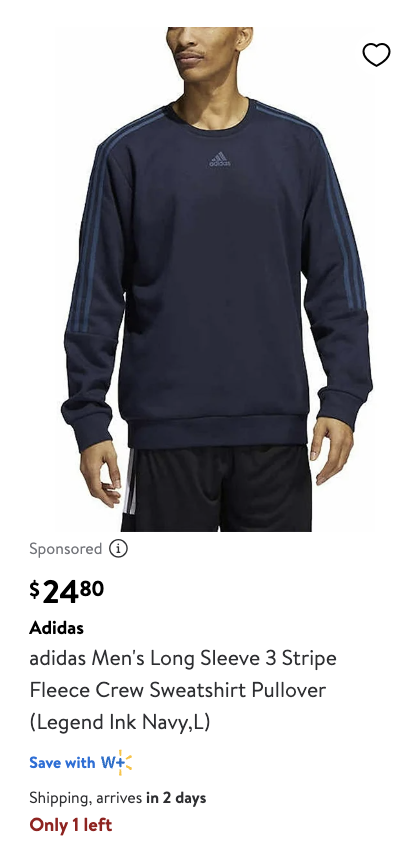
    "url": "/ip/Adidas-Men-s-California-2-0-Crew-Neck-Short-Sleeve-Tee-T-Shirt/833623567?classType=VARIANT",
    "image": "https://i5.walmartimages.com/seo/Adidas-Men-s-California-2-0-Crew-Neck-Short-Sleeve-Tee-T-Shirt_1b8e0b00-fdc7-4b88-99fb-9a633bf0227b_1.812a96a559770448397cd828ef1cf68b.jpeg?odnHeight=180&odnWidth=180&odnBg=FFFFFF",
    "title": "Adidas Men's California 2.0 Crew Neck Short Sleeve Tee T-Shirt",
    "sponsored": true,
    "product_id": "833623567",
    "out_of_stock": false,
    "section_title": "Results for \"adidas\""
},
...
```

<table><thead><tr><th>Key (general)</th><th width="319">Description</th><th>Type</th></tr></thead><tbody><tr><td><code>pos</code></td><td>An indicator denoting the position of a given item within the section product is attributed to.</td><td>integer</td></tr><tr><td><code>url</code></td><td>The URL of the product.</td><td>string</td></tr><tr><td><code>image</code></td><td>The URL of the main product image.</td><td>string</td></tr><tr><td><code>title</code></td><td>Title or name of the product.</td><td>string</td></tr><tr><td><code>product_id</code></td><td>The ID of the product.</td><td>string</td></tr><tr><td><code>sponsored</code></td><td>Identifies if product is sponsored.</td><td>boolean</td></tr><tr><td><code>badge</code> (optional)</td><td>Deal, popular pick, bestseller, 100+ bought since yesterday</td><td>list of strings</td></tr><tr><td><code>section_title</code></td><td>The name of the section which product is attributed to in the search page.</td><td>string</td></tr><tr><td><code>out_of_stock</code></td><td>Indicates if item is out of stock.</td><td>boolean</td></tr></tbody></table>

### Price

<figure><img src="/files/2u8bxlaQ38cxLu2YT5Nd" alt="" width="249"><figcaption></figcaption></figure>

```javascript
...
"price": {
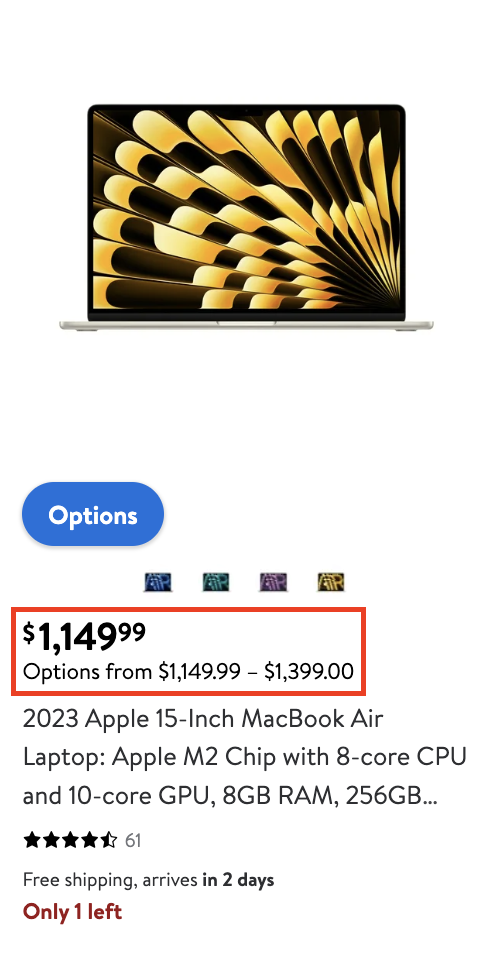
    "price": 1149.99,
    "currency": "USD",
    "price_min": 1149.99
    "price_max": 1399.00
},
...
```

<table><thead><tr><th width="241">Key (price)</th><th width="327">Description</th><th>Type</th></tr></thead><tbody><tr><td><code>price</code></td><td>The current price of the product without any deductions.</td><td>float</td></tr><tr><td><code>price_strikethrough</code>(optional)</td><td>The strikethrough price is either a Was Price, a Bundle Price, or a List Price.</td><td>float</td></tr><tr><td><code>currency</code></td><td>The ISO 4217 three-letter code of the currency.</td><td>string</td></tr><tr><td><code>price_min</code>(optional)</td><td>The minimum price of the product in the case of range pricing.</td><td>float</td></tr><tr><td><code>price_max</code>(optional)</td><td>The maximum price of the product in the case of range pricing.</td><td>float</td></tr></tbody></table>

### Rating

<figure><img src="/files/KuSzk8llpN3n2MVLxhJJ" alt="" width="362"><figcaption></figcaption></figure>

```javascript
...
"rating": {
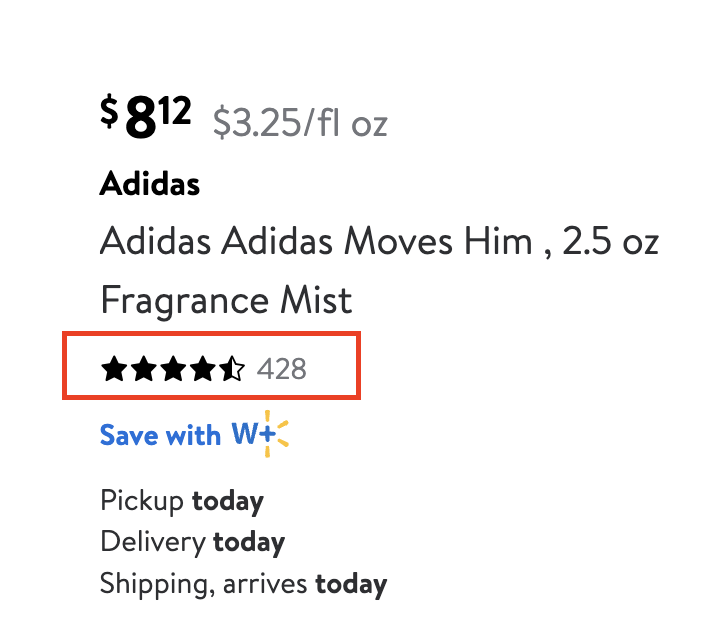
    "count": 428,
    "rating": 4.6
},
...
```

| Key (rating) | Description                        | Type    |
| ------------ | ---------------------------------- | ------- |
| `rating`     | Average rating of the product.     | float   |
| `count`      | Number of ratings for the product. | integer |

### Seller

Data not displayed visually.

<table><thead><tr><th>Key (seller)</th><th width="327">Description</th><th>Type</th></tr></thead><tbody><tr><td><code>name</code></td><td>Name of the seller.</td><td>string</td></tr><tr><td><code>id</code></td><td>ID of the seller.</td><td>string</td></tr></tbody></table>

### Variants

<figure><img src="/files/mVGOrZtgnoZPGKPrhu7i" alt="" width="244"><figcaption></figcaption></figure>

```json
...
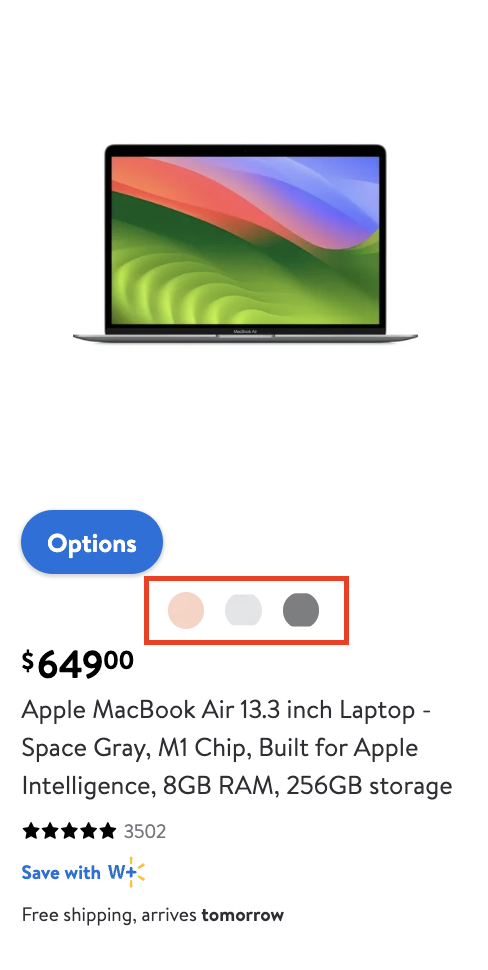
"variants": [
    {
        "url": "/ip/Apple-MacBook-Air-13-3-inch-Laptop-Gold-M1-Chip-8GB-RAM-256GB-storage/550880792?classType=undefined&variantFieldId=actual_color",
        "image": "https://i5.walmartimages.com/asr/a9857413-b9fa-4c8d-9f81-7ea4c93889a1.410fd3cb7fe36102bbe2d3dca32a8075.jpeg?odnHeight=180&odnWidth=180&odnBg=ffffff",
        "title": "Gold",
        "product_id": "550880792"
    },
    {
        "url": "/ip/Apple-MacBook-Air-13-3-inch-Laptop-Silver-M1-Chip-8GB-RAM-256GB-storage/715596133?classType=undefined&variantFieldId=actual_color",
        "image": "https://i5.walmartimages.com/asr/056c08d5-2d68-44f2-beb0-dd8a47e2f8e8.2a2a210657937c3c11b37df5be8fa4ad.jpeg?odnHeight=180&odnWidth=180&odnBg=ffffff",
        "title": "Silver",
        "product_id": "715596133"
    },
    {
        "url": "/ip/Apple-MacBook-Air-13-3-inch-Laptop-Space-Gray-M1-Chip-8GB-RAM-256GB-storage/609040889?classType=undefined&variantFieldId=actual_color",
        "image": "https://i5.walmartimages.com/asr/af1d4133-6de9-4bdc-b1c6-1ca8bd0af7a0.c0eb74c31b2cb05df4ed11124d0e255b.jpeg?odnHeight=180&odnWidth=180&odnBg=ffffff",
        "title": "Space Gray",
        "product_id": "609040889"
    }
],
...
```

<table><thead><tr><th width="248">Key (variants)</th><th width="342">Description</th><th>Type</th></tr></thead><tbody><tr><td><code>url</code></td><td>URL of the product variation.</td><td>string</td></tr><tr><td><code>title</code></td><td>The title of the product variation.</td><td>string</td></tr><tr><td><code>product_id</code></td><td>The Id of the product variation.</td><td>string</td></tr><tr><td><code>image</code></td><td>The image of the product variation.</td><td>string</td></tr></tbody></table>

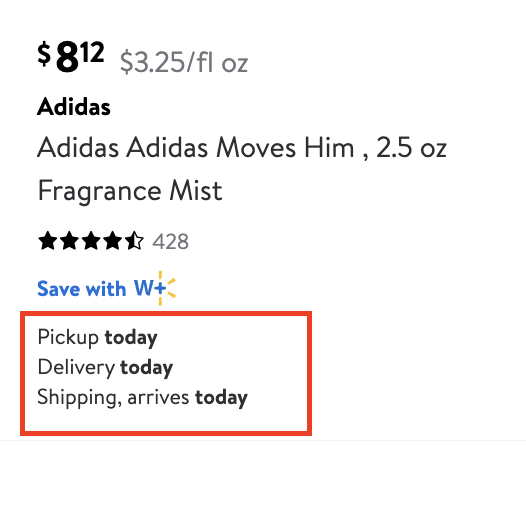
### Fulfillment

<figure><img src="/files/Bgyxitd2EpAyh3fy9eo0" alt="" width="395"><figcaption></figcaption></figure>

```json
 ...
"fulfillment": {
    "pickup": true,
    "delivery": true,
    "shipping": true,
    "free_shipping": false
}
...
```

<table><thead><tr><th>Key (fulfillment)</th><th width="315">Description</th><th>Type</th></tr></thead><tbody><tr><td><code>pickup</code></td><td>Indicates if the product is available to be fulfilled via in-store pickup.</td><td>boolean</td></tr><tr><td><code>delivery</code></td><td><p>Indicates if the product is available to be fulfilled via delivery from store.</p><p>Delivery comes from your local store, if available.</p></td><td>boolean</td></tr><tr><td><code>shipping</code></td><td>Indicates if the product is available to be fulfilled via home shipping.</td><td>boolean</td></tr><tr><td><code>free_shipping</code></td><td>Indicates if shipping is free of charge.</td><td>boolean</td></tr></tbody></table>

### Facets

<figure><img src="https://lh7-qw.googleusercontent.com/docsz/AD_4nXeRlJ-6IDkaftEvHHQTmA8RsJq9YJ3hNQAcyOMvm4RtMZpLLE7iRdLPwgI3_PXJ4xU33QFfefh2OC8Xt0nDr5uQKxDqhHe_FUupBBIE916dAlKH_4oCQY3lmFSiEeTkUFcc8ma0h1LR13j0RkNykhdaHO5I?key=0pdGx4c_qHnNgLislTadiQ" alt=""><figcaption></figcaption></figure>

```json
... 
"facets": [
    {
        "type": "sort",
        "values": [
            {
                "name": "Best Match"
            },
            {
                "name": "Price Low"
            },
            {
                "name": "Price High"
            },
            {
                "name": "Best Seller"
            }
        ],
        "display_name": "Sort by"
    },
...
```

<table><thead><tr><th width="243">Key (facets)</th><th width="351">Description</th><th>Type</th></tr></thead><tbody><tr><td><code>display_name</code></td><td>The display name of the facet (i.e. the user-facing name).</td><td>string</td></tr><tr><td><code>type</code></td><td>The facet type.</td><td>string</td></tr><tr><td><code>values</code></td><td>The facet values array shows the values of the given facet.</td><td>array</td></tr><tr><td><code>values.name</code></td><td>The facet value name.</td><td>string</td></tr><tr><td><code>values.item_count</code> (optional)</td><td>The number of items available for the specific facet.</td><td>integer</td></tr></tbody></table>

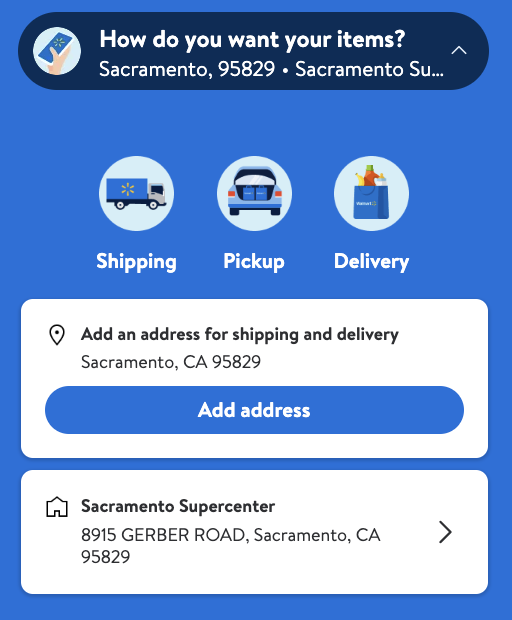
### Location

<figure><img src="/files/yD4pLPY1RwSUxqsv8rsf" alt="" width="384"><figcaption></figcaption></figure>

```json
...
"location": {
    "city": "Sacramento",
    "state": "CA",
    "store_id": "8915",
    "zip_code": "95829"
},
...
```

<table><thead><tr><th>Key (location)</th><th width="335">Description</th><th>Type</th></tr></thead><tbody><tr><td><code>city</code></td><td>The city the request was run on.</td><td>string</td></tr><tr><td><code>state</code></td><td>The state the request was run on.</td><td>string</td></tr><tr><td><code>zip_code</code></td><td>The zip code the request was run on.</td><td>string</td></tr><tr><td><code>store_id</code></td><td>The ID of the store that the request was run on.</td><td>string</td></tr></tbody></table>

### Page details

<figure><img src="https://lh7-qw.googleusercontent.com/docsz/AD_4nXdDeZE3P2q2mpUFrQEV_fWb_KihYfxfjHkYY3NRRA9OL01lC83tilGKDepWHE62LEoG8Qp9rYX6PYHM44CfgQdoZDuev4f1P9jGloQ8Hido9Fy-QFS4k8A4nmCWBA6F59jhRN7ASrkAJWn0Heb0RuD1gAbs?key=0pdGx4c_qHnNgLislTadiQ" alt=""><figcaption></figcaption></figure>

```json
 ...
"page_details": {
    "page": 1,
    "total_results": 11524,
    "last_visible_page": 25
},
...
```

<table><thead><tr><th>Key (page_details)</th><th width="306">Description</th><th>Key</th></tr></thead><tbody><tr><td><code>total_results</code></td><td>The total number of search results shown as being available.</td><td>integer</td></tr><tr><td><code>last_visible_page</code></td><td>Last page number of search results.</td><td>integer</td></tr><tr><td><code>page</code></td><td>Page number from which the product data was extracted</td><td>integer</td></tr></tbody></table>


---

# Agent Instructions: Querying This Documentation

If you need additional information that is not directly available in this page, you can query the documentation dynamically by asking a question.

Perform an HTTP GET request on the current page URL with the `ask` query parameter:

```
GET https://developers.oxylabs.io/api-targets/e-commerce/walmart/search.md?ask=<question>
```

The question should be specific, self-contained, and written in natural language.
The response will contain a direct answer to the question and relevant excerpts and sources from the documentation.

Use this mechanism when the answer is not explicitly present in the current page, you need clarification or additional context, or you want to retrieve related documentation sections.