> For the complete documentation index, see [llms.txt](https://developers.oxylabs.io/llms.txt). Markdown versions of documentation pages are available by appending `.md` to page URLs; this page is available as [Markdown](https://developers.oxylabs.io/api-targets/e-commerce/walmart/product.md).

# Product

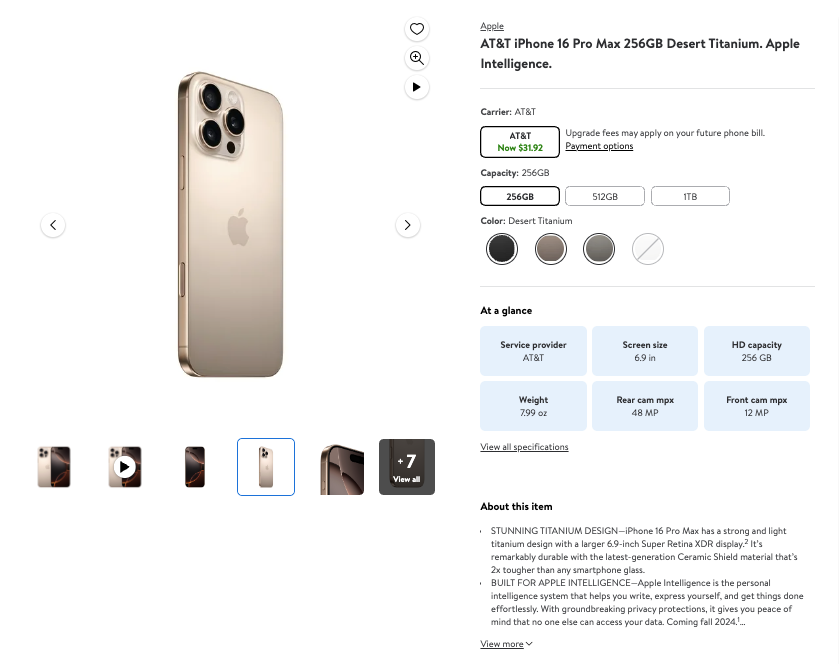
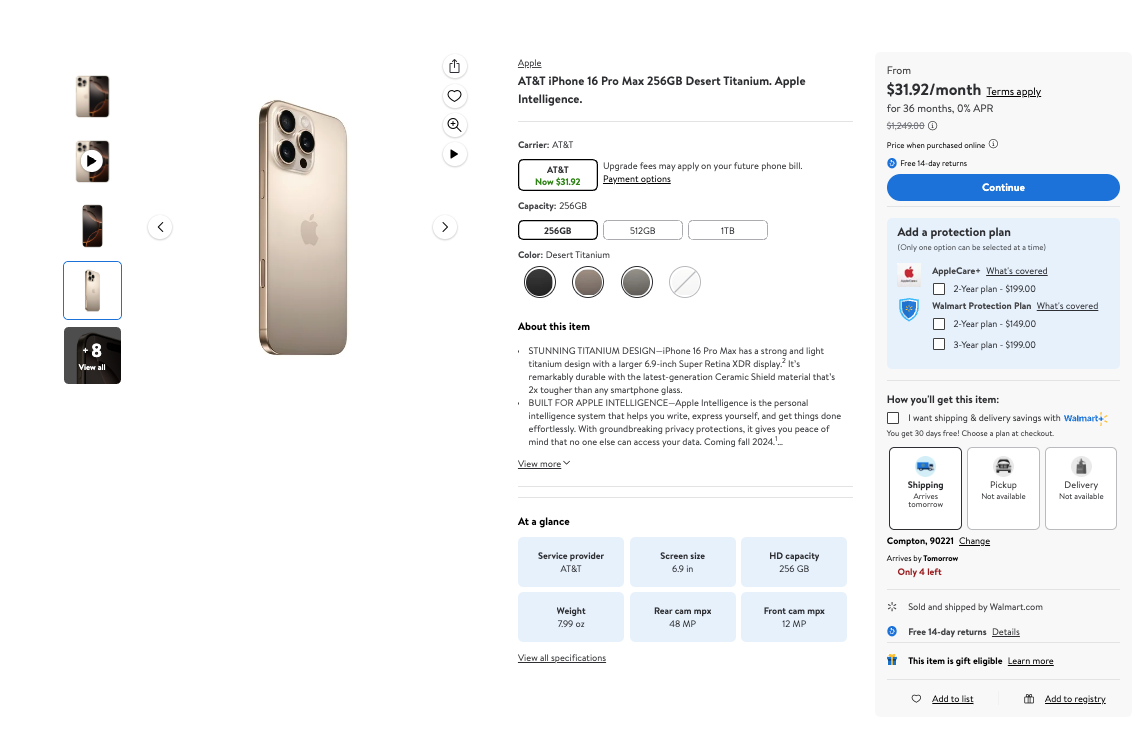
Extract Walmart product pages by product ID with parsed data including pricing, ratings, seller info, specifications, variations, fulfillment options, breadcrumbs, and more.

The `walmart_product` source is designed to retrieve Walmart product result pages. We can return the HTML for any Walmart page you like. Additionally, we can deliver **structured (parsed) output for Walmart product pages**.

## Request samples

The example below illustrates how you can get a parsed Walmart product page result.

{% tabs %}
{% tab title="cURL" %}

```shell
curl 'https://realtime.oxylabs.io/v1/queries' \
--user 'USERNAME:PASSWORD' \
-H 'Content-Type: application/json' \
-d '{
        "source": "walmart_product", 
        "product_id": "11601059297",
        "parse": true
    }'
```

{% endtab %}

{% tab title="Python" %}

```python
import requests
from pprint import pprint


# Structure payload.
payload = {
    'source': 'walmart_product',
    'product_id': '11601059297',
    'parse': True,
}

# Get response.
response = requests.request(
    'POST',
    'https://realtime.oxylabs.io/v1/queries',
    auth=('USERNAME', 'PASSWORD'),
    json=payload,
)

# Instead of response with job status and results url, this will return the
# JSON response with the result.
pprint(response.json())
```

{% endtab %}

{% tab title="Node.js" %}

```javascript
const https = require("https");

const username = "USERNAME";
const password = "PASSWORD";
const body = {
    source: "walmart_product",
    product_id: "11601059297",
    parse: true,
};

const options = {
    hostname: "realtime.oxylabs.io",
    path: "/v1/queries",
    method: "POST",
    headers: {
        "Content-Type": "application/json",
        Authorization:
            "Basic " + Buffer.from(`${username}:${password}`).toString("base64"),
    },
};

const request = https.request(options, (response) => {
    let data = "";

    response.on("data", (chunk) => {
        data += chunk;
    });

    response.on("end", () => {
        const responseData = JSON.parse(data);
        console.log(JSON.stringify(responseData, null, 2));
    });
});

request.on("error", (error) => {
    console.error("Error:", error);
});

request.write(JSON.stringify(body));
request.end();
```

{% endtab %}

{% tab title="HTTP" %}

```http
# The whole string you submit has to be URL-encoded.

https://realtime.oxylabs.io/v1/queries?source=walmart_product&product_id=11601059297&parse=true&access_token=12345abcde
```

{% endtab %}

{% tab title="PHP" %}

```php
<?php

$params = array(
    'source' => 'walmart_product',
    'product_id' => '11601059297',
    'parse' => true
);

$ch = curl_init();

curl_setopt($ch, CURLOPT_URL, "https://realtime.oxylabs.io/v1/queries");
curl_setopt($ch, CURLOPT_RETURNTRANSFER, 1);
curl_setopt($ch, CURLOPT_POSTFIELDS, json_encode($params));
curl_setopt($ch, CURLOPT_POST, 1);
curl_setopt($ch, CURLOPT_USERPWD, "USERNAME" . ":" . "PASSWORD");

$headers = array();
$headers[] = "Content-Type: application/json";
curl_setopt($ch, CURLOPT_HTTPHEADER, $headers);

$result = curl_exec($ch);
echo $result;

if (curl_errno($ch)) {
    echo 'Error:' . curl_error($ch);
}
curl_close($ch);
```

{% endtab %}

{% tab title="Golang" %}

```go
package main

import (
	"bytes"
	"encoding/json"
	"fmt"
	"io/ioutil"
	"net/http"
)

func main() {
	const Username = "USERNAME"
	const Password = "PASSWORD"

	payload := map[string]interface{}{
		"source":       "walmart_product",
		"product_id":   "11601059297",
		"parse":        true,
	}

	jsonValue, _ := json.Marshal(payload)

	client := &http.Client{}
	request, _ := http.NewRequest("POST",
		"https://realtime.oxylabs.io/v1/queries",
		bytes.NewBuffer(jsonValue),
	)

	request.SetBasicAuth(Username, Password)
	response, _ := client.Do(request)

	responseText, _ := ioutil.ReadAll(response.Body)
	fmt.Println(string(responseText))
}

```

{% endtab %}

{% tab title="C#" %}

```csharp
using System;
using System.Collections.Generic;
using System.Net.Http;
using System.Net.Http.Json;
using System.Threading.Tasks;

namespace OxyApi
{
    class Program
    {
        static async Task Main()
        {
            const string Username = "USERNAME";
            const string Password = "PASSWORD";

            var parameters = new {
                source = "walmart_product",
                product_id = "11601059297",
                parse = true
            };

            var client = new HttpClient();

            Uri baseUri = new Uri("https://realtime.oxylabs.io");
            client.BaseAddress = baseUri;

            var requestMessage = new HttpRequestMessage(HttpMethod.Post, "/v1/queries");
            requestMessage.Content = JsonContent.Create(parameters);

            var authenticationString = $"{Username}:{Password}";
            var base64EncodedAuthenticationString = Convert.ToBase64String(System.Text.ASCIIEncoding.UTF8.GetBytes(authenticationString));
            requestMessage.Headers.Add("Authorization", "Basic " + base64EncodedAuthenticationString);

            var response = await client.SendAsync(requestMessage);
            var contents = await response.Content.ReadAsStringAsync();

            Console.WriteLine(contents);
        }
    }
}
```

{% endtab %}

{% tab title="Java" %}

```java
package org.example;

import okhttp3.*;
import org.json.JSONObject;
import java.util.concurrent.TimeUnit;

public class Main implements Runnable {
    private static final String AUTHORIZATION_HEADER = "Authorization";
    public static final String USERNAME = "USERNAME";
    public static final String PASSWORD = "PASSWORD";

    public void run() {
        JSONObject jsonObject = new JSONObject();
        jsonObject.put("source", "walmart_product");
        jsonObject.put("product_id", "11601059297");
        jsonObject.put("parse", true);

        Authenticator authenticator = (route, response) -> {
            String credential = Credentials.basic(USERNAME, PASSWORD);
            return response
                    .request()
                    .newBuilder()
                    .header(AUTHORIZATION_HEADER, credential)
                    .build();
        };

        var client = new OkHttpClient.Builder()
                .authenticator(authenticator)
                .readTimeout(180, TimeUnit.SECONDS)
                .build();

        var mediaType = MediaType.parse("application/json; charset=utf-8");
        var body = RequestBody.create(jsonObject.toString(), mediaType);
        var request = new Request.Builder()
                .url("https://realtime.oxylabs.io/v1/queries")
                .post(body)
                .build();

        try (var response = client.newCall(request).execute()) {
            if (response.body() != null) {
                try (var responseBody = response.body()) {
                    System.out.println(responseBody.string());
                }
            }
        } catch (Exception exception) {
            System.out.println("Error: " + exception.getMessage());
        }

        System.exit(0);
    }

    public static void main(String[] args) {
        new Thread(new Main()).start();
    }
}
```

{% endtab %}

{% tab title="JSON" %}

```json
{
    "source": "walmart_product", 
    "product_id": "11601059297", 
    "parse": true
}
```

{% endtab %}
{% endtabs %}

We use synchronous [**Realtime**](/products/web-scraper-api/integration-methods/realtime.md) integration method in our examples. If you would like to use [**Proxy Endpoint**](/products/web-scraper-api/integration-methods/proxy-endpoint.md) or asynchronous [**Push-Pull**](/products/web-scraper-api/integration-methods/push-pull.md) integration, refer to the [**integration methods**](/products/web-scraper-api/integration-methods.md) section.

## Request parameter values

### Generic

<table><thead><tr><th width="185">Parameter</th><th width="340.3333333333333">Description</th><th>Default Value</th></tr></thead><tbody><tr><td><mark style="background-color:green;"><strong><code>source</code></strong></mark></td><td>Sets the scraper.</td><td><code>walmart_product</code></td></tr><tr><td><mark style="background-color:green;"><strong><code>product_id</code></strong></mark></td><td>Walmart product ID.</td><td>-</td></tr><tr><td><code>render</code></td><td>Enables JavaScript rendering when set to <code>html</code>. <a href="/products/web-scraper-api/features/js-rendering-and-browser-control.md#javascript-rendering"><strong>More info</strong></a><strong>.</strong></td><td>-</td></tr><tr><td><code>parse</code></td><td>Returns parsed data when set to <code>true</code>.</td><td><code>false</code></td></tr><tr><td><code>callback_url</code></td><td>URL to your callback endpoint. <a href="/products/web-scraper-api/integration-methods/push-pull.md"><strong>More info</strong></a></td><td>-</td></tr><tr><td><code>user_agent_type</code></td><td>Device type and browser. The full list can be found <a href="/products/web-scraper-api/features/http-context-and-job-management/user-agent-type.md"><strong>here</strong></a>.</td><td><code>desktop</code></td></tr></tbody></table>

\- mandatory parameter

### Localization

Adapt results to specific stores, shipping locations. Find the list of Walmart Store IDs here:

{% file src="/files/ap2MNKVGUFN3JWB0skN5" %}

You can also find the official page of Walmart Stores [**here**](https://www.walmart.com/store-directory)**.**

<table><thead><tr><th width="164">Parameter</th><th width="398">Description</th><th>Type</th></tr></thead><tbody><tr><td><code>domain</code></td><td>Domain localization for Walmart. Available values: <code>com</code>, <code>com.mx</code>, <code>ca</code>, <code>co.cr</code>. Default: <code>com</code>.</td><td>String</td></tr><tr><td><code>fulfillment_type</code></td><td>Set the fulfillment type. Supported values: <code>pickup</code>, <code>delivery</code>, <code>shipping</code>.</td><td>String</td></tr><tr><td><code>delivery_zip</code></td><td>Set the shipping-to location.</td><td>String</td></tr><tr><td><code>store_id</code></td><td>Set the store location.</td><td>String</td></tr></tbody></table>

Fulfillment type parameter availability varies by Walmart domain:

<table><thead><tr><th width="341">Domain</th><th>Supported fulfillment types</th></tr></thead><tbody><tr><td><code>walmart.com</code></td><td><code>pickup</code>, <code>delivery</code>, <code>shipping</code></td></tr><tr><td><code>walmart.com.mx</code></td><td><code>pickup</code>, <code>delivery</code></td></tr><tr><td><code>walmart.ca</code></td><td><code>pickup</code>, <code>delivery</code></td></tr><tr><td><code>walmart.co.cr</code></td><td><code>pickup</code></td></tr></tbody></table>

For international `store_id` lists, see the files below:

{% file src="/files/wCSX58aVk5NMrIqYupUR" %}

{% file src="/files/PT9PVlmdDOZjvEdjriIx" %}

{% file src="/files/2auGBBJ1I64oQhCmfV3g" %}

{% hint style="info" %}
If target store is too far away from the given postal code - we will attempt to use the postal code of the target store, otherwise the location will not be set properly. In the case we can't set the `delivery_zip` - Walmart will return their default results without store targeting.
{% endhint %}

## Structured data

{% hint style="info" %}
In the following sections, parsed JSON code snippets are shortened where more than one item for the result type is available.
{% endhint %}

<details>

<summary>Walmart product page structured output</summary>

```json
{
    "results": [
        {
            "content": {
                "price": {
                    "currency": "USD",
                    "price": 629
                },
                "rating": {
                    "count": 745,
                    "rating": 4.4
                },
                "seller": {
                    "id": "F55CDC31AB754BB68FE0B39041159D63",
                    "name": "Walmart.com",
                    "official_name": "Walmart.com"
                },
                "cheapest_seller_name": null,
                "sold_by_walmart_price": null,
                "general": {
                    "url": "https://www.walmart.com/ip/Straight-Talk-Apple-iPhone-16-128GB-White-Prepaid-Smartphone-Locked-to-Straight-Talk/11601059297",
                    "meta": {
                        "gtin": "616960552697",
                        "sku": "11632865509"
                    },
                    "badge": [
                        "In 25+ people's carts",
                        "Best seller"
                    ],
                    "brand": "Apple",
                    "title": "Straight Talk Apple iPhone 16, 128GB, White - Prepaid Smartphone [Locked to Straight Talk]",
                    "images": [
                        "https://i5.walmartimages.com/seo/Straight-Talk-Apple-iPhone-16-128GB-White-Prepaid-Smartphone-Locked-to-Straight-Talk_7f52d4b1-47ea-40cc-ae62-2b5edf40f29b.8ef1f8d28ce70177fbc03331f9fa9064.jpeg?odnHeight=117&odnWidth=117&odnBg=FFFFFF",
                        ...
                    ],
                    "main_image": "https://i5.walmartimages.com/seo/Straight-Talk-Apple-iPhone-16-128GB-White-Prepaid-Smartphone-Locked-to-Straight-Talk_7f52d4b1-47ea-40cc-ae62-2b5edf40f29b.8ef1f8d28ce70177fbc03331f9fa9064.jpeg?odnHeight=573&odnWidth=573&odnBg=FFFFFF",
                    "description": "<p>Superfast. Supersmart. Get the first iPhone built for Apple Intelligence<sup>1</sup> with the iPhone 16 from Straight Talk.</p> <p>With a supersmart A18 chip, jump two generations ahead of the A16 Bionic chip in iPhone 15 to enable Apple Intelligence, powering advanced photo and video features, and supportive console-level gaming, with exceptional power efficiency.</p> <p>Apple Intelligence helps you write, express yourself, and get things done effortlessly, and groundbreaking privacy protection gives you peace of mind that no one else can access your data.</p> <p>Take total camera control with an easier way to quickly access camera tools, like zoom or depth of field, so you can take the perfect shot in record time. The advanced dual-camera system features a 48MP Fusion camera, to capture stunning high-resolution images, with 2x optical-quality Telephoto and an improved 12MP Ultra Wide featuring autofocus.</p> <p>Plus, iPhone 16 works together with the A18 chip to deliver a big boost in battery life with up to 22 hours video playback.2 Charge via USB-C or snap on a MagSafe charger for faster wireless charging.<sup>3</sup></p> <p>All this, with a design to last - as iPhone 16 has a sturdy, aerospace-grade aluminum design with a 6.1-inch Super Retina XDR display.4 It's remarkably durable with the latest-generation Ceramic Shield material that's 2x tougher than any smartphone glass.</p> <p>Pair the iPhone 16 with a Straight Talk no-contract plan featuring unlimited talk &amp; text, plus 10GB of high-speed data starting at only $35/month for a single line, all on America's most reliable 5G network.&nbsp;</p> <p>To activate this device, a Straight Talk Wireless plan is required. Shop for the iPhone 16 online or at your local Walmart.</p><ul>  <li>   <ul>    <li>Apple Intelligence helps you write, express yourself, and get things done effortlessly.&nbsp;</li>    <li>Groundbreaking privacy protections to give you peace of mind that no one else can access your data.&nbsp;</li>    <li>Improved 12MP Ultra Wide camera with autofocus lets you takes incredibly detailed macro photos and videos. Use the 48MP Fusion camera for stunning high-resolution images, and zoom in with the 2x optical-quality Telephoto.</li>    <li>Works together with the A18 chip to deliver a big boost in battery life with up to 22 hours video playback. Charge via USB-C or snap on a MagSafe charger for faster wireless charging.</li>    <li>Sturdy, aerospace-grade aluminum design with a 6.1-inch Super Retina XDR display<sup>4</sup> with the latest-generation Ceramic Shield material 2x tougher than any smartphone glass.</li>   </ul></li>  <li>   <ul>    <li>Stay connected on America's most reliable 5G† network</li>    <li>Single line plans with unlimited talk &amp; text + high speed data start at only $35/line/mo.</li>   </ul></li>  <li>Pair this phone with a best-selling no-contract <a href=\"https://www.walmart.com/browse/straight-talk-plans/0/0/?_refineresult=true&amp;_be_shelf_id=4905483&amp;search_sort=100&amp;facet=shelf_id:4905483\" rel=\"nofollow\">Straight Talk plan</a></li>  <li>Learn more about Straight Talk by visiting our <a href=\"https://www.walmart.com/cp/1045119\" rel=\"nofollow\">Brand Page</a></li>  <li>   <ul>    <li><sup>1</sup>Apple Intelligence will be available in beta on all iPhone 16 models, iPhone 15 Pro, and iPhone 15 Pro Max, with Siri and device language set to U.S. English, as an iOS 18 update in fall 2024. Some features and additional languages will be coming over the course of the next year.</li>    <li><sup>2</sup>Battery life varies by use and configuration. See Apple website for more information.</li>    <li><sup>3</sup>Accessories sold separately.</li>    <li><sup>4</sup>The displays have rounded corners. When measured as a rectangle, the screen is 6.12 inches (iPhone 16), 6.69 inches (iPhone 16 Plus), 6.27 inches (iPhone 16 Pro) or 6.86 inches (iPhone Pro Max) diagonally. Actual viewable area is less.</li>    <li>†5G access requires a 5G-capable device in a 5G coverage area.</li>   </ul></li> </ul>"
                },
                "location": {
                    "city": "Sacramento",
                    "state": "CA",
                    "store_id": "3081",
                    "zip_code": "95829"
                },
                "variations": [
                    {
                        "price": {
                            "currency": "USD",
                            "price": 629
                        },
                        "product_id": "3VYN46XFXQYH",
                        "selected_options": [
                            {
                                "key": "Capacity",
                                "value": "128GB"
                            },
                            {
                                "key": "Series",
                                "value": "iPhone 16"
                            },
                            {
                                "key": "Color",
                                "value": "White"
                            }
                        ],
                        "state": "IN_STOCK"
                    },
                    ...
                ],
                "breadcrumbs": [
                    {
                        "category_name": "Cell Phones",
                        "url": "/cp/cell-phones/1105910"
                    },
                    {
                        "category_name": "Shop Phones by Brand",
                        "url": "/cp/shop-phones-by-brand/7551331"
                    },
                    {
                        "category_name": "Apple iPhone",
                        "url": "/cp/apple-iphone/1127173"
                    },
                    {
                        "category_name": "Straight Talk iPhone",
                        "url": "/cp/straight-talk-iphone/1101612"
                    }
                ],
                "fulfillment": {
                    "delivery": false,
                    "delivery_information": ", Delivery, Not available",
                    "free_shipping": false,
                    "fulfilled_by": "",
                    "out_of_stock": false,
                    "pickup": false,
                    "pickup_information": ", Pickup, Not available",
                    "shipping": true,
                    "shipping_information": ", Shipping, Arrives Sep 21, Free"
                },
                "specifications": [
                    {
                        "key": "Edition",
                        "value": "Apple iPhone 16"
                    },
                    {
                        "key": "HD capacity",
                        "value": "128 GB"
                    },
                    {
                        "key": "Battery capacity",
                        "value": "3561 mAh"
                    },
                    ...
                ],
                "parse_status_code": 12000
            },
            "created_at": "2026-09-17 12:50:19",
            "updated_at": "2026-09-17 12:50:21",
            "page": 1,
            "url": "https://www.walmart.com/ip/EDXSVtRlIsxQtrBh/11601059297",
            "job_id": "7506333719238586369",
            "is_render_forced": false,
            "status_code": 200,
            "parser_type": "walmart_product_new"
        }
    ]
}
```

</details>

## Output data dictionary

#### HTML example
<figure><img src="https://597677712-files.gitbook.io/~/files/v0/b/gitbook-x-prod.appspot.com/o/spaces%2FBaJCXoqO1zdFnaMnCKrg%2Fuploads%2Fgit-blob-594d284dbfc053eaf3bc5765fdc40324ee78a1de%2Fimage.png?alt=media" alt=""><figcaption></figcaption></figure>

**JSON structure**

The table below presents a detailed list of each product page element we parse, along with its description and data type. The table also includes some metadata.

<table><thead><tr><th width="235">Key</th><th width="327">Description</th><th>Type</th></tr></thead><tbody><tr><td><code>general</code></td><td>An object with general product page result details.</td><td>object</td></tr><tr><td><code>price</code></td><td>Object contains details on product pricing.</td><td>object</td></tr><tr><td><code>rating</code></td><td>Rating information for the product.</td><td>object</td></tr><tr><td><code>seller</code></td><td>Information about the seller.</td><td>object</td></tr><tr><td><code>variations</code> (optional)</td><td>List of variations of the product.</td><td>array</td></tr><tr><td><code>breadcrumbs</code></td><td>Hierarchy of categories leading to the product.</td><td>object</td></tr><tr><td><code>location</code></td><td>Provides information on the location in which the request was run in.</td><td>object</td></tr><tr><td><code>fulfillment</code></td><td>Object contains information on product fulfillment options.</td><td>object</td></tr><tr><td><code>specifications</code></td><td>Array of key-value pairs detailing specific attributes or features of the product.</td><td>array</td></tr><tr><td><code>parse_status_code</code></td><td>The status code of the parsing job. You can see the parser status codes described <a href="https://github.com/oxylabs/gitbook-public-english/blob/master/scraping-solutions/web-scraper-api/targets/walmart/broken-reference/README.md"><strong>here</strong></a>.</td><td>integer</td></tr><tr><td><code>created_at</code></td><td>The timestamp when the scraping job was created.</td><td>timestamp</td></tr><tr><td><code>updated_at</code></td><td>The timestamp when the scraping job was finished.</td><td>timestamp</td></tr><tr><td><code>page</code></td><td>Page number from which the product data was extracted</td><td>integer</td></tr><tr><td><code>url</code></td><td>URL of the product page on Walmart's website</td><td>string</td></tr><tr><td><code>job_id</code></td><td>The ID of the job associated with the scraping job.</td><td>string</td></tr><tr><td><code>status_code</code></td><td>The status code of the scraping job. You can see the scraper status codes described <a href="https://github.com/oxylabs/gitbook-public-english/blob/master/scraping-solutions/web-scraper-api/targets/walmart/broken-reference/README.md"><strong>here</strong></a>.</td><td>integer</td></tr><tr><td><code>is_render_forced</code></td><td>Identifies whether rendering has been forced for this request.</td><td>boolean</td></tr><tr><td><code>parser_type</code></td><td>Type of parser used for extracting the data (e.g., "walmart_product_new").</td><td>string</td></tr></tbody></table>

### **General**

<figure><img src="https://597677712-files.gitbook.io/~/files/v0/b/gitbook-x-prod.appspot.com/o/spaces%2FBaJCXoqO1zdFnaMnCKrg%2Fuploads%2Fgit-blob-886ac81924e976744cb0e4a71a3f91a7115b6985%2Fimage.png?alt=media" alt=""><figcaption></figcaption></figure>

<table><thead><tr><th>Key (general)</th><th width="295">Description</th><th>Type</th></tr></thead><tbody><tr><td><code>url</code></td><td>The URL of the product.</td><td>string</td></tr><tr><td><code>main_image</code></td><td>The URL of the main product image</td><td>integer</td></tr><tr><td><code>images</code></td><td>Array of URLs to images of the product.</td><td>array</td></tr><tr><td><code>title</code></td><td>Title or name of the product.</td><td>string</td></tr><tr><td><code>description</code></td><td>Detailed description of the product.</td><td>string</td></tr><tr><td><code>brand</code></td><td>The brand of the product.</td><td>string</td></tr><tr><td><code>badge</code></td><td>Indicator of specific attributes such as promotions, product features, certifications, or brand affiliations.</td><td>list of strings</td></tr><tr><td><code>meta</code></td><td>Metadata of the product.</td><td>object</td></tr><tr><td><code>meta.sku</code></td><td>Stock Keeping Unit (SKU) of the product.</td><td>string</td></tr><tr><td><code>meta.gtin</code></td><td>Global Trade Item Number (GTIN) of the product.</td><td>string</td></tr></tbody></table>

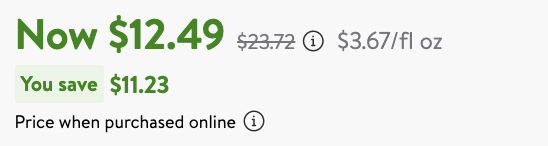
### Price

<figure><img src="https://597677712-files.gitbook.io/~/files/v0/b/gitbook-x-prod.appspot.com/o/spaces%2FBaJCXoqO1zdFnaMnCKrg%2Fuploads%2Fgit-blob-24b4e75dbbbc521ec4d5dcacaed80a1bb236c84f%2FScreenshot%202024-10-16%20at%2015.45.26.png?alt=media" alt=""><figcaption></figcaption></figure>

```json
...
"price": {
    "price": 12.49,
    "price_strikethrough": 23.72,
    "currency": "USD"
},
...
```

<table><thead><tr><th width="217.3046875">Key (price)</th><th width="362.453125">Description</th><th>Type</th></tr></thead><tbody><tr><td><code>price</code></td><td>The current price of the product without any deductions.</td><td>float</td></tr><tr><td><code>price_strikethrough</code></td><td>The strikethrough price is either a Was Price, a Bundle Price, or a List Price.</td><td>float</td></tr><tr><td><code>currency</code></td><td>The ISO 4217 three-letter currency code for the product price.</td><td>string</td></tr></tbody></table>

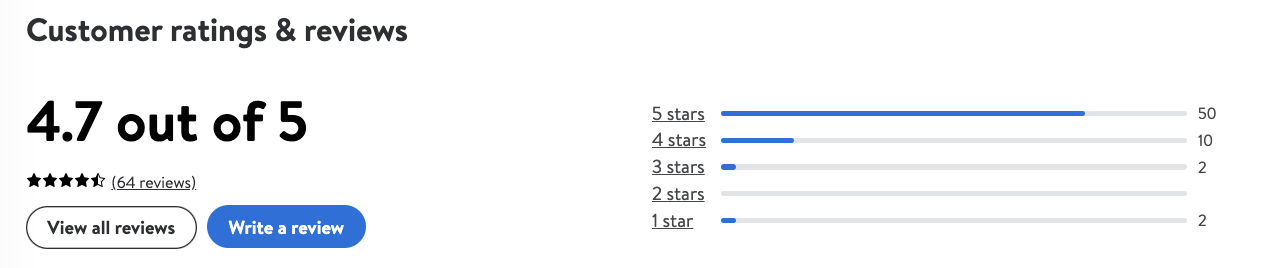
### Rating

<figure><img src="https://597677712-files.gitbook.io/~/files/v0/b/gitbook-x-prod.appspot.com/o/spaces%2FBaJCXoqO1zdFnaMnCKrg%2Fuploads%2Fgit-blob-cfebc6743884bd68f3474cd6567ae0c96bc600c1%2Fimage.png?alt=media" alt=""><figcaption></figcaption></figure>

```json
...
 "rating": {
    "count": 64,
    "rating": 4.7
},
...
```

<table><thead><tr><th>Key (rating)</th><th width="295">Description</th><th>Type</th></tr></thead><tbody><tr><td><code>rating</code></td><td>Average rating of the product.</td><td>float</td></tr><tr><td><code>count</code></td><td>Number of ratings for the product.</td><td>integer</td></tr></tbody></table>

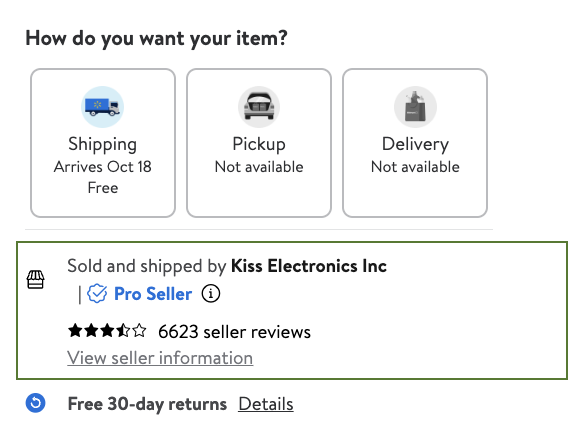
### Seller

<figure><img src="https://597677712-files.gitbook.io/~/files/v0/b/gitbook-x-prod.appspot.com/o/spaces%2FBaJCXoqO1zdFnaMnCKrg%2Fuploads%2Fgit-blob-04dc2a7d4f89ae84d8fb46c84521f610722e14b2%2Fimage.png?alt=media" alt="" width="440"><figcaption></figcaption></figure>

```javascript
...
"seller": {
    "id": "ED6F630F4BA94318A00A1D0BAACD0A48",
    "url": "/seller/7648?itemId=701606028&pageName=item&returnUrl=%2Fip%2FApple-iPhone-Xs-64GB-Unlocked-GSM-CDMA-4G-LTE-Phone-w-Dual-12MP-Camera-Gold-Fair-Cosmetics-Fully-Functional%2F701606028",
    "name": "Kiss Electronics Inc",
    "catalog_id": "7648",
    "official_name": "Kiss Electronics Inc"
},
...
```

<table><thead><tr><th>Key (seller)</th><th width="307">Describtion</th><th>Type</th></tr></thead><tbody><tr><td><code>name</code></td><td>Name of the seller.</td><td>string</td></tr><tr><td><code>official_name</code></td><td>Official registered name of the seller entity.</td><td>string</td></tr><tr><td><code>id</code></td><td>Unique identifier assigned to the seller by the platform.</td><td>string</td></tr><tr><td><code>url</code></td><td>The URL that leads to the seller's official website or storefront.</td><td>string</td></tr><tr><td><code>catalog_id</code></td><td>ID of catalog.</td><td>string</td></tr></tbody></table>

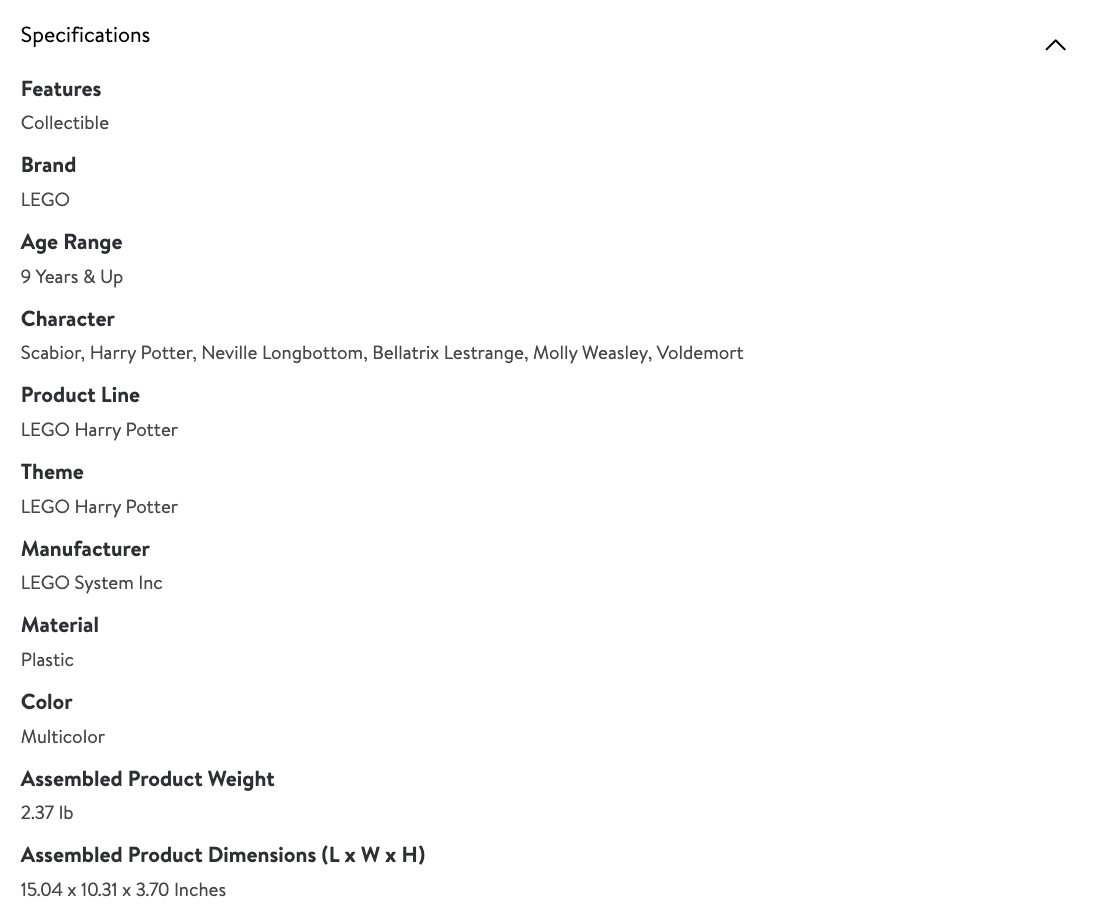
### Specifications

<figure><img src="https://597677712-files.gitbook.io/~/files/v0/b/gitbook-x-prod.appspot.com/o/spaces%2FBaJCXoqO1zdFnaMnCKrg%2Fuploads%2Fgit-blob-36728aaaeee2f22ab5bdb9829ce19776c9e59f80%2Fimage.png?alt=media" alt=""><figcaption></figcaption></figure>

```javascript
...
"specifications": [
    ...
    {
        "key": "Brand",
        "value": "LEGO"
    },
    {
        "key": "Age Range",
        "value": "9 Years & Up"
    },
]
...
```

<table><thead><tr><th>Key (specifications)</th><th width="332">Description</th><th>Type</th></tr></thead><tbody><tr><td><code>key</code></td><td>Specific attribute or characteristic of the product.</td><td>string</td></tr><tr><td><code>value</code></td><td>Corresponding value or description of the attribute specified by the specifications key.</td><td>string</td></tr></tbody></table>

### Fulfillment

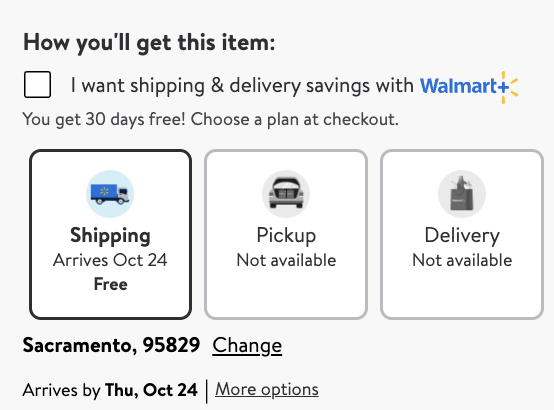
<figure><img src="https://597677712-files.gitbook.io/~/files/v0/b/gitbook-x-prod.appspot.com/o/spaces%2FBaJCXoqO1zdFnaMnCKrg%2Fuploads%2Fgit-blob-662126e2673b86bb05cb9598aab17dbd0ced5aa5%2FScreenshot%202024-10-16%20at%2015.38.34.png?alt=media" alt=""><figcaption></figcaption></figure>

```javascript
...
"fulfillment": {
                    "pickup": false,
                    "delivery": false,
                    "shipping": true,
                    "out_of_stock": false,
                    "free_shipping": true,
                    "pickup_information": "Pickup, Not available",
                    "delivery_information": "Delivery, Not available",
                    "shipping_information": "Shipping, Arrives Oct 24, Free"
                },
...
```

<table><thead><tr><th width="250">Key (fulfillment)</th><th width="325">Description</th><th>Type</th></tr></thead><tbody><tr><td><code>pickup</code></td><td>Indicates if the product is available to be fulfilled via in-store pickup.</td><td>boolean</td></tr><tr><td><code>pickup_information</code></td><td>The pickup message, when pickup = true.</td><td>string</td></tr><tr><td><code>delivery</code></td><td>Indicates if the product is available to be fulfilled via delivery from local store.</td><td>boolean</td></tr><tr><td><code>delivery_information</code></td><td>The delivery from local store message, when delivery = true.</td><td>string</td></tr><tr><td><code>shipping</code></td><td>Indicates if the product is available to be fulfilled via home shipping.</td><td>boolean</td></tr><tr><td><code>shipping_information</code></td><td>The shipping message, if shown.</td><td>string</td></tr><tr><td><code>free_shipping</code></td><td>Indicates if shipping is free of charge.</td><td>boolean</td></tr><tr><td><code>out_of_stock</code></td><td>Indicates if the product is currently out of stock.</td><td>boolean</td></tr></tbody></table>

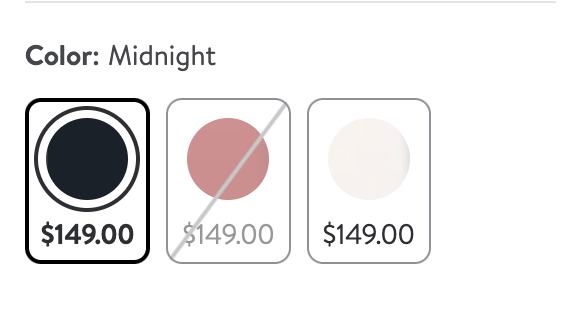
### Variations

<figure><img src="https://597677712-files.gitbook.io/~/files/v0/b/gitbook-x-prod.appspot.com/o/spaces%2FBaJCXoqO1zdFnaMnCKrg%2Fuploads%2Fgit-blob-e964dce87487fe8524d272c2a31cbdb489c22b19%2Fimage.png?alt=media" alt=""><figcaption></figcaption></figure>

```javascript
...
"variations": [
    {
        "state": "IN_STOCK",
        "product_id": "7328JAQF0Y2S",
        "selected_options": [
            {
                "key": "Color",
                "value": "Black"
            },
]
...
```

<table><thead><tr><th width="284">Key (variations)</th><th width="298">Description</th><th>Type</th></tr></thead><tbody><tr><td><code>state</code></td><td>Availability state of the product variation.</td><td>string</td></tr><tr><td><code>product_id</code></td><td>Unique identifier for each product variation.</td><td>string</td></tr><tr><td><code>selected_options</code></td><td>Array containing selected options that define the variation.</td><td>array</td></tr><tr><td><code>selected_options.key</code></td><td>Key describing the option selected.</td><td>string</td></tr><tr><td><code>selected_options.value</code></td><td>Value of the option selected.</td><td>string</td></tr></tbody></table>

### Breadcrumbs

<figure><img src="https://597677712-files.gitbook.io/~/files/v0/b/gitbook-x-prod.appspot.com/o/spaces%2FBaJCXoqO1zdFnaMnCKrg%2Fuploads%2Fgit-blob-250ee4f28c28046e4edef5fb6a6c8c3f75f6ec60%2FScreenshot%202024-10-16%20at%2015.36.54.png?alt=media" alt=""><figcaption></figcaption></figure>

```javascript
... 
"breadcrumbs": [
    {
        "url": "/cp/cell-phones/1105910",
        "category_name": "Cell Phones"
    },
    {
        "url": "/cp/phones-with-plans/1073085",
        "category_name": "Phones With Plans"
    },
    {
        "url": "/cp/postpaid-phones/8230659",
        "category_name": "Postpaid Phones"
    }
    ...
],
...
```

<table><thead><tr><th>Key (breadcrumbs)</th><th width="312">Description</th><th>Type</th></tr></thead><tbody><tr><td><code>category_name</code></td><td>The name of the category.</td><td>string</td></tr><tr><td><code>url</code></td><td>The URL of the category</td><td>string</td></tr></tbody></table>

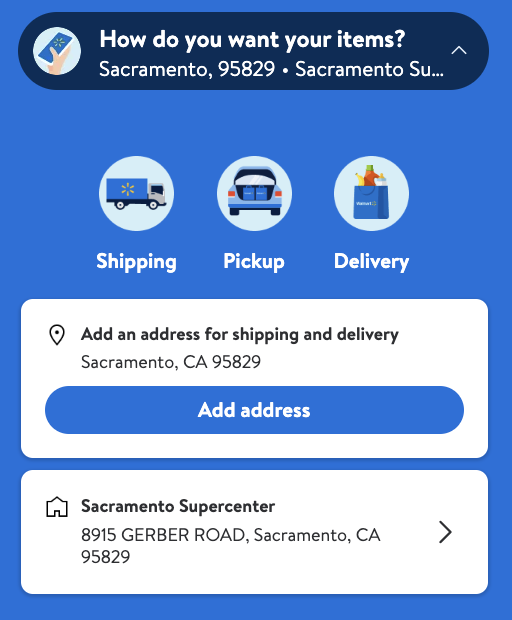
### Location

<figure><img src="https://597677712-files.gitbook.io/~/files/v0/b/gitbook-x-prod.appspot.com/o/spaces%2FBaJCXoqO1zdFnaMnCKrg%2Fuploads%2Fgit-blob-beb3ec96d78cdb3de18fe21fab371e84560da500%2FScreenshot%202024-10-16%20at%2015.31.30.png?alt=media" alt="" width="384"><figcaption></figcaption></figure>

```javascript
...
"location": {
    "city": "Sacramento",
    "state": "CA",
    "store_id": "8915",
    "zip_code": "95829"
},
...
```

<table><thead><tr><th>Key (location)</th><th width="297">Description</th><th>Type</th></tr></thead><tbody><tr><td><code>city</code></td><td>The city the request was run on.</td><td>string</td></tr><tr><td><code>state</code></td><td>The state the request was run on.</td><td>string</td></tr><tr><td><code>zip_code</code></td><td>The zip code the request was run on.</td><td>string</td></tr><tr><td><code>store_id</code></td><td>The ID of the store that the request was run on.</td><td>string</td></tr></tbody></table>


---

# Agent Instructions
This documentation is published with GitBook. GitBook is the documentation platform designed so that both humans and AI agents can read, navigate, and reason over technical content effectively. Learn more at gitbook.com.

## Querying This Documentation
If you need additional information that is not directly available in this page, you can query the documentation dynamically by asking a question.

Perform an HTTP GET request on the current page URL with the `ask` query parameter, and the optional `goal` query parameter:

```
GET https://developers.oxylabs.io/api-targets/e-commerce/walmart/product.md?ask=<question>&goal=<endgoal>
```

`ask` is the immediate question: it should be specific, self-contained, and written in natural language.
`goal` is optional and describes the broader end goal you are ultimately trying to accomplish on behalf of the user. GitBook uses it to tailor the answer towards what is most useful for that goal.

The response will contain a direct answer to the question and relevant excerpts and sources from the documentation.

Use this mechanism when the answer is not explicitly present in the current page, you need clarification or additional context, or you want to retrieve related documentation sections.