> For the complete documentation index, see [llms.txt](https://developers.oxylabs.io/llms.txt). Markdown versions of documentation pages are available by appending `.md` to page URLs; this page is available as [Markdown](https://developers.oxylabs.io/api-targets/e-commerce/target/category.md).
# Category
Scrape Target category pages by taxonomy node ID, with support for store, fulfillment type, and delivery ZIP localization.
The `target_category` source is designed to retrieve Target category pages based on Target's taxonomy node ID. The source supports localization features and allows you to browse through Target's product categories.
## Request samples
{% tabs %}
{% tab title="cURL" %}
```bash
curl 'https://realtime.oxylabs.io/v1/queries' \
--user 'USERNAME:PASSWORD' \
-H 'Content-Type: application/json' \
-d '{
"source": "target_category",
"category_id": "owq2q",
"render": "html"
}'
```
{% endtab %}
{% tab title="Python" %}
```python
import requests
from pprint import pprint
# Structure payload
payload = {
'source': 'target_category',
'category_id': 'owq2q',
'render': 'html',
}
# Get response
response = requests.request(
'POST',
'https://realtime.oxylabs.io/v1/queries',
auth=('USERNAME', 'PASSWORD'),
json=payload,
)
# Print the response
pprint(response.json())
```
{% endtab %}
{% tab title="Node.js" %}
```javascript
const https = require("https");
const username = "USERNAME";
const password = "PASSWORD";
const body = {
source: "target_category",
category_id: "owq2q",
render: "html",
};
const options = {
hostname: "realtime.oxylabs.io",
path: "/v1/queries",
method: "POST",
headers: {
"Content-Type": "application/json",
Authorization:
"Basic " + Buffer.from(`${username}:${password}`).toString("base64"),
},
};
const request = https.request(options, (response) => {
let data = "";
response.on("data", (chunk) => {
data += chunk;
});
response.on("end", () => {
const responseData = JSON.parse(data);
console.log(JSON.stringify(responseData, null, 2));
});
});
request.on("error", (error) => {
console.error("Error:", error);
});
request.write(JSON.stringify(body));
request.end();
```
{% endtab %}
{% tab title="HTTP" %}
```http
# The whole string you submit has to be URL-encoded.
https://realtime.oxylabs.io/v1/queries?source=target_category&category_id=owq2q&render=html&access_token=12345abcde
```
{% endtab %}
{% tab title="PHP" %}
```php
'target_category',
'category_id' => 'owq2q',
'render' => 'html'
);
$ch = curl_init();
curl_setopt($ch, CURLOPT_URL, "https://realtime.oxylabs.io/v1/queries");
curl_setopt($ch, CURLOPT_RETURNTRANSFER, 1);
curl_setopt($ch, CURLOPT_POSTFIELDS, json_encode($params));
curl_setopt($ch, CURLOPT_POST, 1);
curl_setopt($ch, CURLOPT_USERPWD, "USERNAME" . ":" . "PASSWORD");
$headers = array();
$headers[] = "Content-Type: application/json";
curl_setopt($ch, CURLOPT_HTTPHEADER, $headers);
$result = curl_exec($ch);
echo $result;
if (curl_errno($ch)) {
echo 'Error:' . curl_error($ch);
}
curl_close($ch);
```
{% endtab %}
{% tab title="Golang" %}
```go
package main
import (
"bytes"
"encoding/json"
"fmt"
"io/ioutil"
"net/http"
)
func main() {
const Username = "USERNAME"
const Password = "PASSWORD"
payload := map[string]interface{}{
"source": "target_category",
"category_id": "owq2q",
"render": "html",
}
jsonValue, _ := json.Marshal(payload)
client := &http.Client{}
request, _ := http.NewRequest("POST",
"https://realtime.oxylabs.io/v1/queries",
bytes.NewBuffer(jsonValue),
)
request.SetBasicAuth(Username, Password)
response, _ := client.Do(request)
responseText, _ := ioutil.ReadAll(response.Body)
fmt.Println(string(responseText))
}
```
{% endtab %}
{% tab title="Java" %}
```java
package org.example;
import okhttp3.*;
import org.json.JSONObject;
import java.util.concurrent.TimeUnit;
public class Main implements Runnable {
private static final String AUTHORIZATION_HEADER = "Authorization";
public static final String USERNAME = "USERNAME";
public static final String PASSWORD = "PASSWORD";
public void run() {
JSONObject jsonObject = new JSONObject();
jsonObject.put("source", "target_category");
jsonObject.put("category_id", "owq2q");
jsonObject.put("render", "html");
Authenticator authenticator = (route, response) -> {
String credential = Credentials.basic(USERNAME, PASSWORD);
return response
.request()
.newBuilder()
.header(AUTHORIZATION_HEADER, credential)
.build();
};
var client = new OkHttpClient.Builder()
.authenticator(authenticator)
.readTimeout(180, TimeUnit.SECONDS)
.build();
var mediaType = MediaType.parse("application/json; charset=utf-8");
var body = RequestBody.create(jsonObject.toString(), mediaType);
var request = new Request.Builder()
.url("https://realtime.oxylabs.io/v1/queries")
.post(body)
.build();
try (var response = client.newCall(request).execute()) {
if (response.body() != null) {
try (var responseBody = response.body()) {
System.out.println(responseBody.string());
}
}
} catch (Exception exception) {
System.out.println("Error: " + exception.getMessage());
}
System.exit(0);
}
public static void main(String[] args) {
new Thread(new Main()).start();
}
}
```
{% endtab %}
{% tab title="JSON" %}
```json
{
"source": "target_category",
"category_id": "owq2q",
"render": "html"
}
```
{% endtab %}
{% endtabs %}
We use synchronous [**Realtime**](/products/web-scraper-api/integration-methods/realtime.md) integration method in our examples. If you would like to use [**Proxy Endpoint**](/products/web-scraper-api/integration-methods/proxy-endpoint.md) or asynchronous [**Push-Pull**](/products/web-scraper-api/integration-methods/push-pull.md) integration, refer to the [**integration methods**](/products/web-scraper-api/integration-methods.md) section.
## Request parameter values
### Generic
| Parameter | Description | Default Value |
| ------------------------------------------------------------- | ------------------------------------------------------------------------------------------------------------------------------------------------------------------ | ---------------- |
| `source` | Sets the scraper. | target\_category |
| **category\_id** | Target's taxonomy node ID for the category (e.g., "owq2q" for PlayStation 5 controllers). | - |
| `render` | Enables JavaScript rendering when set to `html`. [**More info**](/products/web-scraper-api/features/js-rendering-and-browser-control.md#javascript-rendering)**.** | - |
| `callback_url` | URL to your callback endpoint. [**More info**](/products/web-scraper-api/integration-methods/push-pull.md) | - |
| `user_agent_type` | Device type and browser. The full list can be found [**here**](/products/web-scraper-api/features/http-context-and-job-management/user-agent-type.md). | desktop |
\- mandatory parameter
### Localization
Adapt results to specific stores, fulfillment types, and delivery locations.
| Parameter | Description | Type |
| ------------------ | ------------------------------------------------------------------------------------------------------- | ------- |
| `fulfillment_type` | Set the fulfillment type. Available values are: pickup, shipping, shop\_in\_store, same\_day\_delivery. | String |
| `store_id` | Set the store location. | Integer |
| `delivery_zip` | Set the shipping to location. | String |
## Understanding Target's node IDs
Target's category system uses node IDs to identify specific categories. These node IDs are unique identifiers in Target's taxonomy system.
### Example node IDs
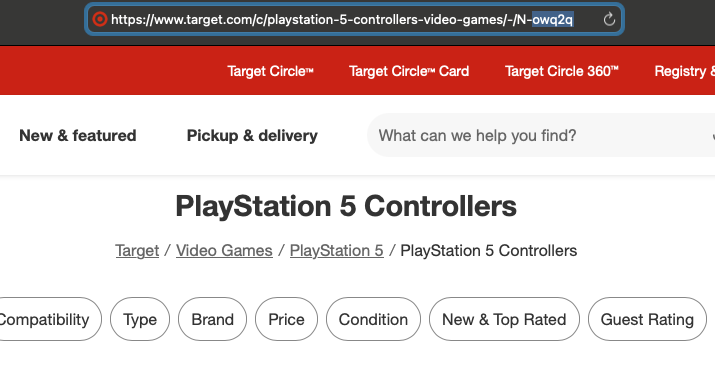
Node IDs can be found in the category page URL. It's the part of the URL that has the format `N-<5 symbols>` . Here are some example category URLs and their corresponding node IDs:
1. PlayStation 5 controllers: `owq2q`
* Full URL:
2. PlayStation 5 accessories: `lbxgt`
* Full URL:
3. PlayStation 5: `hj96d`
* Full URL:
### Node ID format
When using the `target_category` source, you only need to provide the node ID without the `N-` prefix. The API will automatically format the URL correctly.
---
# Agent Instructions
This documentation is published with GitBook. GitBook is the documentation platform designed so that both humans and AI agents can read, navigate, and reason over technical content effectively. Learn more at gitbook.com.
## Querying This Documentation
If you need additional information that is not directly available in this page, you can query the documentation dynamically by asking a question.
Perform an HTTP GET request on the current page URL with the `ask` query parameter, and the optional `goal` query parameter:
```
GET https://developers.oxylabs.io/api-targets/e-commerce/target/category.md?ask=&goal=
```
`ask` is the immediate question: it should be specific, self-contained, and written in natural language.
`goal` is optional and describes the broader end goal you are ultimately trying to accomplish on behalf of the user. GitBook uses it to tailor the answer towards what is most useful for that goal.
The response will contain a direct answer to the question and relevant excerpts and sources from the documentation.
Use this mechanism when the answer is not explicitly present in the current page, you need clarification or additional context, or you want to retrieve related documentation sections.