# Product

The `etsy_product` source is designed to retrieve Etsy product result pages. We can return the HTML for any Etsy page you like. Additionally, we can deliver **structured (parsed) output for Etsy product pages**.

## Request samples

The samples below illustrates how you can get a parsed Best Buy product result.

{% tabs %}
{% tab title="cURL" %}

```shell
curl 'https://realtime.oxylabs.io/v1/queries' \
--user 'USERNAME:PASSWORD' \
-H 'Content-Type: application/json' \
-d '{
        "source": "etsy_product", 
        "product_id": "1858266469",
        "parse": true
    }'
```

{% endtab %}

{% tab title="Python" %}

```python
import requests
from pprint import pprint


# Structure payload.
payload = {
    'source': 'etsy_product',
    'product_id': '1858266469',
    'parse': True
}

# Get response.
response = requests.request(
    'POST',
    'https://realtime.oxylabs.io/v1/queries',
    auth=('USERNAME', 'PASSWORD'),
    json=payload,
)

# Instead of response with job status and results url, this will return the
# JSON response with the result.
pprint(response.json())
```

{% endtab %}

{% tab title="Node.js" %}

```javascript
const https = require("https");

const username = "USERNAME";
const password = "PASSWORD";
const body = {
    source: "etsy_product",
    product_id: "1858266469",
    parse: true
};

const options = {
    hostname: "realtime.oxylabs.io",
    path: "/v1/queries",
    method: "POST",
    headers: {
        "Content-Type": "application/json",
        Authorization:
            "Basic " + Buffer.from(`${username}:${password}`).toString("base64"),
    },
};

const request = https.request(options, (response) => {
    let data = "";

    response.on("data", (chunk) => {
        data += chunk;
    });

    response.on("end", () => {
        const responseData = JSON.parse(data);
        console.log(JSON.stringify(responseData, null, 2));
    });
});

request.on("error", (error) => {
    console.error("Error:", error);
});

request.write(JSON.stringify(body));
request.end();
```

{% endtab %}

{% tab title="HTTP" %}

```http
# The whole string you submit has to be URL-encoded.

https://realtime.oxylabs.io/v1/queries?source=etsy_product&product_id=18582664691&parse=true&access_token=12345abcde
```

{% endtab %}

{% tab title="PHP" %}

```php
<?php

$params = array(
    'source' => 'etsy_product',
    'product_id' => '1858266469',
    'parse' => true
);

$ch = curl_init();

curl_setopt($ch, CURLOPT_URL, "https://realtime.oxylabs.io/v1/queries");
curl_setopt($ch, CURLOPT_RETURNTRANSFER, 1);
curl_setopt($ch, CURLOPT_POSTFIELDS, json_encode($params));
curl_setopt($ch, CURLOPT_POST, 1);
curl_setopt($ch, CURLOPT_USERPWD, "USERNAME" . ":" . "PASSWORD");

$headers = array();
$headers[] = "Content-Type: application/json";
curl_setopt($ch, CURLOPT_HTTPHEADER, $headers);

$result = curl_exec($ch);
echo $result;

if (curl_errno($ch)) {
    echo 'Error:' . curl_error($ch);
}
curl_close($ch);
```

{% endtab %}

{% tab title="Golang" %}

```go
package main

import (
	"bytes"
	"encoding/json"
	"fmt"
	"io/ioutil"
	"net/http"
)

func main() {
	const Username = "USERNAME"
	const Password = "PASSWORD"

	payload := map[string]interface{}{
		"source":       "etsy_product",
		"product_id":   "1858266469",
		"parse":        true
	}

	jsonValue, _ := json.Marshal(payload)

	client := &http.Client{}
	request, _ := http.NewRequest("POST",
		"https://realtime.oxylabs.io/v1/queries",
		bytes.NewBuffer(jsonValue),
	)

	request.SetBasicAuth(Username, Password)
	response, _ := client.Do(request)

	responseText, _ := ioutil.ReadAll(response.Body)
	fmt.Println(string(responseText))
}

```

{% endtab %}

{% tab title="C#" %}

```csharp
using System;
using System.Collections.Generic;
using System.Net.Http;
using System.Net.Http.Json;
using System.Threading.Tasks;

namespace OxyApi
{
    class Program
    {
        static async Task Main()
        {
            const string Username = "USERNAME";
            const string Password = "PASSWORD";

            var parameters = new {
                source = "etsy_product",
                product_id = "1858266469",
                parse = true
            };

            var client = new HttpClient();

            Uri baseUri = new Uri("https://realtime.oxylabs.io");
            client.BaseAddress = baseUri;

            var requestMessage = new HttpRequestMessage(HttpMethod.Post, "/v1/queries");
            requestMessage.Content = JsonContent.Create(parameters);

            var authenticationString = $"{Username}:{Password}";
            var base64EncodedAuthenticationString = Convert.ToBase64String(System.Text.ASCIIEncoding.UTF8.GetBytes(authenticationString));
            requestMessage.Headers.Add("Authorization", "Basic " + base64EncodedAuthenticationString);

            var response = await client.SendAsync(requestMessage);
            var contents = await response.Content.ReadAsStringAsync();

            Console.WriteLine(contents);
        }
    }
}
```

{% endtab %}

{% tab title="Java" %}

```java
package org.example;

import okhttp3.*;
import org.json.JSONObject;
import java.util.concurrent.TimeUnit;

public class Main implements Runnable {
    private static final String AUTHORIZATION_HEADER = "Authorization";
    public static final String USERNAME = "USERNAME";
    public static final String PASSWORD = "PASSWORD";

    public void run() {
        JSONObject jsonObject = new JSONObject();
        jsonObject.put("source", "etsy_product");
        jsonObject.put("product_id", "1858266469");
        jsonObject.put("parse", true);

        Authenticator authenticator = (route, response) -> {
            String credential = Credentials.basic(USERNAME, PASSWORD);
            return response
                    .request()
                    .newBuilder()
                    .header(AUTHORIZATION_HEADER, credential)
                    .build();
        };

        var client = new OkHttpClient.Builder()
                .authenticator(authenticator)
                .readTimeout(180, TimeUnit.SECONDS)
                .build();

        var mediaType = MediaType.parse("application/json; charset=utf-8");
        var body = RequestBody.create(jsonObject.toString(), mediaType);
        var request = new Request.Builder()
                .url("https://realtime.oxylabs.io/v1/queries")
                .post(body)
                .build();

        try (var response = client.newCall(request).execute()) {
            if (response.body() != null) {
                try (var responseBody = response.body()) {
                    System.out.println(responseBody.string());
                }
            }
        } catch (Exception exception) {
            System.out.println("Error: " + exception.getMessage());
        }

        System.exit(0);
    }

    public static void main(String[] args) {
        new Thread(new Main()).start();
    }
}
```

{% endtab %}

{% tab title="JSON" %}

```json
{
    "source": "etsy_product", 
    "product_id": "1858266469", 
    "parse": true
}
```

{% endtab %}
{% endtabs %}

We use synchronous [**Realtime**](broken://pages/N4bxieBs231VuAgJ2qC0) integration method in our examples. If you would like to use [**Proxy Endpoint**](broken://pages/hBGdZ6SZ2ONUOM0VIp5t) or asynchronous [**Push-Pull**](broken://pages/DijMC0XcEbNczNgRaHIV) integration, refer to the [**integration methods**](broken://pages/PMUQIFSmnxA40vdpqgqd) section.

## Request parameter values

### Generic

<table><thead><tr><th width="205">Parameter</th><th width="289.3333333333333">Description</th><th>Default Value</th></tr></thead><tbody><tr><td><mark style="background-color:green;"><strong>source</strong></mark></td><td>Sets the scraper.</td><td><code>etsy_product</code></td></tr><tr><td><mark style="background-color:green;"><strong>product_id</strong></mark></td><td>10-symbol product ID.</td><td>-</td></tr><tr><td><code>render</code></td><td>Enables JavaScript rendering when set to <code>html</code>. <a href="/pages/7sSik87DtvlBOq67ENnO"><strong>More info</strong></a><strong>.</strong></td><td>-</td></tr><tr><td><code>parse</code></td><td>Returns parsed data when set to <code>true</code>. Explore output <a href="#output-data-dictionary"><strong>data dictionary</strong></a>.</td><td><code>false</code></td></tr><tr><td><code>callback_url</code></td><td>URL to your callback endpoint. <a href="/pages/DijMC0XcEbNczNgRaHIV#callback"><strong>More info</strong></a>.</td><td>-</td></tr><tr><td><code>user_agent_type</code></td><td>Device type and browser. The full list can be found <a href="/pages/rrKXR4LNzotP94phU1YL"><strong>here</strong></a>.</td><td><code>desktop</code></td></tr></tbody></table>

&#x20;    \- mandatory parameter

## Structured data

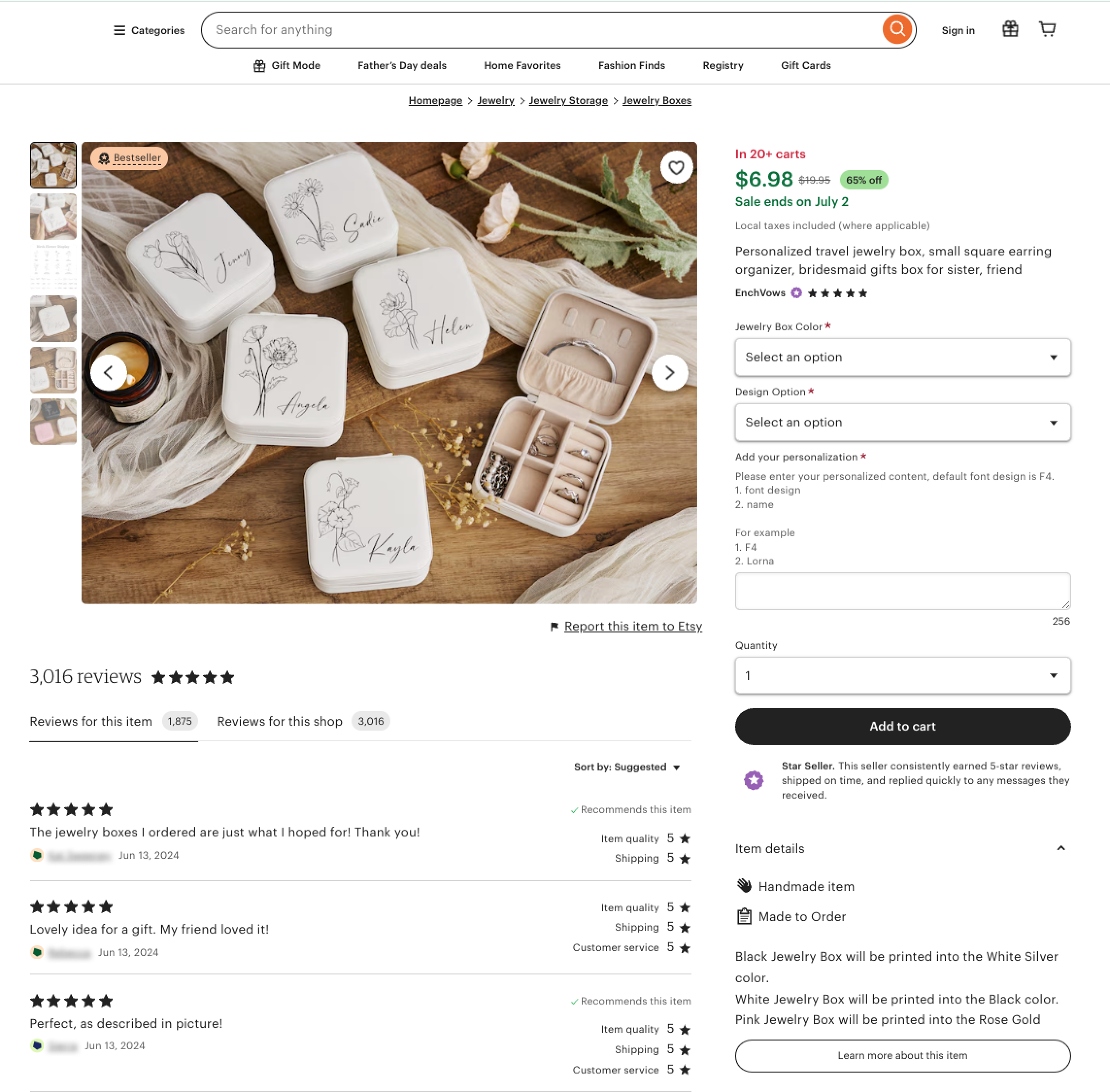
`etsy_product` source can extract Etsy product results in either HTML or JSON format, providing structured data on various elements of the page.

#### Output example

```json
{
    "results": [
        {
            "content": {
                "url": "https://www.etsy.com/listing/1518307138/personalized-travel-jewelry-box-small",
                "price": 6.98,
                "title": "Personalized travel jewelry box, small square earring organizer, bridesmaid gifts box for sister, friend",
                "images": [
                    "https://i.etsystatic.com/41680084/r/il/f09928/5191407963/il_75x75.5191407963_rurr.jpg",
                    "https://i.etsystatic.com/41680084/r/il/c9a00d/5191407709/il_75x75.5191407709_nqq5.jpg",
                    "https://i.etsystatic.com/41680084/r/il/52b188/5179396963/il_75x75.5179396963_pzw9.jpg",
                    "https://i.etsystatic.com/41680084/r/il/ce5219/5191407739/il_75x75.5191407739_k1s6.jpg",
                    "https://i.etsystatic.com/41680084/r/il/23c7e1/5143187268/il_75x75.5143187268_2tsi.jpg",
                    "https://i.etsystatic.com/41680084/r/il/96f059/5143187294/il_75x75.5143187294_1swc.jpg"
                ],
                "seller": {
                    "url": "https://www.etsy.com/shop/EnchVows?ref=shop-header-name&listing_id=1518307138&from_page=listing",
                    "title": "EnchVows",
                    "rating": 4.8247,
                    "best_seller": false,
                    "star_seller": true,
                    "reviews_count": 3016
                },
                "reviews": {
                    "count": 1875
                },
                "currency": "USD",
                "shipping": {
                    "from": "United States"
                },
                "old_price": 19.95,
                "categories": [
                    {
                        "title": "All categories"
                    },
                    {
                        "title": "Jewelry"
                    },
                    {
                        "title": "Jewelry Storage"
                    },
                    {
                        "title": "Jewelry Boxes"
                    }
                ],
                "customized": false,
                "product_id": "1518307138",
                "variation_count": 36,
                "parse_status_code": 12000
            },
            "created_at": "2024-06-13 11:59:06",
            "updated_at": "2024-06-13 11:59:13",
            "page": 1,
            "url": "https://www.etsy.com/de-en/listing/1518307138/personalized-travel-jewelry-box-small?click_key=d602fe08540deffc77a9e2c6ab6cee6d2c2ca74a:1518307138&click_sum=a7bd4b3c&ref=hp_prn-2&pro=1&sts=1",
            "job_id": "7206988452519233537",
            "status_code": 200,
            "parser_type": "etsy_product"
        }
    ]
}
```

## Output data dictionary

#### HTML example

<figure><img src="/files/PMh1W1gsXvSWsvMtZ5Th" alt=""><figcaption></figcaption></figure>

#### JSON Structure

The table below presents a detailed list of each product page element we parse, along with its description and data type. The table also includes some metadata.

<table><thead><tr><th>Key</th><th width="289">Description</th><th>Type</th></tr></thead><tbody><tr><td><code>url</code></td><td>The URL of the Etsy product page.</td><td>string</td></tr><tr><td><code>price</code></td><td>The price of the product.</td><td>float</td></tr><tr><td><code>title</code></td><td>The title of the product.</td><td>string</td></tr><tr><td><code>images</code></td><td>Array of URLs to product images.</td><td>array</td></tr><tr><td><code>seller</code></td><td>The seller object, containing seller details.</td><td>object</td></tr><tr><td><code>reviews</code></td><td>The reviews object, containing review details.</td><td>object</td></tr><tr><td><code>reviews.count</code></td><td>The number of reviews received for the product.</td><td>integer</td></tr><tr><td><code>currency</code></td><td>The currency in which the price is denominated.</td><td>string</td></tr><tr><td><code>shipping</code></td><td>The shipping object, containing shipping details.</td><td>object</td></tr><tr><td><code>shipping.from</code></td><td>The origin country of shipping.</td><td>string</td></tr><tr><td><code>old_price</code></td><td>The previous price of the product before discount.</td><td>integer</td></tr><tr><td><code>categories</code></td><td>Array of category objects to which the product belongs.</td><td>array</td></tr><tr><td><code>categories.title</code></td><td>The title of the category.</td><td>string</td></tr><tr><td><code>customized</code></td><td>Indicates whether the product can be customized.</td><td>boolean</td></tr><tr><td><code>product_id</code></td><td>The unique identifier for the product.</td><td>string</td></tr><tr><td><code>variation_count</code></td><td>The number of variations available for the product.</td><td>integer</td></tr><tr><td><code>parse_status_code</code></td><td>The status code of the parsing job. You can see the parser status codes described <a href="https://github.com/oxylabs/gitbook-public-english/blob/master/scraping-solutions/web-scraper-api/targets/etsy/broken-reference/README.md"><strong>here</strong></a>.</td><td>integer</td></tr><tr><td><code>created_at</code></td><td>The timestamp when the scraping job was created.</td><td>timestamp</td></tr><tr><td><code>updated_at</code></td><td>The timestamp when the scraping job was finished.</td><td>timestamp</td></tr><tr><td><code>page</code></td><td>The page number in the pagination of results.</td><td>integer</td></tr><tr><td><code>status_code</code></td><td>The status code of the scraping job. You can see the scraper status codes described <a href="https://github.com/oxylabs/gitbook-public-english/blob/master/scraping-solutions/web-scraper-api/targets/etsy/broken-reference/README.md"><strong>here</strong></a>.</td><td>integer</td></tr><tr><td><code>parser_type</code></td><td>The type of parser used to extract the data.</td><td>integer</td></tr><tr><td><code>job_id</code></td><td>The ID of the job associated with the scraping job.</td><td>string</td></tr></tbody></table>

### Sellers

The seller object, containing details of the seller.

<div align="center"><figure><img src="https://lh7-us.googleusercontent.com/docsz/AD_4nXckujNQKjQNuMjse1Wtjvktig2WW_ILbup9JGSHnDuCpwNvjnuge6YTm_Trcb0eCX8d1JaUCDxgo49S7WmC0NcIv4kYpFmpweeiRFGYI738t8wVGTAtNwE0N4hu5ejTt2VCH3VUDoEDoIgsUAYomMguJYu0?key=3xpjIOUgn-BXlzCHvQV_ZA" alt=""><figcaption></figcaption></figure></div>

```json
...
"seller": {
    "url": "https://www.etsy.com/shop/EnchVows?ref=shop-header-name&listing_id=1518307138&from_page=listing",
    "title": "EnchVows",
    "rating": 4.8247,
    "best_seller": false,
    "star_seller": true,
    "reviews_count": 3016
},
...
```

<table><thead><tr><th width="213">Key (Seller)</th><th width="385">Description</th><th>Type</th></tr></thead><tbody><tr><td><code>url</code></td><td>The URL of the seller's page.</td><td>string</td></tr><tr><td><code>title</code></td><td>The name of the seller.</td><td>string</td></tr><tr><td><code>rating</code></td><td>The rating score of the seller.</td><td>integer</td></tr><tr><td><code>best_seller</code></td><td>Indicates whether the seller is a best seller.</td><td>boolean</td></tr><tr><td><code>star_seller</code></td><td>Indicates whether the seller is a star seller.</td><td>boolean</td></tr><tr><td><p><code>reviews_count</code></p><p>(optional)</p></td><td>The number of reviews for the seller.</td><td>integer</td></tr></tbody></table>


---

# Agent Instructions: Querying This Documentation

If you need additional information that is not directly available in this page, you can query the documentation dynamically by asking a question.

Perform an HTTP GET request on the current page URL with the `ask` query parameter:

```
GET https://developers.oxylabs.io/api-targets/e-commerce/etsy/product.md?ask=<question>
```

The question should be specific, self-contained, and written in natural language.
The response will contain a direct answer to the question and relevant excerpts and sources from the documentation.

Use this mechanism when the answer is not explicitly present in the current page, you need clarification or additional context, or you want to retrieve related documentation sections.