> For the complete documentation index, see [llms.txt](https://developers.oxylabs.io/llms.txt). Markdown versions of documentation pages are available by appending `.md` to page URLs; this page is available as [Markdown](https://developers.oxylabs.io/api-targets/e-commerce/amazon/best-sellers.md).

# Best Sellers

Discover Amazon Best Sellers data with Web Scraper API. Collect top-ranking product details, categories, and prices using customizable parameters.

The `amazon_bestsellers` source retrieves Amazon Best Sellers pages of a category. With `"parse": true` the response is structured JSON (fields described in the [data dictionary](#data-dictionary) below); without it, the response contains the page HTML in `content`.

## Request samples

In the code examples below, we make a request to retrieve the `2`nd page of Best Sellers in category, which ID is `172541`, on `amazon.com` marketplace.

{% tabs %}
{% tab title="cURL" %}

```bash
curl 'https://realtime.oxylabs.io/v1/queries' \
--user 'USERNAME:PASSWORD' \
-H 'Content-Type: application/json' \
-d '{
        "source": "amazon_bestsellers",
        "domain": "com",
        "query": "172541",
        "start_page": 2,
        "parse": true
    }'
```

{% endtab %}

{% tab title="Python" %}

```python
import requests
from pprint import pprint

# Structure payload.
payload = {
    'source': 'amazon_bestsellers',
    'domain': 'com',
    'query': '172541',
    'start_page': 2,
    'parse': True
}

# Get response.
response = requests.request(
    'POST',
    'https://realtime.oxylabs.io/v1/queries',
    auth=('USERNAME', 'PASSWORD'),
    json=payload
)

# Instead of response with job status and results url, this will return the
# JSON response with the result.
pprint(response.json())
```

{% endtab %}

{% tab title="Node.js" %}

```javascript
const https = require("https");

const username = "USERNAME";
const password = "PASSWORD";
const body = {
    source: "amazon_bestsellers",
    domain: "com",
    query: "172541",
    start_page: 2,
    parse: true
};

const options = {
    hostname: "realtime.oxylabs.io",
    path: "/v1/queries",
    method: "POST",
    headers: {
        "Content-Type": "application/json",
        Authorization:
            "Basic " + Buffer.from(`${username}:${password}`).toString("base64"),
    },
};

const request = https.request(options, (response) => {
    let data = "";

    response.on("data", (chunk) => {
        data += chunk;
    });

    response.on("end", () => {
        const responseData = JSON.parse(data);
        console.log(JSON.stringify(responseData, null, 2));
    });
});

request.on("error", (error) => {
    console.error("Error:", error);
});

request.write(JSON.stringify(body));
request.end();
```

{% endtab %}

{% tab title="HTTP" %}

```http
# The whole string you submit has to be URL-encoded.

https://realtime.oxylabs.io/v1/queries?source=amazon_bestsellers&domain=com&query=172541&start_page=2&parse=true&access_token=12345abcde
```

{% endtab %}

{% tab title="PHP" %}

```php
<?php

$params = array(
    'source' => 'amazon_bestsellers',
    'domain' => 'com',
    'query' => '172541',
    'start_page' => 2,
    'parse' => true
);

$ch = curl_init();

curl_setopt($ch, CURLOPT_URL, "https://realtime.oxylabs.io/v1/queries");
curl_setopt($ch, CURLOPT_RETURNTRANSFER, 1);
curl_setopt($ch, CURLOPT_POSTFIELDS, json_encode($params));
curl_setopt($ch, CURLOPT_POST, 1);
curl_setopt($ch, CURLOPT_USERPWD, "USERNAME" . ":" . "PASSWORD");

$headers = array();
$headers[] = "Content-Type: application/json";
curl_setopt($ch, CURLOPT_HTTPHEADER, $headers);

$result = curl_exec($ch);
echo $result;

if (curl_errno($ch)) {
    echo 'Error:' . curl_error($ch);
}
curl_close($ch);
```

{% endtab %}

{% tab title="Golang" %}

```go
package main

import (
    "bytes"
    "encoding/json"
    "fmt"
    "io/ioutil"
    "net/http"
)

func main() {
    const Username = "USERNAME"
    const Password = "PASSWORD"

    payload := map[string]interface{}{
        "source": "amazon_bestsellers",
        "domain": "com",
        "query": "172541",
        "start_page": 2,
        "parse": true,
    }

    jsonValue, _ := json.Marshal(payload)

    client := &http.Client{}
    request, _ := http.NewRequest("POST",
        "https://realtime.oxylabs.io/v1/queries",
        bytes.NewBuffer(jsonValue),
    )

    request.SetBasicAuth(Username, Password)
    response, _ := client.Do(request)

    responseText, _ := ioutil.ReadAll(response.Body)
    fmt.Println(string(responseText))
}

```

{% endtab %}

{% tab title="C#" %}

```csharp
using System;
using System.Collections.Generic;
using System.Net.Http;
using System.Net.Http.Json;
using System.Threading.Tasks;

namespace OxyApi
{
    class Program
    {
        static async Task Main()
        {
            const string Username = "USERNAME";
            const string Password = "PASSWORD";

            var parameters = new {
                source = "amazon_bestsellers",
                domain = "com",
                query = "172541",
                start_page = 2,
                parse = true
            };

            var client = new HttpClient();

            Uri baseUri = new Uri("https://realtime.oxylabs.io");
            client.BaseAddress = baseUri;

            var requestMessage = new HttpRequestMessage(HttpMethod.Post, "/v1/queries");
            requestMessage.Content = JsonContent.Create(parameters);

            var authenticationString = $"{Username}:{Password}";
            var base64EncodedAuthenticationString = Convert.ToBase64String(System.Text.ASCIIEncoding.UTF8.GetBytes(authenticationString));
            requestMessage.Headers.Add("Authorization", "Basic " + base64EncodedAuthenticationString);

            var response = await client.SendAsync(requestMessage);
            var contents = await response.Content.ReadAsStringAsync();

            Console.WriteLine(contents);
        }
    }
}
```

{% endtab %}

{% tab title="Java" %}

```java
package org.example;

import okhttp3.*;
import org.json.JSONObject;
import java.util.concurrent.TimeUnit;

public class Main implements Runnable {
    private static final String AUTHORIZATION_HEADER = "Authorization";
    public static final String USERNAME = "USERNAME";
    public static final String PASSWORD = "PASSWORD";

    public void run() {
        JSONObject jsonObject = new JSONObject();
        jsonObject.put("source", "amazon_bestsellers");
        jsonObject.put("domain", "com");
        jsonObject.put("query", "172541");
        jsonObject.put("start_page", 2);
        jsonObject.put("parse", true);

        Authenticator authenticator = (route, response) -> {
            String credential = Credentials.basic(USERNAME, PASSWORD);
            return response
                    .request()
                    .newBuilder()
                    .header(AUTHORIZATION_HEADER, credential)
                    .build();
        };

        var client = new OkHttpClient.Builder()
                .authenticator(authenticator)
                .readTimeout(180, TimeUnit.SECONDS)
                .build();

        var mediaType = MediaType.parse("application/json; charset=utf-8");
        var body = RequestBody.create(jsonObject.toString(), mediaType);
        var request = new Request.Builder()
                .url("https://realtime.oxylabs.io/v1/queries")
                .post(body)
                .build();

        try (var response = client.newCall(request).execute()) {
            if (response.body() != null) {
                try (var responseBody = response.body()) {
                    System.out.println(responseBody.string());
                }
            }
        } catch (Exception exception) {
            System.out.println("Error: " + exception.getMessage());
        }

        System.exit(0);
    }

    public static void main(String[] args) {
        new Thread(new Main()).start();
    }
}
```

{% endtab %}

{% tab title="JSON" %}

```json
{
    "source": "amazon_bestsellers",
    "domain": "com",
    "query": "172541",
    "start_page": 2,
    "parse": true
}
```

{% endtab %}
{% endtabs %}

## Request parameter values

{% hint style="info" %}
Besides the parameters listed below, you can include additional parameters such as `user_agent_type`, `geo_location`, `render`, and more to customize your scraping request. Read more [here](/products/web-scraper-api/features.md).
{% endhint %}

<table><thead><tr><th width="230">Parameter</th><th>Description</th><th width="130">Default Value</th></tr></thead><tbody><tr><td><mark style="background-color:green;"><strong><code>source</code></strong></mark></td><td>Sets the scraper.</td><td><code>amazon_bestsellers</code></td></tr><tr><td><mark style="background-color:green;"><strong><code>query</code></strong></mark></td><td>Browse node ID of the category (e.g. <code>172541</code>) or the lowercase category slug from the Best Sellers URL (e.g. <code>electronics</code>).</td><td>-</td></tr><tr><td><code>start_page</code></td><td>Starting page number.</td><td>1</td></tr><tr><td><code>pages</code></td><td>Number of pages to retrieve.</td><td>1</td></tr><tr><td><code>geo_location</code>, <code>domain</code>, <code>locale</code>, <code>context:currency</code></td><td>Localization parameters, see <a href="#localization-and-filtering">Localization and Filtering</a>.</td><td>-</td></tr></tbody></table>

&#x20;   \- mandatory parameter

## Response example <a href="#response-example" id="response-example"></a>

A parsed Best Sellers page for node `172541` (Headphones & Earbuds) on amazon.com (list shortened to one item).

<details>

<summary><code>amazon_bestsellers</code> response example</summary>

```json
{
    "results": [
        {
            "content": {
                "page": 1,
                "pages": 2,
                "parse_status_code": 12000,
                "query": "172541",
                "results": [
                    {
                        "asin": "B0FQFB8FMG",
                        "currency": "USD",
                        "image_url": "https://images-na.ssl-images-amazon.com/images/I/61solmQSSlL._AC_UL300...",
                        "pos": 1,
                        "price": 199,
                        "price_str": "$199.00",
                        "price_upper": 0,
                        "rating": 4.4,
                        "ratings_count": 15399,
                        "title": "Apple AirPods Pro 3 Wireless Earbuds with Active Noise Cancellation | ...",
                        "url": "/Apple-Cancellation-Translation-Headphones-High-Fidelity/dp/B0FQFB8FMG..."
                    },
                    ...
                ],
                "url": "https://www.amazon.com/Best-Sellers/zgbs/x/172541/?pg=1&language=en_US"
            },
            "created_at": "2026-09-23 08:04:24",
            "updated_at": "2026-09-23 08:04:43",
            "page": 1,
            "url": "https://www.amazon.com/Best-Sellers/zgbs/x/172541/?pg=1&language=en_US",
            "job_id": "7508436091473499137",
            "status_code": 200,
            "parser_type": ""
        }
    ],
    "job": {...}
}
```

</details>

## Localization and Filtering <a href="#localization-and-filtering" id="localization-and-filtering"></a>

{% hint style="warning" %}
**IMPORTANT:** On most page types, Amazon tailors the returned results based on the delivery location of their customers. Therefore, we advise using the `geo_location` parameter to set your preferred delivery location. You can read more about using `geo_location` with Amazon [**here**](https://github.com/oxylabs/gitbook-public-english/blob/master/scraping-solutions/web-scraper-api/targets/amazon/broken-reference/README.md).
{% endhint %}

<table><thead><tr><th width="180">Parameter</th><th>Description</th><th width="150">Default Value</th></tr></thead><tbody><tr><td><code>geo_location</code></td><td>The <em>Deliver to</em> location: a ZIP or postal code of the marketplace country (e.g. <code>10001</code> on <code>com</code>) or a two-letter ISO country code (e.g. <code>DE</code>). Country or city names are not accepted.</td><td>-</td></tr><tr><td><code>domain</code></td><td>Amazon marketplace to scrape, e.g. <code>com</code>, <code>co.uk</code>, <code>de</code>. Full list in <a href="/api-targets/e-commerce/amazon.md#domain-and-locale">Domain &#x26; Locale</a>.</td><td><code>com</code></td></tr><tr><td><code>locale</code></td><td>Interface language of the page (<code>Accept-Language</code> value). Values depend on the marketplace; an unsupported value returns <code>400</code> with the accepted list. Full list in <a href="/api-targets/e-commerce/amazon.md#domain-and-locale">Domain &#x26; Locale</a>.</td><td>marketplace default</td></tr><tr><td><code>context:currency</code></td><td>Currency in which prices are shown. Available values depend on the marketplace and some marketplaces (including <code>com</code>) show their default currency only. Available and default values <a href="https://files.gitbook.com/v0/b/gitbook-x-prod.appspot.com/o/spaces%2FzrXw45naRpCZ0Ku9AjY1%2Fuploads%2FNNybEQaVnTrc9ymR1NGE%2Fcurrency_new.json?alt=media&#x26;token=a77440f9-50a5-4e07-9">here</a>.</td><td>marketplace default</td></tr></tbody></table>

```json
{
    "source": "amazon_bestsellers",
    "domain": "de",
    "query": "172541",
    "geo_location": "10115",
    "parse": true
}
```

## Data dictionary

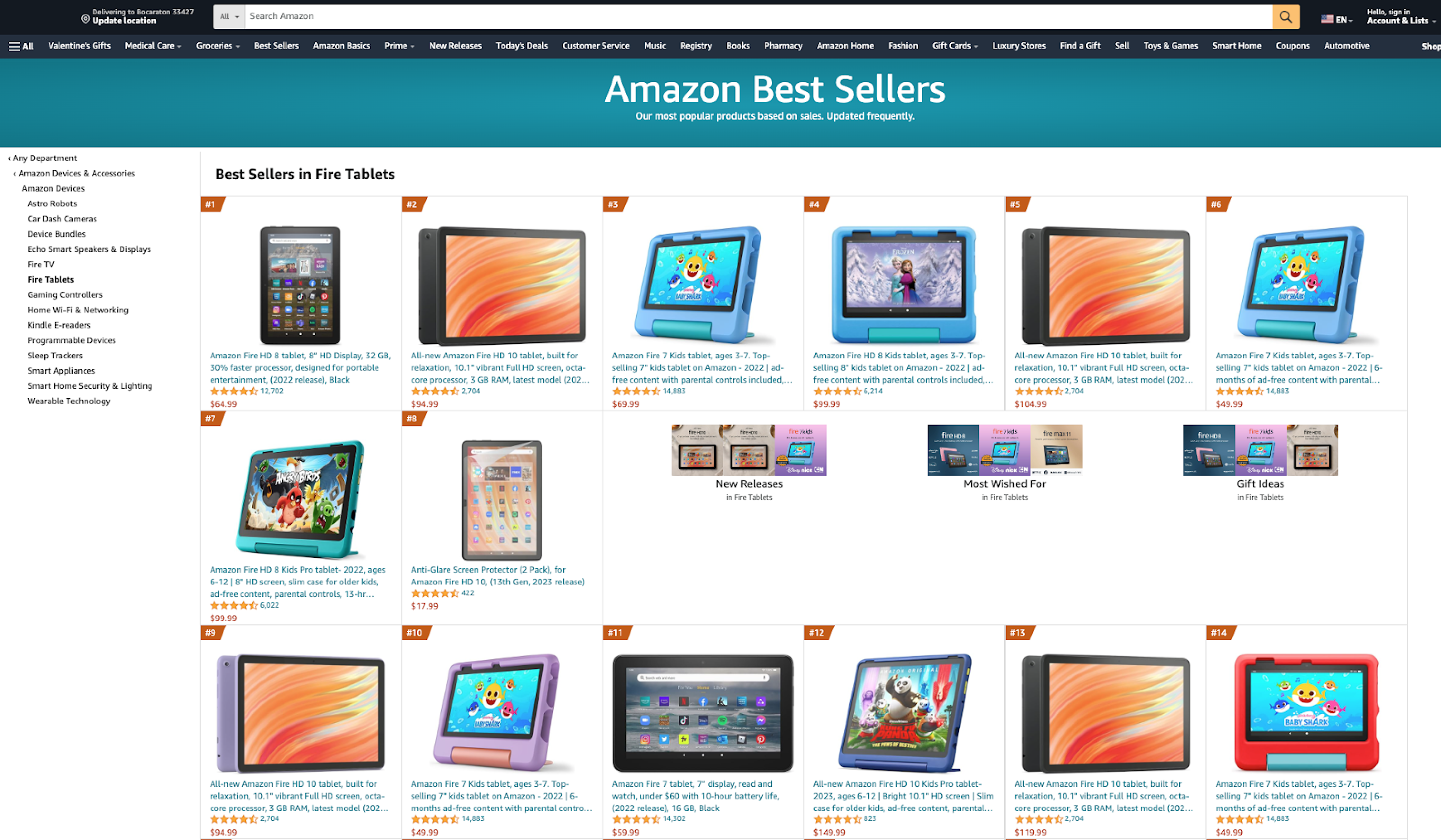
#### HTML example

<figure><img src="https://597677712-files.gitbook.io/~/files/v0/b/gitbook-x-prod.appspot.com/o/spaces%2FBaJCXoqO1zdFnaMnCKrg%2Fuploads%2Fgit-blob-a74c48b93b275d9cfde2e5c15ea3512aa176aab7%2Famazon_best_sellers.png?alt=media" alt=""><figcaption></figcaption></figure>

#### JSON structure

The `amazon_bestsellers` provides comprehensive data on the best-selling products on Amazon. The table below presents a detailed list of each field we parse, along with its description and data type. The table also includes some metadata.

<table><thead><tr><th width="239">Key</th><th width="364">Description</th><th>Type</th></tr></thead><tbody><tr><td><code>url</code></td><td>The URL of the Amazon Best Sellers page.</td><td>string</td></tr><tr><td><code>page</code></td><td>The current page number.</td><td>integer</td></tr><tr><td><code>pages</code></td><td>The total number of pages.</td><td>integer</td></tr><tr><td><code>query</code></td><td>The original search term.</td><td>string</td></tr><tr><td><code>results</code></td><td>A list of best-selling items, one object per item</td><td>array</td></tr><tr><td><code>results.pos</code></td><td>An indicator denoting the position of a bestselling item.</td><td>integer</td></tr><tr><td><code>results.url</code></td><td>The URL of the best selling item.</td><td>string</td></tr><tr><td><code>results.asin</code></td><td>Amazon Standard Identification Number.</td><td>string</td></tr><tr><td><code>results.price</code></td><td>The price of the product.</td><td>float</td></tr><tr><td><code>results.title</code></td><td>The title of the product.</td><td>string</td></tr><tr><td><code>results.image_url</code></td><td>The URL of the product image.</td><td>string</td></tr><tr><td><code>results.rating</code></td><td>The rating of the product.</td><td>float</td></tr><tr><td><code>results.currency</code></td><td>The currency in which the price is denominated.</td><td>string</td></tr><tr><td><code>results.is_prime</code></td><td>Indicates whether the product is eligible for Amazon Prime.</td><td>boolean</td></tr><tr><td><code>results.price_str</code></td><td>The price as displayed on the page, including the currency symbol (e.g. $199.00)</td><td>string</td></tr><tr><td><code>results.price_upper</code></td><td>The upper limit of the price if applicable.</td><td>float</td></tr><tr><td><code>results.ratings_count</code></td><td>The total number of ratings given to the product.</td><td>integer</td></tr><tr><td><code>parse_status_code</code></td><td>The status code of the parsing job. You can see the parser status codes described <a href="/products/web-scraper-api/response-codes.md"><strong>here</strong></a>.</td><td>integer</td></tr><tr><td><code>created_at</code></td><td>The timestamp when the scraping job was created.</td><td>timestamp</td></tr><tr><td><code>updated_at</code></td><td>The timestamp when the scraping job was finished.</td><td>timestamp</td></tr><tr><td><code>job_id</code></td><td>The ID of the job associated with the scraping job.</td><td>string</td></tr><tr><td><code>status_code</code></td><td>The status code of the scraping job. You can see the scraper status codes described <a href="https://github.com/oxylabs/gitbook-public-english/blob/master/scraping-solutions/web-scraper-api/targets/amazon/broken-reference/README.md"><strong>here</strong></a>.</td><td>integer</td></tr><tr><td><code>parser_type</code></td><td>The type of parser used for parsing the data.</td><td>string</td></tr></tbody></table>


---

# Agent Instructions
This documentation is published with GitBook. GitBook is the documentation platform designed so that both humans and AI agents can read, navigate, and reason over technical content effectively. Learn more at gitbook.com.

## Querying This Documentation
If you need additional information that is not directly available in this page, you can query the documentation dynamically by asking a question.

Perform an HTTP GET request on the current page URL with the `ask` query parameter, and the optional `goal` query parameter:

```
GET https://developers.oxylabs.io/api-targets/e-commerce/amazon/best-sellers.md?ask=<question>&goal=<endgoal>
```

`ask` is the immediate question: it should be specific, self-contained, and written in natural language.
`goal` is optional and describes the broader end goal you are ultimately trying to accomplish on behalf of the user. GitBook uses it to tailor the answer towards what is most useful for that goal.

The response will contain a direct answer to the question and relevant excerpts and sources from the documentation.

Use this mechanism when the answer is not explicitly present in the current page, you need clarification or additional context, or you want to retrieve related documentation sections.