> For the complete documentation index, see [llms.txt](https://developers.oxylabs.io/llms.txt). Markdown versions of documentation pages are available by appending `.md` to page URLs; this page is available as [Markdown](https://developers.oxylabs.io/api-targets/cn/e-commerce/walmart/product.md).

# 产品

通过产品 ID 提取 Walmart 产品页面及其解析后的数据，包括价格、评分、卖家信息、规格、变体、履约选项、面包屑导航等。

该 `walmart_product` 源用于检索 Walmart 商品结果页。我们可以返回任意你需要的 Walmart 页面 HTML。此外，我们还可以提供 **Walmart 商品页面的结构化（解析后）输出**.

## 请求示例

下面的示例说明如何获取解析后的 Walmart 商品页面结果。

{% tabs %}
{% tab title="cURL" %}

```shell
curl 'https://realtime.oxylabs.io/v1/queries' \\
--user 'USERNAME:PASSWORD' \\
-H 'Content-Type: application/json' \\
-d '{
        "source": "walmart_product", 
        "product_id": "11601059297",
        "parse": true
    }'
```

{% endtab %}

{% tab title="Python" %}

```python
import requests
from pprint import pprint


# Structure payload.
payload = {
    'source': 'walmart_product',
    'product_id': '11601059297',
    'parse': True,
}

# Get response.
response = requests.request(
    'POST',
    'https://realtime.oxylabs.io/v1/queries',
    auth=('USERNAME', 'PASSWORD'),
    json=payload,
)

# Instead of response with job status and results url, this will return the
# JSON response with the result.
pprint(response.json())
```

{% endtab %}

{% tab title="Node.js" %}

```javascript
const https = require("https");

const username = "USERNAME";
const password = "PASSWORD";
const body = {
    source: "walmart_product",
    product_id: "11601059297",
    parse: true,
};

const options = {
    hostname: "realtime.oxylabs.io",
    path: "/v1/queries",
    method: "POST",
    headers: {
        "Content-Type": "application/json",
        Authorization:
            "Basic " + Buffer.from(`${username}:${password}`).toString("base64"),
    },
};

const request = https.request(options, (response) => {
    let data = "";

    response.on("data", (chunk) => {
        data += chunk;
    });

    response.on("end", () => {
        const responseData = JSON.parse(data);
        console.log(JSON.stringify(responseData, null, 2));
    });
});

request.on("error", (error) => {
    console.error("Error:", error);
});

request.write(JSON.stringify(body));
request.end();
```

{% endtab %}

{% tab title="HTTP" %}

```http
# The whole string you submit has to be URL-encoded.

https://realtime.oxylabs.io/v1/queries?source=walmart_product&product_id=11601059297&parse=true&access_token=12345abcde
```

{% endtab %}

{% tab title="PHP" %}

```php
<?php

$params = array(
    'source' => 'walmart_product',
    'product_id' => '11601059297',
    'parse' => true
);

$ch = curl_init();

curl_setopt($ch, CURLOPT_URL, "https://realtime.oxylabs.io/v1/queries");
curl_setopt($ch, CURLOPT_RETURNTRANSFER, 1);
curl_setopt($ch, CURLOPT_POSTFIELDS, json_encode($params));
curl_setopt($ch, CURLOPT_POST, 1);
curl_setopt($ch, CURLOPT_USERPWD, "USERNAME" . ":" . "PASSWORD");

$headers = array();
$headers[] = "Content-Type: application/json";
curl_setopt($ch, CURLOPT_HTTPHEADER, $headers);

$result = curl_exec($ch);
echo $result;

if (curl_errno($ch)) {
    echo 'Error:' . curl_error($ch);
}
curl_close($ch);
```

{% endtab %}

{% tab title="Golang" %}

```go
package main

import (
	"bytes"
	"encoding/json"
	"fmt"
	"io/ioutil"
	"net/http"
)

func main() {
	const Username = "USERNAME"
	const Password = "PASSWORD"

	payload := map[string]interface{}{
		"source":       "walmart_product",
		"product_id":   "11601059297",
		"parse":        true,
	}

	jsonValue, _ := json.Marshal(payload)

	client := &http.Client{}
	request, _ := http.NewRequest("POST",
		"https://realtime.oxylabs.io/v1/queries",
		bytes.NewBuffer(jsonValue),
	)

	request.SetBasicAuth(Username, Password)
	response, _ := client.Do(request)

	responseText, _ := ioutil.ReadAll(response.Body)
	fmt.Println(string(responseText))
}

```

{% endtab %}

{% tab title="C#" %}

```csharp
using System;
using System.Collections.Generic;
using System.Net.Http;
using System.Net.Http.Json;
using System.Threading.Tasks;

namespace OxyApi
{
    class Program
    {
        static async Task Main()
        {
            const string Username = "USERNAME";
            const string Password = "PASSWORD";

            var parameters = new {
                source = "walmart_product",
                product_id = "11601059297",
                parse = true
            };

            var client = new HttpClient();

            Uri baseUri = new Uri("https://realtime.oxylabs.io");
            client.BaseAddress = baseUri;

            var requestMessage = new HttpRequestMessage(HttpMethod.Post, "/v1/queries");
            requestMessage.Content = JsonContent.Create(parameters);

            var authenticationString = $"{Username}:{Password}";
            var base64EncodedAuthenticationString = Convert.ToBase64String(System.Text.ASCIIEncoding.UTF8.GetBytes(authenticationString));
            requestMessage.Headers.Add("Authorization", "Basic " + base64EncodedAuthenticationString);

            var response = await client.SendAsync(requestMessage);
            var contents = await response.Content.ReadAsStringAsync();

            Console.WriteLine(contents);
        }
    }
}
```

{% endtab %}

{% tab title="Java" %}

```java
package org.example;

import okhttp3.*;
import org.json.JSONObject;
import java.util.concurrent.TimeUnit;

public class Main implements Runnable {
    private static final String AUTHORIZATION_HEADER = "Authorization";
    public static final String USERNAME = "USERNAME";
    public static final String PASSWORD = "PASSWORD";

    public void run() {
        JSONObject jsonObject = new JSONObject();
        jsonObject.put("source", "walmart_product");
        jsonObject.put("product_id", "11601059297");
        jsonObject.put("parse", true);

        Authenticator authenticator = (route, response) -> {
            String credential = Credentials.basic(USERNAME, PASSWORD);
            return response
                    .request()
                    .newBuilder()
                    .header(AUTHORIZATION_HEADER, credential)
                    .build();
        };

        var client = new OkHttpClient.Builder()
                .authenticator(authenticator)
                .readTimeout(180, TimeUnit.SECONDS)
                .build();

        var mediaType = MediaType.parse("application/json; charset=utf-8");
        var body = RequestBody.create(jsonObject.toString(), mediaType);
        var request = new Request.Builder()
                .url("https://realtime.oxylabs.io/v1/queries")
                .post(body)
                .build();

        try (var response = client.newCall(request).execute()) {
            if (response.body() != null) {
                try (var responseBody = response.body()) {
                    System.out.println(responseBody.string());
                }
            }
        } catch (Exception exception) {
            System.out.println("Error: " + exception.getMessage());
        }

        System.exit(0);
    }

    public static void main(String[] args) {
        new Thread(new Main()).start();
    }
}
```

{% endtab %}

{% tab title="JSON" %}

```json
{
    "source": "walmart_product", 
    "product_id": "11601059297", 
    "parse": true
}
```

{% endtab %}
{% endtabs %}

我们使用同步 [**Realtime**](/products/cn/web-scraper-api/integration-methods/realtime.md) 集成方法作为示例。如果你想使用 [**Proxy Endpoint**](/products/cn/web-scraper-api/integration-methods/proxy-endpoint.md) 或异步 [**Push-Pull**](/products/cn/web-scraper-api/integration-methods/push-pull.md) 集成，请参阅 [**集成方法**](/products/cn/web-scraper-api/integration-methods.md) 部分。

## 请求参数值

### 通用

<table><thead><tr><th width="185">参数</th><th width="340.3333333333333">描述</th><th>默认值</th></tr></thead><tbody><tr><td><mark style="background-color:green;"><strong><code>source</code></strong></mark></td><td>设置抓取器。</td><td><code>walmart_product</code></td></tr><tr><td><mark style="background-color:green;"><strong><code>product_id</code></strong></mark></td><td>Walmart 商品 ID。</td><td>-</td></tr><tr><td><code>render</code></td><td>设置为时启用 JavaScript 渲染 <code>html</code>. <a href="/products/cn/web-scraper-api/features/js-rendering-and-browser-control.md#javascript-rendering"><strong>更多信息</strong></a><strong>.</strong></td><td>-</td></tr><tr><td><code>parse</code></td><td>设置为时返回解析后的数据 <code>true</code>.</td><td><code>false</code></td></tr><tr><td><code>callback_url</code></td><td>指向你的回调端点的 URL。 <a href="/products/cn/web-scraper-api/integration-methods/push-pull.md"><strong>更多信息</strong></a></td><td>-</td></tr><tr><td><code>user_agent_type</code></td><td>设备类型和浏览器。完整列表可见 <a href="/products/cn/web-scraper-api/features/http-context-and-job-management/user-agent-type.md"><strong>这里</strong></a>.</td><td><code>桌面端</code></td></tr></tbody></table>

\- 必填参数

### 本地化

将结果适配到特定门店、配送地点。Walmart 门店 ID 列表见：

{% file src="/files/0d53a32dcf2febd94bf40a765b0230511b08c500" %}

你还可以找到 Walmart 门店的官方页面 [**这里**](https://www.walmart.com/store-directory)**.**

<table><thead><tr><th width="164">参数</th><th width="398">描述</th><th>类型</th></tr></thead><tbody><tr><td><code>domain</code></td><td>Walmart 的域名本地化。可用值： <code>com</code>, <code>com.mx</code>, <code>ca</code>, <code>co.cr</code>。默认： <code>com</code>.</td><td>字符串</td></tr><tr><td><code>fulfillment_type</code></td><td>设置履约类型。支持值： <code>pickup</code>, <code>delivery</code>, <code>shipping</code>.</td><td>字符串</td></tr><tr><td><code>delivery_zip</code></td><td>设置收货地点。</td><td>字符串</td></tr><tr><td><code>store_id</code></td><td>设置门店地点。</td><td>字符串</td></tr></tbody></table>

履约类型参数的可用性因 Walmart 域名而异：

<table><thead><tr><th width="341">域名</th><th>支持的履约类型</th></tr></thead><tbody><tr><td><code>walmart.com</code></td><td><code>pickup</code>, <code>delivery</code>, <code>shipping</code></td></tr><tr><td><code>walmart.com.mx</code></td><td><code>pickup</code>, <code>delivery</code></td></tr><tr><td><code>walmart.ca</code></td><td><code>pickup</code>, <code>delivery</code></td></tr><tr><td><code>walmart.co.cr</code></td><td><code>pickup</code></td></tr></tbody></table>

对于国际 `store_id` 列表，请参见以下文件：

{% file src="/files/4f46528eb81a355147474f1621ccb315941832fb" %}

{% file src="/files/d52b112df6ce8920ad2da97936318cc6aaa5aa79" %}

{% file src="/files/b0910e561dcbc6c58b8398ee95b1e9bfd61e074a" %}

{% hint style="info" %}
如果目标门店距离给定邮政编码太远，我们会尝试使用目标门店的邮政编码，否则位置将无法正确设置。如果我们无法设置 `delivery_zip` - Walmart 将返回默认结果，不进行门店定向。
{% endhint %}

## 结构化数据

{% hint style="info" %}
在以下各节中，当某一结果类型有多个项目时，解析后的 JSON 代码片段会被缩短。
{% endhint %}

<details>

<summary>Walmart 商品页面结构化输出</summary>

```json
{
    "results": [
        {
            "content": {
                "price": {
                    "currency": "USD",
                    "price": 629
                },
                "rating": {
                    "count": 745,
                    "rating": 4.4
                },
                "seller": {
                    "id": "F55CDC31AB754BB68FE0B39041159D63",
                    "name": "Walmart.com",
                    "official_name": "Walmart.com"
                },
                "cheapest_seller_name": null,
                "sold_by_walmart_price": null,
                "general": {
                    "url": "https://www.walmart.com/ip/Straight-Talk-Apple-iPhone-16-128GB-White-Prepaid-Smartphone-Locked-to-Straight-Talk/11601059297",
                    "meta": {
                        "gtin": "616960552697",
                        "sku": "11632865509"
                    },
                    "badge": [
                        "In 25+ people's carts",
                        "Best seller"
                    ],
                    "brand": "Apple",
                    "title": "Straight Talk Apple iPhone 16, 128GB, White - Prepaid Smartphone [Locked to Straight Talk]",
                    "images": [
                        "https://i5.walmartimages.com/seo/Straight-Talk-Apple-iPhone-16-128GB-White-Prepaid-Smartphone-Locked-to-Straight-Talk_7f52d4b1-47ea-40cc-ae62-2b5edf40f29b.8ef1f8d28ce70177fbc03331f9fa9064.jpeg?odnHeight=117&odnWidth=117&odnBg=FFFFFF",
                        ...
                    ],
                    "main_image": "https://i5.walmartimages.com/seo/Straight-Talk-Apple-iPhone-16-128GB-White-Prepaid-Smartphone-Locked-to-Straight-Talk_7f52d4b1-47ea-40cc-ae62-2b5edf40f29b.8ef1f8d28ce70177fbc03331f9fa9064.jpeg?odnHeight=573&odnWidth=573&odnBg=FFFFFF",
                    "description": "<p>Superfast. Supersmart. Get the first iPhone built for Apple Intelligence<sup>1</sup> with the iPhone 16 from Straight Talk.</p> <p>With a supersmart A18 chip, jump two generations ahead of the A16 Bionic chip in iPhone 15 to enable Apple Intelligence, powering advanced photo and video features, and supportive console-level gaming, with exceptional power efficiency.</p> <p>Apple Intelligence helps you write, express yourself, and get things done effortlessly, and groundbreaking privacy protection gives you peace of mind that no one else can access your data.</p> <p>Take total camera control with an easier way to quickly access camera tools, like zoom or depth of field, so you can take the perfect shot in record time. The advanced dual-camera system features a 48MP Fusion camera, to capture stunning high-resolution images, with 2x optical-quality Telephoto and an improved 12MP Ultra Wide featuring autofocus.</p> <p>Plus, iPhone 16 works together with the A18 chip to deliver a big boost in battery life with up to 22 hours video playback.2 Charge via USB-C or snap on a MagSafe charger for faster wireless charging.<sup>3</sup></p> <p>All this, with a design to last - as iPhone 16 has a sturdy, aerospace-grade aluminum design with a 6.1-inch Super Retina XDR display.4 It's remarkably durable with the latest-generation Ceramic Shield material that's 2x tougher than any smartphone glass.</p> <p>Pair the iPhone 16 with a Straight Talk no-contract plan featuring unlimited talk &amp; text, plus 10GB of high-speed data starting at only $35/month for a single line, all on America's most reliable 5G network.&nbsp;</p> <p>To activate this device, a Straight Talk Wireless plan is required. Shop for the iPhone 16 online or at your local Walmart.</p><ul>  <li>   <ul>    <li>Apple Intelligence helps you write, express yourself, and get things done effortlessly.&nbsp;</li>    <li>Groundbreaking privacy protections to give you peace of mind that no one else can access your data.&nbsp;</li>    <li>Improved 12MP Ultra Wide camera with autofocus lets you takes incredibly detailed macro photos and videos. Use the 48MP Fusion camera for stunning high-resolution images, and zoom in with the 2x optical-quality Telephoto.</li>    <li>Works together with the A18 chip to deliver a big boost in battery life with up to 22 hours video playback. Charge via USB-C or snap on a MagSafe charger for faster wireless charging.</li>    <li>Sturdy, aerospace-grade aluminum design with a 6.1-inch Super Retina XDR display<sup>4</sup> with the latest-generation Ceramic Shield material 2x tougher than any smartphone glass.</li>   </ul></li>  <li>   <ul>    <li>Stay connected on America's most reliable 5G† network</li>    <li>Single line plans with unlimited talk &amp; text + high speed data start at only $35/line/mo.</li>   </ul></li>  <li>Pair this phone with a best-selling no-contract <a href=\"https://www.walmart.com/browse/straight-talk-plans/0/0/?_refineresult=true&amp;_be_shelf_id=4905483&amp;search_sort=100&amp;facet=shelf_id:4905483\" rel=\"nofollow\">Straight Talk plan</a></li>  <li>Learn more about Straight Talk by visiting our <a href=\"https://www.walmart.com/cp/1045119\" rel=\"nofollow\">Brand Page</a></li>  <li>   <ul>    <li><sup>1</sup>Apple Intelligence will be available in beta on all iPhone 16 models, iPhone 15 Pro, and iPhone 15 Pro Max, with Siri and device language set to U.S. English, as an iOS 18 update in fall 2024. Some features and additional languages will be coming over the course of the next year.</li>    <li><sup>2</sup>Battery life varies by use and configuration. See Apple website for more information.</li>    <li><sup>3</sup>Accessories sold separately.</li>    <li><sup>4</sup>The displays have rounded corners. When measured as a rectangle, the screen is 6.12 inches (iPhone 16), 6.69 inches (iPhone 16 Plus), 6.27 inches (iPhone 16 Pro) or 6.86 inches (iPhone Pro Max) diagonally. Actual viewable area is less.</li>    <li>†5G access requires a 5G-capable device in a 5G coverage area.</li>   </ul></li> </ul>"
                },
                "location": {
                    "city": "Sacramento",
                    "state": "CA",
                    "store_id": "3081",
                    "zip_code": "95829"
                },
                "variations": [
                    {
                        "price": {
                            "currency": "USD",
                            "price": 629
                        },
                        "product_id": "3VYN46XFXQYH",
                        "selected_options": [
                            {
                                "key": "Capacity",
                                "value": "128GB"
                            },
                            {
                                "key": "Series",
                                "value": "iPhone 16"
                            },
                            {
                                "key": "Color",
                                "value": "White"
                            }
                        ],
                        "state": "IN_STOCK"
                    },
                    ...
                ],
                "breadcrumbs": [
                    {
                        "category_name": "Cell Phones",
                        "url": "/cp/cell-phones/1105910"
                    },
                    {
                        "category_name": "Shop Phones by Brand",
                        "url": "/cp/shop-phones-by-brand/7551331"
                    },
                    {
                        "category_name": "Apple iPhone",
                        "url": "/cp/apple-iphone/1127173"
                    },
                    {
                        "category_name": "Straight Talk iPhone",
                        "url": "/cp/straight-talk-iphone/1101612"
                    }
                ],
                "fulfillment": {
                    "delivery": false,
                    "delivery_information": ", Delivery, Not available",
                    "free_shipping": false,
                    "fulfilled_by": "",
                    "out_of_stock": false,
                    "pickup": false,
                    "pickup_information": ", Pickup, Not available",
                    "shipping": true,
                    "shipping_information": ", Shipping, Arrives Sep 21, Free"
                },
                "specifications": [
                    {
                        "key": "版本",
                        "value": "Apple iPhone 16"
                    },
                    {
                        "key": "存储容量",
                        "value": "128 GB"
                    },
                    {
                        "key": "电池容量",
                        "value": "3561 mAh"
                    },
                    ...
                ],
                "parse_status_code": 12000
            },
            "created_at": "2026-09-17 12:50:19",
            "updated_at": "2026-09-17 12:50:21",
            "page": 1,
            "url": "https://www.walmart.com/ip/EDXSVtRlIsxQtrBh/11601059297",
            "job_id": "7506333719238586369",
            "is_render_forced": false,
            "status_code": 200,
            "parser_type": "walmart_product_new"
        }
    ]
}
```

</details>

## 输出数据字典

#### HTML 示例

<figure><img src="https://1830353461-files.gitbook.io/~/files/v0/b/gitbook-x-prod.appspot.com/o/spaces%2FBaJCXoqO1zdFnaMnCKrg%2Fuploads%2Fgit-blob-594d284dbfc053eaf3bc5765fdc40324ee78a1de%2Fimage.png?alt=media" alt=""><figcaption></figcaption></figure>

**JSON 结构**

下表列出了我们解析的每个商品页面元素的详细列表，以及其描述和数据类型。表中还包含一些元数据。

<table><thead><tr><th width="235">键</th><th width="327">描述</th><th>类型</th></tr></thead><tbody><tr><td><code>通用</code></td><td>包含商品页面通用结果详情的对象。</td><td>对象</td></tr><tr><td><code>价格</code></td><td>对象包含商品定价详情。</td><td>对象</td></tr><tr><td><code>评分</code></td><td>商品的评分信息。</td><td>对象</td></tr><tr><td><code>卖家</code></td><td>卖家信息。</td><td>对象</td></tr><tr><td><code>变体</code> （可选）</td><td>商品变体列表。</td><td>数组</td></tr><tr><td><code>面包屑导航</code></td><td>通往商品的类别层级。</td><td>对象</td></tr><tr><td><code>位置</code></td><td>提供请求运行所在位置的信息。</td><td>对象</td></tr><tr><td><code>履约</code></td><td>对象包含商品履约选项信息。</td><td>对象</td></tr><tr><td><code>规格</code></td><td>包含商品具体属性或特征的键值对数组。</td><td>数组</td></tr><tr><td><code>解析状态码</code></td><td>解析任务的状态码。您可以查看所述的解析器状态码 <a href="https://github.com/oxylabs/gitbook-public-english/blob/master/scraping-solutions/web-scraper-api/targets/walmart/broken-reference/README.md"><strong>这里</strong></a>.</td><td>整数</td></tr><tr><td><code>创建时间</code></td><td>抓取任务创建时的时间戳。</td><td>时间戳</td></tr><tr><td><code>更新时间</code></td><td>抓取任务完成时的时间戳。</td><td>时间戳</td></tr><tr><td><code>页码</code></td><td>提取商品数据的页码</td><td>整数</td></tr><tr><td><code>URL</code></td><td>Walmart 网站上商品页面的 URL</td><td>字符串</td></tr><tr><td><code>任务 ID</code></td><td>与抓取任务关联的任务 ID。</td><td>字符串</td></tr><tr><td><code>状态码</code></td><td>抓取任务的状态码。您可以查看所述的抓取器状态码 <a href="https://github.com/oxylabs/gitbook-public-english/blob/master/scraping-solutions/web-scraper-api/targets/walmart/broken-reference/README.md"><strong>这里</strong></a>.</td><td>整数</td></tr><tr><td><code>是否强制渲染</code></td><td>标识此请求是否已强制渲染。</td><td>布尔值</td></tr><tr><td><code>解析器类型</code></td><td>用于提取数据的解析器类型（例如，"walmart_product_new"）。</td><td>字符串</td></tr></tbody></table>

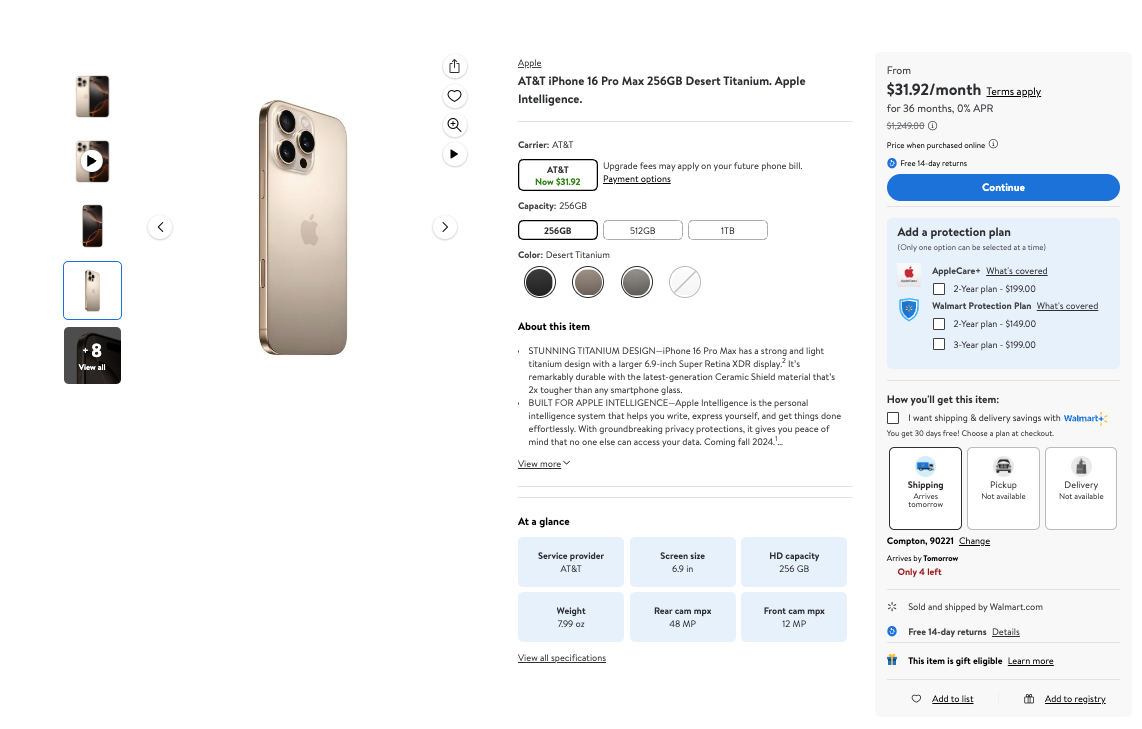
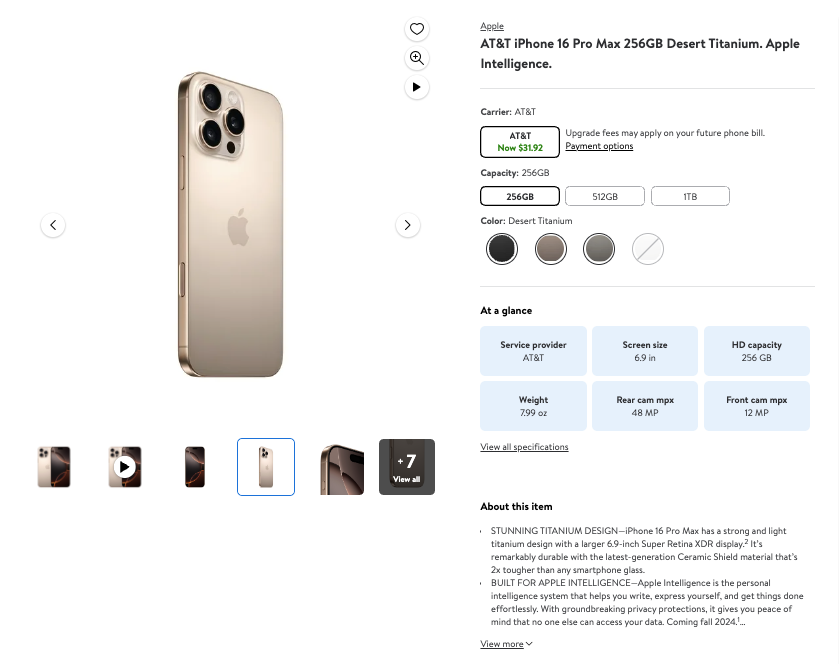
### **通用**

<figure><img src="https://1830353461-files.gitbook.io/~/files/v0/b/gitbook-x-prod.appspot.com/o/spaces%2FBaJCXoqO1zdFnaMnCKrg%2Fuploads%2Fgit-blob-886ac81924e976744cb0e4a71a3f91a7115b6985%2Fimage.png?alt=media" alt=""><figcaption></figcaption></figure>

<table><thead><tr><th>键（通用）</th><th width="295">描述</th><th>类型</th></tr></thead><tbody><tr><td><code>URL</code></td><td>商品的 URL。</td><td>字符串</td></tr><tr><td><code>主图</code></td><td>商品主图的 URL</td><td>整数</td></tr><tr><td><code>图片</code></td><td>商品图片 URL 数组。</td><td>数组</td></tr><tr><td><code>标题</code></td><td>商品标题或名称。</td><td>字符串</td></tr><tr><td><code>描述</code></td><td>商品的详细描述。</td><td>字符串</td></tr><tr><td><code>品牌</code></td><td>商品品牌。</td><td>字符串</td></tr><tr><td><code>标识</code></td><td>表示促销、产品特性、认证或品牌关联等特定属性的标识。</td><td>字符串列表</td></tr><tr><td><code>元数据</code></td><td>商品元数据。</td><td>对象</td></tr><tr><td><code>元数据.sku</code></td><td>商品的库存单位（SKU）。</td><td>字符串</td></tr><tr><td><code>元数据.gtin</code></td><td>商品的全球贸易项目编号（GTIN）。</td><td>字符串</td></tr></tbody></table>

### 价格

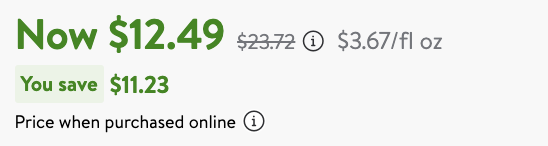
<figure><img src="https://1830353461-files.gitbook.io/~/files/v0/b/gitbook-x-prod.appspot.com/o/spaces%2FBaJCXoqO1zdFnaMnCKrg%2Fuploads%2Fgit-blob-24b4e75dbbbc521ec4d5dcacaed80a1bb236c84f%2FScreenshot%202024-10-16%20at%2015.45.26.png?alt=media" alt=""><figcaption></figcaption></figure>

```json
...
"price": {
    "price": 12.49,
    "price_strikethrough": 23.72,
    "currency": "USD"
},
...
```

<table><thead><tr><th width="217.3046875">键（价格）</th><th width="362.453125">描述</th><th>类型</th></tr></thead><tbody><tr><td><code>价格</code></td><td>商品当前价格，未做任何折扣。</td><td>浮点数</td></tr><tr><td><code>划线价</code></td><td>划线价可能是原价、套装价或标价。</td><td>浮点数</td></tr><tr><td><code>货币</code></td><td>商品价格的 ISO 4217 三字母货币代码。</td><td>字符串</td></tr></tbody></table>

### 评分

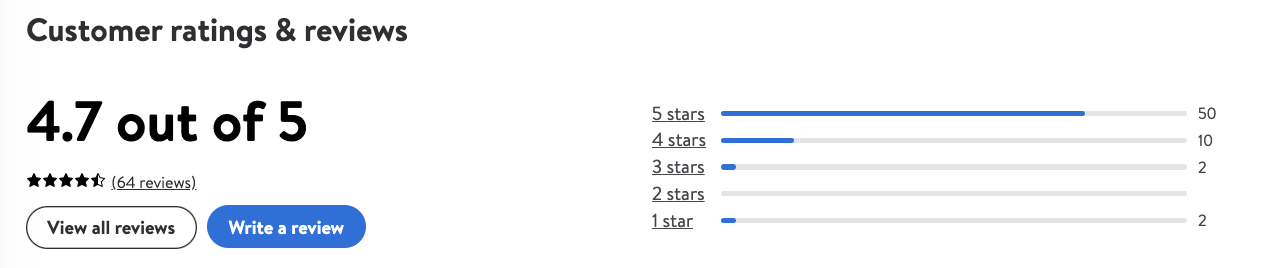
<figure><img src="https://1830353461-files.gitbook.io/~/files/v0/b/gitbook-x-prod.appspot.com/o/spaces%2FBaJCXoqO1zdFnaMnCKrg%2Fuploads%2Fgit-blob-cfebc6743884bd68f3474cd6567ae0c96bc600c1%2Fimage.png?alt=media" alt=""><figcaption></figcaption></figure>

```json
...
 "rating": {
    "count": 64,
    "rating": 4.7
},
...
```

<table><thead><tr><th>键（评分）</th><th width="295">描述</th><th>类型</th></tr></thead><tbody><tr><td><code>评分</code></td><td>商品的平均评分。</td><td>浮点数</td></tr><tr><td><code>数量</code></td><td>商品评分数量。</td><td>整数</td></tr></tbody></table>

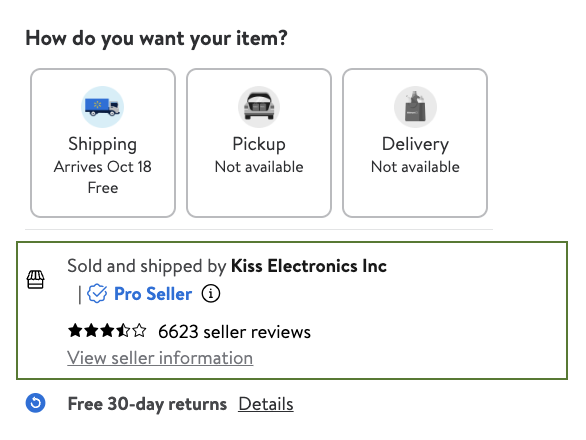
### 卖家

<figure><img src="https://1830353461-files.gitbook.io/~/files/v0/b/gitbook-x-prod.appspot.com/o/spaces%2FBaJCXoqO1zdFnaMnCKrg%2Fuploads%2Fgit-blob-04dc2a7d4f89ae84d8fb46c84521f610722e14b2%2Fimage.png?alt=media" alt="" width="440"><figcaption></figcaption></figure>

```javascript
...
"seller": {
    "id": "ED6F630F4BA94318A00A1D0BAACD0A48",
    "url": "/seller/7648?itemId=701606028&pageName=item&returnUrl=%2Fip%2FApple-iPhone-Xs-64GB-Unlocked-GSM-CDMA-4G-LTE-Phone-w-Dual-12MP-Camera-Gold-Fair-Cosmetics-Fully-Functional%2F701606028",
    "name": "Kiss Electronics Inc",
    "catalog_id": "7648",
    "official_name": "Kiss Electronics Inc"
},
...
```

<table><thead><tr><th>键（卖家）</th><th width="307">描述</th><th>类型</th></tr></thead><tbody><tr><td><code>名称</code></td><td>卖家名称。</td><td>字符串</td></tr><tr><td><code>官方名称</code></td><td>卖家实体的官方注册名称。</td><td>字符串</td></tr><tr><td><code>ID</code></td><td>平台分配给卖家的唯一标识符。</td><td>字符串</td></tr><tr><td><code>URL</code></td><td>指向卖家官网或店铺的 URL。</td><td>字符串</td></tr><tr><td><code>目录 ID</code></td><td>目录 ID。</td><td>字符串</td></tr></tbody></table>

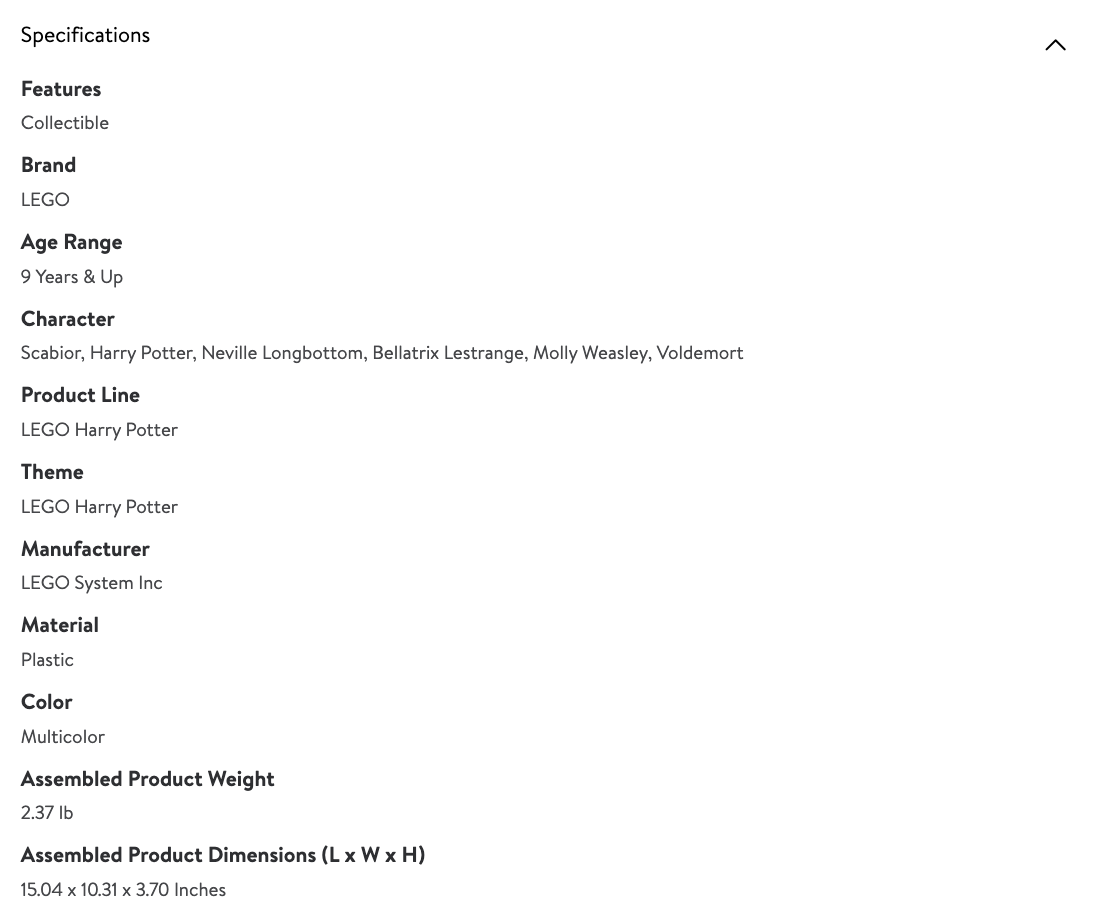
### 规格

<figure><img src="https://1830353461-files.gitbook.io/~/files/v0/b/gitbook-x-prod.appspot.com/o/spaces%2FBaJCXoqO1zdFnaMnCKrg%2Fuploads%2Fgit-blob-36728aaaeee2f22ab5bdb9829ce19776c9e59f80%2Fimage.png?alt=media" alt=""><figcaption></figcaption></figure>

```javascript
...
"specifications": [
    ...
    {
        "key": "品牌",
        "value": "LEGO"
    },
    {
        "key": "适用年龄范围",
        "value": "9 岁及以上"
    },
]
...
```

<table><thead><tr><th>键（规格）</th><th width="332">描述</th><th>类型</th></tr></thead><tbody><tr><td><code>键</code></td><td>商品的具体属性或特征。</td><td>字符串</td></tr><tr><td><code>值</code></td><td>由 specifications 键指定的属性对应的值或描述。</td><td>字符串</td></tr></tbody></table>

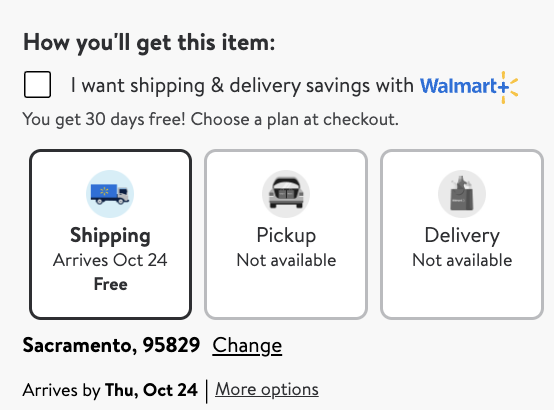
### 履约

<figure><img src="https://1830353461-files.gitbook.io/~/files/v0/b/gitbook-x-prod.appspot.com/o/spaces%2FBaJCXoqO1zdFnaMnCKrg%2Fuploads%2Fgit-blob-662126e2673b86bb05cb9598aab17dbd0ced5aa5%2FScreenshot%202024-10-16%20at%2015.38.34.png?alt=media" alt=""><figcaption></figcaption></figure>

```javascript
...
"fulfillment": {
                    "pickup": false,
                    "delivery": false,
                    "shipping": true,
                    "out_of_stock": false,
                    "free_shipping": true,
                    "pickup_information": "取货，不可用",
                    "delivery_information": "配送，不可用",
                    "shipping_information": "配送，预计 10 月 24 日送达，免运费"
                },
...
```

<table><thead><tr><th width="250">键（履约）</th><th width="325">描述</th><th>类型</th></tr></thead><tbody><tr><td><code>pickup</code></td><td>指示商品是否可通过门店自提履约。</td><td>布尔值</td></tr><tr><td><code>自提信息</code></td><td>当 pickup = true 时的自提提示。</td><td>字符串</td></tr><tr><td><code>delivery</code></td><td>指示商品是否可通过本地门店配送履约。</td><td>布尔值</td></tr><tr><td><code>配送信息</code></td><td>当 delivery = true 时的本地门店配送提示。</td><td>字符串</td></tr><tr><td><code>shipping</code></td><td>指示商品是否可通过送货到家履约。</td><td>布尔值</td></tr><tr><td><code>配送信息</code></td><td>如有显示，则为配送提示。</td><td>字符串</td></tr><tr><td><code>免运费</code></td><td>指示是否免运费。</td><td>布尔值</td></tr><tr><td><code>缺货</code></td><td>指示商品当前是否缺货。</td><td>布尔值</td></tr></tbody></table>

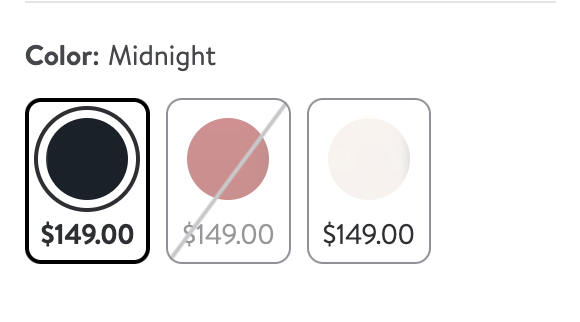
### 变体

<figure><img src="https://1830353461-files.gitbook.io/~/files/v0/b/gitbook-x-prod.appspot.com/o/spaces%2FBaJCXoqO1zdFnaMnCKrg%2Fuploads%2Fgit-blob-e964dce87487fe8524d272c2a31cbdb489c22b19%2Fimage.png?alt=media" alt=""><figcaption></figcaption></figure>

```javascript
...
"variations": [
    {
        "state": "IN_STOCK",
        "product_id": "7328JAQF0Y2S",
        "selected_options": [
            {
                "key": "Color",
                "value": "黑色"
            },
]
...
```

<table><thead><tr><th width="284">键（变体）</th><th width="298">描述</th><th>类型</th></tr></thead><tbody><tr><td><code>状态</code></td><td>商品变体的可用状态。</td><td>字符串</td></tr><tr><td><code>product_id</code></td><td>每个商品变体的唯一标识符。</td><td>字符串</td></tr><tr><td><code>已选选项</code></td><td>包含定义该变体的已选选项的数组。</td><td>数组</td></tr><tr><td><code>selected_options.键</code></td><td>描述所选选项的键。</td><td>字符串</td></tr><tr><td><code>selected_options.值</code></td><td>所选选项的值。</td><td>字符串</td></tr></tbody></table>

### 面包屑导航

<figure><img src="https://1830353461-files.gitbook.io/~/files/v0/b/gitbook-x-prod.appspot.com/o/spaces%2FBaJCXoqO1zdFnaMnCKrg%2Fuploads%2Fgit-blob-250ee4f28c28046e4edef5fb6a6c8c3f75f6ec60%2FScreenshot%202024-10-16%20at%2015.36.54.png?alt=media" alt=""><figcaption></figcaption></figure>

```javascript
... 
"breadcrumbs": [
    {
        "url": "/cp/cell-phones/1105910",
        "category_name": "Cell Phones"
    },
    {
        "url": "/cp/phones-with-plans/1073085",
        "category_name": "Phones With Plans"
    },
    {
        "url": "/cp/postpaid-phones/8230659",
        "category_name": "Postpaid Phones"
    }
    ...
],
...
```

<table><thead><tr><th>键（面包屑导航）</th><th width="312">描述</th><th>类型</th></tr></thead><tbody><tr><td><code>类别名称</code></td><td>类别名称。</td><td>字符串</td></tr><tr><td><code>URL</code></td><td>类别的 URL</td><td>字符串</td></tr></tbody></table>

### 位置

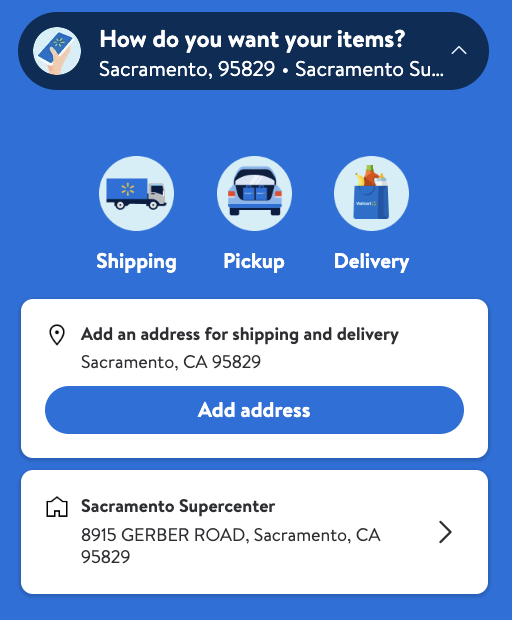
<figure><img src="https://1830353461-files.gitbook.io/~/files/v0/b/gitbook-x-prod.appspot.com/o/spaces%2FBaJCXoqO1zdFnaMnCKrg%2Fuploads%2Fgit-blob-beb3ec96d78cdb3de18fe21fab371e84560da500%2FScreenshot%202024-10-16%20at%2015.31.30.png?alt=media" alt="" width="384"><figcaption></figcaption></figure>

```javascript
...
"location": {
    "city": "Sacramento",
    "state": "CA",
    "store_id": "8915",
    "zip_code": "95829"
},
...
```

<table><thead><tr><th>键（位置）</th><th width="297">描述</th><th>类型</th></tr></thead><tbody><tr><td><code>城市</code></td><td>请求运行所在的城市。</td><td>字符串</td></tr><tr><td><code>状态</code></td><td>请求运行所在的州。</td><td>字符串</td></tr><tr><td><code>邮政编码</code></td><td>请求运行所在的邮政编码。</td><td>字符串</td></tr><tr><td><code>store_id</code></td><td>请求运行所在门店的 ID。</td><td>字符串</td></tr></tbody></table>


---

# Agent Instructions
This documentation is published with GitBook. GitBook is the documentation platform designed so that both humans and AI agents can read, navigate, and reason over technical content effectively. Learn more at gitbook.com.

## Querying This Documentation
If you need additional information that is not directly available in this page, you can query the documentation dynamically by asking a question.

Perform an HTTP GET request on the current page URL with the `ask` query parameter, and the optional `goal` query parameter:

```
GET https://developers.oxylabs.io/api-targets/cn/e-commerce/walmart/product.md?ask=<question>&goal=<endgoal>
```

`ask` is the immediate question: it should be specific, self-contained, and written in natural language.
`goal` is optional and describes the broader end goal you are ultimately trying to accomplish on behalf of the user. GitBook uses it to tailor the answer towards what is most useful for that goal.

The response will contain a direct answer to the question and relevant excerpts and sources from the documentation.

Use this mechanism when the answer is not explicitly present in the current page, you need clarification or additional context, or you want to retrieve related documentation sections.