> For the complete documentation index, see [llms.txt](https://developers.oxylabs.io/llms.txt). Markdown versions of documentation pages are available by appending `.md` to page URLs; this page is available as [Markdown](https://developers.oxylabs.io/api-targets/cn/e-commerce/target/category.md).
# 类别
通过分类节点 ID 抓取 Target 类别页面,支持商店、履约类型和配送 ZIP 代码本地化。
该 `target_category` 该数据源用于根据 Target 的 taxonomy node ID 获取 Target 分类页面。该数据源支持本地化功能,并允许你浏览 Target 的产品分类。
## 请求示例
{% tabs %}
{% tab title="cURL" %}
```bash
curl 'https://realtime.oxylabs.io/v1/queries' \
--user 'USERNAME:PASSWORD' \
-H 'Content-Type: application/json' \
-d '{
"source": "target_category",
"category_id": "owq2q",
"render": "html"
}'
```
{% endtab %}
{% tab title="Python" %}
```python
import requests
from pprint import pprint
# Structure payload
payload = {
'source': 'target_category',
'category_id': 'owq2q',
'render': 'html',
}
# Get response
response = requests.request(
'POST',
'https://realtime.oxylabs.io/v1/queries',
auth=('USERNAME', 'PASSWORD'),
json=payload,
)
# Print the response
pprint(response.json())
```
{% endtab %}
{% tab title="Node.js" %}
```javascript
const https = require("https");
const username = "USERNAME";
const password = "PASSWORD";
const body = {
source: "target_category",
category_id: "owq2q",
render: "html",
};
const options = {
hostname: "realtime.oxylabs.io",
path: "/v1/queries",
method: "POST",
headers: {
"Content-Type": "application/json",
Authorization:
"Basic " + Buffer.from(`${username}:${password}`).toString("base64"),
},
};
const request = https.request(options, (response) => {
let data = "";
response.on("data", (chunk) => {
data += chunk;
});
response.on("end", () => {
const responseData = JSON.parse(data);
console.log(JSON.stringify(responseData, null, 2));
});
});
request.on("error", (error) => {
console.error("Error:", error);
});
request.write(JSON.stringify(body));
request.end();
```
{% endtab %}
{% tab title="HTTP" %}
```http
你提交的整个字符串必须进行 URL 编码。
https://realtime.oxylabs.io/v1/queries?source=target_category&category_id=owq2q&render=html&access_token=12345abcde
```
{% endtab %}
{% tab title="PHP" %}
```php
'target_category',
'category_id' => 'owq2q',
'render' => 'html'
);
$ch = curl_init();
curl_setopt($ch, CURLOPT_URL, "https://realtime.oxylabs.io/v1/queries");
curl_setopt($ch, CURLOPT_RETURNTRANSFER, 1);
curl_setopt($ch, CURLOPT_POSTFIELDS, json_encode($params));
curl_setopt($ch, CURLOPT_POST, 1);
curl_setopt($ch, CURLOPT_USERPWD, "USERNAME" . ":" . "PASSWORD");
$headers = array();
$headers[] = "Content-Type: application/json";
curl_setopt($ch, CURLOPT_HTTPHEADER, $headers);
$result = curl_exec($ch);
echo $result;
if (curl_errno($ch)) {
echo 'Error:' . curl_error($ch);
}
curl_close($ch);
```
{% endtab %}
{% tab title="Golang" %}
```go
package main
import (
"bytes"
"encoding/json"
"fmt"
"io/ioutil"
"net/http"
)
func main() {
const Username = "USERNAME"
const Password = "PASSWORD"
payload := map[string]interface{}{
"source": "target_category",
"category_id": "owq2q",
"render": "html",
}
jsonValue, _ := json.Marshal(payload)
client := &http.Client{}
request, _ := http.NewRequest("POST",
"https://realtime.oxylabs.io/v1/queries",
bytes.NewBuffer(jsonValue),
)
request.SetBasicAuth(Username, Password)
response, _ := client.Do(request)
responseText, _ := ioutil.ReadAll(response.Body)
fmt.Println(string(responseText))
}
```
{% endtab %}
{% tab title="Java" %}
```java
package org.example;
import okhttp3.*;
import org.json.JSONObject;
import java.util.concurrent.TimeUnit;
public class Main implements Runnable {
private static final String AUTHORIZATION_HEADER = "Authorization";
public static final String USERNAME = "USERNAME";
public static final String PASSWORD = "PASSWORD";
public void run() {
JSONObject jsonObject = new JSONObject();
jsonObject.put("source", "target_category");
jsonObject.put("category_id", "owq2q");
jsonObject.put("render", "html");
Authenticator authenticator = (route, response) -> {
String credential = Credentials.basic(USERNAME, PASSWORD);
return response
.request()
.newBuilder()
.header(AUTHORIZATION_HEADER, credential)
.build();
};
var client = new OkHttpClient.Builder()
.authenticator(authenticator)
.readTimeout(180, TimeUnit.SECONDS)
.build();
var mediaType = MediaType.parse("application/json; charset=utf-8");
var body = RequestBody.create(jsonObject.toString(), mediaType);
var request = new Request.Builder()
.url("https://realtime.oxylabs.io/v1/queries")
.post(body)
.build();
try (var response = client.newCall(request).execute()) {
if (response.body() != null) {
try (var responseBody = response.body()) {
System.out.println(responseBody.string());
}
}
} catch (Exception exception) {
System.out.println("Error: " + exception.getMessage());
}
System.exit(0);
}
public static void main(String[] args) {
new Thread(new Main()).start();
}
}
```
{% endtab %}
{% tab title="JSON" %}
```json
{
"source": "target_category",
"category_id": "owq2q",
"render": "html"
}
```
{% endtab %}
{% endtabs %}
我们在示例中使用同步 [**Realtime**](/products/cn/web-scraper-api/integration-methods/realtime.md) 集成方式。如果你想使用 [**Proxy Endpoint**](/products/cn/web-scraper-api/integration-methods/proxy-endpoint.md) 或异步 [**Push-Pull**](/products/cn/web-scraper-api/integration-methods/push-pull.md) 集成,请参阅 [**集成方式**](/products/cn/web-scraper-api/integration-methods.md) 部分。
## 请求参数值
### 通用
| 参数 | 描述 | 默认值 |
| ------------------------------------------------------------- | ----------------------------------------------------------------------------------------------------------------------------------------- | ---------------- |
| `source` | 设置抓取器。 | target\_category |
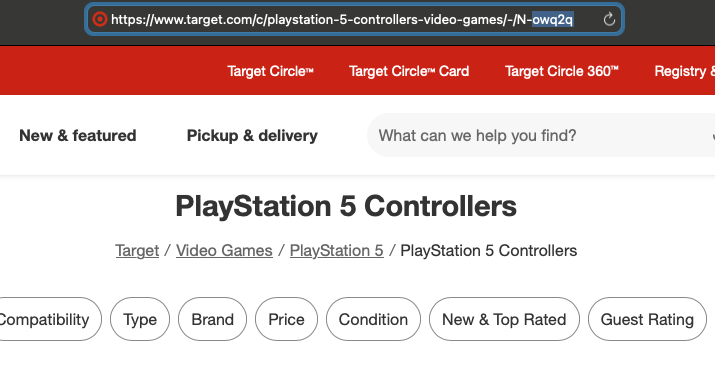
| **category\_id** | 分类的 Target taxonomy node ID(例如,PlayStation 5 控制器对应 "owq2q")。 | - |
| `render` | 设置为 `html`. [**时启用 JavaScript 渲染。**](/products/cn/web-scraper-api/features/js-rendering-and-browser-control.md#javascript-rendering)**.** | - |
| `callback_url` | 指向你的回调端点的 URL。 [**时启用 JavaScript 渲染。**](/products/cn/web-scraper-api/integration-methods/push-pull.md) | - |
| `user_agent_type` | 设备类型和浏览器。完整列表可在 [**这里**](/products/cn/web-scraper-api/features/http-context-and-job-management/user-agent-type.md). | 桌面端 |
\- 必填参数
### 本地化
根据特定商店、履约类型和配送地点调整结果。
| 参数 | 描述 | 类型 |
| ------------------ | ---------------------------------------------------------------- | --- |
| `fulfillment_type` | 设置履约类型。可用值为:pickup、shipping、shop\_in\_store、same\_day\_delivery。 | 字符串 |
| `store_id` | 设置商店位置。 | 整数 |
| `delivery_zip` | 设置配送目的地。 | 字符串 |
## 理解 Target 的 node ID
Target 的分类系统使用 node ID 来标识特定分类。这些 node ID 是 Target taxonomy 系统中的唯一标识符。
### 示例 node ID
Node ID 可在分类页面 URL 中找到。它是 URL 中格式为 `N-<5 个字符>` 的部分。以下是一些示例分类 URL 及其对应的 node ID:
1. PlayStation 5 控制器: `owq2q`
* 完整 URL:
2. PlayStation 5 配件: `lbxgt`
* 完整 URL:
3. PlayStation 5: `hj96d`
* 完整 URL:
 ### Node ID 格式
使用 `target_category` source 时,你只需提供不带 `N-` 前缀的 node ID。API 会自动正确格式化 URL。
---
# Agent Instructions
This documentation is published with GitBook. GitBook is the documentation platform designed so that both humans and AI agents can read, navigate, and reason over technical content effectively. Learn more at gitbook.com.
## Querying This Documentation
If you need additional information that is not directly available in this page, you can query the documentation dynamically by asking a question.
Perform an HTTP GET request on the current page URL with the `ask` query parameter, and the optional `goal` query parameter:
```
GET https://developers.oxylabs.io/api-targets/cn/e-commerce/target/category.md?ask=&goal=
```
`ask` is the immediate question: it should be specific, self-contained, and written in natural language.
`goal` is optional and describes the broader end goal you are ultimately trying to accomplish on behalf of the user. GitBook uses it to tailor the answer towards what is most useful for that goal.
The response will contain a direct answer to the question and relevant excerpts and sources from the documentation.
Use this mechanism when the answer is not explicitly present in the current page, you need clarification or additional context, or you want to retrieve related documentation sections.
### Node ID 格式
使用 `target_category` source 时,你只需提供不带 `N-` 前缀的 node ID。API 会自动正确格式化 URL。
---
# Agent Instructions
This documentation is published with GitBook. GitBook is the documentation platform designed so that both humans and AI agents can read, navigate, and reason over technical content effectively. Learn more at gitbook.com.
## Querying This Documentation
If you need additional information that is not directly available in this page, you can query the documentation dynamically by asking a question.
Perform an HTTP GET request on the current page URL with the `ask` query parameter, and the optional `goal` query parameter:
```
GET https://developers.oxylabs.io/api-targets/cn/e-commerce/target/category.md?ask=&goal=
```
`ask` is the immediate question: it should be specific, self-contained, and written in natural language.
`goal` is optional and describes the broader end goal you are ultimately trying to accomplish on behalf of the user. GitBook uses it to tailor the answer towards what is most useful for that goal.
The response will contain a direct answer to the question and relevant excerpts and sources from the documentation.
Use this mechanism when the answer is not explicitly present in the current page, you need clarification or additional context, or you want to retrieve related documentation sections.