> For the complete documentation index, see [llms.txt](https://developers.oxylabs.io/llms.txt). Markdown versions of documentation pages are available by appending `.md` to page URLs; this page is available as [Markdown](https://developers.oxylabs.io/api-targets/cn/e-commerce/bestbuy/product.md).

# 产品

获取 Best Buy 产品详情，包括价格、评分和规格。高效提取解析后的数据或 HTML 数据。

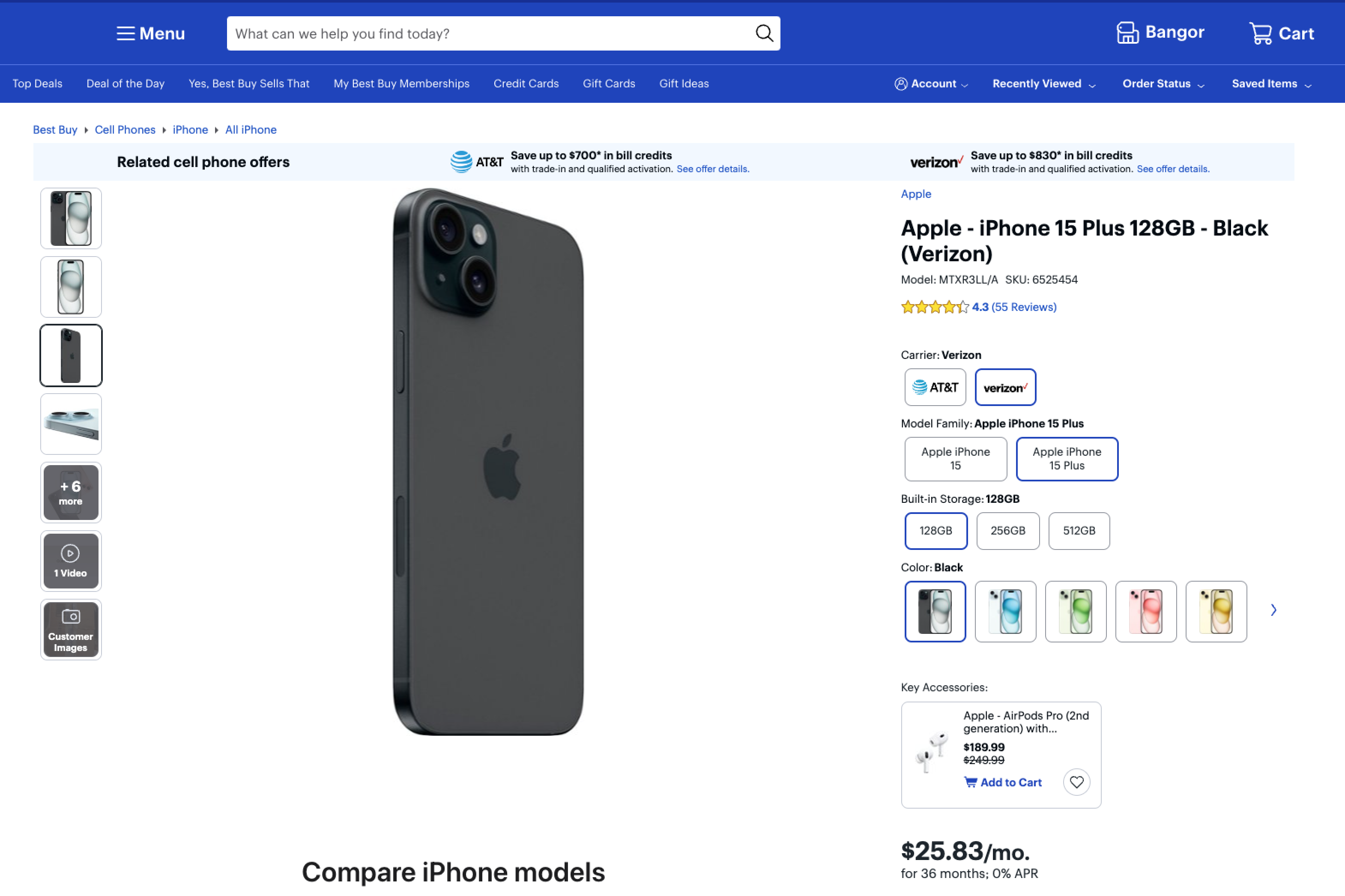
该 `bestbuy_product` source 旨在检索 Bestbuy 产品结果页。我们可以返回你需要的任何 Best Buy 页面 HTML。此外，我们还可以提供 **Best Buy 产品页的结构化（解析后）输出**.

## 请求示例

下面的示例说明如何获取已解析的 Best Buy 商品结果。

{% tabs %}
{% tab title="cURL" %}

```shell
curl 'https://realtime.oxylabs.io/v1/queries' \\
--user 'USERNAME:PASSWORD' \\
-H 'Content-Type: application/json' \\
-d '{
        "source": "bestbuy_product", 
        "product_id": "6586591",
        "parse": true
    }'
```

{% endtab %}

{% tab title="Python" %}

```python
import requests
from pprint import pprint


# 结构化载荷。
payload = {
    'source': 'bestbuy_product',
    'product_id': '6586591',
    'parse': True
}

# 获取响应。
response = requests.request(
    'POST',
    'https://realtime.oxylabs.io/v1/queries',
    auth=('USERNAME', 'PASSWORD'),
    json=payload,
)

# 不会返回包含作业状态和结果 url 的响应，而是返回
# 包含结果的 JSON 响应。
pprint(response.json())
```

{% endtab %}

{% tab title="Node.js" %}

```javascript
const https = require("https");

const username = "USERNAME";
const password = "PASSWORD";
const body = {
    source: "bestbuy_product",
    query: "6586591",
    parse: true
};

const options = {
    hostname: "realtime.oxylabs.io",
    path: "/v1/queries",
    method: "POST",
    headers: {
        "Content-Type": "application/json",
        Authorization:
            "Basic " + Buffer.from(`${username}:${password}`).toString("base64"),
    },
};

const request = https.request(options, (response) => {
    let data = "";

    response.on("data", (chunk) => {
        data += chunk;
    });

    response.on("end", () => {
        const responseData = JSON.parse(data);
        console.log(JSON.stringify(responseData, null, 2));
    });
});

request.on("error", (error) => {
    console.error("Error:", error);
});

request.write(JSON.stringify(body));
request.end();
```

{% endtab %}

{% tab title="HTTP" %}

```http
# The whole string you submit has to be URL-encoded.

https://realtime.oxylabs.io/v1/queries?source=bestbuy_product&product_id=6586591&parse=true&access_token=12345abcde
```

{% endtab %}

{% tab title="PHP" %}

```php
<?php

$params = array(
    'source' => 'bestbuy_product',
    'product_id' => '6586591',
    'parse' => true
);

$ch = curl_init();

curl_setopt($ch, CURLOPT_URL, "https://realtime.oxylabs.io/v1/queries");
curl_setopt($ch, CURLOPT_RETURNTRANSFER, 1);
curl_setopt($ch, CURLOPT_POSTFIELDS, json_encode($params));
curl_setopt($ch, CURLOPT_POST, 1);
curl_setopt($ch, CURLOPT_USERPWD, "USERNAME" . ":" . "PASSWORD");

$headers = array();
$headers[] = "Content-Type: application/json";
curl_setopt($ch, CURLOPT_HTTPHEADER, $headers);

$result = curl_exec($ch);
echo $result;

if (curl_errno($ch)) {
    echo 'Error:' . curl_error($ch);
}
curl_close($ch);
```

{% endtab %}

{% tab title="Golang" %}

```go
package main

import (
	"bytes"
	"encoding/json"
	"fmt"
	"io/ioutil"
	"net/http"
)

func main() {
	const Username = "USERNAME"
	const Password = "PASSWORD"

	payload := map[string]interface{}{
		"source":       "bestbuy_product",
		"product_id":   "6586591",
		"parse":        true
	}

	jsonValue, _ := json.Marshal(payload)

	client := &http.Client{}
	request, _ := http.NewRequest("POST",
		"https://realtime.oxylabs.io/v1/queries",
		bytes.NewBuffer(jsonValue),
	)

	request.SetBasicAuth(Username, Password)
	response, _ := client.Do(request)

	responseText, _ := ioutil.ReadAll(response.Body)
	fmt.Println(string(responseText))
}

```

{% endtab %}

{% tab title="C#" %}

```csharp
using System;
using System.Collections.Generic;
using System.Net.Http;
using System.Net.Http.Json;
using System.Threading.Tasks;

namespace OxyApi
{
    class Program
    {
        static async Task Main()
        {
            const string Username = "USERNAME";
            const string Password = "PASSWORD";

            var parameters = new {
                source = "bestbuy_product",
                product_id = "6586591",
                parse = true
            };

            var client = new HttpClient();

            Uri baseUri = new Uri("https://realtime.oxylabs.io");
            client.BaseAddress = baseUri;

            var requestMessage = new HttpRequestMessage(HttpMethod.Post, "/v1/queries");
            requestMessage.Content = JsonContent.Create(parameters);

            var authenticationString = $"{Username}:{Password}";
            var base64EncodedAuthenticationString = Convert.ToBase64String(System.Text.ASCIIEncoding.UTF8.GetBytes(authenticationString));
            requestMessage.Headers.Add("Authorization", "Basic " + base64EncodedAuthenticationString);

            var response = await client.SendAsync(requestMessage);
            var contents = await response.Content.ReadAsStringAsync();

            Console.WriteLine(contents);
        }
    }
}
```

{% endtab %}

{% tab title="Java" %}

```java
package org.example;

import okhttp3.*;
import org.json.JSONObject;
import java.util.concurrent.TimeUnit;

public class Main implements Runnable {
    private static final String AUTHORIZATION_HEADER = "Authorization";
    public static final String USERNAME = "USERNAME";
    public static final String PASSWORD = "PASSWORD";

    public void run() {
        JSONObject jsonObject = new JSONObject();
        jsonObject.put("source", "bestbuy_product");
        jsonObject.put("product_id", "6586591");
        jsonObject.put("parse", true);

        Authenticator authenticator = (route, response) => {
            String credential = Credentials.basic(USERNAME, PASSWORD);
            return response
                    .request()
                    .newBuilder()
                    .header(AUTHORIZATION_HEADER, credential)
                    .build();
        };

        var client = new OkHttpClient.Builder()
                .authenticator(authenticator)
                .readTimeout(180, TimeUnit.SECONDS)
                .build();

        var mediaType = MediaType.parse("application/json; charset=utf-8");
        var body = RequestBody.create(jsonObject.toString(), mediaType);
        var request = new Request.Builder()
                .url("https://realtime.oxylabs.io/v1/queries")
                .post(body)
                .build();

        try (var response = client.newCall(request).execute()) {
            if (response.body() != null) {
                try (var responseBody = response.body()) {
                    System.out.println(responseBody.string());
                }
            }
        } catch (Exception exception) {
            System.out.println("Error: " + exception.getMessage());
        }

        System.exit(0);
    }

    public static void main(String[] args) {
        new Thread(new Main()).start();
    }
}
```

{% endtab %}

{% tab title="JSON" %}

```json
{
    "source": "bestbuy_product", 
    "product_id": "6586591", 
    "parse": true
}
```

{% endtab %}
{% endtabs %}

我们在示例中使用同步 [**Realtime**](/products/cn/web-scraper-api/integration-methods/realtime.md) 集成方法。如果您想使用 [**Proxy Endpoint**](/products/cn/web-scraper-api/integration-methods/proxy-endpoint.md) 或异步 [**Push-Pull**](/products/cn/web-scraper-api/integration-methods/push-pull.md) 集成，请参阅 [**集成方法**](/products/cn/web-scraper-api/integration-methods.md) 部分。

## 请求参数值

### 通用

<table><thead><tr><th width="205">参数</th><th width="289.3333333333333">描述</th><th>默认值</th></tr></thead><tbody><tr><td><mark style="background-color:green;"><strong>source</strong></mark></td><td>设置抓取器。</td><td><code>universal</code></td></tr><tr><td><mark style="background-color:green;"><strong>product_id</strong></mark></td><td>7 位字符的产品 ID。</td><td>-</td></tr><tr><td><code>render</code></td><td>设置为时启用 JavaScript 渲染 <code>html</code>. <a href="/products/cn/web-scraper-api/features/js-rendering-and-browser-control.md#javascript-rendering"><strong>更多信息</strong></a><strong>.</strong></td><td>-</td></tr><tr><td><code>解析</code></td><td>设置为以下值时返回解析后的数据： <code>true</code>。查看输出 <a href="#output-data-dictionary"><strong>数据字典</strong></a>.</td><td><code>false</code></td></tr><tr><td><code>callback_url</code></td><td>回调端点的 URL。 <a href="/products/cn/web-scraper-api/integration-methods/push-pull.md"><strong>更多信息</strong></a>.</td><td>-</td></tr><tr><td><code>user_agent_type</code></td><td>设备类型和浏览器。完整列表可在 <a href="/products/cn/web-scraper-api/features/http-context-and-job-management/user-agent-type.md"><strong>此处</strong></a>.</td><td><code>desktop</code></td></tr></tbody></table>

\- 必填参数

### 本地化

将结果适配为特定域名、商店和配送地点。

<table><thead><tr><th width="212">参数</th><th width="180">描述</th><th width="135">默认值</th><th>类型</th></tr></thead><tbody><tr><td><code>domain</code></td><td>Bestbuy 的域名本地化。可用值： <code>com</code>, <code>ca</code>.</td><td><code>com</code></td><td>字符串</td></tr><tr><td><code>store_id</code></td><td>指定门店。</td><td>-</td><td>整数</td></tr><tr><td><code>delivery_zip</code></td><td>设置配送 ZIP 位置。</td><td>-</td><td>字符串</td></tr></tbody></table>

电商爬虫 API 可从 Best Buy 产品结果中提取 HTML 或 JSON 格式的数据，并提供页面各元素的结构化数据。

#### 输出示例

```json
{
    "results": [
        {
            "content": {
                "url": "https://www.bestbuy.com/site/apple-iphone-15-plus-128gb-black-verizon/6525454.p?skuId=6525454&intl=nosplash",
                "price": {
                    "price": 25.83,
                    "currency": "USD"
                },
                "title": "Apple - iPhone 15 Plus 128GB - 黑色（Verizon）",
                "rating": {
                    "count": 55,
                    "score": 4.3
                },
                "_errors": [
                    "'NoneType' 对象没有属性 'xpath'"
                ],
                "product_id": "6525410",
                "is_sold_out": false,
                "parse_status_code": 12004,
            },
            "created_at": "2024-06-13 11:44:20",
            "updated_at": "2024-06-13 11:44:48",
            "page": 1,
            "url": "https://www.bestbuy.com/site/apple-iphone-15-plus-128gb-black-verizon/6525454.p?skuId=6525454&intl=nosplash",
            "job_id": "7206984735770310657",
            "status_code": 200,
            "parser_type": "bestbuy_product"
        }
    ]
}
```

## 输出数据字典

#### HTML 示例

<figure><img src="https://1830353461-files.gitbook.io/~/files/v0/b/gitbook-x-prod.appspot.com/o/spaces%2FBaJCXoqO1zdFnaMnCKrg%2Fuploads%2Fgit-blob-b62f1b361663fe21227116f3cb912a492a71c4a2%2Fbestbuy.png?alt=media" alt=""><figcaption></figcaption></figure>

#### JSON 结构

下表详细列出了我们解析的每个商品页面元素，以及对应的描述和数据类型。表中还包含一些元数据。

<table><thead><tr><th width="237">键</th><th width="372.3333333333333">描述</th><th>类型</th></tr></thead><tbody><tr><td><code>url</code></td><td>Best Buy 产品页面的 URL。</td><td>字符串</td></tr><tr><td><code>price</code></td><td>包含价格和货币信息的 price 对象。</td><td>对象</td></tr><tr><td><code>price.price</code></td><td>产品价格。</td><td>浮点数</td></tr><tr><td><code>price.currency</code></td><td>价格所使用的货币。</td><td>字符串</td></tr><tr><td><code>title</code></td><td>产品标题。</td><td>字符串</td></tr><tr><td><code>rating</code></td><td>包含评分数量和评分分数的 rating 对象。</td><td>对象</td></tr><tr><td><code>rating.count</code></td><td>该产品收到的评分数量。</td><td>整数</td></tr><tr><td><code>rating.score</code></td><td>商品的评分。</td><td>整数</td></tr><tr><td><code>product_id</code></td><td>商品的唯一标识符。</td><td>字符串</td></tr><tr><td><code>is_sold_out</code></td><td>指示该产品是否已售罄。</td><td>布尔值</td></tr><tr><td><code>parse_status_code</code></td><td>解析任务的状态码。你可以查看所描述的解析器状态码 <a href="https://github.com/oxylabs/gitbook-public-english/blob/master/scraping-solutions/web-scraper-api/targets/north-american-e-commerce/bestbuy/broken-reference/README.md"><strong>此处</strong></a>.</td><td>整数</td></tr><tr><td><code>创建时间</code></td><td>抓取任务创建时的时间戳。</td><td>时间戳</td></tr><tr><td><code>更新时间</code></td><td>抓取任务完成时的时间戳。</td><td>时间戳</td></tr><tr><td><code>page</code></td><td>结果分页中的页码。</td><td>整数</td></tr><tr><td><code>状态码</code></td><td>抓取任务的状态码。你可以查看所描述的抓取器状态码 <a href="https://github.com/oxylabs/gitbook-public-english/blob/master/scraping-solutions/web-scraper-api/targets/north-american-e-commerce/bestbuy/broken-reference/README.md"><strong>此处</strong></a>.</td><td>整数</td></tr><tr><td><code>parser_type</code></td><td>用于提取数据的解析器类型。</td><td>整数</td></tr><tr><td><code>任务ID</code></td><td>与该抓取任务关联的任务 ID。</td><td>字符串</td></tr></tbody></table>


---

# Agent Instructions
This documentation is published with GitBook. GitBook is the documentation platform designed so that both humans and AI agents can read, navigate, and reason over technical content effectively. Learn more at gitbook.com.

## Querying This Documentation
If you need additional information that is not directly available in this page, you can query the documentation dynamically by asking a question.

Perform an HTTP GET request on the current page URL with the `ask` query parameter, and the optional `goal` query parameter:

```
GET https://developers.oxylabs.io/api-targets/cn/e-commerce/bestbuy/product.md?ask=<question>&goal=<endgoal>
```

`ask` is the immediate question: it should be specific, self-contained, and written in natural language.
`goal` is optional and describes the broader end goal you are ultimately trying to accomplish on behalf of the user. GitBook uses it to tailor the answer towards what is most useful for that goal.

The response will contain a direct answer to the question and relevant excerpts and sources from the documentation.

Use this mechanism when the answer is not explicitly present in the current page, you need clarification or additional context, or you want to retrieve related documentation sections.
